JavaScript is disabled. For a better experience, please enable JavaScript in your browser before proceeding.
You are using an out of date browser. It may not display this or other websites correctly.
You should upgrade or use an
alternative browser .
just upgraded to ultimate now computer is slow
I built this rig a few months ago and i have gotten into sim racing so to get all my ram working i had to upgrade to ultimate I started with win 7 home premium OEM from microcenter it was working fine before the upgrade now it is slower than my old p4 machine that is 12 years old
OS win 7 ult CPU I5 2500K Motherboard gigabyte Z68AP-D3 Memory 32 gig corsair vengance Graphics Card(s) diamond 6970 Sound Card onboard Monitor(s) Displays samsungs and acers a mut 3 screen Screen Resolution 5992x1080 Hard Drives 500gb samsung 7200 sata PSU kingwin mk-750w
Try reinstalling the OS. Happened to me before, I don't know why.
Aspiring Gnome
Guru
Gold Member
VIP
so to get all my ram working i had to upgrade to ultimate
What? I never heard of such a thing.
You can use 16 GB on Home Premium and 192 GB on Professional. Ultimate allows you no more RAM than Professional.
Is your Ultimate disk known to be legitimate?
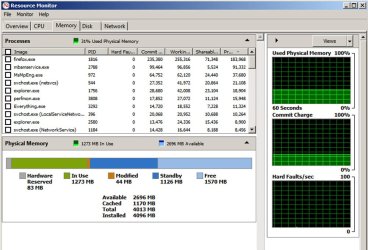
What does Resource Monitor say about your processes and RAM usage?
Computer type PC/Desktop Computer Manufacturer/Model Number Ignatz Special; 4 speed manual gearbox; factory air conditioning; one of one OS Windows 7 Home Premium SP1, 64-bit CPU Intel Skylake i5-6600K, not overclocked Motherboard AsRock Z170M Extreme 4, micro ATX Memory 8 GB HyperX DDR4-2666 (2 x 4 GB) Graphics Card(s) none; graphics are integrated on CPU Sound Card onboard: Realtek ALC1150; external: USB Behringer UF0-202 Monitor(s) Displays Dell S2340M 23 inch IPS Screen Resolution 1600 x 900 Hard Drives System: Crucial MX100 series SSD, 128 GB; PSU Rosewill SilentNight 500 watt fanless, semi-modular Case Antec Solo II Cooling Noctua NH-U12S; Noctua F12 intake, Noctua S12A exhaust Keyboard Microsoft 200 6JH-00001 USB Mouse Dell or Microsoft optical wired; USB Antivirus Microsoft Security Essentials and Malwarebytes Premium Browser Pale Moon Other Info All fans PWM; speeds at idle: CPU circa 500 rpm; intake circa 600 rpm; exhaust circa 600 rpm; CPU temps 27 idle and 47 C load in a warm room (27 C/81 F) when running Intel Extreme Tuning Utility stress test.
New member
Thread Starter
I have 32 gig of ram I know its overkill home preimum only supports 16 and under my computer description it said so I upgraded and now all i can play is diablo i am backing everything up right now what is the recomended way to reinstall ?
OS win 7 ult CPU I5 2500K Motherboard gigabyte Z68AP-D3 Memory 32 gig corsair vengance Graphics Card(s) diamond 6970 Sound Card onboard Monitor(s) Displays samsungs and acers a mut 3 screen Screen Resolution 5992x1080 Hard Drives 500gb samsung 7200 sata PSU kingwin mk-750w
New member
Thread Starter
Try reinstalling the OS. Happened to me before, I don't know why.
I will reboot when i get done backing everything up and see what happens with the light
OS win 7 ult CPU I5 2500K Motherboard gigabyte Z68AP-D3 Memory 32 gig corsair vengance Graphics Card(s) diamond 6970 Sound Card onboard Monitor(s) Displays samsungs and acers a mut 3 screen Screen Resolution 5992x1080 Hard Drives 500gb samsung 7200 sata PSU kingwin mk-750w
Aspiring Gnome
Guru
Gold Member
VIP
There's no current reason to believe you need to reinstall your operating system.
Computer type PC/Desktop Computer Manufacturer/Model Number Ignatz Special; 4 speed manual gearbox; factory air conditioning; one of one OS Windows 7 Home Premium SP1, 64-bit CPU Intel Skylake i5-6600K, not overclocked Motherboard AsRock Z170M Extreme 4, micro ATX Memory 8 GB HyperX DDR4-2666 (2 x 4 GB) Graphics Card(s) none; graphics are integrated on CPU Sound Card onboard: Realtek ALC1150; external: USB Behringer UF0-202 Monitor(s) Displays Dell S2340M 23 inch IPS Screen Resolution 1600 x 900 Hard Drives System: Crucial MX100 series SSD, 128 GB; PSU Rosewill SilentNight 500 watt fanless, semi-modular Case Antec Solo II Cooling Noctua NH-U12S; Noctua F12 intake, Noctua S12A exhaust Keyboard Microsoft 200 6JH-00001 USB Mouse Dell or Microsoft optical wired; USB Antivirus Microsoft Security Essentials and Malwarebytes Premium Browser Pale Moon Other Info All fans PWM; speeds at idle: CPU circa 500 rpm; intake circa 600 rpm; exhaust circa 600 rpm; CPU temps 27 idle and 47 C load in a warm room (27 C/81 F) when running Intel Extreme Tuning Utility stress test.
New member
Thread Starter
exactly what am i looking for in the resource manager if i look at the cpu usage when im not dooing anything its zero right now its at like 27 percent im transfering files to flash drive
OS win 7 ult CPU I5 2500K Motherboard gigabyte Z68AP-D3 Memory 32 gig corsair vengance Graphics Card(s) diamond 6970 Sound Card onboard Monitor(s) Displays samsungs and acers a mut 3 screen Screen Resolution 5992x1080 Hard Drives 500gb samsung 7200 sata PSU kingwin mk-750w
Aspiring Gnome
Guru
Gold Member
VIP
That's normal.
Computer type PC/Desktop Computer Manufacturer/Model Number Ignatz Special; 4 speed manual gearbox; factory air conditioning; one of one OS Windows 7 Home Premium SP1, 64-bit CPU Intel Skylake i5-6600K, not overclocked Motherboard AsRock Z170M Extreme 4, micro ATX Memory 8 GB HyperX DDR4-2666 (2 x 4 GB) Graphics Card(s) none; graphics are integrated on CPU Sound Card onboard: Realtek ALC1150; external: USB Behringer UF0-202 Monitor(s) Displays Dell S2340M 23 inch IPS Screen Resolution 1600 x 900 Hard Drives System: Crucial MX100 series SSD, 128 GB; PSU Rosewill SilentNight 500 watt fanless, semi-modular Case Antec Solo II Cooling Noctua NH-U12S; Noctua F12 intake, Noctua S12A exhaust Keyboard Microsoft 200 6JH-00001 USB Mouse Dell or Microsoft optical wired; USB Antivirus Microsoft Security Essentials and Malwarebytes Premium Browser Pale Moon Other Info All fans PWM; speeds at idle: CPU circa 500 rpm; intake circa 600 rpm; exhaust circa 600 rpm; CPU temps 27 idle and 47 C load in a warm room (27 C/81 F) when running Intel Extreme Tuning Utility stress test.
New member
Thread Starter
it takes much longer for any windows to open on the desktop it takes nearly 30 secs to open firefox for example then if i try internet explorer it is a little faster but when i try to log into i racing in sim it is jumpy and unplayable if i try a non web based game i can tell its lagging because the game such as diablo runs slightly slow
OS win 7 ult CPU I5 2500K Motherboard gigabyte Z68AP-D3 Memory 32 gig corsair vengance Graphics Card(s) diamond 6970 Sound Card onboard Monitor(s) Displays samsungs and acers a mut 3 screen Screen Resolution 5992x1080 Hard Drives 500gb samsung 7200 sata PSU kingwin mk-750w
New member
Thread Starter
it used to take a few seconds for firefox to open ever since i upgraded it has taken much longer to open any windows
OS win 7 ult CPU I5 2500K Motherboard gigabyte Z68AP-D3 Memory 32 gig corsair vengance Graphics Card(s) diamond 6970 Sound Card onboard Monitor(s) Displays samsungs and acers a mut 3 screen Screen Resolution 5992x1080 Hard Drives 500gb samsung 7200 sata PSU kingwin mk-750w
New member
Guru
Gold Member
VIP
Hi there
Computer type PC/Desktop Computer Manufacturer/Model Number Custom built, several laptops HP/ASUS OS Linux CENTOS 7 / various Windows OS'es and servers CPU Intel i7 Intel i5 Memory 8GB, 16GB Graphics Card(s) On Motherboard Sound Card Realtek HD audio Monitor(s) Displays Apple Cinema display, Samsung LCD Screen Resolution 1920 X 1080 Hard Drives 4 X 1TB SATA Mouse Toshiba wireless laser Internet Speed > 20MB up
New member
Thread Starter
no i have a feeling i just did an upgrade how can i fix this do i need to do a clean install how do i do that now?
OS win 7 ult CPU I5 2500K Motherboard gigabyte Z68AP-D3 Memory 32 gig corsair vengance Graphics Card(s) diamond 6970 Sound Card onboard Monitor(s) Displays samsungs and acers a mut 3 screen Screen Resolution 5992x1080 Hard Drives 500gb samsung 7200 sata PSU kingwin mk-750w
Aspiring Gnome
Guru
Gold Member
VIP
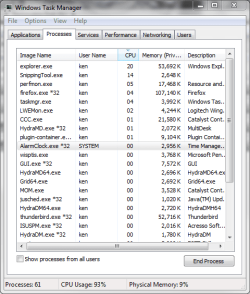
You need to find out what processes are running and what is using CPU cycles WHEN THE PC IS RUNNING SLOW
Computer type PC/Desktop Computer Manufacturer/Model Number Ignatz Special; 4 speed manual gearbox; factory air conditioning; one of one OS Windows 7 Home Premium SP1, 64-bit CPU Intel Skylake i5-6600K, not overclocked Motherboard AsRock Z170M Extreme 4, micro ATX Memory 8 GB HyperX DDR4-2666 (2 x 4 GB) Graphics Card(s) none; graphics are integrated on CPU Sound Card onboard: Realtek ALC1150; external: USB Behringer UF0-202 Monitor(s) Displays Dell S2340M 23 inch IPS Screen Resolution 1600 x 900 Hard Drives System: Crucial MX100 series SSD, 128 GB; PSU Rosewill SilentNight 500 watt fanless, semi-modular Case Antec Solo II Cooling Noctua NH-U12S; Noctua F12 intake, Noctua S12A exhaust Keyboard Microsoft 200 6JH-00001 USB Mouse Dell or Microsoft optical wired; USB Antivirus Microsoft Security Essentials and Malwarebytes Premium Browser Pale Moon Other Info All fans PWM; speeds at idle: CPU circa 500 rpm; intake circa 600 rpm; exhaust circa 600 rpm; CPU temps 27 idle and 47 C load in a warm room (27 C/81 F) when running Intel Extreme Tuning Utility stress test.
New member
Thread Starter
it is running slow all the time. exactly what do i need to look at in the resource monitor?
OS win 7 ult CPU I5 2500K Motherboard gigabyte Z68AP-D3 Memory 32 gig corsair vengance Graphics Card(s) diamond 6970 Sound Card onboard Monitor(s) Displays samsungs and acers a mut 3 screen Screen Resolution 5992x1080 Hard Drives 500gb samsung 7200 sata PSU kingwin mk-750w
Aspiring Gnome
Guru
Gold Member
VIP
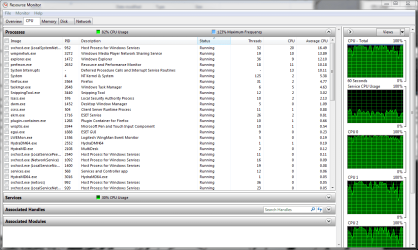
Look at the CPU tab. Then look at the CPU column in the CPU tab. What is at the top of the list?
Untitled-1.jpg
119.6 KB
· Views: 15
Computer type PC/Desktop Computer Manufacturer/Model Number Ignatz Special; 4 speed manual gearbox; factory air conditioning; one of one OS Windows 7 Home Premium SP1, 64-bit CPU Intel Skylake i5-6600K, not overclocked Motherboard AsRock Z170M Extreme 4, micro ATX Memory 8 GB HyperX DDR4-2666 (2 x 4 GB) Graphics Card(s) none; graphics are integrated on CPU Sound Card onboard: Realtek ALC1150; external: USB Behringer UF0-202 Monitor(s) Displays Dell S2340M 23 inch IPS Screen Resolution 1600 x 900 Hard Drives System: Crucial MX100 series SSD, 128 GB; PSU Rosewill SilentNight 500 watt fanless, semi-modular Case Antec Solo II Cooling Noctua NH-U12S; Noctua F12 intake, Noctua S12A exhaust Keyboard Microsoft 200 6JH-00001 USB Mouse Dell or Microsoft optical wired; USB Antivirus Microsoft Security Essentials and Malwarebytes Premium Browser Pale Moon Other Info All fans PWM; speeds at idle: CPU circa 500 rpm; intake circa 600 rpm; exhaust circa 600 rpm; CPU temps 27 idle and 47 C load in a warm room (27 C/81 F) when running Intel Extreme Tuning Utility stress test.
New member
Thread Starter
at the top of the cpu tab it has rundll32.exe but it is suspended under that it has perfmon then fire fox is there a way to take and post a ss for u?
OS win 7 ult CPU I5 2500K Motherboard gigabyte Z68AP-D3 Memory 32 gig corsair vengance Graphics Card(s) diamond 6970 Sound Card onboard Monitor(s) Displays samsungs and acers a mut 3 screen Screen Resolution 5992x1080 Hard Drives 500gb samsung 7200 sata PSU kingwin mk-750w
Aspiring Gnome
Guru
Gold Member
VIP
Computer type PC/Desktop Computer Manufacturer/Model Number Ignatz Special; 4 speed manual gearbox; factory air conditioning; one of one OS Windows 7 Home Premium SP1, 64-bit CPU Intel Skylake i5-6600K, not overclocked Motherboard AsRock Z170M Extreme 4, micro ATX Memory 8 GB HyperX DDR4-2666 (2 x 4 GB) Graphics Card(s) none; graphics are integrated on CPU Sound Card onboard: Realtek ALC1150; external: USB Behringer UF0-202 Monitor(s) Displays Dell S2340M 23 inch IPS Screen Resolution 1600 x 900 Hard Drives System: Crucial MX100 series SSD, 128 GB; PSU Rosewill SilentNight 500 watt fanless, semi-modular Case Antec Solo II Cooling Noctua NH-U12S; Noctua F12 intake, Noctua S12A exhaust Keyboard Microsoft 200 6JH-00001 USB Mouse Dell or Microsoft optical wired; USB Antivirus Microsoft Security Essentials and Malwarebytes Premium Browser Pale Moon Other Info All fans PWM; speeds at idle: CPU circa 500 rpm; intake circa 600 rpm; exhaust circa 600 rpm; CPU temps 27 idle and 47 C load in a warm room (27 C/81 F) when running Intel Extreme Tuning Utility stress test.
New member
Thread Starter
then why is my machine running slow?
OS win 7 ult CPU I5 2500K Motherboard gigabyte Z68AP-D3 Memory 32 gig corsair vengance Graphics Card(s) diamond 6970 Sound Card onboard Monitor(s) Displays samsungs and acers a mut 3 screen Screen Resolution 5992x1080 Hard Drives 500gb samsung 7200 sata PSU kingwin mk-750w
Aspiring Gnome
Guru
Gold Member
VIP
No one knows yet.
Computer type PC/Desktop Computer Manufacturer/Model Number Ignatz Special; 4 speed manual gearbox; factory air conditioning; one of one OS Windows 7 Home Premium SP1, 64-bit CPU Intel Skylake i5-6600K, not overclocked Motherboard AsRock Z170M Extreme 4, micro ATX Memory 8 GB HyperX DDR4-2666 (2 x 4 GB) Graphics Card(s) none; graphics are integrated on CPU Sound Card onboard: Realtek ALC1150; external: USB Behringer UF0-202 Monitor(s) Displays Dell S2340M 23 inch IPS Screen Resolution 1600 x 900 Hard Drives System: Crucial MX100 series SSD, 128 GB; PSU Rosewill SilentNight 500 watt fanless, semi-modular Case Antec Solo II Cooling Noctua NH-U12S; Noctua F12 intake, Noctua S12A exhaust Keyboard Microsoft 200 6JH-00001 USB Mouse Dell or Microsoft optical wired; USB Antivirus Microsoft Security Essentials and Malwarebytes Premium Browser Pale Moon Other Info All fans PWM; speeds at idle: CPU circa 500 rpm; intake circa 600 rpm; exhaust circa 600 rpm; CPU temps 27 idle and 47 C load in a warm room (27 C/81 F) when running Intel Extreme Tuning Utility stress test.
New member
Thread Starter
malware and virus are clean my upgrade is legit (purchased from microcenter)
Capture.PNG
50.3 KB
· Views: 11
Capture 2.PNG
23.7 KB
· Views: 10
OS win 7 ult CPU I5 2500K Motherboard gigabyte Z68AP-D3 Memory 32 gig corsair vengance Graphics Card(s) diamond 6970 Sound Card onboard Monitor(s) Displays samsungs and acers a mut 3 screen Screen Resolution 5992x1080 Hard Drives 500gb samsung 7200 sata PSU kingwin mk-750w