Solved Outlook 2010 Won't Open

Could anyone help me get more detailed directions how to delete that profile key. I am inexperienced in editing the registry but my Outlook constantly not opening is extremely annoying and I'd love to fix it.
 

My Computer My Computer

Computer Manufacturer/Model Number
Lenovo THink Pad T510
OS
Windows 7 ultimate 64
Hello Greenleopard, welcome to the forum. :D

If you are unsure about the registry, I would avoid that method - you could do severe damage to your system.

Could you please start a new thread, explaining exactly what problems you are experiencing. We will then do our very best to help. :)
 

My Computer My Computer

Computer type
PC/Desktop
Computer Manufacturer/Model Number
Packard Bell
OS
Windows 7 Home Premium 64bit
CPU
Intel(R) Core(TM) i3-2120 CPU @ 3.30GHz
Motherboard
Packard Bell IPISB-AG
Memory
3.00 GB
Graphics Card(s)
(1) Intel(R) HD Graphics (2) VNC Mirror Driver
Sound Card
Realtek High Definition Audio
Monitor(s) Displays
AIO LCD
Screen Resolution
1920 x 1080
Hard Drives
WDC WD10EADX-22TDHB0 ATA Device
Fixed hard disk media
4 partitions
931.51 GB
Keyboard
Wireless
Mouse
Wireless
Antivirus
Microsoft Security Essentials
Browser
IE; Firefox
Other Info
Also:
Samsung N220 Plus Netbook - Windows 7 Home
HP laptop
iPad 5
Could anyone help me get more detailed directions how to delete that profile key. I am inexperienced in editing the registry but my Outlook constantly not opening is extremely annoying and I'd love to fix it.

You might of solved it by now, but just in case...

...you can delete your Outlook profile without having to edit any registries by going to Start/Control Panel/Mail, under "Show Profiles". Then select the profile and delete it. You can then set up a new right in there or let Outlook set up a new again.
 

My Computer My Computer

Computer Manufacturer/Model Number
Velocity Micro|ProMagix
OS
Windows 7 Professional x64
CPU
Intel Core 2 Duo Processor E6700
Motherboard
Intel DP35DP
Memory
6GB
Graphics Card(s)
256MB eVGA NVIDIA GeoForce 8600 GTS
Sound Card
Intel High Definition 8-channel Audio
Monitor(s) Displays
Samsung SyncMaster 213T
Hard Drives
500GB Seagate ST3500418AS
250GB Hitachi HDT725025VLA380
PSU
500 Watt
Case
LX Silver (Pure Aluminum)
Cooling
Arctic Cooling Freezer 7 Pro
Thank you thank you Cap.Jack Sparrow!!! I never had this problem untill I had to reinstall my whole O.S., and thank goodness I found the link to this! Saved my bacon ;-).
 

My Computer My Computer

OS
windows 7
i need help urgent please

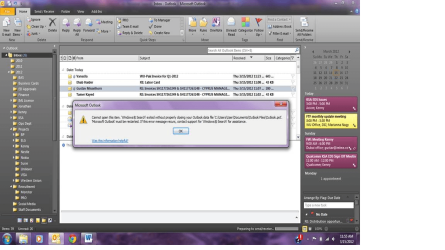
I have been receiving errors on my emails. Below is a screen shot of the error, when this happens I am unable to read, send or move emails to folders. I have to shut down and restart my outlook every time this happens, it then works for a few hours, or days before I have the same issue.


i have uploaded the pic i took a screen shot thanks
 

Attachments

  • outlookprob.png
    outlookprob.png
    170.9 KB · Views: 232

My Computer My Computer

OS
windows 7 64bit
i need help for this matter as soon as possbile i am scared to loose my important emails
 

My Computer My Computer

OS
windows 7 64bit
Hi there!

I'm think it could be the Windows Search add-in. Go to File-> Options-> section Add-Ins there select COM add-ins and uncheck "Windows Search" close Outlook and open again and test it.
 

My Computer My Computer

Computer Manufacturer/Model Number
Samsung NP550P5C-S02IN
OS
Windows 7 Ultimate - 64-bit | Windows 8 Pro - 64-bit
CPU
Intel® Core™ i7 Processor 3,610QM (2.30Hz, 6MB L3 Cach
Memory
8 GB
Graphics Card(s)
NVIDIA® GeForce® GT 650M 2GB Graphics, Optimus™ techno
Sound Card
SoundAlive™ JBL 3 Speakers (With sub-Woofer)
Monitor(s) Displays
39.62cm (15.6) SuperBright 300nit HD+ LED Display
Screen Resolution
1,600 x 900, Anti-Reflective
Hard Drives
1TB S-ATA II Hard Drive (5,400RPM)
I tried this and deleted all the profiles I spent yesterday inputting. Might want to warn people who already have this set up... I didn't connect the dots...
 

My Computer My Computer

OS
vista 32
Hi there!

I'm think it could be the Windows Search add-in. Go to File-> Options-> section Add-Ins there select COM add-ins and uncheck "Windows Search" close Outlook and open again and test it.


i am using windows 7 Sir

so and i am not an IT guy so i need to ask u for little bit of ur time if u can tell me where and how to go to file you mean which file is it in control panel this is what i mean is it in my documents because i tried to search for word file but cannot so just tell me do i go to my computer and c drive then or how SIR
i know i am sorry to disturbe u but it is really bugging me and i really need ur help thank u
 

My Computer My Computer

OS
windows 7 64bit
Download a Program called "ÖfficeIns" just Google it. When you open it you can see a list. There you'll see Outlook add-ins. You can right click and disable it. Disable all the add-ins related to Outlook.
 

My Computer My Computer

Computer Manufacturer/Model Number
Samsung NP550P5C-S02IN
OS
Windows 7 Ultimate - 64-bit | Windows 8 Pro - 64-bit
CPU
Intel® Core™ i7 Processor 3,610QM (2.30Hz, 6MB L3 Cach
Memory
8 GB
Graphics Card(s)
NVIDIA® GeForce® GT 650M 2GB Graphics, Optimus™ techno
Sound Card
SoundAlive™ JBL 3 Speakers (With sub-Woofer)
Monitor(s) Displays
39.62cm (15.6) SuperBright 300nit HD+ LED Display
Screen Resolution
1,600 x 900, Anti-Reflective
Hard Drives
1TB S-ATA II Hard Drive (5,400RPM)
Thanks Capt Jack

Capt. Jack, I too want to thank you, your advise worked like a charm.

On a side note: I seen all of your movies, more than once.

Hi Welcome to Seven Forum

Try this
Start-> type; outlook.exe /resetnavpane

Also an try this


Go to Start > Regedit
  1. Locate HKEY_CURRENT_USER\Software\Microsoft\Windows NT\CurrentVersion\Windows Messaging Subsystem
  2. Delete the Profiles key under the Windows Messaging (Subsystem) key.
Hope that Helps
 

My Computer My Computer

OS
Windows 7
Didn't work for me

Hi Welcome to Seven Forum

Try this
Start-> type; outlook.exe /resetnavpane

Also an try this

Go to Start > Regedit
  1. Locate HKEY_CURRENT_USER\Software\Microsoft\Windows NT\CurrentVersion\Windows Messaging Subsystem
  2. Delete the Profiles key under the Windows Messaging (Subsystem) key.
Hope that Helps

Hi Jack,

This didn't work for me, I couldn't find the windows messaging key and the Profile key, under the HKEY_CURRENT_USER key
 

My Computer My Computer

OS
Windows 7 64 bit
Tried Regedit and outlook.exe /resetnavpane but unsuccessful

I tried with regedit. I deleted profiles and I still can't open Outlook. Help??

I also tried these approaches, but the same error message appears. The only difference is that now, when I attempt to open outlook, I am walked through the account setup for an email account. However, once the setup is complete, my system appears to try and install outlook. Then the message appears "Cannot start Microsoft Outlook. Cannot open Outlook window."

I have tried to uninstall, but windows won't allow me to. Also, I tried running the full setup again, but windows won't allow this either.

To note, this is only occurring recently. I was able to use outlook for about 2 months. However, I had to re-install my copy of windows 7, due to issues with update configuration failures. Don't know if this makes a difference.

Thanks!
 

My Computer My Computer

Computer Manufacturer/Model Number
HP/Envy
OS
window 7 home premium 64 bit
CPU
Intel i3-2377M @ 1.5gHz
Memory
4 GB
Hard Drives
500 Gig
Help!

Dear Capt.Jack Sparrow thanx for the info, My work is to provide IT support for a company in Germany, your workaround did the work! but many of my customers are asking me for an explanation of the problem and what I did delete, as Im no expert in the outlook field I was not able to provide a decent answer. would you be so kind and give me a small explanation of what the problem was and what the workaround does? I would apreciate it very much!! thank you very much for your time !

PD: This forum is great !
Hi Welcome to Seven Forum

Try this
Start-> type; outlook.exe /resetnavpane

Also an try this

Go to Start > Regedit
  1. Locate HKEY_CURRENT_USER\Software\Microsoft\Windows NT\CurrentVersion\Windows Messaging Subsystem
  2. Delete the Profiles key under the Windows Messaging (Subsystem) key.
Hope that Helps
 

My Computer My Computer

OS
windows 7
We are just rebuilding the Outlook profile registry entry.
 

My Computer My Computer

Computer Manufacturer/Model Number
Samsung NP550P5C-S02IN
OS
Windows 7 Ultimate - 64-bit | Windows 8 Pro - 64-bit
CPU
Intel® Core™ i7 Processor 3,610QM (2.30Hz, 6MB L3 Cach
Memory
8 GB
Graphics Card(s)
NVIDIA® GeForce® GT 650M 2GB Graphics, Optimus™ techno
Sound Card
SoundAlive™ JBL 3 Speakers (With sub-Woofer)
Monitor(s) Displays
39.62cm (15.6) SuperBright 300nit HD+ LED Display
Screen Resolution
1,600 x 900, Anti-Reflective
Hard Drives
1TB S-ATA II Hard Drive (5,400RPM)
Cannot Open Your Default Email Folders. The Info cannot be opened

Hello,

I have deleted registries and renamed my user profile, It works for about a day then reverts back to Outlook not working. This is going on in a Cloud Environment running on SBS 2011. Everything I have tried is not working, any advice?
 

My Computer My Computer

OS
Windows 7 64
A Win8 fix too?

Hi Welcome to Seven Forum


Go to Start > Regedit
  1. Locate HKEY_CURRENT_USER\Software\Microsoft\Windows NT\CurrentVersion\Windows Messaging Subsystem
  2. Delete the Profiles key under the Windows Messaging (Subsystem) key.
Hope that Helps

This worked perfectly for my Win 7 system. Do you have analogous directions and registry key for Win8 systems?
 

My Computer My Computer

OS
Windows 8 32 bit
I've lost my Outlook account

HELP!!!!

I had the same problem with my Outlook : none of the word attachments would open (regardless of how I tried to open them). So I followed the suggestion from Capt.Jack Sparrow and went into Start > Regedit then deleted the Profiles key under the WindowsMessaging Subsystemkey (in the chain “HKEY_CURRENT_USER\Software\Microsoft\Windows NT\CurrentVersion\WindowsMessaging Subsystem”).

But now my whole Outlook account has disappeared and I can't get into my account. So I can't find any of my old messages or drafts etc.

Can soneone please help me to restore my Outlook account or allow me to access all my old messages.

Thanks.
 

My Computer My Computer

Computer type
Laptop
Computer Manufacturer/Model Number
HP
OS
Windows 7 Home Premium 64bit
CPU
AMD A8-3520M APU with Radeon(tm) HD Graphics 1.60 GHz
Hello HiFiver, welcome to Seven Forums.

It would be better to begin a new thread for your problem because this one is marked as resolved. Your post will then attract more attention and help. ;)
 

My Computer My Computer

Computer type
PC/Desktop
Computer Manufacturer/Model Number
Packard Bell
OS
Windows 7 Home Premium 64bit
CPU
Intel(R) Core(TM) i3-2120 CPU @ 3.30GHz
Motherboard
Packard Bell IPISB-AG
Memory
3.00 GB
Graphics Card(s)
(1) Intel(R) HD Graphics (2) VNC Mirror Driver
Sound Card
Realtek High Definition Audio
Monitor(s) Displays
AIO LCD
Screen Resolution
1920 x 1080
Hard Drives
WDC WD10EADX-22TDHB0 ATA Device
Fixed hard disk media
4 partitions
931.51 GB
Keyboard
Wireless
Mouse
Wireless
Antivirus
Microsoft Security Essentials
Browser
IE; Firefox
Other Info
Also:
Samsung N220 Plus Netbook - Windows 7 Home
HP laptop
iPad 5
Back
Top