
Solved MS Office won't open - files corrupt

Y0GI

New member
Local time
6:40 AM
Messages
27
Location
League City, Texas (Houston)
MS OUTOOK won't open - files corrupt

I don't know if this is the proper place for this problem or not. If I have placed this in the wrong location, please tell me where to post it.
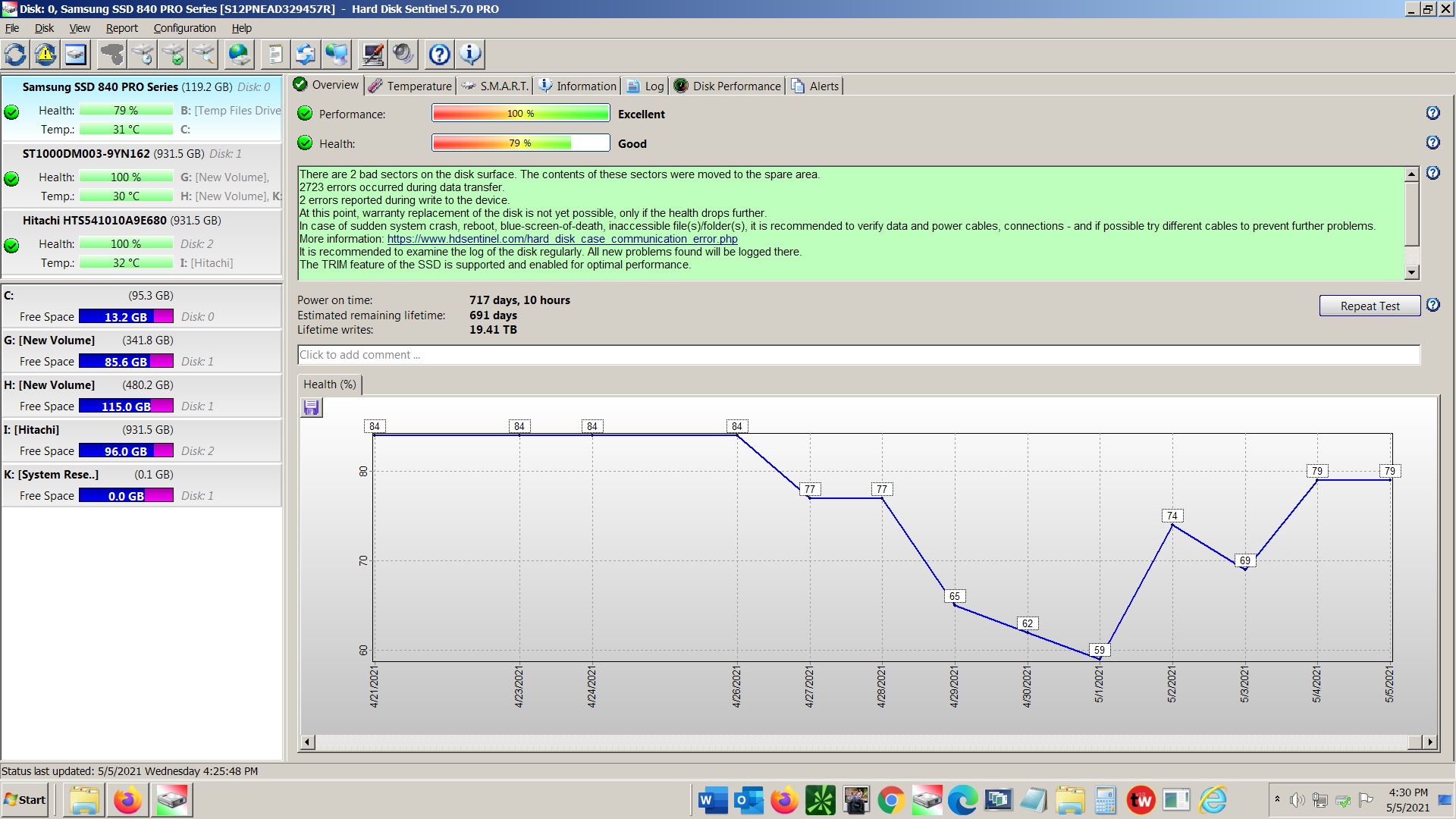
My problem started one day when I attempted to open Outlook and my brokerage program simultaneously and Windows locked up. I forced a shutdown and restarted Windows but HD Sentinel said that my SSD Health was suddenly down from 77 t0 62.
UwUVcTh.jpg

I soon had BSOD problems also (0x0000007A).
I chose to run HD Sentinel's "Disk Repair (Read Test with Sector Repair) - Most cases Non-Destructive (see notes and Help)." After running this "Repair" the Health improved to 79 but I was unable to open MS Outlook. I received a warning that the Outlook.pst file had become corrupted and that a new file would be created, as i recall. This message was presented with a red progress bar that was rapidly moving across the screen, so I clicked on "OK" and the message went away, as I remember.
Next, I tried to restart Outlook, and I got the following message:
huP4Jv2.jpg

So, I opened the folder containing all of the Outlook files:
C:\Users\XXX\AppData\Local\Microsoft\Outlook\
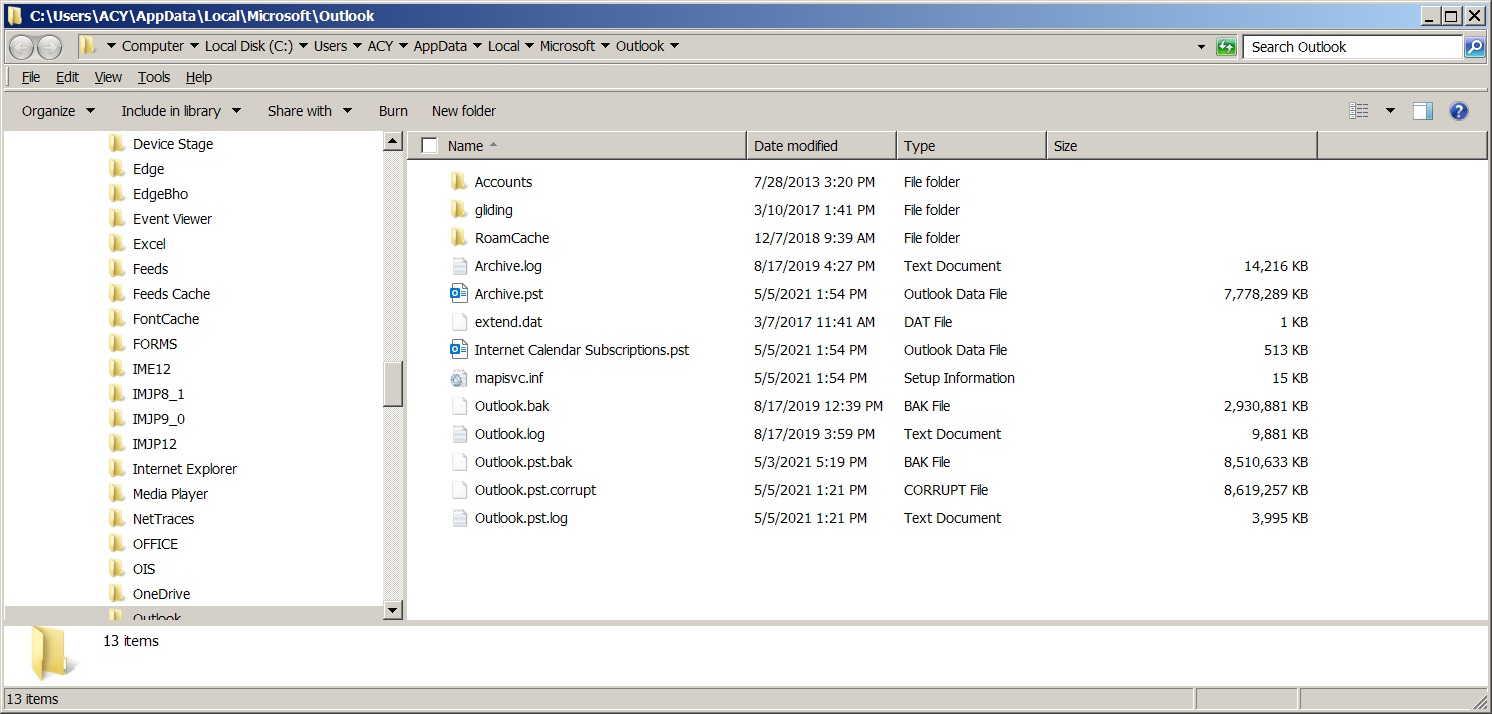
and I found that the Outlook.pst file had been renamed Outlook.pst.Corrupt
Next, I tried one of the following, I'm not sure which:
1) I took a backup Outlook.pst file from January and replaced the Outlook.pst.corrupt file with the known good January file. This did not work. Outlook simply renamed the January file to Outlook.pst.corrupt and II was back to square one.
2) Next (I think) I tried running ScanPST.exe on the Outlook.pst.corrupt three times. The name of the file was unchanged and Outlook would not start.
After either step 1) or 2) above, I received the following error message:
aNMChTa.jpg

Oh, one more factoid and this is probably the root cause of my problem. I have not been paying close attention to the free space on my C: drive which fell as low as 1.7 GB, I think. I remedied this by moving one of the Outlook archive or backup files from the C: drive to my removable, backup I: drive.
Here is an image of my current Outlook folder contents:
WI6wxqb.jpg

I am open to any suggestions on how to proceed.
Thanks!
 
Last edited:

My Computer My Computer

At a glance

Windows 7 Pro X64Intel Core i5 4670K8 GB Crucial Ballistix TacticalIntel Integrated GT 4600
Computer type
PC/Desktop
Computer Manufacturer/Model Number
Custom Built
OS
Windows 7 Pro X64
CPU
Intel Core i5 4670K
Motherboard
MSI Z87-G43
Memory
8 GB Crucial Ballistix Tactical
Graphics Card(s)
Intel Integrated GT 4600
Hard Drives
Seagate Barracuda 1 TB
Antivirus
AVG Free
Browser
Firefox
To help those following me to help you, are the other Windows and 3rd party programs and utilities working aok? Does your brokerage program directly use Outlook for making calls, making trades, etc.?
 

My Computer My Computer

At a glance

Windows 7 Professional 64-bitDesktop i5; Acers i5 & i7desktop 16GB; 1 Acer 8GB & 1 Acer 16GB
Computer type
PC/Desktop
Computer Manufacturer/Model Number
Antec desktop; Acer Aspire laptops
OS
Windows 7 Professional 64-bit
CPU
Desktop i5; Acers i5 & i7
Memory
desktop 16GB; 1 Acer 8GB & 1 Acer 16GB
Hard Drives
1TB split into 2 equal partitions [OS and data] usable by RJS
Internet Speed
AT&T DSL
Browser
FF, GChrome, msIE
Other Info
Windows 7 Firewall, Emsisoft AM/AV, MSE [scan-only], SpywareBlaster, Ruiware/BillP combine
Thank you for your response, RolandJS. I was beginning to think that there was no hope at all.
So far, Firefox, my brokerage program, MS Office Photo Viewer, MS Word and Bitdefender AV all seem to be working normally, but those are the only programs that I have used or know to be in use. My Win 7 boot is slow and displays "Welcome" followed by "Please wait" before going to the desktop, but it was doing that before the Outlook mishap.
Thank you for your interest in my problem and please let me know if you need any more details.
 

My Computer My Computer

At a glance

Windows 7 Pro X64Intel Core i5 4670K8 GB Crucial Ballistix TacticalIntel Integrated GT 4600
Computer type
PC/Desktop
Computer Manufacturer/Model Number
Custom Built
OS
Windows 7 Pro X64
CPU
Intel Core i5 4670K
Motherboard
MSI Z87-G43
Memory
8 GB Crucial Ballistix Tactical
Graphics Card(s)
Intel Integrated GT 4600
Hard Drives
Seagate Barracuda 1 TB
Antivirus
AVG Free
Browser
Firefox
One thing I have done recently to help speed up Windows 7 Pro 64bit boot and load was reset its Firewall back to its default. I do not know if that would work for your Windows 7's Pro 64bit boot and load. The original problem you posted - I have no ideas for you. We await those who can help.
 

My Computer My Computer

At a glance

Windows 7 Professional 64-bitDesktop i5; Acers i5 & i7desktop 16GB; 1 Acer 8GB & 1 Acer 16GB
Computer type
PC/Desktop
Computer Manufacturer/Model Number
Antec desktop; Acer Aspire laptops
OS
Windows 7 Professional 64-bit
CPU
Desktop i5; Acers i5 & i7
Memory
desktop 16GB; 1 Acer 8GB & 1 Acer 16GB
Hard Drives
1TB split into 2 equal partitions [OS and data] usable by RJS
Internet Speed
AT&T DSL
Browser
FF, GChrome, msIE
Other Info
Windows 7 Firewall, Emsisoft AM/AV, MSE [scan-only], SpywareBlaster, Ruiware/BillP combine
I just noticed a MAJOR screw-up in the title of this post. I meant to say "MS OUTLOOK" and NOT MS Office! I have just edited the title to indicate the true nature of the issue. I am so sorry for the misleading original title.
 

My Computer My Computer

At a glance

Windows 7 Pro X64Intel Core i5 4670K8 GB Crucial Ballistix TacticalIntel Integrated GT 4600
Computer type
PC/Desktop
Computer Manufacturer/Model Number
Custom Built
OS
Windows 7 Pro X64
CPU
Intel Core i5 4670K
Motherboard
MSI Z87-G43
Memory
8 GB Crucial Ballistix Tactical
Graphics Card(s)
Intel Integrated GT 4600
Hard Drives
Seagate Barracuda 1 TB
Antivirus
AVG Free
Browser
Firefox
One thing I have done recently to help speed up Windows 7 Pro 64bit boot and load was reset its Firewall back to its default. I do not know if that would work for your Windows 7's Pro 64bit boot and load. The original problem you posted - I have no ideas for you. We await those who can help.

I tried to reset the firewall but all that I had was a mouse pointer. The pointer was ineffective in activating any of the links. I must not be "Logged in as an Admin"? How do I do that?
 

My Computer My Computer

At a glance

Windows 7 Pro X64Intel Core i5 4670K8 GB Crucial Ballistix TacticalIntel Integrated GT 4600
Computer type
PC/Desktop
Computer Manufacturer/Model Number
Custom Built
OS
Windows 7 Pro X64
CPU
Intel Core i5 4670K
Motherboard
MSI Z87-G43
Memory
8 GB Crucial Ballistix Tactical
Graphics Card(s)
Intel Integrated GT 4600
Hard Drives
Seagate Barracuda 1 TB
Antivirus
AVG Free
Browser
Firefox
Along with your normal account, did you earlier activate/enable the built-in admin account? Or, is your normal account an admin level account when things were going just fine?
 

My Computer My Computer

At a glance

Windows 7 Professional 64-bitDesktop i5; Acers i5 & i7desktop 16GB; 1 Acer 8GB & 1 Acer 16GB
Computer type
PC/Desktop
Computer Manufacturer/Model Number
Antec desktop; Acer Aspire laptops
OS
Windows 7 Professional 64-bit
CPU
Desktop i5; Acers i5 & i7
Memory
desktop 16GB; 1 Acer 8GB & 1 Acer 16GB
Hard Drives
1TB split into 2 equal partitions [OS and data] usable by RJS
Internet Speed
AT&T DSL
Browser
FF, GChrome, msIE
Other Info
Windows 7 Firewall, Emsisoft AM/AV, MSE [scan-only], SpywareBlaster, Ruiware/BillP combine
To help those following me to help you, are the other Windows and 3rd party programs and utilities working aok? Does your brokerage program directly use Outlook for making calls, making trades, etc.?
I just noticed that I didn't completely answer your question, RolandJS.
The brokerage program is completely separate from Outlook and in no way requires Outlook for making calls, trades, etc.
 

My Computer My Computer

At a glance

Windows 7 Pro X64Intel Core i5 4670K8 GB Crucial Ballistix TacticalIntel Integrated GT 4600
Computer type
PC/Desktop
Computer Manufacturer/Model Number
Custom Built
OS
Windows 7 Pro X64
CPU
Intel Core i5 4670K
Motherboard
MSI Z87-G43
Memory
8 GB Crucial Ballistix Tactical
Graphics Card(s)
Intel Integrated GT 4600
Hard Drives
Seagate Barracuda 1 TB
Antivirus
AVG Free
Browser
Firefox
Along with your normal account, did you earlier activate/enable the built-in admin account? Or, is your normal account an admin level account when things were going just fine?
My normal account is an Admin level account and there is a separate Admin account also.
I did some more poking around, and I found another window of options for controlling the Firewall. I believe that it was called "Windows Firewall Advanced Security"? Anyway, a warning at the top of the box stated that the options were being controlled by my AV program, BitDefender Total Security. There was an option to reset the Firewall to the default, and the mouse pointer was now a "hand" which gave me the option to reset it, but there was a warning that if I did, it may disable some other programs, or somesuch, so I left it alone.
I am wondering if the reason that I was unable to replace the Outlook.pst.corrupt file with a January version of Outlook.pst is because the Bitdefender AV program would not allow it? Does that sound reasonable?
 

My Computer My Computer

At a glance

Windows 7 Pro X64Intel Core i5 4670K8 GB Crucial Ballistix TacticalIntel Integrated GT 4600
Computer type
PC/Desktop
Computer Manufacturer/Model Number
Custom Built
OS
Windows 7 Pro X64
CPU
Intel Core i5 4670K
Motherboard
MSI Z87-G43
Memory
8 GB Crucial Ballistix Tactical
Graphics Card(s)
Intel Integrated GT 4600
Hard Drives
Seagate Barracuda 1 TB
Antivirus
AVG Free
Browser
Firefox
"I am wondering if the reason that I was unable to replace the Outlook.pst.corrupt file with a January version of Outlook.pst is because the Bitdefender AV program would not allow it? Does that sound reasonable?"
I do not know the answer, will listen in and learn from the others in here.
 

My Computer My Computer

At a glance

Windows 7 Professional 64-bitDesktop i5; Acers i5 & i7desktop 16GB; 1 Acer 8GB & 1 Acer 16GB
Computer type
PC/Desktop
Computer Manufacturer/Model Number
Antec desktop; Acer Aspire laptops
OS
Windows 7 Professional 64-bit
CPU
Desktop i5; Acers i5 & i7
Memory
desktop 16GB; 1 Acer 8GB & 1 Acer 16GB
Hard Drives
1TB split into 2 equal partitions [OS and data] usable by RJS
Internet Speed
AT&T DSL
Browser
FF, GChrome, msIE
Other Info
Windows 7 Firewall, Emsisoft AM/AV, MSE [scan-only], SpywareBlaster, Ruiware/BillP combine
So, I sent a support request to BitDefender and they told me to uninstall "Trusteer Rapport" security program as it was overlapping with BitDefender, so I did. I tried to start Outlook and still no difference.
Next, I changed the name of the corrupted file from Outlook.pst.corrupt to just Outlook.pst and ran the Scanpst.exe program on it twice. VIOLA! It worked. My Outlook program appears to be totally recovered. YAY!
Now to create a new backup!
 

My Computer My Computer

At a glance

Windows 7 Pro X64Intel Core i5 4670K8 GB Crucial Ballistix TacticalIntel Integrated GT 4600
Computer type
PC/Desktop
Computer Manufacturer/Model Number
Custom Built
OS
Windows 7 Pro X64
CPU
Intel Core i5 4670K
Motherboard
MSI Z87-G43
Memory
8 GB Crucial Ballistix Tactical
Graphics Card(s)
Intel Integrated GT 4600
Hard Drives
Seagate Barracuda 1 TB
Antivirus
AVG Free
Browser
Firefox
Back
Top