bridged connection between virtualbox vm and windows host

windstory

New member
Member
VIP
Local time
6:26 PM
Messages
142
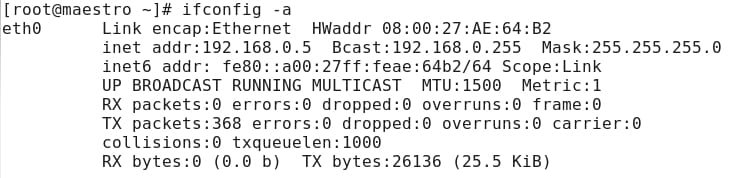
I have a problem at bridged connection between virtualbox vm and windows host.

1. host
windows 7 x64.
192.168.0.2

2. virtualbox guest
scientific linux 6.2 x86
192.168.0.5
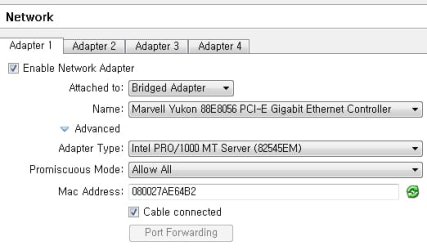
bridged adapter
20120323_1_sl_vb.jpg

I could not make a ping to gateway and open web pages at vm. So I tried these two ways.

1) disabled windows firewall and uninstalled vaccine.
2) install comodo internet security and add VirtualBox.exe and VBoxSVC.exe to Trusted Files".

Please let me know how to make network connection with vm and windows host with bridged adapter for getting ip 192.168.0.x.

Thanks in advance.
 

Attachments
  • 20120323_1_sl_vb.jpg
    20120323_1_sl_vb.jpg
    19.5 KB · Views: 211

My Computer My Computer

Computer Manufacturer/Model Number
self assembling
OS
windows 7 x64 16385
CPU
core2duo 6600
Motherboard
asus p5b delxe
Memory
samsung 1G x 4
Graphics Card(s)
ati x850
Sound Card
audigy2 zs
Monitor(s) Displays
lg lcd
Screen Resolution
1920 x1200
Hard Drives
samsung 520G
PSU
micronics classic 500W
Case
nctop a380
Cooling
zalman
Internet Speed
lan
I've never had much success connecting Linux to a Windows host using the "Network" icon in the file manager but I can connect if I use smb://Your Host PC Name/ in the address bar . It then connects to any shares you have.
 

My Computer My Computer

Computer type
Laptop
Computer Manufacturer/Model Number
Hewlett-Packard/G62-107SA Notebook
OS
Microsoft Windows 7 Home Premium 64-bit Service Pack 1
CPU
Intel(R) Core(TM) i3 CPU M 330 @ 2.13GHz
Motherboard
Hewlett-Packard 1425
Memory
8 GB DDR3
Graphics Card(s)
Intel(R) HD Graphics
Sound Card
Realtek High Definition Audio
Monitor(s) Displays
Builtin
Screen Resolution
1366 x 768 x 32 bits (4294967296 colors) @ 60 Hz
Hard Drives
250 GB SATA Hard Disk Drive 7200 rpm
2TB Seagate GoFlex USB 2 Drive
1TB Iomega Prestige USB 2 Drive
1.5TB Iomega Prestige USB 2 Drive (Samsung)
2TB WD MyBook Live NAS.
Mouse
Logitech Anywhere MX
Internet Speed
152 Mbs download 10 Mbs upload
Antivirus
Norton 360
Browser
Chrome
Did virtualbox linux get a dynamic ip address? So 192.168.0.5 was given to linux by dhcp server?
Can linux ping 192.168.0.2 (windows)?
can windows ping 192.168.0.5 (linux)?
Can linux ping ip-address-router?
Can windows ping ip-address-router?
 

My Computer My Computer

Computer type
Laptop
Computer Manufacturer/Model Number
ACER ASPIRE 5742G
OS
Microsoft Windows 7 Home Premium 64-bits 7601 Multiprocessor Free Service Pack 1
CPU
Intel(R) Core(TM) i3 CPU M 370 @ 2.40GHz
Motherboard
Acer Aspire 5742G
Memory
4,00 GB
Graphics Card(s)
ATI Mobility Radeon HD 5400 Series
Sound Card
(1) AMD High Definition Audio Device (2) Realtek High Defi
Screen Resolution
1366 x 768 x 32 bits (4294967296 colors) @ 60 Hz
Hard Drives
WDC WD5000BEVT-22ZAT0
kado897/ I used virrtualbox's shared folder.

Kaktussoft/ Yes. bridged adapter has 192.168.0.x. I've used several years. But recently I got this problem.
 

My Computer My Computer

Computer Manufacturer/Model Number
self assembling
OS
windows 7 x64 16385
CPU
core2duo 6600
Motherboard
asus p5b delxe
Memory
samsung 1G x 4
Graphics Card(s)
ati x850
Sound Card
audigy2 zs
Monitor(s) Displays
lg lcd
Screen Resolution
1920 x1200
Hard Drives
samsung 520G
PSU
micronics classic 500W
Case
nctop a380
Cooling
zalman
Internet Speed
lan

My Computer My Computer

Computer type
Laptop
Computer Manufacturer/Model Number
Hewlett-Packard/G62-107SA Notebook
OS
Microsoft Windows 7 Home Premium 64-bit Service Pack 1
CPU
Intel(R) Core(TM) i3 CPU M 330 @ 2.13GHz
Motherboard
Hewlett-Packard 1425
Memory
8 GB DDR3
Graphics Card(s)
Intel(R) HD Graphics
Sound Card
Realtek High Definition Audio
Monitor(s) Displays
Builtin
Screen Resolution
1366 x 768 x 32 bits (4294967296 colors) @ 60 Hz
Hard Drives
250 GB SATA Hard Disk Drive 7200 rpm
2TB Seagate GoFlex USB 2 Drive
1TB Iomega Prestige USB 2 Drive
1.5TB Iomega Prestige USB 2 Drive (Samsung)
2TB WD MyBook Live NAS.
Mouse
Logitech Anywhere MX
Internet Speed
152 Mbs download 10 Mbs upload
Antivirus
Norton 360
Browser
Chrome
Did virtualbox linux get a dynamic ip address? So 192.168.0.5 was given to linux by dhcp server?
Can linux ping 192.168.0.2 (windows)?
can windows ping 192.168.0.5 (linux)?
Can linux ping ip-address-router?
Can windows ping ip-address-router?
please answer

So it worked before for years?
 

My Computer My Computer

Computer type
Laptop
Computer Manufacturer/Model Number
ACER ASPIRE 5742G
OS
Microsoft Windows 7 Home Premium 64-bits 7601 Multiprocessor Free Service Pack 1
CPU
Intel(R) Core(TM) i3 CPU M 370 @ 2.40GHz
Motherboard
Acer Aspire 5742G
Memory
4,00 GB
Graphics Card(s)
ATI Mobility Radeon HD 5400 Series
Sound Card
(1) AMD High Definition Audio Device (2) Realtek High Defi
Screen Resolution
1366 x 768 x 32 bits (4294967296 colors) @ 60 Hz
Hard Drives
WDC WD5000BEVT-22ZAT0
Kaktussoft/ Yes. several yeas. Also with vmware.
 

My Computer My Computer

Computer Manufacturer/Model Number
self assembling
OS
windows 7 x64 16385
CPU
core2duo 6600
Motherboard
asus p5b delxe
Memory
samsung 1G x 4
Graphics Card(s)
ati x850
Sound Card
audigy2 zs
Monitor(s) Displays
lg lcd
Screen Resolution
1920 x1200
Hard Drives
samsung 520G
PSU
micronics classic 500W
Case
nctop a380
Cooling
zalman
Internet Speed
lan
So linux can ping router. Router is same as gateway. But you told before "I could not make a ping to gateway"
totally confused.
 

My Computer My Computer

Computer type
Laptop
Computer Manufacturer/Model Number
ACER ASPIRE 5742G
OS
Microsoft Windows 7 Home Premium 64-bits 7601 Multiprocessor Free Service Pack 1
CPU
Intel(R) Core(TM) i3 CPU M 370 @ 2.40GHz
Motherboard
Acer Aspire 5742G
Memory
4,00 GB
Graphics Card(s)
ATI Mobility Radeon HD 5400 Series
Sound Card
(1) AMD High Definition Audio Device (2) Realtek High Defi
Screen Resolution
1366 x 768 x 32 bits (4294967296 colors) @ 60 Hz
Hard Drives
WDC WD5000BEVT-22ZAT0
Kaktussoft/

The "/etc/sysconfig/network-scripts/router-eth0" is this.
Code:
ADDRESS0=192.168.0.0
NETMASK0=255.255.255.0
GATEWAY0=192.168.0.1

Please understood I'm not an expert og linux. I installed linux following some guide documents, but I lost for years.
 

My Computer My Computer

Computer Manufacturer/Model Number
self assembling
OS
windows 7 x64 16385
CPU
core2duo 6600
Motherboard
asus p5b delxe
Memory
samsung 1G x 4
Graphics Card(s)
ati x850
Sound Card
audigy2 zs
Monitor(s) Displays
lg lcd
Screen Resolution
1920 x1200
Hard Drives
samsung 520G
PSU
micronics classic 500W
Case
nctop a380
Cooling
zalman
Internet Speed
lan
Kaktussoft/

The "/etc/sysconfig/network-scripts/router-eth0" is this.
Code:
ADDRESS0=192.168.0.0
NETMASK0=255.255.255.0
GATEWAY0=192.168.0.1
Is DHCP enabled in linux?
Please do /sbin/route
and post output
 

My Computer My Computer

Computer type
Laptop
Computer Manufacturer/Model Number
ACER ASPIRE 5742G
OS
Microsoft Windows 7 Home Premium 64-bits 7601 Multiprocessor Free Service Pack 1
CPU
Intel(R) Core(TM) i3 CPU M 370 @ 2.40GHz
Motherboard
Acer Aspire 5742G
Memory
4,00 GB
Graphics Card(s)
ATI Mobility Radeon HD 5400 Series
Sound Card
(1) AMD High Definition Audio Device (2) Realtek High Defi
Screen Resolution
1366 x 768 x 32 bits (4294967296 colors) @ 60 Hz
Hard Drives
WDC WD5000BEVT-22ZAT0
Kaktussoft/

The result is here.

[root@maestro ~]# /sbin/route
Kernel IP routing table
Destination Gateway Genmask Flags Metric Ref Use Iface
192.168.0.0 * 255.255.255.0 U 1 0 0 eth0
default 192.168.0.1 0.0.0.0 UG 0 0 0 eth0
 

My Computer My Computer

Computer Manufacturer/Model Number
self assembling
OS
windows 7 x64 16385
CPU
core2duo 6600
Motherboard
asus p5b delxe
Memory
samsung 1G x 4
Graphics Card(s)
ati x850
Sound Card
audigy2 zs
Monitor(s) Displays
lg lcd
Screen Resolution
1920 x1200
Hard Drives
samsung 520G
PSU
micronics classic 500W
Case
nctop a380
Cooling
zalman
Internet Speed
lan
Kaktussoft/

The result is here.

[root@maestro ~]# /sbin/route
Kernel IP routing table
Destination Gateway Genmask Flags Metric Ref Use Iface
192.168.0.0 * 255.255.255.0 U 1 0 0 eth0
default 192.168.0.1 0.0.0.0 UG 0 0 0 eth0
so far all is fine!!
on linux:
ping 173.194.78.84
ping www.google.com

post output
 

My Computer My Computer

Computer type
Laptop
Computer Manufacturer/Model Number
ACER ASPIRE 5742G
OS
Microsoft Windows 7 Home Premium 64-bits 7601 Multiprocessor Free Service Pack 1
CPU
Intel(R) Core(TM) i3 CPU M 370 @ 2.40GHz
Motherboard
Acer Aspire 5742G
Memory
4,00 GB
Graphics Card(s)
ATI Mobility Radeon HD 5400 Series
Sound Card
(1) AMD High Definition Audio Device (2) Realtek High Defi
Screen Resolution
1366 x 768 x 32 bits (4294967296 colors) @ 60 Hz
Hard Drives
WDC WD5000BEVT-22ZAT0
[root@maestro ~]# ping 173.194.78.84
PING 173.194.78.84 (173.194.78.84) 56(84) bytes of data.
From 192.168.0.4 icmp_seq=2 Destination Host Unreachable
From 192.168.0.4 icmp_seq=3 Destination Host Unreachable
From 192.168.0.4 icmp_seq=4 Destination Host Unreachable
^C
--- 173.194.78.84 ping statistics ---
4 packets transmitted, 0 received, +3 errors, 100% packet loss, time 3974ms
pipe 3
[root@maestro ~]# ping Google
ping: unknown host Google

So, I posted this problem.
 

My Computer My Computer

Computer Manufacturer/Model Number
self assembling
OS
windows 7 x64 16385
CPU
core2duo 6600
Motherboard
asus p5b delxe
Memory
samsung 1G x 4
Graphics Card(s)
ati x850
Sound Card
audigy2 zs
Monitor(s) Displays
lg lcd
Screen Resolution
1920 x1200
Hard Drives
samsung 520G
PSU
micronics classic 500W
Case
nctop a380
Cooling
zalman
Internet Speed
lan
[root@maestro ~]# ping 173.194.78.84
PING 173.194.78.84 (173.194.78.84) 56(84) bytes of data.
From 192.168.0.4 icmp_seq=2 Destination Host Unreachable
From 192.168.0.4 icmp_seq=3 Destination Host Unreachable
From 192.168.0.4 icmp_seq=4 Destination Host Unreachable
^C
--- 173.194.78.84 ping statistics ---
4 packets transmitted, 0 received, +3 errors, 100% packet loss, time 3974ms
pipe 3
[root@maestro ~]# ping Google
ping: unknown host Google

So, I posted this problem.
192.168.0.2 is windows you told me
192.168.0.5 is linux you told me

But what is 192.168.0.4???
 

My Computer My Computer

Computer type
Laptop
Computer Manufacturer/Model Number
ACER ASPIRE 5742G
OS
Microsoft Windows 7 Home Premium 64-bits 7601 Multiprocessor Free Service Pack 1
CPU
Intel(R) Core(TM) i3 CPU M 370 @ 2.40GHz
Motherboard
Acer Aspire 5742G
Memory
4,00 GB
Graphics Card(s)
ATI Mobility Radeon HD 5400 Series
Sound Card
(1) AMD High Definition Audio Device (2) Realtek High Defi
Screen Resolution
1366 x 768 x 32 bits (4294967296 colors) @ 60 Hz
Hard Drives
WDC WD5000BEVT-22ZAT0
Kaktussoft/ Yes! I found after post here.

So I re-installed linux, but same problem.
 

My Computer My Computer

Computer Manufacturer/Model Number
self assembling
OS
windows 7 x64 16385
CPU
core2duo 6600
Motherboard
asus p5b delxe
Memory
samsung 1G x 4
Graphics Card(s)
ati x850
Sound Card
audigy2 zs
Monitor(s) Displays
lg lcd
Screen Resolution
1920 x1200
Hard Drives
samsung 520G
PSU
micronics classic 500W
Case
nctop a380
Cooling
zalman
Internet Speed
lan
Kaktussoft/ Yes! I found after post here.

So I re-installed linux, but same problem.
192.168.0.2 is windows you told me
192.168.0.5 is linux you told me

But what is 192.168.0.4???
 

My Computer My Computer

Computer type
Laptop
Computer Manufacturer/Model Number
ACER ASPIRE 5742G
OS
Microsoft Windows 7 Home Premium 64-bits 7601 Multiprocessor Free Service Pack 1
CPU
Intel(R) Core(TM) i3 CPU M 370 @ 2.40GHz
Motherboard
Acer Aspire 5742G
Memory
4,00 GB
Graphics Card(s)
ATI Mobility Radeon HD 5400 Series
Sound Card
(1) AMD High Definition Audio Device (2) Realtek High Defi
Screen Resolution
1366 x 768 x 32 bits (4294967296 colors) @ 60 Hz
Hard Drives
WDC WD5000BEVT-22ZAT0
Kaktussoft/

The 192.168.0.5 is what I set for linux at windows, and the 192.168.0.4 is what is linux aligned.
Now this is fixed after rewriting "/etc/sysconfig/network-scripts/ifgcfg-eth0"'s ip to 192.168.0.5.

20120323_8_Network Connetions3.jpg
 

Attachments

  • 20120323_8_Network Connetions3.jpg
    20120323_8_Network Connetions3.jpg
    27.5 KB · Views: 19

My Computer My Computer

Computer Manufacturer/Model Number
self assembling
OS
windows 7 x64 16385
CPU
core2duo 6600
Motherboard
asus p5b delxe
Memory
samsung 1G x 4
Graphics Card(s)
ati x850
Sound Card
audigy2 zs
Monitor(s) Displays
lg lcd
Screen Resolution
1920 x1200
Hard Drives
samsung 520G
PSU
micronics classic 500W
Case
nctop a380
Cooling
zalman
Internet Speed
lan
Kaktussoft/

The 192.168.0.5 is what I set for linux at windows, and the 192.168.0.4 is what is linux aligned.
Now this is fixed after rewriting "/etc/sysconfig/network-scripts/ifgcfg-eth0"'s ip to 192.168.0.5.

20120323_8_Network Connetions3.jpg
still don't understand! did you manually modify "/etc/sysconfig/network-scripts/ifgcfg-eth0"? each time after booting linux? It is using DHCP isn't it?

Where and how did you define 192.168.0.5? You say at windows .. but how and where?
 

My Computer My Computer

Computer type
Laptop
Computer Manufacturer/Model Number
ACER ASPIRE 5742G
OS
Microsoft Windows 7 Home Premium 64-bits 7601 Multiprocessor Free Service Pack 1
CPU
Intel(R) Core(TM) i3 CPU M 370 @ 2.40GHz
Motherboard
Acer Aspire 5742G
Memory
4,00 GB
Graphics Card(s)
ATI Mobility Radeon HD 5400 Series
Sound Card
(1) AMD High Definition Audio Device (2) Realtek High Defi
Screen Resolution
1366 x 768 x 32 bits (4294967296 colors) @ 60 Hz
Hard Drives
WDC WD5000BEVT-22ZAT0
Kaktussoft/

No, I modified just one time! I told you.

"The 192.168.0.5 is what I set for linux at windows, and the 192.168.0.4 is what is linux aligned."
This means "The 192.168.0.5 is what I set for linux at windows" is when I make new vm I set up vm's networking. "the 192.168.0.4 is what is linux aligned." means that after installation of linux the linux got this ip address.

I'm very sorry for my poor english.
 

My Computer My Computer

Computer Manufacturer/Model Number
self assembling
OS
windows 7 x64 16385
CPU
core2duo 6600
Motherboard
asus p5b delxe
Memory
samsung 1G x 4
Graphics Card(s)
ati x850
Sound Card
audigy2 zs
Monitor(s) Displays
lg lcd
Screen Resolution
1920 x1200
Hard Drives
samsung 520G
PSU
micronics classic 500W
Case
nctop a380
Cooling
zalman
Internet Speed
lan
Kaktussoft/

No, I modified just one time! I told you.

"The 192.168.0.5 is what I set for linux at windows, and the 192.168.0.4 is what is linux aligned."
This means "The 192.168.0.5 is what I set for linux at windows" is when I make new vm I set up vm's networking. "the 192.168.0.4 is what is linux aligned." means that after installation of linux the linux got this ip address.

I'm very sorry for my poor english.
So in linux eth0 ip address is 192.168.0.4 (is it still that?, or is it 192.168.0.5 now?)
Can windows succesfully ping 192.168.0.4, 192.168.0.1, 192.168.0.5 ?
Can linux succesfully ping 192.168.0.4, 192.168.0.1, 192.168.0.5 ?
 

My Computer My Computer

Computer type
Laptop
Computer Manufacturer/Model Number
ACER ASPIRE 5742G
OS
Microsoft Windows 7 Home Premium 64-bits 7601 Multiprocessor Free Service Pack 1
CPU
Intel(R) Core(TM) i3 CPU M 370 @ 2.40GHz
Motherboard
Acer Aspire 5742G
Memory
4,00 GB
Graphics Card(s)
ATI Mobility Radeon HD 5400 Series
Sound Card
(1) AMD High Definition Audio Device (2) Realtek High Defi
Screen Resolution
1366 x 768 x 32 bits (4294967296 colors) @ 60 Hz
Hard Drives
WDC WD5000BEVT-22ZAT0
Back
Top