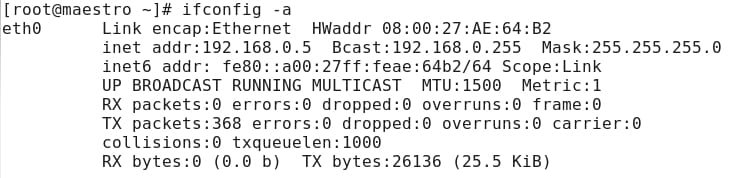
I have a problem at bridged connection between virtualbox vm and windows host.
1. host
windows 7 x64.
192.168.0.2
2. virtualbox guest
scientific linux 6.2 x86
192.168.0.5
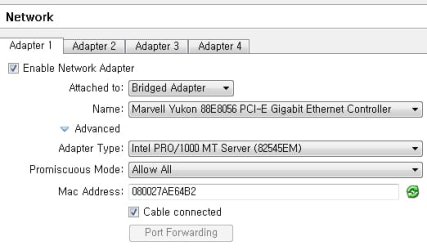
bridged adapter
20120323_1_sl_vb.jpg
I could not make a ping to gateway and open web pages at vm. So I tried these two ways.
1) disabled windows firewall and uninstalled vaccine.
2) install comodo internet security and add VirtualBox.exe and VBoxSVC.exe to Trusted Files".
Please let me know how to make network connection with vm and windows host with bridged adapter for getting ip 192.168.0.x.
Thanks in advance.
1. host
windows 7 x64.
192.168.0.2
2. virtualbox guest
scientific linux 6.2 x86
192.168.0.5
bridged adapter
20120323_1_sl_vb.jpg
I could not make a ping to gateway and open web pages at vm. So I tried these two ways.
1) disabled windows firewall and uninstalled vaccine.
2) install comodo internet security and add VirtualBox.exe and VBoxSVC.exe to Trusted Files".
Please let me know how to make network connection with vm and windows host with bridged adapter for getting ip 192.168.0.x.
Thanks in advance.
Attachments
My Computer
- Computer Manufacturer/Model Number
- self assembling
- OS
- windows 7 x64 16385
- CPU
- core2duo 6600
- Motherboard
- asus p5b delxe
- Memory
- samsung 1G x 4
- Graphics Card(s)
- ati x850
- Sound Card
- audigy2 zs
- Monitor(s) Displays
- lg lcd
- Screen Resolution
- 1920 x1200
- Hard Drives
- samsung 520G
- PSU
- micronics classic 500W
- Case
- nctop a380
- Cooling
- zalman
- Internet Speed
- lan