Guest Account has Admin folders as shortcuts

Avie

New member
:sick:The folders in the Guest are shortcuts of my originals but with out Open Office properties. I will save and try to put them back in Admin account. What do I do about the unknown guest?
I turned on view all files and discovered them which may have been going on for some time without my knowledge. Have taken permission of short cuts and waiting for your advice and help. Or it just hapened with a chat session trying to install a NvIdia driver.
W7sp1
Avie
 

My Computer

Computer Manufacturer/Model Number
HP Pavillon
OS
Microsoft Windows 7 Home Premium 64-bit 7601 Multiprocessor Free Service Pack 1
CPU
AMD Athlon(tm) 64 X2 Dual Core Processor 4400+
Motherboard
ASUSTek Computer INC. NARRA2
Memory
4.00 GB
Graphics Card(s)
NVIDIA GeForce 6150SE nForce 430 (Microsoft Corporation - WD
Sound Card
Realtek High Definition Audio
Monitor(s) Displays
Samsung
Screen Resolution
1280 x 1024 x 32 bits (4294967296 colors) @ 60 Hz
Hard Drives
(1) ST332082 0AS SCSI Disk Device (2) Generic- Compact Flash USB Device (3) Generic- MS/MS-Pro USB Device (4) Generic- SD/MMC USB Device (5) Generic- SM/xD-Picture USB Device
Browser
Firfefox 25
Hello Avie, I am afraid I am not sure what you mean in your above post ^?

I got a little confused. Do you mean that you are sharing folders and/or sharing public folders and the guest account has access to files stored in them? I do not know of any other way in which the guest account can access Admin account folders. If so, type "Change advanced sharing options" without quotes into the start menu search bar, and select options to NOT share public folders and NOT share folders and printers. In addition, make sure you DO select password protected sharing to force a password requirement for all network connected computers in the event you decide later on to start sharing (added security).

If I missed the mark, please explain further. Hope this helps
 

My Computer

Computer type
PC/Desktop
Computer Manufacturer/Model Number
Custom Asus Build
OS
Microsoft Windows 8.1 Pro 64-bit
CPU
Intel(R) Core(TM) i3-4130 CPU @ 3.40GHz
Motherboard
B85M-E
Memory
8.00 GB
Graphics Card(s)
None
Sound Card
Realtek High Definition Audio
Monitor(s) Displays
Asus 23.6" Monitor
Screen Resolution
1920 x 1080 x 32 bits (4294967296 colors) @ 60 Hz
Hard Drives
INTEL SSDSC2BW180A4
Samsung SSD 840 PRO Series
PSU
Seasonic S12II-380Bronze
Case
Lian Li
Cooling
Fan, Passive
Keyboard
Logitech K120
Mouse
Microsoft Touch Mouse
Internet Speed
4ms Ping, 19.0 Mbps Download, 19.0 Mbps Upload
Antivirus
Eset Endpoint
Browser
Internet Explorer, Chrome
Admin account is controlled by Guest account

Hey Dust Sailor :confused:You got it as I see it but it is worse.
I cannot use your suggestion. I do not have permission. Belar Advisor show Disabled Admin and guest account. I was a soul user and only used the admin account. It is awful because my files are getting more and more short cut status. I though the guest account could not have a password.
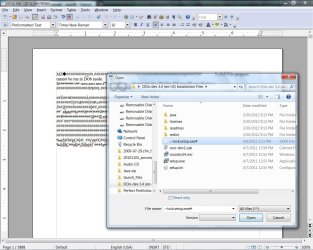
My Open Office is downloading the extensions by opening Wordpad and I cannot change to OXT after the first one comes in with the proper ending.This all started with the Nvidia remote connection they ran programs supposedly to find out why the graphic driver would not update. But I stopped them and then found the programs they had run. then they wanted to charge me. Not happy.
Thank you for an answer. I am not very knowledgeable.Anything else to try?
Would screen shots help. I took two?
 

My Computer

Computer Manufacturer/Model Number
HP Pavillon
OS
Microsoft Windows 7 Home Premium 64-bit 7601 Multiprocessor Free Service Pack 1
CPU
AMD Athlon(tm) 64 X2 Dual Core Processor 4400+
Motherboard
ASUSTek Computer INC. NARRA2
Memory
4.00 GB
Graphics Card(s)
NVIDIA GeForce 6150SE nForce 430 (Microsoft Corporation - WD
Sound Card
Realtek High Definition Audio
Monitor(s) Displays
Samsung
Screen Resolution
1280 x 1024 x 32 bits (4294967296 colors) @ 60 Hz
Hard Drives
(1) ST332082 0AS SCSI Disk Device (2) Generic- Compact Flash USB Device (3) Generic- MS/MS-Pro USB Device (4) Generic- SD/MMC USB Device (5) Generic- SM/xD-Picture USB Device
Browser
Firfefox 25
Which account are you using now, an admin account or standard user? How do you not have permission to change the settings I've indicated? Does a security prompt pop up which requires an admin account and password?

What do you mean "files are getting more and more short cut status"? Are shortcuts being automatically created in guest account? Could you have a virus on your computer?

what extensions are openoffice downloading? Perhaps some screenshots would help, after all.
 

My Computer

Computer type
PC/Desktop
Computer Manufacturer/Model Number
Custom Asus Build
OS
Microsoft Windows 8.1 Pro 64-bit
CPU
Intel(R) Core(TM) i3-4130 CPU @ 3.40GHz
Motherboard
B85M-E
Memory
8.00 GB
Graphics Card(s)
None
Sound Card
Realtek High Definition Audio
Monitor(s) Displays
Asus 23.6" Monitor
Screen Resolution
1920 x 1080 x 32 bits (4294967296 colors) @ 60 Hz
Hard Drives
INTEL SSDSC2BW180A4
Samsung SSD 840 PRO Series
PSU
Seasonic S12II-380Bronze
Case
Lian Li
Cooling
Fan, Passive
Keyboard
Logitech K120
Mouse
Microsoft Touch Mouse
Internet Speed
4ms Ping, 19.0 Mbps Download, 19.0 Mbps Upload
Antivirus
Eset Endpoint
Browser
Internet Explorer, Chrome
Thank you.

Open office has extension which are to be opened in OXT. (Pagination, dictionaries, etc) .Sending screen shot.
My are opening in Word Pad. I currently using the Admin account which is the only one I set up.

Ali
 

Attachments

  • OO corrupt.jpg
    OO corrupt.jpg
    326.9 KB · Views: 31

My Computer

Computer Manufacturer/Model Number
HP Pavillon
OS
Microsoft Windows 7 Home Premium 64-bit 7601 Multiprocessor Free Service Pack 1
CPU
AMD Athlon(tm) 64 X2 Dual Core Processor 4400+
Motherboard
ASUSTek Computer INC. NARRA2
Memory
4.00 GB
Graphics Card(s)
NVIDIA GeForce 6150SE nForce 430 (Microsoft Corporation - WD
Sound Card
Realtek High Definition Audio
Monitor(s) Displays
Samsung
Screen Resolution
1280 x 1024 x 32 bits (4294967296 colors) @ 60 Hz
Hard Drives
(1) ST332082 0AS SCSI Disk Device (2) Generic- Compact Flash USB Device (3) Generic- MS/MS-Pro USB Device (4) Generic- SD/MMC USB Device (5) Generic- SM/xD-Picture USB Device
Browser
Firfefox 25
try this:
1. Uninstall open office, go to their website, and reinstall it. instead of clicking 'standard install' (or whatever it says), choose 'custom intall'. The programs are listed as writer, calc, draw, impress, base, and math. uncheck all that you do not want to install (writer is usually the only program used with openoffice, but you may like calc as well, this is entirely up to you. leave everything else alone. click next and install it.
* if a prompt pops up for file types asking which microsoft word programs you want assigned to openoffice to open, make sure all the boxes that you can select are selected and click next to finish the install.

2. Next, type 'default programs' into the start search bar without quotes, and click 'set your default programs'. Click every open office program you se and click 'set this program as default'.

3. You mentioned something about guest accounts which i am still not sure of. If you are only using the admin account, it may be best to keep other user accounts turned off, including the guest account. Here is Brink's tutorial on how to turn the guest account off: http://www.sevenforums.com/tutorials/7412-guest-account-turn-off.html
* If you've created any accounts that you are not using, go into user account control through the control panel and delete them.

4. Additionally, make sure your antivirus program is up to date, and perform a full install to check for any viruses. It may take a while but it is worth making sure your system is virus free. If you do not have one, ge one! MSE is a common one around here if interested: http://windows.microsoft.com/en-US/windows/products/security-essentials
 

My Computer

Computer type
PC/Desktop
Computer Manufacturer/Model Number
Custom Asus Build
OS
Microsoft Windows 8.1 Pro 64-bit
CPU
Intel(R) Core(TM) i3-4130 CPU @ 3.40GHz
Motherboard
B85M-E
Memory
8.00 GB
Graphics Card(s)
None
Sound Card
Realtek High Definition Audio
Monitor(s) Displays
Asus 23.6" Monitor
Screen Resolution
1920 x 1080 x 32 bits (4294967296 colors) @ 60 Hz
Hard Drives
INTEL SSDSC2BW180A4
Samsung SSD 840 PRO Series
PSU
Seasonic S12II-380Bronze
Case
Lian Li
Cooling
Fan, Passive
Keyboard
Logitech K120
Mouse
Microsoft Touch Mouse
Internet Speed
4ms Ping, 19.0 Mbps Download, 19.0 Mbps Upload
Antivirus
Eset Endpoint
Browser
Internet Explorer, Chrome
Sailor, Thank you. I got locked out of everything and could not respond. Lost password access plus I found what I was typing was being spoken. (This was all came from things downloaded from the Nvidia 800 number for failed driver update help. Urg.They had remote access).
OK, I have my open offfice behaving as you suggested. Only shared shortcut files are OO default public ones and I locked them (for only me).
Still struggling over controls. Found unused drives listed and one used as a DVD in addtion to my E drive. Trying to remove unused drives except c,d,e. They say volume copy or other things.
Belarc Advisor still shows a router, which I do not have. Found steelhead ROUTER droppings in registry and removed.
Malwarebytes removed two files from trash. Need to do repair restore but I only have retail w7 and added sp1. If I remove sp! I can do it from my disc. However there may be a time limit for that. Saw something on this Forum about it under the repair restore section.
Your help was just what I needed. Thank you so much.:D
 

My Computer

Computer Manufacturer/Model Number
HP Pavillon
OS
Microsoft Windows 7 Home Premium 64-bit 7601 Multiprocessor Free Service Pack 1
CPU
AMD Athlon(tm) 64 X2 Dual Core Processor 4400+
Motherboard
ASUSTek Computer INC. NARRA2
Memory
4.00 GB
Graphics Card(s)
NVIDIA GeForce 6150SE nForce 430 (Microsoft Corporation - WD
Sound Card
Realtek High Definition Audio
Monitor(s) Displays
Samsung
Screen Resolution
1280 x 1024 x 32 bits (4294967296 colors) @ 60 Hz
Hard Drives
(1) ST332082 0AS SCSI Disk Device (2) Generic- Compact Flash USB Device (3) Generic- MS/MS-Pro USB Device (4) Generic- SD/MMC USB Device (5) Generic- SM/xD-Picture USB Device
Browser
Firfefox 25
Avie, here is a good tutorial for you: http://www.sevenforums.com/tutorials/1538-sfc-scannow-command-system-file-checker.html

Here is the repair install if you are able to do it: http://www.sevenforums.com/tutorials/3413-repair-install.html

If you cannot log into your computer account, try a system restore: http://www.sevenforums.com/tutorials/700-system-restore.html

All tutorials created by Brink

Go into your control panel uninstall programs/drivers not in use and check if there anything else that you don't use, being careful not to remove current drivers and updates that may be listed there.

Make sure you have installed all updates and all drivers that go with your computer

*EDIT: Also, make sure you aren't going through folders (such as the documents folder and any other) and deleting important files your system creates. It is one thing to delete a file you created, and another entirely to delete one the system created, even if it seems out of place. The way to remove things is through the control panel

Additionally, go to the ease of access center and make sure it isn't set to read what you type. Otherwise, I would make sure the program has been uninstalled and double check that there are no viruses. Malwarebytes is good, but you also need a real-time antivirus program, unless you pay for Malwarebytes. MSE, Avast!, and many other free ones to choose from, but make sure if you need to uninstall it, you find a remover tool as antiviruses should not be uninstalled the normal way (they leave conflicting material behind)
 
Last edited:

My Computer

Computer type
PC/Desktop
Computer Manufacturer/Model Number
Custom Asus Build
OS
Microsoft Windows 8.1 Pro 64-bit
CPU
Intel(R) Core(TM) i3-4130 CPU @ 3.40GHz
Motherboard
B85M-E
Memory
8.00 GB
Graphics Card(s)
None
Sound Card
Realtek High Definition Audio
Monitor(s) Displays
Asus 23.6" Monitor
Screen Resolution
1920 x 1080 x 32 bits (4294967296 colors) @ 60 Hz
Hard Drives
INTEL SSDSC2BW180A4
Samsung SSD 840 PRO Series
PSU
Seasonic S12II-380Bronze
Case
Lian Li
Cooling
Fan, Passive
Keyboard
Logitech K120
Mouse
Microsoft Touch Mouse
Internet Speed
4ms Ping, 19.0 Mbps Download, 19.0 Mbps Upload
Antivirus
Eset Endpoint
Browser
Internet Explorer, Chrome
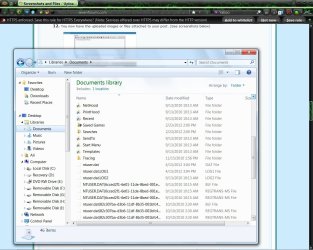
The plan is set to to do restore. However I wish to send this screen shot. All is undone from last night.

Trouble.jpg
 

My Computer

Computer Manufacturer/Model Number
HP Pavillon
OS
Microsoft Windows 7 Home Premium 64-bit 7601 Multiprocessor Free Service Pack 1
CPU
AMD Athlon(tm) 64 X2 Dual Core Processor 4400+
Motherboard
ASUSTek Computer INC. NARRA2
Memory
4.00 GB
Graphics Card(s)
NVIDIA GeForce 6150SE nForce 430 (Microsoft Corporation - WD
Sound Card
Realtek High Definition Audio
Monitor(s) Displays
Samsung
Screen Resolution
1280 x 1024 x 32 bits (4294967296 colors) @ 60 Hz
Hard Drives
(1) ST332082 0AS SCSI Disk Device (2) Generic- Compact Flash USB Device (3) Generic- MS/MS-Pro USB Device (4) Generic- SD/MMC USB Device (5) Generic- SM/xD-Picture USB Device
Browser
Firfefox 25
If you do a system restore to a point before you began to fix everything, then you may need to go back up to the start of this thread and begin to fix everything that I've mentioned once again, such as reinstalling Openoffice (...if that fixed anything at all. However, DO NOT DELETE ANY FOLDERS UNTIL YOU READ ALL POSTS BELOW THIS).

Are you still having trouble after you've attempted the fixes I've supplied above? If so, please once again list everything that is going wrong, because I am still not sure what the problem is. Be as specific as posible.
It looks like random shortcuts are being created in your documents library. Is this your only problem?

Let me know if you used your antivirus program to full scan you computer for viruses. What happens if you delete the shortcuts? Before you do, see the posts below. Make sure you know the difference between a short cut and a regular folder, just in case you don't, because you SHOULD NOT DELETE ANY FOLDER YOU MAY NEED.
 
Last edited:

My Computer

Computer type
PC/Desktop
Computer Manufacturer/Model Number
Custom Asus Build
OS
Microsoft Windows 8.1 Pro 64-bit
CPU
Intel(R) Core(TM) i3-4130 CPU @ 3.40GHz
Motherboard
B85M-E
Memory
8.00 GB
Graphics Card(s)
None
Sound Card
Realtek High Definition Audio
Monitor(s) Displays
Asus 23.6" Monitor
Screen Resolution
1920 x 1080 x 32 bits (4294967296 colors) @ 60 Hz
Hard Drives
INTEL SSDSC2BW180A4
Samsung SSD 840 PRO Series
PSU
Seasonic S12II-380Bronze
Case
Lian Li
Cooling
Fan, Passive
Keyboard
Logitech K120
Mouse
Microsoft Touch Mouse
Internet Speed
4ms Ping, 19.0 Mbps Download, 19.0 Mbps Upload
Antivirus
Eset Endpoint
Browser
Internet Explorer, Chrome
After doing some research, files like that in your screenshot should be hidden. Have you gone into start menu properties and changed options to show all hidden folders? Don't do that! Hide them again. They aren't meant to be modified or used by you (unless you know what you are doing). After you hide them, check and see if they are still there. Please give me as much detail as you can so that I can determine exactly what the problem is.

Also, make sure you set a good password for the Admin account. Are you still able to log on? Do make sure you answer all the questions I've asked, cause if you don't, it takes longer to solve the problem. ;)
 

My Computer

Computer type
PC/Desktop
Computer Manufacturer/Model Number
Custom Asus Build
OS
Microsoft Windows 8.1 Pro 64-bit
CPU
Intel(R) Core(TM) i3-4130 CPU @ 3.40GHz
Motherboard
B85M-E
Memory
8.00 GB
Graphics Card(s)
None
Sound Card
Realtek High Definition Audio
Monitor(s) Displays
Asus 23.6" Monitor
Screen Resolution
1920 x 1080 x 32 bits (4294967296 colors) @ 60 Hz
Hard Drives
INTEL SSDSC2BW180A4
Samsung SSD 840 PRO Series
PSU
Seasonic S12II-380Bronze
Case
Lian Li
Cooling
Fan, Passive
Keyboard
Logitech K120
Mouse
Microsoft Touch Mouse
Internet Speed
4ms Ping, 19.0 Mbps Download, 19.0 Mbps Upload
Antivirus
Eset Endpoint
Browser
Internet Explorer, Chrome
The Nethood folder "Stores the path to the folder containing shortcuts to servers that the user has added to My Network Places," according to Microsoft. Do not delete the files and folders for NTUSER.DAT and the rest, they are important. If you do delete some of these files, it could corrupt your user profile, which isn't good. Have you tried to already? Could this be why you were being locked out of your computer? Once again, after you've done all of this, specifically list if there are any more problems so I can help you out. The more I know, the more help you will get. That was a very good screenshot you sent, by the way. Keep it up! :)
 

My Computer

Computer type
PC/Desktop
Computer Manufacturer/Model Number
Custom Asus Build
OS
Microsoft Windows 8.1 Pro 64-bit
CPU
Intel(R) Core(TM) i3-4130 CPU @ 3.40GHz
Motherboard
B85M-E
Memory
8.00 GB
Graphics Card(s)
None
Sound Card
Realtek High Definition Audio
Monitor(s) Displays
Asus 23.6" Monitor
Screen Resolution
1920 x 1080 x 32 bits (4294967296 colors) @ 60 Hz
Hard Drives
INTEL SSDSC2BW180A4
Samsung SSD 840 PRO Series
PSU
Seasonic S12II-380Bronze
Case
Lian Li
Cooling
Fan, Passive
Keyboard
Logitech K120
Mouse
Microsoft Touch Mouse
Internet Speed
4ms Ping, 19.0 Mbps Download, 19.0 Mbps Upload
Antivirus
Eset Endpoint
Browser
Internet Explorer, Chrome
I wanted to make comments on your quotes above:

Belar Advisor show Disabled Admin and guest account.
Why do you need this program? I would be very careful with PC 'advisors'. In fact, I wouldn't use this program ever. Your computer comes with a security center 'advisor' already, and all you need to do is go to control panel security update center and make sure updates are "automatically installed". That way you get all important updates that your computer needs, including compatability, stability, and security updates. Then the only other thing you need is an antivirus program (the free version of malwarebytes is a good addition to antivirus software, but it by itself is not an antivirus program). This 'advisor' program sounds like it isn't needed, and I don't know its effect on your computer.

It is awful because my files are getting more and more short cut status.
This is randomly happening? Let me know if it still hapens after you do the fixes I've listed in above posts.

I though the guest account could not have a password.
You disabled it right? As I said, if you want a guest account, the best thing to do is to create a limited user account with password and name it "guest". Give the password only to those you trust who need to use it. Otherwise, delete anything you aren't using. If no one needs to use the guest account, disable/delete it.

My Open Office is downloading the extensions by opening Wordpad and I cannot change to OXT after the first one comes in with the proper ending.
Is this still happening after you reinstall it (again, after the system restore if you need to)?

This all started with the Nvidia remote connection they ran programs supposedly to find out why the graphic driver would not update. But I stopped them and then found the programs they had run.
Why did you stop them? They aren't putting viruses on your computer if they are truly from Nvidia, they are only trying to help. Does the driver update now? You removed all the programs they had run?

I got locked out of everything and could not respond. Lost password access plus I found what I was typing was being spoken. (This was all came from things downloaded from the Nvidia 800 number for failed driver update help. Urg.They had remote access).
Again, why did you stop them? Could stopping them have caused the instability your system now faces? Did you ask them about it by any chance?

Still struggling over controls. Found unused drives listed and one used as a DVD in addtion to my E drive. Trying to remove unused drives except c,d,e. They say volume copy or other things.
What controls are you struggling with? what unused drives are listed? I have no idea what you mean. How did you find, and how on earth did you create 'unused drives'? And labled c,d, and e, no less. Do you have more than one hard drive in your computer, or USB devices?

Belarc Advisor still shows a router, which I do not have. Found steelhead ROUTER droppings in registry and removed.
Again, I would trash this program. It could be why you are having some of these problems. First of all, you shouldn't be going through and deleting stuff if you, as you say, aren't very knowledgeable in the tech field. I do not know how it shows this router, but could it be that a neighbor owns a router that your computer has 'discovered'? This is normal.

Malwarebytes removed two files from trash. Need to do repair restore but I only have retail w7 and added sp1. If I remove sp! I can do it from my disc. However there may be a time limit for that.
Don't know what you mean by time limit, there aren't any. Are you still trying to do a repair install or are things back to normal? Do you really need to do a system repair? Let me know!

Hope I've been able to help you out some, computer stuff is hard work. I would recommend that if you don't know whether something can be deleted, either looking it up through google/bing or asking us here. If you delete something that your computer uses, you could be in deep water. Many people use limited user accounts instead of Admin accounts because the computer does not allow limited user accounts to delete files that the system needs/uses, while with the Admin account, it has permission to delete many of these. Using user account control, even with an admin account (a prompt would pop up with an 'OK' option), is a very good idea. At least it would let you know that you are changing/deleting something that could be very important. Looking forward to hearing from you again!

 

My Computer

Computer type
PC/Desktop
Computer Manufacturer/Model Number
Custom Asus Build
OS
Microsoft Windows 8.1 Pro 64-bit
CPU
Intel(R) Core(TM) i3-4130 CPU @ 3.40GHz
Motherboard
B85M-E
Memory
8.00 GB
Graphics Card(s)
None
Sound Card
Realtek High Definition Audio
Monitor(s) Displays
Asus 23.6" Monitor
Screen Resolution
1920 x 1080 x 32 bits (4294967296 colors) @ 60 Hz
Hard Drives
INTEL SSDSC2BW180A4
Samsung SSD 840 PRO Series
PSU
Seasonic S12II-380Bronze
Case
Lian Li
Cooling
Fan, Passive
Keyboard
Logitech K120
Mouse
Microsoft Touch Mouse
Internet Speed
4ms Ping, 19.0 Mbps Download, 19.0 Mbps Upload
Antivirus
Eset Endpoint
Browser
Internet Explorer, Chrome
:shock:Belarc Advisor is only a diagnostic report. It does not run anything. I do use Malwarebytes and WSE. I physically found a installed router on my computer. I do not have any know connection or any wireless connections to my computer.
More later when I redo the system. Thank you for your suggestions.
 

My Computer

Computer Manufacturer/Model Number
HP Pavillon
OS
Microsoft Windows 7 Home Premium 64-bit 7601 Multiprocessor Free Service Pack 1
CPU
AMD Athlon(tm) 64 X2 Dual Core Processor 4400+
Motherboard
ASUSTek Computer INC. NARRA2
Memory
4.00 GB
Graphics Card(s)
NVIDIA GeForce 6150SE nForce 430 (Microsoft Corporation - WD
Sound Card
Realtek High Definition Audio
Monitor(s) Displays
Samsung
Screen Resolution
1280 x 1024 x 32 bits (4294967296 colors) @ 60 Hz
Hard Drives
(1) ST332082 0AS SCSI Disk Device (2) Generic- Compact Flash USB Device (3) Generic- MS/MS-Pro USB Device (4) Generic- SD/MMC USB Device (5) Generic- SM/xD-Picture USB Device
Browser
Firfefox 25
Alrighty, I didin't know exactly what Belarc Advisor was, so I was just cautioning you. How is a router installed on your computer? I've never heard of such a thing. Usually they are just connected to your modem, and if you need to access the settings, you use its address on any web browser. Whenever I find a 'router', it is just another computer broadcasting a signal that my computer is picking up. Where are you finding this router in your computer, and how on earth did you get software installed for it? Are you positive it is a router?

Also, what do you mean "redo the system"? Are you reinstalling?

Looking forward to hearing back from you!
 

My Computer

Computer type
PC/Desktop
Computer Manufacturer/Model Number
Custom Asus Build
OS
Microsoft Windows 8.1 Pro 64-bit
CPU
Intel(R) Core(TM) i3-4130 CPU @ 3.40GHz
Motherboard
B85M-E
Memory
8.00 GB
Graphics Card(s)
None
Sound Card
Realtek High Definition Audio
Monitor(s) Displays
Asus 23.6" Monitor
Screen Resolution
1920 x 1080 x 32 bits (4294967296 colors) @ 60 Hz
Hard Drives
INTEL SSDSC2BW180A4
Samsung SSD 840 PRO Series
PSU
Seasonic S12II-380Bronze
Case
Lian Li
Cooling
Fan, Passive
Keyboard
Logitech K120
Mouse
Microsoft Touch Mouse
Internet Speed
4ms Ping, 19.0 Mbps Download, 19.0 Mbps Upload
Antivirus
Eset Endpoint
Browser
Internet Explorer, Chrome
BA report.png

This is FYI.

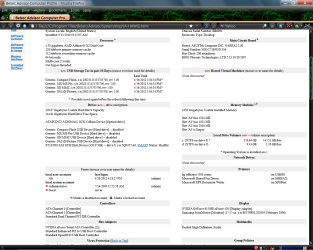
Latest BA report. Shows disabled Guest and Administrator accounts. The routers are now gone but showing a D link device and another unknown device connected. (I can see more when I mouse over for addressees and passwords.)
 

My Computer

Computer Manufacturer/Model Number
HP Pavillon
OS
Microsoft Windows 7 Home Premium 64-bit 7601 Multiprocessor Free Service Pack 1
CPU
AMD Athlon(tm) 64 X2 Dual Core Processor 4400+
Motherboard
ASUSTek Computer INC. NARRA2
Memory
4.00 GB
Graphics Card(s)
NVIDIA GeForce 6150SE nForce 430 (Microsoft Corporation - WD
Sound Card
Realtek High Definition Audio
Monitor(s) Displays
Samsung
Screen Resolution
1280 x 1024 x 32 bits (4294967296 colors) @ 60 Hz
Hard Drives
(1) ST332082 0AS SCSI Disk Device (2) Generic- Compact Flash USB Device (3) Generic- MS/MS-Pro USB Device (4) Generic- SD/MMC USB Device (5) Generic- SM/xD-Picture USB Device
Browser
Firfefox 25
You wanted the built in Guest account disabled, didn't you? This is completely normal. And the built in Administrator account being disabled is okay too, you have the secondary admin account listed as Ali, which is a bit more secure than the built in admin account (which is good).

I don't see where it lists d'link devices or any other device. You can type "Manage wireless networks" without quotes into the start menu search bar and click it. You will get a list of wireless network connections, of which you can RIGHT-click any and select "remove network" if you no longer use it. Previously installed wireless network drivers can be uninstalled using control panel uninstall programs. Other than that, I probably wouldn't worry so much about it. If you are worried about it, however, I can try to help you further locate the devices.

Are you positive you aren't using those devices to connect to the internet?
 

My Computer

Computer type
PC/Desktop
Computer Manufacturer/Model Number
Custom Asus Build
OS
Microsoft Windows 8.1 Pro 64-bit
CPU
Intel(R) Core(TM) i3-4130 CPU @ 3.40GHz
Motherboard
B85M-E
Memory
8.00 GB
Graphics Card(s)
None
Sound Card
Realtek High Definition Audio
Monitor(s) Displays
Asus 23.6" Monitor
Screen Resolution
1920 x 1080 x 32 bits (4294967296 colors) @ 60 Hz
Hard Drives
INTEL SSDSC2BW180A4
Samsung SSD 840 PRO Series
PSU
Seasonic S12II-380Bronze
Case
Lian Li
Cooling
Fan, Passive
Keyboard
Logitech K120
Mouse
Microsoft Touch Mouse
Internet Speed
4ms Ping, 19.0 Mbps Download, 19.0 Mbps Upload
Antivirus
Eset Endpoint
Browser
Internet Explorer, Chrome
Avie, you bought your computer pre-made from a manufacturer, right (HP)? Can you tell me the full model number of it and I can look up which drivers you are supposed to have. Though I am pretty sure everything in your system checks out to be normal, from what I can tell. I got suspicious of Belarc advisor early on because i thought is was telling you stuff about admin shortcuts, etc and I have never used that tool (I do hear it is a good tool to use, however. That info did come a bit late).

Sorry for all the confusion, I feel like I've dragged this out instead of keeping it smooth. Apologies, and hopefully I can stay coherent for the future ;)
 

My Computer

Computer type
PC/Desktop
Computer Manufacturer/Model Number
Custom Asus Build
OS
Microsoft Windows 8.1 Pro 64-bit
CPU
Intel(R) Core(TM) i3-4130 CPU @ 3.40GHz
Motherboard
B85M-E
Memory
8.00 GB
Graphics Card(s)
None
Sound Card
Realtek High Definition Audio
Monitor(s) Displays
Asus 23.6" Monitor
Screen Resolution
1920 x 1080 x 32 bits (4294967296 colors) @ 60 Hz
Hard Drives
INTEL SSDSC2BW180A4
Samsung SSD 840 PRO Series
PSU
Seasonic S12II-380Bronze
Case
Lian Li
Cooling
Fan, Passive
Keyboard
Logitech K120
Mouse
Microsoft Touch Mouse
Internet Speed
4ms Ping, 19.0 Mbps Download, 19.0 Mbps Upload
Antivirus
Eset Endpoint
Browser
Internet Explorer, Chrome
D.S.
System files are hidden. Guest account is off (not deleted). Thanks for clarification of Admin account. I thought I was using the ADMIN. Why do I see the S-S-1-5-etc. for passwords for only ADMIN and GUEST account? No Ali.

My computer was a Vista that I upgraded. I do not use the HP driver up dates. There is too much stuff added that I do not want installed. You might run the Belarc on your computer and see if you have as many security errors as I show. I also use Black Viper to undo what I may not need. ie networking (WAN) as he suggests for a stand alone unit as I have. The D-Link card is from my old W98 on the floor of the closet. So the culprit was in my home. It replaced the 2 cisco router revealed before yesterday. Of course Police will not respond. Glad I got someone as you to fill in the blanks and direct me.
 

My Computer

Computer Manufacturer/Model Number
HP Pavillon
OS
Microsoft Windows 7 Home Premium 64-bit 7601 Multiprocessor Free Service Pack 1
CPU
AMD Athlon(tm) 64 X2 Dual Core Processor 4400+
Motherboard
ASUSTek Computer INC. NARRA2
Memory
4.00 GB
Graphics Card(s)
NVIDIA GeForce 6150SE nForce 430 (Microsoft Corporation - WD
Sound Card
Realtek High Definition Audio
Monitor(s) Displays
Samsung
Screen Resolution
1280 x 1024 x 32 bits (4294967296 colors) @ 60 Hz
Hard Drives
(1) ST332082 0AS SCSI Disk Device (2) Generic- Compact Flash USB Device (3) Generic- MS/MS-Pro USB Device (4) Generic- SD/MMC USB Device (5) Generic- SM/xD-Picture USB Device
Browser
Firfefox 25
Avie, hello again. I will try to be clearer for you so as not to be too confusing :)

About Belarc Advisor:
With what you've given me, I can't see any place where it says "S-S-1-5-[etc.] in your screenshot. And you are using an admin account, but it sounds like it isn't the built in one, which is perfect because is gives you added security. And it looked like the Admin account you are using was called Ali (according to Belarc), but if it isn't, it is okay. The name isn't so important. Perhaps it is your computer name, or a previous Admin name? But it is not important, though whatever it is called.

About drivers and finding missing drivers:
Driver updates are important to have to run a fully functioning computer. However, there are many tools and utilities that HP provides extra that you do not need at all. If you type "Device manager" without quotes into your start menu search bar and click it, you can see if there are any exclaimation marks in yellow triangles. If you see any, it is those drivers that need to be updated. If you don't see any, chances are you are okay. If you do, right click the icon and select "Update driver" or whatever it says in order to update the software. When the pop-up shows, select "search the internet for the right driver" or whatever it says, and let it update. If it cannot update, don't worry.

Digging deeper in finding missing drivers:
If you want to make sure you have the best drivers for your system (Remember, not utilities), then type "Devices and Printers" into your start menu search bar without quotes and click it up at the top. If you see any exclaimation marks in yellow triangles, a driver needs to be updated. Attempt to update the driver.
  • A very good and helpful way to find drivers automatically is this: within Devices and Printers, RIGHT-click your computer icon and select "Device Installation Settings". Select "Yes, do this automatically" and click okay. Then go to windows update and use the update feature, and download all the drivers it gives you.
Be careful with what you disable/remove:
Black Viper is useful in few situations. But unless you know completely what a specific service controls, I would recommend not disabling anything. I've tested it many, many times personally, and found that there is no benefit in disabling services. The speed never increased, and there was a high chance that I'd disabled something I would need later on, and I couldn't remember all of what I had disabled. I strongly urge you not to use it without knowing more about it.

If you still have old drivers installed:
Try your hardest to locate them. You can use either Device Manager, or Control Panel Uninstall Programs to find and remove all drivers that you no longer use. Other than that, unless you use a tool that is designed to find 'ghost' drivers (I don't know if belarc is such a tool), you shouldn't be able to see any incorrect drivers. However, remember that if your computer has the device (and even if you don't use it), it still needs the driver installed for the device. And if you are able to see 'ghost' drivers, I wouldn't worry so much about it unless if is conflicting somehow. If, however, you are really really into removing them, use this tutorial to find them: http://www.sevenforums.com/tutorials/77614-device-manager-hidden-devices.html - created by Bare Foot Kid

Additional:
I hope I've answered all of your questions, and if I haven't, feel free to ask again! Screenshots and further explaination will enable me to make better judgements. I don't know what you meant about the police (don't think they mind you changing your network settings :p)

Take care,
 

My Computer

Computer type
PC/Desktop
Computer Manufacturer/Model Number
Custom Asus Build
OS
Microsoft Windows 8.1 Pro 64-bit
CPU
Intel(R) Core(TM) i3-4130 CPU @ 3.40GHz
Motherboard
B85M-E
Memory
8.00 GB
Graphics Card(s)
None
Sound Card
Realtek High Definition Audio
Monitor(s) Displays
Asus 23.6" Monitor
Screen Resolution
1920 x 1080 x 32 bits (4294967296 colors) @ 60 Hz
Hard Drives
INTEL SSDSC2BW180A4
Samsung SSD 840 PRO Series
PSU
Seasonic S12II-380Bronze
Case
Lian Li
Cooling
Fan, Passive
Keyboard
Logitech K120
Mouse
Microsoft Touch Mouse
Internet Speed
4ms Ping, 19.0 Mbps Download, 19.0 Mbps Upload
Antivirus
Eset Endpoint
Browser
Internet Explorer, Chrome
Back
Top