USB 3.0 Ports Not Working with USB 3.0 Devices

LeadCarbonate

New member
Local time
11:21 PM
Messages
8
Greetings! Sorry if this has been covered but Seven Forums search isn't working atm -- I search for USB 3.0 and I get no results! I went through pages of posts and read all relevant posts but they haven't resolved my problem.

Anyway:

OS: win 7 pro 64 sp1
mobo: asrock x58 extreme6
cpu: i7 970

No overclocking, nothing else goofy going on.

I have two USB 3.0 devices and when I plug them in to USB 2.0 ports, they both are recognized. One is a drive and it fires right up. I can access it without issue. Another is a Black Magic Intensity Shuttle. The shuttle makes not promises about working with USB 2.0 but the important thing is that the USB 2.0 ports are working and both devices appear to be working.

Now, USB 2.0 devices work with my USB 3.0 ports as well.

I've updated the firmware to 3028 on both my NEC USB 3.0 controllers. I'm also running the latest drivers and NECs usb controller utility shows both controllers and reports no errors. USB 3.0 is listed as "enabled" in the BIOS.

I'm happy to post more info or run diagnostics at will. I'm really stuck!
 

My Computer My Computer

At a glance

Windows 7 Pro 64-bit
OS
Windows 7 Pro 64-bit
Welcome to Seven Forums LeadCarbonate.
Check Device Manager/USB devices/ USB 3.0. It should have a driver from Renesas, NEC no longer supports it.
 

My Computer My Computer

At a glance

Windows 7 Ultimate X64 SP1Intel i5-2550K, Differing ~4.4-4.8GHz No buil...16GB G.Skill Sniper 1866MHz @ 2133MHz 2x8GBASUS GTX650TIB-DC2OC-2GD5, (650TI Boost)
Computer type
PC/Desktop
Computer Manufacturer/Model Number
Home Built Desktop By DataTech
OS
Windows 7 Ultimate X64 SP1
CPU
Intel i5-2550K, Differing ~4.4-4.8GHz No built in GPU
Motherboard
ASUS P8Z68-V PRO/GEN3
Memory
16GB G.Skill Sniper 1866MHz @ 2133MHz 2x8GB
Graphics Card(s)
ASUS GTX650TIB-DC2OC-2GD5, (650TI Boost)
Sound Card
Onboard Realtek 5-1
Monitor(s) Displays
Samsung P2570HD
Screen Resolution
1920x1080
Hard Drives
Samsung 840 Pro 256GB SSD for OS, 500GB Seagate Constellation (Enterprise drive) for Data
PSU
Corsair HX650W
Case
Inwin Dragon Rider
Cooling
Hyper 212 EVO w/two Noctua fans, push-pull, @1300 RPM
Keyboard
E-Z Eyes, bright yellow keys with large characters
Mouse
steelseries SENSEI Laser Pro Gaming
Internet Speed
48-51Mbs Mbs down, 11 Mbs up Xfinity Cable
Antivirus
Norton Internet Security 2013
Browser
IE 10, Opera, Pale Moon if needed
Other Info
4 case fans, LG BluRay-RE, ASUS DVD-RW, Mr. Fusion power supply, 1.21 gigawatts.
I am assuming you are using USB 3.0 cables with your USB 3.0 devices.

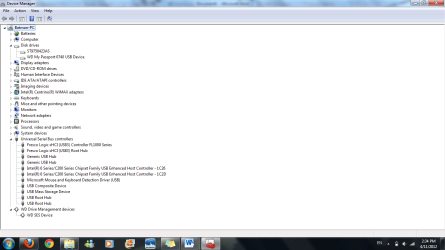
Can you please post a picture of device manager with Universal Serial Bus Controllers opened up.
 

My Computer My Computer

At a glance

Windows 7 Home Premium 64 bit SP1Intel i7 4790k16 GB Corsair 2400 MHz DDR3Visiontek Radeon R9 285
Computer type
PC/Desktop
Computer Manufacturer/Model Number
Custom Build
OS
Windows 7 Home Premium 64 bit SP1
CPU
Intel i7 4790k
Motherboard
MSI Z97-G55 SLI
Memory
16 GB Corsair 2400 MHz DDR3
Graphics Card(s)
Visiontek Radeon R9 285
Sound Card
None
Monitor(s) Displays
Gateway FHX2402L
Screen Resolution
1920 X 1080
Hard Drives
Samsung 840 EVO 500GB
PSU
Corsair 750 TX
Case
Fractal Design
Cooling
Stock fans
Keyboard
Logitech K800
Mouse
Logitech M510
Internet Speed
60.88 Mbps download 10.47 Mbps upload (Speedtest.net)
Antivirus
Norton
Browser
Opera
Other Info
First Computer used: A Commodore Pet of course
Love using Manjaro KDE Linux 64 bit and Windows 7/10 64 bit
Yes, definitely using blue USB cables in blue ports.

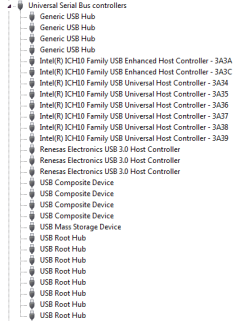
Here is the requested screenshot:

2011-08-02_181029.png
 

My Computer My Computer

At a glance

Windows 7 Pro 64-bit
OS
Windows 7 Pro 64-bit
Something is wrong but I am not sure how to fix it. My understanding is that you need a Root Hub for every Host Controller. You have no Renesas Root Hub installed. I will see if I can find any info on this. You could try removing and re-installing the driver.
 

Attachments

  • Renesas.JPG
    Renesas.JPG
    10.8 KB · Views: 2,841

My Computer My Computer

At a glance

Windows 7 Home Premium 64 bit SP1Intel i7 4790k16 GB Corsair 2400 MHz DDR3Visiontek Radeon R9 285
Computer type
PC/Desktop
Computer Manufacturer/Model Number
Custom Build
OS
Windows 7 Home Premium 64 bit SP1
CPU
Intel i7 4790k
Motherboard
MSI Z97-G55 SLI
Memory
16 GB Corsair 2400 MHz DDR3
Graphics Card(s)
Visiontek Radeon R9 285
Sound Card
None
Monitor(s) Displays
Gateway FHX2402L
Screen Resolution
1920 X 1080
Hard Drives
Samsung 840 EVO 500GB
PSU
Corsair 750 TX
Case
Fractal Design
Cooling
Stock fans
Keyboard
Logitech K800
Mouse
Logitech M510
Internet Speed
60.88 Mbps download 10.47 Mbps upload (Speedtest.net)
Antivirus
Norton
Browser
Opera
Other Info
First Computer used: A Commodore Pet of course
Love using Manjaro KDE Linux 64 bit and Windows 7/10 64 bit
Should I try *uninstalling* all of my root hubs and seeing if windows picks them back up correctly or is a more elaborate approach necessary?
 

My Computer My Computer

At a glance

Windows 7 Pro 64-bit
OS
Windows 7 Pro 64-bit
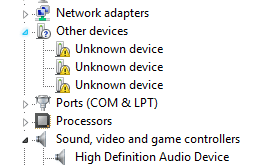
I have three "unknown devices" under "Other Devices" but "Update Driver" is grayed out.
 

My Computer My Computer

At a glance

Windows 7 Pro 64-bit
OS
Windows 7 Pro 64-bit
I'm not certain that mine are right, because I don't use them yet, but I have two NEC host controllers and two root hubs in the Device Manager.
 

My Computer My Computer

At a glance

W7x64 Pro, SuSe 12.1/** W7 x64 Pro, XP MCEPhenom II 1090T w/Noctua NH-D14 /**4400+ X2 w...2 x 2GB Patriot PGS34g1600LLKA/**4x1GB Corsai...EVGA GTX460 SC/**EVGA 8800GTS
Computer Manufacturer/Model Number
DIY
OS
W7x64 Pro, SuSe 12.1/** W7 x64 Pro, XP MCE
CPU
Phenom II 1090T w/Noctua NH-D14 /**4400+ X2 w/CM Hyper TX 3
Motherboard
ASRock 890FX Deluxe 4/**A8N-SLI
Memory
2 x 2GB Patriot PGS34g1600LLKA/**4x1GB Corsair VS
Graphics Card(s)
EVGA GTX460 SC/**EVGA 8800GTS
Sound Card
Asus Xonar D2X/**Xonar D1
Monitor(s) Displays
Acer X233H, Dell E152FPc /**LG M237-WD
Screen Resolution
1920x1080 & 1024x768/**1980x1080
Hard Drives
WDC 2TB, 1.5TB, 1TB, 500GB,Seagate 500GB , Maxtor 80GB /**500GB Seagate & WDC 1TB Black
PSU
CM RS600 w/ APC BX1000G/**Antec 500 TP w/ APC BX1000
Case
HAF922/**Antec 1040IIB
Cooling
3x200mm, 1x140 and 1x120mm/**5x80mm fans
Keyboard
Logitech Media USB/**Saitek Eclipse
Mouse
Cordless Trackman Wheel/**Ditto
Internet Speed
3.3Mbps
Other Info
SB 560 5.1 w/ Sennheiser RS140/**Creative T20 speakers, Dvico FusionHDTV7 Gold RT, Cisco E3000, HP 5510V AIO, Linksys E3000, Belkin F5U237 hub and **F5D8055 adapter
(** = 2nd rig)
Hmm -- sounds like I'm definitely missing some root hubs in that case -- that gives me more to search on fortunately!
 

My Computer My Computer

At a glance

Windows 7 Pro 64-bit
OS
Windows 7 Pro 64-bit
Uninstalling the root hubs would be a starting place, but that'll disable your mouse or keyboard if you have them USB connected.

USB 3.0 cables are much bigger than USB2.0 ones. They are about as big in diameter as an ethernet cable and have 9 conductors as opposed to USB 2.0's four.
 

My Computer My Computer

At a glance

Windows 7 Ultimate X64 SP1Intel i5-2550K, Differing ~4.4-4.8GHz No buil...16GB G.Skill Sniper 1866MHz @ 2133MHz 2x8GBASUS GTX650TIB-DC2OC-2GD5, (650TI Boost)
Computer type
PC/Desktop
Computer Manufacturer/Model Number
Home Built Desktop By DataTech
OS
Windows 7 Ultimate X64 SP1
CPU
Intel i5-2550K, Differing ~4.4-4.8GHz No built in GPU
Motherboard
ASUS P8Z68-V PRO/GEN3
Memory
16GB G.Skill Sniper 1866MHz @ 2133MHz 2x8GB
Graphics Card(s)
ASUS GTX650TIB-DC2OC-2GD5, (650TI Boost)
Sound Card
Onboard Realtek 5-1
Monitor(s) Displays
Samsung P2570HD
Screen Resolution
1920x1080
Hard Drives
Samsung 840 Pro 256GB SSD for OS, 500GB Seagate Constellation (Enterprise drive) for Data
PSU
Corsair HX650W
Case
Inwin Dragon Rider
Cooling
Hyper 212 EVO w/two Noctua fans, push-pull, @1300 RPM
Keyboard
E-Z Eyes, bright yellow keys with large characters
Mouse
steelseries SENSEI Laser Pro Gaming
Internet Speed
48-51Mbs Mbs down, 11 Mbs up Xfinity Cable
Antivirus
Norton Internet Security 2013
Browser
IE 10, Opera, Pale Moon if needed
Other Info
4 case fans, LG BluRay-RE, ASUS DVD-RW, Mr. Fusion power supply, 1.21 gigawatts.

My Computer My Computer

At a glance

Windows 7 Home Premium 64 bit SP1Intel i7 4790k16 GB Corsair 2400 MHz DDR3Visiontek Radeon R9 285
Computer type
PC/Desktop
Computer Manufacturer/Model Number
Custom Build
OS
Windows 7 Home Premium 64 bit SP1
CPU
Intel i7 4790k
Motherboard
MSI Z97-G55 SLI
Memory
16 GB Corsair 2400 MHz DDR3
Graphics Card(s)
Visiontek Radeon R9 285
Sound Card
None
Monitor(s) Displays
Gateway FHX2402L
Screen Resolution
1920 X 1080
Hard Drives
Samsung 840 EVO 500GB
PSU
Corsair 750 TX
Case
Fractal Design
Cooling
Stock fans
Keyboard
Logitech K800
Mouse
Logitech M510
Internet Speed
60.88 Mbps download 10.47 Mbps upload (Speedtest.net)
Antivirus
Norton
Browser
Opera
Other Info
First Computer used: A Commodore Pet of course
Love using Manjaro KDE Linux 64 bit and Windows 7/10 64 bit
Not sure how helpful the picture will be but here it is!

2011-08-02_204529.png

Also, I'm confident that at least one of my blue USB cables is a true 3.0 cable. It is very thick and has a "square" connector at one end that is taller than normal -- has sort of an "attic" to it.

I'll have a look at that thread.

Also, I'll try the uninstall -- I have a PS2 keyboard I can use. I can turn on mouse keys if I get stuck.
 

My Computer My Computer

At a glance

Windows 7 Pro 64-bit
OS
Windows 7 Pro 64-bit

My Computer My Computer

At a glance

W7x64 Pro, SuSe 12.1/** W7 x64 Pro, XP MCEPhenom II 1090T w/Noctua NH-D14 /**4400+ X2 w...2 x 2GB Patriot PGS34g1600LLKA/**4x1GB Corsai...EVGA GTX460 SC/**EVGA 8800GTS
Computer Manufacturer/Model Number
DIY
OS
W7x64 Pro, SuSe 12.1/** W7 x64 Pro, XP MCE
CPU
Phenom II 1090T w/Noctua NH-D14 /**4400+ X2 w/CM Hyper TX 3
Motherboard
ASRock 890FX Deluxe 4/**A8N-SLI
Memory
2 x 2GB Patriot PGS34g1600LLKA/**4x1GB Corsair VS
Graphics Card(s)
EVGA GTX460 SC/**EVGA 8800GTS
Sound Card
Asus Xonar D2X/**Xonar D1
Monitor(s) Displays
Acer X233H, Dell E152FPc /**LG M237-WD
Screen Resolution
1920x1080 & 1024x768/**1980x1080
Hard Drives
WDC 2TB, 1.5TB, 1TB, 500GB,Seagate 500GB , Maxtor 80GB /**500GB Seagate & WDC 1TB Black
PSU
CM RS600 w/ APC BX1000G/**Antec 500 TP w/ APC BX1000
Case
HAF922/**Antec 1040IIB
Cooling
3x200mm, 1x140 and 1x120mm/**5x80mm fans
Keyboard
Logitech Media USB/**Saitek Eclipse
Mouse
Cordless Trackman Wheel/**Ditto
Internet Speed
3.3Mbps
Other Info
SB 560 5.1 w/ Sennheiser RS140/**Creative T20 speakers, Dvico FusionHDTV7 Gold RT, Cisco E3000, HP 5510V AIO, Linksys E3000, Belkin F5U237 hub and **F5D8055 adapter
(** = 2nd rig)
Solved: I'm a bit embarrassed but I have a defense. First, my defense <g>. I've been around for a while and even though I may not be current on my tech, driver installation habits die hard. I make it a point to point devices at drivers via device manager rather than point a driver install or setup at my system. In the past this ensured I didn't get extra stuff and was rarely a problem.

In this case I pointed all device candidates at the USB driver package and came up with the three hubs but no roots. Not surprisingly, the three unknown devices were my three roots but I couldn't point them at anything -- driver update wasn't an option.

So, the solution was to run the driver setup and get out of the way. Let me know if I owe anybody beer money for time spent :)

Thank you sincerely.
 

My Computer My Computer

At a glance

Windows 7 Pro 64-bit
OS
Windows 7 Pro 64-bit
Glad you got it running. Enjoy USB 3.0!
 

My Computer My Computer

At a glance

Windows 7 Home Premium 64 bit SP1Intel i7 4790k16 GB Corsair 2400 MHz DDR3Visiontek Radeon R9 285
Computer type
PC/Desktop
Computer Manufacturer/Model Number
Custom Build
OS
Windows 7 Home Premium 64 bit SP1
CPU
Intel i7 4790k
Motherboard
MSI Z97-G55 SLI
Memory
16 GB Corsair 2400 MHz DDR3
Graphics Card(s)
Visiontek Radeon R9 285
Sound Card
None
Monitor(s) Displays
Gateway FHX2402L
Screen Resolution
1920 X 1080
Hard Drives
Samsung 840 EVO 500GB
PSU
Corsair 750 TX
Case
Fractal Design
Cooling
Stock fans
Keyboard
Logitech K800
Mouse
Logitech M510
Internet Speed
60.88 Mbps download 10.47 Mbps upload (Speedtest.net)
Antivirus
Norton
Browser
Opera
Other Info
First Computer used: A Commodore Pet of course
Love using Manjaro KDE Linux 64 bit and Windows 7/10 64 bit
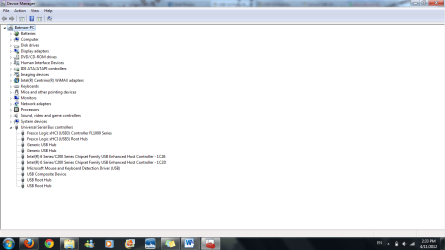
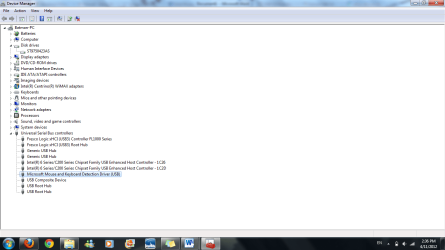
I have a similar problem. My Western Digital My Passport isn't able to connect through my USB 3.0 port, but works fine on any USB 2.0. Other USB 2.0 drives work on that USB 3.0 port too, so I'm not sure what the issue is. Attached are screenshots for the different scenarios.
 

Attachments

  • No external hd connected.png
    No external hd connected.png
    42.7 KB · Views: 29
  • Hd attached through usb 3.0.png
    Hd attached through usb 3.0.png
    44.3 KB · Views: 23
  • Hd connected through USB 2.0.png
    Hd connected through USB 2.0.png
    44.2 KB · Views: 25

My Computer My Computer

At a glance

Windows 7AMD Phenom II X4 5552x2GB OCZ Platinum Edition DDR3 PC3-10666Sapphire Radeon 6870
OS
Windows 7
CPU
AMD Phenom II X4 555
Motherboard
Biostar TA785G3
Memory
2x2GB OCZ Platinum Edition DDR3 PC3-10666
Graphics Card(s)
Sapphire Radeon 6870
Hard Drives
Generic SSD (64GB)
Samsung F3 (1TB)
Seagate (1TB)
Case
Antec 300
I have a similar problem. My Western Digital My Passport isn't able to connect through my USB 3.0 port, but works fine on any USB 2.0. Other USB 2.0 drives work on that USB 3.0 port too, so I'm not sure what the issue is. Attached are screenshots for the different scenarios.


I checked your motherboard specs you have listed for your system and the Biostar TA785G3 does not appear to have USB 3.0 ports only USB 2.0. Is this the correct motherboard or do you have an add-on card and if so what make and model?
 

My Computer My Computer

At a glance

Windows 7 Home Premium 64 bit SP1Intel i7 4790k16 GB Corsair 2400 MHz DDR3Visiontek Radeon R9 285
Computer type
PC/Desktop
Computer Manufacturer/Model Number
Custom Build
OS
Windows 7 Home Premium 64 bit SP1
CPU
Intel i7 4790k
Motherboard
MSI Z97-G55 SLI
Memory
16 GB Corsair 2400 MHz DDR3
Graphics Card(s)
Visiontek Radeon R9 285
Sound Card
None
Monitor(s) Displays
Gateway FHX2402L
Screen Resolution
1920 X 1080
Hard Drives
Samsung 840 EVO 500GB
PSU
Corsair 750 TX
Case
Fractal Design
Cooling
Stock fans
Keyboard
Logitech K800
Mouse
Logitech M510
Internet Speed
60.88 Mbps download 10.47 Mbps upload (Speedtest.net)
Antivirus
Norton
Browser
Opera
Other Info
First Computer used: A Commodore Pet of course
Love using Manjaro KDE Linux 64 bit and Windows 7/10 64 bit
I checked your motherboard specs you have listed for your system and the Biostar TA785G3 does not appear to have USB 3.0 ports only USB 2.0. Is this the correct motherboard or do you have an add-on card and if so what make and model?

▲This - the specs for that board are x4 USB 2.0 ports - no mention of USB 3.0

If it's the correct board and you have an add on card, have you installed the drivers for it?
 

My Computer My Computer

At a glance

8 Pro x64i7 3770K 4.6GHz16GB G.Skill Trident X 2666mhzx2 EVGA 780 Ti Superclocked SLI
Computer type
PC/Desktop
Computer Manufacturer/Model Number
Systems by SmartEyeball
OS
8 Pro x64
CPU
i7 3770K 4.6GHz
Motherboard
ASUS P8Z77 WS
Memory
16GB G.Skill Trident X 2666mhz
Graphics Card(s)
x2 EVGA 780 Ti Superclocked SLI
Sound Card
SB X-FI Surround 5.1 PRO USB / ATH-AD900 Headphones
Monitor(s) Displays
x3 Dell U2410 / 58" Samsung
Screen Resolution
5760*1200/ 1920*1200
Hard Drives
2x Intel 520 240GB (RAID 0) * 2x WD Caviar Blacks 2TB (RAID 0) * 2TB WD Caviar Black * Sony Optirac DVD
PSU
Silverstone Strider Evolution 1200W
Case
Thermaltake Level 10 GT Snow Edition
Cooling
Noctua NH-D14
Keyboard
Topre Realforce // Ducky Shine MX Black // Filco Ninja TKL
Mouse
Thermaltake Theron (Highly Recommended) + Razer Imperator
Antivirus
MSE
Browser
IE, FF, WaterFox
Other Info
GT Extreme V2 Sim Racing Cockpit + 40" LCD and K/B Mouse stand ▼
Fanatec CSR Elite Wheel + Clubsport V1 Pedals + CSR shifter/7G-H ▼Saitek X52 Pro ▼ TrackIR 5 Pro
Buttkicker v2 Seat Rumbler with Dedicated 5.1 and Sub Woofer attached to frame ▼
=
Bloody Big Grin
Back
Top