Can I use this Seagate HD for my HP?

mike6623

New member
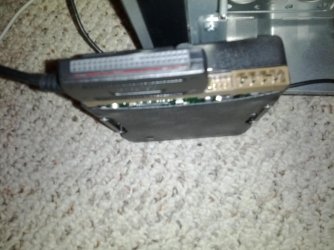
Seagate U Series 6 ST340810A

I took it out of an old Imac that didn't work. I have an open bay for another drive and I just want to see if anything is on it of need. Is this possible?

It is going into an HP, the drive itself doesn't say MAC on it, so I was unsure if it was for MAC only
 

My Computer

Computer Manufacturer/Model Number
HP
OS
Windows 8 Pro
Memory
8gb
Monitor(s) Displays
23 inch Acer
It should work just fine, so long as you have the right cable and cable connection on your mobo of new PC.
 

My Computer

Computer Manufacturer/Model Number
Custom built
OS
Windows 7 Ultimate 64 bit
CPU
AMD Phenom II X4 965 Black Edition
Motherboard
Gigabyte GA-MA790X-DS4
Memory
GSkill 4 X 2 GB PC 8500
Graphics Card(s)
XFX Radeon HD 6790 D
Sound Card
On board RealTek HD
Monitor(s) Displays
Dual monitors:Samsung SyncMaster S20B300
Screen Resolution
1600 X 900
Hard Drives
Seagate Barracuda 1TB (primary)
Seagate Barracuda 2 X 320 GB
PSU
Ultra X4 750 watt fully modular
Case
Thermaltake Overseer RX 1 full tower
Cooling
Core-Contact 92 mm CPU Cooler
Keyboard
Logitech G510
Mouse
Razor DeathAdder
Internet Speed
50/5 Mbps UL/DL
Other Info
Optical: Super Muliti DVD burner w/lightscribe, Hauppauge WinTV HVR-1800
It should work just fine, so long as you have the right cable and cable connection on your mobo of new PC.
Not sure, I actually have an IDE/SATA to usb cable, but I do not have the 4 hole power adapter which I think I need because when I connect, and plug in the usb nothing happens
 

My Computer

Computer Manufacturer/Model Number
HP
OS
Windows 8 Pro
Memory
8gb
Monitor(s) Displays
23 inch Acer
Need to find a spare 4 pin molex connector,

molex.JPG

coming from the power supply and connect it to the hard drive, there isn't enough power through the USB to power it.

Also specs on that drive,

U Series 6 | Seagate
 

My Computer

Computer type
PC/Desktop
Computer Manufacturer/Model Number
Me
OS
Win 7 Ultimate x64
CPU
FX-8350 @ 4.6 GHz so far
Motherboard
Asus M5A97 EVO
Memory
ADATA XPG V1 Series Black 8GB DDR3 1600
Graphics Card(s)
Sapphire R9 270x Dual-X
Sound Card
Xonar DGX w/ Corsair Vengence 1300
Monitor(s) Displays
Acer S232HL Abid
Screen Resolution
1920x1080
Hard Drives
120 GB OCZ Vertex 3
500 GB Seagate 7200.12
PSU
Antec Earthwatts 650W Green
Case
Antec Three Hundred
Cooling
Cooler Master 212 EVO
Keyboard
Logitech G510
Mouse
Logitech G500s
Internet Speed
35000/3000
Need to find a spare 4 pin molex connector,

View attachment 207551

coming from the power supply and connect it to the hard drive, there isn't enough power through the USB to power it.

Also specs on that drive,

U Series 6 | Seagate
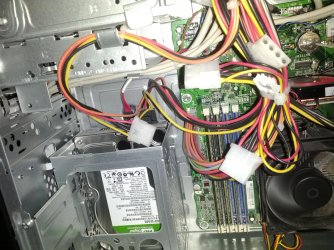
I seen that in my HP, but it looked like there were like 5 different ones. How do I know which one to connect, also, the area where there is like 30 pins, I didn't see anything for that. could I use the adapter I have and connect the 4 hole thing in your pic just to view the drive?

And I actually took that same thing out of the other PC where I got the drive. but on the other end there is a weird input I have never seen
 

My Computer

Computer Manufacturer/Model Number
HP
OS
Windows 8 Pro
Memory
8gb
Monitor(s) Displays
23 inch Acer
Suggest you post some pictures of the pins so that we know what you are talking about.
 

My Computer

Computer Manufacturer/Model Number
HP, Dell, Gateway, Toshiba - 4 laptops and 2 desktops
OS
Vista, Windows7, Mint Mate, Zorin, Windows 8
CPU
from 1.6GHz Duo to i7
Monitor(s) Displays
2x HP w2207
Hard Drives
5x HDD, 7x SSD, 12x Externals
Keyboard
with trackball - no mices
Mouse
Trackball mice
Internet Speed
DSL 6000
This is what I am seeing, notice how there are like 5-6 of those things? Do I need to chose the right one? Am I supposed to keep the drive plugged into the usb thing that I posted as is?
 

Attachments

  • IMG_20120416_182443.jpg
    IMG_20120416_182443.jpg
    656.3 KB · Views: 7
  • IMG_20120416_182512.jpg
    IMG_20120416_182512.jpg
    289.6 KB · Views: 5
  • IMG_20120416_182526.jpg
    IMG_20120416_182526.jpg
    354.7 KB · Views: 10

My Computer

Computer Manufacturer/Model Number
HP
OS
Windows 8 Pro
Memory
8gb
Monitor(s) Displays
23 inch Acer
Any of those 4 pin molex connectors will do. Just make sure the computer is off before connecting one to the hard drive.
 

My Computer

Computer type
PC/Desktop
Computer Manufacturer/Model Number
Me
OS
Win 7 Ultimate x64
CPU
FX-8350 @ 4.6 GHz so far
Motherboard
Asus M5A97 EVO
Memory
ADATA XPG V1 Series Black 8GB DDR3 1600
Graphics Card(s)
Sapphire R9 270x Dual-X
Sound Card
Xonar DGX w/ Corsair Vengence 1300
Monitor(s) Displays
Acer S232HL Abid
Screen Resolution
1920x1080
Hard Drives
120 GB OCZ Vertex 3
500 GB Seagate 7200.12
PSU
Antec Earthwatts 650W Green
Case
Antec Three Hundred
Cooling
Cooler Master 212 EVO
Keyboard
Logitech G510
Mouse
Logitech G500s
Internet Speed
35000/3000
I guess I am too late. Stormy has the answer, LOL.
 

My Computer

Computer Manufacturer/Model Number
HP, Dell, Gateway, Toshiba - 4 laptops and 2 desktops
OS
Vista, Windows7, Mint Mate, Zorin, Windows 8
CPU
from 1.6GHz Duo to i7
Monitor(s) Displays
2x HP w2207
Hard Drives
5x HDD, 7x SSD, 12x Externals
Keyboard
with trackball - no mices
Mouse
Trackball mice
Internet Speed
DSL 6000
This may be a silly question, but when I have it hooked up, how do I view it? I do not see it like I do the externals?
 

My Computer

Computer Manufacturer/Model Number
HP
OS
Windows 8 Pro
Memory
8gb
Monitor(s) Displays
23 inch Acer
If it has a partition, it should show up in Computer. Else find it in Disk Management.
 

My Computer

Computer Manufacturer/Model Number
HP, Dell, Gateway, Toshiba - 4 laptops and 2 desktops
OS
Vista, Windows7, Mint Mate, Zorin, Windows 8
CPU
from 1.6GHz Duo to i7
Monitor(s) Displays
2x HP w2207
Hard Drives
5x HDD, 7x SSD, 12x Externals
Keyboard
with trackball - no mices
Mouse
Trackball mice
Internet Speed
DSL 6000
Also coming out os a Mac it may be a file system that Windows can't see.
 

My Computer

Computer type
PC/Desktop
Computer Manufacturer/Model Number
Me
OS
Win 7 Ultimate x64
CPU
FX-8350 @ 4.6 GHz so far
Motherboard
Asus M5A97 EVO
Memory
ADATA XPG V1 Series Black 8GB DDR3 1600
Graphics Card(s)
Sapphire R9 270x Dual-X
Sound Card
Xonar DGX w/ Corsair Vengence 1300
Monitor(s) Displays
Acer S232HL Abid
Screen Resolution
1920x1080
Hard Drives
120 GB OCZ Vertex 3
500 GB Seagate 7200.12
PSU
Antec Earthwatts 650W Green
Case
Antec Three Hundred
Cooling
Cooler Master 212 EVO
Keyboard
Logitech G510
Mouse
Logitech G500s
Internet Speed
35000/3000
Also coming out os a Mac it may be a file system that Windows can't see.
If that is the case, and it did come from a mac, does that mean I cannot see it? If I can, how?


thanks!
 

My Computer

Computer Manufacturer/Model Number
HP
OS
Windows 8 Pro
Memory
8gb
Monitor(s) Displays
23 inch Acer
Do as whs suggests; open up Disk Management and you should see the newly attached drive. If you see it there, I wouldn't do anything with it if there's data you want to keep.

You might have to use a program like http://www.mediafour.com/products/macdrive/

I've never used it, so cannot vouch for it.
 

My Computer

OS
Windows 7 Ultimate x64
yeah, I actually got an actual 4 hole power cable, plugged that in along with the USB to the PC and I still cannot see it. I feel that the drive is warm so I know it is being powered. Frustrated!
 

My Computer

Computer Manufacturer/Model Number
HP
OS
Windows 8 Pro
Memory
8gb
Monitor(s) Displays
23 inch Acer
Can't see it where? In Disk Management?
Yes, do not see it. Not sure what to do. I know if I bring it to best buy, they will charge me 50$. And, if I can do it myself....well....i'd rather do that. I tried to install the mac drive and it wouldn't install. Something was wrong with it or something.
 

My Computer

Computer Manufacturer/Model Number
HP
OS
Windows 8 Pro
Memory
8gb
Monitor(s) Displays
23 inch Acer
What did you do try and install?

With the drive properly connected and powered, you should see something for it in disk management, even if it did come out of a mac.

Can you feel the spinup of the platters when you apply power?
 

My Computer

OS
Windows 7 Ultimate x64
What did you do try and install?

With the drive properly connected and powered, you should see something for it in disk management, even if it did come out of a mac.

Can you feel the spinup of the platters when you apply power?
I don't think so, it is just hot
 

My Computer

Computer Manufacturer/Model Number
HP
OS
Windows 8 Pro
Memory
8gb
Monitor(s) Displays
23 inch Acer
Back
Top