Solved Part of HDD Unusable

Connor2524

New member
Local time
4:46 PM
Messages
18
Hello,

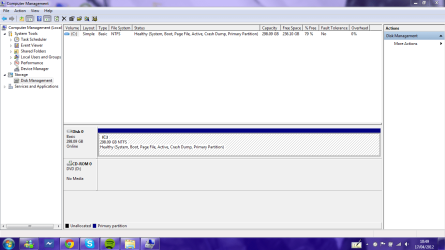
I bought a Dell Inspiron Duo in December 2011, and it has been fine up until a couple of weeks ago, when the 2 OS's that were installed (Windows 7 Home Premium & Windows 8 Consumer Preview) had suddenly disappeared, so I got hold of Windows 7 Ultimate, but when I went to install it, I realised that the 320GB that I had before had gone down to just 298GB, as well as losing all of my files and programs, this space does not show up in any partitioning programs either, it just shows the single partition with Windows 7 Ultimate on it.

Is there any way to get this unusable space back, or am I stuck with a smaller hard drive?

Thanks in advance,
Connor
 

My Computer My Computer

At a glance

Windows 7 Professional (64 Bit)Intel i3 @2.30 GHz2GB DDR3 SDRAM
Computer Manufacturer/Model Number
Dell Vostro 3550
OS
Windows 7 Professional (64 Bit)
CPU
Intel i3 @2.30 GHz
Motherboard
Dell Inc. 06VRFD
Memory
2GB DDR3 SDRAM
Screen Resolution
1366x768
welcome to Seven Forums. What size hard drive is it and how much space does it show? 298Gb is the correct formatted size for a 320GB hard drive. Do you have an OS installed now? If so please right click computer, select manage, in the left column select disk management, expand the screen so we can see the top and bottom and post a screenshot.
 

My Computers My Computers

  • At a glance

    Windows 11 ProRyzen 9 5900X32GB G Skill DDR4-3600EVGA RTX 3080 FTW 3 Ultra
    Computer type
    PC/Desktop
    Computer Manufacturer/Model Number
    ALWAYS UNDER CONSTRUCTION
    OS
    Windows 11 Pro
    CPU
    Ryzen 9 5900X
    Motherboard
    Asus X570 Crosshair Viii Hero
    Memory
    32GB G Skill DDR4-3600
    Graphics Card(s)
    EVGA RTX 3080 FTW 3 Ultra
    Sound Card
    On Board/Sennheiser PC37X Headset
    Monitor(s) Displays
    3 X Asus 27"
    Screen Resolution
    2560x1440
    Hard Drives
    2 X 1 TB NVME drives
    PSU
    EVGA 850
    Case
    Phanteks Eclipse P400A
    Cooling
    EVGA 280 AIO
    Keyboard
    Logitech G510s/ Logitech G13
    Mouse
    Logitech G502
    Internet Speed
    24/1
    Antivirus
    ESET/MBAM Pro/SAS Pro
    Browser
    Chrome/ Firefox/ Edge
  • At a glance

    Windows 11 ProIntel Ultra 9 288V32 GB LPDDR5X 8533
    Computer type
    Laptop
    System Manufacturer/Model Number
    Dell 16 Plus
    OS
    Windows 11 Pro
    CPU
    Intel Ultra 9 288V
    Memory
    32 GB LPDDR5X 8533
    Monitor(s) Displays
    16" Mini-LED HDR600 Touch 90 Hz
    Screen Resolution
    2560X1600
    Hard Drives
    1 TB NVME
Thankyou for replying to my post,

I currently have Windows 7 Ultimate installed on the machine, and it has been working fine, and 298GB is not the correct formatted size for the hard drive, as I was able to use the full 320GB before the OS's had gone. Below are some screenshots that will hopefully show what I mean
 

Attachments

  • HDD Space.PNG
    HDD Space.PNG
    2.4 KB · Views: 126
  • Disk Management.PNG
    Disk Management.PNG
    46 KB · Views: 16

My Computer My Computer

At a glance

Windows 7 Professional (64 Bit)Intel i3 @2.30 GHz2GB DDR3 SDRAM
Computer Manufacturer/Model Number
Dell Vostro 3550
OS
Windows 7 Professional (64 Bit)
CPU
Intel i3 @2.30 GHz
Motherboard
Dell Inc. 06VRFD
Memory
2GB DDR3 SDRAM
Screen Resolution
1366x768
Two suggestions:

First, find out what brand of hard drive you have and then go to the manufacturer's website and download, burn, and run the Diagnostic Program for the hard drive. See if it passes without errors.

Second, download and rum Partition Wizard (or any other good partitioning software) and see if it reads all the space on the drive.

Two things may be going on here:

  • The drive is failing and W7 Ultimate formatted it ignoring the bad sectors.
  • The drive is sold as a 320GB drive but because of a well known discrepancy between the way hard drives are sold and how OS's read the space you are just seeing the actual usable space for the first time.
 

My Computer My Computer

At a glance

Windows 7 64 Bit Home Premium SP1i7-3820GSkill F3-14900CL9Q - 16GBEVGA GeForce GTX660 - Driver 352.86
Computer type
PC/Desktop
Computer Manufacturer/Model Number
Home Built - Jan 2013
OS
Windows 7 64 Bit Home Premium SP1
CPU
i7-3820
Motherboard
Asus P9X79-PRO - Bios 4608
Memory
GSkill F3-14900CL9Q - 16GB
Graphics Card(s)
EVGA GeForce GTX660 - Driver 352.86
Sound Card
On board Realtek ALC898
Monitor(s) Displays
Acer S271HL
Screen Resolution
1920 x 1080
Hard Drives
#1- Samsung 840 Pro Series
#2- Western Digital WD1002FAEX Sata3 Black
#3- Western Digital WD1002FAEX Sata3 Black
PSU
Corsair CMPSU-850TX-V2 - 850 watt (by Seasonic)
Case
Corsair Obsidian 550D
Cooling
Standard 3 120mm case fans, Cooler Master Hyper 212 EVO
Keyboard
MS KC-0405
Mouse
Intellimouse 5-button
Internet Speed
56 Mbits/Sec (on a good day)
Antivirus
Avast & Malwarebytes
Browser
Firefox
Other Info
Asus DVD - DRW-24B1ST 24X
Would HDTUNE work for this? I can't seem to find a diagnostics tool on the Hitachi website
 

My Computer My Computer

At a glance

Windows 7 Professional (64 Bit)Intel i3 @2.30 GHz2GB DDR3 SDRAM
Computer Manufacturer/Model Number
Dell Vostro 3550
OS
Windows 7 Professional (64 Bit)
CPU
Intel i3 @2.30 GHz
Motherboard
Dell Inc. 06VRFD
Memory
2GB DDR3 SDRAM
Screen Resolution
1366x768
This is like My Thread

marsmimar replied:

We humans use 1000MB as equal to 1GB. Computers say 1024MB = 1GB. If you divide out 500GB (500,000,000,000 bytes) by 1024 by 1024 by 1024, it comes out to 465.661GB. Manufacturers like to use the base 10 system because the consumer thinks he's getting a true 500GB drive.

so you have 320GB (320,000,000,000 byte) divide by 1024 by 1024 by 1024 = 298.0232GB.

hope you got the idea.

thanks to marsmimar for easy explanation
 

My Computer My Computer

At a glance

Windows 10 Pro 64-BitIntel(R) Core(TM) i5-4460 CPU @ 3.20 GHz(4CPU...8192 RAMNVIDIA GeForce 710
Computer type
PC/Desktop
Computer Manufacturer/Model Number
Gigabyte Technology Co. Ltd.
OS
Windows 10 Pro 64-Bit
CPU
Intel(R) Core(TM) i5-4460 CPU @ 3.20 GHz(4CPU's), ~3.2GHz
Motherboard
Gigabyte B85M-HD3-A
Memory
8192 RAM
Graphics Card(s)
NVIDIA GeForce 710
Sound Card
Integrated High Definition audio with Realtek ALC888 codec
Monitor(s) Displays
Acer V183HV Ab 18.5" LCD Display
Screen Resolution
1366 x 768
Keyboard
HP
Mouse
HP
Internet Speed
100mbps
Antivirus
Microsoft Security Essentials
Browser
Chrome, Firefox
Well this makes a lot of sense, but how was I able to use 320GB (or a lot closer to 320GB) before the OS's uninstalled themselves?
 

My Computer My Computer

At a glance

Windows 7 Professional (64 Bit)Intel i3 @2.30 GHz2GB DDR3 SDRAM
Computer Manufacturer/Model Number
Dell Vostro 3550
OS
Windows 7 Professional (64 Bit)
CPU
Intel i3 @2.30 GHz
Motherboard
Dell Inc. 06VRFD
Memory
2GB DDR3 SDRAM
Screen Resolution
1366x768
Well this makes a lot of sense, but how was I able to use 320GB (or a lot closer to 320GB) before the OS's uninstalled themselves?

That i dont have any idea.

Here's the thing. For every 500gb that i bought, im ending up having 465gb everytime. So I thought I suppose to have only 465gb in every 500gb HDD.
 

My Computer My Computer

At a glance

Windows 10 Pro 64-BitIntel(R) Core(TM) i5-4460 CPU @ 3.20 GHz(4CPU...8192 RAMNVIDIA GeForce 710
Computer type
PC/Desktop
Computer Manufacturer/Model Number
Gigabyte Technology Co. Ltd.
OS
Windows 10 Pro 64-Bit
CPU
Intel(R) Core(TM) i5-4460 CPU @ 3.20 GHz(4CPU's), ~3.2GHz
Motherboard
Gigabyte B85M-HD3-A
Memory
8192 RAM
Graphics Card(s)
NVIDIA GeForce 710
Sound Card
Integrated High Definition audio with Realtek ALC888 codec
Monitor(s) Displays
Acer V183HV Ab 18.5" LCD Display
Screen Resolution
1366 x 768
Keyboard
HP
Mouse
HP
Internet Speed
100mbps
Antivirus
Microsoft Security Essentials
Browser
Chrome, Firefox
May it be because that every time it has been sent back to dell for repairs (completely separate problem) they have reinstalled the OS, and they may have a different way of maintaining the 320GB? as I had to reformat the hard drive to the NTFS File system in order to install Windows 7 Ultimate.
 

My Computer My Computer

At a glance

Windows 7 Professional (64 Bit)Intel i3 @2.30 GHz2GB DDR3 SDRAM
Computer Manufacturer/Model Number
Dell Vostro 3550
OS
Windows 7 Professional (64 Bit)
CPU
Intel i3 @2.30 GHz
Motherboard
Dell Inc. 06VRFD
Memory
2GB DDR3 SDRAM
Screen Resolution
1366x768
Every Dell system I've had delivered with Windows 7 used NTFS. It isn't possible to use more than the stated space, so what makes you think you were, or where were you checking previously to see more than 298 or so total GBs?
 

My Computer My Computer

At a glance

Windows 7 Ultimate x64 SP1Intel Core i7-260012 GB Patriot Extreme DDR3-1333Nvidia GTX 470
OS
Windows 7 Ultimate x64 SP1
CPU
Intel Core i7-2600
Motherboard
Gigabyte GA-P67A-UD3P-B3
Memory
12 GB Patriot Extreme DDR3-1333
Graphics Card(s)
Nvidia GTX 470
Monitor(s) Displays
Dell UltraSharp 2209WA
Hard Drives
OCZ Agility3 240 GB, WD5001AALS, WD7501AALS
PSU
OCZ ModStream 700W
Case
CoolerMaster HAF 912 Advanced
Cooling
CoolerMaster Hyper 212 Plus
I can definitely remember being able to use more than just 298GB, if I was always getting 298GB of usable space on my HDD, as stated in My Computer, I wouldn't have started this thread, and I didn't say that the HDD wasn't NTFS, although the hard drive was in FAT32 before I had to reformat it to NTFS in order to install Windows 7 Ultimate.
 

My Computer My Computer

At a glance

Windows 7 Professional (64 Bit)Intel i3 @2.30 GHz2GB DDR3 SDRAM
Computer Manufacturer/Model Number
Dell Vostro 3550
OS
Windows 7 Professional (64 Bit)
CPU
Intel i3 @2.30 GHz
Motherboard
Dell Inc. 06VRFD
Memory
2GB DDR3 SDRAM
Screen Resolution
1366x768
I didn't say that the HDD wasn't NTFS, although the hard drive was in FAT32

Can you rephrase that?

I'm apparently misunderstanding something.
 

My Computer My Computer

At a glance

Windows 7 Home Premium SP1, 64-bitIntel Skylake i5-6600K, not overclocked8 GB HyperX DDR4-2666 (2 x 4 GB)none; graphics are integrated on CPU
Computer type
PC/Desktop
Computer Manufacturer/Model Number
Ignatz Special; 4 speed manual gearbox; factory air conditioning; one of one
OS
Windows 7 Home Premium SP1, 64-bit
CPU
Intel Skylake i5-6600K, not overclocked
Motherboard
AsRock Z170M Extreme 4, micro ATX
Memory
8 GB HyperX DDR4-2666 (2 x 4 GB)
Graphics Card(s)
none; graphics are integrated on CPU
Sound Card
onboard: Realtek ALC1150; external: USB Behringer UF0-202
Monitor(s) Displays
Dell S2340M 23 inch IPS
Screen Resolution
1600 x 900
Hard Drives
System: Crucial MX100 series SSD, 128 GB;
Data: Samsung Spinpoint 103SJ, 1 TB;
Backup: WD Caviar Green WD30EZRX-00D8PB0, 3 TB
PSU
Rosewill SilentNight 500 watt fanless, semi-modular
Case
Antec Solo II
Cooling
Noctua NH-U12S; Noctua F12 intake, Noctua S12A exhaust
Keyboard
Microsoft 200 6JH-00001 USB
Mouse
Dell or Microsoft optical wired; USB
Antivirus
Microsoft Security Essentials and Malwarebytes Premium
Browser
Pale Moon
Other Info
All fans PWM; speeds at idle: CPU circa 500 rpm; intake circa 600 rpm; exhaust circa 600 rpm; CPU temps 27 idle and 47 C load in a warm room (27 C/81 F) when running Intel Extreme Tuning Utility stress test.
Basically, I used to have Windows 7 Home Premium, and the hard drive then would offer me 320GB (or at least closer than 298GB) with the NTFS file system, then a couple of weeks or so ago, the OS at the time had erased itself and the file system of the HDD had changed to FAT32. I then proceeded to install Windows 7 Ultimate, and I had to format the HDD back to NTFS, but when I finally managed to log in, My Computer only showed up with 298GB of usable space. Would having a 40GB partition for Windows 8 Consumer Preview have affected it?
 

My Computer My Computer

At a glance

Windows 7 Professional (64 Bit)Intel i3 @2.30 GHz2GB DDR3 SDRAM
Computer Manufacturer/Model Number
Dell Vostro 3550
OS
Windows 7 Professional (64 Bit)
CPU
Intel i3 @2.30 GHz
Motherboard
Dell Inc. 06VRFD
Memory
2GB DDR3 SDRAM
Screen Resolution
1366x768
Having the 40 GB would have lowered your total available space from 298 GB to roughly 258 GB. The point we're trying to make is that you may have misread something along the way. I do have to agree, it's very tough to follow what happened. OSes don't erase themselves and convert a drive to FAT32 on their own.

As detailed above, your drive's actual maximum is 298 GB of space...so anything you would be dealing with would always have to be equal to or lesser than that. That's why I was asking where you saw that you were using more. It's possible some application may have been telling you that you had a 320 GB hard drive, rather than reporting actual space.
 

My Computer My Computer

At a glance

Windows 7 Ultimate x64 SP1Intel Core i7-260012 GB Patriot Extreme DDR3-1333Nvidia GTX 470
OS
Windows 7 Ultimate x64 SP1
CPU
Intel Core i7-2600
Motherboard
Gigabyte GA-P67A-UD3P-B3
Memory
12 GB Patriot Extreme DDR3-1333
Graphics Card(s)
Nvidia GTX 470
Monitor(s) Displays
Dell UltraSharp 2209WA
Hard Drives
OCZ Agility3 240 GB, WD5001AALS, WD7501AALS
PSU
OCZ ModStream 700W
Case
CoolerMaster HAF 912 Advanced
Cooling
CoolerMaster Hyper 212 Plus
then a couple of weeks or so ago, the OS at the time had erased itself and the file system of the HDD had changed to FAT32.......................Would having a 40GB partition for Windows 8 Consumer Preview have affected it?

No, I wouldn't expect Window 8 to have anything to do with this.

Tell us more about the OS erasing itself.

Have you done complete malware scans?

I never heard of a 320 GB drive providing anything other than 298 GB when formatted NTFS.
 

My Computer My Computer

At a glance

Windows 7 Home Premium SP1, 64-bitIntel Skylake i5-6600K, not overclocked8 GB HyperX DDR4-2666 (2 x 4 GB)none; graphics are integrated on CPU
Computer type
PC/Desktop
Computer Manufacturer/Model Number
Ignatz Special; 4 speed manual gearbox; factory air conditioning; one of one
OS
Windows 7 Home Premium SP1, 64-bit
CPU
Intel Skylake i5-6600K, not overclocked
Motherboard
AsRock Z170M Extreme 4, micro ATX
Memory
8 GB HyperX DDR4-2666 (2 x 4 GB)
Graphics Card(s)
none; graphics are integrated on CPU
Sound Card
onboard: Realtek ALC1150; external: USB Behringer UF0-202
Monitor(s) Displays
Dell S2340M 23 inch IPS
Screen Resolution
1600 x 900
Hard Drives
System: Crucial MX100 series SSD, 128 GB;
Data: Samsung Spinpoint 103SJ, 1 TB;
Backup: WD Caviar Green WD30EZRX-00D8PB0, 3 TB
PSU
Rosewill SilentNight 500 watt fanless, semi-modular
Case
Antec Solo II
Cooling
Noctua NH-U12S; Noctua F12 intake, Noctua S12A exhaust
Keyboard
Microsoft 200 6JH-00001 USB
Mouse
Dell or Microsoft optical wired; USB
Antivirus
Microsoft Security Essentials and Malwarebytes Premium
Browser
Pale Moon
Other Info
All fans PWM; speeds at idle: CPU circa 500 rpm; intake circa 600 rpm; exhaust circa 600 rpm; CPU temps 27 idle and 47 C load in a warm room (27 C/81 F) when running Intel Extreme Tuning Utility stress test.
well, I am presuming there may have been some sort of malware that may have done this from an email? as I realised about a week after the problem that my friend's email address was sending most of it's contacts spam emails, and it all looked pretty genuine, until I showed them the email and they said that they didn't send it. I'm guessing that the file that was downloaded when the link was clicked was malware, as it was something posing as an antivirus, as I didn't have one installed and the email had said that my friend liked it and that he recommended it to me. so would this kind of thing be the cause of the problem in the first place?
 

My Computer My Computer

At a glance

Windows 7 Professional (64 Bit)Intel i3 @2.30 GHz2GB DDR3 SDRAM
Computer Manufacturer/Model Number
Dell Vostro 3550
OS
Windows 7 Professional (64 Bit)
CPU
Intel i3 @2.30 GHz
Motherboard
Dell Inc. 06VRFD
Memory
2GB DDR3 SDRAM
Screen Resolution
1366x768
Malware may well have caused the OS erasing itself issue.

I would be highly skeptical of anything that ever told me I had other than 298 GB formatted capacity with an NTFS file system on a 320 GB drive.

Do you have any reason to believe you are free of malware now??
 

My Computer My Computer

At a glance

Windows 7 Home Premium SP1, 64-bitIntel Skylake i5-6600K, not overclocked8 GB HyperX DDR4-2666 (2 x 4 GB)none; graphics are integrated on CPU
Computer type
PC/Desktop
Computer Manufacturer/Model Number
Ignatz Special; 4 speed manual gearbox; factory air conditioning; one of one
OS
Windows 7 Home Premium SP1, 64-bit
CPU
Intel Skylake i5-6600K, not overclocked
Motherboard
AsRock Z170M Extreme 4, micro ATX
Memory
8 GB HyperX DDR4-2666 (2 x 4 GB)
Graphics Card(s)
none; graphics are integrated on CPU
Sound Card
onboard: Realtek ALC1150; external: USB Behringer UF0-202
Monitor(s) Displays
Dell S2340M 23 inch IPS
Screen Resolution
1600 x 900
Hard Drives
System: Crucial MX100 series SSD, 128 GB;
Data: Samsung Spinpoint 103SJ, 1 TB;
Backup: WD Caviar Green WD30EZRX-00D8PB0, 3 TB
PSU
Rosewill SilentNight 500 watt fanless, semi-modular
Case
Antec Solo II
Cooling
Noctua NH-U12S; Noctua F12 intake, Noctua S12A exhaust
Keyboard
Microsoft 200 6JH-00001 USB
Mouse
Dell or Microsoft optical wired; USB
Antivirus
Microsoft Security Essentials and Malwarebytes Premium
Browser
Pale Moon
Other Info
All fans PWM; speeds at idle: CPU circa 500 rpm; intake circa 600 rpm; exhaust circa 600 rpm; CPU temps 27 idle and 47 C load in a warm room (27 C/81 F) when running Intel Extreme Tuning Utility stress test.
Yes, I went out and bought myself McAfee antivirus, seemed good, as when I clicked on the same link again as to test it, it came up as being unsafe, so hopefully there will be no more problems!

I'd just like to thank everyone so much for their help, and for showing me how the usable HDD size tends to be a lot lower than the actual size.

Connor
 

My Computer My Computer

At a glance

Windows 7 Professional (64 Bit)Intel i3 @2.30 GHz2GB DDR3 SDRAM
Computer Manufacturer/Model Number
Dell Vostro 3550
OS
Windows 7 Professional (64 Bit)
CPU
Intel i3 @2.30 GHz
Motherboard
Dell Inc. 06VRFD
Memory
2GB DDR3 SDRAM
Screen Resolution
1366x768
Yes, I went out and bought myself McAfee antivirus

I'm sorry to hear that.

McAfee would be the last choice of most here. But what's done is done.

You'll likely need our help if you ever decide to uninstall it.
 

My Computer My Computer

At a glance

Windows 7 Home Premium SP1, 64-bitIntel Skylake i5-6600K, not overclocked8 GB HyperX DDR4-2666 (2 x 4 GB)none; graphics are integrated on CPU
Computer type
PC/Desktop
Computer Manufacturer/Model Number
Ignatz Special; 4 speed manual gearbox; factory air conditioning; one of one
OS
Windows 7 Home Premium SP1, 64-bit
CPU
Intel Skylake i5-6600K, not overclocked
Motherboard
AsRock Z170M Extreme 4, micro ATX
Memory
8 GB HyperX DDR4-2666 (2 x 4 GB)
Graphics Card(s)
none; graphics are integrated on CPU
Sound Card
onboard: Realtek ALC1150; external: USB Behringer UF0-202
Monitor(s) Displays
Dell S2340M 23 inch IPS
Screen Resolution
1600 x 900
Hard Drives
System: Crucial MX100 series SSD, 128 GB;
Data: Samsung Spinpoint 103SJ, 1 TB;
Backup: WD Caviar Green WD30EZRX-00D8PB0, 3 TB
PSU
Rosewill SilentNight 500 watt fanless, semi-modular
Case
Antec Solo II
Cooling
Noctua NH-U12S; Noctua F12 intake, Noctua S12A exhaust
Keyboard
Microsoft 200 6JH-00001 USB
Mouse
Dell or Microsoft optical wired; USB
Antivirus
Microsoft Security Essentials and Malwarebytes Premium
Browser
Pale Moon
Other Info
All fans PWM; speeds at idle: CPU circa 500 rpm; intake circa 600 rpm; exhaust circa 600 rpm; CPU temps 27 idle and 47 C load in a warm room (27 C/81 F) when running Intel Extreme Tuning Utility stress test.
If I ever change my mind about the antivirus, what do you think would be the best one?
 

My Computer My Computer

At a glance

Windows 7 Professional (64 Bit)Intel i3 @2.30 GHz2GB DDR3 SDRAM
Computer Manufacturer/Model Number
Dell Vostro 3550
OS
Windows 7 Professional (64 Bit)
CPU
Intel i3 @2.30 GHz
Motherboard
Dell Inc. 06VRFD
Memory
2GB DDR3 SDRAM
Screen Resolution
1366x768
Back
Top