
BSOD 0x124 only when gaming. Help appreciated!

AshBadger

New member
Local time
4:09 PM
Messages
9
Hey guys.

First of all I apologize for posting a 0x124 BSOD-related thread (at least I think it is!). From what I gather these errors are super generic/common and don't really contain much specific information to work from - however I'm PRAYING that my lack of knowledge has led me to see right past the giant elephant in the room, and that somebody here will supply me with a single download link that'll fix all my problems. Well.. one can hope.

So, I bought my computer custom built about 2 years ago and I've had BSOD problems on and off when gaming ever since. I'm not much of a tech-head when things get as involved as this, but I've done a little digging during this time and there were obviously a lot of possible reasons for the crashes, but since it wasn't a constant thing I put up with it. It's not since I've decided to sell the system that I've started looking into the issue properly.

The processor IS overclocked (at 3.6GHz currently) but since the blue screen's have only been limited to games I assumed it was a smaller hardware-related problem. System performance has been fine otherwise.

Anyway, here are my specs. I've also attached my BSOD dump, perfmon report & system file collection for you guys to take a look at. My BSOD dump dates back to 2011, I'm guessing some got lost along the way with disk clean-ups/reformatting. It's also worth noting that I've tried to at least narrow down the possibilities by keeping drivers updated, playing at low settings, reformatting and running Windows Memory Diagnostic tests (no problems here), but to no avail. Any help is really appreciated.

System Specs

OS: Windows 7 Home Premium 64bit - OEM
Processor: Intel Core i7 930 2.80GHz (Bloomfield) (Socket LGA1366) - OEM
HDD: Seagate Barracuda 7200.12 500GB SATA-II 16MB Cache - OEM
Graphics Cards: Sapphire ATI Radeon HD 5770 1024MB GDDR5 PCI-Express Crossfire (Two of these)
Motherboard: Gigabyte GA-X58A-UD3R Intel X58 (Socket 1366) DDR3
RAM: Kingston HyperX 6GB (3x2GB) DDR3-12800CL9 (1600MHz) Tri-Channel
PSU: Corsair TX 650W v2

Again, I'm sorry if I haven't looked into the issue further myself. Truth is I'm not quite sure where to start, and if somebody with a trained eye can look over the attached files, maybe I'll get some direction ;)

Please let me know if there's any other information you need. Thanks again!

- Ash
 

My Computer My Computer

OS
Windows 7 Home Premium 64bit
The only way to diagnose this is to start from a known baseline. That means reverting back to default. I note you have BIOS from 2010 and updating that may help

Also when you resolve this issue your should update to SP-1

Please run the System Update Readiness Tool (SURT) and then update to SP-1


32 Bit

http://www.microsoft.com/download/en/details.aspx?displaylang=en&id=3132

64 Bit

http://www.microsoft.com/download/en/details.aspx?displaylang=en&id=20858


Now update to SP-1

http://windows.microsoft.com/installwindows7sp1


Processor may be overclocked!
Expected Frequency: 2800
Actual Frequency: 3629
Overclock Ratio: 1.29
Machine ID Information [From Smbios 2.4, DMIVersion 36, Size=1267]
BiosVendor = Award Software International, Inc.
BiosVersion = F5
BiosReleaseDate = 03/11/2010
SystemManufacturer = Gigabyte Technology Co., Ltd.
SystemProductName = X58A-UD3R
SystemFamily =
SystemVersion =
SystemSKU =
BaseBoardManufacturer = Gigabyte Technology Co., Ltd.
BaseBoardProduct = X58A-UD3R
BaseBoardVersion = x.x
CPUID: "Intel(R) Core(TM) i7 CPU 930 @ 2.80GHz"
MaxSpeed: 2800
CurrentSpeed: 3629
 

My Computer My Computer

Computer Manufacturer/Model Number
HP Pavillion dv-7 1005 Tx
OS
Win 8 Release candidate 8400
CPU
[email protected]
Memory
4 gigs
Graphics Card(s)
Nvidia 9600M
Sound Card
HD built-in
Monitor(s) Displays
17" Wxga
Screen Resolution
1440x900
Cooling
none
Internet Speed
45Mb down 5Mb up
Thanks for your prompt reply zigzag.

I have downloaded the System Update Readiness Tool, however the last link you provided for SP1 gives me quite a few options to download. I am currently downloading "windows6.1-KB976932-X64.exe" as I have the 64bit version of Windows 7 HP, but are there any other files there that I need?

EDIT: Here's the link to the download page:

http://www.microsoft.com/download/en/details.aspx?displaylang=en&id=5842
 

My Computer My Computer

OS
Windows 7 Home Premium 64bit
Thanks for your prompt reply zigzag.

I have downloaded the System Update Readiness Tool, however the last link you provided for SP1 gives me quite a few options to download. I am currently downloading "windows6.1-KB976932-X64.exe" as I have the 64bit version of Windows 7 HP, but are there any other files there that I need?

Hp uses the same SP-1 file as others. Run SURT and it will tell you if you need any other files before updating to SP-1
 

My Computer My Computer

Computer Manufacturer/Model Number
HP Pavillion dv-7 1005 Tx
OS
Win 8 Release candidate 8400
CPU
[email protected]
Memory
4 gigs
Graphics Card(s)
Nvidia 9600M
Sound Card
HD built-in
Monitor(s) Displays
17" Wxga
Screen Resolution
1440x900
Cooling
none
Internet Speed
45Mb down 5Mb up
This MAY be caused by two reasons: (or others that I don't know)
1. Processor might not have the cooling fluid that you may buy separately from the CPU, and when you play games, it is more loaded than on other applications, and it fails because of over-heating. This causes the BSOD and sure, reboot to cool down.

2. PSU might not be able to keep your graphic card running (it consumes more electricity while on games). But your PSU has got enough power so I don't think this is the problem.

Or it may be something that I don't know :) Sometimes BSOD is the hardware's fault.
 

My Computer My Computer

Computer Manufacturer/Model Number
It's not manufactured by any corporation.
OS
Windows 7 Ultimate 32 Bit
CPU
Intel Pentium 4 @ 3.40 GHz
Motherboard
Micro-Star International G31M3-L V2(MS-7529) 1.0
Memory
2048MB (2GB) DDR2 Dual-Channel
Graphics Card(s)
NIVIDIA GeForce 8600 GT (MS WDDM v1.1) - 512MB
Sound Card
Realtek HD Audio
Monitor(s) Displays
LG Flatron W204S
Screen Resolution
1680 x 1050
Hard Drives
1TB ATA Hitachi Digital ECO +
250 GB External (USB) WDC
PSU
380W (I forgot manufacture)
Keyboard
A4Tech USB Wirless Keyboard
Mouse
A4Tech USB Wirless Mouse
Internet Speed
Windows says it's 100Mb/s but it is lower :P
Thanks for your prompt reply zigzag.

I have downloaded the System Update Readiness Tool, however the last link you provided for SP1 gives me quite a few options to download. I am currently downloading "windows6.1-KB976932-X64.exe" as I have the 64bit version of Windows 7 HP, but are there any other files there that I need?

Hp uses the same SP-1 file as others. Run SURT and it will tell you if you need any other files before updating to SP-1

I probably should have checked before-hand but after downloading SP-1 and attempting to install, it seems I already have it. Strange, I would've thought this information would be stated somewhere in the files I provided. Would it make sense to remove SP-1 and try a re-install to see if that updates my BIOS?

EDIT: Would it be a good idea to download a BIOS update from the manufacturer's website? This seems to be referred to as "BIOS flashing" which I see is pretty important (or dangerous if handled incorrectly!).. http://uk.gigabyte.com/products/product-page.aspx?pid=3305&dl=1#bios

This MAY be caused by two reasons: (or others that I don't know)
1. Processor might not have the cooling fluid that you may buy separately from the CPU, and when you play games, it is more loaded than on other applications, and it fails because of over-heating. This causes the BSOD and sure, reboot to cool down.

2. PSU might not be able to keep your graphic card running (it consumes more electricity while on games). But your PSU has got enough power so I don't think this is the problem.

Or it may be something that I don't know :) Sometimes BSOD is the hardware's fault.
I also considered the possibility of overheating, but I initially disregarded the idea as the Blue Screen's have not been happening all the time over the past 2 years, plus I have a CPU cooler (Prolimatech Megahalems Rev B). Since yesterday I haven't had a BSOD since 2011 (according to my BSOD dump at least). I downloaded some mods for Skyrim, played it, and bam. Tried another performance-demanding game today (BF3) to see if it reoccurred and before I know it - BSOD. There could be some truth to what you're saying though.. something in there must be having a hard time keeping up, but I'll be damned if I know what it is.
 
Last edited:

My Computer My Computer

OS
Windows 7 Home Premium 64bit
0x124 is normally a hardware fault in my experience! Would be worth trying each GPU seperatly to see if this happens on any of them! A 650W PSU would probably struggle at this spec on full load so see if you could swap test this with one thats got abit more power!
 

My Computer My Computer

Computer Manufacturer/Model Number
Packard Bell MH36-U300
OS
Windows 7 Ultimate 64-Bit
CPU
Intel(R) Pentium(R) Dual CPU T3400 @ 2.16GHz
Memory
2GB DDR2
Graphics Card(s)
Mobile Intel(R) 4 Series Express Chipset
Sound Card
Realtek High Definition Audio
Monitor(s) Displays
15" LCD
Screen Resolution
1280 x 800
Hard Drives
320GB Western Digital
Case
Notebook
Internet Speed
10Mbps
0x124 is normally a hardware fault in my experience! Would be worth trying each GPU seperatly to see if this happens on any of them! A 650W PSU would probably struggle at this spec on full load so see if you could swap test this with one thats got abit more power!

Thanks for the suggestion. Perhaps trying them separately is something I can do if there is any evidence pointing at the GPU as a possible reason for the problem. I think it'd be wise for me to wait for some more suggestions/opinions given my lack of experience in this area!

Does anyone have any thoughts on trying to update the BIOS via the motherboard manufacturer's website? I appear to have Version "F5" and there have been a few releases since then: GIGABYTE - Motherboard - Socket 1366 - GA-X58A-UD3R (rev. 1.0)
 
Last edited:

My Computer My Computer

OS
Windows 7 Home Premium 64bit
Sorry for the double post, but can anyone advise for/against updating the BIOS this way? I will probably go ahead and try updating it at my own risk anyway but I'd just like to know if there's anything I should be aware of before doing so.

Also ran a full disk check and a System File Check (sfc /scannow) with no apparent problems here.
 

My Computer My Computer

OS
Windows 7 Home Premium 64bit
Do not update to one of the Beta versions. F6 is your best bet.
 

My Computer My Computer

Computer Manufacturer/Model Number
HP Pavilion e9110t
OS
Windows 7 Home Premium 64 Bit
CPU
Intel(R) Core(TM)2 Quad CPU Q9550 @ 2.83GHz
Motherboard
Pegatron IPIEL-LA3
Memory
6.00 GB Hundai HMT125U6BFR8C-H9
Graphics Card(s)
ATI Radeon HD 4850
Sound Card
Realtek High Definition Audio/ATI High Definition Audio
Monitor(s) Displays
Acer AL2216W
Screen Resolution
1680x1050
Hard Drives
Hitachi HDP725050GLA360 ATA Device 500 GB
PSU
Unknown/installed by HP
Case
HP generic case
Cooling
Intel Stock Cooling
Keyboard
HP Keyboard
Mouse
HP Mouse
Internet Speed
Download: 19.15 Mbps Upload: 1.67 Mbps
Other Info
Network Adapter Realtek RTL8168D/8111D Family PCI-E Gigabit Ethernet NIC (NDIS 6.20)
Network Adapter 802.11n Wireless PCI Express Card LAN Adapter
Do not update to one of the Beta versions. F6 is your best bet.

Thanks for the advice, I guess I could try it once I've exhausted my other options.

One of my biggest concerns is the effect the BIOS update will have on my overclocked processor. Obviously this process of overclocking involved the modification of the processor's parameters, so will these modifications be wiped along with the current version of my BIOS?

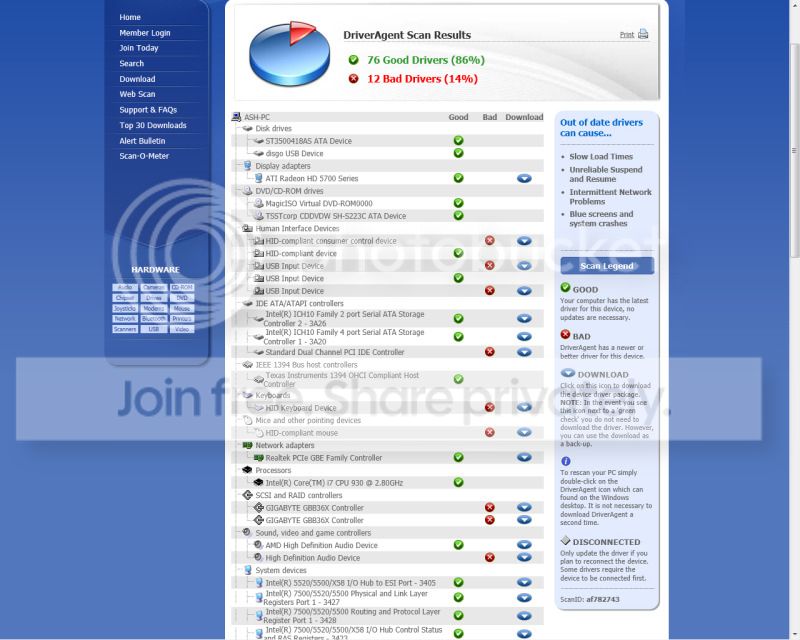
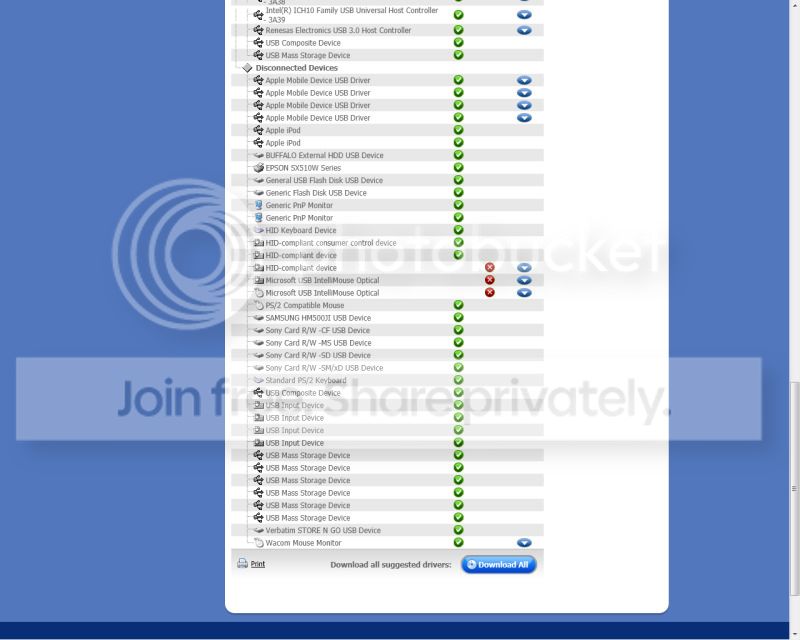
Also, I ran a scan with a driver-finding service called DriverAgent which I came across on the Gigabyte website, now I understand that these services are not always reliable/conclusive, but it tells me that I have "12 bad drivers". It wouldn't hurt to have all the drivers up-to-date or repaired, but I only have BSOD 0x124 problems when gaming. Would any of the following "bad drivers" have a negative effect on my system when gaming?

Screenshot1.jpg


Screenshot2.jpg
 

My Computer My Computer

OS
Windows 7 Home Premium 64bit
UPDATE 1: I tried to roll back my graphics drivers today (from AMD Catalyst 12.3 to 12.1), managed to get an hour of game-time in before another BSOD (the crash report tells me it's another BSOD 124, though I just had a black flickering screen when it crashed). Also ran a memtest (memtest86) a couple of times last night, no problems here.

I've seen on another forum that the "C1E Enhanced Halt State" setting in the BIOS can be a possible cause for such crashes on overclocked systems - I'm going to try disabling this.
 
Last edited:

My Computer My Computer

OS
Windows 7 Home Premium 64bit
UPDATE 2: So I disabled "C1E Enhanced Halt State", un-installed AVG and even turned my top fan up to the Medium setting. Kept Skyrim going for 2 hours whilst putting it through it's paces and haven't crashed at all. Hopefully this is due to the disabled C1E. From what I've read the C1E Enhanced Halt State stops CPU main internal clocks and reduces CPU voltage... I guess this somehow relates to my overclocked processor which links with idle/load temperatures when I'm gaming?

Anyway, I'll re-install AVG and see if I get the BSOD again. I'll mark as solved if everything goes well, but I thought I'd share my progress in case others have a similar issue.

(Bumped so others can see)
 

My Computer My Computer

OS
Windows 7 Home Premium 64bit
Thanks for keeping us updated. Look like good steps. And you are probably correct about the C1E Enhanced Halt State. If it lowers the CPU voltage, that can have an adverse effect on the overclocking.
 

My Computer My Computer

Computer Manufacturer/Model Number
HP Pavilion e9110t
OS
Windows 7 Home Premium 64 Bit
CPU
Intel(R) Core(TM)2 Quad CPU Q9550 @ 2.83GHz
Motherboard
Pegatron IPIEL-LA3
Memory
6.00 GB Hundai HMT125U6BFR8C-H9
Graphics Card(s)
ATI Radeon HD 4850
Sound Card
Realtek High Definition Audio/ATI High Definition Audio
Monitor(s) Displays
Acer AL2216W
Screen Resolution
1680x1050
Hard Drives
Hitachi HDP725050GLA360 ATA Device 500 GB
PSU
Unknown/installed by HP
Case
HP generic case
Cooling
Intel Stock Cooling
Keyboard
HP Keyboard
Mouse
HP Mouse
Internet Speed
Download: 19.15 Mbps Upload: 1.67 Mbps
Other Info
Network Adapter Realtek RTL8168D/8111D Family PCI-E Gigabit Ethernet NIC (NDIS 6.20)
Network Adapter 802.11n Wireless PCI Express Card LAN Adapter
Well just when I thought all was going well, I had another crash when running Battlefield 3 (same as last time, just a black flickering screen but the report tells me it's a BSOD 124), though Skyrim seems to be fine. At a bit of a loss with this, and I really wanted to avoid flashing the BIOS..
 

My Computer My Computer

OS
Windows 7 Home Premium 64bit
Disable your overclock and see if it runs stable. We usually recommend disabling the overclock as a troubleshooting step to see if the problems lie in the overclock causing instability (which overclock will to some extent) or if problems result from some other underlying conflicts/faults in the system.
 

My Computer My Computer

Computer Manufacturer/Model Number
HP Pavilion e9110t
OS
Windows 7 Home Premium 64 Bit
CPU
Intel(R) Core(TM)2 Quad CPU Q9550 @ 2.83GHz
Motherboard
Pegatron IPIEL-LA3
Memory
6.00 GB Hundai HMT125U6BFR8C-H9
Graphics Card(s)
ATI Radeon HD 4850
Sound Card
Realtek High Definition Audio/ATI High Definition Audio
Monitor(s) Displays
Acer AL2216W
Screen Resolution
1680x1050
Hard Drives
Hitachi HDP725050GLA360 ATA Device 500 GB
PSU
Unknown/installed by HP
Case
HP generic case
Cooling
Intel Stock Cooling
Keyboard
HP Keyboard
Mouse
HP Mouse
Internet Speed
Download: 19.15 Mbps Upload: 1.67 Mbps
Other Info
Network Adapter Realtek RTL8168D/8111D Family PCI-E Gigabit Ethernet NIC (NDIS 6.20)
Network Adapter 802.11n Wireless PCI Express Card LAN Adapter
I completely agree with writhziden here. You need to stop overclocking if you are getting an 0x124 error. This is almost always related to hardware that is overworked, overheated. or failing. Please revert to "Fail Safe Settings" in your BIOS. Also, you have a Gigabyte MoBo, if you are using ANY of the Gigabyte softclocking utilities, stop.

After you do so, download Hardware Monitor(to monitor system temperatures) and run Prime95 on blend for a few hours and watch your temps.
 

My Computer My Computer

Computer Manufacturer/Model Number
Home Made
OS
Windows 7 Home Premium x64
CPU
Intel 2500k @4.5ghz 66deg max P95/IBT
Motherboard
Gigabyte Z68A-D3-B3
Memory
8 Gigs Patriot Viper 2 Extreme @1600
Graphics Card(s)
EVGA GTX 580 3 GIG 35degrees idle
Sound Card
Nvidia HD audio via HDMI to 7.1 Receiver
Monitor(s) Displays
32" Olevia hdtv
Screen Resolution
1080p
Hard Drives
64gig SSD(OS/Apps)
250gig (Files and Dox)
1tb (imaging and backup)
PSU
Corsair vx550w
Case
Thermaltake V3 black
Cooling
CM 212+(push n pull) 4 case fans
Keyboard
Logitech wireless Combo, G13
Mouse
G300
Internet Speed
40mps
Other Info
Two others up and running; C2D E5200/MSI G41M-P26/Corsair XMS3 8gb/GTS 250 1gb and C2D E8200/xFx 750sli/8gb Corsair Dominator/2x EVGA 550ti
Working on; i2600 Build...
HP DV6
@Work I use a Lenovo 5536B8U + Lenovo U300s
Back
Top