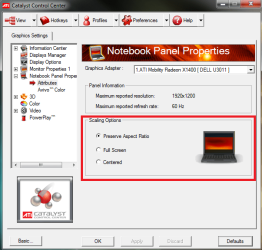
Not sure if this fits well here, but it seemed the most appropriate place. I have suddenly been having an issue where everything has a black frame around it, as if it is not fully filling out my computer monitor. This happened for about 30 minutes when i first bought an HDMI cable last year, but it fixed itself (I am not sure how). But now, all the sudden its come back. It started when i was playing an older game i had installed the night before. It worked fine that whole night, then when I went to play it the next day, everything glitched for a second then it came up in a black boarder. And my whole desktop was like this too.
I have been doing research, and everyone says its an Overscan/Underscan issue, which is partially correct. For me, that fixes the desktop, and any programs that don't require a disc. However, things such as older games that do require disc's to run, don't seem to be effected by this solution and keep their black frames, even though they worked fine for so long (a few months).
I am using an ATI Radeon HD 6970 with the most up-to-date drivers. I know the drivers are not the issue because this happened before I updated them. Also, i am using a DELL ST2320L 1980X1080 monitor (I believe it is an LCD monitor). I would really like to avoid having to re-install windows and all the programs, so if anyone can help me out with another solution, I would greatly appreciate it.
Again, this just randomly started happening, and I have been told it is due to the HDMI cable, and they just switching the cable with a normal VGA/DVI Cable works just as well as an HDMI cable. Is this true?
I have been doing research, and everyone says its an Overscan/Underscan issue, which is partially correct. For me, that fixes the desktop, and any programs that don't require a disc. However, things such as older games that do require disc's to run, don't seem to be effected by this solution and keep their black frames, even though they worked fine for so long (a few months).
I am using an ATI Radeon HD 6970 with the most up-to-date drivers. I know the drivers are not the issue because this happened before I updated them. Also, i am using a DELL ST2320L 1980X1080 monitor (I believe it is an LCD monitor). I would really like to avoid having to re-install windows and all the programs, so if anyone can help me out with another solution, I would greatly appreciate it.
Again, this just randomly started happening, and I have been told it is due to the HDMI cable, and they just switching the cable with a normal VGA/DVI Cable works just as well as an HDMI cable. Is this true?
My Computer
At a glance
Windows 7 Home Premium 64bitIntel core i7 9606 GB of RAMHIS ATI Radeon HD 6970
- Computer Manufacturer/Model Number
- IBuyPower
- OS
- Windows 7 Home Premium 64bit
- CPU
- Intel core i7 960
- Motherboard
- Gigabyte G1.Guerrilla, X58
- Memory
- 6 GB of RAM
- Graphics Card(s)
- HIS ATI Radeon HD 6970
- Sound Card
- 3D Premium Surround Sound Onboard
- Hard Drives
- 1 terabyte Hard drive
- Case
- NZXT Phantom Full Tower Gaming Case - White
- Cooling
- Liquid