Suddenly, sleep command leads to window's shutdown?

flycaster

New member
Member
VIP
Local time
4:32 AM
Messages
472
Location
Boynton Beach, FL
Running a Gateway DX4720-03

All-of-a-sudden, now when my computer is set to sleep, it no longer sleeps but shuts down. I have it set to sleep when inactive for 10 minutes, or when I depress a specific button on my Logitec cordless optical trackman. Been doing it this way for 2 years without a problem. I have also tested the sleep command by choosing sleep from the Start globe on the taskbar. In all instances, the sleep command leads to a shut down.

When awakening the shut down computer, I get a Windows Error Recovery screen. Choosing Normal Start reboots everything without a problem. However, one interesting thing I noted was that if Firefox is minimized at the time the sleep command is given, on rebooting, Firefox informs me that FF crashed and asks if I want to restore it.

I'm at a loss as to why this is happening and how to fix it...


EDIT: I might also add that although I have been using Google search engine in FF's address bar, I now note that Yahoo has become my default search engine. However, I was able to change it back to Google. However, when highlighting text and dragging to an empty space (which normally brings up a Google search), now brings up a Yahoo search...even though the address bar now brings the Google search-as wanted???
 
Last edited:

My Computer My Computer

Computer Manufacturer/Model Number
Gateway DX4720-03/HP Pavilion dv6
OS
Windows 7 HP 64-bit
Memory
4GB/4GB
Antivirus
Avast Pro
Browser
Firefox, the latest

My Computer My Computer

Computer type
PC/Desktop
Computer Manufacturer/Model Number
home built
OS
Multi-Boot W7_Pro_x64 W8.1_Pro_x64 W10_Pro_x64 +Linux_VMs +Chromium_VM
CPU
AMD Athlon II x4 620
Motherboard
Gigabyte GA-MA785G-UD3H
Memory
6GB GSkill DDR2 800
Graphics Card(s)
AMD 4670 GPU + AMD 4200 IGP
Sound Card
on board Realtek ALC889A
Monitor(s) Displays
RCA 40" LCD TV, Insignia 32" LCD TV, HP 15" LCD monitor
Screen Resolution
1680 x 1050
Hard Drives
OCZ Vertex 3 120GB,
Samsung F3 1TB (3),
Several others - WD, Seagate, Hitachi, ...
PSU
Corsair 500 W
Case
Rosewill mid tower
Cooling
CM 90mm rifle
Keyboard
Gyration wireless, Logitech wireless, Dell USB wired
Mouse
Gyration wireless, Logitech wireless, V7 USB wired
Internet Speed
Spectrum - 100Mbps D / 10Mbps U
Antivirus
Avast, MBAM3, EMET, WinPatrol
Browser
Pale Moon, Firefox, IE
Other Info
2 multi-boot PC's
Mainly HTPC/Office/Gen purpose (no gaming).
Trendnet USB KVM.
LG DVD burner/Blue Ray Player.
Tray system for removable SATA backup drives.

Not currently OCd, under-volted.
I use Hybrid sleep, rarely re-boot or shutdown.

Hauppauge HD-PVR, Avermedia PCIe TV Tuner, Hauppauge PCI TV Tuner.
I'm quite certain that the computer is shut down as it "on" light goes out and there certainly isn't any drive noise to be heard.
 

My Computer My Computer

Computer Manufacturer/Model Number
Gateway DX4720-03/HP Pavilion dv6
OS
Windows 7 HP 64-bit
Memory
4GB/4GB
Antivirus
Avast Pro
Browser
Firefox, the latest
Sleep can turn off the light, hard drives, fans, etc.
Did your PC previously have these turned on when sleeping?
If so, you probably use S1 sleep.

It depends on what Sleep State is being used.

I use S3 sleep and S4 hibernate.

Here is link that explains the sleep states:
Standby Explained (S1, S3) - Omar Shahine's WebLog - Site Home - MSDN Blogs

Anyway, can you test if hibernate works?

edit: Also do a Shutdown to see if it restarts without an error.
 
Last edited:

My Computer My Computer

Computer type
PC/Desktop
Computer Manufacturer/Model Number
home built
OS
Multi-Boot W7_Pro_x64 W8.1_Pro_x64 W10_Pro_x64 +Linux_VMs +Chromium_VM
CPU
AMD Athlon II x4 620
Motherboard
Gigabyte GA-MA785G-UD3H
Memory
6GB GSkill DDR2 800
Graphics Card(s)
AMD 4670 GPU + AMD 4200 IGP
Sound Card
on board Realtek ALC889A
Monitor(s) Displays
RCA 40" LCD TV, Insignia 32" LCD TV, HP 15" LCD monitor
Screen Resolution
1680 x 1050
Hard Drives
OCZ Vertex 3 120GB,
Samsung F3 1TB (3),
Several others - WD, Seagate, Hitachi, ...
PSU
Corsair 500 W
Case
Rosewill mid tower
Cooling
CM 90mm rifle
Keyboard
Gyration wireless, Logitech wireless, Dell USB wired
Mouse
Gyration wireless, Logitech wireless, V7 USB wired
Internet Speed
Spectrum - 100Mbps D / 10Mbps U
Antivirus
Avast, MBAM3, EMET, WinPatrol
Browser
Pale Moon, Firefox, IE
Other Info
2 multi-boot PC's
Mainly HTPC/Office/Gen purpose (no gaming).
Trendnet USB KVM.
LG DVD burner/Blue Ray Player.
Tray system for removable SATA backup drives.

Not currently OCd, under-volted.
I use Hybrid sleep, rarely re-boot or shutdown.

Hauppauge HD-PVR, Avermedia PCIe TV Tuner, Hauppauge PCI TV Tuner.
Sleep definitely shuts the computer down. No matter what I do in Power Options, when selecting Sleep, computer is definitely off. How can I be so sure?

Well, in the past when Sleep was working, there would always be a blinking blue light emanating from the computer's on/off button and when bring back from Sleep all I would have to do is tap any key or left click my mouse and without any hassle, open programs would come back. However, now when selecting Sleep, no blinking blue light, no awakening when tapping keys or left clicking mouse. To open computer I have to depress the on/off button and when the computer comes to life there is that Windows Error Recovery screen and when Firefox is opened, I'm told that it crashed and if I wanted to restore stuff.

The results of a Hibernate shut down are quite different and look to be normal. No blinking on/off light, but have to depress this button to get things started. Screen says Resuming Windows instead of Starting Windows as it did when using Sleep, there is no Windows Error screen, and I'm not asked to my user password. Also, Firefox opens without any "crash" alert.

I guess I can live with using Hibernate, but it is a real PITA compared to Sleep and I would much prefer to get to the bottom of this so that I can use Sleep.
 

My Computer My Computer

Computer Manufacturer/Model Number
Gateway DX4720-03/HP Pavilion dv6
OS
Windows 7 HP 64-bit
Memory
4GB/4GB
Antivirus
Avast Pro
Browser
Firefox, the latest
Does Shutdown work ok?

In Power Options enable Hybrid Sleep.
Click on Sleep.
When you restart the PC does it resume from Hibernate?

The blinking light means your PC uses S1 sleep.

It may be there is not enough power to support S1 Sleep.
Maybe the PSU is starting to go, or an issue with MB voltage control.

If your PC supports S3 Sleep, you could try that.
You would have to go into bios and look for the sleep setting.
S3 uses less power than S1.
S3 will turn off all fans, the light, HD, etc.
Only power it uses is a small amount for the RAM.

You could also try using the tutorial i put in my first post to gather Trace info.
I've never needed to do that, so I'm not sure what info is in the trace.
But, it's free and may help identify the problem.
 

My Computer My Computer

Computer type
PC/Desktop
Computer Manufacturer/Model Number
home built
OS
Multi-Boot W7_Pro_x64 W8.1_Pro_x64 W10_Pro_x64 +Linux_VMs +Chromium_VM
CPU
AMD Athlon II x4 620
Motherboard
Gigabyte GA-MA785G-UD3H
Memory
6GB GSkill DDR2 800
Graphics Card(s)
AMD 4670 GPU + AMD 4200 IGP
Sound Card
on board Realtek ALC889A
Monitor(s) Displays
RCA 40" LCD TV, Insignia 32" LCD TV, HP 15" LCD monitor
Screen Resolution
1680 x 1050
Hard Drives
OCZ Vertex 3 120GB,
Samsung F3 1TB (3),
Several others - WD, Seagate, Hitachi, ...
PSU
Corsair 500 W
Case
Rosewill mid tower
Cooling
CM 90mm rifle
Keyboard
Gyration wireless, Logitech wireless, Dell USB wired
Mouse
Gyration wireless, Logitech wireless, V7 USB wired
Internet Speed
Spectrum - 100Mbps D / 10Mbps U
Antivirus
Avast, MBAM3, EMET, WinPatrol
Browser
Pale Moon, Firefox, IE
Other Info
2 multi-boot PC's
Mainly HTPC/Office/Gen purpose (no gaming).
Trendnet USB KVM.
LG DVD burner/Blue Ray Player.
Tray system for removable SATA backup drives.

Not currently OCd, under-volted.
I use Hybrid sleep, rarely re-boot or shutdown.

Hauppauge HD-PVR, Avermedia PCIe TV Tuner, Hauppauge PCI TV Tuner.
"In Power Options enable Hybrid Sleep.
Click on Sleep.
When you restart the PC does it resume from Hibernate?"
Fourth paragraph in my post above describes what happens when I select Sleep and Hybrid sleep is enabled. Apparently, and as best I can tell, the start up is resumed from Hibernate.

"It may be there is not enough power to support S1 Sleep.
Maybe the PSU is starting to go, or an issue with MB voltage control."
The computer is fairly new, about 4 years old, but it is quite possible that there may be power issues, of which I know nothing about. Logically, but naively, if the computer's Sleep was working and as you say it needs more power than S2 or S3, this could point to a power problem. So, if you know, how can I check to see if S2 and S3 are available in BIOS (don't know anything about getting to BIOS or how to find S. Also, I would like to check PSU and MB, but don't have a clue how to.

oing the Trace looks cool, but when I looked at the tutorial
 

My Computer My Computer

Computer Manufacturer/Model Number
Gateway DX4720-03/HP Pavilion dv6
OS
Windows 7 HP 64-bit
Memory
4GB/4GB
Antivirus
Avast Pro
Browser
Firefox, the latest
If i understand correctly Hybrid Sleep works for you.
If you click sleep, then turn on the PC, you do not get any errors.
Your Windows session is "intact", the same as it was when you clicked sleep.
If that is correct, it means your PC is not doing a Shutdown when you click Sleep.

Usually if you keep clicking the Delete key when the PC is booting up you should get a screen where you can enter BIOS.
You will have to get into BIOS and look for a setting to see if you can select S3 sleep.
I couldn't find any info about this for your PC.
If someone here reads this and is familiar with Gateway maybe they can give more specific info.
I build my own PC's...

I'm guessing a power issue because:
Hibernate works, so Windows is able to save the session to HD.
Sleep does not work, and Windows should save the session to RAM.
Sleep requires power to work correctly, Hibernate does not require any power.

Hybrid sleep saves the session to RAM and HD.
With Hybrid, if Sleep fails to wake-up, hibernate kicks in and should resume Windows.

To check your PSU and MB you would probably need to take it to a shop where they can test it.
Or, if you have a friend that builds PC's, ask for help?

I always have spare PSU's around, so that's how I test.
 

My Computer My Computer

Computer type
PC/Desktop
Computer Manufacturer/Model Number
home built
OS
Multi-Boot W7_Pro_x64 W8.1_Pro_x64 W10_Pro_x64 +Linux_VMs +Chromium_VM
CPU
AMD Athlon II x4 620
Motherboard
Gigabyte GA-MA785G-UD3H
Memory
6GB GSkill DDR2 800
Graphics Card(s)
AMD 4670 GPU + AMD 4200 IGP
Sound Card
on board Realtek ALC889A
Monitor(s) Displays
RCA 40" LCD TV, Insignia 32" LCD TV, HP 15" LCD monitor
Screen Resolution
1680 x 1050
Hard Drives
OCZ Vertex 3 120GB,
Samsung F3 1TB (3),
Several others - WD, Seagate, Hitachi, ...
PSU
Corsair 500 W
Case
Rosewill mid tower
Cooling
CM 90mm rifle
Keyboard
Gyration wireless, Logitech wireless, Dell USB wired
Mouse
Gyration wireless, Logitech wireless, V7 USB wired
Internet Speed
Spectrum - 100Mbps D / 10Mbps U
Antivirus
Avast, MBAM3, EMET, WinPatrol
Browser
Pale Moon, Firefox, IE
Other Info
2 multi-boot PC's
Mainly HTPC/Office/Gen purpose (no gaming).
Trendnet USB KVM.
LG DVD burner/Blue Ray Player.
Tray system for removable SATA backup drives.

Not currently OCd, under-volted.
I use Hybrid sleep, rarely re-boot or shutdown.

Hauppauge HD-PVR, Avermedia PCIe TV Tuner, Hauppauge PCI TV Tuner.
"If i understand correctly Hybrid Sleep works for you.
If you click sleep, then turn on the PC, you do not get any errors.
Your Windows session is "intact", the same as it was when you clicked sleep.
If that is correct, it means your PC is not doing a Shutdown when you click Sleep."
You got it right. Power options are set so that when Sleep is selected the computer goes into Hybrid Sleep, as it should. However, when not set for Hybrid Sleep, but just Sleep, computer appears to shut down and then reboot with the Windows Error Screen and a crashed Firefox.

I'll try to get into my BIOS and see if I can find S2 and S3... and let you know what I find. BTW, I've never gone into BIOS, so assuming I find S2/3, how do I make the changes to select one of them?
 

My Computer My Computer

Computer Manufacturer/Model Number
Gateway DX4720-03/HP Pavilion dv6
OS
Windows 7 HP 64-bit
Memory
4GB/4GB
Antivirus
Avast Pro
Browser
Firefox, the latest
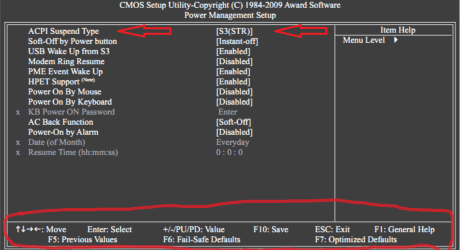
In BIOS you use the keyboard to move around and select things.
Hopefully the keys will be listed on the screen - see my example.
Use Arrow keys, Page keys, Enter, ...

F10 should Save your changes, and ESC should discard changes.

The screen-print is from MY motherboard manual, showing where the "S1/S3" sleep setting is.
This is just an example for you, so you have an idea of what to expect.
I couldn't find any info about your BIOS in the Gateway manuals i looked at.

Bios SP 01.PNG
 

My Computer My Computer

Computer type
PC/Desktop
Computer Manufacturer/Model Number
home built
OS
Multi-Boot W7_Pro_x64 W8.1_Pro_x64 W10_Pro_x64 +Linux_VMs +Chromium_VM
CPU
AMD Athlon II x4 620
Motherboard
Gigabyte GA-MA785G-UD3H
Memory
6GB GSkill DDR2 800
Graphics Card(s)
AMD 4670 GPU + AMD 4200 IGP
Sound Card
on board Realtek ALC889A
Monitor(s) Displays
RCA 40" LCD TV, Insignia 32" LCD TV, HP 15" LCD monitor
Screen Resolution
1680 x 1050
Hard Drives
OCZ Vertex 3 120GB,
Samsung F3 1TB (3),
Several others - WD, Seagate, Hitachi, ...
PSU
Corsair 500 W
Case
Rosewill mid tower
Cooling
CM 90mm rifle
Keyboard
Gyration wireless, Logitech wireless, Dell USB wired
Mouse
Gyration wireless, Logitech wireless, V7 USB wired
Internet Speed
Spectrum - 100Mbps D / 10Mbps U
Antivirus
Avast, MBAM3, EMET, WinPatrol
Browser
Pale Moon, Firefox, IE
Other Info
2 multi-boot PC's
Mainly HTPC/Office/Gen purpose (no gaming).
Trendnet USB KVM.
LG DVD burner/Blue Ray Player.
Tray system for removable SATA backup drives.

Not currently OCd, under-volted.
I use Hybrid sleep, rarely re-boot or shutdown.

Hauppauge HD-PVR, Avermedia PCIe TV Tuner, Hauppauge PCI TV Tuner.
Thanks, David. I have found where my S's are, but I don't know what to make of them, nor what to do with them. Nonetheless, here's what it there:
KB Wakeup from S1/S3 Hybrid...Enabled
MS Wakeup from S1/S3 Hybrid...Enabled
USB Resume from S1/S3...Enabled

There is no S2 and as the screen was a bit too far to the left, I'm not 100% sure that the "K" and "M" are correct.
What now?
 

My Computer My Computer

Computer Manufacturer/Model Number
Gateway DX4720-03/HP Pavilion dv6
OS
Windows 7 HP 64-bit
Memory
4GB/4GB
Antivirus
Avast Pro
Browser
Firefox, the latest
Those look like the options for enabling wake up for Keyboard, Mouse, USB.
What you're looking for is an option for which "S" sleep state to use when going to sleep.
Gateway may not have included that option in your PC.

If nobody here knows Gateway BIOS options for your PC, you may want to ask this question in Gateway Support or the Gateway Forum (if they have one).
 

My Computer My Computer

Computer type
PC/Desktop
Computer Manufacturer/Model Number
home built
OS
Multi-Boot W7_Pro_x64 W8.1_Pro_x64 W10_Pro_x64 +Linux_VMs +Chromium_VM
CPU
AMD Athlon II x4 620
Motherboard
Gigabyte GA-MA785G-UD3H
Memory
6GB GSkill DDR2 800
Graphics Card(s)
AMD 4670 GPU + AMD 4200 IGP
Sound Card
on board Realtek ALC889A
Monitor(s) Displays
RCA 40" LCD TV, Insignia 32" LCD TV, HP 15" LCD monitor
Screen Resolution
1680 x 1050
Hard Drives
OCZ Vertex 3 120GB,
Samsung F3 1TB (3),
Several others - WD, Seagate, Hitachi, ...
PSU
Corsair 500 W
Case
Rosewill mid tower
Cooling
CM 90mm rifle
Keyboard
Gyration wireless, Logitech wireless, Dell USB wired
Mouse
Gyration wireless, Logitech wireless, V7 USB wired
Internet Speed
Spectrum - 100Mbps D / 10Mbps U
Antivirus
Avast, MBAM3, EMET, WinPatrol
Browser
Pale Moon, Firefox, IE
Other Info
2 multi-boot PC's
Mainly HTPC/Office/Gen purpose (no gaming).
Trendnet USB KVM.
LG DVD burner/Blue Ray Player.
Tray system for removable SATA backup drives.

Not currently OCd, under-volted.
I use Hybrid sleep, rarely re-boot or shutdown.

Hauppauge HD-PVR, Avermedia PCIe TV Tuner, Hauppauge PCI TV Tuner.
Problem Solved.

Took the bull by the horns and entered BIOS and went to Power Management Setup. S1/S3 were all enabled for mouse, keyboard and USB, there was no S2. Suspend Mode was set to [S3 (STR)]. There was an option to set it to S1 (POS)], which I did, and then finished booting. I then set all my Power Options (within the Control Panel) to their defaults, backed out to the desktop screen, clicked my mouse button to bring up closing choices and selected Sleep. And, Sleep it was!

Now I'd like to know:
1. What are the meanings of SRT and POS and why did this work?
2. As Sleep was working for about 4 years, what could have caused things to change in the BIOS...here I am assuming that the BIOS setting was originally S1???
 

My Computer My Computer

Computer Manufacturer/Model Number
Gateway DX4720-03/HP Pavilion dv6
OS
Windows 7 HP 64-bit
Memory
4GB/4GB
Antivirus
Avast Pro
Browser
Firefox, the latest
Great - glad you got it working.

It does sound like your BIOS setting did somehow change from S1 to S3, causing the problem.
I'm not sure what might have caused it to change... power spike, CMOS battery getting old, Win update, ...
Normally if the CMOS battery is dying, the Date/Time setting gets lost.
If this does happen again, I'd replace the CMOS battery.

I have seen systems where S1 sleeps and wakes up ok, and S3 does not...
Seems you have that situation.
If you're happy with S1, leave well enough alone :)
If you want to pursue the S3 issue, the Gather Trace Info tutorial might help...

Don't worry about S2, i don't know if it's used (anymore), can't remember the last time (if ever) i saw it.

POS = Power on Suspend
STR = Suspend to RAM

This description is from my MB manual.

ACPI Suspend Type
Specifies the ACPI sleep state when the system enters suspend.
S1(POS) Enables the system to enter the ACPI S1 (Power on Suspend) sleep state.
In S1 sleep state, the system appears suspended and stays in a low power mode.
The system can be resumed at any time.

S3(STR) Enables the system to enter the ACPI S3 (Suspend to RAM) sleep state (default).
In S3 sleep state, the system appears to be off and consumes less power than in
the S1 state. When signaled by a wake-up device or event, the system resumes to
its working state exactly where it was left off.
Please mark this thread as solved.

Enjoy a restful Sleep :D
 

My Computer My Computer

Computer type
PC/Desktop
Computer Manufacturer/Model Number
home built
OS
Multi-Boot W7_Pro_x64 W8.1_Pro_x64 W10_Pro_x64 +Linux_VMs +Chromium_VM
CPU
AMD Athlon II x4 620
Motherboard
Gigabyte GA-MA785G-UD3H
Memory
6GB GSkill DDR2 800
Graphics Card(s)
AMD 4670 GPU + AMD 4200 IGP
Sound Card
on board Realtek ALC889A
Monitor(s) Displays
RCA 40" LCD TV, Insignia 32" LCD TV, HP 15" LCD monitor
Screen Resolution
1680 x 1050
Hard Drives
OCZ Vertex 3 120GB,
Samsung F3 1TB (3),
Several others - WD, Seagate, Hitachi, ...
PSU
Corsair 500 W
Case
Rosewill mid tower
Cooling
CM 90mm rifle
Keyboard
Gyration wireless, Logitech wireless, Dell USB wired
Mouse
Gyration wireless, Logitech wireless, V7 USB wired
Internet Speed
Spectrum - 100Mbps D / 10Mbps U
Antivirus
Avast, MBAM3, EMET, WinPatrol
Browser
Pale Moon, Firefox, IE
Other Info
2 multi-boot PC's
Mainly HTPC/Office/Gen purpose (no gaming).
Trendnet USB KVM.
LG DVD burner/Blue Ray Player.
Tray system for removable SATA backup drives.

Not currently OCd, under-volted.
I use Hybrid sleep, rarely re-boot or shutdown.

Hauppauge HD-PVR, Avermedia PCIe TV Tuner, Hauppauge PCI TV Tuner.
Thanks for all the help in understanding how BIOS and Power Options interact. Also, from what I can see, POS refers to Sleep and STR refers to Hibernation...yes?
 

My Computer My Computer

Computer Manufacturer/Model Number
Gateway DX4720-03/HP Pavilion dv6
OS
Windows 7 HP 64-bit
Memory
4GB/4GB
Antivirus
Avast Pro
Browser
Firefox, the latest
You're welcome.

No, S3(STR) is NOT hibernate ... S4 is hibernate

S1(POS) and S3(STR) are SLEEP states
S3 is a deeper sleep :sleepy:

Take another look at the link in post #4.
 

My Computer My Computer

Computer type
PC/Desktop
Computer Manufacturer/Model Number
home built
OS
Multi-Boot W7_Pro_x64 W8.1_Pro_x64 W10_Pro_x64 +Linux_VMs +Chromium_VM
CPU
AMD Athlon II x4 620
Motherboard
Gigabyte GA-MA785G-UD3H
Memory
6GB GSkill DDR2 800
Graphics Card(s)
AMD 4670 GPU + AMD 4200 IGP
Sound Card
on board Realtek ALC889A
Monitor(s) Displays
RCA 40" LCD TV, Insignia 32" LCD TV, HP 15" LCD monitor
Screen Resolution
1680 x 1050
Hard Drives
OCZ Vertex 3 120GB,
Samsung F3 1TB (3),
Several others - WD, Seagate, Hitachi, ...
PSU
Corsair 500 W
Case
Rosewill mid tower
Cooling
CM 90mm rifle
Keyboard
Gyration wireless, Logitech wireless, Dell USB wired
Mouse
Gyration wireless, Logitech wireless, V7 USB wired
Internet Speed
Spectrum - 100Mbps D / 10Mbps U
Antivirus
Avast, MBAM3, EMET, WinPatrol
Browser
Pale Moon, Firefox, IE
Other Info
2 multi-boot PC's
Mainly HTPC/Office/Gen purpose (no gaming).
Trendnet USB KVM.
LG DVD burner/Blue Ray Player.
Tray system for removable SATA backup drives.

Not currently OCd, under-volted.
I use Hybrid sleep, rarely re-boot or shutdown.

Hauppauge HD-PVR, Avermedia PCIe TV Tuner, Hauppauge PCI TV Tuner.
You're welcome.

No, S3(STR) is NOT hibernate ... S4 is hibernate

S1(POS) and S3(STR) are SLEEP states
S3 is a deeper sleep :sleepy:

Take another look at the link in post #4.

Interesting. I don't have an S4. So I guess that as the screwed up setting was on S3(STR), I wasn't really hibernating, but was in the deep sleep that caused the computer to appear to be hibernating??? Anyway, all is fixed and I'm a happy camper.
 

My Computer My Computer

Computer Manufacturer/Model Number
Gateway DX4720-03/HP Pavilion dv6
OS
Windows 7 HP 64-bit
Memory
4GB/4GB
Antivirus
Avast Pro
Browser
Firefox, the latest

My Computer My Computer

Computer type
PC/Desktop
Computer Manufacturer/Model Number
home built
OS
Multi-Boot W7_Pro_x64 W8.1_Pro_x64 W10_Pro_x64 +Linux_VMs +Chromium_VM
CPU
AMD Athlon II x4 620
Motherboard
Gigabyte GA-MA785G-UD3H
Memory
6GB GSkill DDR2 800
Graphics Card(s)
AMD 4670 GPU + AMD 4200 IGP
Sound Card
on board Realtek ALC889A
Monitor(s) Displays
RCA 40" LCD TV, Insignia 32" LCD TV, HP 15" LCD monitor
Screen Resolution
1680 x 1050
Hard Drives
OCZ Vertex 3 120GB,
Samsung F3 1TB (3),
Several others - WD, Seagate, Hitachi, ...
PSU
Corsair 500 W
Case
Rosewill mid tower
Cooling
CM 90mm rifle
Keyboard
Gyration wireless, Logitech wireless, Dell USB wired
Mouse
Gyration wireless, Logitech wireless, V7 USB wired
Internet Speed
Spectrum - 100Mbps D / 10Mbps U
Antivirus
Avast, MBAM3, EMET, WinPatrol
Browser
Pale Moon, Firefox, IE
Other Info
2 multi-boot PC's
Mainly HTPC/Office/Gen purpose (no gaming).
Trendnet USB KVM.
LG DVD burner/Blue Ray Player.
Tray system for removable SATA backup drives.

Not currently OCd, under-volted.
I use Hybrid sleep, rarely re-boot or shutdown.

Hauppauge HD-PVR, Avermedia PCIe TV Tuner, Hauppauge PCI TV Tuner.
Now that Sleep appears to be working under S1, I do note that fan(s) are still running. Is this normal? If not, how do I stop the fan(s), or do I really want to?
 

My Computer My Computer

Computer Manufacturer/Model Number
Gateway DX4720-03/HP Pavilion dv6
OS
Windows 7 HP 64-bit
Memory
4GB/4GB
Antivirus
Avast Pro
Browser
Firefox, the latest

My Computer My Computer

Computer type
PC/Desktop
Computer Manufacturer/Model Number
home built
OS
Multi-Boot W7_Pro_x64 W8.1_Pro_x64 W10_Pro_x64 +Linux_VMs +Chromium_VM
CPU
AMD Athlon II x4 620
Motherboard
Gigabyte GA-MA785G-UD3H
Memory
6GB GSkill DDR2 800
Graphics Card(s)
AMD 4670 GPU + AMD 4200 IGP
Sound Card
on board Realtek ALC889A
Monitor(s) Displays
RCA 40" LCD TV, Insignia 32" LCD TV, HP 15" LCD monitor
Screen Resolution
1680 x 1050
Hard Drives
OCZ Vertex 3 120GB,
Samsung F3 1TB (3),
Several others - WD, Seagate, Hitachi, ...
PSU
Corsair 500 W
Case
Rosewill mid tower
Cooling
CM 90mm rifle
Keyboard
Gyration wireless, Logitech wireless, Dell USB wired
Mouse
Gyration wireless, Logitech wireless, V7 USB wired
Internet Speed
Spectrum - 100Mbps D / 10Mbps U
Antivirus
Avast, MBAM3, EMET, WinPatrol
Browser
Pale Moon, Firefox, IE
Other Info
2 multi-boot PC's
Mainly HTPC/Office/Gen purpose (no gaming).
Trendnet USB KVM.
LG DVD burner/Blue Ray Player.
Tray system for removable SATA backup drives.

Not currently OCd, under-volted.
I use Hybrid sleep, rarely re-boot or shutdown.

Hauppauge HD-PVR, Avermedia PCIe TV Tuner, Hauppauge PCI TV Tuner.
Back
Top