Solved got an error at "clean" part of DISKPART

mathewss

New member
Local time
9:27 AM
Messages
8
I got this error when trying to format my 4gb Kingston (DT101 G2)
please help if you can.

Code:
DISKPART> clean

DiskPart has encountered an error: The request could not be performed because of 
an I/O device error.
See the System Event Log for more information.

DISKPART>
 

My Computer My Computer

At a glance

Windows 7 Home Premium 64bit
Computer Manufacturer/Model Number
Dell / Inspiron
OS
Windows 7 Home Premium 64bit
Welcome to Seven Forums mathewss.
Did you check the Event log?
You can also go to Computer right the USB drive, Format, UNcheck Quick format, start and OK.
 

My Computer My Computer

At a glance

Windows 7 Ultimate X64 SP1Intel i5-2550K, Differing ~4.4-4.8GHz No buil...16GB G.Skill Sniper 1866MHz @ 2133MHz 2x8GBASUS GTX650TIB-DC2OC-2GD5, (650TI Boost)
Computer type
PC/Desktop
Computer Manufacturer/Model Number
Home Built Desktop By DataTech
OS
Windows 7 Ultimate X64 SP1
CPU
Intel i5-2550K, Differing ~4.4-4.8GHz No built in GPU
Motherboard
ASUS P8Z68-V PRO/GEN3
Memory
16GB G.Skill Sniper 1866MHz @ 2133MHz 2x8GB
Graphics Card(s)
ASUS GTX650TIB-DC2OC-2GD5, (650TI Boost)
Sound Card
Onboard Realtek 5-1
Monitor(s) Displays
Samsung P2570HD
Screen Resolution
1920x1080
Hard Drives
Samsung 840 Pro 256GB SSD for OS, 500GB Seagate Constellation (Enterprise drive) for Data
PSU
Corsair HX650W
Case
Inwin Dragon Rider
Cooling
Hyper 212 EVO w/two Noctua fans, push-pull, @1300 RPM
Keyboard
E-Z Eyes, bright yellow keys with large characters
Mouse
steelseries SENSEI Laser Pro Gaming
Internet Speed
48-51Mbs Mbs down, 11 Mbs up Xfinity Cable
Antivirus
Norton Internet Security 2013
Browser
IE 10, Opera, Pale Moon if needed
Other Info
4 case fans, LG BluRay-RE, ASUS DVD-RW, Mr. Fusion power supply, 1.21 gigawatts.
event log?

srry but how would i check the event log?..

kinda of a nooby sort of with certain computer skills..
 

My Computer My Computer

At a glance

Windows 7 Home Premium 64bit
Computer Manufacturer/Model Number
Dell / Inspiron
OS
Windows 7 Home Premium 64bit
I think this was the event log.. not sure because I restarted the computer once already but I think this is it..

Code:
The driver detected a controller error on \Device\Harddisk1\DR8.
 

My Computer My Computer

At a glance

Windows 7 Home Premium 64bit
Computer Manufacturer/Model Number
Dell / Inspiron
OS
Windows 7 Home Premium 64bit
Sorry Matt, in the Start search type eventvwr and hit enter. In the viewer window's left pane click on Windows Logs to expand it the click System. The log will appear in the center pane. You'll be looking for RED circles for Errors and Critical. There will probably be several, all systems have them.
If you click one the details will be at the bottom. Use the Details and General tabs to find out more.

The one you posted seem to point to your Hard Drive, is it a SSD?
You also shoudl use an Elevated Cmd Prompt to run diskpart. Type cmd in Search, right click cmd.exe and Run as Administrator.
 

My Computer My Computer

At a glance

Windows 7 Ultimate X64 SP1Intel i5-2550K, Differing ~4.4-4.8GHz No buil...16GB G.Skill Sniper 1866MHz @ 2133MHz 2x8GBASUS GTX650TIB-DC2OC-2GD5, (650TI Boost)
Computer type
PC/Desktop
Computer Manufacturer/Model Number
Home Built Desktop By DataTech
OS
Windows 7 Ultimate X64 SP1
CPU
Intel i5-2550K, Differing ~4.4-4.8GHz No built in GPU
Motherboard
ASUS P8Z68-V PRO/GEN3
Memory
16GB G.Skill Sniper 1866MHz @ 2133MHz 2x8GB
Graphics Card(s)
ASUS GTX650TIB-DC2OC-2GD5, (650TI Boost)
Sound Card
Onboard Realtek 5-1
Monitor(s) Displays
Samsung P2570HD
Screen Resolution
1920x1080
Hard Drives
Samsung 840 Pro 256GB SSD for OS, 500GB Seagate Constellation (Enterprise drive) for Data
PSU
Corsair HX650W
Case
Inwin Dragon Rider
Cooling
Hyper 212 EVO w/two Noctua fans, push-pull, @1300 RPM
Keyboard
E-Z Eyes, bright yellow keys with large characters
Mouse
steelseries SENSEI Laser Pro Gaming
Internet Speed
48-51Mbs Mbs down, 11 Mbs up Xfinity Cable
Antivirus
Norton Internet Security 2013
Browser
IE 10, Opera, Pale Moon if needed
Other Info
4 case fans, LG BluRay-RE, ASUS DVD-RW, Mr. Fusion power supply, 1.21 gigawatts.
found the information

okay I have re-done the whole process of low-level formatting and got to the clean step again and it still came up with the same error. I followed the information I was given to look at the event log and I believe this was the error I received.

Code:
Cannot zero sectors on disk \\?\PhysicalDrive1. Error code: \\?\PhysicalDrive1

my only question is this the right one?.. the source is VDS Basic Provider just curious if that is correct.

Also if any of you can provide more help with this information known.
 

My Computer My Computer

At a glance

Windows 7 Home Premium 64bit
Computer Manufacturer/Model Number
Dell / Inspiron
OS
Windows 7 Home Premium 64bit
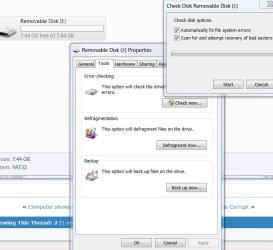
Try this. Open computer, go to your USB drive, right click it and select properties, in properties select the tools tab. Your first entry should be check this drive for errors and try that one, and check both boxes. It should look like this

error.JPG
 

My Computers My Computers

  • At a glance

    Windows 11 ProRyzen 9 5900X32GB G Skill DDR4-3600EVGA RTX 3080 FTW 3 Ultra
    Computer type
    PC/Desktop
    Computer Manufacturer/Model Number
    ALWAYS UNDER CONSTRUCTION
    OS
    Windows 11 Pro
    CPU
    Ryzen 9 5900X
    Motherboard
    Asus X570 Crosshair Viii Hero
    Memory
    32GB G Skill DDR4-3600
    Graphics Card(s)
    EVGA RTX 3080 FTW 3 Ultra
    Sound Card
    On Board/Sennheiser PC37X Headset
    Monitor(s) Displays
    3 X Asus 27"
    Screen Resolution
    2560x1440
    Hard Drives
    2 X 1 TB NVME drives
    PSU
    EVGA 850
    Case
    Phanteks Eclipse P400A
    Cooling
    EVGA 280 AIO
    Keyboard
    Logitech G510s/ Logitech G13
    Mouse
    Logitech G502
    Internet Speed
    24/1
    Antivirus
    ESET/MBAM Pro/SAS Pro
    Browser
    Chrome/ Firefox/ Edge
  • At a glance

    Windows 11 ProIntel Ultra 9 288V32 GB LPDDR5X 8533
    Computer type
    Laptop
    System Manufacturer/Model Number
    Dell 16 Plus
    OS
    Windows 11 Pro
    CPU
    Intel Ultra 9 288V
    Memory
    32 GB LPDDR5X 8533
    Monitor(s) Displays
    16" Mini-LED HDR600 Touch 90 Hz
    Screen Resolution
    2560X1600
    Hard Drives
    1 TB NVME
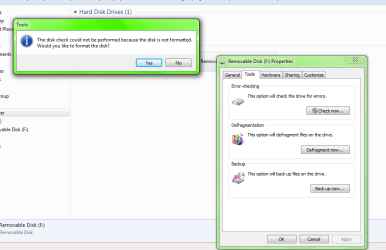
error checking

I did the error check and it just pops up with a information window like this:
 

Attachments

  • error checking.png
    error checking.png
    23.2 KB · Views: 187

My Computer My Computer

At a glance

Windows 7 Home Premium 64bit
Computer Manufacturer/Model Number
Dell / Inspiron
OS
Windows 7 Home Premium 64bit
Did you click yes to format it? What happened?
did the USB drive have some facory intalled encryption software on it? If so that may be the problem.
 

My Computer My Computer

At a glance

Windows 7 Ultimate X64 SP1Intel i5-2550K, Differing ~4.4-4.8GHz No buil...16GB G.Skill Sniper 1866MHz @ 2133MHz 2x8GBASUS GTX650TIB-DC2OC-2GD5, (650TI Boost)
Computer type
PC/Desktop
Computer Manufacturer/Model Number
Home Built Desktop By DataTech
OS
Windows 7 Ultimate X64 SP1
CPU
Intel i5-2550K, Differing ~4.4-4.8GHz No built in GPU
Motherboard
ASUS P8Z68-V PRO/GEN3
Memory
16GB G.Skill Sniper 1866MHz @ 2133MHz 2x8GB
Graphics Card(s)
ASUS GTX650TIB-DC2OC-2GD5, (650TI Boost)
Sound Card
Onboard Realtek 5-1
Monitor(s) Displays
Samsung P2570HD
Screen Resolution
1920x1080
Hard Drives
Samsung 840 Pro 256GB SSD for OS, 500GB Seagate Constellation (Enterprise drive) for Data
PSU
Corsair HX650W
Case
Inwin Dragon Rider
Cooling
Hyper 212 EVO w/two Noctua fans, push-pull, @1300 RPM
Keyboard
E-Z Eyes, bright yellow keys with large characters
Mouse
steelseries SENSEI Laser Pro Gaming
Internet Speed
48-51Mbs Mbs down, 11 Mbs up Xfinity Cable
Antivirus
Norton Internet Security 2013
Browser
IE 10, Opera, Pale Moon if needed
Other Info
4 case fans, LG BluRay-RE, ASUS DVD-RW, Mr. Fusion power supply, 1.21 gigawatts.
Did you click yes to format it? What happened?
did the USB drive have some facory intalled encryption software on it? If so that may be the problem.

yes, i did click yes to format it. when it is formatting the progress bar doesn't move at all and seems as if it never is formatting. I waited like 10min or so and still no progress so I just canceled the format. Also there is no encryption software on the flash drive and it did not come with any, I'm sure of that.
 

My Computer My Computer

At a glance

Windows 7 Home Premium 64bit
Computer Manufacturer/Model Number
Dell / Inspiron
OS
Windows 7 Home Premium 64bit
Mathewss, have you tried other USB drives in the computer and have you tried that USB in other computers? If not, please try it. USB drives do go bad. I would like to try to determine if the problem is with the USB drive or the USB controllers/drivers on your computer. Also, could you right click on computer, select manage, in the left column select device manager. The last entry should be USB controllers. Expand that and see if there are any yellow icons or exclamation marks on any of the entries.
 

My Computers My Computers

  • At a glance

    Windows 11 ProRyzen 9 5900X32GB G Skill DDR4-3600EVGA RTX 3080 FTW 3 Ultra
    Computer type
    PC/Desktop
    Computer Manufacturer/Model Number
    ALWAYS UNDER CONSTRUCTION
    OS
    Windows 11 Pro
    CPU
    Ryzen 9 5900X
    Motherboard
    Asus X570 Crosshair Viii Hero
    Memory
    32GB G Skill DDR4-3600
    Graphics Card(s)
    EVGA RTX 3080 FTW 3 Ultra
    Sound Card
    On Board/Sennheiser PC37X Headset
    Monitor(s) Displays
    3 X Asus 27"
    Screen Resolution
    2560x1440
    Hard Drives
    2 X 1 TB NVME drives
    PSU
    EVGA 850
    Case
    Phanteks Eclipse P400A
    Cooling
    EVGA 280 AIO
    Keyboard
    Logitech G510s/ Logitech G13
    Mouse
    Logitech G502
    Internet Speed
    24/1
    Antivirus
    ESET/MBAM Pro/SAS Pro
    Browser
    Chrome/ Firefox/ Edge
  • At a glance

    Windows 11 ProIntel Ultra 9 288V32 GB LPDDR5X 8533
    Computer type
    Laptop
    System Manufacturer/Model Number
    Dell 16 Plus
    OS
    Windows 11 Pro
    CPU
    Intel Ultra 9 288V
    Memory
    32 GB LPDDR5X 8533
    Monitor(s) Displays
    16" Mini-LED HDR600 Touch 90 Hz
    Screen Resolution
    2560X1600
    Hard Drives
    1 TB NVME
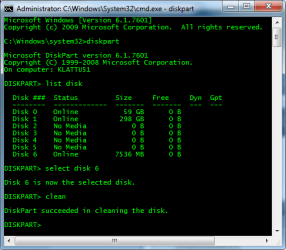
In post #6 you said you went through the low-level format. Did you do it as in the steps below? Open command prompt as Admin, type cmd in to Start/Search, right cmd.exe, select Run as Administrator.

Disk 6 is a USB drive

diskpart.png
 

My Computer My Computer

At a glance

Windows 7 Ultimate X64 SP1Intel i5-2550K, Differing ~4.4-4.8GHz No buil...16GB G.Skill Sniper 1866MHz @ 2133MHz 2x8GBASUS GTX650TIB-DC2OC-2GD5, (650TI Boost)
Computer type
PC/Desktop
Computer Manufacturer/Model Number
Home Built Desktop By DataTech
OS
Windows 7 Ultimate X64 SP1
CPU
Intel i5-2550K, Differing ~4.4-4.8GHz No built in GPU
Motherboard
ASUS P8Z68-V PRO/GEN3
Memory
16GB G.Skill Sniper 1866MHz @ 2133MHz 2x8GB
Graphics Card(s)
ASUS GTX650TIB-DC2OC-2GD5, (650TI Boost)
Sound Card
Onboard Realtek 5-1
Monitor(s) Displays
Samsung P2570HD
Screen Resolution
1920x1080
Hard Drives
Samsung 840 Pro 256GB SSD for OS, 500GB Seagate Constellation (Enterprise drive) for Data
PSU
Corsair HX650W
Case
Inwin Dragon Rider
Cooling
Hyper 212 EVO w/two Noctua fans, push-pull, @1300 RPM
Keyboard
E-Z Eyes, bright yellow keys with large characters
Mouse
steelseries SENSEI Laser Pro Gaming
Internet Speed
48-51Mbs Mbs down, 11 Mbs up Xfinity Cable
Antivirus
Norton Internet Security 2013
Browser
IE 10, Opera, Pale Moon if needed
Other Info
4 case fans, LG BluRay-RE, ASUS DVD-RW, Mr. Fusion power supply, 1.21 gigawatts.
In post #6 you said you went through the low-level format. Did you do it as in the steps below? Open command prompt as Admin, type cmd in to Start/Search, right cmd.exe, select Run as Administrator.

Disk 6 is a USB drive

View attachment 193503

yes I did do exactly as you did. just got an error at the clean step of the process.. I tried the flash drive in another computer and also tried formatting it on another computer. I have the same exact problems with the other computer, the other computer is windows xp though not windows 7, I don't think that would make much of difference though. I also tried different ports on the same computer, still the same problem.. I honestly believe now that it is the flash drive that has gone bad. I still have a 5 year warranty on the flash drive and I just got it like last year so I think I'm just gonna use that and get it replaced. Just worried about costs of shipping or something, don't know if they would charge me for shipping and handling or not, if so I'll just probably end up getting a new flash drive. No big deal really one that isn't working only cost like $20 I kind of want a portable hard drive instead anyways so I have a lot more memory.

Anyways thanks for trying to help. Greatly appreciated, I'll make sure to come back whenever I need help with any other computer problems. Great Forum you have. :D
 

My Computer My Computer

At a glance

Windows 7 Home Premium 64bit
Computer Manufacturer/Model Number
Dell / Inspiron
OS
Windows 7 Home Premium 64bit
Good to hear, as essenbe said, USB drives do fail and yours apparently did. I suspect you'd have to pay shipping to get it replaced with almost anyone.
Yes, come back anytime or contribute help yourself.:)
 

My Computer My Computer

At a glance

Windows 7 Ultimate X64 SP1Intel i5-2550K, Differing ~4.4-4.8GHz No buil...16GB G.Skill Sniper 1866MHz @ 2133MHz 2x8GBASUS GTX650TIB-DC2OC-2GD5, (650TI Boost)
Computer type
PC/Desktop
Computer Manufacturer/Model Number
Home Built Desktop By DataTech
OS
Windows 7 Ultimate X64 SP1
CPU
Intel i5-2550K, Differing ~4.4-4.8GHz No built in GPU
Motherboard
ASUS P8Z68-V PRO/GEN3
Memory
16GB G.Skill Sniper 1866MHz @ 2133MHz 2x8GB
Graphics Card(s)
ASUS GTX650TIB-DC2OC-2GD5, (650TI Boost)
Sound Card
Onboard Realtek 5-1
Monitor(s) Displays
Samsung P2570HD
Screen Resolution
1920x1080
Hard Drives
Samsung 840 Pro 256GB SSD for OS, 500GB Seagate Constellation (Enterprise drive) for Data
PSU
Corsair HX650W
Case
Inwin Dragon Rider
Cooling
Hyper 212 EVO w/two Noctua fans, push-pull, @1300 RPM
Keyboard
E-Z Eyes, bright yellow keys with large characters
Mouse
steelseries SENSEI Laser Pro Gaming
Internet Speed
48-51Mbs Mbs down, 11 Mbs up Xfinity Cable
Antivirus
Norton Internet Security 2013
Browser
IE 10, Opera, Pale Moon if needed
Other Info
4 case fans, LG BluRay-RE, ASUS DVD-RW, Mr. Fusion power supply, 1.21 gigawatts.
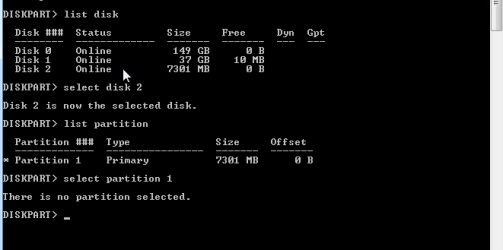
I think you should RMA it too. But, just to see, try running diskpart this way, just to see if it will work.

USB.JPG
 

My Computers My Computers

  • At a glance

    Windows 11 ProRyzen 9 5900X32GB G Skill DDR4-3600EVGA RTX 3080 FTW 3 Ultra
    Computer type
    PC/Desktop
    Computer Manufacturer/Model Number
    ALWAYS UNDER CONSTRUCTION
    OS
    Windows 11 Pro
    CPU
    Ryzen 9 5900X
    Motherboard
    Asus X570 Crosshair Viii Hero
    Memory
    32GB G Skill DDR4-3600
    Graphics Card(s)
    EVGA RTX 3080 FTW 3 Ultra
    Sound Card
    On Board/Sennheiser PC37X Headset
    Monitor(s) Displays
    3 X Asus 27"
    Screen Resolution
    2560x1440
    Hard Drives
    2 X 1 TB NVME drives
    PSU
    EVGA 850
    Case
    Phanteks Eclipse P400A
    Cooling
    EVGA 280 AIO
    Keyboard
    Logitech G510s/ Logitech G13
    Mouse
    Logitech G502
    Internet Speed
    24/1
    Antivirus
    ESET/MBAM Pro/SAS Pro
    Browser
    Chrome/ Firefox/ Edge
  • At a glance

    Windows 11 ProIntel Ultra 9 288V32 GB LPDDR5X 8533
    Computer type
    Laptop
    System Manufacturer/Model Number
    Dell 16 Plus
    OS
    Windows 11 Pro
    CPU
    Intel Ultra 9 288V
    Memory
    32 GB LPDDR5X 8533
    Monitor(s) Displays
    16" Mini-LED HDR600 Touch 90 Hz
    Screen Resolution
    2560X1600
    Hard Drives
    1 TB NVME
thnx

I think you should RMA it too. But, just to see, try running diskpart this way, just to see if it will work.

View attachment 193524

thnx for the advice. I'll have to try that when I get the windows 7 computer back because this windows xp computer won't even read the flash drive for some reason. when I type "list disk" only the hard drive shows up on this computer. The windows 7 computer is my sisters, planing on getting me one soon but my sis is at college I'll just try this next time she comes home. thnx again though.
 

My Computer My Computer

At a glance

Windows 7 Home Premium 64bit
Computer Manufacturer/Model Number
Dell / Inspiron
OS
Windows 7 Home Premium 64bit
the same issue

I think you should RMA it too. But, just to see, try running diskpart this way, just to see if it will work.

View attachment 193524

Hello,

I was following the whole discussion because I have the same issue with my USB Flash Disk.
I would like to reply to the last advice from essenbe.

It is not working for me.

usb.png
 

My Computer My Computer

At a glance

Win 7 x64
OS
Win 7 x64
Made my USB Flash Drive work again

Hello,

I was following the whole discussion because I have the same issue with my USB Flash Disk.
I would like to reply to the last advice from essenbe.

It is not working for me.

View attachment 208690

Hi.

I had the same problem, and I was giving up, until I made something different. Don't know if this will work for all the cases, but I leave what I did here in case someone can do it.

The problem of this method is that you need a Linux machine, not virtualized. I have dual boot for my job. Maybe can download and boot from a live version of Fedora (Fedora). I am assumig you have root privileges, if not, use "sudo fdisk ...".

1. Find out the name of your flash drive in Linux executing:
Code:
fdisk -l
Getting something like this:
Code:
Disk /dev/sda: 931,51 GiB, 1000204886016 bytes, 1953525168 sectors
Disk model: WDC WDS100T2B0B 
Units: sectors of 1 * 512 = 512 bytes
Sector size (logical/physical): 512 bytes / 512 bytes
I/O size (minimum/optimal): 512 bytes / 512 bytes
Disklabel type: gpt
Disk identifier: 316CB1C5-EC81-404E-BC51-AF036B549ED0

Device          Start        End    Sectors   Size Type
/dev/sda1        2048     411647     409600   200M EFI System
/dev/sda2      411648    2508799    2097152     1G Linux filesystem
/dev/sda3     2508800 1290823679 1288314880 614,3G Microsoft basic data
/dev/sda4  1290823680 1290856447      32768    16M Microsoft reserved
/dev/sda5  1290856448 1604347903  313491456 149,5G Microsoft basic data
/dev/sda6  1604347904 1605394431    1046528   511M Windows recovery environment
/dev/sda7  1605396480 1815111679  209715200   100G Linux filesystem
/dev/sda8  1815111680 1919969279  104857600    50G Linux filesystem
/dev/sda9  1919969280 1953523711   33554432    16G Linux swap


Disk /dev/zram0: 8 GiB, 8589934592 bytes, 2097152 sectors
Units: sectors of 1 * 4096 = 4096 bytes
Sector size (logical/physical): 4096 bytes / 4096 bytes
I/O size (minimum/optimal): 4096 bytes / 4096 bytes


Disk /dev/sdb: 57,3 GiB, 61530439680 bytes, 120176640 sectors
Disk model:  SanDisk 3.2Gen1
Units: sectors of 1 * 512 = 512 bytes
Sector size (logical/physical): 512 bytes / 512 bytes
I/O size (minimum/optimal): 512 bytes / 512 bytes
Disklabel type: mbr
Disk identifier: 51B5CA6C-93DE-8848-A970-8AF810F03F0E

Device     Start       End   Sectors  Size Type
/dev/sdb1   2048 120176606 120174559 57,3G Microsoft basic data
For the size, my device is "/dev/sdb" and the partition I can't use is "/dev/sdb1". I tried the same things than was instructed with DISKPART in DISKPART itself and Linux fdisk, but didn't work, so I tried something that can't be done in DISKPART.

2. Open the device with fdisk:
Code:
fdisk /dev/sdb

3. List the options with "m" + Enter (in case you have another version or options):
Code:
Help:

  GPT
   M   enter protective/hybrid MBR

  Generic
   d   delete a partition
   F   list free unpartitioned space
   l   list known partition types
   n   add a new partition
   p   print the partition table
   t   change a partition type
   v   verify the partition table
   i   print information about a partition

  Misc
   m   print this menu
   x   extra functionality (experts only)

  Script
   I   load disk layout from sfdisk script file
   O   dump disk layout to sfdisk script file

  Save & Exit
   w   write table to disk and exit
   q   quit without saving changes

  Create a new label
   g   create a new empty GPT partition table
   G   create a new empty SGI (IRIX) partition table
   o   create a new empty DOS partition table
   s   create a new empty Sun partition table


Command (m for help):

4. Since my drive was MBR, tried with GPT partition model, write "g" + Enter.
Code:
Command (m for help): g
Created a new GPT disklabel (GUID: EC8851FA-79F5-ED44-807A-E5501ED7099D).

Command (m for help):

5. Create a new partition, write "n" + Enter (just Enter to the questions, will make everything by default):
Code:
Command (m for help): n
Partition number (1-128, default 1): 
First sector (2048-120176606, default 2048): 
Last sector, +/-sectors or +/-size{K,M,G,T,P} (2048-120176606, default 120176606): 

Created a new partition 1 of type 'Linux filesystem' and of size 57,3 GiB.

Command (m for help):

6. Change partition signature to something Windows can understand, write "t" + Enter:
Code:
Command (m for help): t
Selected partition 1
Partition type or alias (type L to list all): 11
Changed type of partition 'Linux filesystem' to 'Microsoft basic data'.

Command (m for help):

7. Finally write all the changes to your flash drive, write "w" + Enter.

In my case, I could reboot to Windows and format the drive withour any problem.

Hope this works for some else with the same problem... if it the flash drive is new, well, you can RMA it.

 

My Computers My Computers

  • At a glance

    Windows 10 Proi748GBGeForce RTX
    Computer type
    Laptop
    Computer Manufacturer/Model Number
    Lenovo T15g
    OS
    Windows 10 Pro
    CPU
    i7
    Memory
    48GB
    Graphics Card(s)
    GeForce RTX
  • Computer type
    PC/Desktop
Back
Top