diskpart has encountered an error, during "clean", I/O device error

Yvester

New member
Local time
2:08 AM
Messages
7
diskpart has encountered an error, during "clean", I/O device error

I am trying to do a clean install on an HP laptop. After many tries (and days), still to no avail.
Before, the install would get started and progress to 6% or 14%. Right now, it fails at 0%. (08x... error).
I read the tutorial on using diskpart. This is where I get the error now: DiskPart has encountered an error: The request could not be performed because of an I/O device error. See the System Event Log for more information.
I tried the diskpart with the HD connected to another computer and there it worked. (I ran chkdsk /r before which did not find errors on the HD. And I could load Win7 on it. In my opinion ruling out the Installation disk and HD) But obviously, the installation of Windows after the diskpart, with the HD back in the laptop, still failed.
As I suspected HW I have changed HD, MB and CPU.
I have changed from Windows installer on DVD to Windows installer on USB.
What am I missing?

I have another HP laptop, that I can use every now and then for trouble shooting. Albeit not identical.

Really don't know what to try next. Any help would be greatly appreciated.
 

My Computer My Computer

Computer type
Laptop
Computer Manufacturer/Model Number
HP Pavilion g6/g7
OS
Windows 7 Home Premium x64
CPU
AMD A8
Memory
4 Gb
As I suspected HW I have changed HD, MB and CPU.

If I understand correctly, you changed the motherboard and CPU on an HP laptop. Is that correct?

I don't know much about laptops, but thought that was a difficult job that is rarely done by end consumers.

Have you attempted to install without using Diskpart?

Is your installation DVD a burned disc? Purchased in a store? Came with the laptop?

Where did you get the ISO from which you made the USB installer?
 

My Computer My Computer

Computer type
PC/Desktop
Computer Manufacturer/Model Number
Ignatz Special; 4 speed manual gearbox; factory air conditioning; one of one
OS
Windows 7 Home Premium SP1, 64-bit
CPU
Intel Skylake i5-6600K, not overclocked
Motherboard
AsRock Z170M Extreme 4, micro ATX
Memory
8 GB HyperX DDR4-2666 (2 x 4 GB)
Graphics Card(s)
none; graphics are integrated on CPU
Sound Card
onboard: Realtek ALC1150; external: USB Behringer UF0-202
Monitor(s) Displays
Dell S2340M 23 inch IPS
Screen Resolution
1600 x 900
Hard Drives
System: Crucial MX100 series SSD, 128 GB;
Data: Samsung Spinpoint 103SJ, 1 TB;
Backup: WD Caviar Green WD30EZRX-00D8PB0, 3 TB
PSU
Rosewill SilentNight 500 watt fanless, semi-modular
Case
Antec Solo II
Cooling
Noctua NH-U12S; Noctua F12 intake, Noctua S12A exhaust
Keyboard
Microsoft 200 6JH-00001 USB
Mouse
Dell or Microsoft optical wired; USB
Antivirus
Microsoft Security Essentials and Malwarebytes Premium
Browser
Pale Moon
Other Info
All fans PWM; speeds at idle: CPU circa 500 rpm; intake circa 600 rpm; exhaust circa 600 rpm; CPU temps 27 idle and 47 C load in a warm room (27 C/81 F) when running Intel Extreme Tuning Utility stress test.
If I understand correctly, you changed the motherboard and CPU on an HP laptop. Is that correct? A: Correct

I don't know much about laptops, but thought that was a difficult job that is rarely done by end consumers. A: Youtube shows how, it is fairly easy.

Have you attempted to install without using Diskpart? yes, same result

Is your installation DVD a burned disc? Purchased in a store? Came with the laptop?
A: On USB, downloaded using Windows ISO downloader.exe from HeiDoc.net: The Technology Treasure Chest
On DVD, different version, tested on another laptop to verify DVD and HD, installation completed successfully

Where did you get the ISO from which you made the USB installer? A: see above
 

My Computer My Computer

Computer type
Laptop
Computer Manufacturer/Model Number
HP Pavilion g6/g7
OS
Windows 7 Home Premium x64
CPU
AMD A8
Memory
4 Gb
Why did you changed MB and CPU?
Is your new MB same brand and type of the previous one or you change it to a new generation?
 

My Computers My Computers

System One System Two

  • Computer type
    PC/Desktop
    Computer Manufacturer/Model Number
    custom build
    OS
    Windows 7 HP 64
    CPU
    i5 6600K - 800MHz to 4200MHz
    Motherboard
    GA-Z170-HD3P
    Memory
    4+4G GSkill DDR4 3000
    Graphics Card(s)
    IG - Intel 530
    Monitor(s) Displays
    Samsung 226BW
    Screen Resolution
    1680x1050
    Hard Drives
    (1) -1 SM951 – 128GB M.2 AHCI PCIe SSD drive for Windows 7 and Lubuntu
    (2) -1 WD SATA 3 - 1T for Data
    (3) -1 WD SATA 3 - 1T for backup
    PSU
    Thermaltake 450W TR2 gold
    Keyboard
    Old and good Chicony mechanical keyboard
    Mouse
    Logitech mX performance - 9 buttons (had to disable some)
    Internet Speed
    500Mb/s
    Browser
    Firefox 64
    Other Info
    TinyWall firewall
  • Computer type
    Laptop
    System Manufacturer/Model Number
    Asus Q550LF
    OS
    Windows 7 Pro
    CPU
    i7-4500U 800MHz to 3.0GHz
    Motherboard
    Asus Q550LF
    Memory
    (4+4)G DDR3 1600
    Graphics Card(s)
    IG intel 4400 + NVIDIA GeForce GT 745M
    Sound Card
    Realtek
    Monitor(s) Displays
    LG Display LP156WF4-SPH1
    Screen Resolution
    1920 x 1080
    Hard Drives
    BX500 120G SSD for Windows and programs +
    1T HDD for data
    Internet Speed
    500 Mb/s
    Browser
    Firefox
    Other Info
    TinyWall firewall
Initially, when the problem started, I could install up to 60~70%. That made me think this was a HW issue. I tried a new HD, but no change. As there is not much else HW wise, I have tried MB and CPU. I have read numerous threads on similar issues, but none gives a clear cause nor a clear test plan. Actually, the Microsoft error said it was missing a file, so it took a while before I had figured out it more likely is an I/O error. Now I am stuck at the diskpart issue, which hopefully will lead to a more clear test plan.

The CPU is AMD A8, was an A4.

The MB is from Chun Yam Technology LTD: Wholesale 683029-501 motherboard for HP Pavilion G4 G6 G7 G4-2000 G6-2000 683029-001 laptop Notebook systemboard
On the original MB I cannot find a supplier name (guess it is not HP)
 

My Computer My Computer

Computer type
Laptop
Computer Manufacturer/Model Number
HP Pavilion g6/g7
OS
Windows 7 Home Premium x64
CPU
AMD A8
Memory
4 Gb
Most new MB has only USB 3 ports. Win 7 does not have USB 3.0 drivers.
If it ask for a driver on CD / DVD it may be the USB 3.0 drivers or the SATA drivers.
Also on new MB you have to change some BIOS settings to install Win 7.
Depending on the BIOS settings your disk has to be Legacy-MBR or UEFI-GPT.
If you have a pdf manual that came with the new MB, please attach it here. Go Advanced - Manage Attachments, browse - Upload
 

My Computers My Computers

System One System Two

  • Computer type
    PC/Desktop
    Computer Manufacturer/Model Number
    custom build
    OS
    Windows 7 HP 64
    CPU
    i5 6600K - 800MHz to 4200MHz
    Motherboard
    GA-Z170-HD3P
    Memory
    4+4G GSkill DDR4 3000
    Graphics Card(s)
    IG - Intel 530
    Monitor(s) Displays
    Samsung 226BW
    Screen Resolution
    1680x1050
    Hard Drives
    (1) -1 SM951 – 128GB M.2 AHCI PCIe SSD drive for Windows 7 and Lubuntu
    (2) -1 WD SATA 3 - 1T for Data
    (3) -1 WD SATA 3 - 1T for backup
    PSU
    Thermaltake 450W TR2 gold
    Keyboard
    Old and good Chicony mechanical keyboard
    Mouse
    Logitech mX performance - 9 buttons (had to disable some)
    Internet Speed
    500Mb/s
    Browser
    Firefox 64
    Other Info
    TinyWall firewall
  • Computer type
    Laptop
    System Manufacturer/Model Number
    Asus Q550LF
    OS
    Windows 7 Pro
    CPU
    i7-4500U 800MHz to 3.0GHz
    Motherboard
    Asus Q550LF
    Memory
    (4+4)G DDR3 1600
    Graphics Card(s)
    IG intel 4400 + NVIDIA GeForce GT 745M
    Sound Card
    Realtek
    Monitor(s) Displays
    LG Display LP156WF4-SPH1
    Screen Resolution
    1920 x 1080
    Hard Drives
    BX500 120G SSD for Windows and programs +
    1T HDD for data
    Internet Speed
    500 Mb/s
    Browser
    Firefox
    Other Info
    TinyWall firewall
Hello Megahertz07,
Thanks for the reply.

Wrt USB3.0, the system boots from the USB (2.0 for that matter).
I found the CD/DVD driver request discussed in a different thread: bug in Windows, it forgot it booted from USB, so starts looking for a DVD when it wants to continue the installation. Issue resolved by plugging the USB into a different slot (yes, solutions are sometimes incredibly simple).

Wrt BIOS, that is quite simple, with little options.
The setting I use is Legacy, which the help text says to use for Win7.

There was no manual with the MB.

Thanks for all help.
 

My Computer My Computer

Computer type
Laptop
Computer Manufacturer/Model Number
HP Pavilion g6/g7
OS
Windows 7 Home Premium x64
CPU
AMD A8
Memory
4 Gb
So, you've got it installed? Congratulations.
If so, mark this treat as solved.
 

My Computers My Computers

System One System Two

  • Computer type
    PC/Desktop
    Computer Manufacturer/Model Number
    custom build
    OS
    Windows 7 HP 64
    CPU
    i5 6600K - 800MHz to 4200MHz
    Motherboard
    GA-Z170-HD3P
    Memory
    4+4G GSkill DDR4 3000
    Graphics Card(s)
    IG - Intel 530
    Monitor(s) Displays
    Samsung 226BW
    Screen Resolution
    1680x1050
    Hard Drives
    (1) -1 SM951 – 128GB M.2 AHCI PCIe SSD drive for Windows 7 and Lubuntu
    (2) -1 WD SATA 3 - 1T for Data
    (3) -1 WD SATA 3 - 1T for backup
    PSU
    Thermaltake 450W TR2 gold
    Keyboard
    Old and good Chicony mechanical keyboard
    Mouse
    Logitech mX performance - 9 buttons (had to disable some)
    Internet Speed
    500Mb/s
    Browser
    Firefox 64
    Other Info
    TinyWall firewall
  • Computer type
    Laptop
    System Manufacturer/Model Number
    Asus Q550LF
    OS
    Windows 7 Pro
    CPU
    i7-4500U 800MHz to 3.0GHz
    Motherboard
    Asus Q550LF
    Memory
    (4+4)G DDR3 1600
    Graphics Card(s)
    IG intel 4400 + NVIDIA GeForce GT 745M
    Sound Card
    Realtek
    Monitor(s) Displays
    LG Display LP156WF4-SPH1
    Screen Resolution
    1920 x 1080
    Hard Drives
    BX500 120G SSD for Windows and programs +
    1T HDD for data
    Internet Speed
    500 Mb/s
    Browser
    Firefox
    Other Info
    TinyWall firewall
Hi Megahertz07,
No, not at all.
The problem I was referring to (and I thought you were too) is that, after I changed install media from DVD to USB, a new error popped up: asking for a DVD driver when you are actually using a USB. This is overcome, as mentioned below, after which the installation proceeds to the point where it has failed so far.
It is not clear to me what system is doing at that time. The first step is copying the windows files (to RAM, HD?) which succeeds (100% on screen), the second step is unpacking/installing (forgot the exact phrasing, will check next time) which halts at 0%, or 6% or 14%.
When it fails at 0%, it complains about formatting the partition. This lead me to the diskpart command, which now fails: "DiskPart has encountered an error: The request could not be performed because of an I/O device error. See the System Event Log for more information".
Is the System Event Log in any way useful? Where is it?
Any other info, you may find useful?
Thanks again.
 

My Computer My Computer

Computer type
Laptop
Computer Manufacturer/Model Number
HP Pavilion g6/g7
OS
Windows 7 Home Premium x64
CPU
AMD A8
Memory
4 Gb
If it doesn't ask anymore for a driver on the CD / DVD it my be possible that the disk has a wrong format.
Check on BIOS:
- Fast boot=disable
- Secure boot = disable. Some BIOS call it OS type. Windows or Other. Choose other.
- If you have CSM (compatible system Mode) set it to enable.
- Then you can install as UEFI or Legacy, depending if you choose storage and other devices as UEFI or Legacy.
- To install as UEFI you have to boot your USB flash installation disk as UEFI. And to do so your USB flash installation disk must have the UEFI boot loader.
Does your installation has the efi/boot folder?
The efi/boot has to be added to the installation, it isn't provided by M$.
391487d1473287656-windows-7-installer-stuck-setup-starting-efi.jpg

Attached is boot folder with the files needed.
http://www.sevenforums.com/attachme...ows-7-installer-stuck-setup-starting-boot.zip

- There is no need to enter diskpart. The installation will do the partitions.
- Boot your Win 7 installation on UEFI mode (important) , go to install, custom, advanced, delete all partitions, create a new one (Win will create 3 partitions) and proceed.
 

My Computers My Computers

System One System Two

  • Computer type
    PC/Desktop
    Computer Manufacturer/Model Number
    custom build
    OS
    Windows 7 HP 64
    CPU
    i5 6600K - 800MHz to 4200MHz
    Motherboard
    GA-Z170-HD3P
    Memory
    4+4G GSkill DDR4 3000
    Graphics Card(s)
    IG - Intel 530
    Monitor(s) Displays
    Samsung 226BW
    Screen Resolution
    1680x1050
    Hard Drives
    (1) -1 SM951 – 128GB M.2 AHCI PCIe SSD drive for Windows 7 and Lubuntu
    (2) -1 WD SATA 3 - 1T for Data
    (3) -1 WD SATA 3 - 1T for backup
    PSU
    Thermaltake 450W TR2 gold
    Keyboard
    Old and good Chicony mechanical keyboard
    Mouse
    Logitech mX performance - 9 buttons (had to disable some)
    Internet Speed
    500Mb/s
    Browser
    Firefox 64
    Other Info
    TinyWall firewall
  • Computer type
    Laptop
    System Manufacturer/Model Number
    Asus Q550LF
    OS
    Windows 7 Pro
    CPU
    i7-4500U 800MHz to 3.0GHz
    Motherboard
    Asus Q550LF
    Memory
    (4+4)G DDR3 1600
    Graphics Card(s)
    IG intel 4400 + NVIDIA GeForce GT 745M
    Sound Card
    Realtek
    Monitor(s) Displays
    LG Display LP156WF4-SPH1
    Screen Resolution
    1920 x 1080
    Hard Drives
    BX500 120G SSD for Windows and programs +
    1T HDD for data
    Internet Speed
    500 Mb/s
    Browser
    Firefox
    Other Info
    TinyWall firewall
We see that message if the dvd installer has been burned too fast.

Burn it at no faster then x4 speed and try again.

Free ISO Burner

picture.php
 

My Computer My Computer

Computer type
PC/Desktop
Computer Manufacturer/Model Number
Skylake Special #666
OS
Windows 10 Pro x64
CPU
Intel Core i7 6700K
Motherboard
Asus Sabertooth Z170 Mark 1
Memory
GSkill TridentZ RGB 16GB 3600 16-16-16-36
Graphics Card(s)
EVGA GTX 980 Ti SC x2
Sound Card
Realtek High Definition
Monitor(s) Displays
AOC G2460PG
Screen Resolution
1920 x 1080 144Hz
Hard Drives
Samsung 860 Pro 256GB, Seagate Barracuda 4TB x2
PSU
EVGA 1000 P2, EVGA White Custom Braided Cables
Case
Corsair Vengeance C70 Gunmetal Black
Cooling
Corsair H100i v2, Corsair ML120 x2, Thermal Grizzly Kryonaut
Keyboard
Logitech G910 Orion Spectrum
Mouse
Logitech G700s
Internet Speed
Verizon Fios Quantum Gateway 75/75
Antivirus
Windows Defender, Malwarebytes Free 3.8.3
Browser
Chrome
Other Info
Corsair SP120 x4, LG Blu-ray Drive, Durabrand HT-395 100 Watt Dolby Digital Amp, Corsair H2100 Wireless 7.1 Headset
Hi Megahertz07,
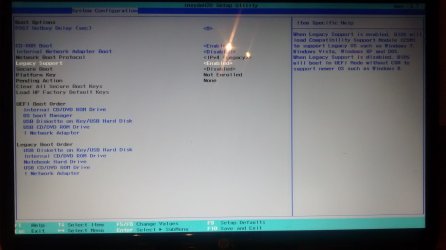
1. Check BIOS settings, settings as you describe, see picture
If I understand correctly, in legacy mode (CSM), can install as UEFI and Legacy. (as Help text also says)
install, custom (advanced),
Disk 0, Unallocated Space -> NEW -> Partition 1 & 2 created
Copying Windows files (100% and OK)
Expanding Windows files (11%)
Error: Windows cannot install required files. Make sure all files required for installation are available, and restart the installation. Error code: 0x8007045D

2. On the USB, added subdirectory boot to EFI (efi/boot) and installed bootx64.efi inside. Is this correct?
Left the BIOS in legacy mode (correct?) and started installation
install, custom (advanced),
Deleted 2 partitions -> NEW -> Partition 1 & 2 created (not 3, something wrong)
Your comment: Boot your Win 7 installation on UEFI mode (important) -> How?

Copying Windows files (100% and OK)
Expanding Windows files (13%)
Error: Windows cannot install required files. Make sure all files required for installation are available, and restart the installation. Error code: 0x8007045D

3. Checked how to make USB UEFI bootable and found link How to: Make a Windows 7 USB Installler bootable for UEFI boot - YouTube that says to copy files from efi/microsoft/boot into efi/boot -> Did so
Started pc, boot options: EFI file / USB / notebook HD
selected Boot from EFI File -> wrong, installation does not start
selected USB boot,
install, custom, deleted 2 partitions -> NEW -> Partition 1 & 2 created (not 3, something wrong)
So, how to get into UEFI?

Is UEFI preferred over Legacy?
 

Attachments

  • IMG_20161122_195456443.jpg
    IMG_20161122_195456443.jpg
    216 KB · Views: 1

My Computer My Computer

Computer type
Laptop
Computer Manufacturer/Model Number
HP Pavilion g6/g7
OS
Windows 7 Home Premium x64
CPU
AMD A8
Memory
4 Gb
Error: Windows can not install required files = Bad installer

In order to use UEFI you simply disable legacy boot.

In order to install in UEFI you must use a GPT Disk

" " " " " Legacy you must use a MBR Disk
 

My Computer My Computer

Computer type
PC/Desktop
Computer Manufacturer/Model Number
Skylake Special #666
OS
Windows 10 Pro x64
CPU
Intel Core i7 6700K
Motherboard
Asus Sabertooth Z170 Mark 1
Memory
GSkill TridentZ RGB 16GB 3600 16-16-16-36
Graphics Card(s)
EVGA GTX 980 Ti SC x2
Sound Card
Realtek High Definition
Monitor(s) Displays
AOC G2460PG
Screen Resolution
1920 x 1080 144Hz
Hard Drives
Samsung 860 Pro 256GB, Seagate Barracuda 4TB x2
PSU
EVGA 1000 P2, EVGA White Custom Braided Cables
Case
Corsair Vengeance C70 Gunmetal Black
Cooling
Corsair H100i v2, Corsair ML120 x2, Thermal Grizzly Kryonaut
Keyboard
Logitech G910 Orion Spectrum
Mouse
Logitech G700s
Internet Speed
Verizon Fios Quantum Gateway 75/75
Antivirus
Windows Defender, Malwarebytes Free 3.8.3
Browser
Chrome
Other Info
Corsair SP120 x4, LG Blu-ray Drive, Durabrand HT-395 100 Watt Dolby Digital Amp, Corsair H2100 Wireless 7.1 Headset
Hi Addram,
DVD was tested on another system, no problem. But to rule out DVD completely, I am now installing from USB (with ISO from a different source).
The legacy mode supports both UEFI and BIOS, with UEFI going first. The first option in Boot Options is actually boot from EFI file. But when booting from USB it does not use the EFI boot.
Nevertheless, I changed to UEFI and still get the same result as when I choose Boot from EFI file: some sort of File Manager (well, just a black screen and some blue letters) and no booting.
Is there anything more to a UEFI boot on USB?
 

My Computer My Computer

Computer type
Laptop
Computer Manufacturer/Model Number
HP Pavilion g6/g7
OS
Windows 7 Home Premium x64
CPU
AMD A8
Memory
4 Gb
Suggest you to re-check all the connections, wiring, etc; are correctly done.
Or remove and re-insert.

It seem that somewhere the connection is not properly insert.
 

My Computer My Computer

Computer type
Laptop
Computer Manufacturer/Model Number
Toshiba L630 and L735
OS
Windows 7 x64
Hard Drives
240 GB SSD
Back
Top