Down the Rabbit Hole of Access Control - Help!

thricipio

New member
Member
Local time
10:22 AM
Messages
65
I seem to have made a change to the Access Control settings for a protected directory and I cannot revert it back to its original settings. I'm not sure exactly how I made this change occur, but I've tried everything I can to return it to its default settings, including doing a System Restore. But nothing works.

So now, at the very least, I'm trying to get a handle on whether or not these changed settings even matter.

Just to add a little context, what I was in the process of doing was trying to figure how to customize what's appearing in my Start Menu, like one could do in the XP world. Apparently, getting to that same endpoint is not so easy with 7.

Here are the details:

After unhiding protected os files in Windows Explorer, I made my way to {C:\ProgramData\Application Data} and of course, I couldn't get any further (access denied).
So, I right-clicked on {Application Data} and then: Properties » /Security\ and listed under "Group or user names:" were the following:
Everyone
SYSTEM
Administrators (‹machine_name›\Administrators)

Under "Permissions for Administrators," only Special permissions had a checkmark -- a faded one, under the Allow column.

I say "were" and "had" because now Administrators... is gone, seemingly forever?!

I did try to get a little further by selecting [Advanced] » /Owner\ » [Edit] and then selecting (or typing in) my admin-class account ID (via the [Other users or groups...] button), and taking over ownership of that directory. I was able to accomplish that, but it didn't really do any good; i.e., it didn't give me read/write access to the directory and it didn't allow me to restore the Administrators... listing on the /Security\ page.

That's it for the details. Thanks for bearing with me.

Ideally, I'd like to be able to accomplish my original goal: tweak what appears in the Start Menu. And whether or not I end up being able to do that, I'd like to be able to then return a directory's access permissions profile to its original state.

One more thing before I (mercifully!) end this post: in the course of trying to figure this out, I came upon a statement in the Win7 help documentation that may hold the key to what I'm after. It said, "Assigning ownership of a file or a folder might require you to elevate your permissions by using User Access Control." This seems promising, but I can't seem to find Help info on how to elevate my permissions.

Okay... that's it. Thanks for bearing with the long read.

Any help on this, will of course, be greatly appreciated.

--Thri
 

My Computer My Computer

At a glance

Windows 7 Professional x64Intel® Core™ i7-2860QM20GBNVIDIA Quadro 1000M
Computer type
PC/Desktop
Computer Manufacturer/Model Number
Lenovo Thinkpad W520 (4270-CTO)
OS
Windows 7 Professional x64
CPU
Intel® Core™ i7-2860QM
Memory
20GB
Graphics Card(s)
NVIDIA Quadro 1000M
Screen Resolution
1920 × 1080
Browser
Mozilla Firefox
Hello Thri,

The C:\ProgramData\Application Data folder cannot be opened it's actually a junction point. It's default owner is "System". Instead, this would be for the C:\Users\(user-name)\AppData folder.

Was there a particular file that you were wanting to modify?
 

My Computer My Computer

At a glance

64-bit Windows 11 Pro for WorkstationsIntel i7-8700K OC'd to 5 GHz64 GB (4x16GB) G.SKILL TridentZ RGB DDR4 3600...ASUS ROG-STRIX-GTX1080TI-O11G-GAMING
Computer type
PC/Desktop
Computer Manufacturer/Model Number
Self built custom
OS
64-bit Windows 11 Pro for Workstations
CPU
Intel i7-8700K OC'd to 5 GHz
Motherboard
ASUS ROG Maximus XI Formula Z390
Memory
64 GB (4x16GB) G.SKILL TridentZ RGB DDR4 3600 MHz
Graphics Card(s)
ASUS ROG-STRIX-GTX1080TI-O11G-GAMING
Sound Card
Integrated
Monitor(s) Displays
2 x Samsung Odyssey G7 27"
Screen Resolution
2560x1440
Hard Drives
1TB Samsung 990 PRO M.2,
4TB Samsung 990 PRO PRO M.2,
TerraMaster F8 SSD Plus NAS
PSU
Seasonic Prime Titanium 850W
Case
Thermaltake Core P3
Cooling
Corsair Hydro H115i
Keyboard
Logitech wireless K800
Mouse
Logitech MX Master 4
Internet Speed
2 Gb/s Download and 100 Mb/s Upload
Antivirus
Malwarebyte Anti-Malware Premium
Browser
Google Chrome
Other Info
Logitech Z625 speaker system,
Logitech BRIO 4K Pro webcam,
HP Color LaserJet Pro MFP M477fdn,
APC SMART-UPS RT 1000 XL - SURT1000XLI,
Galaxy S23 Plus phone
Brink, thanks for taking the time to respond.

The C:\ProgramData\Application Data folder cannot be opened it's actually a junction point. It's default owner is "System".
·····················
Brink, I understand SYSTEM is the default owner. Are you saying there's no way an administrator-class user account (such as my own) can acquire ownership of this directory?
 
Was there a particular file that you were wanting to modify?
·····················
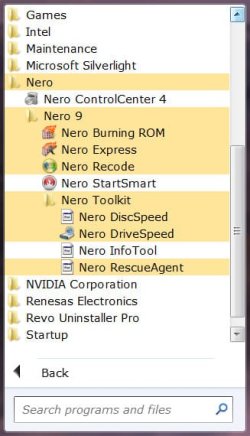
I was trying to find the location of a {Nero 9} subfolder that's visible in my Start Menu (see attached), appearing inside the {Nero} folder along with one shortcut: <Nero ControlCenter 4.lnk>.
 
Instead, this would be for the C:\Users\(user-name)\AppData folder.
·····················
I did find the shortcut where you indicated, or more specifically, here:
{C:\Users\‹user-name›\AppData\Roaming\Microsoft\Windows\Start Menu\Programs\Nero}

However, {Nero 9} was not there. Mistakenly I went looking for it in {C:\ProgramData\Application Data}, which is what got me into trouble (or not?).

With a little more poking around, I did find {Nero 9} here:
{C:\ProgramData\Microsoft\Windows\Start Menu\Programs\Nero}

Speaking of "or not," this brings me back to one of my questions from my original post:
After unhiding protected os files in Windows Explorer, I made my way to {C:\ProgramData\Application Data} and of course, I couldn't get any further (access denied).
So, I right-clicked on {Application Data} and then: Properties » /Security\ and listed under "Group or user names:" were the following:
Everyone
SYSTEM
Administrators (‹machine_name›\Administrators)

Under "Permissions for Administrators," only Special permissions had a checkmark -- a faded one, under the Allow column.

I say "were" and "had" because now Administrators... is gone, seemingly forever?!
. . . the question being, is this something I need to worry about; i.e., that Administrators... (along with its faded Special permissions Allow checkmark) is no longer listed under /Security\ ?? I more than suspect the answer is "No, no worries" but a little assurance would go a long way.

Well, I guess that's about it.

A little long-winded, I know... so thanks for bearing with me.

And thanks again for responding.
--Thri
 

Attachments

  • Thri's.Start.Menu-01.jpg
    Thri's.Start.Menu-01.jpg
    32 KB · Views: 5
Last edited:

My Computer My Computer

At a glance

Windows 7 Professional x64Intel® Core™ i7-2860QM20GBNVIDIA Quadro 1000M
Computer type
PC/Desktop
Computer Manufacturer/Model Number
Lenovo Thinkpad W520 (4270-CTO)
OS
Windows 7 Professional x64
CPU
Intel® Core™ i7-2860QM
Memory
20GB
Graphics Card(s)
NVIDIA Quadro 1000M
Screen Resolution
1920 × 1080
Browser
Mozilla Firefox
The reason why you cannot access "Application Data" or any folder that issues "Access Denied" is a junction neither you, nor the SYSTEM can access these. Because you DO NOT NEED to access them. These junctions are there for compatibility with old applications. The links in my signature explain the purpose of these junctions and you SHOULD LEAVE THEM ALONE.

From, Junction Dysfunction:
....


Of course, a new opportunity can create a new problem: An application that isn’t familiar with junctions may get stuck in an infinite loop when it attempts to perform a recursive directory-tree walk. To prevent this, the compatibility junctions permit directory traversal but explicitly deny List contents permission: If you try to navigate to these folders from Explorer or the command prompt, you’ll get an Access denied error.


The compatibility symbolic links grant enough access to accomplish their goal of providing compatibility for older applications that unwisely chose to hard-code directory names. But they don’t supply enough rope to let these older applications cause themselves serious harm. Blocking List contents also has the pleasant side effect of removing an attractive nuisance for new programmers, who may be tempted to continue the tradition of those older applications. Will this technique work to steer people in the right direction? Only time will tell.
 

My Computer My Computer

At a glance

Windows 10 Pro (x64)Intel Core i7-3930K (3.2GHz - 4.5GHz)4x Samsung 4GB PC3-12800 DDR3 (16GB 1600MHz)Nvidia Geforce GTX 690
Computer type
PC/Desktop
Computer Manufacturer/Model Number
Alienware Aurora ALX R4
OS
Windows 10 Pro (x64)
CPU
Intel Core i7-3930K (3.2GHz - 4.5GHz)
Motherboard
Alienware Aurora-R4 x79
Memory
4x Samsung 4GB PC3-12800 DDR3 (16GB 1600MHz)
Graphics Card(s)
Nvidia Geforce GTX 690
Sound Card
SteelSeries Siberia Elite
Monitor(s) Displays
Dell UltraSharp U3011
Screen Resolution
2560x1600
Hard Drives
Samsung 850 Pro 256 GB, Seagate 1TB Desktop Hybrid HDD, 2x Western Digital 4TB Green HDD
PSU
875W Some Dell PSU <.<
Case
Alienware Aurora ALX
Cooling
Custom Liquid Cooling (EK CPU & GPU blocks) dual EK 480RAD
Keyboard
Logitech G710+ Mechanical
Mouse
Logitech G700s
Internet Speed
Verizon Fios (50 mbps average)
Other Info
Server: Intel NUC D54250WYK: i5-4250U, 16GB, 256 GB mSATA, Windows Server 2012 R2
logicearth, does this mean that he does or doesn't need to worry, based on these two quotes:
Under "Permissions for Administrators," only Special permissions had a checkmark -- a faded one, under the Allow column.
I say "were" and "had" because now Administrators... is gone, seemingly forever?!
. . . the question being, is this something I need to worry about; i.e., that Administrators... (along with its faded Special permissions Allow checkmark) is no longer listed under /Security\ ?? I more than suspect the answer is "No, no worries" but a little assurance would go a long way.
 

My Computer My Computer

At a glance

Windows 7 Ultimate x64
OS
Windows 7 Ultimate x64
It's not a folder. It is, as other s have stated, a Junction Point. It is like a false Link/shortcut. It really doesn't exist.

If you tried to change permissions on these type folders or to the ROOT of the boot drive you may be facing a Re-Install of the OS.
 

My Computer My Computer

At a glance

7 x64
OS
7 x64
But it must really exist, in one form or another, in order to provide the desired functionality. And in this case it exists as an entity, like any other, on the disk in the file system.

And the problem (if there is one) that I would be worried about, is the fact that the administrators group has been removed from the permissions tab.
 
Last edited:

My Computer My Computer

At a glance

Windows 7 Ultimate x64
OS
Windows 7 Ultimate x64
And the problem (if there is one) that I would be worried about, is the fact that the administrators group has been removed from the permissions tab.
Yup... that's it in a nutshell. This is exactly what I'm concerned about. Although, still guardedly optimistic that someone in the know will get back to us and call me "safe at the plate." Leastwise, I'm hoping!

And thanks to one and all who've responded so far. There's still this remaining question, but at least I'm becoming better informed along the way.

:rolleyes: --Thri
__________________
PS - If I've put myself in a ticking timebomb predicament here, I guess I'm better off learning about that now, rather than later. If I end up having to start over from scratch, well... that would be fairly horrible; but better now than later; I'm still at the beginning of installing my apps.
 

My Computer My Computer

At a glance

Windows 7 Professional x64Intel® Core™ i7-2860QM20GBNVIDIA Quadro 1000M
Computer type
PC/Desktop
Computer Manufacturer/Model Number
Lenovo Thinkpad W520 (4270-CTO)
OS
Windows 7 Professional x64
CPU
Intel® Core™ i7-2860QM
Memory
20GB
Graphics Card(s)
NVIDIA Quadro 1000M
Screen Resolution
1920 × 1080
Browser
Mozilla Firefox
If it isn't too painful for you, you might try a system restore to an earlier restore point.

I too would like someone who knows the answer to chime in.
 

My Computer My Computer

At a glance

Windows 7 Ultimate x64
OS
Windows 7 Ultimate x64
You will not be able to open a junction point since it's not a folder, but only a symbolic link used for backwards compatibility to open another folder instead that may still be referenced by it's old location (the junction point) in previous versions of Windows from a older program. The links in logicearth's signature can give you more details about this if you like.

There's no need to worry about you removing the Administrators group by mistake from a junction point since you will not be able to open/access it anyway as it's not actually a folder that can be opened anyways.

@Thri,

Depending on what you need, the shortcuts in the Start Menu can be found at the locations in the tutorial below. If you needed to know where the exe file is that the shortcut runs, then you can right click on the shortcut, and click on Open File Location to be taken to it. :)

http://www.sevenforums.com/tutorials/296-start-menu-all-programs-add-delete-shortcuts.html
 
Last edited:

My Computer My Computer

At a glance

64-bit Windows 11 Pro for WorkstationsIntel i7-8700K OC'd to 5 GHz64 GB (4x16GB) G.SKILL TridentZ RGB DDR4 3600...ASUS ROG-STRIX-GTX1080TI-O11G-GAMING
Computer type
PC/Desktop
Computer Manufacturer/Model Number
Self built custom
OS
64-bit Windows 11 Pro for Workstations
CPU
Intel i7-8700K OC'd to 5 GHz
Motherboard
ASUS ROG Maximus XI Formula Z390
Memory
64 GB (4x16GB) G.SKILL TridentZ RGB DDR4 3600 MHz
Graphics Card(s)
ASUS ROG-STRIX-GTX1080TI-O11G-GAMING
Sound Card
Integrated
Monitor(s) Displays
2 x Samsung Odyssey G7 27"
Screen Resolution
2560x1440
Hard Drives
1TB Samsung 990 PRO M.2,
4TB Samsung 990 PRO PRO M.2,
TerraMaster F8 SSD Plus NAS
PSU
Seasonic Prime Titanium 850W
Case
Thermaltake Core P3
Cooling
Corsair Hydro H115i
Keyboard
Logitech wireless K800
Mouse
Logitech MX Master 4
Internet Speed
2 Gb/s Download and 100 Mb/s Upload
Antivirus
Malwarebyte Anti-Malware Premium
Browser
Google Chrome
Other Info
Logitech Z625 speaker system,
Logitech BRIO 4K Pro webcam,
HP Color LaserJet Pro MFP M477fdn,
APC SMART-UPS RT 1000 XL - SURT1000XLI,
Galaxy S23 Plus phone
Well I was trying and typing this when Brink posted so I guess it's no problem but here's my findings anyway.

Well I thought I'd give it a shot and try to remove the Administrators and even though it told me I was unable to change the permissions Administrators still disappeared.

So I opened up the security tab and clicked advanced. Clicked change permissions > Add > Entered Administrators > Clicked OK > Checked "full control" and set "apply to this folder only" as it was before > Clicked OK > Clicked Apply.

Here I got the Error applying permissions just clicked continue then ok on the seconded dialog. Clicked ok on the permissions window and again got the Error applying permissions dialog, clicked continue again then a different error dialog where I clicked retry. Next I just clicked cancel and what do you know it didn't add Administrators.

So I clicked the Owners and proceeded to change the owner to Administrators then closed the advanced permissions window. Next I preformed the same steps as before starting with clicking advanced. Got the same errors when I clicked on apply and then on ok but when I clicked cancel Administrators showed up on the permissions tab.

So I then simple set the Owner back to System.

Edit: I use a Administator account and have UAC turned off.
 

My Computer My Computer

At a glance

Windows 7 Ultimate x64Intel Pentium Dual Core E5200 2.5GHz (3.77GHz...Corsair 4GB DDR2 (4x1GB CM2X1024-6400C4)Palit GeForce GTS 250 (1024MB)
Computer Manufacturer/Model Number
Self built
OS
Windows 7 Ultimate x64
CPU
Intel Pentium Dual Core E5200 2.5GHz (3.77GHz OC)
Motherboard
Asus P5Q-E
Memory
Corsair 4GB DDR2 (4x1GB CM2X1024-6400C4)
Graphics Card(s)
Palit GeForce GTS 250 (1024MB)
Sound Card
On Board (ADI AD2000B 8ch HD)
Monitor(s) Displays
Samsung 32in LCD TV
Screen Resolution
1360x768
Hard Drives
2 x 1TB Samsung 103SJ (Raid0)
2 x External 500GB Samsung 502IJ (NexStar 3 HD Enclosures)
PSU
550W Antec Neo HE 550
Case
Antec P180
Cooling
Xigmatex Red Scorpion CPU Cooler. 3x120mm Fans
Keyboard
Logitech MX5000 Laser (Combo)
Mouse
Logitech MX5000 Laser (Combo)
Internet Speed
ADSL2+ (avg 10 Mbps Down, 0.80 Mbps up)
Other Info
Gigabyte GN-WP01GS 54g Wireless Lan Card
There's no need to worry about you removing the Administrators group by mistake from a junction point since you will not be able to open/access it anyway as it's not actually a folder that can be opened anyways.
Thanks, Brink. This is encouraging. I have some further thoughts/(questions?), but they'll have to wait: have to get ready for work.*

And thanks for the excellent tutorial on how to customize the Start Menu. I'm now back to the type of scheme I've grown used to in the XP world.

Later . . .
--Thri
________________
* ...which regularly gets in the way of life! ;)
 

My Computer My Computer

At a glance

Windows 7 Professional x64Intel® Core™ i7-2860QM20GBNVIDIA Quadro 1000M
Computer type
PC/Desktop
Computer Manufacturer/Model Number
Lenovo Thinkpad W520 (4270-CTO)
OS
Windows 7 Professional x64
CPU
Intel® Core™ i7-2860QM
Memory
20GB
Graphics Card(s)
NVIDIA Quadro 1000M
Screen Resolution
1920 × 1080
Browser
Mozilla Firefox
Well I was trying and typing this when Brink posted so I guess it's no problem but here's my findings anyway. . . .
Duzzy- I didn't see your post until after I replied to Brink. Anyway, now I really have more questions!

But again, they'll have to wait; work beckons. :(

--Thri
 

My Computer My Computer

At a glance

Windows 7 Professional x64Intel® Core™ i7-2860QM20GBNVIDIA Quadro 1000M
Computer type
PC/Desktop
Computer Manufacturer/Model Number
Lenovo Thinkpad W520 (4270-CTO)
OS
Windows 7 Professional x64
CPU
Intel® Core™ i7-2860QM
Memory
20GB
Graphics Card(s)
NVIDIA Quadro 1000M
Screen Resolution
1920 × 1080
Browser
Mozilla Firefox
Next I performed the same steps as before starting with clicking advanced. Got the same errors when I clicked on apply and then on ok but when I clicked cancel Administrators showed up on the permissions tab.
Duzzy- did you also get restored, the faded checkmark for Allowing Special permissions for Administrators ?? What I'm wondering is: were you able to essentially restore the permissions listing to its original condition?
--Thri
 

My Computer My Computer

At a glance

Windows 7 Professional x64Intel® Core™ i7-2860QM20GBNVIDIA Quadro 1000M
Computer type
PC/Desktop
Computer Manufacturer/Model Number
Lenovo Thinkpad W520 (4270-CTO)
OS
Windows 7 Professional x64
CPU
Intel® Core™ i7-2860QM
Memory
20GB
Graphics Card(s)
NVIDIA Quadro 1000M
Screen Resolution
1920 × 1080
Browser
Mozilla Firefox
Next I performed the same steps as before starting with clicking advanced. Got the same errors when I clicked on apply and then on ok but when I clicked cancel Administrators showed up on the permissions tab.
Duzzy- did you also get restored, the faded checkmark for Allowing Special permissions for Administrators ?? What I'm wondering is: were you able to essentially restore the permissions listing to its original condition?
--Thri
Well original as I know of. I didn't tick the box "Replace all child object permissions.....", only the steps I specified.

I actually done it twice because the first time I forgot about the "Apply to" drop down box and the Administrators just had all permissions checked except Special but the second time I changed it to "This folder only" (what it was) I got only the faded checkmark for Allow Special Permissions checked.
 

My Computer My Computer

At a glance

Windows 7 Ultimate x64Intel Pentium Dual Core E5200 2.5GHz (3.77GHz...Corsair 4GB DDR2 (4x1GB CM2X1024-6400C4)Palit GeForce GTS 250 (1024MB)
Computer Manufacturer/Model Number
Self built
OS
Windows 7 Ultimate x64
CPU
Intel Pentium Dual Core E5200 2.5GHz (3.77GHz OC)
Motherboard
Asus P5Q-E
Memory
Corsair 4GB DDR2 (4x1GB CM2X1024-6400C4)
Graphics Card(s)
Palit GeForce GTS 250 (1024MB)
Sound Card
On Board (ADI AD2000B 8ch HD)
Monitor(s) Displays
Samsung 32in LCD TV
Screen Resolution
1360x768
Hard Drives
2 x 1TB Samsung 103SJ (Raid0)
2 x External 500GB Samsung 502IJ (NexStar 3 HD Enclosures)
PSU
550W Antec Neo HE 550
Case
Antec P180
Cooling
Xigmatex Red Scorpion CPU Cooler. 3x120mm Fans
Keyboard
Logitech MX5000 Laser (Combo)
Mouse
Logitech MX5000 Laser (Combo)
Internet Speed
ADSL2+ (avg 10 Mbps Down, 0.80 Mbps up)
Other Info
Gigabyte GN-WP01GS 54g Wireless Lan Card
Back
Top