Hello all, newbie here, so be gentle!
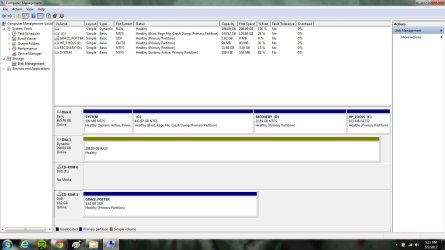
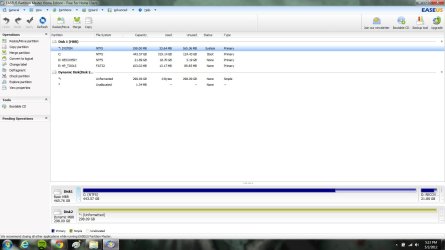
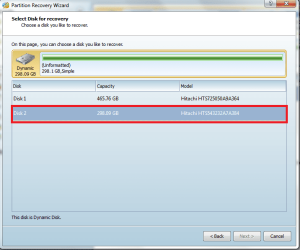
I have a HP laptop that is running windows 7. It has 2 hard drives installed, and has been running fine for months like this. Yesterday while messing around (probably somewhere I shouldn't have been) I somehow unallocated my 2nd hdd. I am not sure exactly how I did this, but know it was in 'disk management' area. This drive contains all of my music and would HATE to lose this data. Does anyone have any simple fixes for my problem. I am sure you might need more info from me, but not sure what to tell you, so ask away please!
I have a side problem to discuss too...but we will focus on this one for now!
Thanks in advance!!
Aaron
I have a HP laptop that is running windows 7. It has 2 hard drives installed, and has been running fine for months like this. Yesterday while messing around (probably somewhere I shouldn't have been) I somehow unallocated my 2nd hdd. I am not sure exactly how I did this, but know it was in 'disk management' area. This drive contains all of my music and would HATE to lose this data. Does anyone have any simple fixes for my problem. I am sure you might need more info from me, but not sure what to tell you, so ask away please!
I have a side problem to discuss too...but we will focus on this one for now!
Thanks in advance!!
Aaron
My Computer
At a glance
Windows 7 Home Premium x64AMD Phenomý II Triple-Core Mobile Processor N...4GB DDR3 System Memory (2 DIMM)ATI Mobility Radeoný HD 5650 graphics with 10...
- Computer Manufacturer/Model Number
- HP Pavilion dv7-4060us
- OS
- Windows 7 Home Premium x64
- CPU
- AMD Phenomý II Triple-Core Mobile Processor N830 2.10GHz
- Memory
- 4GB DDR3 System Memory (2 DIMM)
- Graphics Card(s)
- ATI Mobility Radeoný HD 5650 graphics with 1024MB DDR
- Monitor(s) Displays
- 17.3" diagonal High Definition+(8) HP BrightView LED Display
- Screen Resolution
- 1600 x 900
- Hard Drives
- 500GB (7200RPM) Hard Drive (SATA) with HP ProtectSmart Hard Drive Protection