
Hard drive letter messed up after changing motherboard

sylphan

New member
Local time
3:12 PM
Messages
14
Hello,

Nice to meet you

I have problem, after changing motherboard and cpu from AMD and intel, my windows go to infinite repair loop and drive letter messed up (I have 5 hardrive, with 7 partition), trying many way, failed to recover the windows, so I decided to reinstall my windows, using 1 hardrive, success, but, when I attach the rest hardrive, the drive letter messed up again, my OS drive become D and one of my hardrive become C, windows cannot boot, even failed when I try to reinstall again (cannot continue after first restart) & when choosing drive, there are warning that's all my drive unable to became boot device

now, how I can reinstall the windows?

Thanks,

Sylphan
 

My Computer My Computer

At a glance

Windows 7 Ultimate x64i5 3570k2 x 8 GB Corsair VenganceSapphire HD 5850
OS
Windows 7 Ultimate x64
CPU
i5 3570k
Motherboard
Asrock z77 Extreme6
Memory
2 x 8 GB Corsair Vengance
Graphics Card(s)
Sapphire HD 5850
Hard Drives
300 GB WD Velociraptor
320 GB WD Green
1 TB Seagate Barracuda
1,5 TB WD Green
2 TB WD Green
30 GB Corsair Accelerator
PSU
Seasonic M12II - 620 watt
Case
Cooler Master Storm Trooper
Cooling
Hyper 212+
Other Info
Unusable because drive letter messed up
hello, anyone can help? I just want to rid the drive letter, so I can install the windows & re-assign the hard rive...
 

My Computer My Computer

At a glance

Windows 7 Ultimate x64i5 3570k2 x 8 GB Corsair VenganceSapphire HD 5850
OS
Windows 7 Ultimate x64
CPU
i5 3570k
Motherboard
Asrock z77 Extreme6
Memory
2 x 8 GB Corsair Vengance
Graphics Card(s)
Sapphire HD 5850
Hard Drives
300 GB WD Velociraptor
320 GB WD Green
1 TB Seagate Barracuda
1,5 TB WD Green
2 TB WD Green
30 GB Corsair Accelerator
PSU
Seasonic M12II - 620 watt
Case
Cooler Master Storm Trooper
Cooling
Hyper 212+
Other Info
Unusable because drive letter messed up
Have you been to your disk manager yet? And reassign the drive letter there.
 

My Computer My Computer

At a glance

Windows 7 ultimate 64 bits
OS
Windows 7 ultimate 64 bits
I would personally reformat the drives using a secondary computer. Might be faster.
 

My Computer My Computer

At a glance

Windows 7 ultimate 64 bits
OS
Windows 7 ultimate 64 bits
now, how I can reinstall the windows?

If you have a valid 25 character Product Key and a Windows installation disk that matches the Product Key, disconnect all but one hard drive and reinstall.

Then activate with the Product Key.

The new installation will be drive C.

Then reconnect the other hard drives.
 

My Computer My Computer

At a glance

Windows 7 Home Premium SP1, 64-bitIntel Skylake i5-6600K, not overclocked8 GB HyperX DDR4-2666 (2 x 4 GB)none; graphics are integrated on CPU
Computer type
PC/Desktop
Computer Manufacturer/Model Number
Ignatz Special; 4 speed manual gearbox; factory air conditioning; one of one
OS
Windows 7 Home Premium SP1, 64-bit
CPU
Intel Skylake i5-6600K, not overclocked
Motherboard
AsRock Z170M Extreme 4, micro ATX
Memory
8 GB HyperX DDR4-2666 (2 x 4 GB)
Graphics Card(s)
none; graphics are integrated on CPU
Sound Card
onboard: Realtek ALC1150; external: USB Behringer UF0-202
Monitor(s) Displays
Dell S2340M 23 inch IPS
Screen Resolution
1600 x 900
Hard Drives
System: Crucial MX100 series SSD, 128 GB;
Data: Samsung Spinpoint 103SJ, 1 TB;
Backup: WD Caviar Green WD30EZRX-00D8PB0, 3 TB
PSU
Rosewill SilentNight 500 watt fanless, semi-modular
Case
Antec Solo II
Cooling
Noctua NH-U12S; Noctua F12 intake, Noctua S12A exhaust
Keyboard
Microsoft 200 6JH-00001 USB
Mouse
Dell or Microsoft optical wired; USB
Antivirus
Microsoft Security Essentials and Malwarebytes Premium
Browser
Pale Moon
Other Info
All fans PWM; speeds at idle: CPU circa 500 rpm; intake circa 600 rpm; exhaust circa 600 rpm; CPU temps 27 idle and 47 C load in a warm room (27 C/81 F) when running Intel Extreme Tuning Utility stress test.
I would personally reformat the drives using a secondary computer. Might be faster.

Have you been to your disk manager yet? And reassign the drive letter there.
Thanks for reply, I had format my OS drive, install fresh, only using 1 hard drive, but when rest hard drive added, all messed up again


now, how I can reinstall the windows?

If you have a valid 25 character Product Key and a Windows installation disk that matches the Product Key, disconnect all but one hard drive and reinstall.

Then activate with the Product Key.

The new installation will be drive C.

Then reconnect the other hard drives.


Thanks for reply, I have try that way, but when I reconnect the other hard drives, the drive c become d... everything messed up again, cannot boot & cannot finish the installation....
 
Last edited:

My Computer My Computer

At a glance

Windows 7 Ultimate x64i5 3570k2 x 8 GB Corsair VenganceSapphire HD 5850
OS
Windows 7 Ultimate x64
CPU
i5 3570k
Motherboard
Asrock z77 Extreme6
Memory
2 x 8 GB Corsair Vengance
Graphics Card(s)
Sapphire HD 5850
Hard Drives
300 GB WD Velociraptor
320 GB WD Green
1 TB Seagate Barracuda
1,5 TB WD Green
2 TB WD Green
30 GB Corsair Accelerator
PSU
Seasonic M12II - 620 watt
Case
Cooler Master Storm Trooper
Cooling
Hyper 212+
Other Info
Unusable because drive letter messed up
Hello, my motherboard is Asrock z77 Extreme6, 6 sata port populated... but the drive letter messed up even after re-install the windows... anyone can help?
 

My Computer My Computer

At a glance

Windows 7 Ultimate x64i5 3570k2 x 8 GB Corsair VenganceSapphire HD 5850
OS
Windows 7 Ultimate x64
CPU
i5 3570k
Motherboard
Asrock z77 Extreme6
Memory
2 x 8 GB Corsair Vengance
Graphics Card(s)
Sapphire HD 5850
Hard Drives
300 GB WD Velociraptor
320 GB WD Green
1 TB Seagate Barracuda
1,5 TB WD Green
2 TB WD Green
30 GB Corsair Accelerator
PSU
Seasonic M12II - 620 watt
Case
Cooler Master Storm Trooper
Cooling
Hyper 212+
Other Info
Unusable because drive letter messed up
Thanks for reply, I have try that way, but when I reconnect the other hard drives, the drive c become d... everything messed up again, cannot boot & cannot finish the installation....


DON'T reconnect the other drives until the installation is FINISHED.


Reboot after you complete the installation with only 1 drive attached.

Then look in Windows Disk Management and post a screenshot.

All of this with ONLY 1 drive connected.

Worry about the other drives later.
 

My Computer My Computer

At a glance

Windows 7 Home Premium SP1, 64-bitIntel Skylake i5-6600K, not overclocked8 GB HyperX DDR4-2666 (2 x 4 GB)none; graphics are integrated on CPU
Computer type
PC/Desktop
Computer Manufacturer/Model Number
Ignatz Special; 4 speed manual gearbox; factory air conditioning; one of one
OS
Windows 7 Home Premium SP1, 64-bit
CPU
Intel Skylake i5-6600K, not overclocked
Motherboard
AsRock Z170M Extreme 4, micro ATX
Memory
8 GB HyperX DDR4-2666 (2 x 4 GB)
Graphics Card(s)
none; graphics are integrated on CPU
Sound Card
onboard: Realtek ALC1150; external: USB Behringer UF0-202
Monitor(s) Displays
Dell S2340M 23 inch IPS
Screen Resolution
1600 x 900
Hard Drives
System: Crucial MX100 series SSD, 128 GB;
Data: Samsung Spinpoint 103SJ, 1 TB;
Backup: WD Caviar Green WD30EZRX-00D8PB0, 3 TB
PSU
Rosewill SilentNight 500 watt fanless, semi-modular
Case
Antec Solo II
Cooling
Noctua NH-U12S; Noctua F12 intake, Noctua S12A exhaust
Keyboard
Microsoft 200 6JH-00001 USB
Mouse
Dell or Microsoft optical wired; USB
Antivirus
Microsoft Security Essentials and Malwarebytes Premium
Browser
Pale Moon
Other Info
All fans PWM; speeds at idle: CPU circa 500 rpm; intake circa 600 rpm; exhaust circa 600 rpm; CPU temps 27 idle and 47 C load in a warm room (27 C/81 F) when running Intel Extreme Tuning Utility stress test.
Thanks for reply,

I reconnect it after finished all installation, installing driver, & some essential program... (7zip, Foxit, LibreOffice)
then I shutdown my PC & reconnect the rest hard drive, the hard drive letter messed again... windows refuses to boot

Okay then, I'll do it again & post screenshot of my Windows Disk Management, but I'm working in office now, so maybe latter after I'm go home
 

My Computer My Computer

At a glance

Windows 7 Ultimate x64i5 3570k2 x 8 GB Corsair VenganceSapphire HD 5850
OS
Windows 7 Ultimate x64
CPU
i5 3570k
Motherboard
Asrock z77 Extreme6
Memory
2 x 8 GB Corsair Vengance
Graphics Card(s)
Sapphire HD 5850
Hard Drives
300 GB WD Velociraptor
320 GB WD Green
1 TB Seagate Barracuda
1,5 TB WD Green
2 TB WD Green
30 GB Corsair Accelerator
PSU
Seasonic M12II - 620 watt
Case
Cooler Master Storm Trooper
Cooling
Hyper 212+
Other Info
Unusable because drive letter messed up
sylphan,

Simple:

  1. Disconnect all drives except for the one where you want to install Win 7.
  2. Wipe the hard disk clean using diskpart.
  3. Install win 7.

==========================
now here's how to wipe that hard disk clean using your Win 7 DVD.
1. boot up your Win 7 DVD
2. at the very first dialog, hit SHIFT + F!0 key combo.
that will get you to a command prompt, that looks like this:
X:>
now enter these commands:

USE THE DISKPART PROGRAM TO “CLEAN” THE HARD DISK
Type the commands shown, hitting the Enter key after each.

Do not proceed to the next command until the current command is finished.

· DISKPART (the command prompt will change to DISKPART>)
· LIST DISK (this will list the disks present)
· SELECT DISK 0 (assuming disk zero is the desired hard disk)
· DETAIL DISK (this will show you info regarding the disk you selected)
· CLEAN ALL (this is the command to write zeros to entire disk)
This can take half a day for a 2 Terabyte disk.
· EXIT(this will exit you from the DiskPart program)
· EXIT(this will exit you back to the Windows 7 install program)
 

My Computer My Computer

At a glance

MS Windows 7 Ultimate SP1 64-bitAMD A10-4600M6.00 GB Dual-Channel DDR3 @ 798MHz (11-11-12-28)AMD Radeon HD 7660G
Computer Manufacturer/Model Number
Toshiba Satellite S875D-S7239 laptop
OS
MS Windows 7 Ultimate SP1 64-bit
CPU
AMD A10-4600M
Motherboard
AMD Pumori (Socket FT1)
Memory
6.00 GB Dual-Channel DDR3 @ 798MHz (11-11-12-28)
Graphics Card(s)
AMD Radeon HD 7660G
Sound Card
High Definition Audio Device
Monitor(s) Displays
Generic PnP Monitor (1600x900@60Hz)
Screen Resolution
1600x900@60Hz
Hard Drives
SSD 119GB Corsair CSSD-V128GB2 ATA Device
Keyboard
Standard PS/2 Keyboard
Mouse
HP Wireless Optical Mobile Mouse Model FHA-3410
Internet Speed
What the local pub, local coffee shop offers.
Other Info
Optical Drive:MATSHITA BD-CMB UJ160B ATA Device


Also have an Asus ha1002xp netbook with Win 7 Ultimate installed.
Thanks for reply,

Clean hard disk... formatting? the Hard drive needed to be cleaned using diskpart is just an OS drive isn't? the problem lies when I re-connect the rest hard drive... the drive letter will be messed up... but I'll try it latter....
 

My Computer My Computer

At a glance

Windows 7 Ultimate x64i5 3570k2 x 8 GB Corsair VenganceSapphire HD 5850
OS
Windows 7 Ultimate x64
CPU
i5 3570k
Motherboard
Asrock z77 Extreme6
Memory
2 x 8 GB Corsair Vengance
Graphics Card(s)
Sapphire HD 5850
Hard Drives
300 GB WD Velociraptor
320 GB WD Green
1 TB Seagate Barracuda
1,5 TB WD Green
2 TB WD Green
30 GB Corsair Accelerator
PSU
Seasonic M12II - 620 watt
Case
Cooler Master Storm Trooper
Cooling
Hyper 212+
Other Info
Unusable because drive letter messed up
sylphan,
Just follow the procedure given.

We've helped hundreds if not thousands with problems like yours.

Some of us have been working with computers since before you were born.

Keep the faith!
 

My Computer My Computer

At a glance

MS Windows 7 Ultimate SP1 64-bitAMD A10-4600M6.00 GB Dual-Channel DDR3 @ 798MHz (11-11-12-28)AMD Radeon HD 7660G
Computer Manufacturer/Model Number
Toshiba Satellite S875D-S7239 laptop
OS
MS Windows 7 Ultimate SP1 64-bit
CPU
AMD A10-4600M
Motherboard
AMD Pumori (Socket FT1)
Memory
6.00 GB Dual-Channel DDR3 @ 798MHz (11-11-12-28)
Graphics Card(s)
AMD Radeon HD 7660G
Sound Card
High Definition Audio Device
Monitor(s) Displays
Generic PnP Monitor (1600x900@60Hz)
Screen Resolution
1600x900@60Hz
Hard Drives
SSD 119GB Corsair CSSD-V128GB2 ATA Device
Keyboard
Standard PS/2 Keyboard
Mouse
HP Wireless Optical Mobile Mouse Model FHA-3410
Internet Speed
What the local pub, local coffee shop offers.
Other Info
Optical Drive:MATSHITA BD-CMB UJ160B ATA Device


Also have an Asus ha1002xp netbook with Win 7 Ultimate installed.
Yeah, I'll try it latter because I'm in workplace now & far off from my PC, I'll post the result after work :)

Thanks for help
 

My Computer My Computer

At a glance

Windows 7 Ultimate x64i5 3570k2 x 8 GB Corsair VenganceSapphire HD 5850
OS
Windows 7 Ultimate x64
CPU
i5 3570k
Motherboard
Asrock z77 Extreme6
Memory
2 x 8 GB Corsair Vengance
Graphics Card(s)
Sapphire HD 5850
Hard Drives
300 GB WD Velociraptor
320 GB WD Green
1 TB Seagate Barracuda
1,5 TB WD Green
2 TB WD Green
30 GB Corsair Accelerator
PSU
Seasonic M12II - 620 watt
Case
Cooler Master Storm Trooper
Cooling
Hyper 212+
Other Info
Unusable because drive letter messed up
Hello, I have tried the procedure, 1 Hard drive attached, normal, no problem, when 2 drive attached, it's ok, nothing mess, but when adding the partitioned (2 partition) drive, problem occured, cannot boot, and when detach the rest drive and boot, there error say my windows need to be repaired.


any suggestion?

and I have another question, I need access data from one dynamic Hard Drive, but the hard drive cannot be activated using docking that's connected to a Laptop via USB, How I can access the drive?


@ignatzatsonic
I'm sorry I forgot to take the screenshoot, I'll try post it later
 

My Computer My Computer

At a glance

Windows 7 Ultimate x64i5 3570k2 x 8 GB Corsair VenganceSapphire HD 5850
OS
Windows 7 Ultimate x64
CPU
i5 3570k
Motherboard
Asrock z77 Extreme6
Memory
2 x 8 GB Corsair Vengance
Graphics Card(s)
Sapphire HD 5850
Hard Drives
300 GB WD Velociraptor
320 GB WD Green
1 TB Seagate Barracuda
1,5 TB WD Green
2 TB WD Green
30 GB Corsair Accelerator
PSU
Seasonic M12II - 620 watt
Case
Cooler Master Storm Trooper
Cooling
Hyper 212+
Other Info
Unusable because drive letter messed up
You need to post that disk management snapshot.

For god's sake, stay away from dynamic drives. No home user system needs such or can benefit such but they durn well can get more than their far share of problems.

No dynamic disks unless you want problems.
 

My Computer My Computer

At a glance

MS Windows 7 Ultimate SP1 64-bitAMD A10-4600M6.00 GB Dual-Channel DDR3 @ 798MHz (11-11-12-28)AMD Radeon HD 7660G
Computer Manufacturer/Model Number
Toshiba Satellite S875D-S7239 laptop
OS
MS Windows 7 Ultimate SP1 64-bit
CPU
AMD A10-4600M
Motherboard
AMD Pumori (Socket FT1)
Memory
6.00 GB Dual-Channel DDR3 @ 798MHz (11-11-12-28)
Graphics Card(s)
AMD Radeon HD 7660G
Sound Card
High Definition Audio Device
Monitor(s) Displays
Generic PnP Monitor (1600x900@60Hz)
Screen Resolution
1600x900@60Hz
Hard Drives
SSD 119GB Corsair CSSD-V128GB2 ATA Device
Keyboard
Standard PS/2 Keyboard
Mouse
HP Wireless Optical Mobile Mouse Model FHA-3410
Internet Speed
What the local pub, local coffee shop offers.
Other Info
Optical Drive:MATSHITA BD-CMB UJ160B ATA Device


Also have an Asus ha1002xp netbook with Win 7 Ultimate installed.
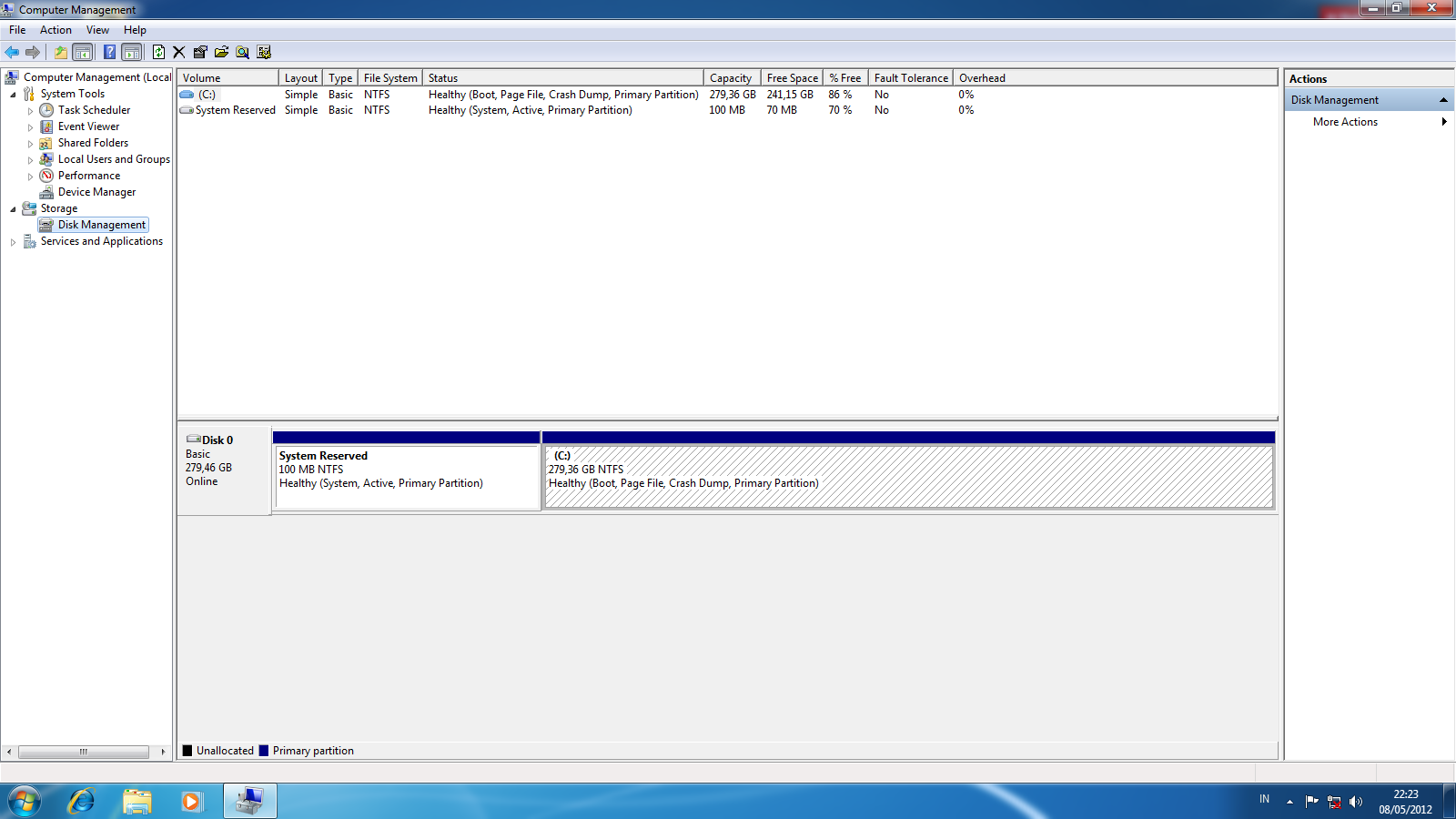
Here the screenshot with 1 Hard drive (WD Velociraptor 300 GB)
fZzK1.png


I don't know the problem lies, but I'm afraid to reattach the rest...

For god's sake, stay away from dynamic drives. No home user system needs such or can benefit such but they durn well can get more than their far share of problems.

No dynamic disks unless you want problems.

Well, I made the dynamic disk long time ago, when the drive was OS drive, partitioned, I want to remove partition without removing the data, windows suggested to make dynamic, and I click ok.... I admit I made a mistake...so how I can access the data without reformatting it? or better if I made new thread for this?
 

My Computer My Computer

At a glance

Windows 7 Ultimate x64i5 3570k2 x 8 GB Corsair VenganceSapphire HD 5850
OS
Windows 7 Ultimate x64
CPU
i5 3570k
Motherboard
Asrock z77 Extreme6
Memory
2 x 8 GB Corsair Vengance
Graphics Card(s)
Sapphire HD 5850
Hard Drives
300 GB WD Velociraptor
320 GB WD Green
1 TB Seagate Barracuda
1,5 TB WD Green
2 TB WD Green
30 GB Corsair Accelerator
PSU
Seasonic M12II - 620 watt
Case
Cooler Master Storm Trooper
Cooling
Hyper 212+
Other Info
Unusable because drive letter messed up
Since I never mess around with dynamic disks, than any recommendations I would make would not be from first-hand experience.

I can mouth things others have said but I'm not comfortable with that.
 

My Computer My Computer

At a glance

MS Windows 7 Ultimate SP1 64-bitAMD A10-4600M6.00 GB Dual-Channel DDR3 @ 798MHz (11-11-12-28)AMD Radeon HD 7660G
Computer Manufacturer/Model Number
Toshiba Satellite S875D-S7239 laptop
OS
MS Windows 7 Ultimate SP1 64-bit
CPU
AMD A10-4600M
Motherboard
AMD Pumori (Socket FT1)
Memory
6.00 GB Dual-Channel DDR3 @ 798MHz (11-11-12-28)
Graphics Card(s)
AMD Radeon HD 7660G
Sound Card
High Definition Audio Device
Monitor(s) Displays
Generic PnP Monitor (1600x900@60Hz)
Screen Resolution
1600x900@60Hz
Hard Drives
SSD 119GB Corsair CSSD-V128GB2 ATA Device
Keyboard
Standard PS/2 Keyboard
Mouse
HP Wireless Optical Mobile Mouse Model FHA-3410
Internet Speed
What the local pub, local coffee shop offers.
Other Info
Optical Drive:MATSHITA BD-CMB UJ160B ATA Device


Also have an Asus ha1002xp netbook with Win 7 Ultimate installed.
Oh, okay then, I'll make another thread for my dynamic drive problem... :)

but now, is there any error in my disk management? that's was default setting
 

My Computer My Computer

At a glance

Windows 7 Ultimate x64i5 3570k2 x 8 GB Corsair VenganceSapphire HD 5850
OS
Windows 7 Ultimate x64
CPU
i5 3570k
Motherboard
Asrock z77 Extreme6
Memory
2 x 8 GB Corsair Vengance
Graphics Card(s)
Sapphire HD 5850
Hard Drives
300 GB WD Velociraptor
320 GB WD Green
1 TB Seagate Barracuda
1,5 TB WD Green
2 TB WD Green
30 GB Corsair Accelerator
PSU
Seasonic M12II - 620 watt
Case
Cooler Master Storm Trooper
Cooling
Hyper 212+
Other Info
Unusable because drive letter messed up
there is no error in disk management.

Make your life easy and straight-forward. Forget dynamic disks which have no place in a standalone system.

Dynamic disks are designed for other environments and even there they are only an emergency measure.
 

My Computer My Computer

At a glance

MS Windows 7 Ultimate SP1 64-bitAMD A10-4600M6.00 GB Dual-Channel DDR3 @ 798MHz (11-11-12-28)AMD Radeon HD 7660G
Computer Manufacturer/Model Number
Toshiba Satellite S875D-S7239 laptop
OS
MS Windows 7 Ultimate SP1 64-bit
CPU
AMD A10-4600M
Motherboard
AMD Pumori (Socket FT1)
Memory
6.00 GB Dual-Channel DDR3 @ 798MHz (11-11-12-28)
Graphics Card(s)
AMD Radeon HD 7660G
Sound Card
High Definition Audio Device
Monitor(s) Displays
Generic PnP Monitor (1600x900@60Hz)
Screen Resolution
1600x900@60Hz
Hard Drives
SSD 119GB Corsair CSSD-V128GB2 ATA Device
Keyboard
Standard PS/2 Keyboard
Mouse
HP Wireless Optical Mobile Mouse Model FHA-3410
Internet Speed
What the local pub, local coffee shop offers.
Other Info
Optical Drive:MATSHITA BD-CMB UJ160B ATA Device


Also have an Asus ha1002xp netbook with Win 7 Ultimate installed.
After second try, now, all main hard drive can be used normally again~:)

but, now the new problem, when my SSD caching Corsair Accelerator 30 gb attached, windows refuses to boot...

why it's happening?
 

My Computer My Computer

At a glance

Windows 7 Ultimate x64i5 3570k2 x 8 GB Corsair VenganceSapphire HD 5850
OS
Windows 7 Ultimate x64
CPU
i5 3570k
Motherboard
Asrock z77 Extreme6
Memory
2 x 8 GB Corsair Vengance
Graphics Card(s)
Sapphire HD 5850
Hard Drives
300 GB WD Velociraptor
320 GB WD Green
1 TB Seagate Barracuda
1,5 TB WD Green
2 TB WD Green
30 GB Corsair Accelerator
PSU
Seasonic M12II - 620 watt
Case
Cooler Master Storm Trooper
Cooling
Hyper 212+
Other Info
Unusable because drive letter messed up
Back
Top