Solved Asus P5Q-E motherboard bios update utility software won't install?

rting

New member
Local time
11:29 AM
Messages
73

Attachments

  • AFUDOS236 will not run 1.PNG
    AFUDOS236 will not run 1.PNG
    7.5 KB · Views: 58

My Computer My Computer

At a glance

Win 7 Pro 64 bit
Computer Manufacturer/Model Number
Asus P5Q-e, Asus N73Jq, Lenovo T420s
OS
Win 7 Pro 64 bit
Motherboard
Asus P5Q-e

My Computer My Computer

At a glance

win 7 X64 Ultimate SP1I3770KG Skill F3-14900CL9-4GBXL x 4NVIDIA GeForce GTX670 + Intel 4000
Computer Manufacturer/Model Number
BGC (Bob's Garage Crew)
OS
win 7 X64 Ultimate SP1
CPU
I3770K
Motherboard
Asus P8Z77-V Deluxe
Memory
G Skill F3-14900CL9-4GBXL x 4
Graphics Card(s)
NVIDIA GeForce GTX670 + Intel 4000
Sound Card
Realtek HD 5.1 (MOB)
Monitor(s) Displays
Asus VW224T (1)
Screen Resolution
1920 x 1080
Hard Drives
SATA Corsair Force GT 2.5" 180GB (System) Sata 3
OCZ Vertex3 120GB
OCZ Vertex 2 120GB 2.5" SATA II
ST31000524AS 1000.2GB
WD15EARS (External)
PSU
CoolerMaster 1000 Watt
Case
CoolerMaster HAF X
Cooling
CPU -- CoolerMaster 520N
Keyboard
MS Wireless 3000 V2
Mouse
MS Wireless 3000 V2
Internet Speed
Cable
Antivirus
Norton Internet Security
Browser
IE9
Other Info
AMI Bios 1805
OC'd 3%
I am trying to update the BIOS and went here to use their update utility:

ASUS - Motherboards- ASUS P5Q-E

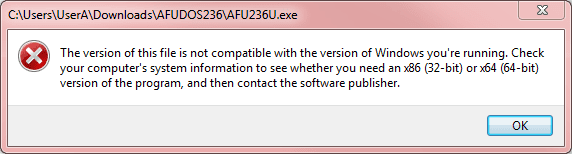
However, the software Afudos BIOS update tool V2.36 will not load (3rd item of the above web page's list)!?!? :mad::mad::mad:

What do I do now? Any other BIOS update utility compatible to the Asus P5Q-E?

I am having these problems: http://www.sevenforums.com/crashes-debugging/228589-bsod-when-screen-saver-trying-start.html
You've got the wrong file.

AFUDOS is the standalone BIOS update utility that runs under DOS. It should be added say to a USB drive that's been formatted to boot DOS, and you put AFUDOS and the proper ROM files on that USB drive. Then you boot your machine to that USB drive (be sure you adjust your BIO to boot from that USB drive before booting from floppy, or CD, or hard disk, in its boot sequence setup) and you run that AFUDOS program from DOS, pointing it to the ROM file you want to apply.


If you want to update your BIOS under Win7, you need to use that particular utility program... it's called ASUS Update 7.16.01 Beta Version for Windows 7.

For some crazy reason ASUS put it in their "Utilities" section, rather than in the "BIOS Utilities" section where you'd expect it to be.

Anyway, the AFUDOS utility (for DOS) is in "BIOS Utilities" while the ASUS Update 7.16.01 utility (for use under Win7) is in the "Utilities" section. Expand "Utilities", scroll down to the ASUS Update 7.16.01 item, and download it. That's what you're looking for to do the BIOS update under Win7 (assuming you've also already downloaded the ROM file itself).

Or, you can use AFUDOS if you plant it and the ROM on a DOS standalone bootable USB drive (or floppy).
 

My Computer My Computer

At a glance

Windows 7 Pro x64 (1), Win7 Pro X64 (2)i5-3350p 3.1Ghz/6MB-cache (1); E8400 3.0Ghz/6...8GB PC3-12800 DDR3 (1); 4GB PC3-10600 DDR3 (2)ATI HD7750 (1), (see TV cards); ATI R7 250 (2)
Computer type
PC/Desktop
Computer Manufacturer/Model Number
Home-built, two systems (1) and (2)
OS
Windows 7 Pro x64 (1), Win7 Pro X64 (2)
CPU
i5-3350p 3.1Ghz/6MB-cache (1); E8400 3.0Ghz/6MB-cache (2)
Motherboard
ASUS P8Z77-V Pro (1); ASUS P5Q3 (2)
Memory
8GB PC3-12800 DDR3 (1); 4GB PC3-10600 DDR3 (2)
Graphics Card(s)
ATI HD7750 (1), (see TV cards); ATI R7 250 (2)
Sound Card
Realtek ALC892 HD Audio (1); Realtek ALC1200 HD Audio (2)
Monitor(s) Displays
Eizo HD2441W LCD, Eizo S2433W (1); Eizo 24" S2433W (2)
Screen Resolution
1920x1200, 1920x1200 (1); 1920x1200 (2)
Hard Drives
(1) 1TB SATA-II (7200RPM), 2x2TB SATA-III (7200RPM), 250GB SATA-III (10000RPM) for OS; 2x2TB external USB 3.0

(2) 320GB SATA-II (7200RPM), 750GB SATA-II (7200RPM), 150GB SATA-II (10000RPM) for OS; 2TB external USB 3.0
PSU
Nesteq ECS-6001 600W (1); Nesteq ECS-5001 500W (2)
Case
Acousti-Case 360 (1) and (2)
Cooling
Noctua NH-U12P SE2 for CPU, 2x120mm case fans (1) and (2)
Keyboard
IBM PS/2 (1) and (2)
Mouse
Logitech MX Revolution wireless (1); Microsoft wired (2)
Internet Speed
100mbps down / 10mbps up
Antivirus
Microsoft Security Essentials; Malwarebyte Anti-Malware Pro
Browser
Firefox
Other Info
Ceton InfiniTV 4-tuner cablecard-enabled TV card as well as Hauppauge HVR-2250 OTA/ATSC 2-tuner TV card in (1), running under Win7 WMC
What? Wrong file?

You know what, FWIW, further down the update list, the LAN's driver - from Marvell - was outdated too. I had to go to Marvell's website to get the latest version!

:mad:

Will look for the right file first .....................................
 

My Computer My Computer

At a glance

Win 7 Pro 64 bit
Computer Manufacturer/Model Number
Asus P5Q-e, Asus N73Jq, Lenovo T420s
OS
Win 7 Pro 64 bit
Motherboard
Asus P5Q-e
What? Wrong file?
Did you read what I said?

You cannot run AFUDOS under Win7. It's a DOS program intended for use with a standalone bootable DOS floppy or USB drive, on which AFUDOS and the related ROM file for the new BIOS upgrade has been placed. You boot to DOS, and run AFUDOS, pointing to the new ROM.

So if you try to run AFUDOS under Win7 it will not work. That's what I meant by "wrong file". It's the wrong program to use if you want to update the BIOS under Win7!!! It will only work under DOS.

===> WRONG FILE IS AFUDOS (unless you want to update your BIOS with a DOS bootable USB drive on which both AFUDOS and the new ROM has been placed, in which case AFUDOS is the correct file).


The second part of my post told you where to find the RIGHT FILE, i.e. the "ASUS Update 7.16.01 Beta version for Win7".

For some reason ASUS chose not to also put it in the "BIOS Utilities" section on the downloads page for your motherboard. Instead, ASUS chose to put it in the "Utilities" section.

So I'm telling you... go to that download page for your ASUS motherboard. Then enter your operating system (presumably Win7 x64). Then expand the "Utilities" section, and scroll down so that "ASUS Update 7.16.01" is shown. Then download it, and run it (assuming you already have the new BIOS ROM file downloaded for use with ASUS Update) to update your motherboard while Win7 is running. And then of course power down your machine, and then power it back up in order to get the newly updated BIOS operational on your hardware.

===>> CORRECT FILE is ASUS UPDATE 7.16.01 (if you want to update BIOS under Win7)


NOTE: in the "BIOS" section of that download page, it does show that P5Q-E BIOS 2101 is the most recent BIOS, so I assume that is the required BIOS ROM file you downloaded (as it contains the needed ROM file for use by either AFUDOS or ASUS Update 7.16.01, if you're trying to upgrade your mobo to the latest ASUS BIOS for that board).

In other words you need BOTH (a) current latest 2101 version of BIOS ROM file to flash the mobo with, and (b) either AFUDOS to flash the mobo under DOS or ASUS Update Utility 7.16.01 to flash the mobo under Win7.
 

My Computer My Computer

At a glance

Windows 7 Pro x64 (1), Win7 Pro X64 (2)i5-3350p 3.1Ghz/6MB-cache (1); E8400 3.0Ghz/6...8GB PC3-12800 DDR3 (1); 4GB PC3-10600 DDR3 (2)ATI HD7750 (1), (see TV cards); ATI R7 250 (2)
Computer type
PC/Desktop
Computer Manufacturer/Model Number
Home-built, two systems (1) and (2)
OS
Windows 7 Pro x64 (1), Win7 Pro X64 (2)
CPU
i5-3350p 3.1Ghz/6MB-cache (1); E8400 3.0Ghz/6MB-cache (2)
Motherboard
ASUS P8Z77-V Pro (1); ASUS P5Q3 (2)
Memory
8GB PC3-12800 DDR3 (1); 4GB PC3-10600 DDR3 (2)
Graphics Card(s)
ATI HD7750 (1), (see TV cards); ATI R7 250 (2)
Sound Card
Realtek ALC892 HD Audio (1); Realtek ALC1200 HD Audio (2)
Monitor(s) Displays
Eizo HD2441W LCD, Eizo S2433W (1); Eizo 24" S2433W (2)
Screen Resolution
1920x1200, 1920x1200 (1); 1920x1200 (2)
Hard Drives
(1) 1TB SATA-II (7200RPM), 2x2TB SATA-III (7200RPM), 250GB SATA-III (10000RPM) for OS; 2x2TB external USB 3.0

(2) 320GB SATA-II (7200RPM), 750GB SATA-II (7200RPM), 150GB SATA-II (10000RPM) for OS; 2TB external USB 3.0
PSU
Nesteq ECS-6001 600W (1); Nesteq ECS-5001 500W (2)
Case
Acousti-Case 360 (1) and (2)
Cooling
Noctua NH-U12P SE2 for CPU, 2x120mm case fans (1) and (2)
Keyboard
IBM PS/2 (1) and (2)
Mouse
Logitech MX Revolution wireless (1); Microsoft wired (2)
Internet Speed
100mbps down / 10mbps up
Antivirus
Microsoft Security Essentials; Malwarebyte Anti-Malware Pro
Browser
Firefox
Other Info
Ceton InfiniTV 4-tuner cablecard-enabled TV card as well as Hauppauge HVR-2250 OTA/ATSC 2-tuner TV card in (1), running under Win7 WMC
I am looking for it as we speak ...

What? Wrong file?
Did you read what I said?

You cannot run AFUDOS under Win7. It's a DOS program intended for use with a standalone bootable DOS floppy or USB drive, on which AFUDOS and the related ROM file for the new BIOS upgrade has been placed. You boot to DOS, and run AFUDOS, pointing to the new ROM.

So if you try to run AFUDOS under Win7 it will not work. That's what I meant by "wrong file". It's the wrong program to use if you want to update the BIOS under Win7!!! It will only work under DOS.

===> WRONG FILE IS AFUDOS.


The second part of my post told you where to find the RIGHT FILE, i.e. the "ASUS Update 7.16.01 Beta version for Win7".

For some reason ASUS chose not to also put it in the "BIOS Utilities" section on the downloads page for your motherboard. Instead, ASUS chose to put it in the "Utilities" section.

So I'm telling you... go to that download page for your ASUS motherboard. Then enter your operating system (presumably Win7 x64). Then expand the "Utilities" section, and scroll down so that "ASUS Update 7.16.01" is shown. Then download it, and run it (assuming you already have the new BIOS ROM file downloaded for use with ASUS Update) to update your motherboard while Win7 is running. And then of course power down your machine, and then power it back up in order to get the newly updated BIOS operational on your hardware.

===>> CORRECT FILE is ASUS UPDATE 7.16.01
 

My Computer My Computer

At a glance

Win 7 Pro 64 bit
Computer Manufacturer/Model Number
Asus P5Q-e, Asus N73Jq, Lenovo T420s
OS
Win 7 Pro 64 bit
Motherboard
Asus P5Q-e
What? Wrong file?
Did you read what I said?

You cannot run AFUDOS under Win7. It's a DOS program intended for use with a standalone bootable DOS floppy or USB drive, on which AFUDOS and the related ROM file for the new BIOS upgrade has been placed. You boot to DOS, and run AFUDOS, pointing to the new ROM.

So if you try to run AFUDOS under Win7 it will not work. That's what I meant by "wrong file". It's the wrong program to use if you want to update the BIOS under Win7!!! It will only work under DOS.

===> WRONG FILE IS AFUDOS.


The second part of my post told you where to find the RIGHT FILE, i.e. the "ASUS Update 7.16.01 Beta version for Win7".

For some reason ASUS chose not to also put it in the "BIOS Utilities" section on the downloads page for your motherboard. Instead, ASUS chose to put it in the "Utilities" section.

So I'm telling you... go to that download page for your ASUS motherboard. Then enter your operating system (presumably Win7 x64). Then expand the "Utilities" section, and scroll down so that "ASUS Update 7.16.01" is shown. Then download it, and run it (assuming you already have the new BIOS ROM file downloaded for use with ASUS Update) to update your motherboard while Win7 is running. And then of course power down your machine, and then power it back up in order to get the newly updated BIOS operational on your hardware.

===>> CORRECT FILE is ASUS UPDATE 7.16.01

The first link in my post will take you to the correct page.
 

My Computer My Computer

At a glance

win 7 X64 Ultimate SP1I3770KG Skill F3-14900CL9-4GBXL x 4NVIDIA GeForce GTX670 + Intel 4000
Computer Manufacturer/Model Number
BGC (Bob's Garage Crew)
OS
win 7 X64 Ultimate SP1
CPU
I3770K
Motherboard
Asus P8Z77-V Deluxe
Memory
G Skill F3-14900CL9-4GBXL x 4
Graphics Card(s)
NVIDIA GeForce GTX670 + Intel 4000
Sound Card
Realtek HD 5.1 (MOB)
Monitor(s) Displays
Asus VW224T (1)
Screen Resolution
1920 x 1080
Hard Drives
SATA Corsair Force GT 2.5" 180GB (System) Sata 3
OCZ Vertex3 120GB
OCZ Vertex 2 120GB 2.5" SATA II
ST31000524AS 1000.2GB
WD15EARS (External)
PSU
CoolerMaster 1000 Watt
Case
CoolerMaster HAF X
Cooling
CPU -- CoolerMaster 520N
Keyboard
MS Wireless 3000 V2
Mouse
MS Wireless 3000 V2
Internet Speed
Cable
Antivirus
Norton Internet Security
Browser
IE9
Other Info
AMI Bios 1805
OC'd 3%
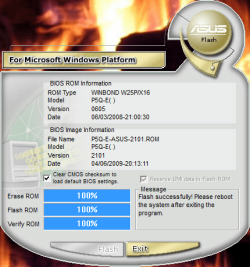
Flashing it ... with the correct file.
 

My Computer My Computer

At a glance

Win 7 Pro 64 bit
Computer Manufacturer/Model Number
Asus P5Q-e, Asus N73Jq, Lenovo T420s
OS
Win 7 Pro 64 bit
Motherboard
Asus P5Q-e
Flashed it ... booting it up now .... hopefully it works ...

Ok, I see "Starting Windows" ... a good sign ...

And it starts!

Ok, thank you dsperber. :D:):D:);)
 

Attachments

  • Asus P5Q-e Flashed May 9, 2012.PNG
    Asus P5Q-e Flashed May 9, 2012.PNG
    56.2 KB · Views: 64

My Computer My Computer

At a glance

Win 7 Pro 64 bit
Computer Manufacturer/Model Number
Asus P5Q-e, Asus N73Jq, Lenovo T420s
OS
Win 7 Pro 64 bit
Motherboard
Asus P5Q-e
The first link in my post will take you to the correct page.
The page may have been correct, but AFUDOS is the wrong program to use if you want to update the BIOS while running under Win7. AFUDOS is for DOS, and ASUS Update is for Win7.

So assuming he's already downloaded the most recent 2101 version of the BIOS for the P5Q-E board, he then has TWO separate choices for how to flash the mobo with that new 2101 BIOS ROM file:

(a) standalone DOS bootable floppy or USB drive, with AFUDOS program and ROM file added to the drive, or

(b) ASUS Update installed in Win7 and run under Win7 and navigate to the ROM file.
 

My Computer My Computer

At a glance

Windows 7 Pro x64 (1), Win7 Pro X64 (2)i5-3350p 3.1Ghz/6MB-cache (1); E8400 3.0Ghz/6...8GB PC3-12800 DDR3 (1); 4GB PC3-10600 DDR3 (2)ATI HD7750 (1), (see TV cards); ATI R7 250 (2)
Computer type
PC/Desktop
Computer Manufacturer/Model Number
Home-built, two systems (1) and (2)
OS
Windows 7 Pro x64 (1), Win7 Pro X64 (2)
CPU
i5-3350p 3.1Ghz/6MB-cache (1); E8400 3.0Ghz/6MB-cache (2)
Motherboard
ASUS P8Z77-V Pro (1); ASUS P5Q3 (2)
Memory
8GB PC3-12800 DDR3 (1); 4GB PC3-10600 DDR3 (2)
Graphics Card(s)
ATI HD7750 (1), (see TV cards); ATI R7 250 (2)
Sound Card
Realtek ALC892 HD Audio (1); Realtek ALC1200 HD Audio (2)
Monitor(s) Displays
Eizo HD2441W LCD, Eizo S2433W (1); Eizo 24" S2433W (2)
Screen Resolution
1920x1200, 1920x1200 (1); 1920x1200 (2)
Hard Drives
(1) 1TB SATA-II (7200RPM), 2x2TB SATA-III (7200RPM), 250GB SATA-III (10000RPM) for OS; 2x2TB external USB 3.0

(2) 320GB SATA-II (7200RPM), 750GB SATA-II (7200RPM), 150GB SATA-II (10000RPM) for OS; 2TB external USB 3.0
PSU
Nesteq ECS-6001 600W (1); Nesteq ECS-5001 500W (2)
Case
Acousti-Case 360 (1) and (2)
Cooling
Noctua NH-U12P SE2 for CPU, 2x120mm case fans (1) and (2)
Keyboard
IBM PS/2 (1) and (2)
Mouse
Logitech MX Revolution wireless (1); Microsoft wired (2)
Internet Speed
100mbps down / 10mbps up
Antivirus
Microsoft Security Essentials; Malwarebyte Anti-Malware Pro
Browser
Firefox
Other Info
Ceton InfiniTV 4-tuner cablecard-enabled TV card as well as Hauppauge HVR-2250 OTA/ATSC 2-tuner TV card in (1), running under Win7 WMC
Flashed it ... booting it up now .... hopefully it works ...

Ok, I see "Starting Windows" ... a good sign ...

And it starts!

Ok, thank you dsperber. :D:):D:);)
Excellent!!

Glad to be of help. Now let's hope the new BIOS solves your original BSOD problem.

(incidentally, I just recently updated the BIOS on my ASUS P5Q3 board to the latest 1102 version of the BIOS for that board, which is really why this was all so fresh in my mind. I actually DO have a DOS standalone bootable USB drive that I could have put AFUDOS and the ROM file on, but decided the Win7 approach was obviously far simpler.)
 

My Computer My Computer

At a glance

Windows 7 Pro x64 (1), Win7 Pro X64 (2)i5-3350p 3.1Ghz/6MB-cache (1); E8400 3.0Ghz/6...8GB PC3-12800 DDR3 (1); 4GB PC3-10600 DDR3 (2)ATI HD7750 (1), (see TV cards); ATI R7 250 (2)
Computer type
PC/Desktop
Computer Manufacturer/Model Number
Home-built, two systems (1) and (2)
OS
Windows 7 Pro x64 (1), Win7 Pro X64 (2)
CPU
i5-3350p 3.1Ghz/6MB-cache (1); E8400 3.0Ghz/6MB-cache (2)
Motherboard
ASUS P8Z77-V Pro (1); ASUS P5Q3 (2)
Memory
8GB PC3-12800 DDR3 (1); 4GB PC3-10600 DDR3 (2)
Graphics Card(s)
ATI HD7750 (1), (see TV cards); ATI R7 250 (2)
Sound Card
Realtek ALC892 HD Audio (1); Realtek ALC1200 HD Audio (2)
Monitor(s) Displays
Eizo HD2441W LCD, Eizo S2433W (1); Eizo 24" S2433W (2)
Screen Resolution
1920x1200, 1920x1200 (1); 1920x1200 (2)
Hard Drives
(1) 1TB SATA-II (7200RPM), 2x2TB SATA-III (7200RPM), 250GB SATA-III (10000RPM) for OS; 2x2TB external USB 3.0

(2) 320GB SATA-II (7200RPM), 750GB SATA-II (7200RPM), 150GB SATA-II (10000RPM) for OS; 2TB external USB 3.0
PSU
Nesteq ECS-6001 600W (1); Nesteq ECS-5001 500W (2)
Case
Acousti-Case 360 (1) and (2)
Cooling
Noctua NH-U12P SE2 for CPU, 2x120mm case fans (1) and (2)
Keyboard
IBM PS/2 (1) and (2)
Mouse
Logitech MX Revolution wireless (1); Microsoft wired (2)
Internet Speed
100mbps down / 10mbps up
Antivirus
Microsoft Security Essentials; Malwarebyte Anti-Malware Pro
Browser
Firefox
Other Info
Ceton InfiniTV 4-tuner cablecard-enabled TV card as well as Hauppauge HVR-2250 OTA/ATSC 2-tuner TV card in (1), running under Win7 WMC
Back
Top