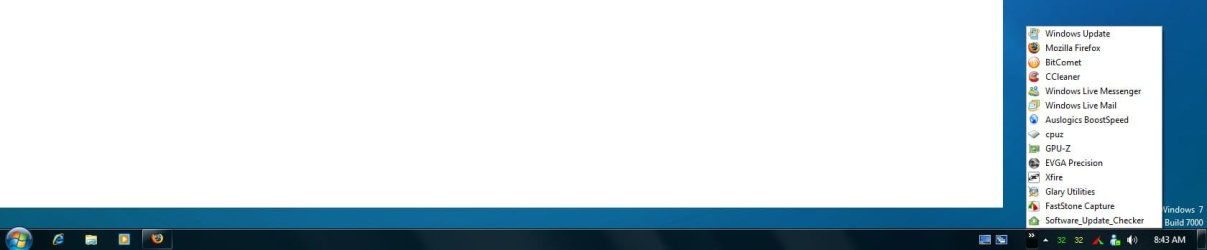
Minimize to right sside of lower taskbar

Burger23

New member
Local time
5:37 AM
Messages
28
Minimize to right side of Taskbar- SUCCESS!!!!

I have a program that I want to minimize to the lower side of the bottom rask bar- beside the TIME. This is a program that I need to know that it is indeed running- but program can run in the background- no need for an icon in the main taskbar. Some programs (AVG anti-virus) automatically go there when minimized. Others (like my weather program, Weatherlink, minimizes to the main taskbar area only. I want the icon to go the Nofication area.

Ideas?
 
Last edited:

My Computer My Computer

At a glance

Windows 7
OS
Windows 7
Does it appear in the notification area at all?
You can customize the area by right clicking on it.
 

My Computer My Computer

At a glance

Windows 7 64bitIntel I7 2600k4GbATI Radeon 5850HD
OS
Windows 7 64bit
CPU
Intel I7 2600k
Motherboard
ASUS P8P67
Memory
4Gb
Graphics Card(s)
ATI Radeon 5850HD
Sound Card
Realtek HD onboard
Monitor(s) Displays
LG Flatron L226WTQ + LG Flatron L1710B
Screen Resolution
1680*1050 + 1280*1024
Hard Drives
1 SSD Intel X25M 80 Gb Boot drive
5 Drives 1774 GB Total
PSU
550 Watt
Case
Antec P180
Keyboard
Logitech G15
Mouse
Logitech MX518
Internet Speed
upto 8MB usually 3.5
Yes- the program starts, then when I minimize the application, the icon appears in the bain bottim taskbar. I would like it to be hidden, not visible. I need a away to get it to the "show Hidden Icons" area so I can use the "customize" function to control when the icon is shown (Notication Area Icons)
 

My Computer My Computer

At a glance

Windows 7
OS
Windows 7
I had the same problem with the messenger and the solution is to make the program run in vista compatibilty, then when you minimize it goes to notification area :)
 

My Computer My Computer

At a glance

Windows 7Intel(R) Core(TM)2 Duo CPU E6750 @ 2.66GHz (2...2046MB RAMNVIDIA GeForce 8800 GTS
OS
Windows 7
CPU
Intel(R) Core(TM)2 Duo CPU E6750 @ 2.66GHz (2 CPUs), ~2
Motherboard
MICRO-STAR INTERNATIONAL CO.,LTD MS-7345
Memory
2046MB RAM
Graphics Card(s)
NVIDIA GeForce 8800 GTS
Internet Speed
24mbps down 1mbps up
I tried this- I change the .exe to run in Compatibility mode for Windows Vista - box is checked. Program starts- but when minimized, it goes into main tray at bottom taskbar- there is no way to hide it.
 

My Computer My Computer

At a glance

Windows 7
OS
Windows 7
yes. bCheck's apps - It is your mama's software

The ZIP & Installer both install version 1.13, but yo can then replace the version with ver 1.16, which is a bit more stable.

If you read the documentation, you can assign a hotkey to a function that will minimize functions to the system tray (or, optionally, completely hidden), and they can either be on the stack (will be restored is Hoekey gets shutdown) or else will be permanently hidden (unless you use process Explorer to bring it to front).

it is small, light weight, and very, very useful.

In Vista I found that not installing it but using the ZIP file from a non protected folder made it a lot easier to edit the config file whenever I needed to. It really and truly is a small, tiny app that rocks.

There are many other apps out there that do this, both freeware and shareware, but This is the most robust and smallest one I have found - and it just works.
 

My Computers My Computers

  • At a glance

    Windows 11 21H2 Current buildAMD Ryzen 9 3950X4 * 32 GB - Corsair Vengeance 3600 MHzEVGA GeForce RTX 3080 Ti XC3 ULTRA GAMING (12...
    Computer type
    PC/Desktop
    Computer Manufacturer/Model Number
    The Beast Model A (homebrew)
    OS
    Windows 11 21H2 Current build
    CPU
    AMD Ryzen 9 3950X
    Motherboard
    MSI MEG X570 GODLIKE
    Memory
    4 * 32 GB - Corsair Vengeance 3600 MHz
    Graphics Card(s)
    EVGA GeForce RTX 3080 Ti XC3 ULTRA GAMING (12G-P5-3955-KR)
    Sound Card
    Realtek® ALC1220 Codec
    Monitor(s) Displays
    2x Eve Spectrum ES07D03 4K Gaming Monitor (Matte) | Eve Spec
    Screen Resolution
    3x 3840 x 2160
    Hard Drives
    3x Samsung 980 Pro NVMe PCIe 4 M.2 2 TB SSD (MZ-V8P2T0B/AM) } 3x Sabrent Rocket NVMe 4.0 1 TB SSD
    PSU
    PC Power & Cooling’s Silencer Series 1050 Watt, 80 Plus Plat
    Case
    Fractal Design Define 7 XL Dark ATX Full Tower Case
    Cooling
    SteelSeries Apex Pro Wired Gaming Keyboard
    Keyboard
    SteelSeries Apex Pro
    Mouse
    Logitech MX Master 3S | MX Master 3 for business
    Internet Speed
    AT&T LightSpeed Gigabit Duplex Ftth
    Antivirus
    Windows Defender + MB 3
    Browser
    Nightly (default) + Firefox (stable),Chrome, Edge
  • At a glance

    ChromeOS Flex Dev Channel (current)Intel(R) Core(TM) i5-6300U CPU @ 2.40GHz, 250...16 GBIntel(R) HD Graphics 520
    Computer type
    PC/Desktop
    System Manufacturer/Model Number
    Dell Latitude E5470
    OS
    ChromeOS Flex Dev Channel (current)
    CPU
    Intel(R) Core(TM) i5-6300U CPU @ 2.40GHz, 2501 Mhz, 2 Core(s), 4 Logical Processor(s)
    Motherboard
    Dell
    Memory
    16 GB
    Graphics Card(s)
    Intel(R) HD Graphics 520
    Sound Card
    Intel(R) HD Graphics 520 + RealTek Audio
    Monitor(s) Displays
    Dell laptop display 15"
    Screen Resolution
    1920 * 1080
    Hard Drives
    Toshiba 128GB M.2 22300 drive
    INTEL Cherryville 520 Series SSDSC2CW180A 180 GB SATA III SSD
    PSU
    Dell
    Case
    Dell
    Cooling
    Dell
    Keyboard
    Dell
    Mouse
    Logitech MX Master 3S (shared w. Sys 1) | Dell TouchPad
    Internet Speed
    AT&T LightSpeed Gigabit Duplex Ftth
Thanks for your reply, Jphn. I will play around with HowKey tomorrow.

But... I am currently using StartUp to launch these programs that I can not get to hide.

Any other ideas?
 

My Computer My Computer

At a glance

Windows 7
OS
Windows 7
Not at the moment - I have HoeKey already set up from my Vista install - let me play with it and see if it works and I'll report back.
 

My Computers My Computers

  • At a glance

    Windows 11 21H2 Current buildAMD Ryzen 9 3950X4 * 32 GB - Corsair Vengeance 3600 MHzEVGA GeForce RTX 3080 Ti XC3 ULTRA GAMING (12...
    Computer type
    PC/Desktop
    Computer Manufacturer/Model Number
    The Beast Model A (homebrew)
    OS
    Windows 11 21H2 Current build
    CPU
    AMD Ryzen 9 3950X
    Motherboard
    MSI MEG X570 GODLIKE
    Memory
    4 * 32 GB - Corsair Vengeance 3600 MHz
    Graphics Card(s)
    EVGA GeForce RTX 3080 Ti XC3 ULTRA GAMING (12G-P5-3955-KR)
    Sound Card
    Realtek® ALC1220 Codec
    Monitor(s) Displays
    2x Eve Spectrum ES07D03 4K Gaming Monitor (Matte) | Eve Spec
    Screen Resolution
    3x 3840 x 2160
    Hard Drives
    3x Samsung 980 Pro NVMe PCIe 4 M.2 2 TB SSD (MZ-V8P2T0B/AM) } 3x Sabrent Rocket NVMe 4.0 1 TB SSD
    PSU
    PC Power & Cooling’s Silencer Series 1050 Watt, 80 Plus Plat
    Case
    Fractal Design Define 7 XL Dark ATX Full Tower Case
    Cooling
    SteelSeries Apex Pro Wired Gaming Keyboard
    Keyboard
    SteelSeries Apex Pro
    Mouse
    Logitech MX Master 3S | MX Master 3 for business
    Internet Speed
    AT&T LightSpeed Gigabit Duplex Ftth
    Antivirus
    Windows Defender + MB 3
    Browser
    Nightly (default) + Firefox (stable),Chrome, Edge
  • At a glance

    ChromeOS Flex Dev Channel (current)Intel(R) Core(TM) i5-6300U CPU @ 2.40GHz, 250...16 GBIntel(R) HD Graphics 520
    Computer type
    PC/Desktop
    System Manufacturer/Model Number
    Dell Latitude E5470
    OS
    ChromeOS Flex Dev Channel (current)
    CPU
    Intel(R) Core(TM) i5-6300U CPU @ 2.40GHz, 2501 Mhz, 2 Core(s), 4 Logical Processor(s)
    Motherboard
    Dell
    Memory
    16 GB
    Graphics Card(s)
    Intel(R) HD Graphics 520
    Sound Card
    Intel(R) HD Graphics 520 + RealTek Audio
    Monitor(s) Displays
    Dell laptop display 15"
    Screen Resolution
    1920 * 1080
    Hard Drives
    Toshiba 128GB M.2 22300 drive
    INTEL Cherryville 520 Series SSDSC2CW180A 180 GB SATA III SSD
    PSU
    Dell
    Case
    Dell
    Cooling
    Dell
    Keyboard
    Dell
    Mouse
    Logitech MX Master 3S (shared w. Sys 1) | Dell TouchPad
    Internet Speed
    AT&T LightSpeed Gigabit Duplex Ftth
UPDATE:

It works. I cannot use the unhide function, but hiding will move items to the system tray.

*problem* - with WLM, it still leaves the item in the taskbar, but I just tried with Fx too, and since I have it pinned on my desktop, it moved Fx to the system tray and changed the taskbar icon back to its regular non running icon.

So, this WLM issue is *definitely* a coding thing. Other apps are now yours for the minimizing to the system tray.

Enjoy!
 

My Computers My Computers

  • At a glance

    Windows 11 21H2 Current buildAMD Ryzen 9 3950X4 * 32 GB - Corsair Vengeance 3600 MHzEVGA GeForce RTX 3080 Ti XC3 ULTRA GAMING (12...
    Computer type
    PC/Desktop
    Computer Manufacturer/Model Number
    The Beast Model A (homebrew)
    OS
    Windows 11 21H2 Current build
    CPU
    AMD Ryzen 9 3950X
    Motherboard
    MSI MEG X570 GODLIKE
    Memory
    4 * 32 GB - Corsair Vengeance 3600 MHz
    Graphics Card(s)
    EVGA GeForce RTX 3080 Ti XC3 ULTRA GAMING (12G-P5-3955-KR)
    Sound Card
    Realtek® ALC1220 Codec
    Monitor(s) Displays
    2x Eve Spectrum ES07D03 4K Gaming Monitor (Matte) | Eve Spec
    Screen Resolution
    3x 3840 x 2160
    Hard Drives
    3x Samsung 980 Pro NVMe PCIe 4 M.2 2 TB SSD (MZ-V8P2T0B/AM) } 3x Sabrent Rocket NVMe 4.0 1 TB SSD
    PSU
    PC Power & Cooling’s Silencer Series 1050 Watt, 80 Plus Plat
    Case
    Fractal Design Define 7 XL Dark ATX Full Tower Case
    Cooling
    SteelSeries Apex Pro Wired Gaming Keyboard
    Keyboard
    SteelSeries Apex Pro
    Mouse
    Logitech MX Master 3S | MX Master 3 for business
    Internet Speed
    AT&T LightSpeed Gigabit Duplex Ftth
    Antivirus
    Windows Defender + MB 3
    Browser
    Nightly (default) + Firefox (stable),Chrome, Edge
  • At a glance

    ChromeOS Flex Dev Channel (current)Intel(R) Core(TM) i5-6300U CPU @ 2.40GHz, 250...16 GBIntel(R) HD Graphics 520
    Computer type
    PC/Desktop
    System Manufacturer/Model Number
    Dell Latitude E5470
    OS
    ChromeOS Flex Dev Channel (current)
    CPU
    Intel(R) Core(TM) i5-6300U CPU @ 2.40GHz, 2501 Mhz, 2 Core(s), 4 Logical Processor(s)
    Motherboard
    Dell
    Memory
    16 GB
    Graphics Card(s)
    Intel(R) HD Graphics 520
    Sound Card
    Intel(R) HD Graphics 520 + RealTek Audio
    Monitor(s) Displays
    Dell laptop display 15"
    Screen Resolution
    1920 * 1080
    Hard Drives
    Toshiba 128GB M.2 22300 drive
    INTEL Cherryville 520 Series SSDSC2CW180A 180 GB SATA III SSD
    PSU
    Dell
    Case
    Dell
    Cooling
    Dell
    Keyboard
    Dell
    Mouse
    Logitech MX Master 3S (shared w. Sys 1) | Dell TouchPad
    Internet Speed
    AT&T LightSpeed Gigabit Duplex Ftth
Johngalt- What is contacting by PM in Windows 7 Forum? Patrick C
 

My Computer My Computer

At a glance

Windows 7 Home - 64 BitAMD A8-3510MX APU with Radeon(tm) HD Graphics6 Gigabytes1GB of DDR3 Memory 7ATI Radeon HD 3200 Graphics
Computer Manufacturer/Model Number
HP Pavillion dv6t
OS
Windows 7 Home - 64 Bit
CPU
AMD A8-3510MX APU with Radeon(tm) HD Graphics
Memory
6 Gigabytes
Graphics Card(s)
1GB of DDR3 Memory 7ATI Radeon HD 3200 Graphics
Sound Card
Motherboard
Monitor(s) Displays
15.6 LCD
Screen Resolution
1280 X 800 - 32-bit Color
Hard Drives
600 Gig - C:\ 299 G ; D:\ 298 G ; E:\ 32 G
Cooling
Laptop sits on a Belkin stand with a cooling fan from USB.
Mouse
On-Board Laptop Synaptics (driver) Point device
Internet Speed
Broadband -Wireless Net Gear (B, G, & N)
If you click on my name in blue, it opens a menu - the second item is "Send a private message"....

I prefer to answer questions here in the open forum so that future users will have ready access to any answer that I give to someone that actually works to solve their problem....hence, I ask that you not ask me questions via PM, especially support type questions.

Don't worry, though, you're kewl. I'll be up front about it when I think something should be kept in the open forum or not.
 

My Computers My Computers

  • At a glance

    Windows 11 21H2 Current buildAMD Ryzen 9 3950X4 * 32 GB - Corsair Vengeance 3600 MHzEVGA GeForce RTX 3080 Ti XC3 ULTRA GAMING (12...
    Computer type
    PC/Desktop
    Computer Manufacturer/Model Number
    The Beast Model A (homebrew)
    OS
    Windows 11 21H2 Current build
    CPU
    AMD Ryzen 9 3950X
    Motherboard
    MSI MEG X570 GODLIKE
    Memory
    4 * 32 GB - Corsair Vengeance 3600 MHz
    Graphics Card(s)
    EVGA GeForce RTX 3080 Ti XC3 ULTRA GAMING (12G-P5-3955-KR)
    Sound Card
    Realtek® ALC1220 Codec
    Monitor(s) Displays
    2x Eve Spectrum ES07D03 4K Gaming Monitor (Matte) | Eve Spec
    Screen Resolution
    3x 3840 x 2160
    Hard Drives
    3x Samsung 980 Pro NVMe PCIe 4 M.2 2 TB SSD (MZ-V8P2T0B/AM) } 3x Sabrent Rocket NVMe 4.0 1 TB SSD
    PSU
    PC Power & Cooling’s Silencer Series 1050 Watt, 80 Plus Plat
    Case
    Fractal Design Define 7 XL Dark ATX Full Tower Case
    Cooling
    SteelSeries Apex Pro Wired Gaming Keyboard
    Keyboard
    SteelSeries Apex Pro
    Mouse
    Logitech MX Master 3S | MX Master 3 for business
    Internet Speed
    AT&T LightSpeed Gigabit Duplex Ftth
    Antivirus
    Windows Defender + MB 3
    Browser
    Nightly (default) + Firefox (stable),Chrome, Edge
  • At a glance

    ChromeOS Flex Dev Channel (current)Intel(R) Core(TM) i5-6300U CPU @ 2.40GHz, 250...16 GBIntel(R) HD Graphics 520
    Computer type
    PC/Desktop
    System Manufacturer/Model Number
    Dell Latitude E5470
    OS
    ChromeOS Flex Dev Channel (current)
    CPU
    Intel(R) Core(TM) i5-6300U CPU @ 2.40GHz, 2501 Mhz, 2 Core(s), 4 Logical Processor(s)
    Motherboard
    Dell
    Memory
    16 GB
    Graphics Card(s)
    Intel(R) HD Graphics 520
    Sound Card
    Intel(R) HD Graphics 520 + RealTek Audio
    Monitor(s) Displays
    Dell laptop display 15"
    Screen Resolution
    1920 * 1080
    Hard Drives
    Toshiba 128GB M.2 22300 drive
    INTEL Cherryville 520 Series SSDSC2CW180A 180 GB SATA III SSD
    PSU
    Dell
    Case
    Dell
    Cooling
    Dell
    Keyboard
    Dell
    Mouse
    Logitech MX Master 3S (shared w. Sys 1) | Dell TouchPad
    Internet Speed
    AT&T LightSpeed Gigabit Duplex Ftth
I want to make sure I am explaining my problem clearly- I am sure that many, many people also have this issue. A program is started- and Windows 7 places its icon into the Taskbar (bottom of screen by default). I simply want to hide the icon- it is taking up valuable real estate on my monitor.

I have included some crude screen shots. Click here to see Taskbar. Below spot marked A shows 3 progroms that have loaded (weatherlink, webcamsqat, and Microsoft's Sysinternal's Process Service). When I right click on these icons I only have 3 choices: Open the program's window, pin the program to the taskbar, or close the program. None are satifactory- I want to miniize it to area marked as B. Or, I want to get it to the NOTIFICATION AREA ICONS in the control panel (this can be accessed from the contol panel- or from clicking on the Up Arrow labled C here.

The key is to get the program into the Notification area Icons- see here. If a program is placed here, then its options can be set.
 

My Computer My Computer

At a glance

Windows 7
OS
Windows 7
ok the way i see it is that you want this program to minimize to the system tray....

i can show you but one way but its not permanent (as i will explain latter....)

i have been using this program pretty much since xp so it has its time....

this program is called powermenu....

as i see it is not currently supported by the author (he/she might have moved to other projects and such....)

ok to the workaround.....

1. you need to install powermenu...(obvious right?)

i have uploaded the batch files needed....

this is includes both the x32 and x64 (you need to choose one which is depends on which iso you download and installed either x32 or x64)

(if you installed with the defaults then this will work)

ok either
http://www.sevenforums.com/tutorials/1401-startup-programs-change.html

follow method two and then insert the file there....

restart and then it should automatically start in the start tray....

(one caveat though is that if you pull it out of the system tray you will need to either right click on the window title and click minimize to tray or run the batch file again....)

this is only a workaround the author himself needs to include this feature to be permantently moved to the system tray...

and check back with us on if it worked....
 

Attachments

My Computer My Computer

At a glance

Windows 7 Ult x64(x2), HomePrem x32(x4), Serv...Turion X2 ultra (oh well came with laptop)/P4...OCZ Dual Channel 4GB kit/ 1gb Dual ChannelHD 3200 graphics /GMA x3100 (yay for intergra...
Computer Manufacturer/Model Number
Tx2500z Tablet Pc/Homemade Server
OS
Windows 7 Ult x64(x2), HomePrem x32(x4), Server 08 (+VM), 08 R2 (VM) , SuSe 11.2 (VM), XP 32 (VM)
CPU
Turion X2 ultra (oh well came with laptop)/P4 @3.2 (yes P4)
Motherboard
IDK HP Motherboard / Intel DG965SS
Memory
OCZ Dual Channel 4GB kit/ 1gb Dual Channel
Graphics Card(s)
HD 3200 graphics /GMA x3100 (yay for intergrated!!)
Sound Card
Realtek HD Audio(mic working, well sort of)/Siig IC-70012
Monitor(s) Displays
built-in Hp 12" laptop screen/ Acer 19"
Screen Resolution
1280x800 /1440x900
Cooling
All Air Cooled
Mouse
Logi MX Rev. /MS Wheel Optical 1.1A /Logitech Optical Mouse
Internet Speed
College baby but its still routed through vpn to 1536k...
Other Info
love my wacom pen and pressure sensitivity...
wished it worked in 7, SUSE for that matter though
I am a little confused- the 2 files you uploaded are .cmd files. What do I do with these? I have downloaded PowerMenu from the INtenret and installed it.
 

My Computer My Computer

At a glance

Windows 7
OS
Windows 7
yes there are two files there...

you need to use one of them and follow the tuturoial brink wrote...

method two

one thing though this program runs at startup correct??

if not this script is if you want to minimize it on startup...
 

My Computer My Computer

At a glance

Windows 7 Ult x64(x2), HomePrem x32(x4), Serv...Turion X2 ultra (oh well came with laptop)/P4...OCZ Dual Channel 4GB kit/ 1gb Dual ChannelHD 3200 graphics /GMA x3100 (yay for intergra...
Computer Manufacturer/Model Number
Tx2500z Tablet Pc/Homemade Server
OS
Windows 7 Ult x64(x2), HomePrem x32(x4), Server 08 (+VM), 08 R2 (VM) , SuSe 11.2 (VM), XP 32 (VM)
CPU
Turion X2 ultra (oh well came with laptop)/P4 @3.2 (yes P4)
Motherboard
IDK HP Motherboard / Intel DG965SS
Memory
OCZ Dual Channel 4GB kit/ 1gb Dual Channel
Graphics Card(s)
HD 3200 graphics /GMA x3100 (yay for intergrated!!)
Sound Card
Realtek HD Audio(mic working, well sort of)/Siig IC-70012
Monitor(s) Displays
built-in Hp 12" laptop screen/ Acer 19"
Screen Resolution
1280x800 /1440x900
Cooling
All Air Cooled
Mouse
Logi MX Rev. /MS Wheel Optical 1.1A /Logitech Optical Mouse
Internet Speed
College baby but its still routed through vpn to 1536k...
Other Info
love my wacom pen and pressure sensitivity...
wished it worked in 7, SUSE for that matter though
yes there are two files there...

you need to use one of them and follow the tuturoial brink wrote...

method two

one thing though this program runs at startup correct??

if not this script is if you want to minimize it on startup...

Just to clarify- I am NOT trying to minimize on StartUp- rather, I want to HIDE the Taskbar icon. I do not want an icon to show at all.
 

My Computer My Computer

At a glance

Windows 7
OS
Windows 7
What other OS does what you are describing because it sound like you are asking a little too much, you can't have a notification area used as a Taskbar.

I don't know what you mean by valuable real estate, what difference does it make, if your that concerned by saving space why don't you set the Taskbar to Auto Hide or you can make the icons smaller like this.

2009-01-14_084210.jpg

2009-01-14_084450.jpg
 

My Computer My Computer

At a glance

Windows 7 Ultimate Vista Ultimate x64Core 2 Duo E8500 3.16Ghz @ 3.8Ghz2x2Gigs Patriot PC2-6400 LLInno3D GeForce GTX260 216 SP
Computer Manufacturer/Model Number
Home Brew
OS
Windows 7 Ultimate Vista Ultimate x64
CPU
Core 2 Duo E8500 3.16Ghz @ 3.8Ghz
Motherboard
eVGA 750i FTW
Memory
2x2Gigs Patriot PC2-6400 LL
Graphics Card(s)
Inno3D GeForce GTX260 216 SP
Monitor(s) Displays
ASUS VW222U 22" 2ms Response time
Screen Resolution
1680x1050
Hard Drives
SATA 150GB
SATA II 250GB
USB IDE 750GB Ext.
PSU
HYTEC 600W & Thermaltake 650W Toughpower Power Exp
Case
Thermaltake Armor LCS (Liquid Cooling System)
Cooling
Liquid Cooling System
Keyboard
Logitech G15 Gaming Keyboard
Mouse
Logitech G9 Gaming Mouse
AutoHide- that's what I am trying to do! I would love for the icon to show up in Windows 7 Notification Area Icons- the Up Arrow on right side of Taskbar. How do you get an icon to show up there? When I right-click on the icon I get only 3 options: the first restore the program to full screen, the second Pins Program to Taskbar, and the third Closes the Window (Program).
 

My Computer My Computer

At a glance

Windows 7
OS
Windows 7

My Computer My Computer

At a glance

Windows 7 RC 7100 32bit/64bitIntel Core2Duo E4500 2.20 GHz2x1GB Kinsgston DDR2 800MHzNvidia 8500GT
Computer Manufacturer/Model Number
ENIAC
OS
Windows 7 RC 7100 32bit/64bit
CPU
Intel Core2Duo E4500 2.20 GHz
Motherboard
ASUS P5LD2-X/1333
Memory
2x1GB Kinsgston DDR2 800MHz
Graphics Card(s)
Nvidia 8500GT
Sound Card
Onboard High Definition Audio Device
Monitor(s) Displays
Sony Bravia 42"
Case
LINKW 2222
Cooling
Standard Intel
Keyboard
Some cheap one
Mouse
Microsoft Intellimouse something
Internet Speed
24MBps ADSL

My Computer My Computer

At a glance

Windows 7 Ultimate Vista Ultimate x64Core 2 Duo E8500 3.16Ghz @ 3.8Ghz2x2Gigs Patriot PC2-6400 LLInno3D GeForce GTX260 216 SP
Computer Manufacturer/Model Number
Home Brew
OS
Windows 7 Ultimate Vista Ultimate x64
CPU
Core 2 Duo E8500 3.16Ghz @ 3.8Ghz
Motherboard
eVGA 750i FTW
Memory
2x2Gigs Patriot PC2-6400 LL
Graphics Card(s)
Inno3D GeForce GTX260 216 SP
Monitor(s) Displays
ASUS VW222U 22" 2ms Response time
Screen Resolution
1680x1050
Hard Drives
SATA 150GB
SATA II 250GB
USB IDE 750GB Ext.
PSU
HYTEC 600W & Thermaltake 650W Toughpower Power Exp
Case
Thermaltake Armor LCS (Liquid Cooling System)
Cooling
Liquid Cooling System
Keyboard
Logitech G15 Gaming Keyboard
Mouse
Logitech G9 Gaming Mouse
Back
Top