Restore the shrink drive to it's original location

unknown01

New member
Member
Local time
12:44 AM
Messages
28
Hey guys,

Actually The question is kind of bad, i couldn't find a better title :D
okay here is my problem:
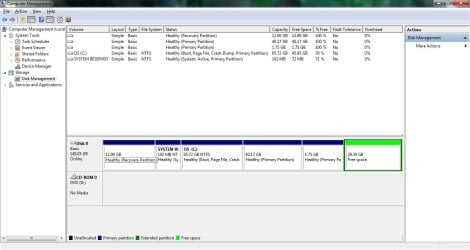
My windows was very bad and had a lot of problems so I decided to restore to default factory settings and I did it, and it was successful but before i did this I had shrink C Drive and now in my new windows the shrink drive is still there but in a green color and it's written "29.30 Free Space" actually I want to put this shrink volume in drive C and just make it one Drive not two and I don't know how to do it, it would be appreciated if anyone can help.

Thanks
 

My Computer My Computer

At a glance

Windows 8 RTM Professional X64Intel Core 2 Duo E8400 3.0GHz4GB OCZEVGA GTX 275
OS
Windows 8 RTM Professional X64
CPU
Intel Core 2 Duo E8400 3.0GHz
Motherboard
Gigabyte EP43-DS3
Memory
4GB OCZ
Graphics Card(s)
EVGA GTX 275
Monitor(s) Displays
Samsung SyncMaster T200
Screen Resolution
1680x1050
Keyboard
Logitech
Mouse
Logitech
Open Disk Management, maximize the window, adjust columns to show maximum info, and post us a screenshot.
 

My Computer My Computer

At a glance

Windows 7 Ultimate x64
OS
Windows 7 Ultimate x64
Computer Management Screenshot

I want that 40.17GB partition to C Partition but i don't know how.

CM.jpg
 

My Computer My Computer

At a glance

Windows 8 RTM Professional X64Intel Core 2 Duo E8400 3.0GHz4GB OCZEVGA GTX 275
OS
Windows 8 RTM Professional X64
CPU
Intel Core 2 Duo E8400 3.0GHz
Motherboard
Gigabyte EP43-DS3
Memory
4GB OCZ
Graphics Card(s)
EVGA GTX 275
Monitor(s) Displays
Samsung SyncMaster T200
Screen Resolution
1680x1050
Keyboard
Logitech
Mouse
Logitech
In addition to the green Logical free space at the right end of the HD, you also have two partitions to the right of C which are empty and have no letters.

It's doubtful these are hidden OEM partitions or they would be so labeled like your Recovery partition at the left end of HD. Perhaps you created them yourself?

To check the content of those two partitions you can unhide Hidden and System files in Control Panel>Folder Options>View tab, rightclick on the partitions in Disk Mgmt to Explore to see if they have any hidden content. If not you can Delete each to extend C into the space.

To also extend C into the green Logical Free Space you must first rightclick it to Delete Volume to get rid of the Logical container and make it Unallocated Space.

Partition or Volume - Delete
Partition or Volume - Extend
 
I want that 40.17GB partition to C Partition but i don't know how.

View attachment 212060

If there is nothing on the 40.17 GB partition, you can simply delete it from a right click or menu.

That will make "unallocated space".

You should then be able to extend C into that unallocated space by right clicking C and choosing extend.

You can probably do the same thing with that little 1.75 GB partition if there is nothing on it.
 

My Computer My Computer

At a glance

Windows 7 Home Premium SP1, 64-bitIntel Skylake i5-6600K, not overclocked8 GB HyperX DDR4-2666 (2 x 4 GB)none; graphics are integrated on CPU
Computer type
PC/Desktop
Computer Manufacturer/Model Number
Ignatz Special; 4 speed manual gearbox; factory air conditioning; one of one
OS
Windows 7 Home Premium SP1, 64-bit
CPU
Intel Skylake i5-6600K, not overclocked
Motherboard
AsRock Z170M Extreme 4, micro ATX
Memory
8 GB HyperX DDR4-2666 (2 x 4 GB)
Graphics Card(s)
none; graphics are integrated on CPU
Sound Card
onboard: Realtek ALC1150; external: USB Behringer UF0-202
Monitor(s) Displays
Dell S2340M 23 inch IPS
Screen Resolution
1600 x 900
Hard Drives
System: Crucial MX100 series SSD, 128 GB;
Data: Samsung Spinpoint 103SJ, 1 TB;
Backup: WD Caviar Green WD30EZRX-00D8PB0, 3 TB
PSU
Rosewill SilentNight 500 watt fanless, semi-modular
Case
Antec Solo II
Cooling
Noctua NH-U12S; Noctua F12 intake, Noctua S12A exhaust
Keyboard
Microsoft 200 6JH-00001 USB
Mouse
Dell or Microsoft optical wired; USB
Antivirus
Microsoft Security Essentials and Malwarebytes Premium
Browser
Pale Moon
Other Info
All fans PWM; speeds at idle: CPU circa 500 rpm; intake circa 600 rpm; exhaust circa 600 rpm; CPU temps 27 idle and 47 C load in a warm room (27 C/81 F) when running Intel Extreme Tuning Utility stress test.
Thank you guys that's exactly what I meant and You guys helped a lot.
just another question,
Should I keep the recovery partition (12.00GB)?
 

My Computer My Computer

At a glance

Windows 8 RTM Professional X64Intel Core 2 Duo E8400 3.0GHz4GB OCZEVGA GTX 275
OS
Windows 8 RTM Professional X64
CPU
Intel Core 2 Duo E8400 3.0GHz
Motherboard
Gigabyte EP43-DS3
Memory
4GB OCZ
Graphics Card(s)
EVGA GTX 275
Monitor(s) Displays
Samsung SyncMaster T200
Screen Resolution
1680x1050
Keyboard
Logitech
Mouse
Logitech
Unless you have created any recovery discs, yes.

Without recovery discs or a recovery partition, you will will be unable to recover your computer to its factory state.

You also need to know that a system recovery is a lot quicker when using the recovery partition than using recovery discs.
 

My Computer My Computer

At a glance

Windows 7 Ultimate SP1 64-BitIntel Core i7 870 @ 2.93GHz8Gb Dual-Channel DDR3 @ 664MHznVidia GeForce GTX 460 1024MB dedicated RAM
Computer Manufacturer/Model Number
HP Pavilion Elite 495UK
OS
Windows 7 Ultimate SP1 64-Bit
CPU
Intel Core i7 870 @ 2.93GHz
Motherboard
MSI 2A9C (CPU1)
Memory
8Gb Dual-Channel DDR3 @ 664MHz
Graphics Card(s)
nVidia GeForce GTX 460 1024MB dedicated RAM
Sound Card
Realtek HD Audio
Monitor(s) Displays
HP2310i
Screen Resolution
1920 x 1080
Hard Drives
1x1954GB Hitachi HDS22020ALA 330 (RAID), 1x1954GB Hitachi External for backup and storage
PSU
460W
Case
HP Elite
Cooling
Air cooled
Keyboard
Logitech K750 solar-powered keyboard
Mouse
Logitech Wireless M180 mouse
Internet Speed
2Mb
Other Info
Pure Avanti Flow Internet Radio with iPod Dock, 64Gb iPod, HP USB Speakers, Sony MDR-V500 Headphones, Sony Vaio F-Series Laptop
good answers and i think now you can do it.
 

My Computer My Computer

At a glance

win 7
OS
win 7
Recovery partition is also more stable method than using the disks, so if you're going to rely on Factory Recovery I would have both and use the disks only as a backup.

However most tech enthusiasts will not run the bloated factory preinstall and choose to Clean Reinstall - Factory OEM Windows 7 to get best performance from the OS.

In that case you may want to save only the disks in case you ever resell the computer and use in place of Recovery a stored Win7 backup image of your customized reinstalled Win7: Backup Complete Computer - Create an Image Backup
 
Recovery partition is also more stable method than using the disks, so if you're going to rely on Factory Recovery I would have both and use the disks only as a backup.

However most tech enthusiasts will not run the bloated factory preinstall and choose to Clean Reinstall - Factory OEM Windows 7 to get best performance from the OS.

In that case you may want to save only the disks in case you ever resell the computer and use in place of Recovery a stored Win7 backup image of your customized reinstalled Win7: Backup Complete Computer - Create an Image Backup

Thanks man
 

My Computer My Computer

At a glance

Windows 8 RTM Professional X64Intel Core 2 Duo E8400 3.0GHz4GB OCZEVGA GTX 275
OS
Windows 8 RTM Professional X64
CPU
Intel Core 2 Duo E8400 3.0GHz
Motherboard
Gigabyte EP43-DS3
Memory
4GB OCZ
Graphics Card(s)
EVGA GTX 275
Monitor(s) Displays
Samsung SyncMaster T200
Screen Resolution
1680x1050
Keyboard
Logitech
Mouse
Logitech
Back
Top