
Mechanical Keyboards - Are you a convert?

Do you use a mechanical Keyboard?


  • Total voters
    18

smarteyeball

knows his stuff
SF Team
Local time
8:10 AM
Messages
12,017
Location
Brisbane
On this forum questions about a bout CPUS, Ram, GPU's, SSD's even mice are prevalent. Yet one of the most regularly used, yet often overlooked component of every PC user is the keyboard.

For most people, the faithful $20 buck special does the job - but as mech keyboard convert, I never realized what I was missing. One you go mech, you won't go back.

In a nutshell, mechanical keyboards are more robust, more enjoyable to type on and for gamers - the nkro is a huge must. Personally I find they are superior in every way to the typical 'rubber domed' boards.

Whether you are a regular typist, developer, forum browser or hard core gamer - mechanical keyboards are definitely worth looking at.

For those that don't what a mechanical keyboard is, this link is invaluable.

I've personally used the el cheapos, the expensively rubbish 'gaming' boards and 'thought' they were doing the job. However nothing has compared to using a mech board since. This once niche market is now gaing traction as more and ore manufacturers are adding mech keyboards to their range. There doing this for a good reason.

Mech keyboards re the new peripheral.


So SF, what are your thoughts?
 

My Computer My Computer

Computer type
PC/Desktop
Computer Manufacturer/Model Number
Systems by SmartEyeball
OS
8 Pro x64
CPU
i7 3770K 4.6GHz
Motherboard
ASUS P8Z77 WS
Memory
16GB G.Skill Trident X 2666mhz
Graphics Card(s)
x2 EVGA 780 Ti Superclocked SLI
Sound Card
SB X-FI Surround 5.1 PRO USB / ATH-AD900 Headphones
Monitor(s) Displays
x3 Dell U2410 / 58" Samsung
Screen Resolution
5760*1200/ 1920*1200
Hard Drives
2x Intel 520 240GB (RAID 0) * 2x WD Caviar Blacks 2TB (RAID 0) * 2TB WD Caviar Black * Sony Optirac DVD
PSU
Silverstone Strider Evolution 1200W
Case
Thermaltake Level 10 GT Snow Edition
Cooling
Noctua NH-D14
Keyboard
Topre Realforce // Ducky Shine MX Black // Filco Ninja TKL
Mouse
Thermaltake Theron (Highly Recommended) + Razer Imperator
Antivirus
MSE
Browser
IE, FF, WaterFox
Other Info
GT Extreme V2 Sim Racing Cockpit + 40" LCD and K/B Mouse stand ▼
Fanatec CSR Elite Wheel + Clubsport V1 Pedals + CSR shifter/7G-H ▼Saitek X52 Pro ▼ TrackIR 5 Pro
Buttkicker v2 Seat Rumbler with Dedicated 5.1 and Sub Woofer attached to frame ▼
=
Bloody Big Grin
I'm not sure I have ever tried one--and may not even recognize it if I was using one right now.

I don't even remember what "electric typewriters" felt like.

The stumbling block for me is the entry fee. I'm not likely to spend 100 plus dollars on speculation and I have no way of sampling one to see if I would be amazed.

I might be amazed--I have no idea. But until and unless I can sample one for nothing, there is NO chance.

I have been using a $5 Goodwill store Hewlett Packard keyboard for 3 or 4 years. It works as well as it ever did, but I have no idea what I may be missing.

Assuming I had the inclination, where do I go to sample a mechanical keyboard?

And if I did that, how do I choose between this mechanical and that mechanical? I'm guessing no "store" is going to carry a dozen brands I can test.

Can't imagine relying on reviews for something so personal and hard to describe.

I may have to remain blissfully ignorant unless you have a workaround.
 

My Computer My Computer

Computer type
PC/Desktop
Computer Manufacturer/Model Number
Ignatz Special; 4 speed manual gearbox; factory air conditioning; one of one
OS
Windows 7 Home Premium SP1, 64-bit
CPU
Intel Skylake i5-6600K, not overclocked
Motherboard
AsRock Z170M Extreme 4, micro ATX
Memory
8 GB HyperX DDR4-2666 (2 x 4 GB)
Graphics Card(s)
none; graphics are integrated on CPU
Sound Card
onboard: Realtek ALC1150; external: USB Behringer UF0-202
Monitor(s) Displays
Dell S2340M 23 inch IPS
Screen Resolution
1600 x 900
Hard Drives
System: Crucial MX100 series SSD, 128 GB;
Data: Samsung Spinpoint 103SJ, 1 TB;
Backup: WD Caviar Green WD30EZRX-00D8PB0, 3 TB
PSU
Rosewill SilentNight 500 watt fanless, semi-modular
Case
Antec Solo II
Cooling
Noctua NH-U12S; Noctua F12 intake, Noctua S12A exhaust
Keyboard
Microsoft 200 6JH-00001 USB
Mouse
Dell or Microsoft optical wired; USB
Antivirus
Microsoft Security Essentials and Malwarebytes Premium
Browser
Pale Moon
Other Info
All fans PWM; speeds at idle: CPU circa 500 rpm; intake circa 600 rpm; exhaust circa 600 rpm; CPU temps 27 idle and 47 C load in a warm room (27 C/81 F) when running Intel Extreme Tuning Utility stress test.
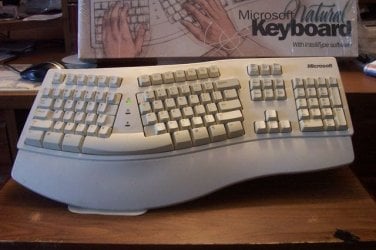
We have a Microsoft Natural Keyboard that we bought about 15years ago when we had Win 98, and it has been a "trouper" ever since.
100_2331.JPG

The DW bought it at Montgomery Wards when she worked there. The sticker price was $89.99, but she got a discount, and we still ended up paying around $50.
I see now you can get them for as little as $30. My how times have changed.

As for the Mechanical it is the first I've heard of them, and I would be willing to try them, but Iggy brings up some very valid points.

I to, "remain blissfully ignorant".
 

My Computer My Computer

Computer type
PC/Desktop
Computer Manufacturer/Model Number
Gateway DX4831-01e (Mid-Tower Desktop)
OS
Originally Win 7 Hm Prem x64 Ver 6.1.7600 Build 7601-SP1 | Upgraded to Windows 10 December 14, 2019
CPU
Intel i3 530 2.93GHz, 2933MHz 2 Cores 4 Logical Processors
Motherboard
Gateway H57M01 133 megahertz
Memory
6GB of 1,333MHz DDR3 SDRAM
Graphics Card(s)
32MB Intel Graphics Media Accelerator HD IGChip
Sound Card
Realtek High Definition Audio
Monitor(s) Displays
Gateway HX2000 20inch TFT active matrix TN
Screen Resolution
1600 x 900 x 59 hertz
Hard Drives
WDC WD10EADS-00M2B0 [HDD] (1000.20 GB) -- drive 0,
HL-DT-ST DVDRAM GH41N [CD-ROM dr]
Four card readers, and Four USB 2.0
PSU
300watts.
Case
Mid-Tower Desktop
Cooling
Stock from Gateway
Keyboard
Natural Ergonomic Keyboard 4000, see Other Info
Mouse
Orig. Gateway wore out now using Insignia USB wired optical
Internet Speed
Vz FIOS 10ms png 57.64Mbps down 65.53Mbps up Speedtest.org
Antivirus
Zamana Anti-logger with Anti-malware, MSE, Windows Firewall,
Browser
IE11.0.9600.19399-Upd ver11.0.135, Firefox 68.0.1 x64
Other Info
System Specs by Belarc.

BIOS: American Megatrends Inc. P01-A0 11/17/2009

Replaced the MS 'Natural' Standard PS/2 Enhanced 101-102 Keyboard with a new Natural Ergonomic Keyboard 4000 on August 1st 2014.

Canon Pixma MG3222 Printer.

Updated to IE11 on 12102015 | Fios Quantum Router g1100

Additional AV: SpywareBlaster, manual Mbam, SAS
I'm a mechanical keyboard user myself. I much prefer the clickly-clack tactile response that I get from them. It certainly does improve my speed of typing. And without a doubt, for a hardcore gamer, the n-key rollover is very important.

However, be aware that many of these keyboards are quiet noisy and would bother those around you. For these reasons, I don't use a mechanical keyboard at my office. I really would like to, but obviously I cannot be bothering all of my coworkers all day long as I type away.

I found pretty much not a single store carried these where I lived. Either most people don't want the loud clicks, or people don't want to spend that much money on a keyboard. Or, many people want all of the extra buttons and crap that many keyboards come with, or they want wireless, etc.

Out of the tech nerds that I hang around with at work, it's about 50/50 right now on mechanical keyboards. 4 of us have them and we really like them. 4 of us simply don't care and use whatever we have at home.

Here is a video which shows various keyboards and the noise they make, and the type of switches that they use; I have the ABS M1 which is featured at 2:36 in this video. I've been happy enough with this keyboard, considering I got it for about $40.
HotHardware Mechanical Keyboard Showcase - YouTube.

Edit; Here is a website that my coworkers have used when they purchased their mechanical keyboards
http://www.elitekeyboards.com/

As for those of you who haven't heard of mechanical keyboards, if you used computers 25+ years ago and remember the old keyboards that were noisy, clicky, springy...those were mechanical keyboards. Most back in the day used buckling springs.
 

My Computer My Computer

Computer Manufacturer/Model Number
Self-Built in July 2009
OS
Windows 7 Ultimate x64
CPU
Intel Q9550 2.83Ghz OC'd to 3.40Ghz
Motherboard
Gigabyte GA-EP45-UD3R rev. 1.1, F12 BIOS
Memory
8GB G.Skill PI DDR2-800, 4-4-4-12 timings
Graphics Card(s)
EVGA 1280MB Nvidia GeForce GTX570
Sound Card
Realtek ALC899A 8 channel onboard audio
Monitor(s) Displays
23" Acer x233H
Screen Resolution
1920x1080
Hard Drives
Intel X25-M 80GB Gen 2 SSD
Western Digital 1TB Caviar Black, 32MB cache. WD1001FALS
PSU
Corsair 620HX modular
Case
Antec P182
Cooling
stock
Keyboard
ABS M1 Mechanical
Mouse
Logitech G9 Laser Mouse
Internet Speed
15/2 cable modem
Other Info
Windows and Linux enthusiast. Logitech G35 Headset.
I have converted from the large click type button keyboards to the semi flush silent jobs that Logitech is selling and I love them. Gave my old style to the girlfriend and I use a wired illuminated, wireless illuminated and just got a solar powered wireless and they are amazing. I'm a poor typist but these have help my speed and accuracy but a factor of 4 or more.

Update: Google'g mechanical keyboards it appears that I'm not a convert as these cost hundreds. I will say that it would have to be a large improvement over my silent keyboards and back light keyboards and even then the price will have to be well below $100.00 to even be considered.
 

My Computer My Computer

Computer type
PC/Desktop
Computer Manufacturer/Model Number
A blend of brains, brawn and dumb luck.
OS
Windows 7 Ultimate 64
CPU
i7 3770k OC'd 4.6 @ 1.17v, also FX 8120 & i5 miniITX
Motherboard
MSI P67A-GD80 b3
Memory
32 gb G.Skill Sniper DDR3 10-12-12-31 @ 2133
Graphics Card(s)
XFX Radeon 7870 2GB DDR5
Sound Card
Sound Blaster Z Series Card
Monitor(s) Displays
(2) LG LED 23" 1920 x 1080 2ms Monitors via mini d-port
Screen Resolution
1680 X 1050 p
Hard Drives
Samsung 256 gb 830 SSD sata III
(1) 1 tb WD Black
(2) 1 tb Hitachi deskmates/sata II
(2) 1 tb WD green/sata II
(2) 3 tb Seagate Barracuda
(1) 120 gb OCZ Vertex SS
(1) Drobo 5N w/5 Seagate 3tb
PSU
EVGA modular 1000G2 80% gold rating & APC 1200 RS
Case
CoolerMaster Storm Styker
Cooling
7 case fans 140mm & 120mm, NZXT Kraken X60
Keyboard
(2) Logitech Illuminated Keyboards (1) usb (1) wireless
Mouse
Logitech G700 & T-BC21 - nano nx for the laptop
Internet Speed
Basic 120mbps down
Antivirus
Trend Micro Titanium Max Security & Malwarebytes Premium
Browser
Chrome and IE 10
Other Info
5 Noctua case fans + 3 Noctua in p/p on NZXT cooler
Integrated hot swap drive bays for 2.5" Drives
(2) Lite-on dvd/cd/Blu Ray optical 22X
Integrated fan controller and led on/off
HP Officejet Pro 8630 all-n-one
Hot-swappable 3.5" hard drive bay
Netgear Nighthawk router
Asus USB 3 & sata 6 PCIe card
Vantec IDE to sata adptr./Ultra sata adptr
Lenovo L420 i5 lappy with m sata
Drobo 5N advanced NAS
We have a Microsoft Natural Keyboard that we bought about 15years ago when we had Win 98, and it has been a "trouper" ever since.
View attachment 212255

The DW bought it at Montgomery Wards when she worked there. The sticker price was $89.99, but she got a discount, and we still ended up paying around $50.
I see now you can get them for as little as $30. My how times have changed.

As for the Mechanical it is the first I've heard of them, and I would be willing to try them, but Iggy brings up some very valid points.

I to, "remain blissfully ignorant".

The MS natural keyboards are the only keyboards for me, I have that one and every model since (and a spare latest wireless model in case they get discontinued).
 

My Computer My Computer

Computer type
PC/Desktop
OS
Windows 11
I also have the Microsoft one and love it, got mine after a conversation with John, our leader :D and find it difficult to type on the everyday type now and I'm a touch typist, although not a very good one.
 

My Computer My Computer

Computer type
PC/Desktop
Computer Manufacturer/Model Number
Acer Aspire XC-704 x64 bit/ Asus K55A Notebook PC/HP Envy x360 Convertible 15-bq0xx
OS
Windows 10 64bit/Windows 10 64bit/Windows 10 64bit
CPU
Intel Pentium J3710 @ 60GHz/Intel B820,1.7GHz/AMD A9 Radeon
Motherboard
Acer Aspire XC-704 (SOCKET 0)/Asus/HP 8312 (Socket FP4)
Memory
8.00GB DDR3 @ 1599MHz/8GB 2 x 4GB DDR3/8.00GB Dual-Channel
Graphics Card(s)
Intel HD Graphics/Intel/512MB ATI AMD Radeon R5 Graphics (HP
Sound Card
Realtek High Definition Audio/Onboard/AMD High Definition Au
Monitor(s) Displays
Acer LCD K222HQL /Asus 15.6/Generic PnP Monitor (1920x1080@6
Screen Resolution
1920x1080@59Hz/1366 x 768/1920x1080@60Hz
Hard Drives
1863GBWesternn Digital WDC/Asus/119GB SanDisk SD8SN8U-128G-1006 (SSD)
931GB Hitachi HGST HTS721010A9E630 (SATA)
Keyboard
Microsoft Natural Ergonomic Keyboard 4000 (UK)/Inbuilt/Inbui
Mouse
Microsoft Optical Wheel Mouse/Same plus Touchpad/Same + Pad
Internet Speed
Infinity 2 up to 76 Mbps
Antivirus
MSE/MSE/MSE and all 3 have MalwareBytes Premium
Browser
Edge, Firefox/Edge, Firefox/Edge, Firefox, Chrome
Other Info
Seagate Expansion 500GB External Desktop Drive
Seagate Expansion Portable Drives 500GB and 1TB
Epson XP-332 Wireless Printer

My Computer My Computer

Computer Manufacturer/Model Number
Hopalong/ Godzilla
OS
Windows7 Pro 64bit SP-1; Windows XP Pro 32bit
CPU
Intel Core i7-870 Lynnfield 2.93GHz LGA 1156 95W Quad-Core
Motherboard
ASUS P7P55D-E PRO
Memory
8GB@1400MHz Crucial Ballistix DDR3-1600 4x2GB
Graphics Card(s)
ASUS ENGTX460 DirectCU/2DI/1GD5 1GB 256-bit GDDR5
Sound Card
VIA Onboard
Monitor(s) Displays
Asus VS248H-P 24"; Samsung SyncMaster 941BW 19"ws
Screen Resolution
1920x1080; 1440x900
Hard Drives
Samsung 830 120GB SSD
Intel 320 120GB SSD
Western Digital Caviar Black WD7501AALS 750GB 7200 RPM SATA 3.0Gb/s
Western Digital Caviar Black WD6401AALS 640GB 7200 RPM SATA 3.0Gb/s
PSU
COOLER MASTER Silent Pro RS850-AMBAJ3-US 850W Modular
Case
COOLER MASTER HAF 932 RC-932-KKN5-GP Black
Cooling
Scythe "Mugen-2 Rev.B" (2 ScytheKaze-Jyuni PWM fans)
Keyboard
Logitech K-320
Mouse
Kensington
Antivirus
Avast Inernet Suite
Browser
IE 9 ; Chrome
Before my current generation mechanical keyboard, I preferred the Microsoft Natural Ergonomic 4000
mskeyboard4000full.jpg


After switching jobs and working nearly 100% from a laptop and wanting to have more deskspace at home, I switched back to a non-ergo keyboard. A while later I made the switch to a mechanical keyboard and generally prefer them now over any soft-dome keyboard.
 

My Computer My Computer

Computer Manufacturer/Model Number
Self-Built in July 2009
OS
Windows 7 Ultimate x64
CPU
Intel Q9550 2.83Ghz OC'd to 3.40Ghz
Motherboard
Gigabyte GA-EP45-UD3R rev. 1.1, F12 BIOS
Memory
8GB G.Skill PI DDR2-800, 4-4-4-12 timings
Graphics Card(s)
EVGA 1280MB Nvidia GeForce GTX570
Sound Card
Realtek ALC899A 8 channel onboard audio
Monitor(s) Displays
23" Acer x233H
Screen Resolution
1920x1080
Hard Drives
Intel X25-M 80GB Gen 2 SSD
Western Digital 1TB Caviar Black, 32MB cache. WD1001FALS
PSU
Corsair 620HX modular
Case
Antec P182
Cooling
stock
Keyboard
ABS M1 Mechanical
Mouse
Logitech G9 Laser Mouse
Internet Speed
15/2 cable modem
Other Info
Windows and Linux enthusiast. Logitech G35 Headset.
Very informative link, smarteyeball, thanks! I learned to type on a typewriter btw - yes, those old clunky knucklebreakers. I play the guitar/piano too and rock climb, so my fingers are used to abuse :p

Problem over here mainly is that shops only stock "standard" keyboards, and even the gaming selection is limited to "bling" type keyboards like Logitechs with their extra programmable keys but otherwise same bog-standard builds. Didn't neglect the keyboard when I got my current PC, snagged a Logitech G110. But even the Tron Razer I've been eyeballing recently looks like it's just a regular 2KRO USB job underneath the shiny.

Would love to try out a different keyboard build someday. Article notes that PS/2 is superior; but they've pretty much phased them out from motherboards nowadays haven't they? :confused: I thought USB was supposed to be "better" and not only because you can use the connector for other devices.
 

My Computer My Computer

Computer Manufacturer/Model Number
Self-built rig
OS
Win7 Pro x64
CPU
Koa i5-2550K
Memory
8 GB
Graphics Card(s)
Sapphire ATI 6870 1GB GDDR5
Sound Card
RealTek HD Audio / ATI HDMI Audio
Monitor(s) Displays
Samsung HDTV Monitor T23A350
Screen Resolution
1920 x 1080
Hard Drives
- SSD (C:)
- HDD (D:)
- BD-ROM (E:)
Keyboard
Logitech G110
Internet Speed
Unifi home (5mbps)
I used to always use PS2 ports when mobos had them because I didn't see the point in wasting a USB port on a keyboard and mouse. Nowadays, you don't often get PS2 ports, and I don't go out of my way to find a mobo with them.

Without a doubt though, I prefer and only use wired keyboards and mice. To me, wireless just seems silly. My cords never get tangled enough to justify changing batteries.
 

My Computer My Computer

Computer Manufacturer/Model Number
Self-Built in July 2009
OS
Windows 7 Ultimate x64
CPU
Intel Q9550 2.83Ghz OC'd to 3.40Ghz
Motherboard
Gigabyte GA-EP45-UD3R rev. 1.1, F12 BIOS
Memory
8GB G.Skill PI DDR2-800, 4-4-4-12 timings
Graphics Card(s)
EVGA 1280MB Nvidia GeForce GTX570
Sound Card
Realtek ALC899A 8 channel onboard audio
Monitor(s) Displays
23" Acer x233H
Screen Resolution
1920x1080
Hard Drives
Intel X25-M 80GB Gen 2 SSD
Western Digital 1TB Caviar Black, 32MB cache. WD1001FALS
PSU
Corsair 620HX modular
Case
Antec P182
Cooling
stock
Keyboard
ABS M1 Mechanical
Mouse
Logitech G9 Laser Mouse
Internet Speed
15/2 cable modem
Other Info
Windows and Linux enthusiast. Logitech G35 Headset.
I'm a 2 finger, look at keyboard while I type Guy :D A good keyboard would likely be wasted on my. I never took to touch typing. As I've mentioned before, took typing in High School. It was me and 30 girls in a class. Needless to say, I was distracted, and concentrated on the touch method with them :D

A Guy
 

My Computer My Computer

Computer type
PC/Desktop
OS
Windows 10 Home x64
CPU
INTEL Core i5-750 Quad-Core 3.37GHz
Motherboard
ASUS P7P55D
Memory
HyperX Fury Black Series 8GB (2 x 4GB) 1866Mhz
Graphics Card(s)
EVGA GeForce GTX 750 Superclocked 1GB 128-Bit GDDR5
Monitor(s) Displays
LG 32MA68HY 32" IPS
Screen Resolution
1920 x 1080
Hard Drives
Samsung 840 Evo 120GB, SEAGATE 500GB Barracuda® 7200.12, SATA 3 Gb/s, 7200 RPM, 16MB cache
PSU
ANTEC TruePower New TP-550, 80 PLUS, 550W
Case
ANTEC Three Hundred Illusion
Cooling
COOLER MASTER Hyper 212 Plus, 4 x 120mm 1 x 140mm Noctua's
Internet Speed
85 + Mbps
Antivirus
Avast
Browser
Vivaldi
The stumbling block for me is the entry fee. I'm not likely to spend 100 plus dollars on speculation and I have no way of sampling one to see if I would be amazed.

Assuming I had the inclination, where do I go to sample a mechanical keyboard?

And if I did that, how do I choose between this mechanical and that mechanical? I'm guessing no "store" is going to carry a dozen brands I can test.

That is a very valid question and is also the most common one asked.

"Why spend X amount dollars when a $5 yum cha does the same job?"


It's completely understandable that not everybody is willing/or can justify the cost of dropping X amount of dollars on something they 'may or may not' like. Just as valid is remaining 'blissfully ignorant'. There's nothing wrong with that either.


However after a vast amount of anecdotal reading (plus personal experience) - I've found the ratio of disappointment is roughly around one in twenty for a variety of similar reasons.


Depending on your location - some stores do stock mech boards and you can get a hands on feel for them. Although admittedly they are few and far between, especially stores that carry a wide variety of brands.

However if you do have a store that stocks a few, the main thing to check is the difference in feel between switch types. Whilst there is a different 'feel' across varying brands even with the same switch type - the difference is not huge and can give you a pretty informed decision regardless.


Can't imagine relying on reviews for something so personal and hard to describe.

For the most part I am the same - I'd much prefer to test something first before taking the plunge.

However in the case of mech keyboard reviews and lots of research I took the plunge, sight unseen. (Admittedly fuelled by one KRO fail too many).


The switch recommend for the majority of 'first timers' is the Cherry MX Brown. It's tactile (clicky) and much quieter than the MX Blue which is another tactile switch.

The cherry MX Brown switch is a good 'all rounder'. Great to type on and great for games. In the absence of being able 'test for ones self' - the MX Brown is typically the best recommendation.


*Personal Experience*

My first board was a Ducky 9008B/G2 with MX browns. I was hooked instantly on mech boards. Suddenly I could strafe/crouch move left/right/back forwards etc without any keypresses failing to register. Previously every rubber domed board I had a certain keypress combo that caused me grief in games. Typing was suddenly more 'enjoyable' too.

Keen to try another board, I gave the Ducky to my Father to replace his $5 Logitech. He noticed and appreciated the difference instantly.

My next board was Leopold 500CR with MX Reds.

The cherry MX Red and Black switches are linear (most like a rubber dome). Red switches are very light switches which require very little actuation (the amount of pressure to register a keystroke). I gave this to my sister and bro-in-law. They love it.

My next board was a Ducky Shine (backlit) with MX Blacks. Black switches are very heavy and require a fair amount of force to actuate. (I personally prefer Blacks to Reds). It's one of the best quality backlight keyboards atm.

I was then lucky enough to get a heavily discounted Topre Realforce. For typing, these are like the rolls Royce of keyboards. This is my favourite for typing.

And my latest acquisition is a Filco Majestouch Ninja TKL (Ten key less/no numpad) with MX Browns with custom yellow PBT keycaps.

(I'm generous to my family hence the reason i didn't sell my 'least favourite' boards - but they retain a good resale value.

*

Basically, I bought all these keyboards site unseen and was not disappointed with a single one. Obviously not everyone is going to buy more than one - trying/collecting is just a hobby for me.

And clearly not everyone needs a mechanical keyboard.

However if someone was planning on spending $150 for a 'gaming' keyboard, like a Logitech for example, then there are other much better, more robust and basically superior keyboards available.

And if gaming isn't your thing, but you do spend a lot of time typing - the 'premium' price in mine, and many others, opinion is well worth it.


Very informative link, smarteyeball, thanks!

Would love to try out a different keyboard build someday. Article notes that PS/2 is superior; but they've pretty much phased them out from motherboards nowadays haven't they? :confused: I thought USB was supposed to be "better" and not only because you can use the connector for other devices.

You're welcome mate :)

The main advantage of PS/2 over USB is that PS/2 is unlimited in the number of simultaneous kepresses you can register. There is also no 'polling rate'. (time to register keypress. USB though, has a virtually imperceptible 'lag'.

Mice for example generally have a 125hz poll rate. Gaming mice typically have a choice between 125mhz, 500mhz or 1000hz. )

USB is limited to 6 NKRO. However 6 is more than adequate to the average user/gamer. 2KRO is quite limited.

There are quite a few new/current motherboards which still have a PS/2 port. Commonly they only have one)
 

My Computer My Computer

Computer type
PC/Desktop
Computer Manufacturer/Model Number
Systems by SmartEyeball
OS
8 Pro x64
CPU
i7 3770K 4.6GHz
Motherboard
ASUS P8Z77 WS
Memory
16GB G.Skill Trident X 2666mhz
Graphics Card(s)
x2 EVGA 780 Ti Superclocked SLI
Sound Card
SB X-FI Surround 5.1 PRO USB / ATH-AD900 Headphones
Monitor(s) Displays
x3 Dell U2410 / 58" Samsung
Screen Resolution
5760*1200/ 1920*1200
Hard Drives
2x Intel 520 240GB (RAID 0) * 2x WD Caviar Blacks 2TB (RAID 0) * 2TB WD Caviar Black * Sony Optirac DVD
PSU
Silverstone Strider Evolution 1200W
Case
Thermaltake Level 10 GT Snow Edition
Cooling
Noctua NH-D14
Keyboard
Topre Realforce // Ducky Shine MX Black // Filco Ninja TKL
Mouse
Thermaltake Theron (Highly Recommended) + Razer Imperator
Antivirus
MSE
Browser
IE, FF, WaterFox
Other Info
GT Extreme V2 Sim Racing Cockpit + 40" LCD and K/B Mouse stand ▼
Fanatec CSR Elite Wheel + Clubsport V1 Pedals + CSR shifter/7G-H ▼Saitek X52 Pro ▼ TrackIR 5 Pro
Buttkicker v2 Seat Rumbler with Dedicated 5.1 and Sub Woofer attached to frame ▼
=
Bloody Big Grin
Depending on your location - some stores do stock mech boards and you can get a hands on feel for them. Although admittedly they are few and far between, especially stores that carry a wide variety of brands.

The switch recommend for the majority of 'first timers' is the Cherry MX Brown. It's tactile (clicky) and much quieter than the MX Blue which is another tactile switch.

The cherry MX Brown switch is a good 'all rounder'. Great to type on and great for games. In the absence of being able 'test for ones self' - the MX Brown is typically the best recommendation.


I was then lucky enough to get a heavily discounted Topre Realforce. For typing, these are like the rolls Royce of keyboards. This is my favourite for typing.

Smarteyeball or anyone:

A few questions on the above points:

Can you name a single store where a USA resident might have a fighting chance of sampling at least one mechanical keyboard? Fry's may (?) carry them, but I wonder if you can actually use one there?

Perhaps someone like Amazon would have a "no questions asked" return policy on a sight unseen purchase?

I don't game and am a decent touch typist. Would you recommend a Topre Realforce over a board with Cherry MX Brown switches?

How did you happen to get in on that "heavily discounted" deal?

Would I likely be able to tell the difference between 2 mechanical keyboards that had identical switches?

Why not just go with the cheapest one with the desired switch, at least on the first plunge?


Lastly re durability/longevity: how long do these things last compared to a high quality standard keyboard?

I am curious and don't rule them out, if I can get return privileges.
 

My Computer My Computer

Computer type
PC/Desktop
Computer Manufacturer/Model Number
Ignatz Special; 4 speed manual gearbox; factory air conditioning; one of one
OS
Windows 7 Home Premium SP1, 64-bit
CPU
Intel Skylake i5-6600K, not overclocked
Motherboard
AsRock Z170M Extreme 4, micro ATX
Memory
8 GB HyperX DDR4-2666 (2 x 4 GB)
Graphics Card(s)
none; graphics are integrated on CPU
Sound Card
onboard: Realtek ALC1150; external: USB Behringer UF0-202
Monitor(s) Displays
Dell S2340M 23 inch IPS
Screen Resolution
1600 x 900
Hard Drives
System: Crucial MX100 series SSD, 128 GB;
Data: Samsung Spinpoint 103SJ, 1 TB;
Backup: WD Caviar Green WD30EZRX-00D8PB0, 3 TB
PSU
Rosewill SilentNight 500 watt fanless, semi-modular
Case
Antec Solo II
Cooling
Noctua NH-U12S; Noctua F12 intake, Noctua S12A exhaust
Keyboard
Microsoft 200 6JH-00001 USB
Mouse
Dell or Microsoft optical wired; USB
Antivirus
Microsoft Security Essentials and Malwarebytes Premium
Browser
Pale Moon
Other Info
All fans PWM; speeds at idle: CPU circa 500 rpm; intake circa 600 rpm; exhaust circa 600 rpm; CPU temps 27 idle and 47 C load in a warm room (27 C/81 F) when running Intel Extreme Tuning Utility stress test.
I think people probably put way too much concern and effort into finding the "right" mechanical keyboard. However, i understand the reasoning since these are often $80+.

Personally, I don't think many people who have only used a "soft-dome, membrane" keyboard would be disappointed with any of the mechanical keyboards with true mechanical keyswitches. Whether you get cherry brown, blue, black, red, etc. The only way you know for sure would be to get experience with all of them to know for sure exactly which you liked best. But like anything else, if you take the plunge and get say, cherry brown's, and never try the others, you wouldn't actually know if one was 2% better for you. In any case, it should be an improvement without question over what you currently have.


With respect to durability, these things are built like tanks and the mechanical keyswitches themselves are meant to outlast the stardard soft membrane keyboards without question. A membrane keyboard will usually last 1-10 million keystrokes...while a mechanical keyboard will last 20-50 million keystrokes.
 

My Computer My Computer

Computer Manufacturer/Model Number
Self-Built in July 2009
OS
Windows 7 Ultimate x64
CPU
Intel Q9550 2.83Ghz OC'd to 3.40Ghz
Motherboard
Gigabyte GA-EP45-UD3R rev. 1.1, F12 BIOS
Memory
8GB G.Skill PI DDR2-800, 4-4-4-12 timings
Graphics Card(s)
EVGA 1280MB Nvidia GeForce GTX570
Sound Card
Realtek ALC899A 8 channel onboard audio
Monitor(s) Displays
23" Acer x233H
Screen Resolution
1920x1080
Hard Drives
Intel X25-M 80GB Gen 2 SSD
Western Digital 1TB Caviar Black, 32MB cache. WD1001FALS
PSU
Corsair 620HX modular
Case
Antec P182
Cooling
stock
Keyboard
ABS M1 Mechanical
Mouse
Logitech G9 Laser Mouse
Internet Speed
15/2 cable modem
Other Info
Windows and Linux enthusiast. Logitech G35 Headset.
A few questions on the above points:

Can you name a single store where a USA resident might have a fighting chance of sampling at least one mechanical keyboard? Fry's may (?) carry them, but I wonder if you can actually use one there?

Being outside the US, I'm afraid I can't help you there :(


I don't game and am a decent touch typist. Would you recommend a Topre Realforce over a board with Cherry MX Brown switches?

How did you happen to get in on that "heavily discounted" deal?

Yes I would highly recommend a Topre for a touch/decent touch typist. The only major downside is that they are not a cheap keyboard.

The reason I got mine heavily discounted was that my favourite online store slashed the prices in an effort to move stock. Due to the high price of the board, they simply weren't selling. So they had a sale for a week and I jumped at the chance.

Mine is a 'variable weighted' Realforce which means certain keys require differing levels of actuation. Variable vs uniform (all keys are the same actuation strength) are more suited for pure typing.

If a Topre is too much of a cost to take a gamble, I would suggest a board with Cherry MX Blues. Out of all the Cherry switches, Blues are the most suited to to typing.


Would I likely be able to tell the difference between 2 mechanical keyboards that had identical switches?

yes. But only if you have tried several brands.

For example, my Ducky w/MX Browns feels a little different to my Filco with MX Browns. But part of that is because my Ducky has ABS keycaps and my Filco has PBT keycaps. (ABS/PBT refer to the plastic polymer that the keycap is made from. PBT are more 'robust' and take longer to 'shine' than ABS caps.

('Shine' is the term used for keycaps when they start to rub off after extended usage)


Why not just go with the cheapest one with the desired switch, at least on the first plunge?

Seems like a good idea. Although if too cheap a brand, you may get the wrong impression of mechanical keyboards. (Just been looking at some of the 'cheap' boards on amazon - and quite frankly I wouldn't touch them)


Lastly re durability/longevity: how long do these things last compared to a high quality standard keyboard?

Off the top of my head, cherry switches are rated for around 50 million keystrokes. I think rubber domes are rated for about 10 million keystrokes..

Part of the durability is that over time, rubber dome keyboards can become 'mushy' (takes more force to register a keystroke, the key takes longer to return to it's original position etc. They also have a higher chance off the rubber dome membrane slipping of the PCB which can result in some keys not responding consistently to keypresesses etc )

Cherry switches will still have the same feel regardless of how many times they've been pressed. ie No mushiness and no chance of 'dud' keys.

Basically they should feel the same as new even after several years worth of use.

Filco, Ducky, Leopold, DAS, Rosewill are some reputable/quality brands. (I haven't personally tried rosewell though, but apparently they are similar to Filco in terms of quality)


However I would avoid the Razer Black Widow/Ultimate. Crap long term quality. Others like the Steelseries, Coolermaster, Corsair, Thermaltake haven't been in the game long enough to cement a reputation. As mentioned above, there are some other brands I've never heard of and don't think the quality is there.

Some examples of typing only toe dippers:

(Blue)
Amazon.com: Das Keyboard Model S Professional Mechanical Keyboard: Computers & Accessories

(Brown)
Amazon.com: Das Keyboard Model S Professional Silent Mechanical Keyboard: Computers & Accessories

(Brown)
Amazon.com: White Filco Ninja Majestouch-2, NKR, Tactile Action, USA Keyboard FKBN104M/EFW2: Computers & Accessories

(Blue)
Newegg.com - Rosewill Mechanical Keyboard RK-9000 with Cherry MX Blue Switch
 

My Computer My Computer

Computer type
PC/Desktop
Computer Manufacturer/Model Number
Systems by SmartEyeball
OS
8 Pro x64
CPU
i7 3770K 4.6GHz
Motherboard
ASUS P8Z77 WS
Memory
16GB G.Skill Trident X 2666mhz
Graphics Card(s)
x2 EVGA 780 Ti Superclocked SLI
Sound Card
SB X-FI Surround 5.1 PRO USB / ATH-AD900 Headphones
Monitor(s) Displays
x3 Dell U2410 / 58" Samsung
Screen Resolution
5760*1200/ 1920*1200
Hard Drives
2x Intel 520 240GB (RAID 0) * 2x WD Caviar Blacks 2TB (RAID 0) * 2TB WD Caviar Black * Sony Optirac DVD
PSU
Silverstone Strider Evolution 1200W
Case
Thermaltake Level 10 GT Snow Edition
Cooling
Noctua NH-D14
Keyboard
Topre Realforce // Ducky Shine MX Black // Filco Ninja TKL
Mouse
Thermaltake Theron (Highly Recommended) + Razer Imperator
Antivirus
MSE
Browser
IE, FF, WaterFox
Other Info
GT Extreme V2 Sim Racing Cockpit + 40" LCD and K/B Mouse stand ▼
Fanatec CSR Elite Wheel + Clubsport V1 Pedals + CSR shifter/7G-H ▼Saitek X52 Pro ▼ TrackIR 5 Pro
Buttkicker v2 Seat Rumbler with Dedicated 5.1 and Sub Woofer attached to frame ▼
=
Bloody Big Grin
As I learned to type on a Sinclair ZX 80 find that even the el-cheapest are an improvement :D

I currently have a wired keyboard & mouse that came with an acer system for when I sit at my desk, plus a Microsoft wireless set for when I work from the sofa.

I always used to specify Cherry keyboards for heavy use, but for myself, a two finger typist and non gamer, I don't feel the need :)

Please ignore any typos, I'm on a touch screen phone :p
 

My Computers My Computers

System One System Two

  • Computer type
    PC/Desktop
    Computer Manufacturer/Model Number
    ChillBlast - Custom to my design
    OS
    Windows 11 Pro x64 [Latest Release and Release Preview]
    CPU
    Ryzen 9 5950X, 3.8 - 5.2 MHz
    Motherboard
    Asus Prime X570-Pro
    Memory
    64GB [2 x 32GB] DDR4 3200MHz
    Graphics Card(s)
    4GB NVIDIA GEFORCE GTX 1650 Ti
    Sound Card
    On-board SPDIF to 5.1 System + HDMI [5.1 system]
    Monitor(s) Displays
    32" UHD 32 Bit HDR Monitor + 43" UHD 4K 32Bit HDR TV
    Screen Resolution
    2 x 3840 x 2160 @60Hz
    Hard Drives
    1TB M2 SSD OS, 500GB Fast Access SSD, 2 x 8TB Data + Various Externals from 1TB to 4TB, 10TB NAS
    PSU
    NZXT C750 80 PLUS Gold 750W Modular PSU
    Case
    Workstation Case [Matt Black]
    Cooling
    NZXT Kraken X63 280mm CPU Cooler +2x Quiet Case fans
    Keyboard
    Logitech Wireless MX Keys & K400 + others
    Mouse
    Logitech Wireless MX Master 3S
    Internet Speed
    920 MB Down 50 MB Up
    Antivirus
    BitDefender Total Security Pro
    Browser
    Chrome (always run latest Non-Beta)
    Other Info
    Also run ...
    Laptop - Quad 8GB - Windows 10 Pro x64
    Nexus 7 Android tablet x2
    Samsung 10.2" tablet
    Blackview TAB 8 4G Android Tablet c/w Keyboard
    Wacom Intuos Pro Medium Pen Pad
    Wacom Intuos Pro Small Pen Pad
    Wacom Expresskeys Remote
    Loopdeck+ Graphics Controller
    Shuttle Pro v2 Control
  • Computer type
    Laptop
    System Manufacturer/Model Number
    Dell XPS 17 10750H
    OS
    Windows 11 Pro x64 Latest RP
    CPU
    Intel I7 10750H 5.0GHz
    Motherboard
    Dell XPS
    Memory
    32GB [2x16GB] DDR4 2933 MHz
    Graphics Card(s)
    nVidia GTX1650Ti 4 GB GDDR6
    Sound Card
    Stock [Realtek] 4 Speaker
    Monitor(s) Displays
    17" IPS UHD+ Infinity Edge Touchscreen
    Screen Resolution
    3840 x 2400
    Hard Drives
    2TB M2 NVMe, 4TB External + various 500GB & 1TB External NVMe (also have access to spinner HDD from
    PSU
    Stock
    Case
    Stock XPS Aluminium & Carbon Fibre
    Cooling
    Stock - Active Fan Control
    Keyboard
    Backlit + Various Logitech
    Mouse
    Stock Track Pad + Logitech MX Trackball
    Internet Speed
    72 MB Down 18MB Up
    Browser
    Chrome
    Other Info
    Also run ...
    Laptop - Quad 8GB - Windows 10 Pro x64
    Nexus 7 Android tablet x2
    10.2" tablet
    Sony Z3 Android Smartphone
    Wacom Intuos Pro Medium Pen Pad
    Wacom Intuos Pro Small Pen Pad
    Wacom Expresskeys Remote
    Loopdeck+ Graphics Controller
    Shuttle Pro v2 Control Pad
    10TB NAS
Likewise I've moved to low semi flush keyboards with a great improvement in accuracy and speed. It's still the rubber button style but the fact that it's quiet for me is the hands down winner. I find the clicking of keys annoying as it just reminds me how I should have paid more attention as I took typing in high school because the instructor was hot and she gave passing grades all the guys.
 

My Computer My Computer

Computer type
PC/Desktop
Computer Manufacturer/Model Number
A blend of brains, brawn and dumb luck.
OS
Windows 7 Ultimate 64
CPU
i7 3770k OC'd 4.6 @ 1.17v, also FX 8120 & i5 miniITX
Motherboard
MSI P67A-GD80 b3
Memory
32 gb G.Skill Sniper DDR3 10-12-12-31 @ 2133
Graphics Card(s)
XFX Radeon 7870 2GB DDR5
Sound Card
Sound Blaster Z Series Card
Monitor(s) Displays
(2) LG LED 23" 1920 x 1080 2ms Monitors via mini d-port
Screen Resolution
1680 X 1050 p
Hard Drives
Samsung 256 gb 830 SSD sata III
(1) 1 tb WD Black
(2) 1 tb Hitachi deskmates/sata II
(2) 1 tb WD green/sata II
(2) 3 tb Seagate Barracuda
(1) 120 gb OCZ Vertex SS
(1) Drobo 5N w/5 Seagate 3tb
PSU
EVGA modular 1000G2 80% gold rating & APC 1200 RS
Case
CoolerMaster Storm Styker
Cooling
7 case fans 140mm & 120mm, NZXT Kraken X60
Keyboard
(2) Logitech Illuminated Keyboards (1) usb (1) wireless
Mouse
Logitech G700 & T-BC21 - nano nx for the laptop
Internet Speed
Basic 120mbps down
Antivirus
Trend Micro Titanium Max Security & Malwarebytes Premium
Browser
Chrome and IE 10
Other Info
5 Noctua case fans + 3 Noctua in p/p on NZXT cooler
Integrated hot swap drive bays for 2.5" Drives
(2) Lite-on dvd/cd/Blu Ray optical 22X
Integrated fan controller and led on/off
HP Officejet Pro 8630 all-n-one
Hot-swappable 3.5" hard drive bay
Netgear Nighthawk router
Asus USB 3 & sata 6 PCIe card
Vantec IDE to sata adptr./Ultra sata adptr
Lenovo L420 i5 lappy with m sata
Drobo 5N advanced NAS

My Computer My Computer

Computer type
PC/Desktop
Computer Manufacturer/Model Number
Gateway DX4831-01e (Mid-Tower Desktop)
OS
Originally Win 7 Hm Prem x64 Ver 6.1.7600 Build 7601-SP1 | Upgraded to Windows 10 December 14, 2019
CPU
Intel i3 530 2.93GHz, 2933MHz 2 Cores 4 Logical Processors
Motherboard
Gateway H57M01 133 megahertz
Memory
6GB of 1,333MHz DDR3 SDRAM
Graphics Card(s)
32MB Intel Graphics Media Accelerator HD IGChip
Sound Card
Realtek High Definition Audio
Monitor(s) Displays
Gateway HX2000 20inch TFT active matrix TN
Screen Resolution
1600 x 900 x 59 hertz
Hard Drives
WDC WD10EADS-00M2B0 [HDD] (1000.20 GB) -- drive 0,
HL-DT-ST DVDRAM GH41N [CD-ROM dr]
Four card readers, and Four USB 2.0
PSU
300watts.
Case
Mid-Tower Desktop
Cooling
Stock from Gateway
Keyboard
Natural Ergonomic Keyboard 4000, see Other Info
Mouse
Orig. Gateway wore out now using Insignia USB wired optical
Internet Speed
Vz FIOS 10ms png 57.64Mbps down 65.53Mbps up Speedtest.org
Antivirus
Zamana Anti-logger with Anti-malware, MSE, Windows Firewall,
Browser
IE11.0.9600.19399-Upd ver11.0.135, Firefox 68.0.1 x64
Other Info
System Specs by Belarc.

BIOS: American Megatrends Inc. P01-A0 11/17/2009

Replaced the MS 'Natural' Standard PS/2 Enhanced 101-102 Keyboard with a new Natural Ergonomic Keyboard 4000 on August 1st 2014.

Canon Pixma MG3222 Printer.

Updated to IE11 on 12102015 | Fios Quantum Router g1100

Additional AV: SpywareBlaster, manual Mbam, SAS
Likewise I've moved to low semi flush keyboards with a great improvement in accuracy and speed. It's still the rubber button style but the fact that it's quiet for me is the hands down winner. I find the clicking of keys annoying as it just reminds me how I should have paid more attention as I took typing in high school because the instructor was hot and she gave passing grades all the guys.

Didn't you say you are using the Logitech illuminated keyboards? These are scissor keyswitch keyboards...not exactly rubber button style.
 

My Computer My Computer

Computer Manufacturer/Model Number
Self-Built in July 2009
OS
Windows 7 Ultimate x64
CPU
Intel Q9550 2.83Ghz OC'd to 3.40Ghz
Motherboard
Gigabyte GA-EP45-UD3R rev. 1.1, F12 BIOS
Memory
8GB G.Skill PI DDR2-800, 4-4-4-12 timings
Graphics Card(s)
EVGA 1280MB Nvidia GeForce GTX570
Sound Card
Realtek ALC899A 8 channel onboard audio
Monitor(s) Displays
23" Acer x233H
Screen Resolution
1920x1080
Hard Drives
Intel X25-M 80GB Gen 2 SSD
Western Digital 1TB Caviar Black, 32MB cache. WD1001FALS
PSU
Corsair 620HX modular
Case
Antec P182
Cooling
stock
Keyboard
ABS M1 Mechanical
Mouse
Logitech G9 Laser Mouse
Internet Speed
15/2 cable modem
Other Info
Windows and Linux enthusiast. Logitech G35 Headset.
Back
Top