- Local time
- 2:23 AM
- Messages
- 12,011
Some examples of typing only toe dippers:
(Blue)
Amazon.com: Das Keyboard Model S Professional Mechanical Keyboard: Computers & Accessories
(Brown)
Amazon.com: Das Keyboard Model S Professional Silent Mechanical Keyboard: Computers & Accessories
(Brown)
Amazon.com: White Filco Ninja Majestouch-2, NKR, Tactile Action, USA Keyboard FKBN104M/EFW2: Computers & Accessories
(Blue)
Newegg.com - Rosewill Mechanical Keyboard RK-9000 with Cherry MX Blue Switch
Smarteyeball:
Thanks for those examples.
For the last 3 or 4 hours, I have been looking around, particularly at geekhack.org, which seems to be ground zero for the keyboard-obsessed. Forums, reviews, classifieds, ranting, the whole enchilada.
The most common recommendation seems to be, for a non-gaming complete newcomer:
IBM Model M or its clones (Unicomp) using buckling spring technology. These are a bit noisy and require a relatively heavy touch. Can be tiring if you type for hours on end.
Any keyboard using Cherry Blue switches. These tend to require a medium touch and are not as noisy as the IBM M. Maybe less tiring if you type constantly.
Some lingo:
A linear switch (eg: Cherry MX Black or Cherry Red) is like a doorbell - smooth travel with no bump; non-tactile, non-clicky. Cherry black and red have the easiest touch of the cherries. Ordinary "rubber dome" keyboards are all linear as far as I can tell.
A tactile switch (eg: Cherry MX Brown or Cherry Clear, black ALPS) is like a light switch - halfway through you feel a bump and then the light comes on. Cherry browns have the lightest touch of the cherries.
A clicky AND tactile switch (eg: Cherry MX Blue or Buckling Spring) is like a Bic pen - clicks AND you feel a bump. Cherry blues have a medium touch. White ALPS switches are tactile and clicky.
Some specific recommendations under $80 or so:
New:
Unicomp clones of IBM model M; still being made. Uses buckling spring technology just like the original IBM. About $79 from Unicomp direct.
Scorpius M10: uses Cherry blue switches; around $50. Sold at Amazon. Build quality can be shaky.
Used:
IBM Model M if you can find one at Goodwill. Refurbished, they tend to go for 70 on up.
Dell AT101W: manufactured up to about 2000. Uses black ALPS switches. Clicky and tactile. Good for typists. Lighter touch than IBM Model M.
Dell AT102DW: also uses black ALPS switches. Manufactured in the 1990s and maybe later?
Compaq 11800: not too common, but cheap when found, maybe $25 on Ebay. Uses Cherry brown switches. Has somewhat odd keyboard layout (function keys).
Northgate: No longer being made, but refurbished can be found. Uses ALPS switches. Very heavy, but durable.
Most of the others are above $80. I saw some keyboards over $400.
Being a cheap SOB, I'll probably see if I can get lucky at Goodwill as even $50 is more than I am willing to risk if I can't return.
My Computer
At a glance
Windows 7 Home Premium SP1, 64-bitIntel Skylake i5-6600K, not overclocked8 GB HyperX DDR4-2666 (2 x 4 GB)none; graphics are integrated on CPU
- Computer type
- PC/Desktop
- Computer Manufacturer/Model Number
- Ignatz Special; 4 speed manual gearbox; factory air conditioning; one of one
- OS
- Windows 7 Home Premium SP1, 64-bit
- CPU
- Intel Skylake i5-6600K, not overclocked
- Motherboard
- AsRock Z170M Extreme 4, micro ATX
- Memory
- 8 GB HyperX DDR4-2666 (2 x 4 GB)
- Graphics Card(s)
- none; graphics are integrated on CPU
- Sound Card
- onboard: Realtek ALC1150; external: USB Behringer UF0-202
- Monitor(s) Displays
- Dell S2340M 23 inch IPS
- Screen Resolution
- 1600 x 900
- Hard Drives
- System: Crucial MX100 series SSD, 128 GB;
Data: Samsung Spinpoint 103SJ, 1 TB;
Backup: WD Caviar Green WD30EZRX-00D8PB0, 3 TB
- PSU
- Rosewill SilentNight 500 watt fanless, semi-modular
- Case
- Antec Solo II
- Cooling
- Noctua NH-U12S; Noctua F12 intake, Noctua S12A exhaust
- Keyboard
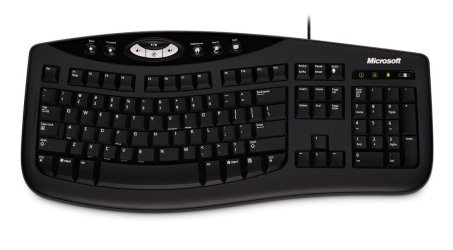
- Microsoft 200 6JH-00001 USB
- Mouse
- Dell or Microsoft optical wired; USB
- Antivirus
- Microsoft Security Essentials and Malwarebytes Premium
- Browser
- Pale Moon
- Other Info
- All fans PWM; speeds at idle: CPU circa 500 rpm; intake circa 600 rpm; exhaust circa 600 rpm; CPU temps 27 idle and 47 C load in a warm room (27 C/81 F) when running Intel Extreme Tuning Utility stress test.


 )
) )
)




 All I could find was the usual suspects, ergonomics, and a couple of gaming keyboards. None of the brands mentioned here.