problem in reinstallation of window 7 urgent

dare2winn

Banned
Local time
5:28 AM
Messages
23
hi friends, i have reinstalled window yesterday. when naming of pc completes and other steps like time zone comletes and it countdown for the re start then it ask me the option to boot the pc giving two option of window 7 and again just below of it another window 7 and says press f10 for advance option which contains boot normally or safe mode etc,( for few sec and boots itself within 2 sec if no option is chosen) ans checks video performance etc

my question is that i have selected custom installation and formated the c drive then why it shows me the option of two window 7?when i installed few months ago there was not any such options and pc used to boot itself without asking any boot mode,

plese give me the idea

regards
 

My Computer My Computer

At a glance

windows 7 ultimate x64 bit1 GB amd raedon
Computer Manufacturer/Model Number
Dell
OS
windows 7 ultimate x64 bit
Graphics Card(s)
1 GB amd raedon
Monitor(s) Displays
14 inch
Hard Drives
500 GB , C ,D,E
Internet Speed
100 Mbps
For a clean install, better you forma tnot only the c drive, but also the 100 mb system reserved partition, too.

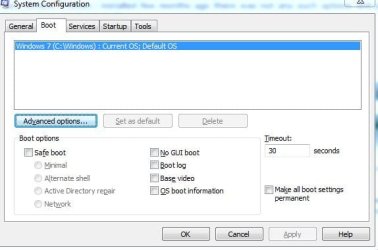
Type msconfig in the search box of the start menu and hit enter. You will get the system configuration window. The second tab there is boot. Can you post a screenshot of that window, with that boot tab selected ?
 

My Computer My Computer

At a glance

Microsoft Windows 10 Pro Insider Preview 64-bitIntel(R) Core(TM) i3-4130 CPU @ 3.40GHzCorsair Vengence 4GB x2 (8.00GB Dual-Channel ...2047MB GeForce GTS 450 (ZOTAC International)
Computer type
PC/Desktop
Computer Manufacturer/Model Number
Self Assembled
OS
Microsoft Windows 10 Pro Insider Preview 64-bit
CPU
Intel(R) Core(TM) i3-4130 CPU @ 3.40GHz
Motherboard
Gigabyte Technology Co., Ltd. B85M-D3H
Memory
Corsair Vengence 4GB x2 (8.00GB Dual-Channel DDR3 @ 798MHz)
Graphics Card(s)
2047MB GeForce GTS 450 (ZOTAC International)
Sound Card
Onboard (Realtek High Definition Audio)
Monitor(s) Displays
LG Flatron E2040T
Screen Resolution
1600x900
Hard Drives
Western Digital 1 TB
Seagate 500 GB
PSU
Corsair VS550
Case
Cooler Master K380
Cooling
Cooler Master Seidon 120V Plus
Keyboard
Logitech MK260r
Mouse
Logitech MK260r
Internet Speed
PMPL Broadband
Antivirus
Windows Defender + MBAM
Browser
Firefox
Other Info
Dell Studio 15" Laptop
please post screenshot of diskmanagment with all fields visible
 

My Computer My Computer

At a glance

Microsoft Windows 7 Home Premium 64-bits 7601...Intel(R) Core(TM) i3 CPU M 370 @ 2.40GHz4,00 GBATI Mobility Radeon HD 5400 Series
Computer type
Laptop
Computer Manufacturer/Model Number
ACER ASPIRE 5742G
OS
Microsoft Windows 7 Home Premium 64-bits 7601 Multiprocessor Free Service Pack 1
CPU
Intel(R) Core(TM) i3 CPU M 370 @ 2.40GHz
Motherboard
Acer Aspire 5742G
Memory
4,00 GB
Graphics Card(s)
ATI Mobility Radeon HD 5400 Series
Sound Card
(1) AMD High Definition Audio Device (2) Realtek High Defi
Screen Resolution
1366 x 768 x 32 bits (4294967296 colors) @ 60 Hz
Hard Drives
WDC WD5000BEVT-22ZAT0
What happens if boot from the other boot entry? Crash, some recovery stuff, same windows as the other entry ... ?
 

My Computer My Computer

At a glance

Microsoft Windows 7 Home Premium 64-bits 7601...Intel(R) Core(TM) i3 CPU M 370 @ 2.40GHz4,00 GBATI Mobility Radeon HD 5400 Series
Computer type
Laptop
Computer Manufacturer/Model Number
ACER ASPIRE 5742G
OS
Microsoft Windows 7 Home Premium 64-bits 7601 Multiprocessor Free Service Pack 1
CPU
Intel(R) Core(TM) i3 CPU M 370 @ 2.40GHz
Motherboard
Acer Aspire 5742G
Memory
4,00 GB
Graphics Card(s)
ATI Mobility Radeon HD 5400 Series
Sound Card
(1) AMD High Definition Audio Device (2) Realtek High Defi
Screen Resolution
1366 x 768 x 32 bits (4294967296 colors) @ 60 Hz
Hard Drives
WDC WD5000BEVT-22ZAT0
hi arc ...thanks for the response, i have sent the screen shot . please help me as much as possible
 

Attachments

  • boot.JPG
    boot.JPG
    32.4 KB · Views: 17

My Computer My Computer

At a glance

windows 7 ultimate x64 bit1 GB amd raedon
Computer Manufacturer/Model Number
Dell
OS
windows 7 ultimate x64 bit
Graphics Card(s)
1 GB amd raedon
Monitor(s) Displays
14 inch
Hard Drives
500 GB , C ,D,E
Internet Speed
100 Mbps
please post screenshot of diskmanagment with all fields visible
thank u for my response....but where can i get this section that is diskmanagment? i wiil send u soon if u give me idea. thanks
 

My Computer My Computer

At a glance

windows 7 ultimate x64 bit1 GB amd raedon
Computer Manufacturer/Model Number
Dell
OS
windows 7 ultimate x64 bit
Graphics Card(s)
1 GB amd raedon
Monitor(s) Displays
14 inch
Hard Drives
500 GB , C ,D,E
Internet Speed
100 Mbps
1. Open the Control Panel (All Items view), and click on the Administrative Tools icon. then close the Control Panel window.

2. Click on Computer Management in Administrative Tools, then close the Administrative Tools window.

3. In the left pane under Storage, click on Disk Management. (See screenshot below)


My Computer My Computer

At a glance

Microsoft Windows 7 Home Premium 64-bits 7601...Intel(R) Core(TM) i3 CPU M 370 @ 2.40GHz4,00 GBATI Mobility Radeon HD 5400 Series
Computer type
Laptop
Computer Manufacturer/Model Number
ACER ASPIRE 5742G
OS
Microsoft Windows 7 Home Premium 64-bits 7601 Multiprocessor Free Service Pack 1
CPU
Intel(R) Core(TM) i3 CPU M 370 @ 2.40GHz
Motherboard
Acer Aspire 5742G
Memory
4,00 GB
Graphics Card(s)
ATI Mobility Radeon HD 5400 Series
Sound Card
(1) AMD High Definition Audio Device (2) Realtek High Defi
Screen Resolution
1366 x 768 x 32 bits (4294967296 colors) @ 60 Hz
Hard Drives
WDC WD5000BEVT-22ZAT0
hi arc ...thanks for the response, i have sent the screen shot . please help me as much as possible
msconfig screenshot shows only ONE bootoption and it stays on screen for 30 seconds. After 30 seconds it boots the default OS. But there is only ONE bootoption so you don't even see it (because that's the only one that's possible).

It must be something else! Can you post a camshot of that bootmenu?
 

My Computer My Computer

At a glance

Microsoft Windows 7 Home Premium 64-bits 7601...Intel(R) Core(TM) i3 CPU M 370 @ 2.40GHz4,00 GBATI Mobility Radeon HD 5400 Series
Computer type
Laptop
Computer Manufacturer/Model Number
ACER ASPIRE 5742G
OS
Microsoft Windows 7 Home Premium 64-bits 7601 Multiprocessor Free Service Pack 1
CPU
Intel(R) Core(TM) i3 CPU M 370 @ 2.40GHz
Motherboard
Acer Aspire 5742G
Memory
4,00 GB
Graphics Card(s)
ATI Mobility Radeon HD 5400 Series
Sound Card
(1) AMD High Definition Audio Device (2) Realtek High Defi
Screen Resolution
1366 x 768 x 32 bits (4294967296 colors) @ 60 Hz
Hard Drives
WDC WD5000BEVT-22ZAT0
I am going with Kaktussoft. As there is only one boot option listed in the msconfig boot tab, you should not see more than one boot options there.

BTW, have you any software like Advanced System Care or TuneUp installed ?
 

My Computer My Computer

At a glance

Microsoft Windows 10 Pro Insider Preview 64-bitIntel(R) Core(TM) i3-4130 CPU @ 3.40GHzCorsair Vengence 4GB x2 (8.00GB Dual-Channel ...2047MB GeForce GTS 450 (ZOTAC International)
Computer type
PC/Desktop
Computer Manufacturer/Model Number
Self Assembled
OS
Microsoft Windows 10 Pro Insider Preview 64-bit
CPU
Intel(R) Core(TM) i3-4130 CPU @ 3.40GHz
Motherboard
Gigabyte Technology Co., Ltd. B85M-D3H
Memory
Corsair Vengence 4GB x2 (8.00GB Dual-Channel DDR3 @ 798MHz)
Graphics Card(s)
2047MB GeForce GTS 450 (ZOTAC International)
Sound Card
Onboard (Realtek High Definition Audio)
Monitor(s) Displays
LG Flatron E2040T
Screen Resolution
1600x900
Hard Drives
Western Digital 1 TB
Seagate 500 GB
PSU
Corsair VS550
Case
Cooler Master K380
Cooling
Cooler Master Seidon 120V Plus
Keyboard
Logitech MK260r
Mouse
Logitech MK260r
Internet Speed
PMPL Broadband
Antivirus
Windows Defender + MBAM
Browser
Firefox
Other Info
Dell Studio 15" Laptop
thank u my frens for the great response. ok what ever is the problem . just answer me will that affect my pc by any way ? and when i re install can i formate the system drive of 100 mb? or it should be untouched? just two queries hope u will help me

regards
 

My Computer My Computer

At a glance

windows 7 ultimate x64 bit1 GB amd raedon
Computer Manufacturer/Model Number
Dell
OS
windows 7 ultimate x64 bit
Graphics Card(s)
1 GB amd raedon
Monitor(s) Displays
14 inch
Hard Drives
500 GB , C ,D,E
Internet Speed
100 Mbps
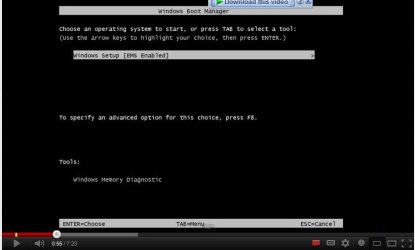
i am attaching the image of that dialog box but i have not formatted my pc . it is the my frens bootin pic but very much similar to mine, just difference is '' in place of'' window set up'' in this box highlighted but in my case there are two options window 7 ultimate and just below that window 7 ultimate. other option are same''

so what is this problem , will it going to harm my pc further or its normal?
 

Attachments

  • boott.JPG
    boott.JPG
    30.1 KB · Views: 6

My Computer My Computer

At a glance

windows 7 ultimate x64 bit1 GB amd raedon
Computer Manufacturer/Model Number
Dell
OS
windows 7 ultimate x64 bit
Graphics Card(s)
1 GB amd raedon
Monitor(s) Displays
14 inch
Hard Drives
500 GB , C ,D,E
Internet Speed
100 Mbps
So you have 2 options which are both EXACTLY the same? May that's why msconfig only shows one.

Do this in http://www.sevenforums.com/tutorials/783-elevated-command-prompt.html

Code:
bcdedit/enum all >bcd.txt
Then post bcd.txt (just open in notepad and copy/paste to forum, or attach to forum)
Then delete bcd.txt

The only problem you have is two exactly the same boot entries? Boot entries open the same windows version, so are both working fine?
 

My Computer My Computer

At a glance

Microsoft Windows 7 Home Premium 64-bits 7601...Intel(R) Core(TM) i3 CPU M 370 @ 2.40GHz4,00 GBATI Mobility Radeon HD 5400 Series
Computer type
Laptop
Computer Manufacturer/Model Number
ACER ASPIRE 5742G
OS
Microsoft Windows 7 Home Premium 64-bits 7601 Multiprocessor Free Service Pack 1
CPU
Intel(R) Core(TM) i3 CPU M 370 @ 2.40GHz
Motherboard
Acer Aspire 5742G
Memory
4,00 GB
Graphics Card(s)
ATI Mobility Radeon HD 5400 Series
Sound Card
(1) AMD High Definition Audio Device (2) Realtek High Defi
Screen Resolution
1366 x 768 x 32 bits (4294967296 colors) @ 60 Hz
Hard Drives
WDC WD5000BEVT-22ZAT0
So you have 2 options which are both EXACTLY the same? May that's why msconfig only shows one.

Do this in http://www.sevenforums.com/tutorials/783-elevated-command-prompt.html

Code:
bcdedit/enum all >bcd.txt
Then post bcd.txt (just open in notepad and copy/paste to forum, or attach to forum)
Then delete bcd.txt

The only problem you have is two exactly the same boot entries? Boot entries open the same windows version, so are both working fine?

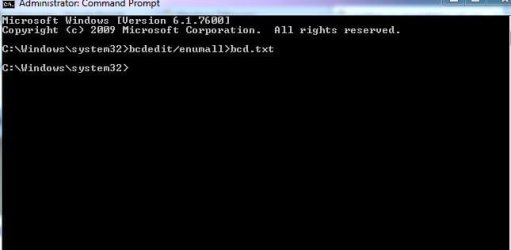
i opened the elevated command and typed what code u have given . but it didnt response when i pressed enter key. i did it by puutin space between enum and all and did without keeping space anywhere. so what is missing that i couldn't do. please help . i have attache the pic of comand too. make me clear what to paste or attach in forum

regards
 

Attachments

  • comand.JPG
    comand.JPG
    19.9 KB · Views: 6

My Computer My Computer

At a glance

windows 7 ultimate x64 bit1 GB amd raedon
Computer Manufacturer/Model Number
Dell
OS
windows 7 ultimate x64 bit
Graphics Card(s)
1 GB amd raedon
Monitor(s) Displays
14 inch
Hard Drives
500 GB , C ,D,E
Internet Speed
100 Mbps
You need spaces in that.

bcdedit /enum all > bcd.txt

the bcd.txt file will be in c:\windows\system32 directory.

TJG :)
 

My Computer My Computer

At a glance

Windows 7 Home Premium 32bitsIntel Pentium 4 521DDR2 4096MBytesATI Radeon HD 2400 Series
Computer Manufacturer/Model Number
Dell Dimension E510
OS
Windows 7 Home Premium 32bits
CPU
Intel Pentium 4 521
Motherboard
Dell Inc. ORD203
Memory
DDR2 4096MBytes
Graphics Card(s)
ATI Radeon HD 2400 Series
Sound Card
On-Board Sigma Tel High Definition Audio
Monitor(s) Displays
Dell ST2210 1920x1080x60 hertz
Hard Drives
320 SATA
500 SATA
PSU
Antec 430 Watts
Case
Dell
Cooling
Standard Fans
Back
Top