Solved what is the difference between basic and dynamic type of hdd volume

dare2winn

Banned
Local time
2:21 AM
Messages
23
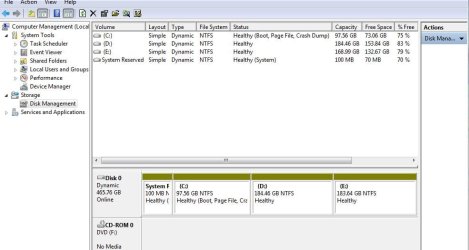
i am attaching the pics of the disc management and there in the type of the drive like c , d , e etc there is ''dynamic'' . but in some pc i have seen there is '' basic''. so how my drive type changed to the dynamics>? is there any draw back being dynami type drive? if yes then how can i change the type of drive from dynamic to basic. please help

regards to all helpers
 

Attachments

  • dynamics.JPG
    dynamics.JPG
    59.9 KB · Views: 82

My Computer My Computer

Computer Manufacturer/Model Number
Dell
OS
windows 7 ultimate x64 bit
Graphics Card(s)
1 GB amd raedon
Monitor(s) Displays
14 inch
Hard Drives
500 GB , C ,D,E
Internet Speed
100 Mbps

My Computer My Computer

Computer type
Laptop
Computer Manufacturer/Model Number
Sony Vaio VPCEB47GM Laptop
OS
Win 7 Pro 64-bit
CPU
Intel i5 2.4 Ghz
Memory
8GB DDR3
Graphics Card(s)
Intel HD 3000
Sound Card
IDT High Definition
Monitor(s) Displays
15.6 WGXA Anti-Glare LED
Screen Resolution
1280x800
Hard Drives
640Gb 7200rpm
Antivirus
MSE
Browser
Opera (primary) with IE9 backup
thank you ffor the response. i have read some where i cannot install new operating system in dynamic hard drive, is it true? it means if i wanted to re instal window seven or wanted to install window 8 then is it impossibe in this dynamic hard drive? please suggest me the truth
 

My Computer My Computer

Computer Manufacturer/Model Number
Dell
OS
windows 7 ultimate x64 bit
Graphics Card(s)
1 GB amd raedon
Monitor(s) Displays
14 inch
Hard Drives
500 GB , C ,D,E
Internet Speed
100 Mbps
According to this Microsoft Answers forum thread, if you convert the disk(s) to dynamic, you will not be able to start installed operating systems from any volume on the disk(s) (except the current boot volume).

Dynamic disks are not supported by this operating system or server - Microsoft Answers

Starting with Vista/Server 2008, the operating system's installation program doesn't allow the operating system to be installed on a dynamic disk. It's all related to security issues. This Microsoft KB article explains that if the hard disk on which you want to install Windows Vista, Windows 7 or Windows Server 2008 R2 is a dynamic disk, you will probably receive a "Windows is unable to find a system volume that meets its criteria for installation" error message. So it's safer to install your operating system on a basic disk. One of our own Forum members (gregrocker) who is also a microsoft MVP says the same thing.

You cannot select or format a hard disk partition when you try to install Windows Vista, Windows 7 or Windows Server 2008 R2

http://www.sevenforums.com/installation-setup/77534-can-i-install-windows-7-dynamic-disk.html
 

My Computer My Computer

Computer type
Laptop
Computer Manufacturer/Model Number
Sony Vaio VPCEB47GM Laptop
OS
Win 7 Pro 64-bit
CPU
Intel i5 2.4 Ghz
Memory
8GB DDR3
Graphics Card(s)
Intel HD 3000
Sound Card
IDT High Definition
Monitor(s) Displays
15.6 WGXA Anti-Glare LED
Screen Resolution
1280x800
Hard Drives
640Gb 7200rpm
Antivirus
MSE
Browser
Opera (primary) with IE9 backup
thank you for the suggestion, so how to convert dynamic to basic? i have heard all the data from each volume will be deleted. so i dont wnat to loose the data so is there any method for this? or by using third party application like partition manager , can i change it without the deletion of the data from drive? if u know any partition manager please suggest me friend.
regards
 

My Computer My Computer

Computer Manufacturer/Model Number
Dell
OS
windows 7 ultimate x64 bit
Graphics Card(s)
1 GB amd raedon
Monitor(s) Displays
14 inch
Hard Drives
500 GB , C ,D,E
Internet Speed
100 Mbps
Here's how to convert from dynamic to basic disk.

http://www.sevenforums.com/tutorials/26829-convert-dynamic-disk-basic-disk.html

As far as I know, you must backup and save any data on the drive before converting it. It's not possible to leave "dynamic data" on a drive that's been converted back to basic because all dynamic partitions/volumes will be deleted. Depending on how much data you have (and from your disk management screenshot it looks like you've got about 450GB) you might want to invest in an external hard drive. From the above tutorial:

   Warning
Before you convert a dynamic disk to a basic disk, be sure to backup anything that you do not want to lose on that dynamic disk. Converting the dynamic disk back to a basic disk requires that all dynamic volumes are deleted on the disk first.
 

My Computer My Computer

Computer type
Laptop
Computer Manufacturer/Model Number
Sony Vaio VPCEB47GM Laptop
OS
Win 7 Pro 64-bit
CPU
Intel i5 2.4 Ghz
Memory
8GB DDR3
Graphics Card(s)
Intel HD 3000
Sound Card
IDT High Definition
Monitor(s) Displays
15.6 WGXA Anti-Glare LED
Screen Resolution
1280x800
Hard Drives
640Gb 7200rpm
Antivirus
MSE
Browser
Opera (primary) with IE9 backup
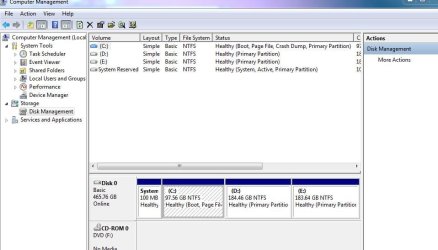
thank u for ur suggestion my frens. i used mini tool partition manager to convert this taking the risk and perhaps i got it. i have attached it. please look it and suggest me that is it ok now to basic or still it is in dynamics? waiting ur reply
regards
 

Attachments

  • uttam.JPG
    uttam.JPG
    63 KB · Views: 70

My Computer My Computer

Computer Manufacturer/Model Number
Dell
OS
windows 7 ultimate x64 bit
Graphics Card(s)
1 GB amd raedon
Monitor(s) Displays
14 inch
Hard Drives
500 GB , C ,D,E
Internet Speed
100 Mbps
The screenshot shows it's been converted. Have you tried to access any of your data?
 

My Computer My Computer

Computer type
Laptop
Computer Manufacturer/Model Number
Sony Vaio VPCEB47GM Laptop
OS
Win 7 Pro 64-bit
CPU
Intel i5 2.4 Ghz
Memory
8GB DDR3
Graphics Card(s)
Intel HD 3000
Sound Card
IDT High Definition
Monitor(s) Displays
15.6 WGXA Anti-Glare LED
Screen Resolution
1280x800
Hard Drives
640Gb 7200rpm
Antivirus
MSE
Browser
Opera (primary) with IE9 backup
The screenshot shows it's been converted. Have you tried to access any of your data?

yeah, i have opened the drive and played the stored movie , played the song and installed the program too, . more important thing is the restore point that were lost when the disk were converted to the dynamics . again reappeared.
i think i got Ur question or you mean to ask some thing else?
regards
 

My Computer My Computer

Computer Manufacturer/Model Number
Dell
OS
windows 7 ultimate x64 bit
Graphics Card(s)
1 GB amd raedon
Monitor(s) Displays
14 inch
Hard Drives
500 GB , C ,D,E
Internet Speed
100 Mbps
Looks like you got it all sorted out! And I learned something new about the Mini Tool. :thumbsup:
 

My Computer My Computer

Computer type
Laptop
Computer Manufacturer/Model Number
Sony Vaio VPCEB47GM Laptop
OS
Win 7 Pro 64-bit
CPU
Intel i5 2.4 Ghz
Memory
8GB DDR3
Graphics Card(s)
Intel HD 3000
Sound Card
IDT High Definition
Monitor(s) Displays
15.6 WGXA Anti-Glare LED
Screen Resolution
1280x800
Hard Drives
640Gb 7200rpm
Antivirus
MSE
Browser
Opera (primary) with IE9 backup
Back
Top