Solved removing "press any key to continue"?

Well, that should have fixed it. Does it still ask to press a key to continue?
 

My Computer My Computer

Computer type
Laptop
Computer Manufacturer/Model Number
Toshiba P775-S7100
OS
Windows 7 Professional SP1 64-bit
CPU
Intel Core i5-2450M @2.5 GHz
Memory
6 GB DDR3 1333MHz
Graphics Card(s)
Intel HD 3000
Monitor(s) Displays
Built-in 17.3" LED; 22" Insignia NS-L22Q-10A
Screen Resolution
1600x900; 1360x768
Hard Drives
750 GB Hitachi
1TB Seagate FreeAgent External
Internet Speed
Verizon DSL Speed(Down/Up): 3360 Kbps / 800 Kbps
Antivirus
MSE and MBAM Pro
Browser
IE10
I have never had that problem. Might have been because of the mix of ATA drive and IDE drive. I'm just not sure.
Sorry you had problems.


Is it working right now?
 

My Computer My Computer

Computer Manufacturer/Model Number
Hopalong/ Godzilla
OS
Windows7 Pro 64bit SP-1; Windows XP Pro 32bit
CPU
Intel Core i7-870 Lynnfield 2.93GHz LGA 1156 95W Quad-Core
Motherboard
ASUS P7P55D-E PRO
Memory
8GB@1400MHz Crucial Ballistix DDR3-1600 4x2GB
Graphics Card(s)
ASUS ENGTX460 DirectCU/2DI/1GD5 1GB 256-bit GDDR5
Sound Card
VIA Onboard
Monitor(s) Displays
Asus VS248H-P 24"; Samsung SyncMaster 941BW 19"ws
Screen Resolution
1920x1080; 1440x900
Hard Drives
Samsung 830 120GB SSD
Intel 320 120GB SSD
Western Digital Caviar Black WD7501AALS 750GB 7200 RPM SATA 3.0Gb/s
Western Digital Caviar Black WD6401AALS 640GB 7200 RPM SATA 3.0Gb/s
PSU
COOLER MASTER Silent Pro RS850-AMBAJ3-US 850W Modular
Case
COOLER MASTER HAF 932 RC-932-KKN5-GP Black
Cooling
Scythe "Mugen-2 Rev.B" (2 ScytheKaze-Jyuni PWM fans)
Keyboard
Logitech K-320
Mouse
Kensington
Antivirus
Avast Inernet Suite
Browser
IE 9 ; Chrome
Nope,natha,niente.Still got it,the mix could be the cause indeed.
 

My Computer My Computer

Computer type
PC/Desktop
Computer Manufacturer/Model Number
Homebuilt,Quadcore processor on Asus MB
OS
Microsoft Windows 7 Ultimate 64-bit Service Pack 1
CPU
Intel(R) Core(TM)2 Quad Q 9550 @ 2.83 GHz
Motherboard
ASUS P5B-Deluxe Wi-Fi Edition
Memory
4x1024 GB DDR2 Corsair PC2-6400 800 Mhz
Graphics Card(s)
MSI TwiFrozer II 1024MB GDDR5
Sound Card
Realtek ALC883 @ Intel 82801HB ICH8 - High Def
Monitor(s) Displays
Asus VW195 [19" LCD]
Screen Resolution
1440x860 pixels
Hard Drives
OCZ Vertex Plus Series SATA II 2.5" SSD 128GB-

Westarn Digital SATA II 250GB
PSU
Corsair CX600W
Case
Custom built,cut and painted
Cooling
Xigmatek Gaia 2x120mm fan
Keyboard
MS Generic
Mouse
MS Optical 6000
Internet Speed
never enough
Antivirus
ESET Smart Security 6.0.306.0
I have never had a need to work with ATA hardrives other than a replacement.
Mixing ATA with the IDE is something I am unfamiliar.

The problem is probably something simple but I am at a loss. :(
 

My Computer My Computer

Computer Manufacturer/Model Number
Hopalong/ Godzilla
OS
Windows7 Pro 64bit SP-1; Windows XP Pro 32bit
CPU
Intel Core i7-870 Lynnfield 2.93GHz LGA 1156 95W Quad-Core
Motherboard
ASUS P7P55D-E PRO
Memory
8GB@1400MHz Crucial Ballistix DDR3-1600 4x2GB
Graphics Card(s)
ASUS ENGTX460 DirectCU/2DI/1GD5 1GB 256-bit GDDR5
Sound Card
VIA Onboard
Monitor(s) Displays
Asus VS248H-P 24"; Samsung SyncMaster 941BW 19"ws
Screen Resolution
1920x1080; 1440x900
Hard Drives
Samsung 830 120GB SSD
Intel 320 120GB SSD
Western Digital Caviar Black WD7501AALS 750GB 7200 RPM SATA 3.0Gb/s
Western Digital Caviar Black WD6401AALS 640GB 7200 RPM SATA 3.0Gb/s
PSU
COOLER MASTER Silent Pro RS850-AMBAJ3-US 850W Modular
Case
COOLER MASTER HAF 932 RC-932-KKN5-GP Black
Cooling
Scythe "Mugen-2 Rev.B" (2 ScytheKaze-Jyuni PWM fans)
Keyboard
Logitech K-320
Mouse
Kensington
Antivirus
Avast Inernet Suite
Browser
IE 9 ; Chrome
Having to run system repair to replace the BOOT MGR didn't strike me as odd, but that not fixing the problem does. Disconnect the second drive and try setting the System Reserved partition as active and run startup repair if needed. See if that solves the issue, then try reattaching the second harddisk. If not, hopefully Greg will know what to do, or I can ask others for more help.
 

My Computer My Computer

Computer type
Laptop
Computer Manufacturer/Model Number
Toshiba P775-S7100
OS
Windows 7 Professional SP1 64-bit
CPU
Intel Core i5-2450M @2.5 GHz
Memory
6 GB DDR3 1333MHz
Graphics Card(s)
Intel HD 3000
Monitor(s) Displays
Built-in 17.3" LED; 22" Insignia NS-L22Q-10A
Screen Resolution
1600x900; 1360x768
Hard Drives
750 GB Hitachi
1TB Seagate FreeAgent External
Internet Speed
Verizon DSL Speed(Down/Up): 3360 Kbps / 800 Kbps
Antivirus
MSE and MBAM Pro
Browser
IE10
The 100mb System Reserved partition should remain Active. Mark Partition Active and run Startup Repair - Run 3 Separate Times until Win7 starts with System Active flags on 100mb as it was before.

I would also move the paging file off of the WD data drive as shown in the tutorial I linked before. If that fails then I'd want to wipe the WD to see if code in the boot sector is interfering.

Make sure Win7 HD remains set HD to boot first in BIOS setup.
 
Last edited:
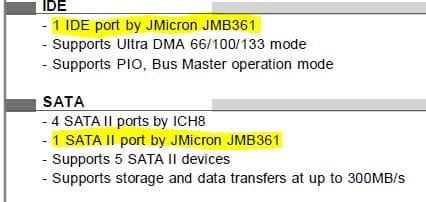
According to the manual for your motherboard you have 4 SATA ports and 1 IDE.> http://www.msi.com/product/mb/P965-Neo.html#/?div=Manual

The two harddrives should be plugged into 2 of the SATA ports.

These are pictures (Snips) of your motherboard manual.
You do not want to plug one of the harddrives into the JMicron port.

Just use the 4 ICH8 ports as circled in yellow. They marked #1 in the manual already.

That is the next thing I would check that the JMicron port does not have a hard drive plugged into it.
 

Attachments

  • ICH Sata ports..PNG
    ICH Sata ports..PNG
    42.6 KB · Views: 12
  • ICH Sata ports2.PNG
    ICH Sata ports2.PNG
    32.3 KB · Views: 11

My Computer My Computer

Computer Manufacturer/Model Number
Hopalong/ Godzilla
OS
Windows7 Pro 64bit SP-1; Windows XP Pro 32bit
CPU
Intel Core i7-870 Lynnfield 2.93GHz LGA 1156 95W Quad-Core
Motherboard
ASUS P7P55D-E PRO
Memory
8GB@1400MHz Crucial Ballistix DDR3-1600 4x2GB
Graphics Card(s)
ASUS ENGTX460 DirectCU/2DI/1GD5 1GB 256-bit GDDR5
Sound Card
VIA Onboard
Monitor(s) Displays
Asus VS248H-P 24"; Samsung SyncMaster 941BW 19"ws
Screen Resolution
1920x1080; 1440x900
Hard Drives
Samsung 830 120GB SSD
Intel 320 120GB SSD
Western Digital Caviar Black WD7501AALS 750GB 7200 RPM SATA 3.0Gb/s
Western Digital Caviar Black WD6401AALS 640GB 7200 RPM SATA 3.0Gb/s
PSU
COOLER MASTER Silent Pro RS850-AMBAJ3-US 850W Modular
Case
COOLER MASTER HAF 932 RC-932-KKN5-GP Black
Cooling
Scythe "Mugen-2 Rev.B" (2 ScytheKaze-Jyuni PWM fans)
Keyboard
Logitech K-320
Mouse
Kensington
Antivirus
Avast Inernet Suite
Browser
IE 9 ; Chrome
It appears from the screen shot you posted that the JMicron port does have one of the hard drives plugged into it.
That is why you are being prompted.

Bios is asking "are you sure you want to boot that device?"

Plug both hard drives into the ICH 8 ports and the prompt will be gone.
Wish I would have caught that earlier. :(
I had a feeling it was something simple.


My Computer My Computer

Computer Manufacturer/Model Number
Hopalong/ Godzilla
OS
Windows7 Pro 64bit SP-1; Windows XP Pro 32bit
CPU
Intel Core i7-870 Lynnfield 2.93GHz LGA 1156 95W Quad-Core
Motherboard
ASUS P7P55D-E PRO
Memory
8GB@1400MHz Crucial Ballistix DDR3-1600 4x2GB
Graphics Card(s)
ASUS ENGTX460 DirectCU/2DI/1GD5 1GB 256-bit GDDR5
Sound Card
VIA Onboard
Monitor(s) Displays
Asus VS248H-P 24"; Samsung SyncMaster 941BW 19"ws
Screen Resolution
1920x1080; 1440x900
Hard Drives
Samsung 830 120GB SSD
Intel 320 120GB SSD
Western Digital Caviar Black WD7501AALS 750GB 7200 RPM SATA 3.0Gb/s
Western Digital Caviar Black WD6401AALS 640GB 7200 RPM SATA 3.0Gb/s
PSU
COOLER MASTER Silent Pro RS850-AMBAJ3-US 850W Modular
Case
COOLER MASTER HAF 932 RC-932-KKN5-GP Black
Cooling
Scythe "Mugen-2 Rev.B" (2 ScytheKaze-Jyuni PWM fans)
Keyboard
Logitech K-320
Mouse
Kensington
Antivirus
Avast Inernet Suite
Browser
IE 9 ; Chrome
It appears from the screen shot you posted that the JMicron port does have one of the hard drives plugged into it.
That is why you are being prompted.

Bios is asking "are you sure you want to boot that device?"

That's how it seems to me too, except the OP is not really getting a choice.

Plug both hard drives into the ICH 8 ports and the prompt will be gone.
Wish I would have caught that earlier. :(
I had a feeling it was something simple.


I'm wondering if the OP is using the PCI-e card as a way to attach the IDE drive rather than using the port available on the motherboard itself. Or is that not a true physical PCI-e card referenced in that screenshot?
 

My Computer My Computer

OS
Windows 7 Ultimate x64
According to the manual for your motherboard you have 4 SATA ports and 1 IDE.> MSI Global ? Mainboard - P965 Neo

The two harddrives should be plugged into 2 of the SATA ports.

These are pictures (Snips) of your motherboard manual.
You do not want to plug one of the harddrives into the JMicron port.

Just use the 4 ICH8 ports as circled in yellow. They marked #1 in the manual already.

That is the next thing I would check that the JMicron port does not have a hard drive plugged into it.
JMicron does not have a drive connected,HD1 ATA Hitachi is connected to slot SATA 4 ICH8,HD2 WDC IDE is connected to IDE slot,just reassuring.
 

My Computer My Computer

Computer type
PC/Desktop
Computer Manufacturer/Model Number
Homebuilt,Quadcore processor on Asus MB
OS
Microsoft Windows 7 Ultimate 64-bit Service Pack 1
CPU
Intel(R) Core(TM)2 Quad Q 9550 @ 2.83 GHz
Motherboard
ASUS P5B-Deluxe Wi-Fi Edition
Memory
4x1024 GB DDR2 Corsair PC2-6400 800 Mhz
Graphics Card(s)
MSI TwiFrozer II 1024MB GDDR5
Sound Card
Realtek ALC883 @ Intel 82801HB ICH8 - High Def
Monitor(s) Displays
Asus VW195 [19" LCD]
Screen Resolution
1440x860 pixels
Hard Drives
OCZ Vertex Plus Series SATA II 2.5" SSD 128GB-

Westarn Digital SATA II 250GB
PSU
Corsair CX600W
Case
Custom built,cut and painted
Cooling
Xigmatek Gaia 2x120mm fan
Keyboard
MS Generic
Mouse
MS Optical 6000
Internet Speed
never enough
Antivirus
ESET Smart Security 6.0.306.0
It appears from the screen shot you posted that the JMicron port does have one of the hard drives plugged into it.
That is why you are being prompted.

Bios is asking "are you sure you want to boot that device?"

That's how it seems to me too, except the OP is not really getting a choice.

Plug both hard drives into the ICH 8 ports and the prompt will be gone.
Wish I would have caught that earlier. :(
I had a feeling it was something simple.


I'm wondering if the OP is using the PCI-e card as a way to attach the IDE drive rather than using the port available on the motherboard itself. Or is that not a true physical PCI-e card referenced in that screenshot?
cannot plug both drives to SATA slots,one ATA and one IDE,and it should not be a physical PCI card as shown.
 

My Computer My Computer

Computer type
PC/Desktop
Computer Manufacturer/Model Number
Homebuilt,Quadcore processor on Asus MB
OS
Microsoft Windows 7 Ultimate 64-bit Service Pack 1
CPU
Intel(R) Core(TM)2 Quad Q 9550 @ 2.83 GHz
Motherboard
ASUS P5B-Deluxe Wi-Fi Edition
Memory
4x1024 GB DDR2 Corsair PC2-6400 800 Mhz
Graphics Card(s)
MSI TwiFrozer II 1024MB GDDR5
Sound Card
Realtek ALC883 @ Intel 82801HB ICH8 - High Def
Monitor(s) Displays
Asus VW195 [19" LCD]
Screen Resolution
1440x860 pixels
Hard Drives
OCZ Vertex Plus Series SATA II 2.5" SSD 128GB-

Westarn Digital SATA II 250GB
PSU
Corsair CX600W
Case
Custom built,cut and painted
Cooling
Xigmatek Gaia 2x120mm fan
Keyboard
MS Generic
Mouse
MS Optical 6000
Internet Speed
never enough
Antivirus
ESET Smart Security 6.0.306.0
It appears from the screen shot you posted that the JMicron port does have one of the hard drives plugged into it.
That is why you are being prompted.

Bios is asking "are you sure you want to boot that device?"

That's how it seems to me too, except the OP is not really getting a choice.

Plug both hard drives into the ICH 8 ports and the prompt will be gone.
Wish I would have caught that earlier. :(
I had a feeling it was something simple.


I'm wondering if the OP is using the PCI-e card as a way to attach the IDE drive rather than using the port available on the motherboard itself. Or is that not a true physical PCI-e card referenced in that screenshot?
Im not using a PCI to connect the second drive so that makes the reference not true.
sorry about the double quote.
 

My Computer My Computer

Computer type
PC/Desktop
Computer Manufacturer/Model Number
Homebuilt,Quadcore processor on Asus MB
OS
Microsoft Windows 7 Ultimate 64-bit Service Pack 1
CPU
Intel(R) Core(TM)2 Quad Q 9550 @ 2.83 GHz
Motherboard
ASUS P5B-Deluxe Wi-Fi Edition
Memory
4x1024 GB DDR2 Corsair PC2-6400 800 Mhz
Graphics Card(s)
MSI TwiFrozer II 1024MB GDDR5
Sound Card
Realtek ALC883 @ Intel 82801HB ICH8 - High Def
Monitor(s) Displays
Asus VW195 [19" LCD]
Screen Resolution
1440x860 pixels
Hard Drives
OCZ Vertex Plus Series SATA II 2.5" SSD 128GB-

Westarn Digital SATA II 250GB
PSU
Corsair CX600W
Case
Custom built,cut and painted
Cooling
Xigmatek Gaia 2x120mm fan
Keyboard
MS Generic
Mouse
MS Optical 6000
Internet Speed
never enough
Antivirus
ESET Smart Security 6.0.306.0
If we are talking about the motherboard listed in your specs then the IDE port is also controlled by the JMicron controller.
MSI_MS-7235.JPG

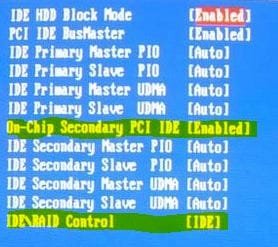
Try this, go into BIOS > Integrated Peripherals > On-Chip ATA Devices. Here you should find "On-Chip Secondary PCI IDE" and probably as a sub option of this should be "IDE\RAID Control".

"On-Chip Secondary PCI IDE" should already be enabled as you can use the IDE port.
"IDE\RAID Control" should be set to IDE or disabled.

Try that and let us know how it goes.
 

My Computer My Computer

Computer Manufacturer/Model Number
Self built
OS
Windows 7 Ultimate x64
CPU
Intel Pentium Dual Core E5200 2.5GHz (3.77GHz OC)
Motherboard
Asus P5Q-E
Memory
Corsair 4GB DDR2 (4x1GB CM2X1024-6400C4)
Graphics Card(s)
Palit GeForce GTS 250 (1024MB)
Sound Card
On Board (ADI AD2000B 8ch HD)
Monitor(s) Displays
Samsung 32in LCD TV
Screen Resolution
1360x768
Hard Drives
2 x 1TB Samsung 103SJ (Raid0)
2 x External 500GB Samsung 502IJ (NexStar 3 HD Enclosures)
PSU
550W Antec Neo HE 550
Case
Antec P180
Cooling
Xigmatex Red Scorpion CPU Cooler. 3x120mm Fans
Keyboard
Logitech MX5000 Laser (Combo)
Mouse
Logitech MX5000 Laser (Combo)
Internet Speed
ADSL2+ (avg 10 Mbps Down, 0.80 Mbps up)
Other Info
Gigabyte GN-WP01GS 54g Wireless Lan Card
In addition it appears the menu you are getting does not allow you to select a HD to boot, correct? If so then it may not be a boot menu but a controller screen showing the attached HD's. In that case there should be a way to hide the screen via a setting in BIOS. Look at the available SATA controller settings closely.

If not then I'd want to try all available SATA/IDE port combinations.
 
DUZZY,disabled the controller,no prompt but also no second disk,no optical.
GREGROCKER,the menu does not ask for a selection,it is stating the detection and finding of second drive WDC-IDE and the optical,prompts for a key and boots on its own from Hitachi-ATA as it should of course.By combinations do you mean physical slots or via bios?
I really dont want to make all you guys getting tired,sure you got plenty of your own concernes...
 

My Computer My Computer

Computer type
PC/Desktop
Computer Manufacturer/Model Number
Homebuilt,Quadcore processor on Asus MB
OS
Microsoft Windows 7 Ultimate 64-bit Service Pack 1
CPU
Intel(R) Core(TM)2 Quad Q 9550 @ 2.83 GHz
Motherboard
ASUS P5B-Deluxe Wi-Fi Edition
Memory
4x1024 GB DDR2 Corsair PC2-6400 800 Mhz
Graphics Card(s)
MSI TwiFrozer II 1024MB GDDR5
Sound Card
Realtek ALC883 @ Intel 82801HB ICH8 - High Def
Monitor(s) Displays
Asus VW195 [19" LCD]
Screen Resolution
1440x860 pixels
Hard Drives
OCZ Vertex Plus Series SATA II 2.5" SSD 128GB-

Westarn Digital SATA II 250GB
PSU
Corsair CX600W
Case
Custom built,cut and painted
Cooling
Xigmatek Gaia 2x120mm fan
Keyboard
MS Generic
Mouse
MS Optical 6000
Internet Speed
never enough
Antivirus
ESET Smart Security 6.0.306.0
don't know if this would affect anything, but I know HDD's have jumpers on them that designate them as master or slave. Maybe the jumper on the IDE is set incorrectly. Haven't had any machines with a mix of HDD's... just thought i'd throw that out there....
 

My Computer My Computer

Computer type
Laptop
Computer Manufacturer/Model Number
ASUS G60-RBBX05
OS
Win7 Home Premium 64x
CPU
Intel Core 2 Duo P7450 / 2.13 GHz (2.29 with Extreme Turbo)
Memory
4 GB PC-6400 Hyundai (2X2) at 800Mhz
Graphics Card(s)
NVIDIA GeForce GTX 260M 1GB DDR3 VRAM
Monitor(s) Displays
16" LED Backlit
Screen Resolution
1366 x 768 on laptop 1600x1050 max res on 22" external mon
Hard Drives
OCZ Agility 3 60GB SSD / 320 GB - Serial ATA-150 - 7200 rpm
PSU
6-cell Lithium ion { lasts 1.5 hours }
Case
ASUS G60 Laptop
Keyboard
Chicklet type back-lit (white light) keyboard
Mouse
Logitech G9 Laser Mouse 3200dpi and 1000 reports per minute
Internet Speed
Comcast 8.60mb/s up - 3.11mb/s down
Antivirus
MSE
Browser
Firefox
Other Info
General mid-budget gaming Comp. Low batterylife - High FrameRates - currently overheating problems :(

2nd Rig: Case: Rosewill BLACKHAWK Gaming ATX Mid Tower Computer Case

Mobo: GIGABYTE GA-990FXA-UD3
CPU: AMD FX-6200 Zambezi 3.8GHz (4.1GHz Turbo)
Heatsink: COOLER MASTER V8 CPU Cooler
RAM: Patriot Viper 3 8GB (2 x 4GB) 240-Pin DDR3 SDRAM 1866 (PC3 15000)
GPU: SAPPHIRE Radeon HD 6850 1GB 2
This is what we do. We keep working at it until it's solved.

See how the jumper is set on WD: How to physically install, set jumper settings, and set up a Serial ATA, EIDE, or SSD drive in Windows 7, Vista, XP, and 2000

I may have missed it but have you tried plugging the SATA HD into the ICH8 controller?

Did you check all settings in BIOS for one to hide the controller screen?

I would also access your Manual on the MSI Support Downloads webpage for your model to read how to configure this so that the screen is bypassed.
 
DUZZY,disabled the controller,no prompt but also no second disk,no optical.
The actual controller (On-Chip Secondary PCI IDE) should be left enabled but change the "IDE\RAID Control" to IDE going by the image I found via Google. Is this what you tried? If not check the image and set as highlighted.
MSI_MS-7235_BIOS.JPG
If I have my SATA connections set as RAID I get an extra screen after the first POST screen which gives me the chance to create/edit RAID Arrays and displays the drives connected but when set to IDE this screen is not shown and I thought this would be the same for you, although your manual states to press the key to open the RAID setup screen during POST.
 

My Computer My Computer

Computer Manufacturer/Model Number
Self built
OS
Windows 7 Ultimate x64
CPU
Intel Pentium Dual Core E5200 2.5GHz (3.77GHz OC)
Motherboard
Asus P5Q-E
Memory
Corsair 4GB DDR2 (4x1GB CM2X1024-6400C4)
Graphics Card(s)
Palit GeForce GTS 250 (1024MB)
Sound Card
On Board (ADI AD2000B 8ch HD)
Monitor(s) Displays
Samsung 32in LCD TV
Screen Resolution
1360x768
Hard Drives
2 x 1TB Samsung 103SJ (Raid0)
2 x External 500GB Samsung 502IJ (NexStar 3 HD Enclosures)
PSU
550W Antec Neo HE 550
Case
Antec P180
Cooling
Xigmatex Red Scorpion CPU Cooler. 3x120mm Fans
Keyboard
Logitech MX5000 Laser (Combo)
Mouse
Logitech MX5000 Laser (Combo)
Internet Speed
ADSL2+ (avg 10 Mbps Down, 0.80 Mbps up)
Other Info
Gigabyte GN-WP01GS 54g Wireless Lan Card
This is what we do. We keep working at it until it's solved.

See how the jumper is set on WD: How to physically install, set jumper settings, and set up a Serial ATA, EIDE, or SSD drive in Windows 7, Vista, XP, and 2000

I may have missed it but have you tried plugging the SATA HD into the ICH8 controller?

Did you check all settings in BIOS for one to hide the controller screen?

I would also access your Manual on the MSI Support Downloads webpage for your model to read how to configure this so that the screen is bypassed.
Jumper is set on pins 5-6 dual master
SATA HD is plugged into ICH8 slot,namely SATA4
believe that checked thoroughly for option to hide(already logo hidden etc)
trying to find manual...
 

My Computer My Computer

Computer type
PC/Desktop
Computer Manufacturer/Model Number
Homebuilt,Quadcore processor on Asus MB
OS
Microsoft Windows 7 Ultimate 64-bit Service Pack 1
CPU
Intel(R) Core(TM)2 Quad Q 9550 @ 2.83 GHz
Motherboard
ASUS P5B-Deluxe Wi-Fi Edition
Memory
4x1024 GB DDR2 Corsair PC2-6400 800 Mhz
Graphics Card(s)
MSI TwiFrozer II 1024MB GDDR5
Sound Card
Realtek ALC883 @ Intel 82801HB ICH8 - High Def
Monitor(s) Displays
Asus VW195 [19" LCD]
Screen Resolution
1440x860 pixels
Hard Drives
OCZ Vertex Plus Series SATA II 2.5" SSD 128GB-

Westarn Digital SATA II 250GB
PSU
Corsair CX600W
Case
Custom built,cut and painted
Cooling
Xigmatek Gaia 2x120mm fan
Keyboard
MS Generic
Mouse
MS Optical 6000
Internet Speed
never enough
Antivirus
ESET Smart Security 6.0.306.0
DUZZY,disabled the controller,no prompt but also no second disk,no optical.
The actual controller (On-Chip Secondary PCI IDE) should be left enabled but change the "IDE\RAID Control" to IDE going by the image I found via Google. Is this what you tried? If not check the image and set as highlighted.
View attachment 214362
If I have my SATA connections set as RAID I get an extra screen after the first POST screen which gives me the chance to create/edit RAID Arrays and displays the drives connected but when set to IDE this screen is not shown and I thought this would be the same for you, although your manual states to press the key to open the RAID setup screen during POST.
These were and are again exactly the settings,when IDE-RAID disabled,"lost" second and optical.
 

My Computer My Computer

Computer type
PC/Desktop
Computer Manufacturer/Model Number
Homebuilt,Quadcore processor on Asus MB
OS
Microsoft Windows 7 Ultimate 64-bit Service Pack 1
CPU
Intel(R) Core(TM)2 Quad Q 9550 @ 2.83 GHz
Motherboard
ASUS P5B-Deluxe Wi-Fi Edition
Memory
4x1024 GB DDR2 Corsair PC2-6400 800 Mhz
Graphics Card(s)
MSI TwiFrozer II 1024MB GDDR5
Sound Card
Realtek ALC883 @ Intel 82801HB ICH8 - High Def
Monitor(s) Displays
Asus VW195 [19" LCD]
Screen Resolution
1440x860 pixels
Hard Drives
OCZ Vertex Plus Series SATA II 2.5" SSD 128GB-

Westarn Digital SATA II 250GB
PSU
Corsair CX600W
Case
Custom built,cut and painted
Cooling
Xigmatek Gaia 2x120mm fan
Keyboard
MS Generic
Mouse
MS Optical 6000
Internet Speed
never enough
Antivirus
ESET Smart Security 6.0.306.0
Back
Top