Display driver stopped responding and has recovered

My Computer My Computer

At a glance

Windows 7 Home Premium 64bitPentium(R) Dual-Core CPU E5800 @ 3.20GHz4.00 GBIntel(R) G41 Express Chipset
Computer Manufacturer/Model Number
Acer eMachines EL1850
OS
Windows 7 Home Premium 64bit
CPU
Pentium(R) Dual-Core CPU E5800 @ 3.20GHz
Motherboard
eMachines EL1850
Memory
4.00 GB
Graphics Card(s)
Intel(R) G41 Express Chipset
Sound Card
Realtek High Definition Audio
Monitor(s) Displays
Intel(R) G41 Express Chipset
Screen Resolution
1600 x 900 x 32 bits (4294967296 colors) @ 59 Hz
Hard Drives
(1) Hitachi HDS721032CLA362 ATA Device (2) Generic- Compact Flash USB Device (3) Multiple Flash Reader USB Device
For three posts I stated clearly you need to get your latest drivers in optional Updates. Now you ask me if it's wise to include optional Updates?

You should set your Updates to automatic and install all Updates you receive. This is not XP. Not even one in a million Windows Updates in Win7 foul out. This is how the latest drivers are delivered.
 
For three posts I stated clearly you need to get your latest drivers in optional Updates. Now you ask me if it's wise to include optional Updates?

You should set your Updates to automatic and install all Updates you receive. This is not XP. Not even one in a million Windows Updates in Win7 foul out. This is how the latest drivers are delivered.

Ah thank i missed your previous post. Is there anyway to set Automatic update everything including optional ones?
 

My Computer My Computer

At a glance

Windows 7 Home Premium 64bitPentium(R) Dual-Core CPU E5800 @ 3.20GHz4.00 GBIntel(R) G41 Express Chipset
Computer Manufacturer/Model Number
Acer eMachines EL1850
OS
Windows 7 Home Premium 64bit
CPU
Pentium(R) Dual-Core CPU E5800 @ 3.20GHz
Motherboard
eMachines EL1850
Memory
4.00 GB
Graphics Card(s)
Intel(R) G41 Express Chipset
Sound Card
Realtek High Definition Audio
Monitor(s) Displays
Intel(R) G41 Express Chipset
Screen Resolution
1600 x 900 x 32 bits (4294967296 colors) @ 59 Hz
Hard Drives
(1) Hitachi HDS721032CLA362 ATA Device (2) Generic- Compact Flash USB Device (3) Multiple Flash Reader USB Device
Under Change Settings in Windows Updates, allow it to install Recommended updates. But you should still check periodically to install any cued optional Updates unless they clearly are not needed. You can always ask here in if in doubt.
 
Hi,

Just today i experience the same thing again. My pc shut down and restarted on its own.. Does this has to do with the driver again??
 

My Computer My Computer

At a glance

Windows 7 Home Premium 64bitPentium(R) Dual-Core CPU E5800 @ 3.20GHz4.00 GBIntel(R) G41 Express Chipset
Computer Manufacturer/Model Number
Acer eMachines EL1850
OS
Windows 7 Home Premium 64bit
CPU
Pentium(R) Dual-Core CPU E5800 @ 3.20GHz
Motherboard
eMachines EL1850
Memory
4.00 GB
Graphics Card(s)
Intel(R) G41 Express Chipset
Sound Card
Realtek High Definition Audio
Monitor(s) Displays
Intel(R) G41 Express Chipset
Screen Resolution
1600 x 900 x 32 bits (4294967296 colors) @ 59 Hz
Hard Drives
(1) Hitachi HDS721032CLA362 ATA Device (2) Generic- Compact Flash USB Device (3) Multiple Flash Reader USB Device
Well if you keep updating your video driver and then the problem occurs, stop updating your video driver. Roll back to the previous driver that worked and leave it alone.
 

My Computer My Computer

At a glance

Windows 10 Pro x64Intel Core i7 6700KGSkill TridentZ RGB 16GB 3600 16-16-16-36EVGA GTX 980 Ti SC x2
Computer type
PC/Desktop
Computer Manufacturer/Model Number
Skylake Special #666
OS
Windows 10 Pro x64
CPU
Intel Core i7 6700K
Motherboard
Asus Sabertooth Z170 Mark 1
Memory
GSkill TridentZ RGB 16GB 3600 16-16-16-36
Graphics Card(s)
EVGA GTX 980 Ti SC x2
Sound Card
Realtek High Definition
Monitor(s) Displays
AOC G2460PG
Screen Resolution
1920 x 1080 144Hz
Hard Drives
Samsung 860 Pro 256GB, Seagate Barracuda 4TB x2
PSU
EVGA 1000 P2, EVGA White Custom Braided Cables
Case
Corsair Vengeance C70 Gunmetal Black
Cooling
Corsair H100i v2, Corsair ML120 x2, Thermal Grizzly Kryonaut
Keyboard
Logitech G910 Orion Spectrum
Mouse
Logitech G700s
Internet Speed
Verizon Fios Quantum Gateway 75/75
Antivirus
Windows Defender, Malwarebytes Free 3.8.3
Browser
Chrome
Other Info
Corsair SP120 x4, LG Blu-ray Drive, Durabrand HT-395 100 Watt Dolby Digital Amp, Corsair H2100 Wireless 7.1 Headset
I tried to right-click setup then choose Run as Administrator again. I wonder am i using the correct driver and other better ones? Currently updated with "Intel VGA driver".
 

My Computer My Computer

At a glance

Windows 7 Home Premium 64bitPentium(R) Dual-Core CPU E5800 @ 3.20GHz4.00 GBIntel(R) G41 Express Chipset
Computer Manufacturer/Model Number
Acer eMachines EL1850
OS
Windows 7 Home Premium 64bit
CPU
Pentium(R) Dual-Core CPU E5800 @ 3.20GHz
Motherboard
eMachines EL1850
Memory
4.00 GB
Graphics Card(s)
Intel(R) G41 Express Chipset
Sound Card
Realtek High Definition Audio
Monitor(s) Displays
Intel(R) G41 Express Chipset
Screen Resolution
1600 x 900 x 32 bits (4294967296 colors) @ 59 Hz
Hard Drives
(1) Hitachi HDS721032CLA362 ATA Device (2) Generic- Compact Flash USB Device (3) Multiple Flash Reader USB Device
If you have tried different drivers and the problem still occurs, you will have to consider the possibility that you have a hardware problem with your integrated graphics chip.

Do you have a local repair shop that can check it out for you? Failing that, you could contact eMachine's support and see what they say.

You might even want to consider buying a dedicated graphics card if your motherboard has a spare slot.
 

My Computer My Computer

At a glance

Windows 7 Ultimate SP1 64-BitIntel Core i7 870 @ 2.93GHz8Gb Dual-Channel DDR3 @ 664MHznVidia GeForce GTX 460 1024MB dedicated RAM
Computer Manufacturer/Model Number
HP Pavilion Elite 495UK
OS
Windows 7 Ultimate SP1 64-Bit
CPU
Intel Core i7 870 @ 2.93GHz
Motherboard
MSI 2A9C (CPU1)
Memory
8Gb Dual-Channel DDR3 @ 664MHz
Graphics Card(s)
nVidia GeForce GTX 460 1024MB dedicated RAM
Sound Card
Realtek HD Audio
Monitor(s) Displays
HP2310i
Screen Resolution
1920 x 1080
Hard Drives
1x1954GB Hitachi HDS22020ALA 330 (RAID), 1x1954GB Hitachi External for backup and storage
PSU
460W
Case
HP Elite
Cooling
Air cooled
Keyboard
Logitech K750 solar-powered keyboard
Mouse
Logitech Wireless M180 mouse
Internet Speed
2Mb
Other Info
Pure Avanti Flow Internet Radio with iPod Dock, 64Gb iPod, HP USB Speakers, Sony MDR-V500 Headphones, Sony Vaio F-Series Laptop
If you have tried different drivers and the problem still occurs, you will have to consider the possibility that you have a hardware problem with your integrated graphics chip.

Do you have a local repair shop that can check it out for you? Failing that, you could contact eMachine's support and see what they say.

You might even want to consider buying a dedicated graphics card if your motherboard has a spare slot.

Is there anyway to check if my graphic card has problem myself now?

And secondly what are the other Drivers i can test out with? Thanks
 

My Computer My Computer

At a glance

Windows 7 Home Premium 64bitPentium(R) Dual-Core CPU E5800 @ 3.20GHz4.00 GBIntel(R) G41 Express Chipset
Computer Manufacturer/Model Number
Acer eMachines EL1850
OS
Windows 7 Home Premium 64bit
CPU
Pentium(R) Dual-Core CPU E5800 @ 3.20GHz
Motherboard
eMachines EL1850
Memory
4.00 GB
Graphics Card(s)
Intel(R) G41 Express Chipset
Sound Card
Realtek High Definition Audio
Monitor(s) Displays
Intel(R) G41 Express Chipset
Screen Resolution
1600 x 900 x 32 bits (4294967296 colors) @ 59 Hz
Hard Drives
(1) Hitachi HDS721032CLA362 ATA Device (2) Generic- Compact Flash USB Device (3) Multiple Flash Reader USB Device
Things I would do before taking it to a shop and pay and trust some "unknown" person.

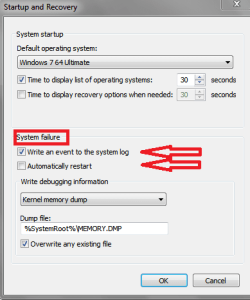
  • Make sure auto restart on system failure is turned off (see screen print below).
  • Maybe there is an error message or BSOD / memory dump, that isn't being seen or known.
  • Run a Memory test (Memtest86).
  • Run a System File Check (SFC).
  • Run A Windows Check Disk.
  • Install a utility and check temperatures to eliminate a possible overheating issue (not likely, but...).
This thread/issue seems to be based on the assumption that the Video driver is causing the problem.
I haven't seen a screen print for the error message that was reported in the OP.
Maybe the outdated driver message and the system crash are unrelated and just coincidence???
I understand it may be a driver / IGP problem, but I'm not sure.

There are a lot of more knowledgeable people than me in this thread with suggestions and I respect that.
I'm just throwing MY ideas out, and what i would do.
If I'm way off base and my ideas are "stupid", feel free to say so.
I won't be offended/hurt if someone says "That's the worst idea since UNsliced bread" :)

Guess I'm curious as to my own troubleshooting approach.
I don't want to try and help people on this Forum (or anywhere) and give bad info and cause problems/frustration for them.

SysErrSP01.PNG
 

My Computer My Computer

At a glance

Multi-Boot W7_Pro_x64 W8.1_Pro_x64 W10_Pro_x6...AMD Athlon II x4 6206GB GSkill DDR2 800AMD 4670 GPU + AMD 4200 IGP
Computer type
PC/Desktop
Computer Manufacturer/Model Number
home built
OS
Multi-Boot W7_Pro_x64 W8.1_Pro_x64 W10_Pro_x64 +Linux_VMs +Chromium_VM
CPU
AMD Athlon II x4 620
Motherboard
Gigabyte GA-MA785G-UD3H
Memory
6GB GSkill DDR2 800
Graphics Card(s)
AMD 4670 GPU + AMD 4200 IGP
Sound Card
on board Realtek ALC889A
Monitor(s) Displays
RCA 40" LCD TV, Insignia 32" LCD TV, HP 15" LCD monitor
Screen Resolution
1680 x 1050
Hard Drives
OCZ Vertex 3 120GB,
Samsung F3 1TB (3),
Several others - WD, Seagate, Hitachi, ...
PSU
Corsair 500 W
Case
Rosewill mid tower
Cooling
CM 90mm rifle
Keyboard
Gyration wireless, Logitech wireless, Dell USB wired
Mouse
Gyration wireless, Logitech wireless, V7 USB wired
Internet Speed
Spectrum - 100Mbps D / 10Mbps U
Antivirus
Avast, MBAM3, EMET, WinPatrol
Browser
Pale Moon, Firefox, IE
Other Info
2 multi-boot PC's
Mainly HTPC/Office/Gen purpose (no gaming).
Trendnet USB KVM.
LG DVD burner/Blue Ray Player.
Tray system for removable SATA backup drives.

Not currently OCd, under-volted.
I use Hybrid sleep, rarely re-boot or shutdown.

Hauppauge HD-PVR, Avermedia PCIe TV Tuner, Hauppauge PCI TV Tuner.
I agree with David. In addition to his suggestions, work through these Troubleshooting Steps for Windows 7 to establish a Clean Boot, check the logs for errors at the time the problem occurrred, and utilize System Resources to find solutions for problems. Not only will you learn how to troubleshoot your computer, you'll also know you've done everything possible.

If there is a question that the driver may have caused the problem, click on the Device in Device Manager, on the Driver tab, Roll back the driver to see if it helps. If not you can Update it and it will reinstall.
 
Your suggestions David are eminently sensible and ones the OP in particular should follow up.

Whilst accepting your surmise that the thread concentrated on a possible driver problem it was the way the thread just gradually progressed to this assumption.

Your timely intervention reminds us we shouldn't assume anything.
 

My Computer My Computer

At a glance

Windows 7 Ultimate SP1 64-BitIntel Core i7 870 @ 2.93GHz8Gb Dual-Channel DDR3 @ 664MHznVidia GeForce GTX 460 1024MB dedicated RAM
Computer Manufacturer/Model Number
HP Pavilion Elite 495UK
OS
Windows 7 Ultimate SP1 64-Bit
CPU
Intel Core i7 870 @ 2.93GHz
Motherboard
MSI 2A9C (CPU1)
Memory
8Gb Dual-Channel DDR3 @ 664MHz
Graphics Card(s)
nVidia GeForce GTX 460 1024MB dedicated RAM
Sound Card
Realtek HD Audio
Monitor(s) Displays
HP2310i
Screen Resolution
1920 x 1080
Hard Drives
1x1954GB Hitachi HDS22020ALA 330 (RAID), 1x1954GB Hitachi External for backup and storage
PSU
460W
Case
HP Elite
Cooling
Air cooled
Keyboard
Logitech K750 solar-powered keyboard
Mouse
Logitech Wireless M180 mouse
Internet Speed
2Mb
Other Info
Pure Avanti Flow Internet Radio with iPod Dock, 64Gb iPod, HP USB Speakers, Sony MDR-V500 Headphones, Sony Vaio F-Series Laptop
If these events happen mostly while gaming, here is what I suggest.

Here are things you want to do, to eliminate what ISN'T a problem. It is important to understand that you are not running "benchmark" tests. Your goal is to run stress tests. That is a proper way to qualify hardware.

Prerequisite to running stress tests. Download and install Speedfan. Use that to monitor system temperatures. If any temp goes over 70c, stop testing and resolve your cooling issues. Note, there will be people who disagree and give a higher maximum temp allowance. That's fine, however I will not allow my components to go over 70c and I suggest you do likewise. (actually my threshold is lower even but 70c will suffice)

First memtest86, run that for at least one full pass.

Second, Prime95. Run that for at least an hour (prefer 90 minutes or more) or until your system crashes. Whichever comes first. If it crashes, resolve your hardware issue.

Third, Furmark. This is another stress test like Prime95. The whole point of running stress tests is to find where potential problems are. So you will want to run this until you are satisfied that your GPU doesn't have a fundamental issue. That doesn't mean to run it for five minutes and quit, you want to stress the video card beyond a shadow of a doubt that it is rock stable.

Those are pretty much basic tests to qualify your hardware. If you pass all of those then you can start to look at higher level functions. Also, if you crash on the Prime95 test, the likelihood is that you have a power issue. Sometimes simply bumping up the core voltage .1 in the CMOS setup will fix that.

SpeedFan - Access temperature sensor in your computer
Memtest86+ - Advanced Memory Diagnostic Tool
Prime95
FurMark: VGA Stress Test, Graphics Card and GPU Stability Test

Good luck

 

My Computer My Computer

At a glance

Home Premium 7 64biti5 4690s (picked for low power consumption)8GB (Will change to 16GB in the near future)HIS IceQX HD 6850
Computer type
PC/Desktop
Computer Manufacturer/Model Number
Spec'd and built by me.
OS
Home Premium 7 64bit
CPU
i5 4690s (picked for low power consumption)
Motherboard
AsRock z97m ITX (Great features)
Memory
8GB (Will change to 16GB in the near future)
Graphics Card(s)
HIS IceQX HD 6850
Monitor(s) Displays
Samsung & Acer
Hard Drives
Mixed Seagate/WD HDD
PSU
Thermaltake 500 Watt
Case
CoolerMaster 130 Mini ITX (Very impressed with this case)
Cooling
Stock
Keyboard
Logitech
Mouse
Kensington Expert Trackball
Internet Speed
ADSL
Antivirus
Me!
Browser
Firefox
Thread is titled "Display driver stopped resonding and has recovered" which is quite explicit error message.

Andy provided him with latest download link which he installed and seemed to work.

I suggested he also then check optional Updates to see if Win7 wants a different driver after scanning, and to let him know to always check there.

He reported back the problem reoccurred, sounds like it may have crashed.

Check also if there is a bugcheck report to post up: Blue Screen of Death (BSOD) Posting Instructions - Windows 7 Forums
 
Now I'm even more curious and confused.
Based on the thread title and the OP problem what was the sequence for all this.

Title: Display driver stopped responding and has recovered

Problem Description (post #1): This error happened to me just now and my PC blackout and restarted on its own. And i was told that my driver is outdated.

If the system restarted on its own when did these message(s) get displayed?
Before or After the Restart?
For a "PC blackout" can a message be seen?

I thought an auto restart happens quickly, or can it display messages long enough to be read before the restart?
 

My Computer My Computer

At a glance

Multi-Boot W7_Pro_x64 W8.1_Pro_x64 W10_Pro_x6...AMD Athlon II x4 6206GB GSkill DDR2 800AMD 4670 GPU + AMD 4200 IGP
Computer type
PC/Desktop
Computer Manufacturer/Model Number
home built
OS
Multi-Boot W7_Pro_x64 W8.1_Pro_x64 W10_Pro_x64 +Linux_VMs +Chromium_VM
CPU
AMD Athlon II x4 620
Motherboard
Gigabyte GA-MA785G-UD3H
Memory
6GB GSkill DDR2 800
Graphics Card(s)
AMD 4670 GPU + AMD 4200 IGP
Sound Card
on board Realtek ALC889A
Monitor(s) Displays
RCA 40" LCD TV, Insignia 32" LCD TV, HP 15" LCD monitor
Screen Resolution
1680 x 1050
Hard Drives
OCZ Vertex 3 120GB,
Samsung F3 1TB (3),
Several others - WD, Seagate, Hitachi, ...
PSU
Corsair 500 W
Case
Rosewill mid tower
Cooling
CM 90mm rifle
Keyboard
Gyration wireless, Logitech wireless, Dell USB wired
Mouse
Gyration wireless, Logitech wireless, V7 USB wired
Internet Speed
Spectrum - 100Mbps D / 10Mbps U
Antivirus
Avast, MBAM3, EMET, WinPatrol
Browser
Pale Moon, Firefox, IE
Other Info
2 multi-boot PC's
Mainly HTPC/Office/Gen purpose (no gaming).
Trendnet USB KVM.
LG DVD burner/Blue Ray Player.
Tray system for removable SATA backup drives.

Not currently OCd, under-volted.
I use Hybrid sleep, rarely re-boot or shutdown.

Hauppauge HD-PVR, Avermedia PCIe TV Tuner, Hauppauge PCI TV Tuner.
Now I'm even more curious and confused.
Based on the thread title and the OP problem what was the sequence for all this.

Title: Display driver stopped responding and has recovered

Problem Description (post #1): This error happened to me just now and my PC blackout and restarted on its own. And i was told that my driver is outdated.

If the system restarted on its own when did these message(s) get displayed?
Before or After the Restart?
For a "PC blackout" can a message be seen?

I thought an auto restart happens quickly, or can it display messages long enough to be read before the restart?


Hi,

I may be experiencing 2 different types of problem.. First my pc shut down and then restarted on its own. Then while using halfway the screen black out and return(no shut down). The "Display driver stopped responding and has recovered" appear...

Today while using halfway my pc totally shut down and restarted on it own. And no i am not playing game at all.

Anyone knows what is wrong actually?
 

My Computer My Computer

At a glance

Windows 7 Home Premium 64bitPentium(R) Dual-Core CPU E5800 @ 3.20GHz4.00 GBIntel(R) G41 Express Chipset
Computer Manufacturer/Model Number
Acer eMachines EL1850
OS
Windows 7 Home Premium 64bit
CPU
Pentium(R) Dual-Core CPU E5800 @ 3.20GHz
Motherboard
eMachines EL1850
Memory
4.00 GB
Graphics Card(s)
Intel(R) G41 Express Chipset
Sound Card
Realtek High Definition Audio
Monitor(s) Displays
Intel(R) G41 Express Chipset
Screen Resolution
1600 x 900 x 32 bits (4294967296 colors) @ 59 Hz
Hard Drives
(1) Hitachi HDS721032CLA362 ATA Device (2) Generic- Compact Flash USB Device (3) Multiple Flash Reader USB Device
For us to help you, you must try and help us.

Have you read through any of the information posted in the links in posts #31, #33, and #34?

I'm of the opinion now that you have a hardware problem and complying with the reqests above will go a long way to pinning down the cause of your problem.
 

My Computer My Computer

At a glance

Windows 7 Ultimate SP1 64-BitIntel Core i7 870 @ 2.93GHz8Gb Dual-Channel DDR3 @ 664MHznVidia GeForce GTX 460 1024MB dedicated RAM
Computer Manufacturer/Model Number
HP Pavilion Elite 495UK
OS
Windows 7 Ultimate SP1 64-Bit
CPU
Intel Core i7 870 @ 2.93GHz
Motherboard
MSI 2A9C (CPU1)
Memory
8Gb Dual-Channel DDR3 @ 664MHz
Graphics Card(s)
nVidia GeForce GTX 460 1024MB dedicated RAM
Sound Card
Realtek HD Audio
Monitor(s) Displays
HP2310i
Screen Resolution
1920 x 1080
Hard Drives
1x1954GB Hitachi HDS22020ALA 330 (RAID), 1x1954GB Hitachi External for backup and storage
PSU
460W
Case
HP Elite
Cooling
Air cooled
Keyboard
Logitech K750 solar-powered keyboard
Mouse
Logitech Wireless M180 mouse
Internet Speed
2Mb
Other Info
Pure Avanti Flow Internet Radio with iPod Dock, 64Gb iPod, HP USB Speakers, Sony MDR-V500 Headphones, Sony Vaio F-Series Laptop
Sudden shut downs in my experiences are usually heat/hardware/power supply related.

If your computer is not experiencing any kind of stress when these shut downs happen my usual instinct is to open the computer, clean it out and reseat components. IE remove and reseat DRAM chips, video card and even the CPU if you have heat compound on hand and suspect a heat related issue. You need to be comfortable to do this or look up video walk through's to give you some familiarity and confidence.

Also sniff around your computer case for any burnt electronic part smell and look closely at old style can capacitors, look for bulging tops and or discoloration.

If that fails to yield any positive results or useful information then I go back to what I posted first about stress testing the system. If that doesn't bare out an issue with the hardware then you're back software level issues.
 

My Computer My Computer

At a glance

Home Premium 7 64biti5 4690s (picked for low power consumption)8GB (Will change to 16GB in the near future)HIS IceQX HD 6850
Computer type
PC/Desktop
Computer Manufacturer/Model Number
Spec'd and built by me.
OS
Home Premium 7 64bit
CPU
i5 4690s (picked for low power consumption)
Motherboard
AsRock z97m ITX (Great features)
Memory
8GB (Will change to 16GB in the near future)
Graphics Card(s)
HIS IceQX HD 6850
Monitor(s) Displays
Samsung & Acer
Hard Drives
Mixed Seagate/WD HDD
PSU
Thermaltake 500 Watt
Case
CoolerMaster 130 Mini ITX (Very impressed with this case)
Cooling
Stock
Keyboard
Logitech
Mouse
Kensington Expert Trackball
Internet Speed
ADSL
Antivirus
Me!
Browser
Firefox
Hi, after runnign speedfan this is the result. I think there is no problem with this.. So i guess the problem is with my harddisk?


I do discover a thing is that when i was browsing certain websites the chances of shutting down is higher. I maybe wrong though.


speedfan.jpg
 

My Computer My Computer

At a glance

Windows 7 Home Premium 64bitPentium(R) Dual-Core CPU E5800 @ 3.20GHz4.00 GBIntel(R) G41 Express Chipset
Computer Manufacturer/Model Number
Acer eMachines EL1850
OS
Windows 7 Home Premium 64bit
CPU
Pentium(R) Dual-Core CPU E5800 @ 3.20GHz
Motherboard
eMachines EL1850
Memory
4.00 GB
Graphics Card(s)
Intel(R) G41 Express Chipset
Sound Card
Realtek High Definition Audio
Monitor(s) Displays
Intel(R) G41 Express Chipset
Screen Resolution
1600 x 900 x 32 bits (4294967296 colors) @ 59 Hz
Hard Drives
(1) Hitachi HDS721032CLA362 ATA Device (2) Generic- Compact Flash USB Device (3) Multiple Flash Reader USB Device
That HDD temp is very hot. That is a temp that you would normally see for your GPU, not HDD. The -95 you should be able to ignore. You may want to read the SMART data on the HDD to see if any flags are up.
 

My Computer My Computer

At a glance

Home Premium 7 64biti5 4690s (picked for low power consumption)8GB (Will change to 16GB in the near future)HIS IceQX HD 6850
Computer type
PC/Desktop
Computer Manufacturer/Model Number
Spec'd and built by me.
OS
Home Premium 7 64bit
CPU
i5 4690s (picked for low power consumption)
Motherboard
AsRock z97m ITX (Great features)
Memory
8GB (Will change to 16GB in the near future)
Graphics Card(s)
HIS IceQX HD 6850
Monitor(s) Displays
Samsung & Acer
Hard Drives
Mixed Seagate/WD HDD
PSU
Thermaltake 500 Watt
Case
CoolerMaster 130 Mini ITX (Very impressed with this case)
Cooling
Stock
Keyboard
Logitech
Mouse
Kensington Expert Trackball
Internet Speed
ADSL
Antivirus
Me!
Browser
Firefox
Back
Top