Solved Hello people, I have several questions(Back up related)

Questions

New member
Local time
5:47 AM
Messages
10
Alright, my computer broke recently and I finally understood the time backups can save, I'm sort of inexperience but have some basic/high level understanding of the system, so I need some assistance from the kind experts here!

Question 1:

If you create a disk image and back up your harddisk, which has a size of 1TB, can the image be backed up to a harddisk of 1.5TB without side-effects?

What's actually going on when you restore a disc image?
What happens with the empty space as old partitions only uses the size you've set?

Question 2:

Although I've read that creating a disc image is like a 100% clone of your hard disk entirely, is this true?

Question 3:

If I've used tools such as those disc alignment/advance format tools on my harddrive, will this affect the backup in anyway should I restore a disc image to a hardrdrive that doesn't support advance format?


These questions are really hard to google so I decided to ask them here, I'm really grateful for any amount of support I'll get!
 

My Computer My Computer

At a glance

Windows 7 Ultimate x86
OS
Windows 7 Ultimate x86
Hi Questions and welcome to Seven Forums.

To answer your questions.

1. Yes proveided there is sufficient free space on the 1.5 TB HDD. An image will normally take between 50-60% of the size of the data you are backing up. That is the used data not the size of the disk. The restore will return your disk to the state it was when you took the image.

2. It is not truly a clone as it doesn't normally back up unused storage but in effect it is a clone of all the data that is on your drive.

3. You don't need to worry about that. The image is just a file or files that contain enough information to put everything back the way it was when you do a restore.
 

My Computer My Computer

At a glance

Microsoft Windows 7 Home Premium 64-bit Servi...Intel(R) Core(TM) i3 CPU M 330 @ 2.13GHz8 GB DDR3Intel(R) HD Graphics
Computer type
Laptop
Computer Manufacturer/Model Number
Hewlett-Packard/G62-107SA Notebook
OS
Microsoft Windows 7 Home Premium 64-bit Service Pack 1
CPU
Intel(R) Core(TM) i3 CPU M 330 @ 2.13GHz
Motherboard
Hewlett-Packard 1425
Memory
8 GB DDR3
Graphics Card(s)
Intel(R) HD Graphics
Sound Card
Realtek High Definition Audio
Monitor(s) Displays
Builtin
Screen Resolution
1366 x 768 x 32 bits (4294967296 colors) @ 60 Hz
Hard Drives
250 GB SATA Hard Disk Drive 7200 rpm
2TB Seagate GoFlex USB 2 Drive
1TB Iomega Prestige USB 2 Drive
1.5TB Iomega Prestige USB 2 Drive (Samsung)
2TB WD MyBook Live NAS.
Mouse
Logitech Anywhere MX
Internet Speed
152 Mbs download 10 Mbs upload
Antivirus
Norton 360
Browser
Chrome
Alright, thanks for the assistance!

Right after you answered me, I bravely plugged in the docking station and attempted to created a disc image, only be to greeted by an error along the lines of:

There is not enough space to create the volume shadow copy... etc

The harddisk in the docking station has 1 partition of 1.5TB, none of which is used, is this error talking about space that isn't partitioned instead?
 

My Computer My Computer

At a glance

Windows 7 Ultimate x86
OS
Windows 7 Ultimate x86
I think we have seen this problem before. I don't think it refers to the space on your external HDD but to the space on one of the partitions on your internal drive.

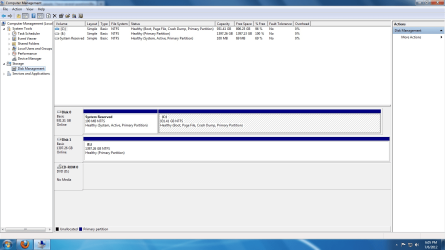
Could you post a screen shot of your disk management screen. Type disk management into the start menu search box and select the entry Create and format disk partitions. Maximize the display and follow this tutorial to post the screen shot. http://www.sevenforums.com/tutorials/9733-screenshots-files-upload-post-seven-forums.html
 

My Computer My Computer

At a glance

Microsoft Windows 7 Home Premium 64-bit Servi...Intel(R) Core(TM) i3 CPU M 330 @ 2.13GHz8 GB DDR3Intel(R) HD Graphics
Computer type
Laptop
Computer Manufacturer/Model Number
Hewlett-Packard/G62-107SA Notebook
OS
Microsoft Windows 7 Home Premium 64-bit Service Pack 1
CPU
Intel(R) Core(TM) i3 CPU M 330 @ 2.13GHz
Motherboard
Hewlett-Packard 1425
Memory
8 GB DDR3
Graphics Card(s)
Intel(R) HD Graphics
Sound Card
Realtek High Definition Audio
Monitor(s) Displays
Builtin
Screen Resolution
1366 x 768 x 32 bits (4294967296 colors) @ 60 Hz
Hard Drives
250 GB SATA Hard Disk Drive 7200 rpm
2TB Seagate GoFlex USB 2 Drive
1TB Iomega Prestige USB 2 Drive
1.5TB Iomega Prestige USB 2 Drive (Samsung)
2TB WD MyBook Live NAS.
Mouse
Logitech Anywhere MX
Internet Speed
152 Mbs download 10 Mbs upload
Antivirus
Norton 360
Browser
Chrome
Size problem, give me a couple of minutes
 

Attachments

  • Error.jpg
    Error.jpg
    42 KB · Views: 14
  • Disks.jpg
    Disks.jpg
    244.7 KB · Views: 8

My Computer My Computer

At a glance

Windows 7 Ultimate x86
OS
Windows 7 Ultimate x86
I'm sorry. for some reason your images are corrupted.
 

My Computer My Computer

At a glance

Microsoft Windows 7 Home Premium 64-bit Servi...Intel(R) Core(TM) i3 CPU M 330 @ 2.13GHz8 GB DDR3Intel(R) HD Graphics
Computer type
Laptop
Computer Manufacturer/Model Number
Hewlett-Packard/G62-107SA Notebook
OS
Microsoft Windows 7 Home Premium 64-bit Service Pack 1
CPU
Intel(R) Core(TM) i3 CPU M 330 @ 2.13GHz
Motherboard
Hewlett-Packard 1425
Memory
8 GB DDR3
Graphics Card(s)
Intel(R) HD Graphics
Sound Card
Realtek High Definition Audio
Monitor(s) Displays
Builtin
Screen Resolution
1366 x 768 x 32 bits (4294967296 colors) @ 60 Hz
Hard Drives
250 GB SATA Hard Disk Drive 7200 rpm
2TB Seagate GoFlex USB 2 Drive
1TB Iomega Prestige USB 2 Drive
1.5TB Iomega Prestige USB 2 Drive (Samsung)
2TB WD MyBook Live NAS.
Mouse
Logitech Anywhere MX
Internet Speed
152 Mbs download 10 Mbs upload
Antivirus
Norton 360
Browser
Chrome
Finally got it to work, this forum doesn't like jpegs I think.

Error.png

Disks.png
 

My Computer My Computer

At a glance

Windows 7 Ultimate x86
OS
Windows 7 Ultimate x86
Yes that would be ok.
 

My Computer My Computer

At a glance

Microsoft Windows 7 Home Premium 64-bit Servi...Intel(R) Core(TM) i3 CPU M 330 @ 2.13GHz8 GB DDR3Intel(R) HD Graphics
Computer type
Laptop
Computer Manufacturer/Model Number
Hewlett-Packard/G62-107SA Notebook
OS
Microsoft Windows 7 Home Premium 64-bit Service Pack 1
CPU
Intel(R) Core(TM) i3 CPU M 330 @ 2.13GHz
Motherboard
Hewlett-Packard 1425
Memory
8 GB DDR3
Graphics Card(s)
Intel(R) HD Graphics
Sound Card
Realtek High Definition Audio
Monitor(s) Displays
Builtin
Screen Resolution
1366 x 768 x 32 bits (4294967296 colors) @ 60 Hz
Hard Drives
250 GB SATA Hard Disk Drive 7200 rpm
2TB Seagate GoFlex USB 2 Drive
1TB Iomega Prestige USB 2 Drive
1.5TB Iomega Prestige USB 2 Drive (Samsung)
2TB WD MyBook Live NAS.
Mouse
Logitech Anywhere MX
Internet Speed
152 Mbs download 10 Mbs upload
Antivirus
Norton 360
Browser
Chrome
I think we have seen this problem before. I don't think it refers to the space on your external HDD but to the space on one of the partitions on your internal drive.

Could you post a screen shot of your disk management screen. Type disk management into the start menu search box and select the entry Create and format disk partitions. Maximize the display and follow this tutorial to post the screen shot. http://www.sevenforums.com/tutorials/9733-screenshots-files-upload-post-seven-forums.html

Keith I think you're on to something. As I always tell people, I'm not an expert at anything and my one remaining brain cell doesn't always work. But I seem to recall that the System Reserved partition needs a certain amount of free space in order for a VSS to be created. Likewise, if System Protection is turned off or doesn't have enough space allocated, the VSS can't be created. Does this sound familiar to you?

EDIT: Found this Technet forum thread. NehaaMSFT says the System Reserved partition needs 40MB free space. And jimg43 says he had to turn on System Protection and allocate a couple of GB free space. Yes, it's an older thread but I think the parameters still apply.

Windows 7 RC Backup fails - Errorcode 0x81000019
 

My Computer My Computer

At a glance

Win 7 Pro 64-bitIntel i5 2.4 Ghz8GB DDR3Intel HD 3000
Computer type
Laptop
Computer Manufacturer/Model Number
Sony Vaio VPCEB47GM Laptop
OS
Win 7 Pro 64-bit
CPU
Intel i5 2.4 Ghz
Memory
8GB DDR3
Graphics Card(s)
Intel HD 3000
Sound Card
IDT High Definition
Monitor(s) Displays
15.6 WGXA Anti-Glare LED
Screen Resolution
1280x800
Hard Drives
640Gb 7200rpm
Antivirus
MSE
Browser
Opera (primary) with IE9 backup
That was my thinking Lee.
 

My Computer My Computer

At a glance

Microsoft Windows 7 Home Premium 64-bit Servi...Intel(R) Core(TM) i3 CPU M 330 @ 2.13GHz8 GB DDR3Intel(R) HD Graphics
Computer type
Laptop
Computer Manufacturer/Model Number
Hewlett-Packard/G62-107SA Notebook
OS
Microsoft Windows 7 Home Premium 64-bit Service Pack 1
CPU
Intel(R) Core(TM) i3 CPU M 330 @ 2.13GHz
Motherboard
Hewlett-Packard 1425
Memory
8 GB DDR3
Graphics Card(s)
Intel(R) HD Graphics
Sound Card
Realtek High Definition Audio
Monitor(s) Displays
Builtin
Screen Resolution
1366 x 768 x 32 bits (4294967296 colors) @ 60 Hz
Hard Drives
250 GB SATA Hard Disk Drive 7200 rpm
2TB Seagate GoFlex USB 2 Drive
1TB Iomega Prestige USB 2 Drive
1.5TB Iomega Prestige USB 2 Drive (Samsung)
2TB WD MyBook Live NAS.
Mouse
Logitech Anywhere MX
Internet Speed
152 Mbs download 10 Mbs upload
Antivirus
Norton 360
Browser
Chrome
I read that link marsmimar suggested, it feels too dangerous for me =s

So basically, I am left with no other options other than to use a 3rd party software?
 

My Computer My Computer

At a glance

Windows 7 Ultimate x86
OS
Windows 7 Ultimate x86

My Computer My Computer

At a glance

Microsoft Windows 7 Home Premium 64-bit Servi...Intel(R) Core(TM) i3 CPU M 330 @ 2.13GHz8 GB DDR3Intel(R) HD Graphics
Computer type
Laptop
Computer Manufacturer/Model Number
Hewlett-Packard/G62-107SA Notebook
OS
Microsoft Windows 7 Home Premium 64-bit Service Pack 1
CPU
Intel(R) Core(TM) i3 CPU M 330 @ 2.13GHz
Motherboard
Hewlett-Packard 1425
Memory
8 GB DDR3
Graphics Card(s)
Intel(R) HD Graphics
Sound Card
Realtek High Definition Audio
Monitor(s) Displays
Builtin
Screen Resolution
1366 x 768 x 32 bits (4294967296 colors) @ 60 Hz
Hard Drives
250 GB SATA Hard Disk Drive 7200 rpm
2TB Seagate GoFlex USB 2 Drive
1TB Iomega Prestige USB 2 Drive
1.5TB Iomega Prestige USB 2 Drive (Samsung)
2TB WD MyBook Live NAS.
Mouse
Logitech Anywhere MX
Internet Speed
152 Mbs download 10 Mbs upload
Antivirus
Norton 360
Browser
Chrome
I think there's enough room on the System Reserved partition. It shows 69MB (69%) free space. On my machine I've got 54MB (54%) free space. So I think System Protection needs to be checked. And it's relatively easy. If I can do it, anybody can do it! :)

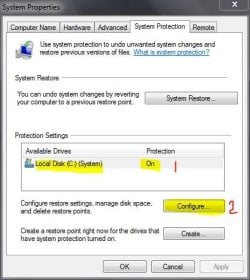
-Click Start > type in Create. A list if items will appear.
-Select "Create a restore point". A new dialog box will appear called System Properties.
-Make sure "Protection" is On for C: System.
-Regardless if it's On or Off, click the "Configure" button.

System Protection.JPG

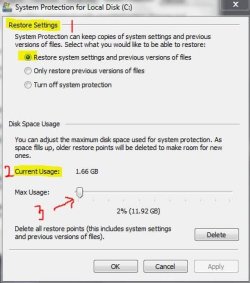
-Another dialog box will open called System Protection for Local Disk C:
-Under "Restore Settings" select the first option (Restore system settings...)
-If "Protection" was previous Off it will now be On
-Check "Current Usage" and "Max Usage". As I understand it, Current Usage tells you how much hard drive space is currrently being used for restore points and Volume Shadow Copies. Max Usage tells you how much total hard drive space is set aside for restore points and Volume Shadow Copies.
-Use the slide control to set Max Usage. I think the default is 10% of total hard drive size. So on a 1TB (1000GB) drive you're looking at about 100GB being set aside. That might be overkill if you're running low on hard drive space. (I've got mine set to 2% and I have no problems using the Windows 7 built in imaging tool to create my system images. Right now I have 2 restore points set and 3 system images. I've used less than 2GB for all of that. You can play around with this setting and optimize it for your machine.)
-Click OK to save settings and close dialog boxes

System Protection 2.JPG
 

My Computer My Computer

At a glance

Win 7 Pro 64-bitIntel i5 2.4 Ghz8GB DDR3Intel HD 3000
Computer type
Laptop
Computer Manufacturer/Model Number
Sony Vaio VPCEB47GM Laptop
OS
Win 7 Pro 64-bit
CPU
Intel i5 2.4 Ghz
Memory
8GB DDR3
Graphics Card(s)
Intel HD 3000
Sound Card
IDT High Definition
Monitor(s) Displays
15.6 WGXA Anti-Glare LED
Screen Resolution
1280x800
Hard Drives
640Gb 7200rpm
Antivirus
MSE
Browser
Opera (primary) with IE9 backup
It might also be worth checking the Volume Shadow Copy service.

type services in the search box and select Services from the list. Scroll down to Volume Shadow Copy and check that it is set to start manually.
 

My Computer My Computer

At a glance

Microsoft Windows 7 Home Premium 64-bit Servi...Intel(R) Core(TM) i3 CPU M 330 @ 2.13GHz8 GB DDR3Intel(R) HD Graphics
Computer type
Laptop
Computer Manufacturer/Model Number
Hewlett-Packard/G62-107SA Notebook
OS
Microsoft Windows 7 Home Premium 64-bit Service Pack 1
CPU
Intel(R) Core(TM) i3 CPU M 330 @ 2.13GHz
Motherboard
Hewlett-Packard 1425
Memory
8 GB DDR3
Graphics Card(s)
Intel(R) HD Graphics
Sound Card
Realtek High Definition Audio
Monitor(s) Displays
Builtin
Screen Resolution
1366 x 768 x 32 bits (4294967296 colors) @ 60 Hz
Hard Drives
250 GB SATA Hard Disk Drive 7200 rpm
2TB Seagate GoFlex USB 2 Drive
1TB Iomega Prestige USB 2 Drive
1.5TB Iomega Prestige USB 2 Drive (Samsung)
2TB WD MyBook Live NAS.
Mouse
Logitech Anywhere MX
Internet Speed
152 Mbs download 10 Mbs upload
Antivirus
Norton 360
Browser
Chrome

My Computer My Computer

At a glance

Vista, Windows7, Mint Mate, Zorin, Windows 8from 1.6GHz Duo to i7
Computer Manufacturer/Model Number
HP, Dell, Gateway, Toshiba - 4 laptops and 2 desktops
OS
Vista, Windows7, Mint Mate, Zorin, Windows 8
CPU
from 1.6GHz Duo to i7
Monitor(s) Displays
2x HP w2207
Hard Drives
5x HDD, 7x SSD, 12x Externals
Keyboard
with trackball - no mices
Mouse
Trackball mice
Internet Speed
DSL 6000
No luck for me, the system protection was already on, and I had 80GB+ of free space set aside left still, the shadow volume service was running too =(
 

My Computer My Computer

At a glance

Windows 7 Ultimate x86
OS
Windows 7 Ultimate x86
No luck for me, the system protection was already on, and I had 80GB+ of free space set aside left still, the shadow volume service was running too =(

I'm just wondering if you have any damaged or corrupted system files. You could try running a System File Checker scan from an elevated command prompt (option two, this tutorial.) If any problems are found, run the scan 3 times, rebooting in between each scan.

http://www.sevenforums.com/tutorials/1538-sfc-scannow-command-system-file-checker.html
 

My Computer My Computer

At a glance

Win 7 Pro 64-bitIntel i5 2.4 Ghz8GB DDR3Intel HD 3000
Computer type
Laptop
Computer Manufacturer/Model Number
Sony Vaio VPCEB47GM Laptop
OS
Win 7 Pro 64-bit
CPU
Intel i5 2.4 Ghz
Memory
8GB DDR3
Graphics Card(s)
Intel HD 3000
Sound Card
IDT High Definition
Monitor(s) Displays
15.6 WGXA Anti-Glare LED
Screen Resolution
1280x800
Hard Drives
640Gb 7200rpm
Antivirus
MSE
Browser
Opera (primary) with IE9 backup
I did that before doing a complete clean reinstall, then I thought of imaging the computer to save myself from future problems such as this =(

I tried a couple of other native backup options, all of them seems to point to the problem of unable to create a shadow volume, any ideas?
 

My Computer My Computer

At a glance

Windows 7 Ultimate x86
OS
Windows 7 Ultimate x86
I did that before doing a complete clean reinstall, then I thought of imaging the computer to save myself from future problems such as this =(

I tried a couple of other native backup options, all of them seems to point to the problem of unable to create a shadow volume, any ideas?

Please accept my apology for some clarification. I'm just trying to wrap my one brain cell around this problem. :o

OK, if I'm understanding this correctly, you ran SFC before doing a complete clean reinstall. Then after you did the complete clean reinstall you decided to try imaging the computer. I'm guessing that after you did the complete clean reinstall, you also installed all Windows Updates, added your personalized settings, installed various programs, etc.

At any time after doing all of this, and before trying to create a system image, did you check system integrity by running another SFC? It wouldn't be the first time that a clean reinstall suffered a glitch during the installation process, or that Windows Updates damaged some system files, or that any of the newly downloaded/installed programs messed something up.
 

My Computer My Computer

At a glance

Win 7 Pro 64-bitIntel i5 2.4 Ghz8GB DDR3Intel HD 3000
Computer type
Laptop
Computer Manufacturer/Model Number
Sony Vaio VPCEB47GM Laptop
OS
Win 7 Pro 64-bit
CPU
Intel i5 2.4 Ghz
Memory
8GB DDR3
Graphics Card(s)
Intel HD 3000
Sound Card
IDT High Definition
Monitor(s) Displays
15.6 WGXA Anti-Glare LED
Screen Resolution
1280x800
Hard Drives
640Gb 7200rpm
Antivirus
MSE
Browser
Opera (primary) with IE9 backup
Back
Top