Solved Bought parts and i failed. I think.

VincentStrike

New member
Member
Local time
9:35 AM
Messages
79
Location
Finland
My old computer is Acer ASpire x1301 where i took the parts from to those new one

So i bought this Corsair 600W CX V2 Builder Series, ATX-virtalähde, 80Plus | 65.00e - Jimms.fi and CoolerMaster Elite 430 ATX-kotelo, musta | 59.00e - Jimms.fi

I'm not sure but i think that PSU's the long cable seems like to be too big for my motherboard white slot. here's picture of my motherboard Google-kuvahaun tulos kohteessa http://bios-repair.co.uk/Images/mobo/Acer/Aspire/Aspire-X1301-Mainboard.jpg

So...I think the power supply is the problem that my computer won't start up...Or the motherboard? Too old? Please help me :(
 

My Computer My Computer

At a glance

Windows 7 64 bitAMD Athlon(tm) II X2 215 Processor 2.70 GHz4gb RAM (3.75 In use)Nvidia Integrated Geforce 9200
Computer Manufacturer/Model Number
Acer Aspire X1301
OS
Windows 7 64 bit
CPU
AMD Athlon(tm) II X2 215 Processor 2.70 GHz
Motherboard
Acer Aspire
Memory
4gb RAM (3.75 In use)
Graphics Card(s)
Nvidia Integrated Geforce 9200
Monitor(s) Displays
Philips 192E
Screen Resolution
1368 x 766 (Recommended)
Hard Drives
HDD 1TB
Internet Speed
110MB/S (11 - 12MB Download per second.)
Please can someone help...So i switched all parts from Acer Aspire x1301 to that new case there + i added the new PSU. But the PSU's black big plug in thing is too big for my motherboard :(
 

My Computer My Computer

At a glance

Windows 7 64 bitAMD Athlon(tm) II X2 215 Processor 2.70 GHz4gb RAM (3.75 In use)Nvidia Integrated Geforce 9200
Computer Manufacturer/Model Number
Acer Aspire X1301
OS
Windows 7 64 bit
CPU
AMD Athlon(tm) II X2 215 Processor 2.70 GHz
Motherboard
Acer Aspire
Memory
4gb RAM (3.75 In use)
Graphics Card(s)
Nvidia Integrated Geforce 9200
Monitor(s) Displays
Philips 192E
Screen Resolution
1368 x 766 (Recommended)
Hard Drives
HDD 1TB
Internet Speed
110MB/S (11 - 12MB Download per second.)
My Computer My Computer

At a glance

Windows 7 64 bitAMD Athlon(tm) II X2 215 Processor 2.70 GHz4gb RAM (3.75 In use)Nvidia Integrated Geforce 9200
Computer Manufacturer/Model Number
Acer Aspire X1301
OS
Windows 7 64 bit
CPU
AMD Athlon(tm) II X2 215 Processor 2.70 GHz
Motherboard
Acer Aspire
Memory
4gb RAM (3.75 In use)
Graphics Card(s)
Nvidia Integrated Geforce 9200
Monitor(s) Displays
Philips 192E
Screen Resolution
1368 x 766 (Recommended)
Hard Drives
HDD 1TB
Internet Speed
110MB/S (11 - 12MB Download per second.)
Some MOBO's only require a 20 pin in stead of a 24 pin cable. With most PSU's these cables are made so you can detach the 4 pins that are to much
 

My Computer My Computer

At a glance

Windows 7 Ultimate x64Intel Core i7 2600k @ 4.5 Ghz6 GB kingston hyperX memory 1600 MhzASUS GTX 570 Direct CUII
Computer Manufacturer/Model Number
Me
OS
Windows 7 Ultimate x64
CPU
Intel Core i7 2600k @ 4.5 Ghz
Motherboard
MSI P67A-GD65
Memory
6 GB kingston hyperX memory 1600 Mhz
Graphics Card(s)
ASUS GTX 570 Direct CUII
Sound Card
On board
Monitor(s) Displays
Digimate 22" 16:10 1680x1050
Hard Drives
Seagate Momentus XT 250 GB
WD 500 GB Green HDD
PSU
Corsair 750W Professional
Case
Antec DF-85
Cooling
Corsair H70
Keyboard
Logitech G510
Mouse
Logitech G700
Internet Speed
D: 40 Mbps - U: 1.5 Mbps
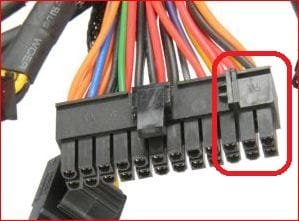
The connector from the pwoer supply is 24 pin and the motherboard is only 20 pin, not a problem though. This is the connector from the power supply,

24pin.JPG

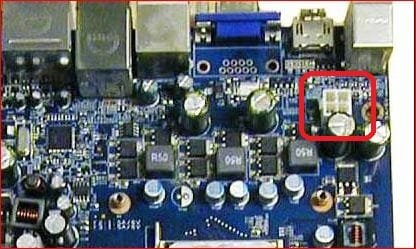
the extra 4 pin connector on the end (circled in red) is made to come off so that it will fit/work with 20 pin motherboards. As for it not starting up, did you remember to connect the additional 4 pin power connector to the motherboard?

4pin.JPG
 

My Computer My Computer

At a glance

Win 7 Ultimate x64FX-8350 @ 4.6 GHz so farADATA XPG V1 Series Black 8GB DDR3 1600Sapphire R9 270x Dual-X
Computer type
PC/Desktop
Computer Manufacturer/Model Number
Me
OS
Win 7 Ultimate x64
CPU
FX-8350 @ 4.6 GHz so far
Motherboard
Asus M5A97 EVO
Memory
ADATA XPG V1 Series Black 8GB DDR3 1600
Graphics Card(s)
Sapphire R9 270x Dual-X
Sound Card
Xonar DGX w/ Corsair Vengence 1300
Monitor(s) Displays
Acer S232HL Abid
Screen Resolution
1920x1080
Hard Drives
120 GB OCZ Vertex 3
500 GB Seagate 7200.12
PSU
Antec Earthwatts 650W Green
Case
Antec Three Hundred
Cooling
Cooler Master 212 EVO
Keyboard
Logitech G510
Mouse
Logitech G500s
Internet Speed
35000/3000
The connector from the pwoer supply is 24 pin and the motherboard is only 20 pin, not a problem though. This is the connector from the power supply,

View attachment 215535

the extra 4 pin connector on the end (circled in red) is made to come off so that it will fit/work with 20 pin motherboards. As for it not starting up, did you remember to connect the additional 4 pin power connector to the motherboard?

View attachment 215536

I'm gonna try this, thanks for the picture just the way i want so i can understand easily :) CAn you also check my other thread in Hardware Devices of the (START) Button pins
 

My Computer My Computer

At a glance

Windows 7 64 bitAMD Athlon(tm) II X2 215 Processor 2.70 GHz4gb RAM (3.75 In use)Nvidia Integrated Geforce 9200
Computer Manufacturer/Model Number
Acer Aspire X1301
OS
Windows 7 64 bit
CPU
AMD Athlon(tm) II X2 215 Processor 2.70 GHz
Motherboard
Acer Aspire
Memory
4gb RAM (3.75 In use)
Graphics Card(s)
Nvidia Integrated Geforce 9200
Monitor(s) Displays
Philips 192E
Screen Resolution
1368 x 766 (Recommended)
Hard Drives
HDD 1TB
Internet Speed
110MB/S (11 - 12MB Download per second.)
The connector from the pwoer supply is 24 pin and the motherboard is only 20 pin, not a problem though. This is the connector from the power supply,

View attachment 215535

the extra 4 pin connector on the end (circled in red) is made to come off so that it will fit/work with 20 pin motherboards. As for it not starting up, did you remember to connect the additional 4 pin power connector to the motherboard?

View attachment 215536


Here is the picture after all hard work :D Valokuva0254.jpg

So can you show with paint or somehow where i put each wire? :) I appreciate your all help! :)

And btw you said i should plug in the last 4 pins in the 24 pin cable to the white slot...I don't think the 4 ''add'' pins gonna reach there :D
 

My Computer My Computer

At a glance

Windows 7 64 bitAMD Athlon(tm) II X2 215 Processor 2.70 GHz4gb RAM (3.75 In use)Nvidia Integrated Geforce 9200
Computer Manufacturer/Model Number
Acer Aspire X1301
OS
Windows 7 64 bit
CPU
AMD Athlon(tm) II X2 215 Processor 2.70 GHz
Motherboard
Acer Aspire
Memory
4gb RAM (3.75 In use)
Graphics Card(s)
Nvidia Integrated Geforce 9200
Monitor(s) Displays
Philips 192E
Screen Resolution
1368 x 766 (Recommended)
Hard Drives
HDD 1TB
Internet Speed
110MB/S (11 - 12MB Download per second.)
There should be an 8 pin connector from the power supply that is really two 4 pin attached together. Once you find it, you split it apart just like the 24 pin main connector and only use one of the two 4 pin.
 

My Computer My Computer

At a glance

Win 7 Ultimate x64FX-8350 @ 4.6 GHz so farADATA XPG V1 Series Black 8GB DDR3 1600Sapphire R9 270x Dual-X
Computer type
PC/Desktop
Computer Manufacturer/Model Number
Me
OS
Win 7 Ultimate x64
CPU
FX-8350 @ 4.6 GHz so far
Motherboard
Asus M5A97 EVO
Memory
ADATA XPG V1 Series Black 8GB DDR3 1600
Graphics Card(s)
Sapphire R9 270x Dual-X
Sound Card
Xonar DGX w/ Corsair Vengence 1300
Monitor(s) Displays
Acer S232HL Abid
Screen Resolution
1920x1080
Hard Drives
120 GB OCZ Vertex 3
500 GB Seagate 7200.12
PSU
Antec Earthwatts 650W Green
Case
Antec Three Hundred
Cooling
Cooler Master 212 EVO
Keyboard
Logitech G510
Mouse
Logitech G500s
Internet Speed
35000/3000
There should be an 8 pin connector from the power supply that is really two 4 pin attached together. Once you find it, you split it apart just like the 24 pin main connector and only use one of the two 4 pin.


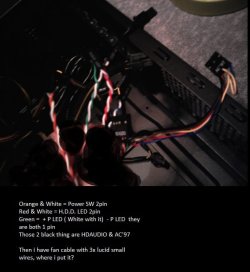
Okay...But what about the START button so my computer goes on? That picture where i've typed orange & white ... etc... Comes from the start up button...Where do i put them?


EDIT: In other thread i saw that picture i'll try it on the morning. :)
 

My Computer My Computer

At a glance

Windows 7 64 bitAMD Athlon(tm) II X2 215 Processor 2.70 GHz4gb RAM (3.75 In use)Nvidia Integrated Geforce 9200
Computer Manufacturer/Model Number
Acer Aspire X1301
OS
Windows 7 64 bit
CPU
AMD Athlon(tm) II X2 215 Processor 2.70 GHz
Motherboard
Acer Aspire
Memory
4gb RAM (3.75 In use)
Graphics Card(s)
Nvidia Integrated Geforce 9200
Monitor(s) Displays
Philips 192E
Screen Resolution
1368 x 766 (Recommended)
Hard Drives
HDD 1TB
Internet Speed
110MB/S (11 - 12MB Download per second.)
Back
Top