What don't you like about Windows 7?

Status
Not open for further replies.
A dislike of mine is not in the OS but the GUI. Show desktop. I use the taskbar left docked (irrelevant, I suppose). Show desktop is simply in the wrong place. Each time I tweak out a shortcut and place it near the Start button, it will eventually "self correct" and disappear.

Since this is the GUI, I will find a replacement or the hack in due course.
 

My Computer My Computer

At a glance

Windows 7 Ultimate x64, Mint 9Intel i5-2500k2x 4Gb Corsair VENGEANCE DDR3-1600NVidia GeForce N260GTX Twin Frozr
Computer Manufacturer/Model Number
Hera
OS
Windows 7 Ultimate x64, Mint 9
CPU
Intel i5-2500k
Motherboard
ASUS P8P67 Pro
Memory
2x 4Gb Corsair VENGEANCE DDR3-1600
Graphics Card(s)
NVidia GeForce N260GTX Twin Frozr
Sound Card
Realtek HD OnBoard Audio
Monitor(s) Displays
ASUS 24" Monitor
Screen Resolution
1920x1080
Hard Drives
G.SKILL Phoenix Series 60GB SATA II MLC Internal Solid State Drive (SSD)
SAMSUNG Spinpoint F3R 1TB 7200 RPM 32MB Cache SATA II
PSU
Cooler Master Real Power Pro 750W
Case
Cooler Master Haf 932
Cooling
Fans
Keyboard
Razer Tarantula
Mouse
Razer Lachesis
Internet Speed
not fast enough
Nope. Too lazy, and I can grab the RTM when I get back from Band Camp.

~Lordbob
You want me to help you install RTM on your pc? LOL. :p
 

My Computer My Computer

At a glance

Windows® 8 Pro (64-bit)Intel® Core™ i5 Processor 2467M (1.60GHz, 3MB...6GB DDR3 System Memory at 1,333MHz (on BD 4GB...AMD Radeon™ HD7550M 1GB DDR3 (Ext. Graphic)
Computer Manufacturer/Model Number
Samsung NP530U4B-S02IN
OS
Windows® 8 Pro (64-bit)
CPU
Intel® Core™ i5 Processor 2467M (1.60GHz, 3MB L3 Cache)
Motherboard
Samsung Electronics
Memory
6GB DDR3 System Memory at 1,333MHz (on BD 4GB + 2GB x 1)
Graphics Card(s)
AMD Radeon™ HD7550M 1GB DDR3 (Ext. Graphic)
Sound Card
Realtek High Definition Audio
Monitor(s) Displays
35.56cm (14.0) SuperBright 300nit HD LED Display
Screen Resolution
1366x768
Hard Drives
1TB S-ATA II Hard Drive (5400RPM) with ExpressCache 16GB SSD
Internet Speed
sucks
Antivirus
Microsoft Security Essentials
Browser
Google Chrome (Sync enabled)
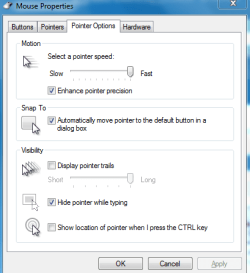
mouse acceleration....there is no way to completely disable it like there is in xp and vista
 

My Computer My Computer

At a glance

vista
OS
vista
I haven't installed the RTM yet., still running 7100RC x64!

Is there anyway for folders NOT to be sorted in the RTM? e.g. I can drag/position folder icons any which way I like just like in XP?

Thanks.
 

My Computer My Computer

At a glance

Windows 7 Pro x64 RTMIntel
OS
Windows 7 Pro x64 RTM
CPU
Intel
mouse acceleration....there is no way to completely disable it like there is in xp and vista
Is this what you mean?
Drag the bar all the way to the left.
Capture.PNG

Or you can follow this registry editing :

Browse to HKEY_CURRENT_USER\Control Panel\Mouse

  1. Set the value of MouseThreshold1 to 0.
  2. Set the value of MouseThreshold2 to 0.
  3. Set the value of MouseSpeed to 1 or 2 (1 doubles the normal speed, 2 quadruples the normal speed).
  4. Close Registry Editor, close all applications, and restart Windows 7.
 
Last edited:

My Computer My Computer

At a glance

Windows® 8 Pro (64-bit)Intel® Core™ i5 Processor 2467M (1.60GHz, 3MB...6GB DDR3 System Memory at 1,333MHz (on BD 4GB...AMD Radeon™ HD7550M 1GB DDR3 (Ext. Graphic)
Computer Manufacturer/Model Number
Samsung NP530U4B-S02IN
OS
Windows® 8 Pro (64-bit)
CPU
Intel® Core™ i5 Processor 2467M (1.60GHz, 3MB L3 Cache)
Motherboard
Samsung Electronics
Memory
6GB DDR3 System Memory at 1,333MHz (on BD 4GB + 2GB x 1)
Graphics Card(s)
AMD Radeon™ HD7550M 1GB DDR3 (Ext. Graphic)
Sound Card
Realtek High Definition Audio
Monitor(s) Displays
35.56cm (14.0) SuperBright 300nit HD LED Display
Screen Resolution
1366x768
Hard Drives
1TB S-ATA II Hard Drive (5400RPM) with ExpressCache 16GB SSD
Internet Speed
sucks
Antivirus
Microsoft Security Essentials
Browser
Google Chrome (Sync enabled)
1. The taskbar could be a tiiiiny bit smaller. Plus, I'd like icons to magnify, like the Mac OS dock.

2. MS left in a lot of GUI elements that (by now) should be changed.

3. Lack of a "Gaming Mode", in which explorer.exe is killed when playing a game.

4. Gadgets are still ugly, and annoying to use. I'd rather it be like Mac OS X, where you push a key, and gadgets come up.
 

My Computer My Computer

At a glance

Windows 7 RTMIntel Q660 Quad-Core CPU (2.40GHz)4GB Dual Channel DDR2 SDRAM (800MHz)ATI Radeon HD 4850 (512MB)
Computer Manufacturer/Model Number
Dell Studio 540
OS
Windows 7 RTM
CPU
Intel Q660 Quad-Core CPU (2.40GHz)
Memory
4GB Dual Channel DDR2 SDRAM (800MHz)
Graphics Card(s)
ATI Radeon HD 4850 (512MB)
Monitor(s) Displays
20'' Dell E207WFP
Screen Resolution
1680x1050
Hard Drives
500GB Serial ATA Hard Drive (7200RPM)

250GB Serial ATA Hard Drive (7200RPM)
PSU
400 Watt DC Power Supply
Case
H: 14.2 inches | W: 6.7 inches | D: 17.1 inches
Keyboard
Dell Multimedia Keyboard
Mouse
Dell Premium Optical USB Mouse
Internet Speed
Download Rate: 5533 KB/s | Upload Rate: 2085 KB/s
Is this what you mean?
Drag the bar all the way to the left.
View attachment 19881

Or you can follow this registry editing :

Browse to HKEY_CURRENT_USER\Control Panel\Mouse

  1. Set the value of MouseThreshold1 to 0.
  2. Set the value of MouseThreshold2 to 0.
  3. Set the value of MouseSpeed to 1 or 2 (1 doubles the normal speed, 2 quadruples the normal speed).
  4. Close Registry Editor, close all applications, and restart Windows 7.

yeah I've edited my registry..etc but some games will reintroduce mouse acceleration which is really annoying. When i was using vista I found a patch that patches win32k.sys in memory to disable mouse acceleration no matter what the setting. I cant get this to work for windows 7 unfortunately. The patch is called wcafix for anyone interested. edit: oh didn't read properly...what your suggesting is to turn ON mouse acceleration, what I want is to turn it OFF completely, forever and ever.
 

My Computer My Computer

At a glance

vista
OS
vista
1. The taskbar could be a tiiiiny bit smaller.
I thought it was large at first, but you get used to it pretty quickly.

You could always turn up the display size to 125% for a bit then change it back. it will look much smaller then. :p

3. Lack of a "Gaming Mode", in which explorer.exe is killed when playing a game.

Explorer shouldn't take up enough resources to matter. Though if you really want to you can just kill it in task manager before playing a game.
 

My Computer My Computer

At a glance

Windows 7 Build 7229 x64Intel Core2 Duo T5250 @ 1.50GHz2GB DDR2Moble Intel 965 Express
Computer Manufacturer/Model Number
HP Pavillion dv2550se
OS
Windows 7 Build 7229 x64
CPU
Intel Core2 Duo T5250 @ 1.50GHz
Memory
2GB DDR2
Graphics Card(s)
Moble Intel 965 Express
Screen Resolution
1280x800
Hard Drives
160GB
750GB External
yeah I've edited my registry..etc but some games will reintroduce mouse acceleration which is really annoying. When i was using vista I found a patch that patches win32k.sys in memory to disable mouse acceleration no matter what the setting. I cant get this to work for windows 7 unfortunately. The patch is called wcafix for anyone interested. edit: oh didn't read properly...what your suggesting is to turn ON mouse acceleration, what I want is to turn it OFF completely, forever and ever.
sorry to hear that the fix is not working with win7. :(
 

My Computer My Computer

At a glance

Windows® 8 Pro (64-bit)Intel® Core™ i5 Processor 2467M (1.60GHz, 3MB...6GB DDR3 System Memory at 1,333MHz (on BD 4GB...AMD Radeon™ HD7550M 1GB DDR3 (Ext. Graphic)
Computer Manufacturer/Model Number
Samsung NP530U4B-S02IN
OS
Windows® 8 Pro (64-bit)
CPU
Intel® Core™ i5 Processor 2467M (1.60GHz, 3MB L3 Cache)
Motherboard
Samsung Electronics
Memory
6GB DDR3 System Memory at 1,333MHz (on BD 4GB + 2GB x 1)
Graphics Card(s)
AMD Radeon™ HD7550M 1GB DDR3 (Ext. Graphic)
Sound Card
Realtek High Definition Audio
Monitor(s) Displays
35.56cm (14.0) SuperBright 300nit HD LED Display
Screen Resolution
1366x768
Hard Drives
1TB S-ATA II Hard Drive (5400RPM) with ExpressCache 16GB SSD
Internet Speed
sucks
Antivirus
Microsoft Security Essentials
Browser
Google Chrome (Sync enabled)
Explorer shouldn't take up enough resources to matter. Though if you really want to you can just kill it in task manager before playing a game.

It's a real pain in the ass having to do the Ctrl+Alt+Del thing in the middle of a game, even before it. Also, even on my rig with a Quad Core CPU, 4GB's of RAM, and a GeForce 9500GT, Explorer being gone makes a big difference.
 
Last edited:

My Computer My Computer

At a glance

Windows 7 RTMIntel Q660 Quad-Core CPU (2.40GHz)4GB Dual Channel DDR2 SDRAM (800MHz)ATI Radeon HD 4850 (512MB)
Computer Manufacturer/Model Number
Dell Studio 540
OS
Windows 7 RTM
CPU
Intel Q660 Quad-Core CPU (2.40GHz)
Memory
4GB Dual Channel DDR2 SDRAM (800MHz)
Graphics Card(s)
ATI Radeon HD 4850 (512MB)
Monitor(s) Displays
20'' Dell E207WFP
Screen Resolution
1680x1050
Hard Drives
500GB Serial ATA Hard Drive (7200RPM)

250GB Serial ATA Hard Drive (7200RPM)
PSU
400 Watt DC Power Supply
Case
H: 14.2 inches | W: 6.7 inches | D: 17.1 inches
Keyboard
Dell Multimedia Keyboard
Mouse
Dell Premium Optical USB Mouse
Internet Speed
Download Rate: 5533 KB/s | Upload Rate: 2085 KB/s
Ctrl+Alt+Del is the hard way of opening the Task Manager. It seems much easier to just right click on the clock and opening it through there.

For restoring explorer afterwards, ctrl+r should still work fine to run...Run. Much easier to use that than opening the TM through ctrl-alt-del then using Run through it.
 

My Computer My Computer

At a glance

Windows 7 Build 7229 x64Intel Core2 Duo T5250 @ 1.50GHz2GB DDR2Moble Intel 965 Express
Computer Manufacturer/Model Number
HP Pavillion dv2550se
OS
Windows 7 Build 7229 x64
CPU
Intel Core2 Duo T5250 @ 1.50GHz
Memory
2GB DDR2
Graphics Card(s)
Moble Intel 965 Express
Screen Resolution
1280x800
Hard Drives
160GB
750GB External
I press ctrl+shift+esc to pull taskmgr. i find it easy as i hate using mouse.
 

My Computer My Computer

At a glance

Windows® 8 Pro (64-bit)Intel® Core™ i5 Processor 2467M (1.60GHz, 3MB...6GB DDR3 System Memory at 1,333MHz (on BD 4GB...AMD Radeon™ HD7550M 1GB DDR3 (Ext. Graphic)
Computer Manufacturer/Model Number
Samsung NP530U4B-S02IN
OS
Windows® 8 Pro (64-bit)
CPU
Intel® Core™ i5 Processor 2467M (1.60GHz, 3MB L3 Cache)
Motherboard
Samsung Electronics
Memory
6GB DDR3 System Memory at 1,333MHz (on BD 4GB + 2GB x 1)
Graphics Card(s)
AMD Radeon™ HD7550M 1GB DDR3 (Ext. Graphic)
Sound Card
Realtek High Definition Audio
Monitor(s) Displays
35.56cm (14.0) SuperBright 300nit HD LED Display
Screen Resolution
1366x768
Hard Drives
1TB S-ATA II Hard Drive (5400RPM) with ExpressCache 16GB SSD
Internet Speed
sucks
Antivirus
Microsoft Security Essentials
Browser
Google Chrome (Sync enabled)
It seems much easier to just right click on the clock and opening it through there.

Either on the clock or any part of the open taskbar ;)
 

My Computer My Computer

At a glance

Windows 7 Ultimate x86AMD Sempron 3600+ATI Radeon Xpress 1150
Computer Manufacturer/Model Number
Dell Vostro 1000
OS
Windows 7 Ultimate x86
CPU
AMD Sempron 3600+
Graphics Card(s)
ATI Radeon Xpress 1150
Monitor(s) Displays
Generic PnP Monitor
Screen Resolution
1200 x 800
Hard Drives
WD Scorpio Blue 500 GB (WD5000BEVT)
Mouse
Logitech V320 Cordless Optical Mouse
Since no product is usually ever 100% perfect I'll say that I have 2 problems with Windows 7 - one fairly trivial and one a bit more serious.

1) Networking is still way way behind Linux especially for "Mixed" computer environments -- and remote connection (RDP) is fiddly especially if you want to do it via "Web connection" which requires (when it works) an ACTIVE X application to be started on the client computer -- naughty stuff indeed which in any case forces you to use IE as this type of application won't work with Firefix etc.

2) The serious bit -- The Library concept is a great idea but totally flawed since if you have non W7 computers on a network you can't access the data unless you know its real physical location - which defeats the whole point of libraries in the first place. I've nearly lost valuable data by messing around with these. (Of course always back up stuff before experimenting).


Otherwise I'm quite happy with W7. I have to keep XP for a while as well as I do have some applications and hardware that won't run on W7. The XP system will be a VM as these appsrun on an XP VM but I WON'T be using Virtual PC -- too slow. VMWARE workstation or Virtual Box are streets better>


Cheers
jimbo
 

My Computer My Computer

At a glance

Linux CENTOS 7 / various Windows OS'es and se...Intel i7 Intel i58GB, 16GBOn Motherboard
Computer type
PC/Desktop
Computer Manufacturer/Model Number
Custom built, several laptops HP/ASUS
OS
Linux CENTOS 7 / various Windows OS'es and servers
CPU
Intel i7 Intel i5
Memory
8GB, 16GB
Graphics Card(s)
On Motherboard
Sound Card
Realtek HD audio
Monitor(s) Displays
Apple Cinema display, Samsung LCD
Screen Resolution
1920 X 1080
Hard Drives
4 X 1TB SATA
Mouse
Toshiba wireless laser
Internet Speed
> 20MB up
I press ctrl+shift+esc to pull taskmgr. i find it easy as i hate using mouse.

Didn't know about that one.

I'll keep that in mind.
 

My Computer My Computer

At a glance

Windows 7 Build 7229 x64Intel Core2 Duo T5250 @ 1.50GHz2GB DDR2Moble Intel 965 Express
Computer Manufacturer/Model Number
HP Pavillion dv2550se
OS
Windows 7 Build 7229 x64
CPU
Intel Core2 Duo T5250 @ 1.50GHz
Memory
2GB DDR2
Graphics Card(s)
Moble Intel 965 Express
Screen Resolution
1280x800
Hard Drives
160GB
750GB External
Well... I hate the fact that Win7 is not released retail until Oct.22nd, but it is leaked out on the net months before...its like a tease... I want my legit keys damnit @#%#!%!!! (not being ungrateful about the leaks, just want to be able to buy keys so I can install it _and_ be able to activate it...) :(

Also... +1 to the talking Windows... But would you really want to hear it screaming and choking every time you got a BSOD? (I kid...that never happens anymore...right?) :p
 

My Computer My Computer

At a glance

Windows XP MCE (Soon to be 7)Duo Core 3.4 GHz
Computer Manufacturer/Model Number
HP Pavillion zd8000
OS
Windows XP MCE (Soon to be 7)
CPU
Duo Core 3.4 GHz
networking is clumsy and difficult to access , compared to using a macbook the process in windows just seems so mmm unnecesary :confused:

UAC still needs some method where I can specify a program I trust so that it will work on boot forever.

I would feel much more supported and part of a greater family if the feedback option was still there and saw results :geek:
 

My Computer My Computer

At a glance

win7 ultimate / virtual boxIntel Core i7 3770K,1155, Ivy BridgeGSkill Ripjaws Z Series 1600 CL 9.0 16GBKFA2 GeForce GTX 670 EX OC 2048MB GDDR5 PCI-E...
Computer Manufacturer/Model Number
built my own
OS
win7 ultimate / virtual box
CPU
Intel Core i7 3770K,1155, Ivy Bridge
Motherboard
MSI Z77A-G43
Memory
GSkill Ripjaws Z Series 1600 CL 9.0 16GB
Graphics Card(s)
KFA2 GeForce GTX 670 EX OC 2048MB GDDR5 PCI-E gfx card
Sound Card
onboard Nvidia HDMI audio
Monitor(s) Displays
ASUS VK222H 22" widescreen LCD monitor
Screen Resolution
1680x1050
Hard Drives
Kingston 128gb SSD
OCZ Vertex 90gb SSD
500GB WDCaviar 16mb 5000KS
320GB WDCaviar 16mb 3200AAKS sata 2
1TB Samsung 16mb HD103SJ sata 2
PSU
Corsair HX 750W ATX2.2 Modular
Cooling
Antec 25 Kuhler H2O 620
Keyboard
logitech
Mouse
logitech MX518
Internet Speed
7mb adsl
I dislike they took away the columnheaders in list view. Yes i understand that in principe they serve no purpose but it was an easy way to sort the contents and be able to scroll sideways.

Now i have to put Detail view and on folders with many files (my free collection of movies for example ;) ) you have to scroll for ages or rightclick, select sort, click.
 

My Computer My Computer

At a glance

vista x64/ win 7 x64phenom 9950 BE8 gbnvidia gts 250
Computer Manufacturer/Model Number
me and myself
OS
vista x64/ win 7 x64
CPU
phenom 9950 BE
Motherboard
ASUS M2A-VM HDMI
Memory
8 gb
Graphics Card(s)
nvidia gts 250
Sound Card
realtek HD onboard
Monitor(s) Displays
dual hd 19" tft
Screen Resolution
1440x900
Hard Drives
2 x 500 gb WDC
1 x 500 gb Seagate
1 x 1000 gb Seagate
1 80 gb raptor
1 usb 160 gb
Cooling
standard issue
Keyboard
logitech g11
Mouse
usb wireless MS laser 6000
Internet Speed
18 mb (according to my provider :)
I few things I think could be improved, I would not go as far as saying I currently dis like them just think they could be better-


1) The start orb should be movable instead of stuck to the left.

2) The bar icons should not all be packed to the left, you should be able to space them or move the to the other end.

3) Samba NAS, error 1208!!! I have to map individual folders instaed of viewing all that's on the network HDD.

4) The file system should have been started over, eliminate need for anti virus, malware, spyware protection etc.

5) More customisation without the need for 3rd party software.

6) Why did they drop the animated effects? If the computer was capable the option to have them should have been there. (I'm searching for the video will link it soon.)

Yes it looks outdated now cos we are used to seeing it, I took my laptop to work to show some of the die hard XP users what Win7 is about, 6 people or put in pre orders that day!

 

My Computer My Computer

At a glance

Win7 7600 x648gigNvidia
OS
Win7 7600 x64
Memory
8gig
Graphics Card(s)
Nvidia
Monitor(s) Displays
dual wide screen 22inch each
Hard Drives
2x 500gig
Status
Not open for further replies.
Back
Top