Solved Can I re-initialize Windows 7 with Upgade DVD?

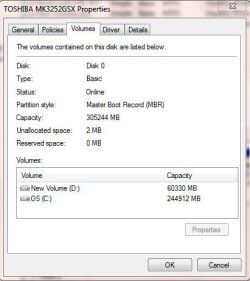
Some OEM's create a D partition for data so it is separated from the Win7 backup image from C. It is purely user preference and can be deleted to extend C:
Partition or Volume - Delete
Partition or Volume - Extend

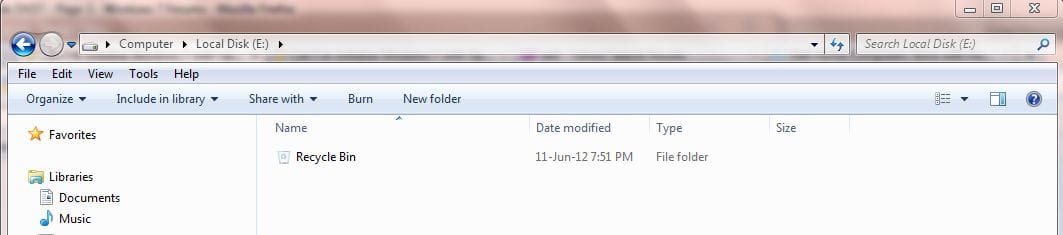
E is showing empty. Is there anything in it when you click on it? is there anything plugged into a USB port? Rightclick on the panel to its immediate left in Disk Mgmt and post up a screenshot of the Properties.
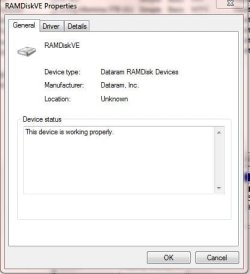
 
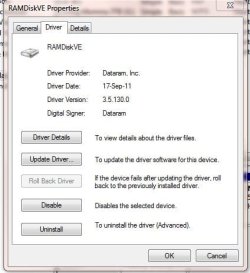
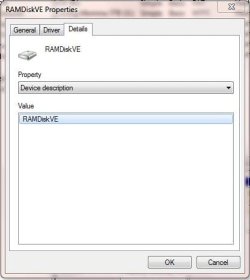
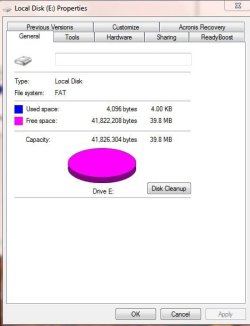
I'll repeat what I wrote earlier in this thread. I am told that the E: partition is actually part of the C: drive. It is not a USB and nothing is plugged into it. It appeared about 4-5 months ago from who knows where. I was also told that this is unique to Dell computers. Attached are 3 screenshots re: its driver per your request.

I am very much relieved knowing that the D: partition is superfluous and I can go on with my existing system without starting over again. Thank you.

Richie
 

Attachments

  • Screenshot - E_Properties1.jpg
    Screenshot - E_Properties1.jpg
    17.1 KB · Views: 1
  • Screenshot - E_Properties2.jpg
    Screenshot - E_Properties2.jpg
    26.7 KB · Views: 1
  • Screenshot - E_Properties3.jpg
    Screenshot - E_Properties3.jpg
    16.1 KB · Views: 0

My Computer My Computer

At a glance

Windows 7 Home Premium 32 bit SP1Intel T52504gbNvdia GeForce 8400M GS
Computer Manufacturer/Model Number
Dell Inspiron 1720
OS
Windows 7 Home Premium 32 bit SP1
CPU
Intel T5250
Motherboard
Dell OUK437
Memory
4gb
Graphics Card(s)
Nvdia GeForce 8400M GS
Sound Card
Sigma Tel High Definition Audio CODEC
Hard Drives
2 3tb Seagate GoFlex Desktops
1 1tb Seagate Free Agent
Mouse
Logitech M305
Internet Speed
Free Wi-Fi provided to residents of building, too slow!
Go to Control Panel>Folder Options>View to unhide Hidden and System files.

Post back a screenshot of the contents of E and the Disk Mgmt>rightclick Properties>Volumes tab for the drive which I requested.
 

Attachments

  • Untitled.png
    Untitled.png
    56.9 KB · Views: 5
I couldn't find a 'Volumes' tab but I think this is what you're asking for.
 

Attachments

  • Screenshot - E_Properties4.jpg
    Screenshot - E_Properties4.jpg
    24.2 KB · Views: 3

My Computer My Computer

At a glance

Windows 7 Home Premium 32 bit SP1Intel T52504gbNvdia GeForce 8400M GS
Computer Manufacturer/Model Number
Dell Inspiron 1720
OS
Windows 7 Home Premium 32 bit SP1
CPU
Intel T5250
Motherboard
Dell OUK437
Memory
4gb
Graphics Card(s)
Nvdia GeForce 8400M GS
Sound Card
Sigma Tel High Definition Audio CODEC
Hard Drives
2 3tb Seagate GoFlex Desktops
1 1tb Seagate Free Agent
Mouse
Logitech M305
Internet Speed
Free Wi-Fi provided to residents of building, too slow!
Until you unhide Hidden and System files there is no way to know for sure if anything is on the drive.

Once you do that, click on the partition in Computer to post back a screenshot of its content.

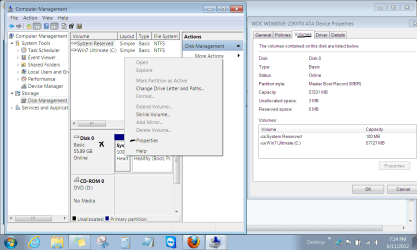
The Properties box is separate and from Disk management. Type Disk Management in Start search box, rightclick on the space I marked with an X next to the E partition, choose Properties, click on Volumes tab to post a screenshot.
 
I don't understand what you're looking for. Everything is now unhidden. Here are 2 more screenshots.

How can you mark something with an 'X'? I don't understand and I still can't find a 'Volumes' tab anywhere. You need to be more specific.
 

Attachments

  • Screenshot - D_Computer.jpg
    Screenshot - D_Computer.jpg
    26.5 KB · Views: 3
  • Screenshot - E_Computer.jpg
    Screenshot - E_Computer.jpg
    22.5 KB · Views: 3

My Computer My Computer

At a glance

Windows 7 Home Premium 32 bit SP1Intel T52504gbNvdia GeForce 8400M GS
Computer Manufacturer/Model Number
Dell Inspiron 1720
OS
Windows 7 Home Premium 32 bit SP1
CPU
Intel T5250
Motherboard
Dell OUK437
Memory
4gb
Graphics Card(s)
Nvdia GeForce 8400M GS
Sound Card
Sigma Tel High Definition Audio CODEC
Hard Drives
2 3tb Seagate GoFlex Desktops
1 1tb Seagate Free Agent
Mouse
Logitech M305
Internet Speed
Free Wi-Fi provided to residents of building, too slow!
If you unhid System and Hidden files in Control panel>Folder options then there is nothing on D or E. You can hide them again.

If you click to enlarge and look at the screenshot carefully, the area I marked with the handwritten X is where to rightclick next to your E partition and choose Properties. Then click on Volumes tab.

If you can't find it it really doesn't matter to know what kind of partition it is - since it's empty you can delete it.

 
When I right click on the left side of the E: partition and select properties, it gives me driver information. Here is a screenshot when I did the exact same thing for Disk 0 > Properties > Volumes.
 

Attachments

  • Screenshot - Disk0_Volumes.jpg
    Screenshot - Disk0_Volumes.jpg
    24 KB · Views: 2

My Computer My Computer

At a glance

Windows 7 Home Premium 32 bit SP1Intel T52504gbNvdia GeForce 8400M GS
Computer Manufacturer/Model Number
Dell Inspiron 1720
OS
Windows 7 Home Premium 32 bit SP1
CPU
Intel T5250
Motherboard
Dell OUK437
Memory
4gb
Graphics Card(s)
Nvdia GeForce 8400M GS
Sound Card
Sigma Tel High Definition Audio CODEC
Hard Drives
2 3tb Seagate GoFlex Desktops
1 1tb Seagate Free Agent
Mouse
Logitech M305
Internet Speed
Free Wi-Fi provided to residents of building, too slow!
Is the drive Properties box that comes up for E the same as previous RAMdiskVE screenshot you posted earlier from Disk Mgmt?


If so I believe that is installed with Acronis. Are you using its installed program for scheduled backup or have a backup capsule of some sort?

Best method with Acronis is to use it's boot disk to save externally a backup image, and to restore it.
 
Yes, that is what I see from the E: partition and yes, I use Acronis but only for manual backups. I don't schedule them. If I use Acronis to backup an image of the whole C: drive and then restore it, it comes back identically to what I have now. Are you suggesting that I backup an image of the C: drive, format it and then restore the C: partition only along with the MBR? If I do that, both D: and E: should be gone.
 

My Computer My Computer

At a glance

Windows 7 Home Premium 32 bit SP1Intel T52504gbNvdia GeForce 8400M GS
Computer Manufacturer/Model Number
Dell Inspiron 1720
OS
Windows 7 Home Premium 32 bit SP1
CPU
Intel T5250
Motherboard
Dell OUK437
Memory
4gb
Graphics Card(s)
Nvdia GeForce 8400M GS
Sound Card
Sigma Tel High Definition Audio CODEC
Hard Drives
2 3tb Seagate GoFlex Desktops
1 1tb Seagate Free Agent
Mouse
Logitech M305
Internet Speed
Free Wi-Fi provided to residents of building, too slow!
There's no reason to do that. I am only saying that Acronis is known to create that RAMdisk partition for something to do with it's bloatware installation.

This is why many Acronis users don't install the program and for imaging or restoring only use the Acronis boot disk - which you should have anyway in case Win7 ever becomes unbootable.

Make sure you have your Product key backed up and then uninstall Acronis to see if E goes away. If not you can delete it in Disk Management along with D which is a data partition set up by your OEM which you don't want.
 
I have 2 CDs as Acronis rescue media but I find it convenient to have Acronis installed. The E: partition is so small (39.8mb) so who cares if it exists or not. Earlier you showed two links. One to delete a partition and the other to extend a partition. Are those links to execute a procedure or links to instructions for doing so? What happens to the space when a partition is deleted?
 

My Computer My Computer

At a glance

Windows 7 Home Premium 32 bit SP1Intel T52504gbNvdia GeForce 8400M GS
Computer Manufacturer/Model Number
Dell Inspiron 1720
OS
Windows 7 Home Premium 32 bit SP1
CPU
Intel T5250
Motherboard
Dell OUK437
Memory
4gb
Graphics Card(s)
Nvdia GeForce 8400M GS
Sound Card
Sigma Tel High Definition Audio CODEC
Hard Drives
2 3tb Seagate GoFlex Desktops
1 1tb Seagate Free Agent
Mouse
Logitech M305
Internet Speed
Free Wi-Fi provided to residents of building, too slow!
I have 2 CDs as Acronis rescue media but I find it convenient to have Acronis installed. The E: partition is so small (39.8mb) so who cares if it exists or not. Earlier you showed two links. One to delete a partition and the other to extend a partition. Are those links to execute a procedure or links to instructions for doing so? What happens to the space when a partition is deleted?

Those 2 links are to tutorials to delete and extend.

When a partition is deleted, it becomes "unallocated space" and can then be added to other partitions or left alone as you choose.
 

My Computer My Computer

At a glance

Windows 7 Home Premium SP1, 64-bitIntel Skylake i5-6600K, not overclocked8 GB HyperX DDR4-2666 (2 x 4 GB)none; graphics are integrated on CPU
Computer type
PC/Desktop
Computer Manufacturer/Model Number
Ignatz Special; 4 speed manual gearbox; factory air conditioning; one of one
OS
Windows 7 Home Premium SP1, 64-bit
CPU
Intel Skylake i5-6600K, not overclocked
Motherboard
AsRock Z170M Extreme 4, micro ATX
Memory
8 GB HyperX DDR4-2666 (2 x 4 GB)
Graphics Card(s)
none; graphics are integrated on CPU
Sound Card
onboard: Realtek ALC1150; external: USB Behringer UF0-202
Monitor(s) Displays
Dell S2340M 23 inch IPS
Screen Resolution
1600 x 900
Hard Drives
System: Crucial MX100 series SSD, 128 GB;
Data: Samsung Spinpoint 103SJ, 1 TB;
Backup: WD Caviar Green WD30EZRX-00D8PB0, 3 TB
PSU
Rosewill SilentNight 500 watt fanless, semi-modular
Case
Antec Solo II
Cooling
Noctua NH-U12S; Noctua F12 intake, Noctua S12A exhaust
Keyboard
Microsoft 200 6JH-00001 USB
Mouse
Dell or Microsoft optical wired; USB
Antivirus
Microsoft Security Essentials and Malwarebytes Premium
Browser
Pale Moon
Other Info
All fans PWM; speeds at idle: CPU circa 500 rpm; intake circa 600 rpm; exhaust circa 600 rpm; CPU temps 27 idle and 47 C load in a warm room (27 C/81 F) when running Intel Extreme Tuning Utility stress test.
Thanks for all your assistance. I think it's time to close this thread and mark it solved. Thanks again to all of you.
 

My Computer My Computer

At a glance

Windows 7 Home Premium 32 bit SP1Intel T52504gbNvdia GeForce 8400M GS
Computer Manufacturer/Model Number
Dell Inspiron 1720
OS
Windows 7 Home Premium 32 bit SP1
CPU
Intel T5250
Motherboard
Dell OUK437
Memory
4gb
Graphics Card(s)
Nvdia GeForce 8400M GS
Sound Card
Sigma Tel High Definition Audio CODEC
Hard Drives
2 3tb Seagate GoFlex Desktops
1 1tb Seagate Free Agent
Mouse
Logitech M305
Internet Speed
Free Wi-Fi provided to residents of building, too slow!
Back
Top