MSE Trojan Cleanup Prompt

jdizzle921

New member
Local time
5:34 AM
Messages
24
I apologize for the length of this. I just feel it is important to give all the details as they may help with coming up with a solution. I thank anyone in advance for lending me your time in helping me fix this problem.
=============================================================

I've got a bit of a problem with my system in that I am getting a very odd Microsoft Security Essentials message that I am trying to figure out.

To start, today upon start-up and after bit of browsing my computer was fine. After this problem occurred. I retraced my steps and the only things that I've done on my computer today are...

1) Let Adobe Flash update itself
2) Download and email several pictures from my Droid SD card for a college project.

Since I really haven't done anything abnormal today (Install any programs, etc.) I have to believe that one of those two actions caused all this to happen.

I noticed that when I went on YouTube or any other site that required the use of Flash, that I got a 'An Error has Occurred" prompt on the video. I then uninstalled and re-installed all my Adobe Flash programs but I still have the same problem. SEE EDIT#2

Now, here is the real problem....

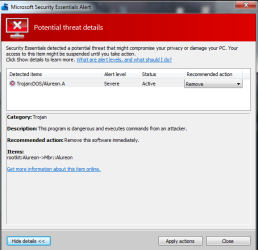
Upon start up of my computer, I get a Microsoft Security Essentials (MSE) dialog box in the lower right hand corner of my screen saying that there is a "Potential Threat" that's been suspended by MSE.

I've attached photo #1 showing that prompt.

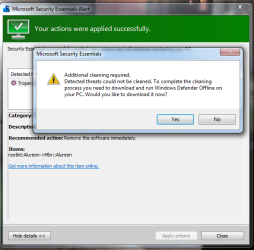
After clicking 'Show Details' I then get the 2nd dialog box that shows the details of the alert.

I've attached photo #2 showing that box.

From there it asks if you'd like to 'Apply Actions' in which it brings you to the 3rd dialog box that asks you to "Download and Run Windows Defender Offline on your PC" to get rid of the thread.


This is where I've stopped as it seems like a classic ploy to have me download something even nastier. I may just be paranoid, but it raised a red flag for me.


If I do choose to ignore the last prompt it takes me to yet another dialog saying that the threat has been removed successfully and that a re-boot is needed. Once I go ahead and do that, I'm right back at square one as it says that the same thread is there once again.

I normally run Norton Antivirus as it has successfully kept away all the smaller bugs thus far but I fear a bigger one may have gotten through this time. SEE EDIT #1


If anyone would happen to be able to lend me some assistance, I would be very grateful.

Best Regards


Edit #1: I forgot to mention that I opened up Norton and did a complete system scan in which no viruses/trojans, etc. were found so that has me a bit stumped as well.

Edit #2: After using a test YouTube link via FaceBook, the video will play properly. I was able to further search via YouTube and other videos did indeed play so thankfully that problem seems to have resolved itself.
 

Attachments

  • MSENotice1.png
    MSENotice1.png
    11.7 KB · Views: 13
  • MSENotice2.png
    MSENotice2.png
    18 KB · Views: 23
  • MSENotice3.png
    MSENotice3.png
    32 KB · Views: 23

My Computer My Computer

OS
Windows 7 Professional 64 bit
CPU
Intel (R) Core (TM) i7 CPU 950 @ 3.07 GHz
Motherboard
ASUSTeK Computer INC. SABERTOOTH X58
Memory
24.0 GB
Graphics Card(s)
AMD Radeon HD 6800 Series
Sound Card
(1) AMD High Definition Audio Device (2) Realtek High Defi
Hard Drives
Samsung 128gb SSD, WDC 1TB HDD, Hitachi 1TB HDD,
Case
Cooler Master
From the screen shots you've provided, it appears to be a genuine MSE alert. However, the bad guys have become very skillful in making their alerts look like the real thing.

Windows Defender Offline is a real Microsoft product and it can be obtained directly from the WDO website. This product can (sometimes) find malware that other anti-malware products might miss. (No anti-malware product is 100% effective 100% of the time. If there was such a product we'd all be using it. That's why it's a good idea to have a few other on-demand scanners like Malwarebytes, Superantispyware, Hitman Pro, ESET, WDO, etc to check if the primary product might have missed something.) Microsoft warns that WDO should be downloaded and created on a computer that is not suspected of being infected.

What is Windows Defender Offline?

The fact that you believe the problem is now corrected should not lull you into a false sense of security. Depending on how the malware was written, it might run immediately, or it might run at unexpected times. If it was my computer I'd run as many on-demand scanners as I could just to maximize the probablility that the computer really is clean.
 

My Computer My Computer

Computer type
Laptop
Computer Manufacturer/Model Number
Sony Vaio VPCEB47GM Laptop
OS
Win 7 Pro 64-bit
CPU
Intel i5 2.4 Ghz
Memory
8GB DDR3
Graphics Card(s)
Intel HD 3000
Sound Card
IDT High Definition
Monitor(s) Displays
15.6 WGXA Anti-Glare LED
Screen Resolution
1280x800
Hard Drives
640Gb 7200rpm
Antivirus
MSE
Browser
Opera (primary) with IE9 backup
Thank you for the tip marsmimar. I'm gonna boot up my laptop and get the software downloaded here shortly.

At the moment the prompt does not come up for me as I uninstalled and reinstalled MSE and the prompt did not show up after restarting my computer a few times. I'm going to still run that program though to see.

Also on a separate note. It seems as if the Flash problems have come up again as I now get the 'An Error Has Occurred' message when viewing YouTube, etc. I've installed and re-installed Flash a handful of times including going to an older 10.X version (I believe the current one is 11.X) and still nothing.

Could the possible malware be causing that to occur?
 

My Computer My Computer

OS
Windows 7 Professional 64 bit
CPU
Intel (R) Core (TM) i7 CPU 950 @ 3.07 GHz
Motherboard
ASUSTeK Computer INC. SABERTOOTH X58
Memory
24.0 GB
Graphics Card(s)
AMD Radeon HD 6800 Series
Sound Card
(1) AMD High Definition Audio Device (2) Realtek High Defi
Hard Drives
Samsung 128gb SSD, WDC 1TB HDD, Hitachi 1TB HDD,
Case
Cooler Master
Adobe Flash is a popular magnet for malware writers because so many computers have it installed. It's also possible that Flash wasn't fully uninstalled whenever you uninstalled/reinstalled in the past. If any Flash remnants were left on your computer they could prevent a clean reinstall. Adobe has an uninstaller that's supposed to remove all traces of Flash.

Flash Player Help | Uninstall Flash Player | Windows

I'd run it at least a couple of times just to make sure. I wouldn't use an older version of Flash. Older versions are susceptible to all kinds of malware. The latest version (11.3.300.257) can be obtained here. Don't forget to uncheck any unwanted "stuff" like toolbars, browsers, etc.

Adobe - Install Adobe Flash Player
 

My Computer My Computer

Computer type
Laptop
Computer Manufacturer/Model Number
Sony Vaio VPCEB47GM Laptop
OS
Win 7 Pro 64-bit
CPU
Intel i5 2.4 Ghz
Memory
8GB DDR3
Graphics Card(s)
Intel HD 3000
Sound Card
IDT High Definition
Monitor(s) Displays
15.6 WGXA Anti-Glare LED
Screen Resolution
1280x800
Hard Drives
640Gb 7200rpm
Antivirus
MSE
Browser
Opera (primary) with IE9 backup
Thanks marsmimar. I'll go ahead and give that a try.

I downloaded Malwarebytes as you suggested and it came across and removed 8 different malware items (3 of which were 'Trojan' labeled)

I've still got the YouTube/Flash problem though. So I'll go ahead and give that official Adobe uninstaller a try right now.

Thank you so much for your help so far.
=======================================================================
Edit/Update: I followed the uninstall steps for Flash and made sure to check the three flass folder locations and delete the leftover files from there.

Then upon reinstalling Flash, I had a notification box appear two different times.

The first time I had the warning box appear right after the installation. I then followed the steps and the the un/reinstall once more. The second time it waited about 10 minutes before appearing.

The notification box is attached below.

At the moment, Flash still does not work properly as it seems it's still 'communicating' with whatever the Malwarebytes said it already removed.
 

Attachments

  • Malwarebytes1.png
    Malwarebytes1.png
    7.8 KB · Views: 14
Last edited:

My Computer My Computer

OS
Windows 7 Professional 64 bit
CPU
Intel (R) Core (TM) i7 CPU 950 @ 3.07 GHz
Motherboard
ASUSTeK Computer INC. SABERTOOTH X58
Memory
24.0 GB
Graphics Card(s)
AMD Radeon HD 6800 Series
Sound Card
(1) AMD High Definition Audio Device (2) Realtek High Defi
Hard Drives
Samsung 128gb SSD, WDC 1TB HDD, Hitachi 1TB HDD,
Case
Cooler Master
It's very possible that there's still malware on the computer. If you haven't tried Windows Defender Offline I'd recommend it. I've also had good results with Hitman Pro. It uses the data bases of 5 different companies during its scans.

Hitman Pro 3 - SurfRight

Unfortunately, if a computer gets infected, you can never be 100% sure that all of the malware has been removed. Even if you run 8 different scans, and even if they all come back clean, the 9th or 10th scan could reveal malware. But let's take it one step at a time. If Hitman Pro and WDO don't help there are some MSMVP security experts who hang out on this Forum who would be available for additional help.
 

My Computer My Computer

Computer type
Laptop
Computer Manufacturer/Model Number
Sony Vaio VPCEB47GM Laptop
OS
Win 7 Pro 64-bit
CPU
Intel i5 2.4 Ghz
Memory
8GB DDR3
Graphics Card(s)
Intel HD 3000
Sound Card
IDT High Definition
Monitor(s) Displays
15.6 WGXA Anti-Glare LED
Screen Resolution
1280x800
Hard Drives
640Gb 7200rpm
Antivirus
MSE
Browser
Opera (primary) with IE9 backup
Hi,

It might also be a good idea to post the names of the items Malwarebytes found - depending on what it found, you might have to try other tools to clean your system.

Lee already mentioned ESET : this is the link to the free on-line scanner, which is well regarded:

ESET :: Get a FREE Online Virus Scan

Regards,
Golden
 

My Computer My Computer

Computer type
PC/Desktop
Computer Manufacturer/Model Number
Golden Mk. I.4
OS
Windows 10 Pro x64 ; Xubuntu x64
CPU
Intel i7 860 @ 2.80 GHz O/C'ed to 4.0GHz
Motherboard
Gigabyte P55A-UD3R Rev.1. Award BIOS F13
Memory
16GB Corsair Vengance DDR3 @ 661 MHz Dual Channel (9-9-9-24)
Graphics Card(s)
EVGA NVidia GTX 560 1024MB
Sound Card
Realtek Integrated
Monitor(s) Displays
Dual Samsung SyncMaster 2494HS
Screen Resolution
1920*1080 and 1920*1080
Hard Drives
1*Samsung 840 EVO 120GB SSD;
1*OCZ Vertex 2 60GB SSD;
2*Samsung F3 SpinPoint 1TB in RAID0;
1*Samsung F1 SpinPoint 1TB;
2*Western Digital 1TB External USB 3.0
1*Western Digital 500GB External USB 3.0
1*Seagate 500GB External USB 2.0
PSU
Thermaltake ToughPower QFan 750W
Case
Thermaltake Element S VK60001W2Z
Cooling
Corsair H60 Water Cooling, 2*230mm and 2*80mm case fans
Keyboard
Logitech G110
Mouse
Logitech MX518
I had to wrestle with a PC recently that was compromised by Alureon. When using Windows Defender Offline, I received the same messages (Additional cleaning required). I can't tell you if the MSE does in fact prompt you to d/l Defender, as the PC I had to fix didn't even have a working Windows environment. And no disks of any kind (The lady lost them....)

If you do indeed have that virus, be aware it's hard to remove because it makes a cloaked partition that it boots from every time, bypassing the regular boot sector. Even after a factory reset, the virus was still present (Along with another rootkit). I can offer you the following tools to try, they may help, however, in the end I used a bootable partition manager to make sure the partition was indeed erased.

Hopefully you don't have Alureon, but it's best to take no chances as this is one tough virus to get out.

Technical Details:

Backdoor.Tidserv | Symantec

Removal tool

Backdoor.Tidserv Removal Tool | Symantec

Kaspersky TDSSKiller

Anti-rootkit utility TDSSKiller

Note: When using this tool, make sure to click on the "Change Parameters" and check "Detect TDLFS File system" & "Verify file digital signatures".

If you do have this virus, you may wish to consider a clean install as an option, after you have thoroughly wiped the drive.

http://www.sevenforums.com/tutorials/1649-clean-install-windows-7-a.html
 
Last edited:

My Computer My Computer

Computer type
PC/Desktop
Computer Manufacturer/Model Number
Dell Hell oh Well
OS
Win 7 32 Home Premium, Win 7 64 Pro, Win 8.1, Win 10
CPU
Intel Core 2 Duo 2.93GHz
Memory
Not much with my ADHD
Graphics Card(s)
ATI Radeon HD 4350
Monitor(s) Displays
24" HDTV/Monitor
Screen Resolution
Blurry after a Scotch or 2
Hard Drives
1 HDD 250 GB, 1 HDD 1 TB, 3 - 1 TB Externals
Case
Don't get on my case...man :D
Cooling
I have an Air Conditioner & Diet Pepsi
Keyboard
Saitek Cyborg
Mouse
10 yr old MS optical mouse that still works
Internet Speed
Never fast enough
Antivirus
Various
Browser
Various
Good afternoon everyone,

I just want to say, "jdizzle921" I am currently having the same issue as yourself only different is virus is named Alureon.E instead of Alureon.A. So if its okay I am going to subscribe to your thread if that's alright or premitted? while I wait for further assistance with my thread.

regards,

kyle miller
 

My Computer My Computer

Computer Manufacturer/Model Number
Gateway
OS
Windows 7 home premium 64bit
CPU
intel i3
Memory
6gb
Graphics Card(s)
nvidia
Monitor(s) Displays
samsung plasma 50'
Hard Drives
1tb
Case
factory
Cooling
1 fan
Alureon.E is the detection name for infected Volume Boot Records (VBR) produced by certain variants of the Win32/Alureon rootkit family. The rootkit infects 32-bit and 64-bit systems.
Alureon E is just a different variant of Alureon A

The hidden partition will be small, 1 to 3 MB, it may or may not show up on your MS Disk Management. It generally doesn't. You can use a bootable partition manager to find it.

Hiren's Boot CD 15.1 contains a few bootable partition managers.

Hiren's BootCD 15.1 - All in one Bootable CD » www.hiren.info

Outright deleting the offending partition may/may not leave your original boot sector readable and is not always guaranteed to remove all of the virus. It depends on the variant.

Kaspersky TDSSKiller attempts to fix this by writing a generic boot code to repair the original one.

However, the best course of action would be to do a clean install after making sure the entire HD is formatted.

@kylemiller - Try the above tools if a clean install is not possible.
 

My Computer My Computer

Computer type
PC/Desktop
Computer Manufacturer/Model Number
Dell Hell oh Well
OS
Win 7 32 Home Premium, Win 7 64 Pro, Win 8.1, Win 10
CPU
Intel Core 2 Duo 2.93GHz
Memory
Not much with my ADHD
Graphics Card(s)
ATI Radeon HD 4350
Monitor(s) Displays
24" HDTV/Monitor
Screen Resolution
Blurry after a Scotch or 2
Hard Drives
1 HDD 250 GB, 1 HDD 1 TB, 3 - 1 TB Externals
Case
Don't get on my case...man :D
Cooling
I have an Air Conditioner & Diet Pepsi
Keyboard
Saitek Cyborg
Mouse
10 yr old MS optical mouse that still works
Internet Speed
Never fast enough
Antivirus
Various
Browser
Various
Thank you for the replies everyone. I just woke back up as I was up all night and most of the morning trying to figure this out.

@kyle- Not a problem.

It was stupid of me not to take another screenshot of the different pieces of malware that Malwarebytes removed, but I believe at least one, if not all 3 of the 'Trojan' titled ones had 'Alureon' in them. (I could be wrong though, as that may have been the name of the virus I read about last night and the two are mixing around in my memory) Is there some sort of way I can check the deleted log of Malwarebytes to confirm for you guys? SEE EDIT#1 Below

I'm gonna get started on installing these programs. Would it be a good idea to go ahead and download them all on another computer and use the flash drive/SD card to transfer over to my infected desktop like I did with Malwarebytes? Or is not suggested due to the virus possibly attaching itself to the removable media and then getting into my laptop?

================================================================

Edit: I found the Malwarebytes protection log shown below. I deleted my username for safety's sake, but everything else is there in it's original state.


2012/06/12 02:13:59 -0400 DESKTOP MESSAGE Starting protection
2012/06/12 02:14:01 -0400 DESKTOP MESSAGE Protection started successfully
2012/06/12 02:14:04 -0400 DESKTOP MESSAGE Starting IP protection
2012/06/12 02:14:05 -0400 DESKTOP MESSAGE IP Protection started successfully
2012/06/12 02:26:00 -0400 DESKTOP IP-BLOCK 206.161.121.6 (Type: outgoing, Port: 49778, Process: svchost.exe)
2012/06/12 02:52:50 -0400 DESKTOP IP-BLOCK 206.161.121.6 (Type: outgoing, Port: 50208, Process: svchost.exe)
2012/06/12 03:14:41 -0400 DESKTOP IP-BLOCK 206.161.121.6 (Type: outgoing, Port: 50281, Process: svchost.exe)
2012/06/12 03:16:36 -0400 DESKTOP DETECTION C:\Windows\svchost.exe Trojan.Agent QUARANTINE
2012/06/12 03:16:36 -0400 DESKTOP ERROR Quarantine failed: DeleteFile failed with error code 5
2012/06/12 03:16:44 -0400 DESKTOP IP-BLOCK 206.161.121.6 (Type: outgoing, Port: 50284, Process: svchost.exe)
2012/06/12 03:19:07 -0400 DESKTOP MESSAGE Starting protection
2012/06/12 03:19:09 -0400 DESKTOP MESSAGE Protection started successfully
2012/06/12 03:19:12 -0400 DESKTOP MESSAGE Starting IP protection
2012/06/12 03:19:13 -0400 DESKTOP MESSAGE IP Protection started successfully
2012/06/12 03:19:45 -0400 DESKTOP DETECTION C:\Windows\svchost.exe Trojan.Agent QUARANTINE
2012/06/12 03:19:55 -0400 DESKTOP DETECTION C:\Windows\svchost.exe Trojan.Agent DENY
2012/06/12 03:20:07 -0400 DESKTOP DETECTION C:\Windows\svchost.exe Trojan.Agent DENY
2012/06/12 03:20:21 -0400 DESKTOP DETECTION C:\Windows\svchost.exe Trojan.Agent DENY
2012/06/12 03:20:33 -0400 DESKTOP DETECTION C:\Windows\svchost.exe Trojan.Agent DENY
2012/06/12 03:20:46 -0400 DESKTOP DETECTION C:\Windows\svchost.exe Trojan.Agent DENY
2012/06/12 03:20:58 -0400 DESKTOP DETECTION C:\Windows\svchost.exe Trojan.Agent DENY
2012/06/12 03:21:10 -0400 DESKTOP DETECTION C:\Windows\svchost.exe Trojan.Agent DENY
2012/06/12 03:21:20 -0400 DESKTOP DETECTION C:\Windows\svchost.exe Trojan.Agent DENY
2012/06/12 03:21:31 -0400 DESKTOP DETECTION C:\Windows\svchost.exe Trojan.Agent DENY
2012/06/12 03:21:41 -0400 DESKTOP DETECTION C:\Windows\svchost.exe Trojan.Agent DENY
2012/06/12 03:21:51 -0400 DESKTOP DETECTION C:\Windows\svchost.exe Trojan.Agent DENY
2012/06/12 03:22:01 -0400 DESKTOP DETECTION C:\Windows\svchost.exe Trojan.Agent DENY
2012/06/12 03:22:11 -0400 DESKTOP DETECTION C:\Windows\svchost.exe Trojan.Agent DENY
2012/06/12 03:22:21 -0400 DESKTOP DETECTION C:\Windows\svchost.exe Trojan.Agent DENY
2012/06/12 03:22:31 -0400 DESKTOP DETECTION C:\Windows\svchost.exe Trojan.Agent DENY
2012/06/12 03:22:41 -0400 DESKTOP DETECTION C:\Windows\svchost.exe Trojan.Agent DENY
2012/06/12 03:22:52 -0400 DESKTOP DETECTION C:\Windows\svchost.exe Trojan.Agent DENY
2012/06/12 03:23:02 -0400 DESKTOP DETECTION C:\Windows\svchost.exe Trojan.Agent DENY
2012/06/12 03:23:12 -0400 DESKTOP DETECTION C:\Windows\svchost.exe Trojan.Agent DENY
2012/06/12 03:23:22 -0400 DESKTOP DETECTION C:\Windows\svchost.exe Trojan.Agent DENY
2012/06/12 03:23:32 -0400 DESKTOP DETECTION C:\Windows\svchost.exe Trojan.Agent DENY
2012/06/12 03:23:42 -0400 DESKTOP DETECTION C:\Windows\svchost.exe Trojan.Agent DENY
2012/06/12 03:23:52 -0400 DESKTOP DETECTION C:\Windows\svchost.exe Trojan.Agent DENY
2012/06/12 03:24:02 -0400 DESKTOP DETECTION C:\Windows\svchost.exe Trojan.Agent DENY
2012/06/12 03:24:12 -0400 DESKTOP DETECTION C:\Windows\svchost.exe Trojan.Agent DENY
2012/06/12 03:24:23 -0400 DESKTOP DETECTION C:\Windows\svchost.exe Trojan.Agent DENY
2012/06/12 03:24:33 -0400 DESKTOP DETECTION C:\Windows\svchost.exe Trojan.Agent DENY
2012/06/12 03:24:43 -0400 DESKTOP DETECTION C:\Windows\svchost.exe Trojan.Agent DENY
2012/06/12 03:24:53 -0400 DESKTOP DETECTION C:\Windows\svchost.exe Trojan.Agent DENY
2012/06/12 03:25:03 -0400 DESKTOP DETECTION C:\Windows\svchost.exe Trojan.Agent DENY
2012/06/12 03:25:14 -0400 DESKTOP DETECTION C:\Windows\svchost.exe Trojan.Agent DENY
2012/06/12 03:25:24 -0400 DESKTOP DETECTION C:\Windows\svchost.exe Trojan.Agent DENY
2012/06/12 03:25:34 -0400 DESKTOP DETECTION C:\Windows\svchost.exe Trojan.Agent DENY
2012/06/12 03:25:44 -0400 DESKTOP DETECTION C:\Windows\svchost.exe Trojan.Agent DENY
2012/06/12 03:25:54 -0400 DESKTOP DETECTION C:\Windows\svchost.exe Trojan.Agent DENY
2012/06/12 03:26:04 -0400 DESKTOP DETECTION C:\Windows\svchost.exe Trojan.Agent DENY
2012/06/12 03:26:14 -0400 DESKTOP DETECTION C:\Windows\svchost.exe Trojan.Agent DENY
2012/06/12 03:26:25 -0400 DESKTOP DETECTION C:\Windows\svchost.exe Trojan.Agent DENY
2012/06/12 03:26:28 -0400 DESKTOP DETECTION C:\Windows\svchost.exe Trojan.Agent DENY
2012/06/12 03:26:35 -0400 DESKTOP DETECTION C:\Windows\svchost.exe Trojan.Agent DENY
2012/06/12 03:26:45 -0400 DESKTOP DETECTION C:\Windows\svchost.exe Trojan.Agent DENY
2012/06/12 03:26:55 -0400 DESKTOP DETECTION C:\Windows\svchost.exe Trojan.Agent DENY
2012/06/12 03:27:05 -0400 DESKTOP DETECTION C:\Windows\svchost.exe Trojan.Agent DENY
2012/06/12 03:27:16 -0400 DESKTOP DETECTION C:\Windows\svchost.exe Trojan.Agent DENY
2012/06/12 03:27:26 -0400 DESKTOP DETECTION C:\Windows\svchost.exe Trojan.Agent DENY
2012/06/12 03:27:36 -0400 DESKTOP DETECTION C:\Windows\svchost.exe Trojan.Agent DENY
2012/06/12 03:27:46 -0400 DESKTOP DETECTION C:\Windows\svchost.exe Trojan.Agent DENY
2012/06/12 03:27:57 -0400 DESKTOP DETECTION C:\Windows\svchost.exe Trojan.Agent DENY
2012/06/12 03:28:07 -0400 DESKTOP DETECTION C:\Windows\svchost.exe Trojan.Agent DENY
2012/06/12 03:28:17 -0400 DESKTOP DETECTION C:\Windows\svchost.exe Trojan.Agent DENY
2012/06/12 03:28:27 -0400 DESKTOP DETECTION C:\Windows\svchost.exe Trojan.Agent DENY
2012/06/12 03:28:37 -0400 DESKTOP DETECTION C:\Windows\svchost.exe Trojan.Agent DENY
2012/06/12 03:28:47 -0400 DESKTOP DETECTION C:\Windows\svchost.exe Trojan.Agent DENY
2012/06/12 03:28:57 -0400 DESKTOP DETECTION C:\Windows\svchost.exe Trojan.Agent DENY
2012/06/12 03:29:07 -0400 DESKTOP DETECTION C:\Windows\svchost.exe Trojan.Agent DENY
2012/06/12 03:29:17 -0400 DESKTOP DETECTION C:\Windows\svchost.exe Trojan.Agent DENY
2012/06/12 03:29:27 -0400 DESKTOP DETECTION C:\Windows\svchost.exe Trojan.Agent DENY
2012/06/12 03:29:37 -0400 DESKTOP DETECTION C:\Windows\svchost.exe Trojan.Agent DENY
2012/06/12 03:29:48 -0400 DESKTOP DETECTION C:\Windows\svchost.exe Trojan.Agent DENY
2012/06/12 03:29:58 -0400 DESKTOP DETECTION C:\Windows\svchost.exe Trojan.Agent DENY
2012/06/12 03:30:08 -0400 DESKTOP DETECTION C:\Windows\svchost.exe Trojan.Agent DENY
2012/06/12 03:30:18 -0400 DESKTOP DETECTION C:\Windows\svchost.exe Trojan.Agent DENY
2012/06/12 03:30:28 -0400 DESKTOP DETECTION C:\Windows\svchost.exe Trojan.Agent DENY
2012/06/12 03:30:38 -0400 DESKTOP DETECTION C:\Windows\svchost.exe Trojan.Agent DENY
2012/06/12 03:30:48 -0400 DESKTOP DETECTION C:\Windows\svchost.exe Trojan.Agent DENY
2012/06/12 03:30:58 -0400 DESKTOP DETECTION C:\Windows\svchost.exe Trojan.Agent DENY
2012/06/12 03:31:08 -0400 DESKTOP DETECTION C:\Windows\svchost.exe Trojan.Agent DENY
2012/06/12 03:31:18 -0400 DESKTOP DETECTION C:\Windows\svchost.exe Trojan.Agent DENY
2012/06/12 03:31:28 -0400 DESKTOP DETECTION C:\Windows\svchost.exe Trojan.Agent DENY
2012/06/12 03:31:38 -0400 DESKTOP DETECTION C:\Windows\svchost.exe Trojan.Agent DENY
2012/06/12 03:31:49 -0400 DESKTOP DETECTION C:\Windows\svchost.exe Trojan.Agent DENY
2012/06/12 03:31:59 -0400 DESKTOP DETECTION C:\Windows\svchost.exe Trojan.Agent DENY
2012/06/12 03:32:09 -0400 DESKTOP DETECTION C:\Windows\svchost.exe Trojan.Agent DENY
2012/06/12 03:32:19 -0400 DESKTOP (null) DETECTION C:\Windows\svchost.exe Trojan.Agent DENY
2012/06/12 03:32:30 -0400 DESKTOP (null) DETECTION C:\Windows\svchost.exe Trojan.Agent DENY
2012/06/12 03:36:04 -0400 DESKTOP MESSAGE Starting protection
2012/06/12 03:36:06 -0400 DESKTOP MESSAGE Protection started successfully
2012/06/12 03:36:09 -0400 DESKTOP MESSAGE Starting IP protection
2012/06/12 03:36:10 -0400 DESKTOP MESSAGE IP Protection started successfully
2012/06/12 03:38:10 -0400 DESKTOP IP-BLOCK 206.161.121.6 (Type: outgoing, Port: 49426, Process: svchost.exe)
2012/06/12 03:48:42 -0400 DESKTOP MESSAGE Starting protection
2012/06/12 03:48:44 -0400 DESKTOP MESSAGE Protection started successfully
2012/06/12 03:48:47 -0400 DESKTOP MESSAGE Starting IP protection
2012/06/12 03:48:48 -0400 DESKTOP MESSAGE IP Protection started successfully
2012/06/12 03:52:16 -0400 DESKTOP IP-BLOCK 206.161.121.6 (Type: outgoing, Port: 49569, Process: svchost.exe)
2012/06/12 03:52:33 -0400 DESKTOP IP-BLOCK 78.41.203.118 (Type: outgoing, Port: 49632, Process: svchost.exe)
2012/06/12 03:52:41 -0400 DESKTOP IP-BLOCK 78.41.203.118 (Type: outgoing, Port: 49640, Process: svchost.exe)
2012/06/12 04:01:14 -0400 DESKTOP IP-BLOCK 206.161.121.6 (Type: outgoing, Port: 50132, Process: svchost.exe)
2012/06/12 14:00:39 -0400 DESKTOP MESSAGE Starting protection
2012/06/12 14:00:41 -0400 DESKTOP MESSAGE Protection started successfully
2012/06/12 14:00:44 -0400 DESKTOP MESSAGE Executing scheduled update: Daily
2012/06/12 14:00:44 -0400 DESKTOP MESSAGE Starting IP protection
2012/06/12 14:00:45 -0400 DESKTOP MESSAGE IP Protection started successfully
2012/06/12 14:00:50 -0400 DESKTOP MESSAGE Starting database refresh
2012/06/12 14:00:50 -0400 DESKTOP MESSAGE Scheduled update executed successfully: database updated from version v2012.06.12.02 to version v2012.06.12.07
2012/06/12 14:00:50 -0400 DESKTOP MESSAGE Stopping IP protection
2012/06/12 14:01:39 -0400 DESKTOP MESSAGE IP Protection stopped
2012/06/12 14:01:41 -0400 DESKTOP MESSAGE Database refreshed successfully
2012/06/12 14:01:41 -0400 DESKTOP MESSAGE Starting IP protection
2012/06/12 14:01:41 -0400 DESKTOP MESSAGE IP Protection started successfully
===================================================================

Edit #2: I also just realized that after starting up my computer today I did not receive the same Malwarebytes protection notification like my last uploaded screenshot. (I'm sure the virus is still there though) Also, Flash/YouTube, etc. is still giving me the same problems.
 
Last edited:

My Computer My Computer

OS
Windows 7 Professional 64 bit
CPU
Intel (R) Core (TM) i7 CPU 950 @ 3.07 GHz
Motherboard
ASUSTeK Computer INC. SABERTOOTH X58
Memory
24.0 GB
Graphics Card(s)
AMD Radeon HD 6800 Series
Sound Card
(1) AMD High Definition Audio Device (2) Realtek High Defi
Hard Drives
Samsung 128gb SSD, WDC 1TB HDD, Hitachi 1TB HDD,
Case
Cooler Master
Good Evening Borg386,

And thanks for your expert advice in advance. And thanks for having me here on SevenForums. Just wanted to say the link to Hiren BootCD 15.1 has NO downloadable button,link or icon for the software, so that I can attempt the deletion of those partitions that plague my harddrive. The scrolling to the bottom of the page of that, link... Shows the file size (500MB) but no... link to download it. :geek:

A clean install is not out of the question... Only ask if at all possible exhaust every option that may help removing this terrible, vicious, nasty virus first. I performed a data log of MBRcheck and aswMBR... on my thread I posted earlier. Have a look when you get a chance or moment. Let me know what you think, after of course you get "jdizzle921" taken care of first. I do not want to cut line or anything. :p

warm regards,

Kyle.
 

My Computer My Computer

Computer Manufacturer/Model Number
Gateway
OS
Windows 7 home premium 64bit
CPU
intel i3
Memory
6gb
Graphics Card(s)
nvidia
Monitor(s) Displays
samsung plasma 50'
Hard Drives
1tb
Case
factory
Cooling
1 fan
I think at least some progress is being made as it seems each program is finding something new.

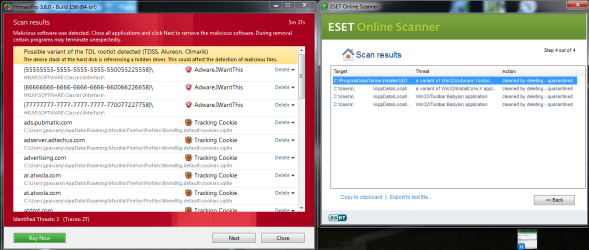
I attached the screenshot of both my ESE and HitmanPro. Both found something, the HitmanPro finding the Alureon trace which has me worried. I just had to wait for the ESET to finish scanning before going forward with Hitman. I'm going to do so right now.


Quick question for you Borg..

I have all the programs you suggested dowloaded off my laptop ready to transfer. The TDSSKiller is an online scanner only, and there's nothing I need to download yes?

Also, for the 'Clean Windows 7 Install', this will completely wipe out my system and erase all the files, programs, etc. I have installed without any way of recovering them, yes?

Is there any way I'm able to transfer and save some of the files I cannot afford to lose? Or is a complete hard drive wipe the only option?
====================================================================


EDIT #1: Ok, so far I've done..

ESET Scan: (4 items detected and removed. None were 'Trojan' or 'Alureon')
HitmanPro: (Numerous 'Tracking Cookies' and trace of 'Alureon' found)

Both are in the Red/Green looking screenshot.

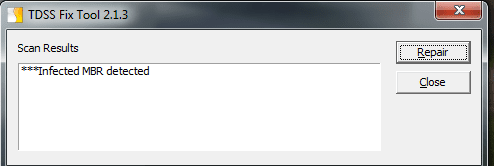
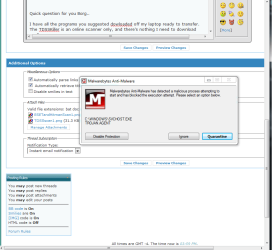
TDSS Scan: It revealed that I had an 'Infected MBR'. I chose 'repair' and said that it was successfully removed with no other prompts. It didn't however give me the option to change any parameters though. It just took me into the 'Proceed' step and prompted the restart from there.

Upon uploading the new screenshots and editing my post, I had the Malwarebytes popup for the first time today warning me the 'Trojan' was trying to communicate again, in which I selected to quarantine it.

I'm about to go ahead with the Windows Defender as I've got it installed onto a CD/DVD from a clean computer and going to see what it does.
-------------------------------------------------------------

Edit #2: I opened and ran Windows Defender from the boot menu and it didn't find anything. I checked the Quarantined. Allowed, and ___ (Forgot the last category) from the History tab and it didn't grab anything bad.
 

Attachments

  • ESETandHitmanScan1.png
    ESETandHitmanScan1.png
    70.5 KB · Views: 13
  • TDSSscan1.png
    TDSSscan1.png
    6.6 KB · Views: 7
  • MalwarePopup1.png
    MalwarePopup1.png
    27.7 KB · Views: 8
Last edited:

My Computer My Computer

OS
Windows 7 Professional 64 bit
CPU
Intel (R) Core (TM) i7 CPU 950 @ 3.07 GHz
Motherboard
ASUSTeK Computer INC. SABERTOOTH X58
Memory
24.0 GB
Graphics Card(s)
AMD Radeon HD 6800 Series
Sound Card
(1) AMD High Definition Audio Device (2) Realtek High Defi
Hard Drives
Samsung 128gb SSD, WDC 1TB HDD, Hitachi 1TB HDD,
Case
Cooler Master

My Computer My Computer

Computer type
Laptop
Computer Manufacturer/Model Number
Toshiba P775-S7100
OS
Windows 7 Professional SP1 64-bit
CPU
Intel Core i5-2450M @2.5 GHz
Memory
6 GB DDR3 1333MHz
Graphics Card(s)
Intel HD 3000
Monitor(s) Displays
Built-in 17.3" LED; 22" Insignia NS-L22Q-10A
Screen Resolution
1600x900; 1360x768
Hard Drives
750 GB Hitachi
1TB Seagate FreeAgent External
Internet Speed
Verizon DSL Speed(Down/Up): 3360 Kbps / 800 Kbps
Antivirus
MSE and MBAM Pro
Browser
IE10
Thanks petey7 :D
 

My Computer My Computer

Computer Manufacturer/Model Number
Gateway
OS
Windows 7 home premium 64bit
CPU
intel i3
Memory
6gb
Graphics Card(s)
nvidia
Monitor(s) Displays
samsung plasma 50'
Hard Drives
1tb
Case
factory
Cooling
1 fan
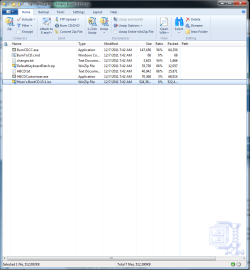
This is going to sound like a stupid question, but once I get the Hiren all downloaded, where do I start?

Nevermind, I guess my brain is fried. :confused: Commencing the CD burn at the moment.
 

Attachments

  • HirenInstall1.png
    HirenInstall1.png
    48.4 KB · Views: 19

My Computer My Computer

OS
Windows 7 Professional 64 bit
CPU
Intel (R) Core (TM) i7 CPU 950 @ 3.07 GHz
Motherboard
ASUSTeK Computer INC. SABERTOOTH X58
Memory
24.0 GB
Graphics Card(s)
AMD Radeon HD 6800 Series
Sound Card
(1) AMD High Definition Audio Device (2) Realtek High Defi
Hard Drives
Samsung 128gb SSD, WDC 1TB HDD, Hitachi 1TB HDD,
Case
Cooler Master
Just wanted to say the link to Hiren BootCD 15.1 has NO downloadable button,link or icon for the software, so that I can attempt the deletion of those partitions that plague my harddrive. The scrolling to the bottom of the page of that, link... Shows the file size (500MB) but no... link to download it. :geek:

I apologize for that, last time I d/l ed it (not too long ago) that link was still usable...Thank you Petey7 for supplying that.

For both of you, the best, safest option would be a clean install. Once a PC is compromised at that level, it's not trustworthy anymore.

You can migrate the files you wish to save to another medium, however it would be best to carefully scan each & every one of them before introducing them back onto a clean system. If you transfer them to a FD, make sure the autorun is disabled, so that it doesn't jump back on your clean system.

Being that Alureaon creates a cloaked partition, the best thing to do would be to wipe the drive with Darik's Boot and Nuke.

About DBAN | Darik's Boot And Nuke

@ jdizzle921 - Right above the Start switch on the L, there should be a "Change Parameters" Green sentence which is what you click on. After running TDSSKiller again with the boxes checked, it got rid of the "leftovers" of the virus. After this, all AV scans showed negative.

Alureon is notorious for introducing other viruses into the system, so it wouldn't be surprising if you did find lots of malware/viruses. Hence, the reason for a clean install as being the best option.

@ kylemiller - No prob, I can multitask :D. If you found a partition that was small (1-3MB) at the end of the HD, that's more then likely the virus. You can try running the tools & see if they can save your PC, however the safest choice is a clean install. Try TDSSKiller with the boxes checked ( "Change Parameters", check the bottom two) and see what it finds. If you need to do a clean install, make sure to scan the files carefully before putting them back on.

For both of you, you can submit files to VirusTotal, which uses multiple AV engines to scan a file. Be aware that the max file size is 32MB

https://www.virustotal.com/

Please post back to let everyone know what the outcome was.
 
Last edited:

My Computer My Computer

Computer type
PC/Desktop
Computer Manufacturer/Model Number
Dell Hell oh Well
OS
Win 7 32 Home Premium, Win 7 64 Pro, Win 8.1, Win 10
CPU
Intel Core 2 Duo 2.93GHz
Memory
Not much with my ADHD
Graphics Card(s)
ATI Radeon HD 4350
Monitor(s) Displays
24" HDTV/Monitor
Screen Resolution
Blurry after a Scotch or 2
Hard Drives
1 HDD 250 GB, 1 HDD 1 TB, 3 - 1 TB Externals
Case
Don't get on my case...man :D
Cooling
I have an Air Conditioner & Diet Pepsi
Keyboard
Saitek Cyborg
Mouse
10 yr old MS optical mouse that still works
Internet Speed
Never fast enough
Antivirus
Various
Browser
Various
Thanks Borg. :)

I've been preparing for that Clean Install by copying down the raw addresses of my Bookmarks and anything else I need via email thus far. I figured I might as well use the time I had while waiting for the scans to complete to prepare for the worst possible scenario. :confused:

I've got several questions about transferring the files though. I hope I don't annoy you with them as I'm guessing some are pretty trivial for those who are very knowledgeable with computers....

In regards to keeping my files...
A) When using a flash drive or SD Card to transfer, is there a guide on what I need to do to disable 'autorun' (I believe it is 'Autoplay' for me) for the removable media?
B) When scanning the files I'd like to keep, is there some sort of guide here on the forum that will help me do that if my files are larger than 32mb? (Large files with multiple music, video, and picture files)
C) The steps for scanning and re-scanning the files I'd like to keep (Whether I need to scan before transferring or if the scanning program would be corrupted and useless if I used it BEFORE I transfer the files to the clean system)
D) Also, I've been using my card scanner and a SD card to transfer all the recent AV install files from my laptop to infected desktop, will I still be able to use that reader with the Autoplay disabled? Or should I go out and buy a removable Thumb Drive and use that instead?

In regards to the Boot n' Nuke..
A) Can any damage be done to my Hard Drive or any other components in my computer when doing the 'Nuke'? (Sound/Video cards, etc. etc.)


Also, I haven't finished up with the Hiren yet. Do you think I should just forego that and not waste my time since you mentioned about the system not being 110% trustworthy without doing a complete wipe of everything?
 

My Computer My Computer

OS
Windows 7 Professional 64 bit
CPU
Intel (R) Core (TM) i7 CPU 950 @ 3.07 GHz
Motherboard
ASUSTeK Computer INC. SABERTOOTH X58
Memory
24.0 GB
Graphics Card(s)
AMD Radeon HD 6800 Series
Sound Card
(1) AMD High Definition Audio Device (2) Realtek High Defi
Hard Drives
Samsung 128gb SSD, WDC 1TB HDD, Hitachi 1TB HDD,
Case
Cooler Master
Good Evening/ Good night


Solution to Alureon.E has been reached my computer is a 100% back to normal,:D(THANKS PETEY) :D I can't say or express enough of how grateful I am to SevenForums and the professionals that perform on this site and come together from around the world. I am thankful you guys are my heros.

I've done regression testing with Malwarebytes, TDSSkiller, MSE, aswMBR, MBRcheck, and WDO.

All came back with no detections.

Solution Reached thanks PETEY you rock. And thank you Borg386. jdizzle thanks you too


Sincerely

Kyle Miller
 

My Computer My Computer

Computer Manufacturer/Model Number
Gateway
OS
Windows 7 home premium 64bit
CPU
intel i3
Memory
6gb
Graphics Card(s)
nvidia
Monitor(s) Displays
samsung plasma 50'
Hard Drives
1tb
Case
factory
Cooling
1 fan
Sorry, had to leave for a bit to get my wife....

It wouldn't hurt to investigate your system with Hiren's. See if you can locate the partition (Usually at the end of the drive, 1 - 3 MB) and make sure it's deleted.

The system shouldn't be considered trustworthy, however, you may have cleaned it out. But, there's always a chance that some bit of the virus survived and may cause trouble down the road.

It's basically your call. If it looks like you got it all & repeated scans from different AV's show that it's clean, then proceed with it if you wish, but keep a watchful eye on everything for some time. If anything suspicious rears it's head, investigate immediately or do the clean install.

BTW, if you used this PC to do any online banking or sign into any websites, contact the banks & change your passwords from a clean computer.

A) http://www.sevenforums.com/tutorials/216706-autoplay-enable-disable.html

B) You'll have to rely on downloaded multiple AV scanners on files larger then 32MB. Standalone AV scanners such as Malwarebytes or SuperAntiSpyware. BTW, SuperAntiSpyware makes a portable scanner that you can d/l on your FD & use from there. AV defs are updated daily, so d/l it only when you need it. Don't use an old version you've had around for a few weeks, it's out of date.

C) Best bet would be to transfer them to your storage & then scan them from a clean PC. Also, I would keep an eye on your SD card, as the virus may have hopped over to it if you used it prior to starting the disinfection process.

D) You should be able to use the reader, it simply won't launch, you'll have to R click on your PC icon & it should show up as a removable HD.

DBAN is just a Hard Drive Eraser, it won't hurt any of your hardware.

If you believe the virus is gone...Here is a tool you can run which does deep scans, this tool also includes a rootkit scan:

Norton Power Eraser (You'll need a net connect to use it)

Norton Power Eraser | Free Tool |Easily remove scamware that traditional virus scanning can

Because Norton Power Eraser uses aggressive methods to detect threats, there is a risk that it can select some legitimate programs for removal. You should use this tool very carefully. If you accidently remove a legitimate program, you can run Norton Power Eraser to review past repair sessions and undo them.
Another scanner to consider

Microsoft Safety Scanner - Antivirus | Remove Spyware, Malware, Viruses Free

Just be aware you're had a deep seated infection which probably introduced who knows how many viruses to your PC. Scans with multiple AV's are highly recommended.

BTW, did you re-run TDSSKIller and were you able to access the "Change Parameters" & check the two lower boxes? This should get the remnants of the remaining virus files.
 
Last edited:

My Computer My Computer

Computer type
PC/Desktop
Computer Manufacturer/Model Number
Dell Hell oh Well
OS
Win 7 32 Home Premium, Win 7 64 Pro, Win 8.1, Win 10
CPU
Intel Core 2 Duo 2.93GHz
Memory
Not much with my ADHD
Graphics Card(s)
ATI Radeon HD 4350
Monitor(s) Displays
24" HDTV/Monitor
Screen Resolution
Blurry after a Scotch or 2
Hard Drives
1 HDD 250 GB, 1 HDD 1 TB, 3 - 1 TB Externals
Case
Don't get on my case...man :D
Cooling
I have an Air Conditioner & Diet Pepsi
Keyboard
Saitek Cyborg
Mouse
10 yr old MS optical mouse that still works
Internet Speed
Never fast enough
Antivirus
Various
Browser
Various
Back
Top