i have only one account and displays switch user??

waltdisneypixar

New member
Member
Local time
11:41 PM
Messages
20
i have only one account and when i hit control L

it goes to the lock windows where it displays my acccount and to enter the password

but below it displays switch user??

why? i only have one account!!!
 

My Computer My Computer

At a glance

7
OS
7
i have only one account and when i hit control L

it goes to the lock windows where it displays my acccount and to enter the password

but below it displays switch user??

why? i only have one account!!!
The switch user funstion is still on even when you have one account. The reason, I do not know, but it isn't anything to worry about:)
 

My Computer My Computer

At a glance

Windows 7 Professional x64 Service Pack 1AMD Athlon X4 6456GB DDR3 1066Sapphire Radeon HD 5670 512MB GDDR5
Computer type
PC/Desktop
Computer Manufacturer/Model Number
HP Pavilion P7-1010
OS
Windows 7 Professional x64 Service Pack 1
CPU
AMD Athlon X4 645
Motherboard
Foxxcon N-Alvorix RS880
Memory
6GB DDR3 1066
Graphics Card(s)
Sapphire Radeon HD 5670 512MB GDDR5
Sound Card
Realtek Integrated Audio
Monitor(s) Displays
HP 2011x
Screen Resolution
1600x900
Hard Drives
1. Crucial M4 128GB SSD
2. 1TB Seagate Barracuda 7200.12 RPM
3. 1TB Western Digital Caviar Green 5400RPM
PSU
Seasonic S12 II Bronze 380 Watt
Case
HP OEM
Cooling
Coolermaster Heatsink, AVC Case Fan
Keyboard
HP OEM- Made by Chicony
Mouse
HP OEM- Made by Logitech
Internet Speed
20MBit Down/4 Up
Antivirus
Microsoft Security Essentials
Browser
Internet Explorer 10

My Computer My Computer

At a glance

Windows 7 Ultimate x64 SP1i7 960 3.20Ghz16GB Crucial Ballistix DDR3 Triple ChannelNvidia GeForce GTX 670 ftw
Computer Manufacturer/Model Number
Custom build
OS
Windows 7 Ultimate x64 SP1
CPU
i7 960 3.20Ghz
Motherboard
Gigabyte X58A UD3R
Memory
16GB Crucial Ballistix DDR3 Triple Channel
Graphics Card(s)
Nvidia GeForce GTX 670 ftw
Sound Card
On-Broad
Monitor(s) Displays
27" Samsung HD
Screen Resolution
1920x1080
Hard Drives
Crucial m4 128GB SSD
WD 1TB Caviar Black HD
Seagate 2TB External drive
PSU
850W Thermaltake
Case
CoolerMaster HAF 932 Advanced
Cooling
Corsair H80,
Internet Speed
DSL
You could actually log in using a network account if there were any. The local machine does necessarily know the state of the complexities of your network so it always gives you the chance to log in using a different user name (which may not be local). You could do the same at the initial login page too like so "<domain name>/<user name>" or "<Machine name>/<user name>" Then the lock screen would allow you to switch back to a local account if necessary :)
 

My Computer My Computer

At a glance

Windows 7 x64 Ultimatei7 96012 Gig Corsair DominatorNvidia 480
Computer Manufacturer/Model Number
Scratch built
OS
Windows 7 x64 Ultimate
CPU
i7 960
Motherboard
Asus P6X58D
Memory
12 Gig Corsair Dominator
Graphics Card(s)
Nvidia 480
Sound Card
Maudio Delta 44 + breakout box
Monitor(s) Displays
Dell UltraSharp U2410 24in and Samsung 21 dual monitors
Screen Resolution
1920x1200 and 1280x1024
Hard Drives
Primary: Intel X-25M G2 160G SSD
Secondary: Segate baracuda 1.0 TB
HDs in AHCI mode.
PSU
Corasair TX850
Case
Cooler Master HAF
Cooling
Corsair H50
Keyboard
Logitech G15 + N52 game pad
Mouse
Logitech MX518
Internet Speed
15kbs down 4.5kbps up
Other Info
WEI 7.6
CPU & RAM 7.6
Graphics 7.9
Hard disk 7.7
Hi Walt Disney Pixar,

I am Francis M and I work for Dell Social Media and Community Outreach team at Dell.

Disable UAC on Windows 7

We can try doing this procedure below:

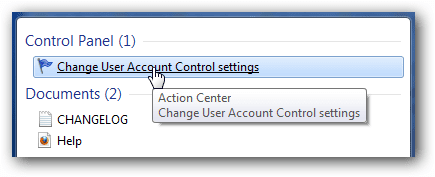
Windows 7 makes it much easier to deal with UAC settings, and in fact you don’t have to completely disable UAC if you don’t want to. Just type UAC into the start menu or Control Panel search box.
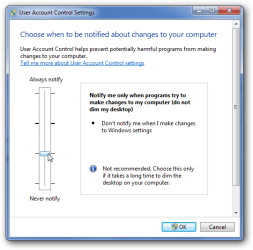
You can simply drag the slider up or down, depending on how often you want to be alerted.
If you drag it all the way down to the bottom, you’ll have disabled it entirely.

Regards,
DELL_FRANCIS
 

Attachments

  • pic 1.png
    pic 1.png
    5.9 KB · Views: 2
  • pic 2.png
    pic 2.png
    16.3 KB · Views: 1
Last edited:

My Computer My Computer

At a glance

windows xp 32 bit
OS
windows xp 32 bit
doing your picture , still the same
and i am not going to disable UAC , i am not that crazy

thanks to all
 

My Computer My Computer

At a glance

7
OS
7
Back
Top