Solved How to Have only one video controller driver in windows 7

My Computer My Computer

At a glance

Windows 10 Pro x64Intel Core i7 6700KGSkill TridentZ RGB 16GB 3600 16-16-16-36EVGA GTX 980 Ti SC x2
Computer type
PC/Desktop
Computer Manufacturer/Model Number
Skylake Special #666
OS
Windows 10 Pro x64
CPU
Intel Core i7 6700K
Motherboard
Asus Sabertooth Z170 Mark 1
Memory
GSkill TridentZ RGB 16GB 3600 16-16-16-36
Graphics Card(s)
EVGA GTX 980 Ti SC x2
Sound Card
Realtek High Definition
Monitor(s) Displays
AOC G2460PG
Screen Resolution
1920 x 1080 144Hz
Hard Drives
Samsung 860 Pro 256GB, Seagate Barracuda 4TB x2
PSU
EVGA 1000 P2, EVGA White Custom Braided Cables
Case
Corsair Vengeance C70 Gunmetal Black
Cooling
Corsair H100i v2, Corsair ML120 x2, Thermal Grizzly Kryonaut
Keyboard
Logitech G910 Orion Spectrum
Mouse
Logitech G700s
Internet Speed
Verizon Fios Quantum Gateway 75/75
Antivirus
Windows Defender, Malwarebytes Free 3.8.3
Browser
Chrome
Other Info
Corsair SP120 x4, LG Blu-ray Drive, Durabrand HT-395 100 Watt Dolby Digital Amp, Corsair H2100 Wireless 7.1 Headset
I agree, but i wonder if that's because there is a Vista chipset driver and not a Win 7 chipset driver available.
Do you think the OP might need to try a force install of the Vista chipset driver first, then install the Vista video driver ?
 

My Computer My Computer

At a glance

Multi-Boot W7_Pro_x64 W8.1_Pro_x64 W10_Pro_x6...AMD Athlon II x4 6206GB GSkill DDR2 800AMD 4670 GPU + AMD 4200 IGP
Computer type
PC/Desktop
Computer Manufacturer/Model Number
home built
OS
Multi-Boot W7_Pro_x64 W8.1_Pro_x64 W10_Pro_x64 +Linux_VMs +Chromium_VM
CPU
AMD Athlon II x4 620
Motherboard
Gigabyte GA-MA785G-UD3H
Memory
6GB GSkill DDR2 800
Graphics Card(s)
AMD 4670 GPU + AMD 4200 IGP
Sound Card
on board Realtek ALC889A
Monitor(s) Displays
RCA 40" LCD TV, Insignia 32" LCD TV, HP 15" LCD monitor
Screen Resolution
1680 x 1050
Hard Drives
OCZ Vertex 3 120GB,
Samsung F3 1TB (3),
Several others - WD, Seagate, Hitachi, ...
PSU
Corsair 500 W
Case
Rosewill mid tower
Cooling
CM 90mm rifle
Keyboard
Gyration wireless, Logitech wireless, Dell USB wired
Mouse
Gyration wireless, Logitech wireless, V7 USB wired
Internet Speed
Spectrum - 100Mbps D / 10Mbps U
Antivirus
Avast, MBAM3, EMET, WinPatrol
Browser
Pale Moon, Firefox, IE
Other Info
2 multi-boot PC's
Mainly HTPC/Office/Gen purpose (no gaming).
Trendnet USB KVM.
LG DVD burner/Blue Ray Player.
Tray system for removable SATA backup drives.

Not currently OCd, under-volted.
I use Hybrid sleep, rarely re-boot or shutdown.

Hauppauge HD-PVR, Avermedia PCIe TV Tuner, Hauppauge PCI TV Tuner.

My Computer My Computer

At a glance

Windows 7 Ultimate 32bitIntel Core 2 Duo T5750 @2.0ghz3GB DDR2Mobile Intel(R) 965 Express Chipset Family
Computer type
Laptop
Computer Manufacturer/Model Number
Acer
OS
Windows 7 Ultimate 32bit
CPU
Intel Core 2 Duo T5750 @2.0ghz
Memory
3GB DDR2
Graphics Card(s)
Mobile Intel(R) 965 Express Chipset Family
Screen Resolution
1280x800
Hard Drives
Toshiba MK1646GSX ATA device
Mouse
HID Compilant device
Browser
Google Chrome
But the really odd thing is, it keeps showing 2 display adapters (or whatever) on his 7 install, I have never seen that before.

Vis, did you ever run the W7 upgrade adviser on this laptop ?

https://www.microsoft.com/en-us/download/details.aspx?id=20

Hey,
it says that i can upgrade to windows 7 home premium or ultimate!
All system requirements paassed including support for aero

Should i install ultimate instead?
i can borrow it from my friend
 

My Computer My Computer

At a glance

Windows 7 Ultimate 32bitIntel Core 2 Duo T5750 @2.0ghz3GB DDR2Mobile Intel(R) 965 Express Chipset Family
Computer type
Laptop
Computer Manufacturer/Model Number
Acer
OS
Windows 7 Ultimate 32bit
CPU
Intel Core 2 Duo T5750 @2.0ghz
Memory
3GB DDR2
Graphics Card(s)
Mobile Intel(R) 965 Express Chipset Family
Screen Resolution
1280x800
Hard Drives
Toshiba MK1646GSX ATA device
Mouse
HID Compilant device
Browser
Google Chrome
IF i had this problem i would first try installing the Vista chipset driver to see if that makes a difference in what Display adapters are listed.
If that doesn't work, then i'd try installing Ultimate and see if that makes a difference.

EDIT:
Do you see any devices with errors in Win 7 Device Manager ?
 
Last edited:

My Computer My Computer

At a glance

Multi-Boot W7_Pro_x64 W8.1_Pro_x64 W10_Pro_x6...AMD Athlon II x4 6206GB GSkill DDR2 800AMD 4670 GPU + AMD 4200 IGP
Computer type
PC/Desktop
Computer Manufacturer/Model Number
home built
OS
Multi-Boot W7_Pro_x64 W8.1_Pro_x64 W10_Pro_x64 +Linux_VMs +Chromium_VM
CPU
AMD Athlon II x4 620
Motherboard
Gigabyte GA-MA785G-UD3H
Memory
6GB GSkill DDR2 800
Graphics Card(s)
AMD 4670 GPU + AMD 4200 IGP
Sound Card
on board Realtek ALC889A
Monitor(s) Displays
RCA 40" LCD TV, Insignia 32" LCD TV, HP 15" LCD monitor
Screen Resolution
1680 x 1050
Hard Drives
OCZ Vertex 3 120GB,
Samsung F3 1TB (3),
Several others - WD, Seagate, Hitachi, ...
PSU
Corsair 500 W
Case
Rosewill mid tower
Cooling
CM 90mm rifle
Keyboard
Gyration wireless, Logitech wireless, Dell USB wired
Mouse
Gyration wireless, Logitech wireless, V7 USB wired
Internet Speed
Spectrum - 100Mbps D / 10Mbps U
Antivirus
Avast, MBAM3, EMET, WinPatrol
Browser
Pale Moon, Firefox, IE
Other Info
2 multi-boot PC's
Mainly HTPC/Office/Gen purpose (no gaming).
Trendnet USB KVM.
LG DVD burner/Blue Ray Player.
Tray system for removable SATA backup drives.

Not currently OCd, under-volted.
I use Hybrid sleep, rarely re-boot or shutdown.

Hauppauge HD-PVR, Avermedia PCIe TV Tuner, Hauppauge PCI TV Tuner.
Installing Ultimate will make no difference, it`s the same thing. What do you have keys just laying around ? I`d love a Windows 7 Ultimate key :D

But you could try a fresh clean install, make sure you wipe the entire drive to unallocated space, unless you have a data partition, don`t touch that, but format the install partition, then install windows. You have to install the version you have an activation key for. You do not have to activate windows yet though, you have 30 days to do that. Let`s get this problem fixed 1st.

Kitty says we can do it !!
 

Attachments

  • IMG_0478.JPG
    IMG_0478.JPG
    509.3 KB · Views: 3

My Computer My Computer

At a glance

Windows 10 Pro x64Intel Core i7 6700KGSkill TridentZ RGB 16GB 3600 16-16-16-36EVGA GTX 980 Ti SC x2
Computer type
PC/Desktop
Computer Manufacturer/Model Number
Skylake Special #666
OS
Windows 10 Pro x64
CPU
Intel Core i7 6700K
Motherboard
Asus Sabertooth Z170 Mark 1
Memory
GSkill TridentZ RGB 16GB 3600 16-16-16-36
Graphics Card(s)
EVGA GTX 980 Ti SC x2
Sound Card
Realtek High Definition
Monitor(s) Displays
AOC G2460PG
Screen Resolution
1920 x 1080 144Hz
Hard Drives
Samsung 860 Pro 256GB, Seagate Barracuda 4TB x2
PSU
EVGA 1000 P2, EVGA White Custom Braided Cables
Case
Corsair Vengeance C70 Gunmetal Black
Cooling
Corsair H100i v2, Corsair ML120 x2, Thermal Grizzly Kryonaut
Keyboard
Logitech G910 Orion Spectrum
Mouse
Logitech G700s
Internet Speed
Verizon Fios Quantum Gateway 75/75
Antivirus
Windows Defender, Malwarebytes Free 3.8.3
Browser
Chrome
Other Info
Corsair SP120 x4, LG Blu-ray Drive, Durabrand HT-395 100 Watt Dolby Digital Amp, Corsair H2100 Wireless 7.1 Headset
But the really odd thing is, it keeps showing 2 display adapters (or whatever) on his 7 install, I have never seen that before.

Vis, did you ever run the W7 upgrade adviser on this laptop ?

https://www.microsoft.com/en-us/download/details.aspx?id=20

Hey,
it says that i can upgrade to windows 7 home premium or ultimate!
All system requirements paassed including support for aero

Should i install ultimate instead?
i can borrow it from my friend

Viz, the UA does not specifically tell you which version you can update to, if your laptop only supports 4 GB of memory, which you really need to have installed (at least) then just install Home Premium Service Pack 1, there is no need to install Ultimate. And I don`t care what anyone says, you have a 64 bit capable cpu, so install 64 bit.

3 GB of memory is a crazy amount to have installed, you need to have 2 2GB sticks installed of the same brand and speed. ( it will come in a kit of 2 x 2GB sticks ) do not buy it any other way.

This is the speed and size you should have installed:

Standard Memory 2 GB
Maximum Memory 4 GB
Memory Technology DDR2 SDRAM
Memory Standard DDR2-667/PC2-5300
Number of Total Memory Slots 2

So that means 2 x 2GB sticks for a total of 4 GB

I hate this tool but scan your PC with it, it will give us the facts on the memory we can install.

Crucial.com - Crucial System Scanner

I personally hate Kingston memory, but this is what you need.

Kingston 4 GB DDR2 SDRAM Memory Modules 4 GB (2 x 2 GB) 667MHz DDR2667/PC25400 DDR2 SDRAM 200pin KTA-MB667K2/4G at Amazon.com
 
Last edited:

My Computer My Computer

At a glance

Windows 10 Pro x64Intel Core i7 6700KGSkill TridentZ RGB 16GB 3600 16-16-16-36EVGA GTX 980 Ti SC x2
Computer type
PC/Desktop
Computer Manufacturer/Model Number
Skylake Special #666
OS
Windows 10 Pro x64
CPU
Intel Core i7 6700K
Motherboard
Asus Sabertooth Z170 Mark 1
Memory
GSkill TridentZ RGB 16GB 3600 16-16-16-36
Graphics Card(s)
EVGA GTX 980 Ti SC x2
Sound Card
Realtek High Definition
Monitor(s) Displays
AOC G2460PG
Screen Resolution
1920 x 1080 144Hz
Hard Drives
Samsung 860 Pro 256GB, Seagate Barracuda 4TB x2
PSU
EVGA 1000 P2, EVGA White Custom Braided Cables
Case
Corsair Vengeance C70 Gunmetal Black
Cooling
Corsair H100i v2, Corsair ML120 x2, Thermal Grizzly Kryonaut
Keyboard
Logitech G910 Orion Spectrum
Mouse
Logitech G700s
Internet Speed
Verizon Fios Quantum Gateway 75/75
Antivirus
Windows Defender, Malwarebytes Free 3.8.3
Browser
Chrome
Other Info
Corsair SP120 x4, LG Blu-ray Drive, Durabrand HT-395 100 Watt Dolby Digital Amp, Corsair H2100 Wireless 7.1 Headset

After all this is said and done you need to get rid of that 5400 rpm hard drive and get this.

SSD 850 EVO 2.5" SATA III 250GB | Samsung Solid State Drives

You have a decent CPU, get the memory up to 4 GB, then install windows on the ssd and you`ll be a happy camper for a long while.

And in my opinion PNY is much better then Kingston, I have used PNY and it was flawless.

PNY OPTIMA 4GB (2x2GB) Dual Channel Kit DDR2 667 MHz PC2-5300 Notebook / Laptop SODIMM Memory Modules MN4096KD2-667 at Amazon.com
 

My Computer My Computer

At a glance

Windows 10 Pro x64Intel Core i7 6700KGSkill TridentZ RGB 16GB 3600 16-16-16-36EVGA GTX 980 Ti SC x2
Computer type
PC/Desktop
Computer Manufacturer/Model Number
Skylake Special #666
OS
Windows 10 Pro x64
CPU
Intel Core i7 6700K
Motherboard
Asus Sabertooth Z170 Mark 1
Memory
GSkill TridentZ RGB 16GB 3600 16-16-16-36
Graphics Card(s)
EVGA GTX 980 Ti SC x2
Sound Card
Realtek High Definition
Monitor(s) Displays
AOC G2460PG
Screen Resolution
1920 x 1080 144Hz
Hard Drives
Samsung 860 Pro 256GB, Seagate Barracuda 4TB x2
PSU
EVGA 1000 P2, EVGA White Custom Braided Cables
Case
Corsair Vengeance C70 Gunmetal Black
Cooling
Corsair H100i v2, Corsair ML120 x2, Thermal Grizzly Kryonaut
Keyboard
Logitech G910 Orion Spectrum
Mouse
Logitech G700s
Internet Speed
Verizon Fios Quantum Gateway 75/75
Antivirus
Windows Defender, Malwarebytes Free 3.8.3
Browser
Chrome
Other Info
Corsair SP120 x4, LG Blu-ray Drive, Durabrand HT-395 100 Watt Dolby Digital Amp, Corsair H2100 Wireless 7.1 Headset
I don't think seeing 2 graphics adapters is the problem. That's normal for some Intel Chipset Families - must include your too. Intel explains
Device Manager Showing Two Different Graphics Controllers

Have you tried in Intel Driver Update tool?

/* EDIT */
Not sure why you only saw one with an older Windows OS but could only guess it was driver implementation. But seeing 2 in Windows 7 is not uncommon
 

My Computer My Computer

At a glance

Desk 1: Win 7 Pro x32; Desk 2: Windows 10 x64
Computer type
PC/Desktop
Computer Manufacturer/Model Number
Dell Optiplex 360 and Optiplex 755
OS
Desk 1: Win 7 Pro x32; Desk 2: Windows 10 x64
Hard Drives
500GB Crucial SSD in both Desktops
Other Info
Buffalo 6TB NAS, Raid 1
I don't think seeing 2 graphics adapters is the problem. That's normal for some Intel Chipset Families - must include your too. Intel explains
Device Manager Showing Two Different Graphics Controllers

Have you tried in Intel Driver Update tool?

/* EDIT */
Not sure why you only saw one with an older Windows OS but could only guess it was driver implementation. But seeing 2 in Windows 7 is not uncommon

OK, what do you think of the information that's missing from the lower one here,

http://www.sevenforums.com/drivers/...ontroller-driver-windows-7-a.html#post3228220

That was taken from his msinfo32.nfo in his BSOD thread.
 

My Computer My Computer

At a glance

Win 10 Pro x64Intel I5-2500K @3.3GHz16GB G.Skill Ripjaws X (4x4GB)EVGA GeForce 750 Ti SC 2GB
Computer type
PC/Desktop
Computer Manufacturer/Model Number
Self Built
OS
Win 10 Pro x64
CPU
Intel I5-2500K @3.3GHz
Motherboard
Asrock P67 Extreme4
Memory
16GB G.Skill Ripjaws X (4x4GB)
Graphics Card(s)
EVGA GeForce 750 Ti SC 2GB
Sound Card
ASUS Xonar DG 5.1 Channels 24-bit 96KHz PCI Interface Sound
Monitor(s) Displays
auria eq2367
Screen Resolution
1920 x 1080
Hard Drives
250GB Samsung 850 EVO SSD
1TB WD Blue
1TB Hitachi
PSU
SeaSonic X 650W 80 Plus Gold
Case
Corsair Obsidian 750D
Cooling
Corsair H60, Three 140mm case fans
Keyboard
Logitech Wireless Keyboard K520
Mouse
Logitech Wireless Mouse M310
Internet Speed
Wave Broadband ~ 100 dn 5 up
Antivirus
Windows Defender, Malwarebytes Premium
Browser
Edge, IE11, Chrome
Other Info
Laptop specs: HP g7-1365dx /
CPU: AMD A6-3420M APU with Radeon(tm) HD Graphics /
RAM: Crucial 8Gb (2x4Gb) /
SSD: Crucial M4-CT128M4SSD2 ATA Device/ FW 000F /
GFX: AMD Radeon HD 6520G /
OS: Windows 10 Pro x64
<snip>OK, what do you think of the information that's missing from the lower one here,

http://www.sevenforums.com/drivers/...ontroller-driver-windows-7-a.html#post3228220

That was taken from his msinfo32.nfo in his BSOD thread.
Not sure what information is missing from the "the lower one"? Please clarify. The msinfo code snippet shown in your link confirms the OP's Intel graphics card has 2 controllers which is why we see 2 display adapters in Device Manager (just as described in the Intel post).

Here's what I see. The msinfo snippet from your post shows 2 device install entries. The upper one includes line item
Code:
INF File	oem2.inf (i965GM0 section)
the lower one includes line item
Code:
INF File	oem2.inf (i965GM1 section)

The driver INF file name is the same for both (oem2.inf). That tells us both devices use the same driver. (A driver INF file includes directives telling Windows how to install the driver for the device) But notice each device shows a different INF section name: i965GM0 vs i965GM1

A driver's INF file is often divided into sections. Each section having different device install directives for Windows. Example: A single device driver might be used to install to install the device on either x86 or x64 architectures. But x86 and x64 architectures often require somewhat different install instructions. So each architecture has its own section name in the INF file. The Windows installer is smart enough to discern what section to use when installing under different conditions.

In this case we are also seeing a single driver for the Intel graphics card. The driver INF has a different install section for each of the 2 controllers. i.e. the single graphics driver is designed to install 2 controllers on the card

I also see the driver is version version 8.14.10.1930, dated 9/23/2009 so suggested the Intel Driver Update tool
 

My Computer My Computer

At a glance

Desk 1: Win 7 Pro x32; Desk 2: Windows 10 x64
Computer type
PC/Desktop
Computer Manufacturer/Model Number
Dell Optiplex 360 and Optiplex 755
OS
Desk 1: Win 7 Pro x32; Desk 2: Windows 10 x64
Hard Drives
500GB Crucial SSD in both Desktops
Other Info
Buffalo 6TB NAS, Raid 1
Yeah, thanks for all that. This is what I'm talking about,

Code:
Name	Mobile Intel(R) 965 Express Chipset Family
PNP Device ID	PCI\VEN_8086&DEV_2A03&SUBSYS_011F1025&REV_03\3&21436425&0&11
Adapter Type	Not Available, Intel Corporation compatible
Adapter Description	Mobile Intel(R) 965 Express Chipset Family
Adapter RAM	Not Available
Installed Drivers	igdumdx32.dll,igd10umd32.dll
Driver Version	8.15.10.1930
INF File	oem2.inf (i965GM1 section)
Color Planes	Not Available
Color Table Entries	Not Available
Resolution	Not Available
Bits/Pixel	Not Available
Memory Address	0xFC100000-0xFC1FFFFF
Driver	c:\windows\system32\drivers\igdkmd32.sys (8.14.10.1930, 4.59 MB (4,808,192 bytes), 9/23/2009 12:18 PM)

You don't see all the Not Available entries? Compared to the other one,

Code:
Name	Mobile Intel(R) 965 Express Chipset Family
PNP Device ID	PCI\VEN_8086&DEV_2A02&SUBSYS_011F1025&REV_03\3&21436425&0&10
Adapter Type	Mobile Intel(R) 965 Express Chipset Family, Intel Corporation compatible
Adapter Description	Mobile Intel(R) 965 Express Chipset Family
Adapter RAM	384.00 MB (402,653,184 bytes)
Installed Drivers	igdumdx32.dll,igd10umd32.dll
Driver Version	8.15.10.1930
INF File	oem2.inf (i965GM0 section)
Color Planes	Not Available
Color Table Entries	65536
Resolution	1280 x 800 x 60 hertz
Bits/Pixel	16
Memory Address	0xFC000000-0xFC0FFFFF
Memory Address	0xD0000000-0xDFFFFFFF
I/O Port	0x00001800-0x00001807
IRQ Channel	IRQ 16
I/O Port	0x000003B0-0x000003BB
I/O Port	0x000003C0-0x000003DF
Memory Address	0xA0000-0xBFFFF
Driver	c:\windows\system32\drivers\igdkmd32.sys (8.14.10.1930, 4.59 MB (4,808,192 bytes), 9/23/2009 12:18 PM)

I'm not disagreeing with what you said previously I just thought it was odd there were all those entries.
 

My Computer My Computer

At a glance

Win 10 Pro x64Intel I5-2500K @3.3GHz16GB G.Skill Ripjaws X (4x4GB)EVGA GeForce 750 Ti SC 2GB
Computer type
PC/Desktop
Computer Manufacturer/Model Number
Self Built
OS
Win 10 Pro x64
CPU
Intel I5-2500K @3.3GHz
Motherboard
Asrock P67 Extreme4
Memory
16GB G.Skill Ripjaws X (4x4GB)
Graphics Card(s)
EVGA GeForce 750 Ti SC 2GB
Sound Card
ASUS Xonar DG 5.1 Channels 24-bit 96KHz PCI Interface Sound
Monitor(s) Displays
auria eq2367
Screen Resolution
1920 x 1080
Hard Drives
250GB Samsung 850 EVO SSD
1TB WD Blue
1TB Hitachi
PSU
SeaSonic X 650W 80 Plus Gold
Case
Corsair Obsidian 750D
Cooling
Corsair H60, Three 140mm case fans
Keyboard
Logitech Wireless Keyboard K520
Mouse
Logitech Wireless Mouse M310
Internet Speed
Wave Broadband ~ 100 dn 5 up
Antivirus
Windows Defender, Malwarebytes Premium
Browser
Edge, IE11, Chrome
Other Info
Laptop specs: HP g7-1365dx /
CPU: AMD A6-3420M APU with Radeon(tm) HD Graphics /
RAM: Crucial 8Gb (2x4Gb) /
SSD: Crucial M4-CT128M4SSD2 ATA Device/ FW 000F /
GFX: AMD Radeon HD 6520G /
OS: Windows 10 Pro x64
And then what`s causing his bluscreens ???
 

My Computer My Computer

At a glance

Windows 10 Pro x64Intel Core i7 6700KGSkill TridentZ RGB 16GB 3600 16-16-16-36EVGA GTX 980 Ti SC x2
Computer type
PC/Desktop
Computer Manufacturer/Model Number
Skylake Special #666
OS
Windows 10 Pro x64
CPU
Intel Core i7 6700K
Motherboard
Asus Sabertooth Z170 Mark 1
Memory
GSkill TridentZ RGB 16GB 3600 16-16-16-36
Graphics Card(s)
EVGA GTX 980 Ti SC x2
Sound Card
Realtek High Definition
Monitor(s) Displays
AOC G2460PG
Screen Resolution
1920 x 1080 144Hz
Hard Drives
Samsung 860 Pro 256GB, Seagate Barracuda 4TB x2
PSU
EVGA 1000 P2, EVGA White Custom Braided Cables
Case
Corsair Vengeance C70 Gunmetal Black
Cooling
Corsair H100i v2, Corsair ML120 x2, Thermal Grizzly Kryonaut
Keyboard
Logitech G910 Orion Spectrum
Mouse
Logitech G700s
Internet Speed
Verizon Fios Quantum Gateway 75/75
Antivirus
Windows Defender, Malwarebytes Free 3.8.3
Browser
Chrome
Other Info
Corsair SP120 x4, LG Blu-ray Drive, Durabrand HT-395 100 Watt Dolby Digital Amp, Corsair H2100 Wireless 7.1 Headset
So, that means what should i do now?

and hey addram, i found one ram which says its 4gb ddr2 laptop ram??

i mean like 1x4 gb?? so is that good?
 

My Computer My Computer

At a glance

Windows 7 Ultimate 32bitIntel Core 2 Duo T5750 @2.0ghz3GB DDR2Mobile Intel(R) 965 Express Chipset Family
Computer type
Laptop
Computer Manufacturer/Model Number
Acer
OS
Windows 7 Ultimate 32bit
CPU
Intel Core 2 Duo T5750 @2.0ghz
Memory
3GB DDR2
Graphics Card(s)
Mobile Intel(R) 965 Express Chipset Family
Screen Resolution
1280x800
Hard Drives
Toshiba MK1646GSX ATA device
Mouse
HID Compilant device
Browser
Google Chrome
<snip>I also see the driver is version version 8.14.10.1930, dated 9/23/2009 so suggested the Intel Driver Update tool
@Vishalshetty
Next step is to use the Intel Driver update tool. See if it finds a more recent driver for you.

@derekimo
As to why the missing info for the lower one (the 2nd controller i965GM1), I don't know why or know that level of detail. :(

So I googled to find and compare the data you found in this case to another (I found the msinfo data for another case HERE) It shows same info also missing in the lower case, which is for controller i965GM1. So, don't know why, can only guess that's just how the data is for controller i965GM1 (Maybe the 2nd controller doesn't need that info? IDK just a wild a** guess.
Code:
Name Mobile Intel(R) 965 Express Chipset Family
PNP Device ID PCI\VEN_8086&DEV_2A02&SUBSYS_9015104D&REV_0C\3&21436425&0&10
Adapter Type Mobile Intel(R) 965 Express Chipset Family, Intel Corporation compatible
Adapter Description Mobile Intel(R) 965 Express Chipset Family
Adapter RAM 448.00 MB (469,762,048 bytes)
Installed Drivers igdumdx32.dll,igd10umd32.dll
Driver Version Not Available
INF File oem10.inf (i965GM0 section)
Color Planes Not Available
Color Table Entries 4294967296
Resolution 1280 x 800 x 60 hertz
Bits/Pixel 32
Memory Address 0xFC000000-0xFC0FFFFF
Memory Address 0xD0000000-0xDFFFFFFF
I/O Port 0x00001800-0x00001807
IRQ Channel IRQ 16
I/O Port 0x000003B0-0x000003BB
I/O Port 0x000003C0-0x000003DF
Memory Address 0xA0000-0xBFFFF
Driver c:\windows\system32\drivers\igdkmd32.sys (7.15.10.1666, 4.36 MB (4,569,088 bytes), 2/26/2009 12:39 PM)

Name Mobile Intel(R) 965 Express Chipset Family
PNP Device ID PCI\VEN_8086&DEV_2A03&SUBSYS_9015104D&REV_0C\3&21436425&0&11
Adapter Type Not Available, Intel Corporation compatible
Adapter Description Mobile Intel(R) 965 Express Chipset Family
Adapter RAM Not Available
Installed Drivers igdumdx32.dll,igd10umd32.dll
Driver Version Not Available
INF File oem10.inf (i965GM1 section)
Color Planes Not Available
Color Table Entries Not Available
Resolution Not Available
Bits/Pixel Not Available
Memory Address 0xFC100000-0xFC1FFFFF
Driver c:\windows\system32\drivers\igdkmd32.sys (7.15.10.1666, 4.36 MB (4,569,088 bytes), 2/26/2009 12:39 PM)

@AddRam
So why the BSOD? That's an excellent and still remaining question. In disclosure: Although I've invested time trying to understand Windows drivers, I've spent very little time investigating BSODs. But I'll have a go at this one and post back if can find any suggestions to try

What we do know at this point
1. Seeing 2 graphics adapters in Device Manager is a red herring. At least for Windows 7, we now know that's exactly how things should appear
2. OP should next try the Intel Driver update tool and tell us the result
 
Last edited:

My Computer My Computer

At a glance

Desk 1: Win 7 Pro x32; Desk 2: Windows 10 x64
Computer type
PC/Desktop
Computer Manufacturer/Model Number
Dell Optiplex 360 and Optiplex 755
OS
Desk 1: Win 7 Pro x32; Desk 2: Windows 10 x64
Hard Drives
500GB Crucial SSD in both Desktops
Other Info
Buffalo 6TB NAS, Raid 1
<snip>I also see the driver is version version 8.14.10.1930, dated 9/23/2009 so suggested the Intel Driver Update tool
@Vishalshetty
Next step is to use the Intel Driver update tool. See if it finds a more recent driver for you.

@derekimo
As to why the missing info for the lower one (the 2nd controller i965GM1), I don't know why or know that level of detail. :(

So I googled to find and compare the data you found in this case to another (I found the msinfo data for another case HERE) It shows same info also missing in the lower case, which is for controller i965GM1. So, don't know why, can only guess that's just how the data is for controller i965GM1 (Maybe the 2nd controller doesn't need that info? IDK just a wild a** guess.
Code:
Name Mobile Intel(R) 965 Express Chipset Family
PNP Device ID PCI\VEN_8086&DEV_2A02&SUBSYS_9015104D&REV_0C\3&21436425&0&10
Adapter Type Mobile Intel(R) 965 Express Chipset Family, Intel Corporation compatible
Adapter Description Mobile Intel(R) 965 Express Chipset Family
Adapter RAM 448.00 MB (469,762,048 bytes)
Installed Drivers igdumdx32.dll,igd10umd32.dll
Driver Version Not Available
INF File oem10.inf (i965GM0 section)
Color Planes Not Available
Color Table Entries 4294967296
Resolution 1280 x 800 x 60 hertz
Bits/Pixel 32
Memory Address 0xFC000000-0xFC0FFFFF
Memory Address 0xD0000000-0xDFFFFFFF
I/O Port 0x00001800-0x00001807
IRQ Channel IRQ 16
I/O Port 0x000003B0-0x000003BB
I/O Port 0x000003C0-0x000003DF
Memory Address 0xA0000-0xBFFFF
Driver c:\windows\system32\drivers\igdkmd32.sys (7.15.10.1666, 4.36 MB (4,569,088 bytes), 2/26/2009 12:39 PM)

Name Mobile Intel(R) 965 Express Chipset Family
PNP Device ID PCI\VEN_8086&DEV_2A03&SUBSYS_9015104D&REV_0C\3&21436425&0&11
Adapter Type Not Available, Intel Corporation compatible
Adapter Description Mobile Intel(R) 965 Express Chipset Family
Adapter RAM Not Available
Installed Drivers igdumdx32.dll,igd10umd32.dll
Driver Version Not Available
INF File oem10.inf (i965GM1 section)
Color Planes Not Available
Color Table Entries Not Available
Resolution Not Available
Bits/Pixel Not Available
Memory Address 0xFC100000-0xFC1FFFFF
Driver c:\windows\system32\drivers\igdkmd32.sys (7.15.10.1666, 4.36 MB (4,569,088 bytes), 2/26/2009 12:39 PM)

@AddRam
So why the BSOD? That's an excellent and still remaining question. In disclosure: Although I've invested time trying to understand Windows drivers, I've spent very little time investigating BSODs. But I'll have a go at this one and post back if can find any suggestions to try

What we do know at this point
1. Seeing 2 graphics adapters in Device Manager is a red herring. At least for Windows 7, we now know that's exactly how things should appear
2. OP should next try the Intel Driver update tool and tell us the result

I also had this bsod issue in windows xp where there was 2 graphic cards just like windows 7 and it was crashing!! :cry:

i downloaded the intel driver update tool but it seemed to get stuck everytime it tries to get installed. :huh:
 

My Computer My Computer

At a glance

Windows 7 Ultimate 32bitIntel Core 2 Duo T5750 @2.0ghz3GB DDR2Mobile Intel(R) 965 Express Chipset Family
Computer type
Laptop
Computer Manufacturer/Model Number
Acer
OS
Windows 7 Ultimate 32bit
CPU
Intel Core 2 Duo T5750 @2.0ghz
Memory
3GB DDR2
Graphics Card(s)
Mobile Intel(R) 965 Express Chipset Family
Screen Resolution
1280x800
Hard Drives
Toshiba MK1646GSX ATA device
Mouse
HID Compilant device
Browser
Google Chrome
I also had this bsod issue in windows xp where there was 2 graphic cards just like windows 7 and it was crashing!! :cry:

i downloaded the intel driver update tool but it seemed to get stuck everytime it tries to get installed. :huh:
You having same problem before doesn't bode well :( And the Intel driver update tool hanging is also strange. Don't know if that could indicate a different problem? IDK :confused:

You could try installing in SafeMode - so your other programs aren't running if they're interfering with the install. The Windows installer doesn't normally run in Safemode so you need do a little work first

Do you know how to copy text from a paste and right-click to paste in a command prompt window? (makes safemode setup easier) But is up to you if you want to copy/paste or just type things by hand http://www.sevenforums.com/tutorials/21874-command-prompt-copy-clipboard.html

How to make Windows Installer work in Safe Mode
 

My Computer My Computer

At a glance

Desk 1: Win 7 Pro x32; Desk 2: Windows 10 x64
Computer type
PC/Desktop
Computer Manufacturer/Model Number
Dell Optiplex 360 and Optiplex 755
OS
Desk 1: Win 7 Pro x32; Desk 2: Windows 10 x64
Hard Drives
500GB Crucial SSD in both Desktops
Other Info
Buffalo 6TB NAS, Raid 1
So, that means what should i do now?

and hey addram, i found one ram which says its 4gb ddr2 laptop ram??

i mean like 1x4 gb?? so is that good?

No, you need 2 x 2 GB sticks of ram, did you not read what I posted ? Did you not look at the links that I posted ?

You can not put a 4 GB stick into a slot that only supports a 2 GB stick.

That is why I did the research for you and posted the link.

If the board supported a 4 GB stick then I would have told you to get a 2 x 4 GB set.
 

My Computer My Computer

At a glance

Windows 10 Pro x64Intel Core i7 6700KGSkill TridentZ RGB 16GB 3600 16-16-16-36EVGA GTX 980 Ti SC x2
Computer type
PC/Desktop
Computer Manufacturer/Model Number
Skylake Special #666
OS
Windows 10 Pro x64
CPU
Intel Core i7 6700K
Motherboard
Asus Sabertooth Z170 Mark 1
Memory
GSkill TridentZ RGB 16GB 3600 16-16-16-36
Graphics Card(s)
EVGA GTX 980 Ti SC x2
Sound Card
Realtek High Definition
Monitor(s) Displays
AOC G2460PG
Screen Resolution
1920 x 1080 144Hz
Hard Drives
Samsung 860 Pro 256GB, Seagate Barracuda 4TB x2
PSU
EVGA 1000 P2, EVGA White Custom Braided Cables
Case
Corsair Vengeance C70 Gunmetal Black
Cooling
Corsair H100i v2, Corsair ML120 x2, Thermal Grizzly Kryonaut
Keyboard
Logitech G910 Orion Spectrum
Mouse
Logitech G700s
Internet Speed
Verizon Fios Quantum Gateway 75/75
Antivirus
Windows Defender, Malwarebytes Free 3.8.3
Browser
Chrome
Other Info
Corsair SP120 x4, LG Blu-ray Drive, Durabrand HT-395 100 Watt Dolby Digital Amp, Corsair H2100 Wireless 7.1 Headset
I didn't read AddRAMs earlier posts about memory closely until i read his last one. Then I went back to re-read. I also pulled up the Acer manual for your Extensa 5620. I think AddRAM is onto your problem! (Certainly A problem)

The system spec in your profile says you have 3GB memory installed? I don't think that's kosher per Acer manual. I'm not a h/w guy so think AddRAM should be able to better comment. But sounds to me if you have 3GB installed that's not to spec and your problem could be memory as AddRAM pointed out
 

Attachments

  • memory.jpg
    memory.jpg
    15.2 KB · Views: 14

My Computer My Computer

At a glance

Desk 1: Win 7 Pro x32; Desk 2: Windows 10 x64
Computer type
PC/Desktop
Computer Manufacturer/Model Number
Dell Optiplex 360 and Optiplex 755
OS
Desk 1: Win 7 Pro x32; Desk 2: Windows 10 x64
Hard Drives
500GB Crucial SSD in both Desktops
Other Info
Buffalo 6TB NAS, Raid 1
Memory has nothing to do with his problem, that computer was sold with 3 GB installed, dumb yes, part of the problem, no.

But it needs 4 GB total installed asap.

PNY OPTIMA 4GB (2x2GB) Dual Channel Kit DDR2 667 MHz PC2-5300 Notebook / Laptop SODIMM Memory Modules MN4096KD2-667 at Amazon.com


I would just put XP back on the thing, after all it`s just a laptop.


It ran fine with Vista, this issue started with 7.

There are several different versions of this particular Acer with different cpu`s etc

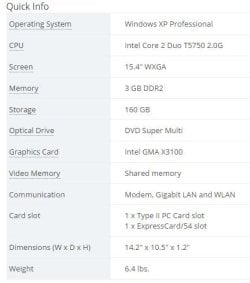
This was Newegg`s specs for example:
 

Attachments

  • Capture.JPG
    Capture.JPG
    26.7 KB · Views: 12

My Computer My Computer

At a glance

Windows 10 Pro x64Intel Core i7 6700KGSkill TridentZ RGB 16GB 3600 16-16-16-36EVGA GTX 980 Ti SC x2
Computer type
PC/Desktop
Computer Manufacturer/Model Number
Skylake Special #666
OS
Windows 10 Pro x64
CPU
Intel Core i7 6700K
Motherboard
Asus Sabertooth Z170 Mark 1
Memory
GSkill TridentZ RGB 16GB 3600 16-16-16-36
Graphics Card(s)
EVGA GTX 980 Ti SC x2
Sound Card
Realtek High Definition
Monitor(s) Displays
AOC G2460PG
Screen Resolution
1920 x 1080 144Hz
Hard Drives
Samsung 860 Pro 256GB, Seagate Barracuda 4TB x2
PSU
EVGA 1000 P2, EVGA White Custom Braided Cables
Case
Corsair Vengeance C70 Gunmetal Black
Cooling
Corsair H100i v2, Corsair ML120 x2, Thermal Grizzly Kryonaut
Keyboard
Logitech G910 Orion Spectrum
Mouse
Logitech G700s
Internet Speed
Verizon Fios Quantum Gateway 75/75
Antivirus
Windows Defender, Malwarebytes Free 3.8.3
Browser
Chrome
Other Info
Corsair SP120 x4, LG Blu-ray Drive, Durabrand HT-395 100 Watt Dolby Digital Amp, Corsair H2100 Wireless 7.1 Headset
Back
Top