How Make Desktop Shortcut Icon for Internet Explorer?

TomBrooklyn

New member
Member
Local time
12:03 PM
Messages
75
How can I make a desktop shortcut for Internet Explorer?


There is no option to create a shortcut after right clicking on IE--neither in Start/Programs nor on the IE icon I have on the task bar.

I think the icon I have on the task bar is the one that used to be on the desktop before I moved it; because I couldn't find how to create a duplicate back then either.
 

My Computer My Computer

At a glance

Win 7 ProIntel i7 2600K16 GB 1333 Crucial Hyper-X Blu I thinkIntegrated
Computer Manufacturer/Model Number
Home Built
OS
Win 7 Pro
CPU
Intel i7 2600K
Motherboard
Asus P8Z68-V LX
Memory
16 GB 1333 Crucial Hyper-X Blu I think
Graphics Card(s)
Integrated
Sound Card
Integrated
Monitor(s) Displays
Dual LCD IPS panels
Screen Resolution
1980x1200, 1980x1080
Hard Drives
3 SATA: 250, 160, 2000 GB, External USB 3TB
PSU
OCZ modular 500W
Case
Antec 300
Cooling
Case: 2 Stock fans, CPU: CoolerMaster Evo 212; PSU: fan
Keyboard
Dell Logitech wireless
Mouse
Logitech Wireless 510
Internet Speed
1.0 Mbps down, 448 Kbps up
Other Info
Case is too small.

My Computer My Computer

At a glance

64-bit Windows 11 Pro for WorkstationsIntel i7-8700K OC'd to 5 GHz64 GB (4x16GB) G.SKILL TridentZ RGB DDR4 3600...ASUS ROG-STRIX-GTX1080TI-O11G-GAMING
Computer type
PC/Desktop
Computer Manufacturer/Model Number
Self built custom
OS
64-bit Windows 11 Pro for Workstations
CPU
Intel i7-8700K OC'd to 5 GHz
Motherboard
ASUS ROG Maximus XI Formula Z390
Memory
64 GB (4x16GB) G.SKILL TridentZ RGB DDR4 3600 MHz
Graphics Card(s)
ASUS ROG-STRIX-GTX1080TI-O11G-GAMING
Sound Card
Integrated
Monitor(s) Displays
2 x Samsung Odyssey G7 27"
Screen Resolution
2560x1440
Hard Drives
1TB Samsung 990 PRO M.2,
4TB Samsung 990 PRO PRO M.2,
TerraMaster F8 SSD Plus NAS
PSU
Seasonic Prime Titanium 850W
Case
Thermaltake Core P3
Cooling
Corsair Hydro H115i
Keyboard
Logitech wireless K800
Mouse
Logitech MX Master 4
Internet Speed
2 Gb/s Download and 100 Mb/s Upload
Antivirus
Malwarebyte Anti-Malware Premium
Browser
Google Chrome
Other Info
Logitech Z625 speaker system,
Logitech BRIO 4K Pro webcam,
HP Color LaserJet Pro MFP M477fdn,
APC SMART-UPS RT 1000 XL - SURT1000XLI,
Galaxy S23 Plus phone
.......There is no option to create a shortcut after right clicking on IE.......
I never noticed that before... but then again, I don't use W7 much. That option in the context menu seems to be there in XP, but gone from W7 - no matter what shortcut you right click on.

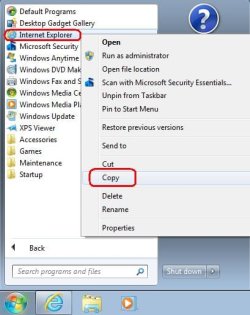
You can always use right click, "Copy"...

copy.JPG

...then right click on a blank spot on the desktop and select "Paste shortcut"

paste.JPG

....I think the icon I have on the task bar is the one that used to be on the desktop before I moved it...
I've installed W7 lots of times (creating virtual machines) and the default install does not place a shortcut to IE on the desktop.

The shortcut that Brink pointed you to is the special shortcut. The one that went missing from desktops starting with Vista. It is probably the one that you want. But I posted the info that I did just in case you want the type of shortcut that is in the Start Menu.

You can also drag and drop URLs from IE's address bar straight to the desktop. :-)
 

My Computer My Computer

At a glance

W7 Pro SP1 64biti78GBIntel HD Graphics
Computer type
Laptop
Computer Manufacturer/Model Number
Employer provided Dell Latitude
OS
W7 Pro SP1 64bit
CPU
i7
Memory
8GB
Graphics Card(s)
Intel HD Graphics
Hard Drives
crappy SSD
Antivirus
Employer mandated Symantec Endpoint Protection
Browser
Pale Moon 64bit, IE11 64bit & Chrome 64bit
Back
Top