How to Create and Add a "Internet Explorer" Desktop Icon in Windows 7
Information
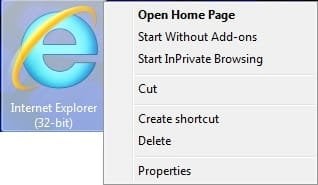
This will show you how to create a Internet Explorer (IE) desktop icon in Windows 7 that has Open Home Page, Start Without Add-ons, Start InPrivate Browsing, and Properties that opens "Internet Options" included in it's context menu.
This Internet Explorer desktop icon will only be added to the desktop of the user that runs the REG files below.
This Internet Explorer desktop icon will only be added to the desktop of the user that runs the REG files below.
EXAMPLE: Internet Explorer Desktop Icon in Windows 7
NOTE: This also shows the right click context menu.
Here's How:
NOTE: Using either REG file download below will override any of them.
1. To Add 32-bit IE Desktop Icon in 32-bit Windows 7
NOTE: Use this option if you have 32-bit Windows 7 installed on your computer.
A) Click on the Download button below to download the file below.
ADD_32-bit_W7_IE_Desktop_Icon.reg
Download
B) Go to step 5.
2. To Add 32-bit IE Desktop Icon in 64-bit Windows 7
NOTE: Use this option if you have 64-bit Windows 7 installed on your computer, and would like to have a 32-bit IE desktop icon.
A) Click on the Download button below to download the file below.
ADD_64-bit_W7_32-bit_IE_Desktop_Icon.reg
Download
B) Go to step 5.
3. To Add 64-bit IE Desktop Icon in 64-bit Windows 7
NOTE: Use this option if you have 64-bit Windows 7 installed on your computer, and would like to have a 64-bit IE desktop icon.
A) Click on the Download button below to download the file below.
ADD_64-bit_W7_64-bit_IE_Desktop_Icon.reg
Download
B) Go to step 5.
4. To Remove the IE Desktop Icon in 32- bit or 64-bit Windows 7
A) Click on the Download button below to download the file below.
Remove_W7_IE_Desktop_Icon.reg
Download
5. Click on Save, and save the .reg file to the desktop.
6. Right click on the downloaded .reg file and click on Merge.
7. Click on Run, Yes, Yes, and OK when prompted.
8. Right click on a emtpy area of your desktop and click on Refresh (F5) to apply.
9. When done, you can delete the downloaded .reg file if you like.
That's it,
Shawn
Related Tutorials
- How to Create a Fully Functional "Internet Explorer" Desktop Icon Shortcut in Vista
- How to Add or Remove a Default Desktop Icon in Windows 7
- How to Hide or Show the Text of Desktop Icons in Windows 7
- How to Hide or Show Desktop Icons in Windows 7
- How to Create a Windows 7 Internet Explorer No Add-ons Shortcut
- How to Create a Internet Explorer InPrivate Browsing Shortcut
Attachments
Last edited: