undesirable .bat file side effects in Win7 pro 64-bit

threejeeps

New member
Local time
7:46 AM
Messages
5
I run a very simple .bat file every 5 mins:

@echo OFF
cd c:\user_name_directory
mkdir foo
exit

I also run a similar .bat file to remove the foo directory:
@echo OFF
cd c:\user_name_directory
rmdir foo
exit

I use task scheduler to schedule and execute each task, with each task being separated by about 2 mins, so the directory is first created, then two min later is is removed, and the loop repeats.

When either task runs, I get a window that flashes up on the screen and then instantaneously disappears. I can't tell what window it is, but I suspect it is the Command prompt, e.g. DOS window.

In any case, can someone tell me how to eliminate the flashing window side effect??

Thank you!
 

My Computer My Computer

At a glance

win 7 64-bit
OS
win 7 64-bit
Hi threejeeps and welcome to W7 Forums :party:

That is an unfortunate side effect of invoking the command console.

Try the following vbscript files instead:

Code:
strFolder = "C:\test"
set objFSO = createobject ("Scripting.FileSystemObject")
if objFSO.FolderExists (strFolder) = False then
objFSO.CreateFolder strFolder
else
objFSO.DeleteFolder strFolder
end if
This code carries out both the creation and deletion of a folder, alternating with each execution cycle. If you require explicitly separate files for each function, use the following pieces of code:

Create Folder:
Code:
strFolder = "C:\test"
set objFSO = createobject ("Scripting.FileSystemObject")
objFSO.CreateFolder strFolder

Delete Folder:
Code:
strFolder = "C:\test"
set objFSO = createobject ("Scripting.FileSystemObject")
objFSO.DeleteFolder strFolder
 
Last edited:

My Computer My Computer

At a glance

Windows 8.1 Pro RTM x64Intel Core-i5-3570K 4-core @ 3.4GHz (Ivy Brid...4 x 4GB DDR3-1600 Corsair Vengeance CMZ8GX3M2...MSI GeForce GTX770 Gaming OC 2GB
Computer type
PC/Desktop
Computer Manufacturer/Model Number
Dwarf Dwf/11/2012 r09/2013
OS
Windows 8.1 Pro RTM x64
CPU
Intel Core-i5-3570K 4-core @ 3.4GHz (Ivy Bridge) (OC 4.4GHz)
Motherboard
ASRock Z77 Extreme4-M
Memory
4 x 4GB DDR3-1600 Corsair Vengeance CMZ8GX3M2A1600C9B (16GB)
Graphics Card(s)
MSI GeForce GTX770 Gaming OC 2GB
Sound Card
Realtek High Definition on board solution (ALC 898)
Monitor(s) Displays
ViewSonic VA1912w Widescreen (VGA)
Screen Resolution
1440x900
Hard Drives
OCZ Agility 3 SSD 120GB SATA III x2 (RAID 0)
Samsung HD501LJ 500GB SATA II x2
Hitachi HDS721010CLA332 1TB SATA II
Iomega 1.5TB Ext USB 2.0
WD 2.0TB Ext USB 3.0
PSU
XFX Pro Series 850W Semi-Modular
Case
Gigabyte IF233
Cooling
1 x 120mm Front Inlet 1 x 120mm Rear Exhaust
Keyboard
Microsoft Comfort Curve Keyboard 3000 (USB)
Mouse
Microsoft Comfort Mouse 3000 for Business (USB)
Internet Speed
NetGear DG834Gv3 ADSL Modem/Router (Ethernet) ~4.0 Mb/s (O2)
Antivirus
Avast! 8.0.1497
Browser
IE 11
Other Info
Optical Drive: HL-DT-ST BD-RE BH10LS30 SATA Bluray
Lexmark S305 Printer/Scanner/Copier (USB)
WEI Score: 8.1/8.1/8.5/8.5/8.25
Asus Eee PC 1011PX Netbook (Windows 7 x86 Starter)
So I tried the two vbs script version (the delete is giving an error):
Delete Folder
Code:
strFolder = "C:\test" set objFSO = createobject("Scripting.FileSystemObject") objFSO.DeleteFolder strFolder

I changed strFolder to: "C:\user_name\my_test"

I get an error reported when it runs: Line 3, Char 1, Path not found, 800a004c, VBScript runtime error.

Any idea as to why??

Thanks
 

My Computer My Computer

At a glance

win 7 64-bit
OS
win 7 64-bit
I've just checked the code on my system, and all scripts run as expected. Check your typing again. I think you have omitted a space character.

What you have written:
set objFSO = createobject("Scripting.FileSystemObject")

What you should have written (notice the space before the ():
set objFSO = createobject ("Scripting.FileSystemObject")
 

My Computer My Computer

At a glance

Windows 8.1 Pro RTM x64Intel Core-i5-3570K 4-core @ 3.4GHz (Ivy Brid...4 x 4GB DDR3-1600 Corsair Vengeance CMZ8GX3M2...MSI GeForce GTX770 Gaming OC 2GB
Computer type
PC/Desktop
Computer Manufacturer/Model Number
Dwarf Dwf/11/2012 r09/2013
OS
Windows 8.1 Pro RTM x64
CPU
Intel Core-i5-3570K 4-core @ 3.4GHz (Ivy Bridge) (OC 4.4GHz)
Motherboard
ASRock Z77 Extreme4-M
Memory
4 x 4GB DDR3-1600 Corsair Vengeance CMZ8GX3M2A1600C9B (16GB)
Graphics Card(s)
MSI GeForce GTX770 Gaming OC 2GB
Sound Card
Realtek High Definition on board solution (ALC 898)
Monitor(s) Displays
ViewSonic VA1912w Widescreen (VGA)
Screen Resolution
1440x900
Hard Drives
OCZ Agility 3 SSD 120GB SATA III x2 (RAID 0)
Samsung HD501LJ 500GB SATA II x2
Hitachi HDS721010CLA332 1TB SATA II
Iomega 1.5TB Ext USB 2.0
WD 2.0TB Ext USB 3.0
PSU
XFX Pro Series 850W Semi-Modular
Case
Gigabyte IF233
Cooling
1 x 120mm Front Inlet 1 x 120mm Rear Exhaust
Keyboard
Microsoft Comfort Curve Keyboard 3000 (USB)
Mouse
Microsoft Comfort Mouse 3000 for Business (USB)
Internet Speed
NetGear DG834Gv3 ADSL Modem/Router (Ethernet) ~4.0 Mb/s (O2)
Antivirus
Avast! 8.0.1497
Browser
IE 11
Other Info
Optical Drive: HL-DT-ST BD-RE BH10LS30 SATA Bluray
Lexmark S305 Printer/Scanner/Copier (USB)
WEI Score: 8.1/8.1/8.5/8.5/8.25
Asus Eee PC 1011PX Netbook (Windows 7 x86 Starter)
Yes, you are correct. I omitted the space. Thank you.

I have a related question. Is there a way using a VB script to do a ping of a IP address and send the results into a file?

Thanks

John
 

My Computer My Computer

At a glance

win 7 64-bit
OS
win 7 64-bit
Glad you have got that sorted. :)

It is possible to do what you wish, however it involves creating 2 files. The first one is a vbscript file which suppresses the command window and then calls a batch file which actually executes the command.

VBScript File:
Code:
Set WshShell = CreateObject("WScript.Shell") 
WshShell.Run chr(34) & "<PATH>.bat" & Chr(34), 0
Set WshShell = Nothing
<PATH> should be edited to point to the location of the following batch file.

Batch File:
Code:
ping 173.194.67.94 > <PATH>\pingresult.txt
<PATH> should be edited to point to the location where you want to store the results. The filename can be changed if desired. Obviously, you will need to substitute the required IP in place of what I have included (which is Google.co.uk). You can check functionality by executing the batch file separately, if you wish.
 

My Computer My Computer

At a glance

Windows 8.1 Pro RTM x64Intel Core-i5-3570K 4-core @ 3.4GHz (Ivy Brid...4 x 4GB DDR3-1600 Corsair Vengeance CMZ8GX3M2...MSI GeForce GTX770 Gaming OC 2GB
Computer type
PC/Desktop
Computer Manufacturer/Model Number
Dwarf Dwf/11/2012 r09/2013
OS
Windows 8.1 Pro RTM x64
CPU
Intel Core-i5-3570K 4-core @ 3.4GHz (Ivy Bridge) (OC 4.4GHz)
Motherboard
ASRock Z77 Extreme4-M
Memory
4 x 4GB DDR3-1600 Corsair Vengeance CMZ8GX3M2A1600C9B (16GB)
Graphics Card(s)
MSI GeForce GTX770 Gaming OC 2GB
Sound Card
Realtek High Definition on board solution (ALC 898)
Monitor(s) Displays
ViewSonic VA1912w Widescreen (VGA)
Screen Resolution
1440x900
Hard Drives
OCZ Agility 3 SSD 120GB SATA III x2 (RAID 0)
Samsung HD501LJ 500GB SATA II x2
Hitachi HDS721010CLA332 1TB SATA II
Iomega 1.5TB Ext USB 2.0
WD 2.0TB Ext USB 3.0
PSU
XFX Pro Series 850W Semi-Modular
Case
Gigabyte IF233
Cooling
1 x 120mm Front Inlet 1 x 120mm Rear Exhaust
Keyboard
Microsoft Comfort Curve Keyboard 3000 (USB)
Mouse
Microsoft Comfort Mouse 3000 for Business (USB)
Internet Speed
NetGear DG834Gv3 ADSL Modem/Router (Ethernet) ~4.0 Mb/s (O2)
Antivirus
Avast! 8.0.1497
Browser
IE 11
Other Info
Optical Drive: HL-DT-ST BD-RE BH10LS30 SATA Bluray
Lexmark S305 Printer/Scanner/Copier (USB)
WEI Score: 8.1/8.1/8.5/8.5/8.25
Asus Eee PC 1011PX Netbook (Windows 7 x86 Starter)
I run a very simple .bat file every 5 mins:

In any case, can someone tell me how to eliminate the flashing window side effect??

Thank you!

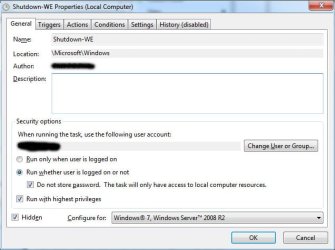
Sorry to jump in here. Not meaning to detract from the help that has already been provided, but I'm sure I don't have this this issue. I have tasks running regularly across multiple W7 computers and the DOS window does not flash up on any of them.

I achieved this using the combination of settings as shown on the attached image.

Tanya
 

Attachments

  • sf-1.jpg
    sf-1.jpg
    58.9 KB · Views: 27

My Computer My Computer

At a glance

Linux Mint 17 Cinnamon | Win 7 Ult x64Intel I7-3770K @ 4.2ghz32GB G-Skill C10QEVGA GTX 670 2GB SC
Computer type
PC/Desktop
Computer Manufacturer/Model Number
Home Made
OS
Linux Mint 17 Cinnamon | Win 7 Ult x64
CPU
Intel I7-3770K @ 4.2ghz
Motherboard
ASRock Extreme 4
Memory
32GB G-Skill C10Q
Graphics Card(s)
EVGA GTX 670 2GB SC
Sound Card
Creative Fatality ExtremeGamer
Monitor(s) Displays
LG E2742V x 2
Screen Resolution
1920x1080
Hard Drives
256GB Vertex 4 SSD
2TB Seagate ST2000DM001
1TB Seagate ST1000DM003
PSU
Corsair HX 650
Case
HAF 932 advanced
Cooling
Corsair H100i liquid cooler
Keyboard
Logitech Wireless
Mouse
Logitech Wireless
Internet Speed
OptusNet NBN 100/40
Antivirus
Malwarebytes
Browser
Firefox 30
Other Info
Router: Sagemcom F@st 3846 Crippled by Optus.
Does you scheduled task launch a batch file? You don't show the action tab.
 

My Computer My Computer

At a glance

Windows 10 Pro X64Intel Quad Core i7-4770 @ 3.4Ghz16.0GB PC3-12800 DDR3 SDRAM 1600 MHzIntel Integrated HD Graphics
Computer type
PC/Desktop
Computer Manufacturer/Model Number
Lenovo IdeaCenter 450
OS
Windows 10 Pro X64
CPU
Intel Quad Core i7-4770 @ 3.4Ghz
Memory
16.0GB PC3-12800 DDR3 SDRAM 1600 MHz
Graphics Card(s)
Intel Integrated HD Graphics
Sound Card
Realtek HD Audio
Monitor(s) Displays
HP 22" LCD
Screen Resolution
1680 x 1050
Hard Drives
250GB Samsung EVO SATA-3 SSD
2TB Seagate ST2000DM001 SATA-2
1.5TB Seagate ST3150041AS SATA
Keyboard
Dell USB
Mouse
Lenovo USB
Internet Speed
Cable via Road Runner 3MB Upload, 30MB Download
Antivirus
Windows Defender, MBAM Pro, MBAE
Browser
Seamonkey
Other Info
UEFI/GPT
PLDS DVD-RW DH16AERSH
Does you scheduled task launch a batch file? You don't show the action tab.

Yes, sorry, it does the following (I've changed the user names)
This one runs from the server..

net user xxxxxx /times:m-f,su,9am-3am;Sa,9am-2am
net user xxxxx/times:m-f,Su,9am-3am;Sa,9am-2am
net user "zzzzzz yyyyyy" /times:m-su,9am-1am
net user xxxxxx /times:m-Su,9am-1am
shutdown /t 60 /s

There's are different versions for different times of the year, but you get the gist.

This one runs from each client computer every two hours...

netsh interface ip set address name="Local Area Connection" dhcp
netsh interface ip set dns name="Local Area Connection" source=dhcp

This helps stop the boys from trying to configure their way around network security
 

My Computer My Computer

At a glance

Linux Mint 17 Cinnamon | Win 7 Ult x64Intel I7-3770K @ 4.2ghz32GB G-Skill C10QEVGA GTX 670 2GB SC
Computer type
PC/Desktop
Computer Manufacturer/Model Number
Home Made
OS
Linux Mint 17 Cinnamon | Win 7 Ult x64
CPU
Intel I7-3770K @ 4.2ghz
Motherboard
ASRock Extreme 4
Memory
32GB G-Skill C10Q
Graphics Card(s)
EVGA GTX 670 2GB SC
Sound Card
Creative Fatality ExtremeGamer
Monitor(s) Displays
LG E2742V x 2
Screen Resolution
1920x1080
Hard Drives
256GB Vertex 4 SSD
2TB Seagate ST2000DM001
1TB Seagate ST1000DM003
PSU
Corsair HX 650
Case
HAF 932 advanced
Cooling
Corsair H100i liquid cooler
Keyboard
Logitech Wireless
Mouse
Logitech Wireless
Internet Speed
OptusNet NBN 100/40
Antivirus
Malwarebytes
Browser
Firefox 30
Other Info
Router: Sagemcom F@st 3846 Crippled by Optus.
I've had a further look into this, and there is a way to do what you want. At the moment, I have the results displayed on the screen, but I'll see what I can do about that.

Here are the blocks of code I used to test. They are identical, apart from the strIP variable (the IP address that is being queried).

Again, I have used Google.co.uk for this example. It returns 0 and True as the results.
Code:
strIP = "173.194.67.94"
wmiQuery = "Select * From Win32_PingStatus Where Address = '" & strIP & "'"
Set objWMIService = GetObject ("winmgmts://./root/cimv2")
Set objPing = objWMIService.ExecQuery (wmiQuery)
For Each objStatus in objPing
msgBox objStatus.Statuscode
strPingResult ="True"
If IsNull (objStatus.Statuscode) Or objStatus.Statuscode <> 0 Then strPingResult = "False"
msgBox strPingResult
Next

This IP address does not exist. Consequently, the routine returns 11010 and False.
Code:
strIP = "123.45.67.89"
wmiQuery = "Select * From Win32_PingStatus Where Address = '" & strIP & "'"
Set objWMIService = GetObject ("winmgmts://./root/cimv2")
Set objPing = objWMIService.ExecQuery (wmiQuery)
For Each objStatus in objPing
msgBox objStatus.Statuscode
strPingResult ="True"
If IsNull (objStatus.Statuscode) Or objStatus.Statuscode <> 0 Then strPingResult = "False"
msgBox strPingResult
Next

In both cases, the first output is the raw data, which corresponds to the information found in the section StatusCode here: Win32_PingStatus class

The second output returns True if the raw data exists and is 0, and False if it doesn't exist or is non-zero.
 

My Computer My Computer

At a glance

Windows 8.1 Pro RTM x64Intel Core-i5-3570K 4-core @ 3.4GHz (Ivy Brid...4 x 4GB DDR3-1600 Corsair Vengeance CMZ8GX3M2...MSI GeForce GTX770 Gaming OC 2GB
Computer type
PC/Desktop
Computer Manufacturer/Model Number
Dwarf Dwf/11/2012 r09/2013
OS
Windows 8.1 Pro RTM x64
CPU
Intel Core-i5-3570K 4-core @ 3.4GHz (Ivy Bridge) (OC 4.4GHz)
Motherboard
ASRock Z77 Extreme4-M
Memory
4 x 4GB DDR3-1600 Corsair Vengeance CMZ8GX3M2A1600C9B (16GB)
Graphics Card(s)
MSI GeForce GTX770 Gaming OC 2GB
Sound Card
Realtek High Definition on board solution (ALC 898)
Monitor(s) Displays
ViewSonic VA1912w Widescreen (VGA)
Screen Resolution
1440x900
Hard Drives
OCZ Agility 3 SSD 120GB SATA III x2 (RAID 0)
Samsung HD501LJ 500GB SATA II x2
Hitachi HDS721010CLA332 1TB SATA II
Iomega 1.5TB Ext USB 2.0
WD 2.0TB Ext USB 3.0
PSU
XFX Pro Series 850W Semi-Modular
Case
Gigabyte IF233
Cooling
1 x 120mm Front Inlet 1 x 120mm Rear Exhaust
Keyboard
Microsoft Comfort Curve Keyboard 3000 (USB)
Mouse
Microsoft Comfort Mouse 3000 for Business (USB)
Internet Speed
NetGear DG834Gv3 ADSL Modem/Router (Ethernet) ~4.0 Mb/s (O2)
Antivirus
Avast! 8.0.1497
Browser
IE 11
Other Info
Optical Drive: HL-DT-ST BD-RE BH10LS30 SATA Bluray
Lexmark S305 Printer/Scanner/Copier (USB)
WEI Score: 8.1/8.1/8.5/8.5/8.25
Asus Eee PC 1011PX Netbook (Windows 7 x86 Starter)
OK, here you go. :D

Code:
strDirectory = "c:\users\<UserName>\documents\pingresults\"
strFile = "pingresult.txt"
strIP = "173.194.67.94"
Const WriteMethod = 8
Set objFSO = CreateObject ("Scripting.FileSystemObject")
If objFSO.FolderExists (strDirectory) Then
Set objFolder = objFSO.GetFolder (strDirectory)
Else
Set objFolder = objFSO.CreateFolder (strDirectory)
End If
If objFSO.FileExists (strDirectory & strFile) Then
Set objFolder = objFSO.GetFolder (strDirectory)
Else
Set objFile = objFSO.CreateTextFile (strDirectory & strFile)
End If
Set objFolder = nothing
set objFile = nothing
Set objTextFile = objFSO.OpenTextFile (strDirectory & strFile, WriteMethod, True)
objTextFile.WriteLine (" ")
objTextFile.Close
Set objTextFile = objFSO.OpenTextFile (strDirectory & strFile, WriteMethod, True) 
wmiQuery = "Select * From Win32_PingStatus Where Address = '" & strIP & "'"
Set objWMIService = GetObject ("winmgmts://./root/cimv2")
Set objPing = objWMIService.ExecQuery (wmiQuery)
For Each objStatus in objPing
strPingResult ="True"
If IsNull (objStatus.Statuscode) Or objStatus.Statuscode <> 0 Then strPingResult = "False"
objTextFile.WriteLine (strIP)
objTextFile.WriteLine (strPingResult)
objTextFile.Close
Next

Adapt the initial variables to suit your needs. They should take the format shown.

strDirectory This is the directory where the results file is located.
strFile This is the name of the results file. Don't forget to include the .txt suffix.
strIP This is the IP address.
 

My Computer My Computer

At a glance

Windows 8.1 Pro RTM x64Intel Core-i5-3570K 4-core @ 3.4GHz (Ivy Brid...4 x 4GB DDR3-1600 Corsair Vengeance CMZ8GX3M2...MSI GeForce GTX770 Gaming OC 2GB
Computer type
PC/Desktop
Computer Manufacturer/Model Number
Dwarf Dwf/11/2012 r09/2013
OS
Windows 8.1 Pro RTM x64
CPU
Intel Core-i5-3570K 4-core @ 3.4GHz (Ivy Bridge) (OC 4.4GHz)
Motherboard
ASRock Z77 Extreme4-M
Memory
4 x 4GB DDR3-1600 Corsair Vengeance CMZ8GX3M2A1600C9B (16GB)
Graphics Card(s)
MSI GeForce GTX770 Gaming OC 2GB
Sound Card
Realtek High Definition on board solution (ALC 898)
Monitor(s) Displays
ViewSonic VA1912w Widescreen (VGA)
Screen Resolution
1440x900
Hard Drives
OCZ Agility 3 SSD 120GB SATA III x2 (RAID 0)
Samsung HD501LJ 500GB SATA II x2
Hitachi HDS721010CLA332 1TB SATA II
Iomega 1.5TB Ext USB 2.0
WD 2.0TB Ext USB 3.0
PSU
XFX Pro Series 850W Semi-Modular
Case
Gigabyte IF233
Cooling
1 x 120mm Front Inlet 1 x 120mm Rear Exhaust
Keyboard
Microsoft Comfort Curve Keyboard 3000 (USB)
Mouse
Microsoft Comfort Mouse 3000 for Business (USB)
Internet Speed
NetGear DG834Gv3 ADSL Modem/Router (Ethernet) ~4.0 Mb/s (O2)
Antivirus
Avast! 8.0.1497
Browser
IE 11
Other Info
Optical Drive: HL-DT-ST BD-RE BH10LS30 SATA Bluray
Lexmark S305 Printer/Scanner/Copier (USB)
WEI Score: 8.1/8.1/8.5/8.5/8.25
Asus Eee PC 1011PX Netbook (Windows 7 x86 Starter)
Cool Dwarf! Thank you! I got it to work...and thanks for the template that I can expand on.

So my last issue is writing a script to simulate a small mouse movement, i.e. 2-3 pixels, periodically.

I am aware of AutoIt and am looking into it. I am wondering if there is another approach?

-John
 

My Computer My Computer

At a glance

win 7 64-bit
OS
win 7 64-bit
Does you scheduled task launch a batch file? You don't show the action tab.
Not that you were talking to me... but:


Am I missing something in the OP's request?
 

My Computer My Computer

At a glance

W7 Pro SP1 64biti78GBIntel HD Graphics
Computer type
Laptop
Computer Manufacturer/Model Number
Employer provided Dell Latitude
OS
W7 Pro SP1 64bit
CPU
i7
Memory
8GB
Graphics Card(s)
Intel HD Graphics
Hard Drives
crappy SSD
Antivirus
Employer mandated Symantec Endpoint Protection
Browser
Pale Moon 64bit, IE11 64bit & Chrome 64bit
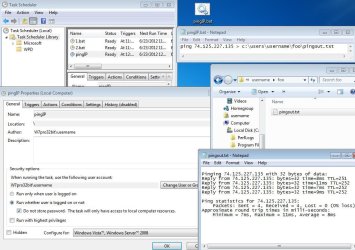
........Is there a way using a VB script to do a ping of a IP address and send the results into a file?.......
I'm not sure if you had the same requirement of hiding the command prompt window on this request too, but if the actions/settings shown in the video that I posted above do indeed hide the command prompt window for you then a simple batch file with

ping google.com > c:\users\username\foo\pingout.txt

or

ping 74.125.227.135 > c:\users\username\foo\pingout.txt

should do what you want

ping2file.JPG
 

My Computer My Computer

At a glance

W7 Pro SP1 64biti78GBIntel HD Graphics
Computer type
Laptop
Computer Manufacturer/Model Number
Employer provided Dell Latitude
OS
W7 Pro SP1 64bit
CPU
i7
Memory
8GB
Graphics Card(s)
Intel HD Graphics
Hard Drives
crappy SSD
Antivirus
Employer mandated Symantec Endpoint Protection
Browser
Pale Moon 64bit, IE11 64bit & Chrome 64bit
Cool Dwarf! Thank you! I got it to work...and thanks for the template that I can expand on.

So my last issue is writing a script to simulate a small mouse movement, i.e. 2-3 pixels, periodically.

I am aware of AutoIt and am looking into it. I am wondering if there is another approach?

-John
What is the end goal of this mouse movement? To prevent screensaver or power settings from kicking in?
 

My Computer My Computer

At a glance

W7 Pro SP1 64biti78GBIntel HD Graphics
Computer type
Laptop
Computer Manufacturer/Model Number
Employer provided Dell Latitude
OS
W7 Pro SP1 64bit
CPU
i7
Memory
8GB
Graphics Card(s)
Intel HD Graphics
Hard Drives
crappy SSD
Antivirus
Employer mandated Symantec Endpoint Protection
Browser
Pale Moon 64bit, IE11 64bit & Chrome 64bit
What is the end goal of this mouse movement? To prevent screensaver or power settings from kicking in?

Actually, it is to prevent having to reauthenticate. I understand the difference in what you point out,but not sure how (or if) either of them relate to logging in. I need to do some digging to better understand that.

-John
 

My Computer My Computer

At a glance

win 7 64-bit
OS
win 7 64-bit
If this mouse movement is to keep a VPN alive, then ping might be enough/better.

As far as moving the mouse - a scripting language like AutoHotKey or AutoIt will do. The AutoIt code in the attached text file (mm1.txt) does what you asked - but exiting that script is a bit problematic. The AutoIt code in (mm2.txt) is less likely to get a gamer banned while AFK.

See this post for some warnings/options about using AutoIt.
 

Attachments

My Computer My Computer

At a glance

W7 Pro SP1 64biti78GBIntel HD Graphics
Computer type
Laptop
Computer Manufacturer/Model Number
Employer provided Dell Latitude
OS
W7 Pro SP1 64bit
CPU
i7
Memory
8GB
Graphics Card(s)
Intel HD Graphics
Hard Drives
crappy SSD
Antivirus
Employer mandated Symantec Endpoint Protection
Browser
Pale Moon 64bit, IE11 64bit & Chrome 64bit
Or you might just try removing:
@echo off

from the batch file.

Was told long ago when modems were used (tin-cans and strings like) in BBS
type batch files, @echo off removed the seen text on screen to stop some one
from seeing and Cntl-C ing the batch file.
My 2 cents FWIW..
 

My Computer My Computer

At a glance

Windows 7Ultimate x64AMD Phenom II x68gbNvida 8400GS 1GB DDR3 HDMI
Computer Manufacturer/Model Number
Custom,
OS
Windows 7Ultimate x64
CPU
AMD Phenom II x6
Motherboard
Gigabyte Z with 2 memory slots
Memory
8gb
Graphics Card(s)
Nvida 8400GS 1GB DDR3 HDMI
Sound Card
Internal or Nvida HDMI
Monitor(s) Displays
APex 32" LCD
Hard Drives
1TB
PSU
500w
Case
Custom case with Black-lite Blue
Cooling
12" plus cpu fan and Nvida Fan also
Back
Top