IE9 - Preventing Right-Click/Delete in browsing history

grims68

New member
Local time
11:38 PM
Messages
4
I am trying to prevent any browser history being deleted from Internet Explorer 9.

Thanks to this forum, I have successfully disabled the "Clear Browsing History" option and disabled InPrivate browsing, so I am very grateful for that :D

Unfortunately, it seems that individual history entries can still be deleted directly from the history list (after clicking the "star" at the top-right of the window). Is there a way I can prevent this from happening? ... So far, my seemingly endless searching for this has drawn a blank on this.

Many thanks in advance!
Chris
 

My Computer My Computer

At a glance

Windows 7 Home Premium x64
OS
Windows 7 Home Premium x64
Welcome to the Seven Forums!

Sorry that you have not gotten an answer before now. I only had W7 pro inside a virtual machine, but I was curious enough about your question that I did some testing on a W7 home premium system. It is easy to prevent the delete on W7pro using group policy settings - but I could not figure out how to do it on W7HP. Maybe others know how to do this for your.

You could always $upgrade$ to W7 pro. :-(
 

My Computer My Computer

At a glance

W7 Pro SP1 64biti78GBIntel HD Graphics
Computer type
Laptop
Computer Manufacturer/Model Number
Employer provided Dell Latitude
OS
W7 Pro SP1 64bit
CPU
i7
Memory
8GB
Graphics Card(s)
Intel HD Graphics
Hard Drives
crappy SSD
Antivirus
Employer mandated Symantec Endpoint Protection
Browser
Pale Moon 64bit, IE11 64bit & Chrome 64bit
Thanks for the reply and for taking the time to investigate my question.

Unfortunately, I need to prevent this on three home premium machines and three upgrades to W7Pro is a stretch to far for my wallet :(

I have access to a W7Pro installation so maybe I can work out the registry changes by messing with the grouip policy editor on that machine. Is the setting easy to find in GPE?
 

My Computer My Computer

At a glance

Windows 7 Home Premium x64
OS
Windows 7 Home Premium x64

My Computer My Computer

At a glance

Win7 Pro-64 Biti7-2600-3.4GHz8 GIG DDR3onboard
Computer Manufacturer/Model Number
Put together
OS
Win7 Pro-64 Bit
CPU
i7-2600-3.4GHz
Motherboard
ASRock Z68M
Memory
8 GIG DDR3
Graphics Card(s)
onboard
Sound Card
onboard
Hard Drives
Seagate 1TB 7200RPM
PSU
680 W
Case
black
Cooling
stock fans
Keyboard
Microsoft
Mouse
Microsoft optical

Thanks for the pointer, BrightBlessings. I've disabled this feature in Win7HP through the registry but I can still right-click the entries in the history and delete them individually - which is very frustrating.

Having said that, I'll see what the GPE changes in the registry in Win7Pro for this setting as there may be more to change than just what is stated as the "equivalent" in the registry.

I'll post back when I have some results.
 

My Computer My Computer

At a glance

Windows 7 Home Premium x64
OS
Windows 7 Home Premium x64
....maybe I can work out the registry changes by messing with the group policy editor on that machine. Is the setting easy to find in GPE?
I opened the GPE, found the setting of interest and then started process monitor - filtering only registry changes made by mmc.exe. I found what it changed, exported that and then imported it into a W7HP virtual machine. The W7HP OS ignores it.

mmc.exe is the tool that the GPE snap-in runs inside of - but I'm not sure that mmc.exe is the only thing changing the registry during a GPO setting change. You can try and ferret that out :-)

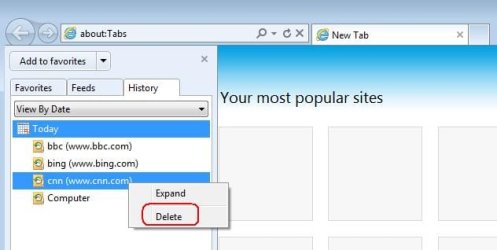
Hopefully, I've been chasing the correct rabbit. Here is my understanding what you want to prevent. You never want to see this context menu delete option:

2.JPG


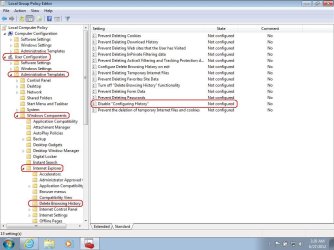
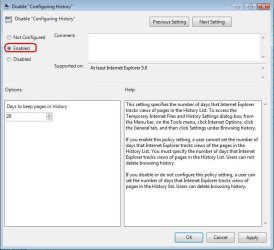
Via GPE at the user level or the machine level - the path is the same:

1.JPG

3.JPG


I did not even have to close IE

4.JPG
 

My Computer My Computer

At a glance

W7 Pro SP1 64biti78GBIntel HD Graphics
Computer type
Laptop
Computer Manufacturer/Model Number
Employer provided Dell Latitude
OS
W7 Pro SP1 64bit
CPU
i7
Memory
8GB
Graphics Card(s)
Intel HD Graphics
Hard Drives
crappy SSD
Antivirus
Employer mandated Symantec Endpoint Protection
Browser
Pale Moon 64bit, IE11 64bit & Chrome 64bit
Hopefully, I've been chasing the correct rabbit. Here is my understanding what you want to prevent. You never want to see this context menu delete option:

View attachment 218569

Yep, that's the rabbit alright!

Thanks for the extended info. I'll do some playing and messing about tonight when I'm back at one of the W7HP machines.
 

My Computer My Computer

At a glance

Windows 7 Home Premium x64
OS
Windows 7 Home Premium x64
I am also having the same problem. I dont have group policy editor though. Can some tell me how to get rid of the right click delete history using reg edit?
 

My Computer My Computer

At a glance

Windows 7 Home Premium 64bitIntel® Core™ i3-380M Processor(2b)(3)4GB DDR3 System Memory (2 DIMM)Intel® HD Graphics with up to 1696MB total gr...
Computer Manufacturer/Model Number
g6-1a53nr Notebook PC (HP Pavilion g6 Notebook)
OS
Windows 7 Home Premium 64bit
CPU
Intel® Core™ i3-380M Processor(2b)(3)
Memory
4GB DDR3 System Memory (2 DIMM)
Graphics Card(s)
Intel® HD Graphics with up to 1696MB total graphics memory
Sound Card
SRS Premium Sound with Altec Lansing speakers
Monitor(s) Displays
15.6" diagonal High-Definition(8) HP BrightView LED Display
Hard Drives
500GB (5400RPM) Hard Drive (SATA)
PSU
• 65W AC Adapter • 6-Cell 47WHr Lithium-Ion Battery
Let's see what the OP found... but I don't think that it can be done for W7 Home Premium.

Please, someone prove me wrong :-)
 

My Computer My Computer

At a glance

W7 Pro SP1 64biti78GBIntel HD Graphics
Computer type
Laptop
Computer Manufacturer/Model Number
Employer provided Dell Latitude
OS
W7 Pro SP1 64bit
CPU
i7
Memory
8GB
Graphics Card(s)
Intel HD Graphics
Hard Drives
crappy SSD
Antivirus
Employer mandated Symantec Endpoint Protection
Browser
Pale Moon 64bit, IE11 64bit & Chrome 64bit
Back
Top