FPS Spiking and Low FPS While Playing Online Games

BeKure

New member
Member
VIP
Local time
1:00 AM
Messages
117
I play alot of MMO's and I notice that during my play sessions I get low FPS in populated areas and sometimes even when in not so populated areas. I also get FPS spikes that dip into the teens and sometimes even single digits for about 1-2 secs. It's very annoying because my PC specs aren't terrible.
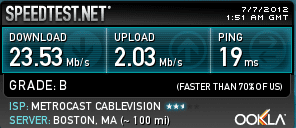
I never notice low FPS or these FPS spikes while playing single player offline games so I am convinced that it has something to do with my internet connection. Streaming movies or shows from NetFlicks/hulu for example works fine. Is my 2Mbps upload speed just to slow for online gaming (particularly MMO's)?
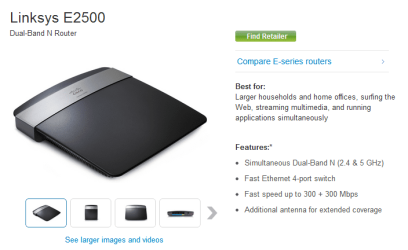
I use a Linksys e2500 router at the moment and I'm hoping that there is a router out there that is built with gaming in mind that would eliminate these issue that I'm having.
My internet connection isn't super slow so this is a frustrating issue to say the least.
Anyone who may be able to shed some light on my problem will be forever appreciated.
Please keep in mind that when I play any game (including online) that I always turn the graphical settings all the way up and I run at a 1920 x 1080 resolution.


CASE: NZXT Phantom PHAN-001WT Red Steel / Plastic Enthusiast ATX Full Tower Computer Case
CPU: AMD Phenom II X6 1100T Black Edition Thuban 3.3GHz, 3.7GHz Turbo Socket AM3
CPU Cooler: ZALMAN CNPS11X Extreme V-Shaped Dual Heatpipe Design w/120mm Long Life Bearing
GPU: EVGA GeForce GTX 550 Ti 2048 MB GDDR5 x2
PSU: Antec High Current Gamer Series HCG-900 900W
MOBO: GIGABYTE GA-990XA-UD3 AM3+ AMD
MEMORY: G.SKILL Ripjaws X Series 8GB 240-Pin DDR3 SDRAM DDR3 186
OPTICAL DRIVE: SONY Black Blu-ray Burner 12X BD-R 2X BD-RE 8X DVD+R 5X DVD-RAM 8X BD-ROM
SSD: Crucial M4 CT064M4SSD2 2.5" 64GB SATA
HDD 1: Western Digital Caviar Blue WD5000AAKS 2TB 7200 RPM 16MB Cache
HDD 2: Western Digital Caviar Blue WD5000AAKS 1TB 7200 RPM 16MB Cache
HDD 3: Western Digital Caviar Blue WD5000AAKS 500GB 7200 RPM 16MB Cache
WIRELESS ADAPTER: ASUS PCE-N13 Wireless Adapter IEEE 802.11b/g/n
FANS: 140MM (x1), 120MM (x3), 200MM (x2)
KEYBOARD: Logitech G13 & Steelseries Merc Stealth
MOUSE: Logitech G700 & Steelseries WoW MMO Gaming Mouse
HEADSET: Logitech G930
DISPLAY: HANNSpree 42" Class LCD 1080p 120Hz HDTV
 

Attachments
  • Capture2.PNG
    Capture2.PNG
    25.7 KB · Views: 8
  • Capture.PNG
    Capture.PNG
    8 KB · Views: 595

My Computer My Computer

At a glance

Windows 7 [64-Bit]AMD Phenom II X6 1100T Black Edition Thuban 3...G.SKILL Ripjaws X Series 8GB 240-Pin DDR3 SDR...ATI Radeon HD 5870 1GB DDR5 PCI-Express Card
OS
Windows 7 [64-Bit]
CPU
AMD Phenom II X6 1100T Black Edition Thuban 3.3GHz, 3.7GHz
Motherboard
GIGABYTE GA-990XA-UD3 AM3+ AMD
Memory
G.SKILL Ripjaws X Series 8GB 240-Pin DDR3 SDRAM DDR3 186
Graphics Card(s)
ATI Radeon HD 5870 1GB DDR5 PCI-Express Card
Sound Card
N/A (On-board Sound)
Monitor(s) Displays
HANNSpree 42" Class LCD 1080p 120Hz HDTV
Screen Resolution
1920 x 1080
Hard Drives
SSD: Crucial M4 CT064M4SSD2 2.5" 64GB SATA

HDD 1: Western Digital Caviar Blue WD5000AAKS 2TB 7200 RPM 16MB Cache

HDD 2: Western Digital Caviar Blue WD5000AAKS 1TB 7200 RPM 16MB Cache

HDD 3: Western Digital Caviar Blue WD5000AAKS 500GB 7200 R
PSU
Antec High Current Gamer Series HCG-900 900W
Case
NZXT Phantom PHAN-001WT Red Steel / Plastic Enthusiast ATX
Cooling
FANS: 140MM (x1), 120MM (x3), 200MM (x2)
Keyboard
Logitech G13 & Steelseries Merc Stealth
Mouse
Cyborg M.M.O. 7 Gaming Mouse, Logitech G700 & Steelseries Wo
Internet Speed
25 Mbps Download / 2 Mbps Upload
Those issues you mention are strongly related to your Internet/Network Connectivity,

Please try the following steps.

Have you tried optimizing your network stack for lower latency gaming using this
Tcp/ip batch file from speed guides?

SG TCP/IP Batch File


View attachment SG_Vista_TcpIp_patch.zip


Description:-

The SG Vista/7 TCP/IP patch us a quick way to optimize Vista TCP/IP settings for broadband internet connections.

It sets both netsh auto tunning levels and modifies the Windows Registry as recommended by our Vista Tweaks article.

It is recommended to run the patch when logged in with administrative priviledges.

The patch allows for reverting all settings to their respective Windows default values as well. Note you may have to right-click the link above and choose "Save Target As..." to save to your computer.

To apply, save to your desktop and run as administrator (right-click -> run as administrator). Type Y when prompted to optimize parameters.

This batch file works for Windows 7 perfectly as well.


Leatrix Latency Fix


Next, try this Leatrix Latency Fix that has been successfully used to lower latency in MMOs like WoW and Everquest:-


View attachment Leatrix_Latency_Fix_3.00 (use to reduce lag).zip


Network Throttling Fix


Also, just to be sure, try this registry fix to prevent Windows from fudging up your network utilization if you're running movies/music in the background:-

http://www.daveherbert.info/network-bandwidth-throttling-in-windows-7

http://blogs.technet.com/b/markrussinovich/archive/2007/08/27/1833290.aspx
(explains the phenomenon very well, this still exists in Windows 7 as a problem)


View attachment boost network game priority.zip


Unzip and run the reg file. Double click and press Yes to accept changes.

Hope that helps!
 
Last edited:

My Computer My Computer

At a glance

Windows 7 x64 Professional SP1Intel C2D T9550 2.66 GHz @ 2.793 GHz (Thanks ...8 GB DDR3ATI MOBILITY RADEON 4670
Computer Manufacturer/Model Number
DELL SXPS 1640
OS
Windows 7 x64 Professional SP1
CPU
Intel C2D T9550 2.66 GHz @ 2.793 GHz (Thanks ThrottleStop!!)
Motherboard
Intel PM45
Memory
8 GB DDR3
Graphics Card(s)
ATI MOBILITY RADEON 4670
Sound Card
CREATIVE XFI AUDIO NOTEBOOK
Monitor(s) Displays
16.1 WLED
Screen Resolution
1920x1080
Hard Drives
Seagate ST9500420AS 500GB (465GiBi) 7200 RPM Drive

External Drives:-
2 TB WD Essentials x 3
1 TB WD Mybook Gen 1
1 TB WD Mybook Gen 2
1 TB Seagate
1 TB Seagate
320 GB WD Scorpio Black (enclosed)
PSU
90W Dell Power Brick
Case
Dell Chassis
Cooling
Coolermaster Cooling Pad
Keyboard
Built-in backlighted Keyboard
Mouse
Logitech Wireless Mini Mouse
Internet Speed
4/0.5
Should I do this for every PC that's on my network?
I tried it on my main gaming PC and 1080p video seems to buffer a bit faster.
As far as gaming, its still FPS spiking down into at least the low 20's. There does seem to be slight improvement though. So far I haven't noticed any single digit FPS spikes. Let me test for few days though.
Thanks for all the info you provided.
 

My Computer My Computer

At a glance

Windows 7 [64-Bit]AMD Phenom II X6 1100T Black Edition Thuban 3...G.SKILL Ripjaws X Series 8GB 240-Pin DDR3 SDR...ATI Radeon HD 5870 1GB DDR5 PCI-Express Card
OS
Windows 7 [64-Bit]
CPU
AMD Phenom II X6 1100T Black Edition Thuban 3.3GHz, 3.7GHz
Motherboard
GIGABYTE GA-990XA-UD3 AM3+ AMD
Memory
G.SKILL Ripjaws X Series 8GB 240-Pin DDR3 SDRAM DDR3 186
Graphics Card(s)
ATI Radeon HD 5870 1GB DDR5 PCI-Express Card
Sound Card
N/A (On-board Sound)
Monitor(s) Displays
HANNSpree 42" Class LCD 1080p 120Hz HDTV
Screen Resolution
1920 x 1080
Hard Drives
SSD: Crucial M4 CT064M4SSD2 2.5" 64GB SATA

HDD 1: Western Digital Caviar Blue WD5000AAKS 2TB 7200 RPM 16MB Cache

HDD 2: Western Digital Caviar Blue WD5000AAKS 1TB 7200 RPM 16MB Cache

HDD 3: Western Digital Caviar Blue WD5000AAKS 500GB 7200 R
PSU
Antec High Current Gamer Series HCG-900 900W
Case
NZXT Phantom PHAN-001WT Red Steel / Plastic Enthusiast ATX
Cooling
FANS: 140MM (x1), 120MM (x3), 200MM (x2)
Keyboard
Logitech G13 & Steelseries Merc Stealth
Mouse
Cyborg M.M.O. 7 Gaming Mouse, Logitech G700 & Steelseries Wo
Internet Speed
25 Mbps Download / 2 Mbps Upload
Should I do this for every PC that's on my network?
I tried it on my main gaming PC and 1080p video seems to buffer a bit faster.
As far as gaming, its still FPS spiking down into at least the low 20's. There does seem to be slight improvement though. So far I haven't noticed any single digit FPS spikes. Let me test for few days though.
Thanks for all the info you provided.

Pretty much... i've done it on my own laptop and PC... never failed to improve my network performance...
 

My Computer My Computer

At a glance

Windows 7 x64 Professional SP1Intel C2D T9550 2.66 GHz @ 2.793 GHz (Thanks ...8 GB DDR3ATI MOBILITY RADEON 4670
Computer Manufacturer/Model Number
DELL SXPS 1640
OS
Windows 7 x64 Professional SP1
CPU
Intel C2D T9550 2.66 GHz @ 2.793 GHz (Thanks ThrottleStop!!)
Motherboard
Intel PM45
Memory
8 GB DDR3
Graphics Card(s)
ATI MOBILITY RADEON 4670
Sound Card
CREATIVE XFI AUDIO NOTEBOOK
Monitor(s) Displays
16.1 WLED
Screen Resolution
1920x1080
Hard Drives
Seagate ST9500420AS 500GB (465GiBi) 7200 RPM Drive

External Drives:-
2 TB WD Essentials x 3
1 TB WD Mybook Gen 1
1 TB WD Mybook Gen 2
1 TB Seagate
1 TB Seagate
320 GB WD Scorpio Black (enclosed)
PSU
90W Dell Power Brick
Case
Dell Chassis
Cooling
Coolermaster Cooling Pad
Keyboard
Built-in backlighted Keyboard
Mouse
Logitech Wireless Mini Mouse
Internet Speed
4/0.5
I just picked up another GeForce GTX 550 Ti and now I am FPS spiking even on offline single player games now. This is really frustrating. I know that some single player offline games do in fact stay connected to internet while you play them. For example, I have Batman Arkum City and that game stays connected to Windows Live and the FPS spikes are terrible. They happen about every 30-45 seconds which makes the game not very fun to play. I also have Alice Madness Returns and it happens in that game as well, just not as often as Batman does so.
Maybe I need to forward some ports? Or maye it's my CPU? I purchased another GeForce GTX 550 Ti so that I could SLI and I was hoping that my gameplay experience would at least improve but thats not the case. I hope that the SLI hasn't anything to do with it.
 

My Computer My Computer

At a glance

Windows 7 [64-Bit]AMD Phenom II X6 1100T Black Edition Thuban 3...G.SKILL Ripjaws X Series 8GB 240-Pin DDR3 SDR...ATI Radeon HD 5870 1GB DDR5 PCI-Express Card
OS
Windows 7 [64-Bit]
CPU
AMD Phenom II X6 1100T Black Edition Thuban 3.3GHz, 3.7GHz
Motherboard
GIGABYTE GA-990XA-UD3 AM3+ AMD
Memory
G.SKILL Ripjaws X Series 8GB 240-Pin DDR3 SDRAM DDR3 186
Graphics Card(s)
ATI Radeon HD 5870 1GB DDR5 PCI-Express Card
Sound Card
N/A (On-board Sound)
Monitor(s) Displays
HANNSpree 42" Class LCD 1080p 120Hz HDTV
Screen Resolution
1920 x 1080
Hard Drives
SSD: Crucial M4 CT064M4SSD2 2.5" 64GB SATA

HDD 1: Western Digital Caviar Blue WD5000AAKS 2TB 7200 RPM 16MB Cache

HDD 2: Western Digital Caviar Blue WD5000AAKS 1TB 7200 RPM 16MB Cache

HDD 3: Western Digital Caviar Blue WD5000AAKS 500GB 7200 R
PSU
Antec High Current Gamer Series HCG-900 900W
Case
NZXT Phantom PHAN-001WT Red Steel / Plastic Enthusiast ATX
Cooling
FANS: 140MM (x1), 120MM (x3), 200MM (x2)
Keyboard
Logitech G13 & Steelseries Merc Stealth
Mouse
Cyborg M.M.O. 7 Gaming Mouse, Logitech G700 & Steelseries Wo
Internet Speed
25 Mbps Download / 2 Mbps Upload
Those issues you mention are strongly related to your Internet/Network Connectivity,

Please try the following steps.

Have you tried optimizing your network stack for lower latency gaming using this
Tcp/ip batch file from speed guides?

SG TCP/IP Batch File


View attachment 220118


Description:-

The SG Vista/7 TCP/IP patch us a quick way to optimize Vista TCP/IP settings for broadband internet connections.

It sets both netsh auto tunning levels and modifies the Windows Registry as recommended by our Vista Tweaks article.

It is recommended to run the patch when logged in with administrative priviledges.

The patch allows for reverting all settings to their respective Windows default values as well. Note you may have to right-click the link above and choose "Save Target As..." to save to your computer.

To apply, save to your desktop and run as administrator (right-click -> run as administrator). Type Y when prompted to optimize parameters.

This batch file works for Windows 7 perfectly as well.


Leatrix Latency Fix


Next, try this Leatrix Latency Fix that has been successfully used to lower latency in MMOs like WoW and Everquest:-


View attachment 220119


Network Throttling Fix


Also, just to be sure, try this registry fix to prevent Windows from fudging up your network utilization if you're running movies/music in the background:-

http://www.daveherbert.info/network-bandwidth-throttling-in-windows-7

http://blogs.technet.com/b/markrussinovich/archive/2007/08/27/1833290.aspx
(explains the phenomenon very well, this still exists in Windows 7 as a problem)


View attachment 220120


Unzip and run the reg file. Double click and press Yes to accept changes.

Hope that helps!

Will this work on Windows 8 as well?
 

My Computer My Computer

At a glance

Windows 7 [64-Bit]AMD Phenom II X6 1100T Black Edition Thuban 3...G.SKILL Ripjaws X Series 8GB 240-Pin DDR3 SDR...ATI Radeon HD 5870 1GB DDR5 PCI-Express Card
OS
Windows 7 [64-Bit]
CPU
AMD Phenom II X6 1100T Black Edition Thuban 3.3GHz, 3.7GHz
Motherboard
GIGABYTE GA-990XA-UD3 AM3+ AMD
Memory
G.SKILL Ripjaws X Series 8GB 240-Pin DDR3 SDRAM DDR3 186
Graphics Card(s)
ATI Radeon HD 5870 1GB DDR5 PCI-Express Card
Sound Card
N/A (On-board Sound)
Monitor(s) Displays
HANNSpree 42" Class LCD 1080p 120Hz HDTV
Screen Resolution
1920 x 1080
Hard Drives
SSD: Crucial M4 CT064M4SSD2 2.5" 64GB SATA

HDD 1: Western Digital Caviar Blue WD5000AAKS 2TB 7200 RPM 16MB Cache

HDD 2: Western Digital Caviar Blue WD5000AAKS 1TB 7200 RPM 16MB Cache

HDD 3: Western Digital Caviar Blue WD5000AAKS 500GB 7200 R
PSU
Antec High Current Gamer Series HCG-900 900W
Case
NZXT Phantom PHAN-001WT Red Steel / Plastic Enthusiast ATX
Cooling
FANS: 140MM (x1), 120MM (x3), 200MM (x2)
Keyboard
Logitech G13 & Steelseries Merc Stealth
Mouse
Cyborg M.M.O. 7 Gaming Mouse, Logitech G700 & Steelseries Wo
Internet Speed
25 Mbps Download / 2 Mbps Upload
Do you check your ping in Online games ?

If your ping is fine it may not be the Internet sometimes other players with high ping could be the issue also

If your video card has wobbly drivers you will get Micro stutter that is lag performance because the drivers suck

Before you try to recure the Internet connection try newer drivers I keep hearing on here Nvidia has a new beta driver that fixes things like that so check out your options

Most of the time i wouldn't do a registry fix to speed up a connection rule out all potential issues first
 

My Computer My Computer

At a glance

Windows 10 Home Premium 64bit sp1Intel I7-6700K @ 4.6 Ghz 1.344 volts everyday OC32GB G-Skill TridentZ 3200mhz 16-18-18-38 DDR4Sli Gigabyte Windforce GTX 980 G1
Computer type
PC/Desktop
Computer Manufacturer/Model Number
CoreI7-6700K MrFingerIII Special Builds
OS
Windows 10 Home Premium 64bit sp1
CPU
Intel I7-6700K @ 4.6 Ghz 1.344 volts everyday OC
Motherboard
Asrock Fatality K6 Z170 Socket 1151
Memory
32GB G-Skill TridentZ 3200mhz 16-18-18-38 DDR4
Graphics Card(s)
Sli Gigabyte Windforce GTX 980 G1
Sound Card
AC97 Creative Rage Tactic 3D Headphones Bluetooth
Monitor(s) Displays
27" Asus ROG Swift PG278Q G-Sync 48" Vizio Smart HD TV
Screen Resolution
2560x1440p 27"- 48" Currently Gaming at 2560x1440p Res 2K
Hard Drives
250GB Samsung Evo840SSD Seagate baracuda 500 GB WD Mybook 500Gb 1TB Seagate Barracuda
PSU
HX1050w Corsair Silver 80plus certified crosfire/sli
Case
Enthod Pro Full Tower
Cooling
Corsair H110i GT 280 mm High Performance WaterBlock
Keyboard
Logitech wireless keyboard
Mouse
Logitech wireless mouse
Internet Speed
Cox Cable 100+ mb
Antivirus
WebRoot Spysweeper with Antivirus
Browser
IE-10, Chrome, Opera
Other Info
My Other Rig is a AMD FX8320E @4.6Ghz 16GB Ballistic Sport Ram
Mobo Asrock Fatality 990FX 120GB OCZ SSD 1TB Seagate Barracuda Corsair H75 Cooling PSU Corsair CX750
GPU GTX Gigabyte 970G1
Do you check your ping in Online games ?

If your ping is fine it may not be the Internet sometimes other players with high ping could be the issue also

If your video card has wobbly drivers you will get Micro stutter that is lag performance because the drivers suck

Before you try to recure the Internet connection try newer drivers I keep hearing on here Nvidia has a new beta driver that fixes things like that so check out your options

Most of the time i wouldn't do a registry fix to speed up a connection rule out all potential issues first

I downloaded the new Nvidia driver yesterday and I'm running 2 GTX 550ti's in SLI and not only am I still receiving FPS spiking but also when I have SLI activated I get massive flickering. This is VERY frustrating.
I'm not sure how to check my ping.
 

My Computer My Computer

At a glance

Windows 7 [64-Bit]AMD Phenom II X6 1100T Black Edition Thuban 3...G.SKILL Ripjaws X Series 8GB 240-Pin DDR3 SDR...ATI Radeon HD 5870 1GB DDR5 PCI-Express Card
OS
Windows 7 [64-Bit]
CPU
AMD Phenom II X6 1100T Black Edition Thuban 3.3GHz, 3.7GHz
Motherboard
GIGABYTE GA-990XA-UD3 AM3+ AMD
Memory
G.SKILL Ripjaws X Series 8GB 240-Pin DDR3 SDRAM DDR3 186
Graphics Card(s)
ATI Radeon HD 5870 1GB DDR5 PCI-Express Card
Sound Card
N/A (On-board Sound)
Monitor(s) Displays
HANNSpree 42" Class LCD 1080p 120Hz HDTV
Screen Resolution
1920 x 1080
Hard Drives
SSD: Crucial M4 CT064M4SSD2 2.5" 64GB SATA

HDD 1: Western Digital Caviar Blue WD5000AAKS 2TB 7200 RPM 16MB Cache

HDD 2: Western Digital Caviar Blue WD5000AAKS 1TB 7200 RPM 16MB Cache

HDD 3: Western Digital Caviar Blue WD5000AAKS 500GB 7200 R
PSU
Antec High Current Gamer Series HCG-900 900W
Case
NZXT Phantom PHAN-001WT Red Steel / Plastic Enthusiast ATX
Cooling
FANS: 140MM (x1), 120MM (x3), 200MM (x2)
Keyboard
Logitech G13 & Steelseries Merc Stealth
Mouse
Cyborg M.M.O. 7 Gaming Mouse, Logitech G700 & Steelseries Wo
Internet Speed
25 Mbps Download / 2 Mbps Upload
on steam if you play certain games you hit the TAB key in game and it gives you ping you can also read on your online games how to check it too

also some games don't like 2 card set ups
 

My Computer My Computer

At a glance

Windows 10 Home Premium 64bit sp1Intel I7-6700K @ 4.6 Ghz 1.344 volts everyday OC32GB G-Skill TridentZ 3200mhz 16-18-18-38 DDR4Sli Gigabyte Windforce GTX 980 G1
Computer type
PC/Desktop
Computer Manufacturer/Model Number
CoreI7-6700K MrFingerIII Special Builds
OS
Windows 10 Home Premium 64bit sp1
CPU
Intel I7-6700K @ 4.6 Ghz 1.344 volts everyday OC
Motherboard
Asrock Fatality K6 Z170 Socket 1151
Memory
32GB G-Skill TridentZ 3200mhz 16-18-18-38 DDR4
Graphics Card(s)
Sli Gigabyte Windforce GTX 980 G1
Sound Card
AC97 Creative Rage Tactic 3D Headphones Bluetooth
Monitor(s) Displays
27" Asus ROG Swift PG278Q G-Sync 48" Vizio Smart HD TV
Screen Resolution
2560x1440p 27"- 48" Currently Gaming at 2560x1440p Res 2K
Hard Drives
250GB Samsung Evo840SSD Seagate baracuda 500 GB WD Mybook 500Gb 1TB Seagate Barracuda
PSU
HX1050w Corsair Silver 80plus certified crosfire/sli
Case
Enthod Pro Full Tower
Cooling
Corsair H110i GT 280 mm High Performance WaterBlock
Keyboard
Logitech wireless keyboard
Mouse
Logitech wireless mouse
Internet Speed
Cox Cable 100+ mb
Antivirus
WebRoot Spysweeper with Antivirus
Browser
IE-10, Chrome, Opera
Other Info
My Other Rig is a AMD FX8320E @4.6Ghz 16GB Ballistic Sport Ram
Mobo Asrock Fatality 990FX 120GB OCZ SSD 1TB Seagate Barracuda Corsair H75 Cooling PSU Corsair CX750
GPU GTX Gigabyte 970G1
Yes but those games that I mentioned really do take advantage of PhysX and should (at least in my opinion) benefit from SLI.
I have only one game thus far that doesn't produce extreme flickering when SLI is activated and that's Tera Online. Every other game does and I can't figure out what I'm doing wrong.
Thank you for the tip on determining the games ping.
 

My Computer My Computer

At a glance

Windows 7 [64-Bit]AMD Phenom II X6 1100T Black Edition Thuban 3...G.SKILL Ripjaws X Series 8GB 240-Pin DDR3 SDR...ATI Radeon HD 5870 1GB DDR5 PCI-Express Card
OS
Windows 7 [64-Bit]
CPU
AMD Phenom II X6 1100T Black Edition Thuban 3.3GHz, 3.7GHz
Motherboard
GIGABYTE GA-990XA-UD3 AM3+ AMD
Memory
G.SKILL Ripjaws X Series 8GB 240-Pin DDR3 SDRAM DDR3 186
Graphics Card(s)
ATI Radeon HD 5870 1GB DDR5 PCI-Express Card
Sound Card
N/A (On-board Sound)
Monitor(s) Displays
HANNSpree 42" Class LCD 1080p 120Hz HDTV
Screen Resolution
1920 x 1080
Hard Drives
SSD: Crucial M4 CT064M4SSD2 2.5" 64GB SATA

HDD 1: Western Digital Caviar Blue WD5000AAKS 2TB 7200 RPM 16MB Cache

HDD 2: Western Digital Caviar Blue WD5000AAKS 1TB 7200 RPM 16MB Cache

HDD 3: Western Digital Caviar Blue WD5000AAKS 500GB 7200 R
PSU
Antec High Current Gamer Series HCG-900 900W
Case
NZXT Phantom PHAN-001WT Red Steel / Plastic Enthusiast ATX
Cooling
FANS: 140MM (x1), 120MM (x3), 200MM (x2)
Keyboard
Logitech G13 & Steelseries Merc Stealth
Mouse
Cyborg M.M.O. 7 Gaming Mouse, Logitech G700 & Steelseries Wo
Internet Speed
25 Mbps Download / 2 Mbps Upload
I swapped out the SLI bridge and the flickering has ceased. I'm still getting major lag spikes though. Thanks for the suggestions everyone.
 

My Computer My Computer

At a glance

Windows 7 [64-Bit]AMD Phenom II X6 1100T Black Edition Thuban 3...G.SKILL Ripjaws X Series 8GB 240-Pin DDR3 SDR...ATI Radeon HD 5870 1GB DDR5 PCI-Express Card
OS
Windows 7 [64-Bit]
CPU
AMD Phenom II X6 1100T Black Edition Thuban 3.3GHz, 3.7GHz
Motherboard
GIGABYTE GA-990XA-UD3 AM3+ AMD
Memory
G.SKILL Ripjaws X Series 8GB 240-Pin DDR3 SDRAM DDR3 186
Graphics Card(s)
ATI Radeon HD 5870 1GB DDR5 PCI-Express Card
Sound Card
N/A (On-board Sound)
Monitor(s) Displays
HANNSpree 42" Class LCD 1080p 120Hz HDTV
Screen Resolution
1920 x 1080
Hard Drives
SSD: Crucial M4 CT064M4SSD2 2.5" 64GB SATA

HDD 1: Western Digital Caviar Blue WD5000AAKS 2TB 7200 RPM 16MB Cache

HDD 2: Western Digital Caviar Blue WD5000AAKS 1TB 7200 RPM 16MB Cache

HDD 3: Western Digital Caviar Blue WD5000AAKS 500GB 7200 R
PSU
Antec High Current Gamer Series HCG-900 900W
Case
NZXT Phantom PHAN-001WT Red Steel / Plastic Enthusiast ATX
Cooling
FANS: 140MM (x1), 120MM (x3), 200MM (x2)
Keyboard
Logitech G13 & Steelseries Merc Stealth
Mouse
Cyborg M.M.O. 7 Gaming Mouse, Logitech G700 & Steelseries Wo
Internet Speed
25 Mbps Download / 2 Mbps Upload
Back
Top