
Solved Low FPS While Playing Online Games

BeKure

New member
Member
VIP
Local time
12:10 AM
Messages
117
I play a lot of PC games and most of those games are online games. My problem is that I get such low frames per second while playing online. When I play single player offline games I have seen my fps well over 100 and I average about 60.
When I play online games, (MMO's for example) I average 20-60 fps and I even see my fps dip into the teens occasionally. This is with or without V Sync. Needless to say, I do experience slow down. It's not often but when it does happen, it is annoying.
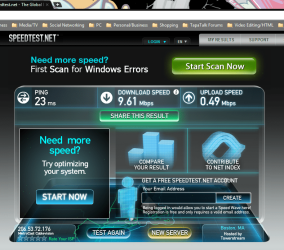
I utilize cable oppose to DSL and I average about 8Mbps download speed, so I can't figure out for the life of me what the problem is.
I hear some people say that they average 60-100 fps even while playing these same MMO's or other online games. It sounds kind of fake to me when I hear that these people are getting such good numbers and I'm getting such bad ones. I don't have a top of the line PC but I don't have a toaster either. Any help would be appreciated.

Thanks.

CASE: NZXT Phantom PHAN-001WT Red Steel / Plastic Enthusiast ATX Full Tower Computer Case
CPU: AMD Phenom II X6 1100T Black Edition Thuban 3.3GHz, 3.7GHz Turbo Socket AM3
GPU: Radeon HD 5870, 1GB Memory
CPU Cooler: ZALMAN CNPS11X Extreme V-Shaped Dual Heatpipe Design w/120mm Long Life Bearing
PSU: Antec High Current Gamer Series HCG-900 900W
MOBO: GIGABYTE GA-990XA-UD3 AM3+ AMD
MEMORY: G.SKILL Ripjaws X Series 8GB 240-Pin DDR3 SDRAM DDR3 186
OPTICAL DRIVE: SONY Black Blu-ray Burner 12X BD-R 2X BD-RE 8X DVD+R 5X DVD-RAM 8X BD-ROM
SSD: Crucial M4 CT064M4SSD2 2.5" 64GB SATA
HDD 1: Western Digital Caviar Blue WD5000AAKS 2TB 7200 RPM 16MB Cache
HDD 2: Western Digital Caviar Blue WD5000AAKS 1TB 7200 RPM 16MB Cache
HDD 3: Western Digital Caviar Blue WD5000AAKS 500GB 7200 RPM 16MB Cache
WIRELESS ADAPTER: ASUS PCE-N13 Wireless Adapter IEEE 802.11b/g/n
FANS: 140MM (x1), 120MM (x3), 200MM (x2)
 

Attachments
  • DxDiag.txt
    DxDiag.txt
    40.3 KB · Views: 35
  • Capture.PNG
    Capture.PNG
    141.4 KB · Views: 33

My Computer

OS
Windows 7 [64-Bit]
CPU
AMD Phenom II X6 1100T Black Edition Thuban 3.3GHz, 3.7GHz
Motherboard
GIGABYTE GA-990XA-UD3 AM3+ AMD
Memory
G.SKILL Ripjaws X Series 8GB 240-Pin DDR3 SDRAM DDR3 186
Graphics Card(s)
ATI Radeon HD 5870 1GB DDR5 PCI-Express Card
Sound Card
N/A (On-board Sound)
Monitor(s) Displays
HANNSpree 42" Class LCD 1080p 120Hz HDTV
Screen Resolution
1920 x 1080
Hard Drives
SSD: Crucial M4 CT064M4SSD2 2.5" 64GB SATA

HDD 1: Western Digital Caviar Blue WD5000AAKS 2TB 7200 RPM 16MB Cache

HDD 2: Western Digital Caviar Blue WD5000AAKS 1TB 7200 RPM 16MB Cache

HDD 3: Western Digital Caviar Blue WD5000AAKS 500GB 7200 R
PSU
Antec High Current Gamer Series HCG-900 900W
Case
NZXT Phantom PHAN-001WT Red Steel / Plastic Enthusiast ATX
Cooling
FANS: 140MM (x1), 120MM (x3), 200MM (x2)
Keyboard
Logitech G13 & Steelseries Merc Stealth
Mouse
Cyborg M.M.O. 7 Gaming Mouse, Logitech G700 & Steelseries Wo
Internet Speed
25 Mbps Download / 2 Mbps Upload
have you considered possibly lowering settings like AA FX or lowering shadows or resolution? Or it could possibly be a driver problem not sure because from what i see you have a decent setup trying tinkering with the settings first
 

My Computer

Computer type
PC/Desktop
Computer Manufacturer/Model Number
custom build
OS
Windows 10 64bit
CPU
AMD Phenom II X4 925 (Deneb)(2.8GHz) OC 3.4GHz
Motherboard
M5A78L-MLX Plus
Memory
Corsair Vengeance DDR3 4GBX2 (8192MB)
Graphics Card(s)
XFX HD 6870 1GB (OC)- 940MHz core, mem 1150MHz
Monitor(s) Displays
Vizio 26' 1920x1080 / Acer 1336x768
Screen Resolution
1920x1080 60Hz /1336x768
Hard Drives
Kingston Digital 60GB SSDNow V300/500gb HDD Western Digital 7200rpm (/WD 160GB HDD 7200rpm
PSU
CORSAIR CX600 600w
Case
AZZA Orion 202 EVO
Cooling
cooler master hyper TX3 cpu cooler
Keyboard
Razer DeathStalker
Mouse
Logitech Optical Gaming Mouse G400
Antivirus
Defualt on win 10
Browser
Firefox
Other Info
cpu is overclocked in bios
I think most online games require at the very least 10Mbps speeds. Optimal is 15-20Mbps and that's with a router that can handle it (not the little piddly modems that come with the ISP - even the Verizon fiOs ones). I personally do not play online games... especially not MMO's (I don't want to be robbed monthly just to play an already expensive to buy game)... but I could if I wanted too, because I have 30Mbps down and almost 25Mbps up and that's with a router designed for gaming/video streaming that is also guaranteed to not bottleneck large data transfers online (Netgear WNDR37AV, which is also responsible for bumping my 25/25 to 30/25).

I can say with a certainty, since other non-net games work perfectly within normal and above average FPS, it is NOT your hardware or rig. Period. It has to be your net (and I'd say most of your problem would be coming from the dismal upload speed as online games - especially MMO's - rely on BOTH to send and receive data in a continuous loop).
 

My Computer

Computer Manufacturer/Model Number
Acer Aspire 5738PG-6306
OS
7 Ultimate x64 SP1
CPU
Core 2 Duo T6600 @ 2.20GHz
Motherboard
Acer JV50 | Intel PM45 Chipset | BIOS Phoenix v1.21
Memory
4GB SDRAM DDR2 667
Graphics Card(s)
ATI Mobility Radeon 4570HD 512MB VDDR3 (2.25GB HyperMemory)
Sound Card
Integrated Dolby Home Theater HD Audio Support
Monitor(s) Displays
15.6" LED backlight HD/WS CineCrystal w/ Multi-Touch
Screen Resolution
Notebook: 1366x768 | Syncmaster P2370HD: 1920x1080
Hard Drives
Primary internal: 320GB WD3200BEVT-22ZCT0 @ 5400 RPM | Secondary external 1: 2TB Cavalry CAXB3702T0 @7200 RPM (USB 2.0) | Secondary external 2: 500GB Calvary CAUM @7200 RPM (USB 2.0).
PSU
AC Adapter
Case
Blue Clam shell
Cooling
OEM Bult-in.
Keyboard
Microsoft Wireless 3000 (USB)
Mouse
Logitech V220 (USB)
Internet Speed
31Mbps DL/25Mbps UL - Verizon fiOs/Netgear WNDR37AV
Other Info
EXTERNAL DISPLAY: 23" Samsung Syncmaster P2370HD | EXTERNAL SOUND: 300 Watt MX-KB30 JVC Stereo (AUX) | ROUTER: Netgear WNDR37AV 802.11a/b/g/n Dual-Band Gigabit | Satechi 12-Port USB 2.0 Hub | GAME PAD: SteelSeries 3GC USB 2.0 (JoyToKey Mapping) | DETAILED SYSTEM SPECIFICATIONS: http://www.tigerdirect.com/applications/SearchTools/item-details.asp?EdpNo=5265887&CatId=4938
10Mbps!?!?!!?

I have an average ping on BF3 64player of about 40! With a 1.7Mbps connection!

Used to play 128player return to castle wolfenstien with 56k lol.

The average internet speed in the entire uk is less than 6Mbps, from your reply it would mean most of the Uk can't play online games lol

Sent from my BlackBerry 9900 using Tapatalk
 

My Computer

Computer type
PC/Desktop
Computer Manufacturer/Model Number
Built by badgers!!!
OS
Windows 7 Ultimate x64, & Mac OS X 10.9.2
CPU
Intel Core i5 2500k
Motherboard
Asus P8z68 LE
Memory
Corsair Vengence 8gb 1866mhz
Graphics Card(s)
Nvidia GTX 770 OC
Monitor(s) Displays
2x ASUS LED 22" IPS
Screen Resolution
3840x1080
Hard Drives
240GB Crucial M500 SSD
120gb Corsair Force 3 SSD
1TB Western Digital
PSU
Corsair HX650w Modular
Case
Corsair Air 540
Cooling
Corsair H60 Push/Pull
Keyboard
Corsair K70/ Logitech G27 wheel
Mouse
Saitek R.A.T 9
Internet Speed
Too slow!
Other Info
AMD fusion E350N Home server-Windows Home Server 2011 (also made by badgers!)
2011 Macbook 2.4ghz Core2Duo, 4gb ddr3, 120gb Ocz Vertex SSD
have you considered possibly lowering settings like AA FX or lowering shadows or resolution? Or it could possibly be a driver problem not sure because from what i see you have a decent setup trying tinkering with the settings first

Even when lowering the settings, the issue is still there. Thank you for your suggestion tho.

Emitted from my Droid Bionic via Tapatalk
 

My Computer

OS
Windows 7 [64-Bit]
CPU
AMD Phenom II X6 1100T Black Edition Thuban 3.3GHz, 3.7GHz
Motherboard
GIGABYTE GA-990XA-UD3 AM3+ AMD
Memory
G.SKILL Ripjaws X Series 8GB 240-Pin DDR3 SDRAM DDR3 186
Graphics Card(s)
ATI Radeon HD 5870 1GB DDR5 PCI-Express Card
Sound Card
N/A (On-board Sound)
Monitor(s) Displays
HANNSpree 42" Class LCD 1080p 120Hz HDTV
Screen Resolution
1920 x 1080
Hard Drives
SSD: Crucial M4 CT064M4SSD2 2.5" 64GB SATA

HDD 1: Western Digital Caviar Blue WD5000AAKS 2TB 7200 RPM 16MB Cache

HDD 2: Western Digital Caviar Blue WD5000AAKS 1TB 7200 RPM 16MB Cache

HDD 3: Western Digital Caviar Blue WD5000AAKS 500GB 7200 R
PSU
Antec High Current Gamer Series HCG-900 900W
Case
NZXT Phantom PHAN-001WT Red Steel / Plastic Enthusiast ATX
Cooling
FANS: 140MM (x1), 120MM (x3), 200MM (x2)
Keyboard
Logitech G13 & Steelseries Merc Stealth
Mouse
Cyborg M.M.O. 7 Gaming Mouse, Logitech G700 & Steelseries Wo
Internet Speed
25 Mbps Download / 2 Mbps Upload
I think most online games require at the very least 10Mbps speeds. Optimal is 15-20Mbps and that's with a router that can handle it (not the little piddly modems that come with the ISP - even the Verizon fiOs ones). I personally do not play online games... especially not MMO's (I don't want to be robbed monthly just to play an already expensive to buy game)... but I could if I wanted too, because I have 30Mbps down and almost 25Mbps up and that's with a router designed for gaming/video streaming that is also guaranteed to not bottleneck large data transfers online (Netgear WNDR37AV, which is also responsible for bumping my 25/25 to 30/25).

I can say with a certainty, since other non-net games work perfectly within normal and above average FPS, it is NOT your hardware or rig. Period. It has to be your net (and I'd say most of your problem would be coming from the dismal upload speed as online games - especially MMO's - rely on BOTH to send and receive data in a continuous loop).

I think that's the best answer that I have ever received concerning this issue. It just makes sense. I'm using a Dual Band Linksys router (Linksys E2500) and a Arris TM602G/115 modem (that was provided by my ISP). My ISP offers at max, a 25MBPS download/2MBPS upload package.
Your upload speed seems ridiculously fast compared to the norm.

Emitted from my Droid Bionic via Tapatalk
 
Last edited:

My Computer

OS
Windows 7 [64-Bit]
CPU
AMD Phenom II X6 1100T Black Edition Thuban 3.3GHz, 3.7GHz
Motherboard
GIGABYTE GA-990XA-UD3 AM3+ AMD
Memory
G.SKILL Ripjaws X Series 8GB 240-Pin DDR3 SDRAM DDR3 186
Graphics Card(s)
ATI Radeon HD 5870 1GB DDR5 PCI-Express Card
Sound Card
N/A (On-board Sound)
Monitor(s) Displays
HANNSpree 42" Class LCD 1080p 120Hz HDTV
Screen Resolution
1920 x 1080
Hard Drives
SSD: Crucial M4 CT064M4SSD2 2.5" 64GB SATA

HDD 1: Western Digital Caviar Blue WD5000AAKS 2TB 7200 RPM 16MB Cache

HDD 2: Western Digital Caviar Blue WD5000AAKS 1TB 7200 RPM 16MB Cache

HDD 3: Western Digital Caviar Blue WD5000AAKS 500GB 7200 R
PSU
Antec High Current Gamer Series HCG-900 900W
Case
NZXT Phantom PHAN-001WT Red Steel / Plastic Enthusiast ATX
Cooling
FANS: 140MM (x1), 120MM (x3), 200MM (x2)
Keyboard
Logitech G13 & Steelseries Merc Stealth
Mouse
Cyborg M.M.O. 7 Gaming Mouse, Logitech G700 & Steelseries Wo
Internet Speed
25 Mbps Download / 2 Mbps Upload
10Mbps!?!?!!?

I have an average ping on BF3 64player of about 40! With a 1.7Mbps connection!

Used to play 128player return to castle wolfenstien with 56k lol.

The average internet speed in the entire uk is less than 6Mbps, from your reply it would mean most of the Uk can't play online games lol

Sent from my BlackBerry 9900 using Tapatalk
As the OP stated, he CAN play them... they're just bottle-necked. You get what you pay for. I could probably downgrade my internet to the bare minimum of 1Mbps each way (and on "high speed" DSL rather than fiOs Broadband), and still be able to play an older game like Warcraft II.BNE over it's online network (though I doubt anyone's still playing it) and have NO problems. Try that with a modern MMORPG game (i.e. WOW) with significantly larger chunks of data having to be passed between you and the net. It'll be horrible.

And what else, pray tell, would you suspect when all other games NOT online play perfect? It has got to be the net.
 

My Computer

Computer Manufacturer/Model Number
Acer Aspire 5738PG-6306
OS
7 Ultimate x64 SP1
CPU
Core 2 Duo T6600 @ 2.20GHz
Motherboard
Acer JV50 | Intel PM45 Chipset | BIOS Phoenix v1.21
Memory
4GB SDRAM DDR2 667
Graphics Card(s)
ATI Mobility Radeon 4570HD 512MB VDDR3 (2.25GB HyperMemory)
Sound Card
Integrated Dolby Home Theater HD Audio Support
Monitor(s) Displays
15.6" LED backlight HD/WS CineCrystal w/ Multi-Touch
Screen Resolution
Notebook: 1366x768 | Syncmaster P2370HD: 1920x1080
Hard Drives
Primary internal: 320GB WD3200BEVT-22ZCT0 @ 5400 RPM | Secondary external 1: 2TB Cavalry CAXB3702T0 @7200 RPM (USB 2.0) | Secondary external 2: 500GB Calvary CAUM @7200 RPM (USB 2.0).
PSU
AC Adapter
Case
Blue Clam shell
Cooling
OEM Bult-in.
Keyboard
Microsoft Wireless 3000 (USB)
Mouse
Logitech V220 (USB)
Internet Speed
31Mbps DL/25Mbps UL - Verizon fiOs/Netgear WNDR37AV
Other Info
EXTERNAL DISPLAY: 23" Samsung Syncmaster P2370HD | EXTERNAL SOUND: 300 Watt MX-KB30 JVC Stereo (AUX) | ROUTER: Netgear WNDR37AV 802.11a/b/g/n Dual-Band Gigabit | Satechi 12-Port USB 2.0 Hub | GAME PAD: SteelSeries 3GC USB 2.0 (JoyToKey Mapping) | DETAILED SYSTEM SPECIFICATIONS: http://www.tigerdirect.com/applications/SearchTools/item-details.asp?EdpNo=5265887&CatId=4938
i dont know, but id have thought modern games like Bf3 will have more and larger data packs than WoW.

was merely saying i manage with 1.7Mbps with 0 lag and low pings on all modern FPS's :D
 

My Computer

Computer type
PC/Desktop
Computer Manufacturer/Model Number
Built by badgers!!!
OS
Windows 7 Ultimate x64, & Mac OS X 10.9.2
CPU
Intel Core i5 2500k
Motherboard
Asus P8z68 LE
Memory
Corsair Vengence 8gb 1866mhz
Graphics Card(s)
Nvidia GTX 770 OC
Monitor(s) Displays
2x ASUS LED 22" IPS
Screen Resolution
3840x1080
Hard Drives
240GB Crucial M500 SSD
120gb Corsair Force 3 SSD
1TB Western Digital
PSU
Corsair HX650w Modular
Case
Corsair Air 540
Cooling
Corsair H60 Push/Pull
Keyboard
Corsair K70/ Logitech G27 wheel
Mouse
Saitek R.A.T 9
Internet Speed
Too slow!
Other Info
AMD fusion E350N Home server-Windows Home Server 2011 (also made by badgers!)
2011 Macbook 2.4ghz Core2Duo, 4gb ddr3, 120gb Ocz Vertex SSD
10Mbps!?!?!!?

I have an average ping on BF3 64player of about 40! With a 1.7Mbps connection!

Used to play 128player return to castle wolfenstien with 56k lol.

The average internet speed in the entire uk is less than 6Mbps, from your reply it would mean most of the Uk can't play online games lol

Sent from my BlackBerry 9900 using Tapatalk
As the OP stated, he CAN play them... they're just bottle-necked. You get what you pay for. I could probably downgrade my internet to the bare minimum of 1Mbps each way (and on "high speed" DSL rather than fiOs Broadband), and still be able to play an older game like Warcraft II.BNE over it's online network (though I doubt anyone's still playing it) and have NO problems. Try that with a modern MMORPG game (i.e. WOW) with significantly larger chunks of data having to be passed between you and the net. It'll be horrible.

And what else, pray tell, would you suspect when all other games NOT online play perfect? It has got to be the net.

Woot? I've been playing wow since the wotlk came out with 1mbps, and never had any problems! It runs constantly at around 60ms ping, which may not be perfect, but i couldn't expect more from 1mbps. It just can't be his internet.

Edit: BTW. I don't think internet has anything to do with fps...
 

My Computer

OS
Windows 7 Home Premium 64bit
CPU
Amd Phenom II X4 960T
Motherboard
Asrock 970 Extreme4
Memory
Kingston HyperX Blue 4GB DDR3 1600MHz
Graphics Card(s)
Gainward GeForce GTX 560 Ti 1GB GDDR5
Sound Card
Realtek HD audio
Monitor(s) Displays
Proview AI2237W
Screen Resolution
1680x1050
Hard Drives
Hitachi 160Gb Sata II 2Mb
PSU
Chieftec CTB-650S
Case
Cooler Master Elite 430
Cooling
Cooler Master Vortex Plus + 3 120mm case fans
Keyboard
Omega illuminated
Mouse
A4Tech Wireless
Internet Speed
1 mbitps
it doesnt/shouldnt. it would just produce lag. But fraps may read that as lower frame rates, as its the same thing that happens when a system struggles.

is it possible for you to run a cable from your router to your rig? that will rule at a wireless issue.
 

My Computer

Computer type
PC/Desktop
Computer Manufacturer/Model Number
Built by badgers!!!
OS
Windows 7 Ultimate x64, & Mac OS X 10.9.2
CPU
Intel Core i5 2500k
Motherboard
Asus P8z68 LE
Memory
Corsair Vengence 8gb 1866mhz
Graphics Card(s)
Nvidia GTX 770 OC
Monitor(s) Displays
2x ASUS LED 22" IPS
Screen Resolution
3840x1080
Hard Drives
240GB Crucial M500 SSD
120gb Corsair Force 3 SSD
1TB Western Digital
PSU
Corsair HX650w Modular
Case
Corsair Air 540
Cooling
Corsair H60 Push/Pull
Keyboard
Corsair K70/ Logitech G27 wheel
Mouse
Saitek R.A.T 9
Internet Speed
Too slow!
Other Info
AMD fusion E350N Home server-Windows Home Server 2011 (also made by badgers!)
2011 Macbook 2.4ghz Core2Duo, 4gb ddr3, 120gb Ocz Vertex SSD
Wireless internet isn't really all that reliable (especially for games). I hate using wireless internet. I have a cable from my Router to my PC in my room. Try using a cable, and see if that helps any. It did for me.
 

My Computer

Computer Manufacturer/Model Number
Custom
OS
Windows 7 Ultimate 32-Bit
CPU
Intel(R) Core(TM) i7 CPU 920 @ 2.67GHz
Motherboard
Gigabyte Technology Co., Ltd. EX58-UD3R
Memory
Corsair DDR3 4Gb
Graphics Card(s)
Nvidia Ge-Force GTS250
Sound Card
High Definition Audio Device
Monitor(s) Displays
Envision 19 inch
Screen Resolution
1280x1024
Hard Drives
2 physical hard drives (4 letter drives) that equal up to 626.3 gigs of space all together. I think both are Maxtors, but primary is a SATA drive, secondary is a SATA, too.
Case
"Elite" style case
Cooling
"Cooler Master"
Mouse
Microsoft Optical USB Mouse.
Internet Speed
Verizon DSL Internet
I use a cable directly from my router actually. I recently upgraded my internet speed and I do notice a slight difference while gaming online. :( Although it's not a staggering difference, it is still somewhat noticeable. (18Mbps/2Mbps)

I do notice a significant difference when it comes to downloading and streaming video though. :D
 

My Computer

OS
Windows 7 [64-Bit]
CPU
AMD Phenom II X6 1100T Black Edition Thuban 3.3GHz, 3.7GHz
Motherboard
GIGABYTE GA-990XA-UD3 AM3+ AMD
Memory
G.SKILL Ripjaws X Series 8GB 240-Pin DDR3 SDRAM DDR3 186
Graphics Card(s)
ATI Radeon HD 5870 1GB DDR5 PCI-Express Card
Sound Card
N/A (On-board Sound)
Monitor(s) Displays
HANNSpree 42" Class LCD 1080p 120Hz HDTV
Screen Resolution
1920 x 1080
Hard Drives
SSD: Crucial M4 CT064M4SSD2 2.5" 64GB SATA

HDD 1: Western Digital Caviar Blue WD5000AAKS 2TB 7200 RPM 16MB Cache

HDD 2: Western Digital Caviar Blue WD5000AAKS 1TB 7200 RPM 16MB Cache

HDD 3: Western Digital Caviar Blue WD5000AAKS 500GB 7200 R
PSU
Antec High Current Gamer Series HCG-900 900W
Case
NZXT Phantom PHAN-001WT Red Steel / Plastic Enthusiast ATX
Cooling
FANS: 140MM (x1), 120MM (x3), 200MM (x2)
Keyboard
Logitech G13 & Steelseries Merc Stealth
Mouse
Cyborg M.M.O. 7 Gaming Mouse, Logitech G700 & Steelseries Wo
Internet Speed
25 Mbps Download / 2 Mbps Upload
When you say "18MBP/s", do you mean 18megabytes a second? That's pretty dang high. That shouldn't be causing any lag at all.

Edit: Even with my lame ass DSL (which is only 125 killabytes a second), and no one else is using the internet except for me, even I could play WoW without problems.
 

My Computer

Computer Manufacturer/Model Number
Custom
OS
Windows 7 Ultimate 32-Bit
CPU
Intel(R) Core(TM) i7 CPU 920 @ 2.67GHz
Motherboard
Gigabyte Technology Co., Ltd. EX58-UD3R
Memory
Corsair DDR3 4Gb
Graphics Card(s)
Nvidia Ge-Force GTS250
Sound Card
High Definition Audio Device
Monitor(s) Displays
Envision 19 inch
Screen Resolution
1280x1024
Hard Drives
2 physical hard drives (4 letter drives) that equal up to 626.3 gigs of space all together. I think both are Maxtors, but primary is a SATA drive, secondary is a SATA, too.
Case
"Elite" style case
Cooling
"Cooler Master"
Mouse
Microsoft Optical USB Mouse.
Internet Speed
Verizon DSL Internet
Ill put money on it NOT being internet related.

If it was, you'd get the same poor performance/lagging on your system while downloading, and or running speedtests.

Is it just WOW? I could just be a compatability issue, with your hardware and or windows version.

Not sure if you've mentioned it but try compatibility mode. Xp s3 or similar

Sent from my BlackBerry 9900 using Tapatalk
 

My Computer

Computer type
PC/Desktop
Computer Manufacturer/Model Number
Built by badgers!!!
OS
Windows 7 Ultimate x64, & Mac OS X 10.9.2
CPU
Intel Core i5 2500k
Motherboard
Asus P8z68 LE
Memory
Corsair Vengence 8gb 1866mhz
Graphics Card(s)
Nvidia GTX 770 OC
Monitor(s) Displays
2x ASUS LED 22" IPS
Screen Resolution
3840x1080
Hard Drives
240GB Crucial M500 SSD
120gb Corsair Force 3 SSD
1TB Western Digital
PSU
Corsair HX650w Modular
Case
Corsair Air 540
Cooling
Corsair H60 Push/Pull
Keyboard
Corsair K70/ Logitech G27 wheel
Mouse
Saitek R.A.T 9
Internet Speed
Too slow!
Other Info
AMD fusion E350N Home server-Windows Home Server 2011 (also made by badgers!)
2011 Macbook 2.4ghz Core2Duo, 4gb ddr3, 120gb Ocz Vertex SSD
He could also be having problems if he doesn't have "Ports" forwarded in his Router, but I have a suspicion that it's not that either.
 

My Computer

Computer Manufacturer/Model Number
Custom
OS
Windows 7 Ultimate 32-Bit
CPU
Intel(R) Core(TM) i7 CPU 920 @ 2.67GHz
Motherboard
Gigabyte Technology Co., Ltd. EX58-UD3R
Memory
Corsair DDR3 4Gb
Graphics Card(s)
Nvidia Ge-Force GTS250
Sound Card
High Definition Audio Device
Monitor(s) Displays
Envision 19 inch
Screen Resolution
1280x1024
Hard Drives
2 physical hard drives (4 letter drives) that equal up to 626.3 gigs of space all together. I think both are Maxtors, but primary is a SATA drive, secondary is a SATA, too.
Case
"Elite" style case
Cooling
"Cooler Master"
Mouse
Microsoft Optical USB Mouse.
Internet Speed
Verizon DSL Internet
He could also be having problems if he doesn't have "Ports" forwarded in his Router, but I have a suspicion that it's not that either.

I didn't even think of that. Are there certain ports that are typically forwarded for online gaming purposes?
 
Last edited:

My Computer

OS
Windows 7 [64-Bit]
CPU
AMD Phenom II X6 1100T Black Edition Thuban 3.3GHz, 3.7GHz
Motherboard
GIGABYTE GA-990XA-UD3 AM3+ AMD
Memory
G.SKILL Ripjaws X Series 8GB 240-Pin DDR3 SDRAM DDR3 186
Graphics Card(s)
ATI Radeon HD 5870 1GB DDR5 PCI-Express Card
Sound Card
N/A (On-board Sound)
Monitor(s) Displays
HANNSpree 42" Class LCD 1080p 120Hz HDTV
Screen Resolution
1920 x 1080
Hard Drives
SSD: Crucial M4 CT064M4SSD2 2.5" 64GB SATA

HDD 1: Western Digital Caviar Blue WD5000AAKS 2TB 7200 RPM 16MB Cache

HDD 2: Western Digital Caviar Blue WD5000AAKS 1TB 7200 RPM 16MB Cache

HDD 3: Western Digital Caviar Blue WD5000AAKS 500GB 7200 R
PSU
Antec High Current Gamer Series HCG-900 900W
Case
NZXT Phantom PHAN-001WT Red Steel / Plastic Enthusiast ATX
Cooling
FANS: 140MM (x1), 120MM (x3), 200MM (x2)
Keyboard
Logitech G13 & Steelseries Merc Stealth
Mouse
Cyborg M.M.O. 7 Gaming Mouse, Logitech G700 & Steelseries Wo
Internet Speed
25 Mbps Download / 2 Mbps Upload
Depends on what game it is. Almost every game out there uses a different port for multiplayer. You'll have to look at the game's main website to get the port numbers.
 

My Computer

Computer Manufacturer/Model Number
Custom
OS
Windows 7 Ultimate 32-Bit
CPU
Intel(R) Core(TM) i7 CPU 920 @ 2.67GHz
Motherboard
Gigabyte Technology Co., Ltd. EX58-UD3R
Memory
Corsair DDR3 4Gb
Graphics Card(s)
Nvidia Ge-Force GTS250
Sound Card
High Definition Audio Device
Monitor(s) Displays
Envision 19 inch
Screen Resolution
1280x1024
Hard Drives
2 physical hard drives (4 letter drives) that equal up to 626.3 gigs of space all together. I think both are Maxtors, but primary is a SATA drive, secondary is a SATA, too.
Case
"Elite" style case
Cooling
"Cooler Master"
Mouse
Microsoft Optical USB Mouse.
Internet Speed
Verizon DSL Internet
You are getting decent FPS while you play offline, this ensures that you can play with the same framerate online.
I've been playing online RPG's for 3 years with 2Mbps line, ain't got a problem ever with pings/FPS.
But, what is not considered here is your SNR value, which is equally important.

What is a good "Signal Level" ? What is "Upstream SNR" ? What is a good signal strength ? If you want to know the answers to those and other similar questions, read on.
The basic information about your particular brand of modem can probably be found at the manufacturer's website... The most taled about issue when having problems, and the first thing to analyze, is the status of the signal to your [COLOR=green !important][FONT=inherit !important][COLOR=green ! important][FONT=inherit ! important]cable [/FONT][/FONT][FONT=inherit !important][COLOR=green ! important][FONT=inherit ! important]modem[/FONT][/COLOR][/FONT][/COLOR][/COLOR], so what does it mean ?
On your cable modem manufacturer's page you might find terms such as: downstream SNR (signal to noise ratio), downstream power level, upstream SNR and upstream power level. Here's what all those mean, and a general guideline of what constitutes a problem:
Downstream SNR shows the strength of the signal to your cable modem as compared to the noise on the line (signal/noise). If the noise level increases the SNR value decreases. So, then high levels are good for the SNR. This number should be at 30 or more. If the SNR goes below 30 than you will probably start to experience some problems, such as intermittent connection, packet loss, etc.
Downstream Power shows the power of the signal your cable modem is getting. The level of the downstream power should be -15 to 15 dB according to most manufacturers' specs... However, it is best for that level to be in the -8 to 8 range.
Upstream SNR shows how much signal the head end is getting from your cable modem, compared to the noise level. "Head End" refers to the point of reference that is the central point of the local network of your [COLOR=green !important][FONT=inherit !important][COLOR=green !important][FONT=inherit !important]service [/FONT][/FONT][FONT=inherit !important][COLOR=green !important][FONT=inherit !important]provider[/FONT][/COLOR][/FONT][/COLOR][/COLOR]. Anything above 29 is good. Just like the download SNR if the noise level increases the upstream SNR decreases.
Upstream Power shows the level of the signal from the cable modem to the provider. This number should be lower than 55dB. The lower the number, the better your connection.
All those numbers can aid in determining many potential problems with your cable modem connection...
^via speedguide.net

YBL.
 

My Computer

Computer Manufacturer/Model Number
AMD _(Assembled)_
OS
Dual Booting Windows 7 64-Bit Ultimate Edition and Fedora 16.
CPU
AMD Phenom X4 925
Motherboard
MSI 785g-E53
Memory
4gb DDR3 G.skill RipJaws
Graphics Card(s)
ATI Radeon HD 6770
Sound Card
Realtek
Monitor(s) Displays
Dell IN2020M LED
Screen Resolution
1600*900 20"
Hard Drives
Seagate 500 Gibs
External 320 Gb Western Digital(Got Glitchy)
PSU
Cooler Master
Case
Cooler Master
Cooling
Cooler Master
Keyboard
Logitech K100
Mouse
Razor Death Adder v2 3500 dPi (Razer Goliathus Pad)
Internet Speed
Back to college Internet with Cyberroam X|
Some games have a problem if you can't open ports on your Router. StarCraft had this issue. If you can't open your ports, you can't play online due to your PC not receiving any "information packets".

Edit: I should say "sensitive" instead of problem.
 

My Computer

Computer Manufacturer/Model Number
Custom
OS
Windows 7 Ultimate 32-Bit
CPU
Intel(R) Core(TM) i7 CPU 920 @ 2.67GHz
Motherboard
Gigabyte Technology Co., Ltd. EX58-UD3R
Memory
Corsair DDR3 4Gb
Graphics Card(s)
Nvidia Ge-Force GTS250
Sound Card
High Definition Audio Device
Monitor(s) Displays
Envision 19 inch
Screen Resolution
1280x1024
Hard Drives
2 physical hard drives (4 letter drives) that equal up to 626.3 gigs of space all together. I think both are Maxtors, but primary is a SATA drive, secondary is a SATA, too.
Case
"Elite" style case
Cooling
"Cooler Master"
Mouse
Microsoft Optical USB Mouse.
Internet Speed
Verizon DSL Internet
Back
Top