
Solved How do I clean my screen monitor?

James661

New member
Local time
2:30 PM
Messages
5
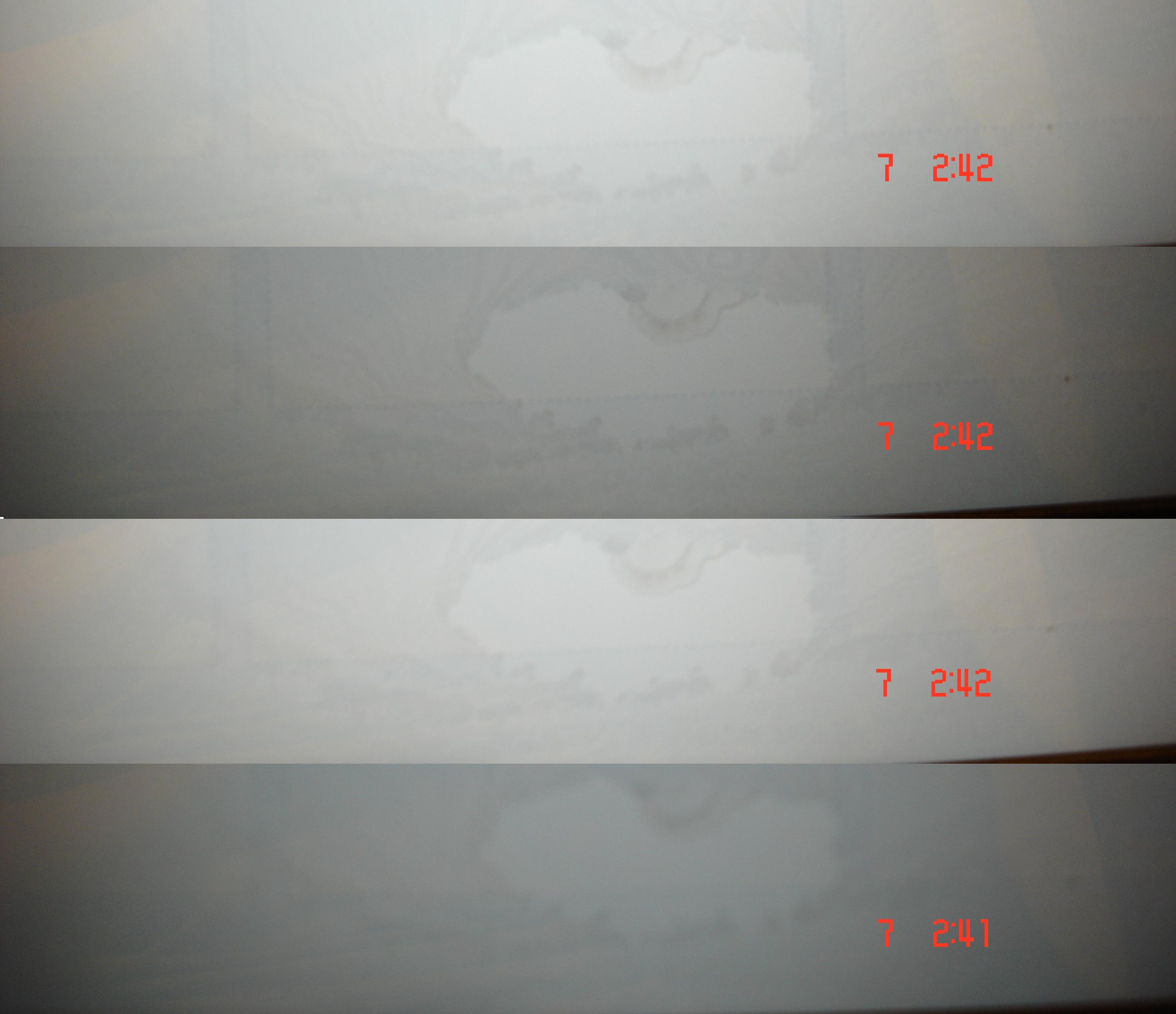
Hi, my new laptop's screen has a weird stain at the bottom, I can't get rid of it can you guys tell me what is it and how can I fix it myself? I still got the warranty but I don't want to send the laptop to repair because It's too much trouble there must be a way I can fix it myself so please help?

Here's a picture of the stain I took 4 different pictures and put them together in 1 single picture.. (stain is in the middle)
OzRE7.jpg
 

My Computer My Computer

At a glance

Windows 7 Home Premium 64 Bit
OS
Windows 7 Home Premium 64 Bit
For exterior dirt, smudges, etc this is the official Toshiba suggested way to clean a laptop screen. I'm sure it will work for any brand laptop.

How to properly clean your laptop | Research Center | Toshiba

But what you photographed might be LCD "bruising". This is a permanent, superficially discolored (light or dark) area on the back side of an LCD panel often caused by heat stress and/or excessive pressure and possible excessive force (being hit, dropped etc) damaging the LCD cells. This damage can't be repaired and is there for the life of the panel. I guess another possibility is that there was condensation of some sort on the inside surface of the panel 'glass' that has subsequently dried out leaving behind water spots. This is usually not repairable either; you'd have to dismantle the LCD panel and this may not be possible.

Sorry for not having a better answer. :(
 

My Computer My Computer

At a glance

Win 7 Pro 64-bitIntel i5 2.4 Ghz8GB DDR3Intel HD 3000
Computer type
Laptop
Computer Manufacturer/Model Number
Sony Vaio VPCEB47GM Laptop
OS
Win 7 Pro 64-bit
CPU
Intel i5 2.4 Ghz
Memory
8GB DDR3
Graphics Card(s)
Intel HD 3000
Sound Card
IDT High Definition
Monitor(s) Displays
15.6 WGXA Anti-Glare LED
Screen Resolution
1280x800
Hard Drives
640Gb 7200rpm
Antivirus
MSE
Browser
Opera (primary) with IE9 backup
For exterior dirt, smudges, etc this is the official Toshiba suggested way to clean a laptop screen. I'm sure it will work for any brand laptop.

How to properly clean your laptop | Research Center | Toshiba

But what you photographed might be LCD "bruising". This is a permanent, superficially discolored (light or dark) area on the back side of an LCD panel often caused by heat stress and/or excessive pressure and possible excessive force (being hit, dropped etc) damaging the LCD cells. This damage can't be repaired and is there for the life of the panel. I guess another possibility is that there was condensation of some sort on the inside surface of the panel 'glass' that has subsequently dried out leaving behind water spots. This is usually not repairable either; you'd have to dismantle the LCD panel and this may not be possible.

Sorry for not having a better answer. :(

That's terrible news! do you think they would give me another laptop if I send it back? because you said there's no way to repair or dismantle it..

I don't mind really but my relative said he's gonna return it if I don't fix it that's why I came here to ask..
 

My Computer My Computer

At a glance

Windows 7 Home Premium 64 Bit
OS
Windows 7 Home Premium 64 Bit
For exterior dirt, smudges, etc this is the official Toshiba suggested way to clean a laptop screen. I'm sure it will work for any brand laptop.

How to properly clean your laptop | Research Center | Toshiba

But what you photographed might be LCD "bruising". This is a permanent, superficially discolored (light or dark) area on the back side of an LCD panel often caused by heat stress and/or excessive pressure and possible excessive force (being hit, dropped etc) damaging the LCD cells. This damage can't be repaired and is there for the life of the panel. I guess another possibility is that there was condensation of some sort on the inside surface of the panel 'glass' that has subsequently dried out leaving behind water spots. This is usually not repairable either; you'd have to dismantle the LCD panel and this may not be possible.

Sorry for not having a better answer. :(

:ditto: Definitely looks like it needs a replacement. Good description of the problem.
 

My Computer My Computer

At a glance

Windows 7 x64 Professional SP1Intel C2D T9550 2.66 GHz @ 2.793 GHz (Thanks ...8 GB DDR3ATI MOBILITY RADEON 4670
Computer Manufacturer/Model Number
DELL SXPS 1640
OS
Windows 7 x64 Professional SP1
CPU
Intel C2D T9550 2.66 GHz @ 2.793 GHz (Thanks ThrottleStop!!)
Motherboard
Intel PM45
Memory
8 GB DDR3
Graphics Card(s)
ATI MOBILITY RADEON 4670
Sound Card
CREATIVE XFI AUDIO NOTEBOOK
Monitor(s) Displays
16.1 WLED
Screen Resolution
1920x1080
Hard Drives
Seagate ST9500420AS 500GB (465GiBi) 7200 RPM Drive

External Drives:-
2 TB WD Essentials x 3
1 TB WD Mybook Gen 1
1 TB WD Mybook Gen 2
1 TB Seagate
1 TB Seagate
320 GB WD Scorpio Black (enclosed)
PSU
90W Dell Power Brick
Case
Dell Chassis
Cooling
Coolermaster Cooling Pad
Keyboard
Built-in backlighted Keyboard
Mouse
Logitech Wireless Mini Mouse
Internet Speed
4/0.5
I don't have a definite answer for you. The manufacturer may try to say the screen was fine when it left the factory and somebody did something to void the warranty. Or, the factory may have had a production run of several laptops with the same problem and they'll replace it, no questions asked. How long have you had the lappy and when did you first notice that discoloration?
 

My Computer My Computer

At a glance

Win 7 Pro 64-bitIntel i5 2.4 Ghz8GB DDR3Intel HD 3000
Computer type
Laptop
Computer Manufacturer/Model Number
Sony Vaio VPCEB47GM Laptop
OS
Win 7 Pro 64-bit
CPU
Intel i5 2.4 Ghz
Memory
8GB DDR3
Graphics Card(s)
Intel HD 3000
Sound Card
IDT High Definition
Monitor(s) Displays
15.6 WGXA Anti-Glare LED
Screen Resolution
1280x800
Hard Drives
640Gb 7200rpm
Antivirus
MSE
Browser
Opera (primary) with IE9 backup
I don't have a definite answer for you. The manufacturer may try to say the screen was fine when it left the factory and somebody did something to void the warranty. Or, the factory may have had a production run of several laptops with the same problem and they'll replace it, no questions asked. How long have you had the lappy and when did you first notice that discoloration?

Got the laptop last December and it started to show up 5 months later I did not drop it on the floor or spilled any liquids which is odd why that appeared but thanks for the help!

the warranty is for 1 year but not sure if they are going to do anything about it ~
 

My Computer My Computer

At a glance

Windows 7 Home Premium 64 Bit
OS
Windows 7 Home Premium 64 Bit
The absolute worst that can happen is they say they won't do anything to help. In which case you're no worse off than you are right now. On the other hand, they may change out the entire screen assembly free of charge. You won't know unless you ask. ;)
 

My Computer My Computer

At a glance

Win 7 Pro 64-bitIntel i5 2.4 Ghz8GB DDR3Intel HD 3000
Computer type
Laptop
Computer Manufacturer/Model Number
Sony Vaio VPCEB47GM Laptop
OS
Win 7 Pro 64-bit
CPU
Intel i5 2.4 Ghz
Memory
8GB DDR3
Graphics Card(s)
Intel HD 3000
Sound Card
IDT High Definition
Monitor(s) Displays
15.6 WGXA Anti-Glare LED
Screen Resolution
1280x800
Hard Drives
640Gb 7200rpm
Antivirus
MSE
Browser
Opera (primary) with IE9 backup
Back
Top