My Sony VAIO Blu-Ray drive has stopped reading DVDs and CDs

SamuelGE

New member
Local time
5:49 PM
Messages
43
Earlier this week whilst trying to make a system repair disc in Windows, half way through making the disc, it stopped. Since then my Blu-Ray drive has stopped reading DVDs and CDs, but still reads Blu-Rays that I put in the drive. I can't boot from it and I reinstalled Windows yesterday with no difference with the drive.

Sony suggested I uninstall the drive but didn't say how to in their email. Is that really going to work?

Even when there is a CD or DVD in the drive, if I click on the drive it says 'please insert a disc into drive D:'

Thank you.
 

My Computer My Computer

At a glance

Windows 7 Ultimate 64bitAMD Phenom II P840 Triple-Core6GB RAM
Computer Manufacturer/Model Number
Sony VAIO VPCEE3Z0E
OS
Windows 7 Ultimate 64bit
CPU
AMD Phenom II P840 Triple-Core
Memory
6GB RAM
Screen Resolution
1366x768
Earlier this week whilst trying to make a system repair disc in Windows, half way through making the disc, it stopped. Since then my Blu-Ray drive has stopped reading DVDs and CDs, but still reads Blu-Rays that I put in the drive. I can't boot from it and I reinstalled Windows yesterday with no difference with the drive.

Sony suggested I uninstall the drive but didn't say how to in their email. Is that really going to work?

Even when there is a CD or DVD in the drive, if I click on the drive it says 'please insert a disc into drive D:'

Thank you.
I had an issue with a dvd drive where the driver was reinsalled and volia, it worked. I would try that first. To reinstall the dvd drive, go to start and type in Device Manager and press enter. Then, expand the section titled " DVD/CDROM Drives. Then, right click on your dvd drive and select uninstall. Then, reboot your computer and it will install the dvd drive again upon boot.
 

My Computer My Computer

At a glance

Windows 7 Professional x64 Service Pack 1AMD Athlon X4 6456GB DDR3 1066Sapphire Radeon HD 5670 512MB GDDR5
Computer type
PC/Desktop
Computer Manufacturer/Model Number
HP Pavilion P7-1010
OS
Windows 7 Professional x64 Service Pack 1
CPU
AMD Athlon X4 645
Motherboard
Foxxcon N-Alvorix RS880
Memory
6GB DDR3 1066
Graphics Card(s)
Sapphire Radeon HD 5670 512MB GDDR5
Sound Card
Realtek Integrated Audio
Monitor(s) Displays
HP 2011x
Screen Resolution
1600x900
Hard Drives
1. Crucial M4 128GB SSD
2. 1TB Seagate Barracuda 7200.12 RPM
3. 1TB Western Digital Caviar Green 5400RPM
PSU
Seasonic S12 II Bronze 380 Watt
Case
HP OEM
Cooling
Coolermaster Heatsink, AVC Case Fan
Keyboard
HP OEM- Made by Chicony
Mouse
HP OEM- Made by Logitech
Internet Speed
20MBit Down/4 Up
Antivirus
Microsoft Security Essentials
Browser
Internet Explorer 10
I uninstalled both the drives here;
PIONEER BD-ROM BDC-TD03 ATA Device
QXURYX SPU7KLE7 SCSI CdRom Device
(I think the SCSI one is because I have Daemon Tools installed)

I then rebooted and I am still getting the insert disc dilemma.

My drive will still read Blu-Rays though, but still nothing for CDs and DVDs.
 

My Computer My Computer

At a glance

Windows 7 Ultimate 64bitAMD Phenom II P840 Triple-Core6GB RAM
Computer Manufacturer/Model Number
Sony VAIO VPCEE3Z0E
OS
Windows 7 Ultimate 64bit
CPU
AMD Phenom II P840 Triple-Core
Memory
6GB RAM
Screen Resolution
1366x768
How long have you had Daemon Tools installed? Every so often I hear of issues with it. If you find you can use the drive without Windows being loaded (like booting from a CD/DVD) it would tend to indicate the hardware's okay. If so, I would try uninstalling both the Daemon Tools program and its driver, at least temporarily, just to see. Rebooting after uninstalling may be necessary.

If it still doesn't work after uninstalling Daemon Tools, you may need to uninstall the PIONEER BD-ROM driver and reboot again.

One other thing to try, maybe even before uninstalling Daemon Tools, is to use System Restore to go back to a point before Daemon Tools was installed (if it's a relatively recent restore point). That should take you back to a pre-Daemon Tools install condition more cleanly than a direct uninstall is likely to do.
 
Last edited:

My Computer My Computer

At a glance

Windows 7 Ultimate x64
OS
Windows 7 Ultimate x64
I've had it installed for a while, plus I reinstalled windows yesterday so I can't go back. It used to work even when Daemon tools was installed, but I'll give it a shot in the morning.

I also can't boot from it, I don't think. I'll have another go in the morning.

Thank you


Sent from my iPhone using SevenForums app
 

My Computer My Computer

At a glance

Windows 7 Ultimate 64bitAMD Phenom II P840 Triple-Core6GB RAM
Computer Manufacturer/Model Number
Sony VAIO VPCEE3Z0E
OS
Windows 7 Ultimate 64bit
CPU
AMD Phenom II P840 Triple-Core
Memory
6GB RAM
Screen Resolution
1366x768
I've uninstalled Daemon tools, restarted.
Then uninstalled the Pioneer drive and restarted again and still nothing.
 

My Computer My Computer

At a glance

Windows 7 Ultimate 64bitAMD Phenom II P840 Triple-Core6GB RAM
Computer Manufacturer/Model Number
Sony VAIO VPCEE3Z0E
OS
Windows 7 Ultimate 64bit
CPU
AMD Phenom II P840 Triple-Core
Memory
6GB RAM
Screen Resolution
1366x768
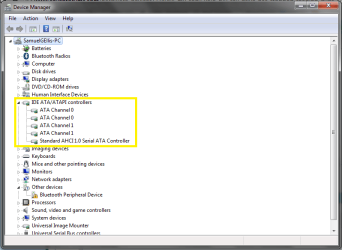
Should I uninstall any of these?
 

Attachments

  • Untitled.png
    Untitled.png
    21.5 KB · Views: 84

My Computer My Computer

At a glance

Windows 7 Ultimate 64bitAMD Phenom II P840 Triple-Core6GB RAM
Computer Manufacturer/Model Number
Sony VAIO VPCEE3Z0E
OS
Windows 7 Ultimate 64bit
CPU
AMD Phenom II P840 Triple-Core
Memory
6GB RAM
Screen Resolution
1366x768
Should I uninstall any of these?
No. Those are the controllers that control your hard drive and dvd drive. Try burning a blu-ray disc and see how the drive runs. If it burns the blu-ray disc sucessfully, then it may just not read cds and dvds anymore for some weired reason. I would suggest you get it replaced under warranty.
 

My Computer My Computer

At a glance

Windows 7 Professional x64 Service Pack 1AMD Athlon X4 6456GB DDR3 1066Sapphire Radeon HD 5670 512MB GDDR5
Computer type
PC/Desktop
Computer Manufacturer/Model Number
HP Pavilion P7-1010
OS
Windows 7 Professional x64 Service Pack 1
CPU
AMD Athlon X4 645
Motherboard
Foxxcon N-Alvorix RS880
Memory
6GB DDR3 1066
Graphics Card(s)
Sapphire Radeon HD 5670 512MB GDDR5
Sound Card
Realtek Integrated Audio
Monitor(s) Displays
HP 2011x
Screen Resolution
1600x900
Hard Drives
1. Crucial M4 128GB SSD
2. 1TB Seagate Barracuda 7200.12 RPM
3. 1TB Western Digital Caviar Green 5400RPM
PSU
Seasonic S12 II Bronze 380 Watt
Case
HP OEM
Cooling
Coolermaster Heatsink, AVC Case Fan
Keyboard
HP OEM- Made by Chicony
Mouse
HP OEM- Made by Logitech
Internet Speed
20MBit Down/4 Up
Antivirus
Microsoft Security Essentials
Browser
Internet Explorer 10
Unfortunately I don't have any Blu-Ray discs. I also think that it is out of warranty :(
 

My Computer My Computer

At a glance

Windows 7 Ultimate 64bitAMD Phenom II P840 Triple-Core6GB RAM
Computer Manufacturer/Model Number
Sony VAIO VPCEE3Z0E
OS
Windows 7 Ultimate 64bit
CPU
AMD Phenom II P840 Triple-Core
Memory
6GB RAM
Screen Resolution
1366x768
Unfortunately I don't have any Blu-Ray discs. I also think that it is out of warranty :(
Then you may just want to get a new drive:( We've gone throught the basic steps and the fact that it reads only blueray discs is really weired. Have you tried multiple cds/dvds? Maybe it's just the one or two that you were trying. Try a few others and see if they work and if not, then you should buy a new drive.
 

My Computer My Computer

At a glance

Windows 7 Professional x64 Service Pack 1AMD Athlon X4 6456GB DDR3 1066Sapphire Radeon HD 5670 512MB GDDR5
Computer type
PC/Desktop
Computer Manufacturer/Model Number
HP Pavilion P7-1010
OS
Windows 7 Professional x64 Service Pack 1
CPU
AMD Athlon X4 645
Motherboard
Foxxcon N-Alvorix RS880
Memory
6GB DDR3 1066
Graphics Card(s)
Sapphire Radeon HD 5670 512MB GDDR5
Sound Card
Realtek Integrated Audio
Monitor(s) Displays
HP 2011x
Screen Resolution
1600x900
Hard Drives
1. Crucial M4 128GB SSD
2. 1TB Seagate Barracuda 7200.12 RPM
3. 1TB Western Digital Caviar Green 5400RPM
PSU
Seasonic S12 II Bronze 380 Watt
Case
HP OEM
Cooling
Coolermaster Heatsink, AVC Case Fan
Keyboard
HP OEM- Made by Chicony
Mouse
HP OEM- Made by Logitech
Internet Speed
20MBit Down/4 Up
Antivirus
Microsoft Security Essentials
Browser
Internet Explorer 10
I think you can leave those alone for now.

I'd hold off of reinstalling Daemon Tools until resolution. Can you think of any other software that you've installed that may have affected the driver's settings. Maybe burning software or something. I'd be interested in what's displayed when you open the properties window for the CD/DVD drive in Device Management, select the details page, scrolling down to lower class filters and upper class filters. I've worked on machines with similar CD/DVD drive related issues and found odd entries in those filters. All those machines had third party software installed that was in some way associated with the optical drive.

The way I fixed those was by modifying the registry to clear those entries in the class filters. But those were XP machines and I couldn't say for sure (from memory) the key names to remove, and as this is w7 they could be named differently anyway. But I've run across a thread here just awhile ago where a user had a similar (but opposite) issue with the optical drive and he solved it similar to the way I did in XP:

http://www.sevenforums.com/drivers/239092-driver-not-loaded-bluray-driver-bc5600-s.html#post1996061

Microsoft at one time had a "fix-it" for the class filter issue. I'm not sure if this is it, but if not, there's a link on the page for related "fix-its":

Fix problems with CD or DVD drives that can
 

My Computer My Computer

At a glance

Windows 7 Ultimate x64
OS
Windows 7 Ultimate x64
I've tried loads of blank discs and also ones with music and films on.

Is it easy to pick a drive up for a laptop?

(and fit it myself, I don't get any time and I don't really trust anyone with my data as some is sensitive)
 

My Computer My Computer

At a glance

Windows 7 Ultimate 64bitAMD Phenom II P840 Triple-Core6GB RAM
Computer Manufacturer/Model Number
Sony VAIO VPCEE3Z0E
OS
Windows 7 Ultimate 64bit
CPU
AMD Phenom II P840 Triple-Core
Memory
6GB RAM
Screen Resolution
1366x768
One other thing to try before writing the drive off is to try and boot your machine from a bootable CD/DVD, like some install disc or alternate OS that you can just cancel/quit out of and then reboot again normally. If it booted successfully to the CD/DVD then you know it's not a hardware issue.

If you don't have a bootable disc do you have another machine that you can make one with?
 

My Computer My Computer

At a glance

Windows 7 Ultimate x64
OS
Windows 7 Ultimate x64
Yes, I'll use my partners.
If it will boot then why wouldn't it work in windows if it says the drivers are installed?


Sent from my iPhone using SevenForums app
 

My Computer My Computer

At a glance

Windows 7 Ultimate 64bitAMD Phenom II P840 Triple-Core6GB RAM
Computer Manufacturer/Model Number
Sony VAIO VPCEE3Z0E
OS
Windows 7 Ultimate 64bit
CPU
AMD Phenom II P840 Triple-Core
Memory
6GB RAM
Screen Resolution
1366x768
Yes, I'll use my partners.
If it will boot then why wouldn't it work in windows if it says the drivers are installed?

If it works then it was likely a problem with those "class filters" I was referring to in a prior post. You might want to go back and read it as I also posted a possible quick fix.
 

My Computer My Computer

At a glance

Windows 7 Ultimate x64
OS
Windows 7 Ultimate x64
The upper filters says GEARAspiWDM and the lower filters says PxHlpa64.

I also can't boot from a DVD with a bootable image on it.
 

My Computer My Computer

At a glance

Windows 7 Ultimate 64bitAMD Phenom II P840 Triple-Core6GB RAM
Computer Manufacturer/Model Number
Sony VAIO VPCEE3Z0E
OS
Windows 7 Ultimate 64bit
CPU
AMD Phenom II P840 Triple-Core
Memory
6GB RAM
Screen Resolution
1366x768
The upper filters says GEARAspiWDM and the lower filters says PxHlpa64.

I also can't boot from a DVD with a bootable image on it.

I recognize the "Gear..." entry so I think no issue. Not sure of the "PxHlp..." entry and so I'm not sure about it.


The fact you can't boot from a DVD can be either:
  • optical drive was not selected as the first boot device (check your BIOS)
  • the DVD is flawed (see if it boots in another machine)
  • dead optical drive (still holding out hope)
Another Microsoft fix-it, with considerable relevant info included (for various Windows versions, so pay attention to which steps relate to your version):

Your CD drive or DVD drive is missing or is not recognized by Windows or other programs
 

My Computer My Computer

At a glance

Windows 7 Ultimate x64
OS
Windows 7 Ultimate x64
I can't get into my BIOS because I have truecrypt encrypting my drive. I'll have a look to see if there is a way to get in, I'm sure it was optical drive, external drive then internal.

I'll have a look at the fix it and let you know


Sent from my iPhone using SevenForums app
 

My Computer My Computer

At a glance

Windows 7 Ultimate 64bitAMD Phenom II P840 Triple-Core6GB RAM
Computer Manufacturer/Model Number
Sony VAIO VPCEE3Z0E
OS
Windows 7 Ultimate 64bit
CPU
AMD Phenom II P840 Triple-Core
Memory
6GB RAM
Screen Resolution
1366x768
I have put another HDD in my laptop and the disc drive doesn't work. Looks like the drive now :(


There is no such thing as bad weather, only inappropriate clothing.

Sent from my iPhone using SevenForums app
 

My Computer My Computer

At a glance

Windows 7 Ultimate 64bitAMD Phenom II P840 Triple-Core6GB RAM
Computer Manufacturer/Model Number
Sony VAIO VPCEE3Z0E
OS
Windows 7 Ultimate 64bit
CPU
AMD Phenom II P840 Triple-Core
Memory
6GB RAM
Screen Resolution
1366x768
Gotta say that doesn't sound good. But also gotta say that as the drive continues handling Blu-Rays and only has problems with the other formats, I'd check out the Pioneer website/forum to see what you might find before giving up on it altogether.
 

My Computer My Computer

At a glance

Windows 7 Ultimate x64
OS
Windows 7 Ultimate x64
Back
Top