Solved Is there another way I can install Windows 8?

shadowboy1795

New member
Member
Local time
9:25 AM
Messages
53
Location
New Jersey
Hello, all.

Not long ago, I tried to install Windows 8 on a virtual hard drive (.vhd), to start it from my external hard drive. The install was very quick, but as soon as I started it up, many features were missing, and it asked me to refresh the computer when I tried to enter PC settings. I didn't think that refreshing the computer would help, considering it was on a virtual hard drive.
So, as I just get to the point, I used PWBoot to install Windows 8 on the external hard drive. If I were to make a new partition on my C: drive, could I use PWBoot to install Windows 8 to that partition?

Any help would be greatly appreciated!
~Shadowboy1795~
 

My Computer My Computer

At a glance

Windows 7 Ultimate x86Intel Core i5-3320m @ 2.6GHz8 GBIntel HD Graphics 4000
Computer type
Laptop
Computer Manufacturer/Model Number
HP EliteBook 8470p
OS
Windows 7 Ultimate x86
CPU
Intel Core i5-3320m @ 2.6GHz
Memory
8 GB
Graphics Card(s)
Intel HD Graphics 4000
Screen Resolution
1600x900
Antivirus
Malwarebytes
Browser
Google Chrome

My Computer My Computer

At a glance

Vista, Windows7, Mint Mate, Zorin, Windows 8from 1.6GHz Duo to i7
Computer Manufacturer/Model Number
HP, Dell, Gateway, Toshiba - 4 laptops and 2 desktops
OS
Vista, Windows7, Mint Mate, Zorin, Windows 8
CPU
from 1.6GHz Duo to i7
Monitor(s) Displays
2x HP w2207
Hard Drives
5x HDD, 7x SSD, 12x Externals
Keyboard
with trackball - no mices
Mouse
Trackball mice
Internet Speed
DSL 6000
Thank you, but Windows 8 To Go is what I did. I guess that's why everything went wrong. I would try using VirtualBox, but my concern is the virtual machine running too slowly, or my host OS crashing.

I tried using a separate partition but Windows 7 wasn't starting.

Is there anything else? Thank you anyway.
 

My Computer My Computer

At a glance

Windows 7 Ultimate x86Intel Core i5-3320m @ 2.6GHz8 GBIntel HD Graphics 4000
Computer type
Laptop
Computer Manufacturer/Model Number
HP EliteBook 8470p
OS
Windows 7 Ultimate x86
CPU
Intel Core i5-3320m @ 2.6GHz
Memory
8 GB
Graphics Card(s)
Intel HD Graphics 4000
Screen Resolution
1600x900
Antivirus
Malwarebytes
Browser
Google Chrome
Shrink C in Disk Mgmt: Partition or Volume - Shrink

Download the ISO from here: Windows 8 Release Preview - Download

Burn ISO to DVD using ImgBurn at 4x speed.

Boot the DVD by setting DVD drive first to boot in BIOS setup, or tapping the one-time BIOS BOot Menu key at boot. Choose Custom Install, the space you shrunk, click Next.

After you did everything but those simple steps in the previous thread, let's see if you can actually complete those steps now.
 
I would try using VirtualBox, but my concern is the virtual machine running too slowly, or my host OS crashing.
Why would your host OS crash? That's the point of virtualization, and one of the reasons its killing dual-booting. The guest OS is isolated from your host OS and has no affect on it. When you try setting up a multi-boot system, if something goes wrong, you possible damage the existing OS as well.

EDIT: Then again, I checked your system specs, and I wouldn't even bother installing it either way right now. It would run natively on your system, most likely, but I still wouldn't go the route of a multi-boot setup. You could pull your drives and use a blank drive to try Windows 8 if you must.
 

My Computer My Computer

At a glance

Windows 7 Ultimate x64 SP1Intel Core i7-260012 GB Patriot Extreme DDR3-1333Nvidia GTX 470
OS
Windows 7 Ultimate x64 SP1
CPU
Intel Core i7-2600
Motherboard
Gigabyte GA-P67A-UD3P-B3
Memory
12 GB Patriot Extreme DDR3-1333
Graphics Card(s)
Nvidia GTX 470
Monitor(s) Displays
Dell UltraSharp 2209WA
Hard Drives
OCZ Agility3 240 GB, WD5001AALS, WD7501AALS
PSU
OCZ ModStream 700W
Case
CoolerMaster HAF 912 Advanced
Cooling
CoolerMaster Hyper 212 Plus
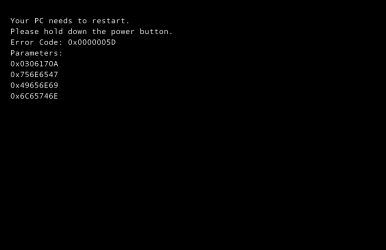
OK, I tried installing Windows 8 in VirtualBox, but I keep getting a black screen no matter how hard I try. =(
I first tried it in Virtual PC, but I kind of knew that wouldn't work, so that's why I relied on VirtualBox. I got the same black screen I got in Virtual PC.
 

Attachments

  • Windows 8 BlSOD.PNG
    Windows 8 BlSOD.PNG
    4 KB · Views: 18

My Computer My Computer

At a glance

Windows 7 Ultimate x86Intel Core i5-3320m @ 2.6GHz8 GBIntel HD Graphics 4000
Computer type
Laptop
Computer Manufacturer/Model Number
HP EliteBook 8470p
OS
Windows 7 Ultimate x86
CPU
Intel Core i5-3320m @ 2.6GHz
Memory
8 GB
Graphics Card(s)
Intel HD Graphics 4000
Screen Resolution
1600x900
Antivirus
Malwarebytes
Browser
Google Chrome
Hey look a neighbor :)

Why don`t you take Deacon`s advice. By the way IMO Windows 8 is terrible, not worth the effort.
 

My Computer My Computer

At a glance

Windows 10 Pro x64Intel Core i7 6700KGSkill TridentZ RGB 16GB 3600 16-16-16-36EVGA GTX 980 Ti SC x2
Computer type
PC/Desktop
Computer Manufacturer/Model Number
Skylake Special #666
OS
Windows 10 Pro x64
CPU
Intel Core i7 6700K
Motherboard
Asus Sabertooth Z170 Mark 1
Memory
GSkill TridentZ RGB 16GB 3600 16-16-16-36
Graphics Card(s)
EVGA GTX 980 Ti SC x2
Sound Card
Realtek High Definition
Monitor(s) Displays
AOC G2460PG
Screen Resolution
1920 x 1080 144Hz
Hard Drives
Samsung 860 Pro 256GB, Seagate Barracuda 4TB x2
PSU
EVGA 1000 P2, EVGA White Custom Braided Cables
Case
Corsair Vengeance C70 Gunmetal Black
Cooling
Corsair H100i v2, Corsair ML120 x2, Thermal Grizzly Kryonaut
Keyboard
Logitech G910 Orion Spectrum
Mouse
Logitech G700s
Internet Speed
Verizon Fios Quantum Gateway 75/75
Antivirus
Windows Defender, Malwarebytes Free 3.8.3
Browser
Chrome
Other Info
Corsair SP120 x4, LG Blu-ray Drive, Durabrand HT-395 100 Watt Dolby Digital Amp, Corsair H2100 Wireless 7.1 Headset
I would take DeaconFrost's advice, but I also tried installing it to a VHD. The only problem is that it wouldn't let me activate it.
Does anyone know a product key for Windows 8? (Not Developer, Consumer, or Release Preview, because it just says Windows 8.)
 

My Computer My Computer

At a glance

Windows 7 Ultimate x86Intel Core i5-3320m @ 2.6GHz8 GBIntel HD Graphics 4000
Computer type
Laptop
Computer Manufacturer/Model Number
HP EliteBook 8470p
OS
Windows 7 Ultimate x86
CPU
Intel Core i5-3320m @ 2.6GHz
Memory
8 GB
Graphics Card(s)
Intel HD Graphics 4000
Screen Resolution
1600x900
Antivirus
Malwarebytes
Browser
Google Chrome
Shrink C in Disk Mgmt: Partition or Volume - Shrink

Download the ISO from here: Windows 8 Release Preview - Download

Burn ISO to DVD using ImgBurn at 4x speed.

Boot the DVD by setting DVD drive first to boot in BIOS setup, or tapping the one-time BIOS BOot Menu key at boot. Choose Custom Install, the space you shrunk, click Next.

After you did everything but those simple steps in the previous thread, let's see if you can actually complete those steps now.

Guess not.

Don't pretend like you have ever actually tried to Dual Boot Win8 because you haven't, but pretend like you have while blithely ignoring how to do it correctly.
 
I have used this Win8 product key a few times and it always worked: DNJXJ-7XBW8-2378T-X22TX-BKG7J


My Computer My Computer

At a glance

Vista, Windows7, Mint Mate, Zorin, Windows 8from 1.6GHz Duo to i7
Computer Manufacturer/Model Number
HP, Dell, Gateway, Toshiba - 4 laptops and 2 desktops
OS
Vista, Windows7, Mint Mate, Zorin, Windows 8
CPU
from 1.6GHz Duo to i7
Monitor(s) Displays
2x HP w2207
Hard Drives
5x HDD, 7x SSD, 12x Externals
Keyboard
with trackball - no mices
Mouse
Trackball mice
Internet Speed
DSL 6000

My Computer My Computer

At a glance

Windows 7 Ultimate x64AMD Phenom 9850 x4 2.50GHz4GB DDR2nVidia GeFore 210
Computer type
PC/Desktop
Computer Manufacturer/Model Number
Custom Built
OS
Windows 7 Ultimate x64
CPU
AMD Phenom 9850 x4 2.50GHz
Motherboard
ASUS M4A785-M
Memory
4GB DDR2
Graphics Card(s)
nVidia GeFore 210
Sound Card
Onboard
Monitor(s) Displays
Samsung SyncMaster BX2031 20" LED
Screen Resolution
1600x900
Hard Drives
Western Digital Caviar Blue 500 GB SATA III 7200 RPM
PSU
450 Watt
Case
Raygo R12-40835 ATX Mid-Tower Case
Cooling
Air
Antivirus
Microsoft Security Essentials
Browser
Google Chrome
Other Info
Laptop:
Intel Core Duo T2450 @ 2.00GHz
2GB RAM
Windows 7 Ultimate x86
Thank you! This worked!
 

My Computer My Computer

At a glance

Windows 7 Ultimate x86Intel Core i5-3320m @ 2.6GHz8 GBIntel HD Graphics 4000
Computer type
Laptop
Computer Manufacturer/Model Number
HP EliteBook 8470p
OS
Windows 7 Ultimate x86
CPU
Intel Core i5-3320m @ 2.6GHz
Memory
8 GB
Graphics Card(s)
Intel HD Graphics 4000
Screen Resolution
1600x900
Antivirus
Malwarebytes
Browser
Google Chrome
Wait... if I add the boot files to the boot store (In the tutorial), will that in any way overwrite Windows 7?
 

My Computer My Computer

At a glance

Windows 7 Ultimate x86Intel Core i5-3320m @ 2.6GHz8 GBIntel HD Graphics 4000
Computer type
Laptop
Computer Manufacturer/Model Number
HP EliteBook 8470p
OS
Windows 7 Ultimate x86
CPU
Intel Core i5-3320m @ 2.6GHz
Memory
8 GB
Graphics Card(s)
Intel HD Graphics 4000
Screen Resolution
1600x900
Antivirus
Malwarebytes
Browser
Google Chrome
If you do it exactly as the tutorial you shouldn't run into any problems booting into Windows 7.
 

My Computer My Computer

At a glance

Windows 7 Ultimate x64AMD Phenom 9850 x4 2.50GHz4GB DDR2nVidia GeFore 210
Computer type
PC/Desktop
Computer Manufacturer/Model Number
Custom Built
OS
Windows 7 Ultimate x64
CPU
AMD Phenom 9850 x4 2.50GHz
Motherboard
ASUS M4A785-M
Memory
4GB DDR2
Graphics Card(s)
nVidia GeFore 210
Sound Card
Onboard
Monitor(s) Displays
Samsung SyncMaster BX2031 20" LED
Screen Resolution
1600x900
Hard Drives
Western Digital Caviar Blue 500 GB SATA III 7200 RPM
PSU
450 Watt
Case
Raygo R12-40835 ATX Mid-Tower Case
Cooling
Air
Antivirus
Microsoft Security Essentials
Browser
Google Chrome
Other Info
Laptop:
Intel Core Duo T2450 @ 2.00GHz
2GB RAM
Windows 7 Ultimate x86
Back
Top