Solved Check Disk Taking Forever, Is there another option

noman007

New member
Local time
1:05 AM
Messages
11
Recently I have trouble with an external USB HD so I performed a check disk option (automatically fix file system errors & scan for and attempt recovery of bad sectors). However, it is taking forever?

Been 5 hours and the progress bar has barely moved?

fyi 1TB drive with about 1 TB data.

Would it be faster using check disk from command prompt? Or some other options?

What am I looking at here? 48 hours to complete? And should I just let it run its course? Potentially could take a long time.

I'm unable to do anything to the drive when clicking on it in explorer. Gives me a no access popup.
 

My Computer

Computer type
Laptop
Computer Manufacturer/Model Number
samsung chronos
OS
Windows 7
Browser
chrome
Lost my patience and clicked stop.

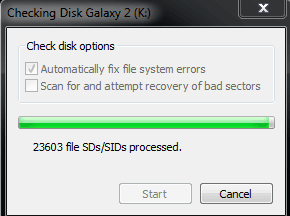
Redid check disk from windows explorer with only auto fix file system errors. Now it seems to be stuck at xxx file SDs/SIDs processed. HD light seems to be blinging but nothing else happening? Is this normal? Do I wait it out?

fyi, what are the stages in a windows check disk? If it stays this way for another 5 hours do I cancel? There doesn't seem to be a % like in command prompt check disk.
 

My Computer

Computer type
Laptop
Computer Manufacturer/Model Number
samsung chronos
OS
Windows 7
Browser
chrome
Attached file shows its been stuck at that state for 4 hours now? Still cannot access HD.
 

Attachments

  • stuck.PNG
    stuck.PNG
    18.4 KB · Views: 20

My Computer

Computer type
Laptop
Computer Manufacturer/Model Number
samsung chronos
OS
Windows 7
Browser
chrome
Hmmmm. Cancelled and reformatted.
 

My Computer

Computer type
Laptop
Computer Manufacturer/Model Number
samsung chronos
OS
Windows 7
Browser
chrome
Sorry late reply mate posted it in the wrong place but anywy for future reference
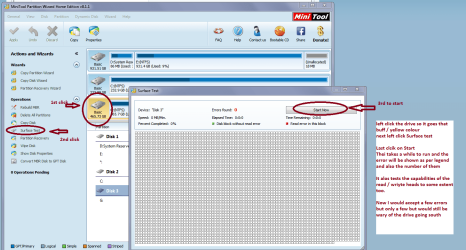
If you want an alternative disk check try a surface test with Partition Wizard Best Free Partition Manager for Windows | MiniTool Partition Free install it and run as in my pic - it is a physical test rather than a software one ie the platter surfaces and to some extent the read / write arm and actuators.
 

Attachments

  • MINI TOOL SURFACE 2.PNG
    MINI TOOL SURFACE 2.PNG
    162.1 KB · Views: 2

My Computer

Computer type
PC/Desktop
Computer Manufacturer/Model Number
Own build (new) Desk1 / Asus ROG Win 7 / Desk2 1st build
OS
Desk1 7 Home Prem / Desk2 10 Pro / Main lap Asus ROG 10 Pro 2 laptop Toshiba 7 Pro Asus P2520 7 & 10
CPU
Desk1 i5 3750K / Laptop i7 GTX 860M / Desk2 i5 2500
Motherboard
Desk1 Asus P877-V / Desk2 Gigabyte H67 UD3H / Laptop ?
Memory
Desk1 8GB (1866) / Desk2 16GB (1333) / Laptop 8Gb DDR3
Graphics Card(s)
Desk 1& 2NVidia GTX 650 & Laptops on board Intel
Sound Card
Desk 1 & 2 -XONAR DG Realtek High Def audio Laptop
Monitor(s) Displays
Desk 1 Benq HD 2450 / Desk2 Philips 24" / Laptop 17.5"
Screen Resolution
1920x1080 D1 & D2 & Laptop 1
Hard Drives
Desk1 Samsung 120GB 830 SSD
Asus ROG 256GB 850 Pro SSD
Desk2 Samsung 840 256 SSD
Toshiba 120GB EVO
PSU
Desk 1 Corsair HX 1050/ Laptop ? / Desk 2 Corsair HX 650
Case
Desk 1 Cooler HAF XM ? Toshiba laptop / Desk2 Coolermaster
Cooling
Fans on all Desk1 -2 Desk2 - all Coolermasters 5 Laptop ?
Keyboard
Desk 1 MS Sidewinder X6 Desk 2 MS Sidewinder X 4
Mouse
Desk 1&2 - Gigabyte MS 900 gamer - laptop - Logitec wireless
Internet Speed
ADSL2+
Other Info
One other Desktop (tester) and spare Toshba laptop both with SSD's
Running Kaspersky 2016 ISS on all machines config'd identically
Logitec audio stereo systems on each machine (x3)
Canon MG5250MFC
Router/modem TP-Link running WPA2SK
Back
Top