
Solved "Item not found" bug when moving or renaming files/folders

kpopsaranghaex3

New member
Local time
1:18 PM
Messages
12
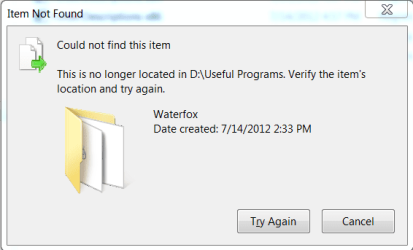
Hello, I just made an account here because this bug is seriously bugging me. It shows up whenever I move or create any new files/folders.

I have googled the registry fix and that doesn't seem to be working. Is there any other known fix?

P.S. There is nothing wrong with Waterfox.
 

Attachments
  • Capture.PNG
    Capture.PNG
    11 KB · Views: 12
Last edited:

My Computer My Computer

At a glance

Windows 7 Ultimate x64Intel i7 351710 GB DDR3 1600 MHZGT620M
Computer Manufacturer/Model Number
Asus Zenbook UX32VD
OS
Windows 7 Ultimate x64
CPU
Intel i7 3517
Memory
10 GB DDR3 1600 MHZ
Graphics Card(s)
GT620M
Monitor(s) Displays
1080p IPS Display
Screen Resolution
1920x1080
Hard Drives
512 GB Crucial M4
I would be very worried about Waterfox if a registry fiddle dumb has to be used to get it to work properly. If it was my computer I would remove all of it and wait for Mozilla to get it fixed.
 

My Computer My Computer

At a glance

Windows 10 Pro. 64/ version 1709 Windows 7 Pr...Intel i7-6800K @ 4.3Corsair Platinum 16 gig @2400EVGA GTX 1070 OC
Computer type
PC/Desktop
Computer Manufacturer/Model Number
Home made Desktop
OS
Windows 10 Pro. 64/ version 1709 Windows 7 Pro/64
CPU
Intel i7-6800K @ 4.3
Motherboard
ASUS X-99 Deluxe II
Memory
Corsair Platinum 16 gig @2400
Graphics Card(s)
EVGA GTX 1070 OC
Monitor(s) Displays
Asus 27" LED LCD/VE278Q
Screen Resolution
1920-1080 or 1280-720 HDMI
Hard Drives
INTEL SSD 730-240 Gb Sata 3.0/
PSU
EVGA Platium 1200W
Case
Phanteks Luxe Tempered Glass 8 fans/ one radiator
Cooling
XSPC/ Water Cooled CPU
Keyboard
Das 4 Professional
Mouse
Logitech M705/MX Anywhere 2-S
Internet Speed
100 mbits
Antivirus
Microsoft Security Essentials/ Malwarebytes Premium 3.0/ SAS
Browser
I.E. 11 default/Firefox/ ISP Time Warner Cable/Spectrum
Other Info
LG BluRay Burner/
Sound system-KLipsch-THX/
Icy Dock ssd Hot Swap bays.
I would be very worried about Waterfox if a registry fiddle dumb has to be used to get it to work properly. If it was my computer I would remove all of it and wait for Mozilla to get it fixed.

Waterfox works fine hahaha. I just used the folder with my Waterfox installer to show an example of the error.
 

My Computer My Computer

At a glance

Windows 7 Ultimate x64Intel i7 351710 GB DDR3 1600 MHZGT620M
Computer Manufacturer/Model Number
Asus Zenbook UX32VD
OS
Windows 7 Ultimate x64
CPU
Intel i7 3517
Memory
10 GB DDR3 1600 MHZ
Graphics Card(s)
GT620M
Monitor(s) Displays
1080p IPS Display
Screen Resolution
1920x1080
Hard Drives
512 GB Crucial M4
Hello, I just made an account here because this bug is seriously bugging me. It shows up whenever I move or create any new files/folders.

I have googled the registry fix and that doesn't seem to be working. Is there any other known fix?

P.S. There is nothing wrong with Waterfox.
When did this first start to happen and exactly what did you do immediately before?
What makes you think you need to do a registry "fix"? When you say quote: "I have googled the registry fix and that doesn't seem to be working". Did you edit the registry then? If so I do hope you made a backup of the registry before editing!
Can you do a system restore to a point behind where it went wrong?
 

My Computer My Computer

At a glance

Microsoft Windows 7 Home Premium 64-bit 7601 ...Intel(R) Core(TM) i7-3770 CPU @ 3.40GHz8.00 GBIntel(R) HD Graphics 4000
Computer type
PC/Desktop
OS
Microsoft Windows 7 Home Premium 64-bit 7601 Multiprocessor Free Service Pack 1
CPU
Intel(R) Core(TM) i7-3770 CPU @ 3.40GHz
Motherboard
ASUSTeK COMPUTER INC. P8H77-M
Memory
8.00 GB
Graphics Card(s)
Intel(R) HD Graphics 4000
Sound Card
On Board
Monitor(s) Displays
Dell 24"
Screen Resolution
1920 x 1080
Hard Drives
(1) INTEL SSDSC2CT180A3 ATA Device (2) ST500DM002-1BD142 ATA Device (3) WDC WD3200AAKS-75L9A0 ATA Device (4) Generic- Compact Flash USB Device (5) Generic- MS/MS-Pro USB Device (6) Generic- SD/MMC USB Device (7) Generic- SM/xD-Picture USB
PSU
500w Corsair
Case
Cooler Master
Cooling
3 Fans
Keyboard
Logitech MK300
Mouse
Logitech WOM
Internet Speed
75Mb
Antivirus
Norton 360
Browser
Firefox, Opera, IE
Hello, I just made an account here because this bug is seriously bugging me. It shows up whenever I move or create any new files/folders.

I have googled the registry fix and that doesn't seem to be working. Is there any other known fix?

P.S. There is nothing wrong with Waterfox.
When did this first start to happen and exactly what did you do immediately before?
What makes you think you need to do a registry "fix"? When you say quote: "I have googled the registry fix and that doesn't seem to be working". Did you edit the registry then? If so I do hope you made a backup of the registry before editing!
Can you do a system restore to a point behind where it went wrong?

It was off of a fresh Windows install. I got the registry idea from this thread since it is the exact same bug.

http://www.sevenforums.com/general-discussion/216427-item-not-found-error.html
 

My Computer My Computer

At a glance

Windows 7 Ultimate x64Intel i7 351710 GB DDR3 1600 MHZGT620M
Computer Manufacturer/Model Number
Asus Zenbook UX32VD
OS
Windows 7 Ultimate x64
CPU
Intel i7 3517
Memory
10 GB DDR3 1600 MHZ
Graphics Card(s)
GT620M
Monitor(s) Displays
1080p IPS Display
Screen Resolution
1920x1080
Hard Drives
512 GB Crucial M4
OP post #3. Waterfox works fine hahaha. I just used the folder with my Waterfox installer to show an example of the error.
What does this mean?
-------------------------------------------------------------------
Did you have a problem, yes or no?
Is your problem fix, yes or no?
How was it fixed?
 

My Computer My Computer

At a glance

Windows 10 Pro. 64/ version 1709 Windows 7 Pr...Intel i7-6800K @ 4.3Corsair Platinum 16 gig @2400EVGA GTX 1070 OC
Computer type
PC/Desktop
Computer Manufacturer/Model Number
Home made Desktop
OS
Windows 10 Pro. 64/ version 1709 Windows 7 Pro/64
CPU
Intel i7-6800K @ 4.3
Motherboard
ASUS X-99 Deluxe II
Memory
Corsair Platinum 16 gig @2400
Graphics Card(s)
EVGA GTX 1070 OC
Monitor(s) Displays
Asus 27" LED LCD/VE278Q
Screen Resolution
1920-1080 or 1280-720 HDMI
Hard Drives
INTEL SSD 730-240 Gb Sata 3.0/
PSU
EVGA Platium 1200W
Case
Phanteks Luxe Tempered Glass 8 fans/ one radiator
Cooling
XSPC/ Water Cooled CPU
Keyboard
Das 4 Professional
Mouse
Logitech M705/MX Anywhere 2-S
Internet Speed
100 mbits
Antivirus
Microsoft Security Essentials/ Malwarebytes Premium 3.0/ SAS
Browser
I.E. 11 default/Firefox/ ISP Time Warner Cable/Spectrum
Other Info
LG BluRay Burner/
Sound system-KLipsch-THX/
Icy Dock ssd Hot Swap bays.
Waterfox isn't the issue, I repeat, Waterfox has no issues... -_- the issue is that every time I transfer files/folders I get the error message in the picture in the OP.
 

My Computer My Computer

At a glance

Windows 7 Ultimate x64Intel i7 351710 GB DDR3 1600 MHZGT620M
Computer Manufacturer/Model Number
Asus Zenbook UX32VD
OS
Windows 7 Ultimate x64
CPU
Intel i7 3517
Memory
10 GB DDR3 1600 MHZ
Graphics Card(s)
GT620M
Monitor(s) Displays
1080p IPS Display
Screen Resolution
1920x1080
Hard Drives
512 GB Crucial M4
Have you tried running in the Super Admin mode?
 

My Computer My Computer

At a glance

Microsoft Windows 7 Home Premium 64-bit 7601 ...Intel(R) Core(TM) i7-3770 CPU @ 3.40GHz8.00 GBIntel(R) HD Graphics 4000
Computer type
PC/Desktop
OS
Microsoft Windows 7 Home Premium 64-bit 7601 Multiprocessor Free Service Pack 1
CPU
Intel(R) Core(TM) i7-3770 CPU @ 3.40GHz
Motherboard
ASUSTeK COMPUTER INC. P8H77-M
Memory
8.00 GB
Graphics Card(s)
Intel(R) HD Graphics 4000
Sound Card
On Board
Monitor(s) Displays
Dell 24"
Screen Resolution
1920 x 1080
Hard Drives
(1) INTEL SSDSC2CT180A3 ATA Device (2) ST500DM002-1BD142 ATA Device (3) WDC WD3200AAKS-75L9A0 ATA Device (4) Generic- Compact Flash USB Device (5) Generic- MS/MS-Pro USB Device (6) Generic- SD/MMC USB Device (7) Generic- SM/xD-Picture USB
PSU
500w Corsair
Case
Cooler Master
Cooling
3 Fans
Keyboard
Logitech MK300
Mouse
Logitech WOM
Internet Speed
75Mb
Antivirus
Norton 360
Browser
Firefox, Opera, IE

My Computer My Computer

At a glance

Windows 7 Ultimate x64Intel i7 351710 GB DDR3 1600 MHZGT620M
Computer Manufacturer/Model Number
Asus Zenbook UX32VD
OS
Windows 7 Ultimate x64
CPU
Intel i7 3517
Memory
10 GB DDR3 1600 MHZ
Graphics Card(s)
GT620M
Monitor(s) Displays
1080p IPS Display
Screen Resolution
1920x1080
Hard Drives
512 GB Crucial M4

My Computer My Computer

At a glance

Microsoft Windows 7 Home Premium 64-bit 7601 ...Intel(R) Core(TM) i7-3770 CPU @ 3.40GHz8.00 GBIntel(R) HD Graphics 4000
Computer type
PC/Desktop
OS
Microsoft Windows 7 Home Premium 64-bit 7601 Multiprocessor Free Service Pack 1
CPU
Intel(R) Core(TM) i7-3770 CPU @ 3.40GHz
Motherboard
ASUSTeK COMPUTER INC. P8H77-M
Memory
8.00 GB
Graphics Card(s)
Intel(R) HD Graphics 4000
Sound Card
On Board
Monitor(s) Displays
Dell 24"
Screen Resolution
1920 x 1080
Hard Drives
(1) INTEL SSDSC2CT180A3 ATA Device (2) ST500DM002-1BD142 ATA Device (3) WDC WD3200AAKS-75L9A0 ATA Device (4) Generic- Compact Flash USB Device (5) Generic- MS/MS-Pro USB Device (6) Generic- SD/MMC USB Device (7) Generic- SM/xD-Picture USB
PSU
500w Corsair
Case
Cooler Master
Cooling
3 Fans
Keyboard
Logitech MK300
Mouse
Logitech WOM
Internet Speed
75Mb
Antivirus
Norton 360
Browser
Firefox, Opera, IE
Tried it and sadly it did not work.
 

My Computer My Computer

At a glance

Windows 7 Ultimate x64Intel i7 351710 GB DDR3 1600 MHZGT620M
Computer Manufacturer/Model Number
Asus Zenbook UX32VD
OS
Windows 7 Ultimate x64
CPU
Intel i7 3517
Memory
10 GB DDR3 1600 MHZ
Graphics Card(s)
GT620M
Monitor(s) Displays
1080p IPS Display
Screen Resolution
1920x1080
Hard Drives
512 GB Crucial M4
OK Then my guess is that the fresh install is not so fresh! Did the PC come with Win 7 installed? If so how did you do a "fresh install"? If not pre installed did you upgrade sometime to Win 7?
EDIT
Just checked the times of these posts. Are you sure you followed that link completely, if so you did it very quickly?
 

My Computer My Computer

At a glance

Microsoft Windows 7 Home Premium 64-bit 7601 ...Intel(R) Core(TM) i7-3770 CPU @ 3.40GHz8.00 GBIntel(R) HD Graphics 4000
Computer type
PC/Desktop
OS
Microsoft Windows 7 Home Premium 64-bit 7601 Multiprocessor Free Service Pack 1
CPU
Intel(R) Core(TM) i7-3770 CPU @ 3.40GHz
Motherboard
ASUSTeK COMPUTER INC. P8H77-M
Memory
8.00 GB
Graphics Card(s)
Intel(R) HD Graphics 4000
Sound Card
On Board
Monitor(s) Displays
Dell 24"
Screen Resolution
1920 x 1080
Hard Drives
(1) INTEL SSDSC2CT180A3 ATA Device (2) ST500DM002-1BD142 ATA Device (3) WDC WD3200AAKS-75L9A0 ATA Device (4) Generic- Compact Flash USB Device (5) Generic- MS/MS-Pro USB Device (6) Generic- SD/MMC USB Device (7) Generic- SM/xD-Picture USB
PSU
500w Corsair
Case
Cooler Master
Cooling
3 Fans
Keyboard
Logitech MK300
Mouse
Logitech WOM
Internet Speed
75Mb
Antivirus
Norton 360
Browser
Firefox, Opera, IE
OK Then my guess is that the fresh install is not so fresh! Did the PC come with Win 7 installed? If so how did you do a "fresh install"? If not pre installed did you upgrade sometime to Win 7?
EDIT
Just checked the times of these posts. Are you sure you followed that link completely, if so you did it very quickly?

This was a fresh fresh install. I swapped the mechanical HDD with a 512GB Crucial M4 so I needed to install Windows. It was Windows 7 Ultimate + SP1. The "item not found" error was there right from the start.

And yes, I used option 2 and logged in to the Super Admin account and the registry edit/hack still did not work.
 

My Computer My Computer

At a glance

Windows 7 Ultimate x64Intel i7 351710 GB DDR3 1600 MHZGT620M
Computer Manufacturer/Model Number
Asus Zenbook UX32VD
OS
Windows 7 Ultimate x64
CPU
Intel i7 3517
Memory
10 GB DDR3 1600 MHZ
Graphics Card(s)
GT620M
Monitor(s) Displays
1080p IPS Display
Screen Resolution
1920x1080
Hard Drives
512 GB Crucial M4
But the idea of going into the Default admin was to see if the problem was still there, I didn't mention trying the registry hack. I would NEVER advise anyone to touch the registry without first making a backup. Was the Win 7 disc an original and did it come supplied with the PC? If you would like to complete your system specs it would save a bit of time!
 

My Computer My Computer

At a glance

Microsoft Windows 7 Home Premium 64-bit 7601 ...Intel(R) Core(TM) i7-3770 CPU @ 3.40GHz8.00 GBIntel(R) HD Graphics 4000
Computer type
PC/Desktop
OS
Microsoft Windows 7 Home Premium 64-bit 7601 Multiprocessor Free Service Pack 1
CPU
Intel(R) Core(TM) i7-3770 CPU @ 3.40GHz
Motherboard
ASUSTeK COMPUTER INC. P8H77-M
Memory
8.00 GB
Graphics Card(s)
Intel(R) HD Graphics 4000
Sound Card
On Board
Monitor(s) Displays
Dell 24"
Screen Resolution
1920 x 1080
Hard Drives
(1) INTEL SSDSC2CT180A3 ATA Device (2) ST500DM002-1BD142 ATA Device (3) WDC WD3200AAKS-75L9A0 ATA Device (4) Generic- Compact Flash USB Device (5) Generic- MS/MS-Pro USB Device (6) Generic- SD/MMC USB Device (7) Generic- SM/xD-Picture USB
PSU
500w Corsair
Case
Cooler Master
Cooling
3 Fans
Keyboard
Logitech MK300
Mouse
Logitech WOM
Internet Speed
75Mb
Antivirus
Norton 360
Browser
Firefox, Opera, IE
But the idea of going into the Default admin was to see if the problem was still there, I didn't mention trying the registry hack. I would NEVER advise anyone to touch the registry without first making a backup. Was the Win 7 disc an original and did it come supplied with the PC? If you would like to complete your system specs it would save a bit of time!

Yes, the error was still there in the Super Admin account. The Windows 7 I installed was an extra copy I had lying around. System specs are also updated.
 

My Computer My Computer

At a glance

Windows 7 Ultimate x64Intel i7 351710 GB DDR3 1600 MHZGT620M
Computer Manufacturer/Model Number
Asus Zenbook UX32VD
OS
Windows 7 Ultimate x64
CPU
Intel i7 3517
Memory
10 GB DDR3 1600 MHZ
Graphics Card(s)
GT620M
Monitor(s) Displays
1080p IPS Display
Screen Resolution
1920x1080
Hard Drives
512 GB Crucial M4
Then I guess the spare copy was corrupt somewhere. Was it an OEM copy from another PC perhaps. Suggest you get an original MS disc and try that!
 

My Computer My Computer

At a glance

Microsoft Windows 7 Home Premium 64-bit 7601 ...Intel(R) Core(TM) i7-3770 CPU @ 3.40GHz8.00 GBIntel(R) HD Graphics 4000
Computer type
PC/Desktop
OS
Microsoft Windows 7 Home Premium 64-bit 7601 Multiprocessor Free Service Pack 1
CPU
Intel(R) Core(TM) i7-3770 CPU @ 3.40GHz
Motherboard
ASUSTeK COMPUTER INC. P8H77-M
Memory
8.00 GB
Graphics Card(s)
Intel(R) HD Graphics 4000
Sound Card
On Board
Monitor(s) Displays
Dell 24"
Screen Resolution
1920 x 1080
Hard Drives
(1) INTEL SSDSC2CT180A3 ATA Device (2) ST500DM002-1BD142 ATA Device (3) WDC WD3200AAKS-75L9A0 ATA Device (4) Generic- Compact Flash USB Device (5) Generic- MS/MS-Pro USB Device (6) Generic- SD/MMC USB Device (7) Generic- SM/xD-Picture USB
PSU
500w Corsair
Case
Cooler Master
Cooling
3 Fans
Keyboard
Logitech MK300
Mouse
Logitech WOM
Internet Speed
75Mb
Antivirus
Norton 360
Browser
Firefox, Opera, IE
Then I guess the spare copy was corrupt somewhere. Was it an OEM copy from another PC perhaps. Suggest you get an original MS disc and try that!

No sir, it was an original MS disc. I really want to fix this error without losing any of my data... It is really annoying.
 

My Computer My Computer

At a glance

Windows 7 Ultimate x64Intel i7 351710 GB DDR3 1600 MHZGT620M
Computer Manufacturer/Model Number
Asus Zenbook UX32VD
OS
Windows 7 Ultimate x64
CPU
Intel i7 3517
Memory
10 GB DDR3 1600 MHZ
Graphics Card(s)
GT620M
Monitor(s) Displays
1080p IPS Display
Screen Resolution
1920x1080
Hard Drives
512 GB Crucial M4
Well if as you say this started from day one of the new install did you not already have you data saved to an external source from the old HD. If so can you not try a new install and reinstate the data from the old stored source?
 

My Computer My Computer

At a glance

Microsoft Windows 7 Home Premium 64-bit 7601 ...Intel(R) Core(TM) i7-3770 CPU @ 3.40GHz8.00 GBIntel(R) HD Graphics 4000
Computer type
PC/Desktop
OS
Microsoft Windows 7 Home Premium 64-bit 7601 Multiprocessor Free Service Pack 1
CPU
Intel(R) Core(TM) i7-3770 CPU @ 3.40GHz
Motherboard
ASUSTeK COMPUTER INC. P8H77-M
Memory
8.00 GB
Graphics Card(s)
Intel(R) HD Graphics 4000
Sound Card
On Board
Monitor(s) Displays
Dell 24"
Screen Resolution
1920 x 1080
Hard Drives
(1) INTEL SSDSC2CT180A3 ATA Device (2) ST500DM002-1BD142 ATA Device (3) WDC WD3200AAKS-75L9A0 ATA Device (4) Generic- Compact Flash USB Device (5) Generic- MS/MS-Pro USB Device (6) Generic- SD/MMC USB Device (7) Generic- SM/xD-Picture USB
PSU
500w Corsair
Case
Cooler Master
Cooling
3 Fans
Keyboard
Logitech MK300
Mouse
Logitech WOM
Internet Speed
75Mb
Antivirus
Norton 360
Browser
Firefox, Opera, IE
Well if as you say this started from day one of the new install did you not already have you data saved to an external source from the old HD. If so can you not try a new install and reinstate the data from the old stored source?

Nope, I replaced the HDD immediately, so this SSD is the only place where I have the data. I'm not worried about backing up data, I'm worried about losing installed programs and settings and such.
 

My Computer My Computer

At a glance

Windows 7 Ultimate x64Intel i7 351710 GB DDR3 1600 MHZGT620M
Computer Manufacturer/Model Number
Asus Zenbook UX32VD
OS
Windows 7 Ultimate x64
CPU
Intel i7 3517
Memory
10 GB DDR3 1600 MHZ
Graphics Card(s)
GT620M
Monitor(s) Displays
1080p IPS Display
Screen Resolution
1920x1080
Hard Drives
512 GB Crucial M4
Bells are ringing!!! When you say "and settings and such." What settings and did you know that the problm existed before you changed these setting? What settings have you edited and how?
 

My Computer My Computer

At a glance

Microsoft Windows 7 Home Premium 64-bit 7601 ...Intel(R) Core(TM) i7-3770 CPU @ 3.40GHz8.00 GBIntel(R) HD Graphics 4000
Computer type
PC/Desktop
OS
Microsoft Windows 7 Home Premium 64-bit 7601 Multiprocessor Free Service Pack 1
CPU
Intel(R) Core(TM) i7-3770 CPU @ 3.40GHz
Motherboard
ASUSTeK COMPUTER INC. P8H77-M
Memory
8.00 GB
Graphics Card(s)
Intel(R) HD Graphics 4000
Sound Card
On Board
Monitor(s) Displays
Dell 24"
Screen Resolution
1920 x 1080
Hard Drives
(1) INTEL SSDSC2CT180A3 ATA Device (2) ST500DM002-1BD142 ATA Device (3) WDC WD3200AAKS-75L9A0 ATA Device (4) Generic- Compact Flash USB Device (5) Generic- MS/MS-Pro USB Device (6) Generic- SD/MMC USB Device (7) Generic- SM/xD-Picture USB
PSU
500w Corsair
Case
Cooler Master
Cooling
3 Fans
Keyboard
Logitech MK300
Mouse
Logitech WOM
Internet Speed
75Mb
Antivirus
Norton 360
Browser
Firefox, Opera, IE
Back
Top