Help with ownership and permissions

baritompa

New member
Member
Local time
11:18 AM
Messages
27
Location
New Zealand
Hi, Are they any tutorials or information about how these work (as opposed to how to set or alter them). Thanks.
 

My Computer My Computer

OS
Windows 7 Pro x64

My Computer My Computer

Computer type
PC/Desktop
Computer Manufacturer/Model Number
Lenovo IdeaCenter 450
OS
Windows 10 Pro X64
CPU
Intel Quad Core i7-4770 @ 3.4Ghz
Memory
16.0GB PC3-12800 DDR3 SDRAM 1600 MHz
Graphics Card(s)
Intel Integrated HD Graphics
Sound Card
Realtek HD Audio
Monitor(s) Displays
HP 22" LCD
Screen Resolution
1680 x 1050
Hard Drives
250GB Samsung EVO SATA-3 SSD
2TB Seagate ST2000DM001 SATA-2
1.5TB Seagate ST3150041AS SATA
Keyboard
Dell USB
Mouse
Lenovo USB
Internet Speed
Cable via Road Runner 3MB Upload, 30MB Download
Antivirus
Windows Defender, MBAM Pro, MBAE
Browser
Seamonkey
Other Info
UEFI/GPT
PLDS DVD-RW DH16AERSH
Thanks, that was the clearest I've read so far. It still doesn't explain some of the behaviour I'm getting. Can you recommend any article that clarifies ownership. Windows help says "The owner controls how permissions are set on the object and to whom permissions are granted." Why when I'm running under a admin account, do I get pop ups sometimes saying "I don't have permission to view files, click here to get perminant permission." Is this an ownership issue? Is this a UAC "feature." I notice after I've clicked this, my username is added to the permissions list.
 

My Computer My Computer

OS
Windows 7 Pro x64
Many files and folders on a Windows computer are owned by System, not the Administrator group, which is where your administrator level account is anchored. Many times, adding the Administrator group to have Full permission is sufficient to allow you access. Some time you need to take ownership though I have never been able to figure out why.

Maybe one of the other folks here can clarify that.
 

My Computer My Computer

Computer type
PC/Desktop
Computer Manufacturer/Model Number
Lenovo IdeaCenter 450
OS
Windows 10 Pro X64
CPU
Intel Quad Core i7-4770 @ 3.4Ghz
Memory
16.0GB PC3-12800 DDR3 SDRAM 1600 MHz
Graphics Card(s)
Intel Integrated HD Graphics
Sound Card
Realtek HD Audio
Monitor(s) Displays
HP 22" LCD
Screen Resolution
1680 x 1050
Hard Drives
250GB Samsung EVO SATA-3 SSD
2TB Seagate ST2000DM001 SATA-2
1.5TB Seagate ST3150041AS SATA
Keyboard
Dell USB
Mouse
Lenovo USB
Internet Speed
Cable via Road Runner 3MB Upload, 30MB Download
Antivirus
Windows Defender, MBAM Pro, MBAE
Browser
Seamonkey
Other Info
UEFI/GPT
PLDS DVD-RW DH16AERSH
What files/folders are you trying to access? Many in Windows will deny you access because they are for compatibility with old software. See links below.
 

My Computer My Computer

Computer type
PC/Desktop
Computer Manufacturer/Model Number
Alienware Aurora ALX R4
OS
Windows 10 Pro (x64)
CPU
Intel Core i7-3930K (3.2GHz - 4.5GHz)
Motherboard
Alienware Aurora-R4 x79
Memory
4x Samsung 4GB PC3-12800 DDR3 (16GB 1600MHz)
Graphics Card(s)
Nvidia Geforce GTX 690
Sound Card
SteelSeries Siberia Elite
Monitor(s) Displays
Dell UltraSharp U3011
Screen Resolution
2560x1600
Hard Drives
Samsung 850 Pro 256 GB, Seagate 1TB Desktop Hybrid HDD, 2x Western Digital 4TB Green HDD
PSU
875W Some Dell PSU <.<
Case
Alienware Aurora ALX
Cooling
Custom Liquid Cooling (EK CPU & GPU blocks) dual EK 480RAD
Keyboard
Logitech G710+ Mechanical
Mouse
Logitech G700s
Internet Speed
Verizon Fios (50 mbps average)
Other Info
Server: Intel NUC D54250WYK: i5-4250U, 16GB, 256 GB mSATA, Windows Server 2012 R2
Many files and folders on a Windows computer are owned by System, not the Administrator group, which is where your administrator level account is anchored. Many times, adding the Administrator group to have Full permission is sufficient to allow you access. Some time you need to take ownership though I have never been able to figure out why.

Maybe one of the other folks here can clarify that.
Thanks. It would be nice to figure out why though, rather than just accept it as some windows mystery:sarc:
 

My Computer My Computer

OS
Windows 7 Pro x64
What files/folders are you trying to access? Many in Windows will deny you access because they are for compatibility with old software. See links below.

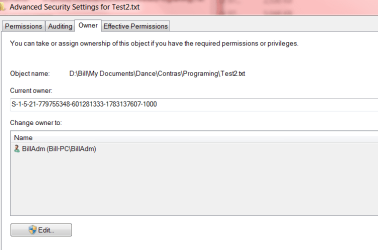
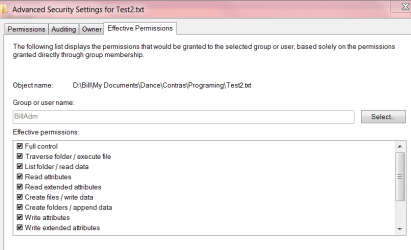
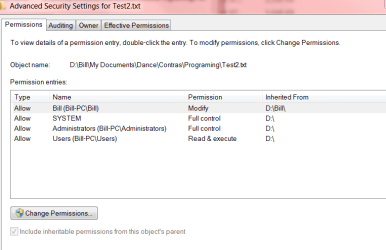
Nothing complicated. If logged on as BillAdm (my admin acct) and try and use notepad to change the txt file (see attached shots for permission and ownership and 'effective' permissions), I cannot save any changes - getting access denied. To delete it, I must confirm in UAC my admin rights. To restore from recycle bin I must confirm again my admin rights. On .doc files (with same permissions), word only opens them up in read-only mode. I can't even save copies.

According to the effective permissions I should have full control.

If I do the same logged on as Bill (my user acct), I have control.
I note that Bill is explicitly listed in the permissions.

Any insights? Thanks.
 

Attachments

  • PermissionTest.PNG
    PermissionTest.PNG
    14.7 KB · Views: 4
  • PermissionOwnerTest.PNG
    PermissionOwnerTest.PNG
    12.6 KB · Views: 4
  • PermissionEffectiveTest.PNG
    PermissionEffectiveTest.PNG
    15.1 KB · Views: 4

My Computer My Computer

OS
Windows 7 Pro x64
Unless you run notepad as Administrator (right-click > Run as Administrator) it will run under the context of the "Users" group. According to your permissions those of the "Users" group only have read permissions no write. You would either need to add an entry for BillAdm into the list of permissions or run notepad as administrator.

The reason for this is protection, even under and Administrator account everything runs under the context of being a standard user. Only when elevated with Run as Administrator will an application get the full power. This helps negate security issues with running applications as full power all the time.
 

My Computer My Computer

Computer type
PC/Desktop
Computer Manufacturer/Model Number
Alienware Aurora ALX R4
OS
Windows 10 Pro (x64)
CPU
Intel Core i7-3930K (3.2GHz - 4.5GHz)
Motherboard
Alienware Aurora-R4 x79
Memory
4x Samsung 4GB PC3-12800 DDR3 (16GB 1600MHz)
Graphics Card(s)
Nvidia Geforce GTX 690
Sound Card
SteelSeries Siberia Elite
Monitor(s) Displays
Dell UltraSharp U3011
Screen Resolution
2560x1600
Hard Drives
Samsung 850 Pro 256 GB, Seagate 1TB Desktop Hybrid HDD, 2x Western Digital 4TB Green HDD
PSU
875W Some Dell PSU <.<
Case
Alienware Aurora ALX
Cooling
Custom Liquid Cooling (EK CPU & GPU blocks) dual EK 480RAD
Keyboard
Logitech G710+ Mechanical
Mouse
Logitech G700s
Internet Speed
Verizon Fios (50 mbps average)
Other Info
Server: Intel NUC D54250WYK: i5-4250U, 16GB, 256 GB mSATA, Windows Server 2012 R2
Unless you run notepad as Administrator (right-click > Run as Administrator) it will run under the context of the "Users" group. According to your permissions those of the "Users" group only have read permissions no write. You would either need to add an entry for BillAdm into the list of permissions or run notepad as administrator.

The reason for this is protection, even under and Administrator account everything runs under the context of being a standard user. Only when elevated with Run as Administrator will an application get the full power. This helps negate security issues with running applications as full power all the time.

Thanks. So is there any reason to ever login under my admin account? If I also use my user acct, and need to elevate I can always use my admin name and password at that point.
 

My Computer My Computer

OS
Windows 7 Pro x64
Back
Top