Help with D and F drive locations not available

Steph2022

New member
Local time
11:13 AM
Messages
3
I am in desperate need of some help. I am trying to access files on my sister's laptop. She sadly passed away - I'm only saying this so you're aware I have no knowledge of how she set up her laptop and can't ask her, have no access to back ups or anything else. All I have is the laptop in front of me with no knowledge of anything other than what I see.

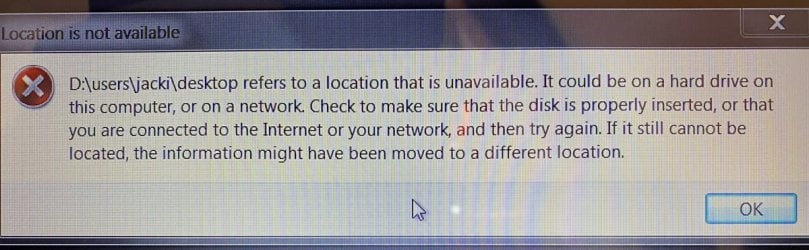
The laptop was working fine two weeks ago. However, when I turned it on yesterday I got a message that the location is unavailable (see picture). What?!!! I have rebooted, virus scanned, looked at everything I can but for the life of me have no idea.

What I know:
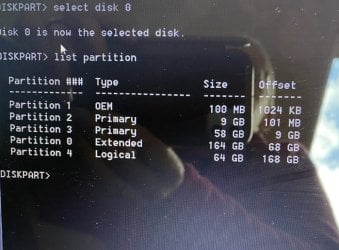
  • diskpart.exe was in the run box, so I assumed she had partitioned the drive.
  • It's a 250 GB hard disk
  • She used the D drive as per the first shot as when I turned it on the desktop had a file explorer type window open and icons wallpaper etc.
  • She had an F drive probably for her self employed work as there is a file location F:\April 21 to April 22 in the recent files list in Word; one called F:\House
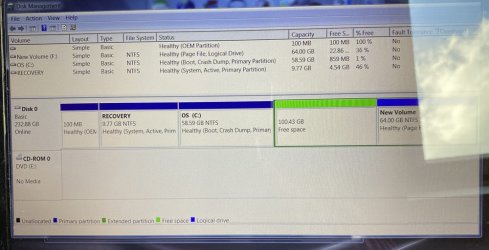
  • There is a "New Volume (F:) which has old personal files in it. The folders above don't exist there.
  • Word normal.dotm can't be opened (but no error details) and I have to force shut Word as it won't work.
It seems like D and F have disappeared but having spent a day on the internet I'm assuming they are still there but for some reason have hidden themselves. I've attached a screen shot of diskpart screen and disk management so you can see the differences.

I would be so grateful for any help as I desperately don't want to lose any files that are on the laptop. The laptop itself can go where the sun doesn't shine! I'm hoping that some of the fine folk here will be able to point me in the direction needed to access the partitions. Thank you in advance.
 

Attachments
  • LocationNotAvail.JPG
    LocationNotAvail.JPG
    103.4 KB · Views: 0
  • DiskManager.JPG
    DiskManager.JPG
    78.5 KB · Views: 1
  • Diskpart.JPG
    Diskpart.JPG
    67.5 KB · Views: 6

My Computers My Computers

  • At a glance

    Windows 7 Home Premium 64 bitIntel Core i3 ; M330 @ 2.13 GHzRAM 3 GB (2.86 GB usable)Intel HD Graphics Core i3
    Computer type
    Laptop
    Computer Manufacturer/Model Number
    Dell Inspiron1564
    OS
    Windows 7 Home Premium 64 bit
    CPU
    Intel Core i3 ; M330 @ 2.13 GHz
    Memory
    RAM 3 GB (2.86 GB usable)
    Graphics Card(s)
    Intel HD Graphics Core i3
  • Computer type
    PC/Desktop
What are you trying to find exactly?
 

My Computer My Computer

At a glance

Windows 7 Ultimate x64
Computer type
PC/Desktop
OS
Windows 7 Ultimate x64
Hi F22 Simpilot - basically anything on the missing partitions. I know there are photos, videos and other files that her son will want to keep, and our mum will want as well. Also I need any financial information to help deal with her estate, which is tough enough without the laptop throwing a hissy fit.
 

My Computers My Computers

  • At a glance

    Windows 7 Home Premium 64 bitIntel Core i3 ; M330 @ 2.13 GHzRAM 3 GB (2.86 GB usable)Intel HD Graphics Core i3
    Computer type
    Laptop
    Computer Manufacturer/Model Number
    Dell Inspiron1564
    OS
    Windows 7 Home Premium 64 bit
    CPU
    Intel Core i3 ; M330 @ 2.13 GHz
    Memory
    RAM 3 GB (2.86 GB usable)
    Graphics Card(s)
    Intel HD Graphics Core i3
  • Computer type
    PC/Desktop
Okay, you'll need to use some partition recovery software and/or file recovery software. And depending on how much data was written to the disk after the files were deleted or repartitioned over will dictate your chances of success.

This is a job, and a job not meant for those not too computer savvy. It requires you to FIRST make an exact raw 1:1 full disk clone of the laptop's hard drive to another hard drive of equal or greater size. It will then be this hard drive you attempt to recover any data and/or partitions. It'll work since it'll be an exact 1:1, bit for bit clone. You NEVER EVER want to mess with your source disk there, i.e. the laptop. You make a very specific raw clone of it for recovery operations. Having said this, you should stop now from even using the laptop as subsequent usage can degrade your chances of file recovery success.

Since you have indicated the data you're after is very important, especially with information relating to an estate, you'll want to seek professional and reputable data recovery services. Or a good solid reputable computer store that knows what they're doing.
 

My Computer My Computer

At a glance

Windows 7 Ultimate x64
Computer type
PC/Desktop
OS
Windows 7 Ultimate x64
Thanks. I was hoping this was one of those seemingly common "my D drive has disappeared" with a fairly simple quick fix. I'm okay with a command prompt or two but this is way out of my league so I'll have to wait until I can get to a computer expert. Many thanks for the advice.
 

My Computers My Computers

  • At a glance

    Windows 7 Home Premium 64 bitIntel Core i3 ; M330 @ 2.13 GHzRAM 3 GB (2.86 GB usable)Intel HD Graphics Core i3
    Computer type
    Laptop
    Computer Manufacturer/Model Number
    Dell Inspiron1564
    OS
    Windows 7 Home Premium 64 bit
    CPU
    Intel Core i3 ; M330 @ 2.13 GHz
    Memory
    RAM 3 GB (2.86 GB usable)
    Graphics Card(s)
    Intel HD Graphics Core i3
  • Computer type
    PC/Desktop
You're welcome.
 

My Computer My Computer

At a glance

Windows 7 Ultimate x64
Computer type
PC/Desktop
OS
Windows 7 Ultimate x64
Back
Top