Solved Why cant I shrink Drive C more than 16GB?

laungst

New member
Local time
10:13 PM
Messages
23
I want to shrink my Drive C by 100GB~ so I can create a new partition and install the pre-release of Windows 8.

My drive C is 906 GB total and it has around 55% (Surprisingly exactly 500GB) of free space.

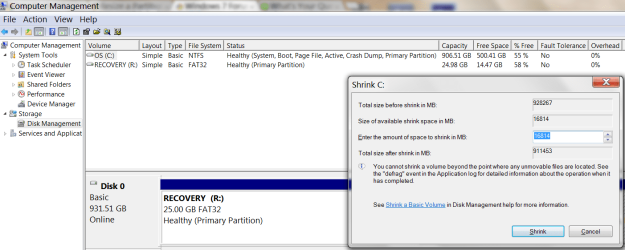
I go into "Computer Management" and then go into the "Disk Management" under the "Storage" tab. I right click on "(C:)" and click on "Shrink Volume". After it finishes "Querying Volume for Available Shrink Space" it says the following

"Total size before shrink in MB: 928267 (906GB)
Size of available shrink space in MB: 16814 (17GB)
Enter the amount of space to shrink in MB: (Gives me box to type in)
Total size after shrink in MB: (Goes up and down with above box)
You cannot shrink a volume beyond the point where any unmovable files are located. See the "defrag" event in the Application log for detailed information about the operation when it has completed."

In the "Enter the amount of space to shrink in MB" box, it wont let me go over 16814 MB- About 17GB, even though I have EXACTLY 500GB free. If I can, how can I fix this?

Note: The first thing I did when I saw this was Defragment my harddrive. Nothing changed. The numbers were exactly the same.

Thanks for your help
 

Attachments
  • Shrinking.png
    Shrinking.png
    46 KB · Views: 91

My Computer My Computer

At a glance

Windows 7 Home Premium 64bitIntel Core i7 2720QM @ 2.20GHz8 GBNVIDIA GeForce GTX 560M
Computer type
PC/Desktop
Computer Manufacturer/Model Number
ASUS G74SX-BBK11
OS
Windows 7 Home Premium 64bit
CPU
Intel Core i7 2720QM @ 2.20GHz
Motherboard
ASUSTeK Computer Inc. G74Sx (CPU 1)
Memory
8 GB
Graphics Card(s)
NVIDIA GeForce GTX 560M
Screen Resolution
1920x1080
Hard Drives
977GB Seagate ST1000LM024 HN-M101MBB (SATA)
128 GB SSD
Internet Speed
~20 Mbps

My Computer My Computer

At a glance

Microsoft Windows 7 Home Premium 64-bits 7601...Intel(R) Core(TM) i3 CPU M 370 @ 2.40GHz4,00 GBATI Mobility Radeon HD 5400 Series
Computer type
Laptop
Computer Manufacturer/Model Number
ACER ASPIRE 5742G
OS
Microsoft Windows 7 Home Premium 64-bits 7601 Multiprocessor Free Service Pack 1
CPU
Intel(R) Core(TM) i3 CPU M 370 @ 2.40GHz
Motherboard
Acer Aspire 5742G
Memory
4,00 GB
Graphics Card(s)
ATI Mobility Radeon HD 5400 Series
Sound Card
(1) AMD High Definition Audio Device (2) Realtek High Defi
Screen Resolution
1366 x 768 x 32 bits (4294967296 colors) @ 60 Hz
Hard Drives
WDC WD5000BEVT-22ZAT0
I want to shrink my Drive C by 100GB~ so I can create a new partition and install the pre-release of Windows 8.

My drive C is 906 GB total and it has around 55% (Surprisingly exactly 500GB) of free space.

I go into "Computer Management" and then go into the "Disk Management" under the "Storage" tab. I right click on "(C:)" and click on "Shrink Volume". After it finishes "Querying Volume for Available Shrink Space" it says the following

"Total size before shrink in MB: 928267 (906GB)
Size of available shrink space in MB: 16814 (17GB)
Enter the amount of space to shrink in MB: (Gives me box to type in)
Total size after shrink in MB: (Goes up and down with above box)
You cannot shrink a volume beyond the point where any unmovable files are located. See the "defrag" event in the Application log for detailed information about the operation when it has completed."

In the "Enter the amount of space to shrink in MB" box, it wont let me go over 16814 MB- About 17GB, even though I have EXACTLY 500GB free. If I can, how can I fix this?

Note: The first thing I did when I saw this was Defragment my harddrive. Nothing changed. The numbers were exactly the same.

Thanks for your help

The reason is that windows has placed files it considers unmovable near the end of the partition. Do as kactussoft recommends and use Partition Wizard. You may need to use the bootable version to accomplish what you need if the files are in use.
 

My Computer My Computer

At a glance

Microsoft Windows 7 Home Premium 64-bit Servi...Intel(R) Core(TM) i3 CPU M 330 @ 2.13GHz8 GB DDR3Intel(R) HD Graphics
Computer type
Laptop
Computer Manufacturer/Model Number
Hewlett-Packard/G62-107SA Notebook
OS
Microsoft Windows 7 Home Premium 64-bit Service Pack 1
CPU
Intel(R) Core(TM) i3 CPU M 330 @ 2.13GHz
Motherboard
Hewlett-Packard 1425
Memory
8 GB DDR3
Graphics Card(s)
Intel(R) HD Graphics
Sound Card
Realtek High Definition Audio
Monitor(s) Displays
Builtin
Screen Resolution
1366 x 768 x 32 bits (4294967296 colors) @ 60 Hz
Hard Drives
250 GB SATA Hard Disk Drive 7200 rpm
2TB Seagate GoFlex USB 2 Drive
1TB Iomega Prestige USB 2 Drive
1.5TB Iomega Prestige USB 2 Drive (Samsung)
2TB WD MyBook Live NAS.
Mouse
Logitech Anywhere MX
Internet Speed
152 Mbs download 10 Mbs upload
Antivirus
Norton 360
Browser
Chrome
I want to shrink my Drive C by 100GB~ so I can create a new partition and install the pre-release of Windows 8.

My drive C is 906 GB total and it has around 55% (Surprisingly exactly 500GB) of free space.

I go into "Computer Management" and then go into the "Disk Management" under the "Storage" tab. I right click on "(C:)" and click on "Shrink Volume". After it finishes "Querying Volume for Available Shrink Space" it says the following

"Total size before shrink in MB: 928267 (906GB)
Size of available shrink space in MB: 16814 (17GB)
Enter the amount of space to shrink in MB: (Gives me box to type in)
Total size after shrink in MB: (Goes up and down with above box)
You cannot shrink a volume beyond the point where any unmovable files are located. See the "defrag" event in the Application log for detailed information about the operation when it has completed."

In the "Enter the amount of space to shrink in MB" box, it wont let me go over 16814 MB- About 17GB, even though I have EXACTLY 500GB free. If I can, how can I fix this?

Note: The first thing I did when I saw this was Defragment my harddrive. Nothing changed. The numbers were exactly the same.

Thanks for your help

The reason is that windows has placed files it considers unmovable near the end of the partition. Do as kactussoft recommends and use Partition Wizard. You may need to use the bootable version to accomplish what you need if the files are in use.
Bootable version not needed!! It does the task on reboot.
 

My Computer My Computer

At a glance

Microsoft Windows 7 Home Premium 64-bits 7601...Intel(R) Core(TM) i3 CPU M 370 @ 2.40GHz4,00 GBATI Mobility Radeon HD 5400 Series
Computer type
Laptop
Computer Manufacturer/Model Number
ACER ASPIRE 5742G
OS
Microsoft Windows 7 Home Premium 64-bits 7601 Multiprocessor Free Service Pack 1
CPU
Intel(R) Core(TM) i3 CPU M 370 @ 2.40GHz
Motherboard
Acer Aspire 5742G
Memory
4,00 GB
Graphics Card(s)
ATI Mobility Radeon HD 5400 Series
Sound Card
(1) AMD High Definition Audio Device (2) Realtek High Defi
Screen Resolution
1366 x 768 x 32 bits (4294967296 colors) @ 60 Hz
Hard Drives
WDC WD5000BEVT-22ZAT0
I want to shrink my Drive C by 100GB~ so I can create a new partition and install the pre-release of Windows 8.

My drive C is 906 GB total and it has around 55% (Surprisingly exactly 500GB) of free space.

I go into "Computer Management" and then go into the "Disk Management" under the "Storage" tab. I right click on "(C:)" and click on "Shrink Volume". After it finishes "Querying Volume for Available Shrink Space" it says the following

"Total size before shrink in MB: 928267 (906GB)
Size of available shrink space in MB: 16814 (17GB)
Enter the amount of space to shrink in MB: (Gives me box to type in)
Total size after shrink in MB: (Goes up and down with above box)
You cannot shrink a volume beyond the point where any unmovable files are located. See the "defrag" event in the Application log for detailed information about the operation when it has completed."

In the "Enter the amount of space to shrink in MB" box, it wont let me go over 16814 MB- About 17GB, even though I have EXACTLY 500GB free. If I can, how can I fix this?

Note: The first thing I did when I saw this was Defragment my harddrive. Nothing changed. The numbers were exactly the same.

Thanks for your help

The reason is that windows has placed files it considers unmovable near the end of the partition. Do as kactussoft recommends and use Partition Wizard. You may need to use the bootable version to accomplish what you need if the files are in use.
Bootable version not needed!! It does the task on reboot.

Ah thanks. That's good to know.
 

My Computer My Computer

At a glance

Microsoft Windows 7 Home Premium 64-bit Servi...Intel(R) Core(TM) i3 CPU M 330 @ 2.13GHz8 GB DDR3Intel(R) HD Graphics
Computer type
Laptop
Computer Manufacturer/Model Number
Hewlett-Packard/G62-107SA Notebook
OS
Microsoft Windows 7 Home Premium 64-bit Service Pack 1
CPU
Intel(R) Core(TM) i3 CPU M 330 @ 2.13GHz
Motherboard
Hewlett-Packard 1425
Memory
8 GB DDR3
Graphics Card(s)
Intel(R) HD Graphics
Sound Card
Realtek High Definition Audio
Monitor(s) Displays
Builtin
Screen Resolution
1366 x 768 x 32 bits (4294967296 colors) @ 60 Hz
Hard Drives
250 GB SATA Hard Disk Drive 7200 rpm
2TB Seagate GoFlex USB 2 Drive
1TB Iomega Prestige USB 2 Drive
1.5TB Iomega Prestige USB 2 Drive (Samsung)
2TB WD MyBook Live NAS.
Mouse
Logitech Anywhere MX
Internet Speed
152 Mbs download 10 Mbs upload
Antivirus
Norton 360
Browser
Chrome
I want to shrink my Drive C by 100GB~ so I can create a new partition and install the pre-release of Windows 8.
Given your system specs...save yourself a lot of time and grief. Virtualize Windows 8.
I have scanned this site, all recommend partition wizard, not spamming??
against your own policy i think.
I'm not exactly sure what you mean. However, I can tell you, we recommend Partition Wizard because it's a great product and you can't beat the price (free).
 

My Computer My Computer

At a glance

Windows 7 Ultimate x64 SP1Intel Core i7-260012 GB Patriot Extreme DDR3-1333Nvidia GTX 470
OS
Windows 7 Ultimate x64 SP1
CPU
Intel Core i7-2600
Motherboard
Gigabyte GA-P67A-UD3P-B3
Memory
12 GB Patriot Extreme DDR3-1333
Graphics Card(s)
Nvidia GTX 470
Monitor(s) Displays
Dell UltraSharp 2209WA
Hard Drives
OCZ Agility3 240 GB, WD5001AALS, WD7501AALS
PSU
OCZ ModStream 700W
Case
CoolerMaster HAF 912 Advanced
Cooling
CoolerMaster Hyper 212 Plus
I want to shrink my Drive C by 100GB~ so I can create a new partition and install the pre-release of Windows 8.
Given your system specs...save yourself a lot of time and grief. Virtualize Windows 8.

There are problems running Windows 8 RP in VirtualBox but they can be overcome and it runs well.
 

My Computer My Computer

At a glance

Microsoft Windows 7 Home Premium 64-bit Servi...Intel(R) Core(TM) i3 CPU M 330 @ 2.13GHz8 GB DDR3Intel(R) HD Graphics
Computer type
Laptop
Computer Manufacturer/Model Number
Hewlett-Packard/G62-107SA Notebook
OS
Microsoft Windows 7 Home Premium 64-bit Service Pack 1
CPU
Intel(R) Core(TM) i3 CPU M 330 @ 2.13GHz
Motherboard
Hewlett-Packard 1425
Memory
8 GB DDR3
Graphics Card(s)
Intel(R) HD Graphics
Sound Card
Realtek High Definition Audio
Monitor(s) Displays
Builtin
Screen Resolution
1366 x 768 x 32 bits (4294967296 colors) @ 60 Hz
Hard Drives
250 GB SATA Hard Disk Drive 7200 rpm
2TB Seagate GoFlex USB 2 Drive
1TB Iomega Prestige USB 2 Drive
1.5TB Iomega Prestige USB 2 Drive (Samsung)
2TB WD MyBook Live NAS.
Mouse
Logitech Anywhere MX
Internet Speed
152 Mbs download 10 Mbs upload
Antivirus
Norton 360
Browser
Chrome
Partition Wizard works perfectly. By the way, you will hate Windows 8. It`s not worth the effort.
 

My Computer My Computer

At a glance

Windows 10 Pro x64Intel Core i7 6700KGSkill TridentZ RGB 16GB 3600 16-16-16-36EVGA GTX 980 Ti SC x2
Computer type
PC/Desktop
Computer Manufacturer/Model Number
Skylake Special #666
OS
Windows 10 Pro x64
CPU
Intel Core i7 6700K
Motherboard
Asus Sabertooth Z170 Mark 1
Memory
GSkill TridentZ RGB 16GB 3600 16-16-16-36
Graphics Card(s)
EVGA GTX 980 Ti SC x2
Sound Card
Realtek High Definition
Monitor(s) Displays
AOC G2460PG
Screen Resolution
1920 x 1080 144Hz
Hard Drives
Samsung 860 Pro 256GB, Seagate Barracuda 4TB x2
PSU
EVGA 1000 P2, EVGA White Custom Braided Cables
Case
Corsair Vengeance C70 Gunmetal Black
Cooling
Corsair H100i v2, Corsair ML120 x2, Thermal Grizzly Kryonaut
Keyboard
Logitech G910 Orion Spectrum
Mouse
Logitech G700s
Internet Speed
Verizon Fios Quantum Gateway 75/75
Antivirus
Windows Defender, Malwarebytes Free 3.8.3
Browser
Chrome
Other Info
Corsair SP120 x4, LG Blu-ray Drive, Durabrand HT-395 100 Watt Dolby Digital Amp, Corsair H2100 Wireless 7.1 Headset
Okay thanks everybody. I'm going to try the Partition Wizard/ Partition Wizard Bootable CD. But first I'm backing up my computer, I have not done it in a while and I don't want to lose anything. Ill post my results when everything's done.
 

My Computer My Computer

At a glance

Windows 7 Home Premium 64bitIntel Core i7 2720QM @ 2.20GHz8 GBNVIDIA GeForce GTX 560M
Computer type
PC/Desktop
Computer Manufacturer/Model Number
ASUS G74SX-BBK11
OS
Windows 7 Home Premium 64bit
CPU
Intel Core i7 2720QM @ 2.20GHz
Motherboard
ASUSTeK Computer Inc. G74Sx (CPU 1)
Memory
8 GB
Graphics Card(s)
NVIDIA GeForce GTX 560M
Screen Resolution
1920x1080
Hard Drives
977GB Seagate ST1000LM024 HN-M101MBB (SATA)
128 GB SSD
Internet Speed
~20 Mbps
Okay, I backed everything up and everything was moving nicely. I was about to "shrink" it. I just wanted to move one folder from the program files to my almost- filled external hard drive just to make sure it backed it up. When I did this, I noticed that my R: recovery drive (25GB~) was gone from the hard drive list.

Before this I had not done anything other than look through everything with the partition wizard. I didn't do any changes, I didn't have to wait for anything to be done, I didn't get any please wait message. I don't know what I could have done to make it disappear, but obviously it was because of messing with partitions. So I open up the Partition wizard, and right click on it and click make active or something along those lines. I then looked again and both drives were there with their correct letter.

I shut down my computer to go eat and do something with my family. I come back, press the power button and get the message: "Reboot and Select the proper Boot device or insert Boot Media in selected Boot device and press a key.

I restarted and open boot BIOS like anyone would do. My hard drive was the first boot device in the list and I restored the default settings to be sure, saved, and exited. I rebooted and got the same message. I would insert the windows disc, but I'm afraid that it wouldn't open the correct drive anyway.


And to think that this all came from what should have been a very easy install of Windows 8 -_-
 

My Computer My Computer

At a glance

Windows 7 Home Premium 64bitIntel Core i7 2720QM @ 2.20GHz8 GBNVIDIA GeForce GTX 560M
Computer type
PC/Desktop
Computer Manufacturer/Model Number
ASUS G74SX-BBK11
OS
Windows 7 Home Premium 64bit
CPU
Intel Core i7 2720QM @ 2.20GHz
Motherboard
ASUSTeK Computer Inc. G74Sx (CPU 1)
Memory
8 GB
Graphics Card(s)
NVIDIA GeForce GTX 560M
Screen Resolution
1920x1080
Hard Drives
977GB Seagate ST1000LM024 HN-M101MBB (SATA)
128 GB SSD
Internet Speed
~20 Mbps
Why would you randomly mark a data drive Active "or something" as though these settings can be played around with without disastrous consequences? You have a thread open to those who would have told you with certainty that this is not an option. These actions are reckless.

Is the Win7 partition still marked Active? If not boot PW CD to mark it Active, then click on Disk # to highlight it, from Disk tab select Rebuild MBR, Apply.

If that fails to boot Win7 then boot the WIn7 DVD or System Repair Disk to run Startup Repair - Run 3 Separate Times

Then post back a camera snap of your full Disk Management or PW CD drive map and listings. Screenshots and Files - Upload and Post in Seven Forums - Windows 7 Forums
 
laungst,
How did you backup your system? that is, Win 7 backup and restore, Macrium, Paragon, Acronis or ????
 

My Computer My Computer

At a glance

MS Windows 7 Ultimate SP1 64-bitAMD A10-4600M6.00 GB Dual-Channel DDR3 @ 798MHz (11-11-12-28)AMD Radeon HD 7660G
Computer Manufacturer/Model Number
Toshiba Satellite S875D-S7239 laptop
OS
MS Windows 7 Ultimate SP1 64-bit
CPU
AMD A10-4600M
Motherboard
AMD Pumori (Socket FT1)
Memory
6.00 GB Dual-Channel DDR3 @ 798MHz (11-11-12-28)
Graphics Card(s)
AMD Radeon HD 7660G
Sound Card
High Definition Audio Device
Monitor(s) Displays
Generic PnP Monitor (1600x900@60Hz)
Screen Resolution
1600x900@60Hz
Hard Drives
SSD 119GB Corsair CSSD-V128GB2 ATA Device
Keyboard
Standard PS/2 Keyboard
Mouse
HP Wireless Optical Mobile Mouse Model FHA-3410
Internet Speed
What the local pub, local coffee shop offers.
Other Info
Optical Drive:MATSHITA BD-CMB UJ160B ATA Device


Also have an Asus ha1002xp netbook with Win 7 Ultimate installed.
Its working again. I used ASUS AI Recovery burner. I have most of my information backed up on my external harddrive, so I didn't lose too much. Right now, its at the stage where it brings me to my desktop, installs/does something, then restarts.

I guess this answers my original question too: Ill now be able to use windows partitioning software now that my HD is wiped clean.

And gregrocker: What I did wasn't random, Im not saying that it wasn't wreckless in any way, but it definitely was not random. A whole drive just disappeared and I wanted it back. And when I said "or something" it wasn't like I just clicked on anything, its just that I didn't remember what the EXACT words were. It was either Make Active, Activate Drive, or Make Drive Active. All implying the same thing.
 

My Computer My Computer

At a glance

Windows 7 Home Premium 64bitIntel Core i7 2720QM @ 2.20GHz8 GBNVIDIA GeForce GTX 560M
Computer type
PC/Desktop
Computer Manufacturer/Model Number
ASUS G74SX-BBK11
OS
Windows 7 Home Premium 64bit
CPU
Intel Core i7 2720QM @ 2.20GHz
Motherboard
ASUSTeK Computer Inc. G74Sx (CPU 1)
Memory
8 GB
Graphics Card(s)
NVIDIA GeForce GTX 560M
Screen Resolution
1920x1080
Hard Drives
977GB Seagate ST1000LM024 HN-M101MBB (SATA)
128 GB SSD
Internet Speed
~20 Mbps
Post a shot of disk management b4 you go any further.
 

My Computer My Computer

At a glance

Windows 10 Pro x64Intel Core i7 6700KGSkill TridentZ RGB 16GB 3600 16-16-16-36EVGA GTX 980 Ti SC x2
Computer type
PC/Desktop
Computer Manufacturer/Model Number
Skylake Special #666
OS
Windows 10 Pro x64
CPU
Intel Core i7 6700K
Motherboard
Asus Sabertooth Z170 Mark 1
Memory
GSkill TridentZ RGB 16GB 3600 16-16-16-36
Graphics Card(s)
EVGA GTX 980 Ti SC x2
Sound Card
Realtek High Definition
Monitor(s) Displays
AOC G2460PG
Screen Resolution
1920 x 1080 144Hz
Hard Drives
Samsung 860 Pro 256GB, Seagate Barracuda 4TB x2
PSU
EVGA 1000 P2, EVGA White Custom Braided Cables
Case
Corsair Vengeance C70 Gunmetal Black
Cooling
Corsair H100i v2, Corsair ML120 x2, Thermal Grizzly Kryonaut
Keyboard
Logitech G910 Orion Spectrum
Mouse
Logitech G700s
Internet Speed
Verizon Fios Quantum Gateway 75/75
Antivirus
Windows Defender, Malwarebytes Free 3.8.3
Browser
Chrome
Other Info
Corsair SP120 x4, LG Blu-ray Drive, Durabrand HT-395 100 Watt Dolby Digital Amp, Corsair H2100 Wireless 7.1 Headset
laungst,
For the record: I agree with GregRocker.

I also agree with AddRAM. We need following:

HOW TO POST A SNAPSHOT OF DISK MANAGEMENT DISPLAY
Run disk management:
WIN |
type DISKMGMT.MSC | ENTER
This method gives you a display without the unneeded navigation pane.
WIN=key with Microsoft logo on top.

Maximize the output of Disk Management:
ALT-Spacebar key combo | X key (selects Maximize) |
Drag the field separators (such as between Status and Capacity) to show entire field.


Make a snapshot:
WIN |
type SNIPPING | ENTER | New
Drag the cursor around the area you want to snip.
File | Save as | select save location and name | Save


Post the snapshot:
Post a File or Screenshot in Seven Forums
 

My Computer My Computer

At a glance

MS Windows 7 Ultimate SP1 64-bitAMD A10-4600M6.00 GB Dual-Channel DDR3 @ 798MHz (11-11-12-28)AMD Radeon HD 7660G
Computer Manufacturer/Model Number
Toshiba Satellite S875D-S7239 laptop
OS
MS Windows 7 Ultimate SP1 64-bit
CPU
AMD A10-4600M
Motherboard
AMD Pumori (Socket FT1)
Memory
6.00 GB Dual-Channel DDR3 @ 798MHz (11-11-12-28)
Graphics Card(s)
AMD Radeon HD 7660G
Sound Card
High Definition Audio Device
Monitor(s) Displays
Generic PnP Monitor (1600x900@60Hz)
Screen Resolution
1600x900@60Hz
Hard Drives
SSD 119GB Corsair CSSD-V128GB2 ATA Device
Keyboard
Standard PS/2 Keyboard
Mouse
HP Wireless Optical Mobile Mouse Model FHA-3410
Internet Speed
What the local pub, local coffee shop offers.
Other Info
Optical Drive:MATSHITA BD-CMB UJ160B ATA Device


Also have an Asus ha1002xp netbook with Win 7 Ultimate installed.
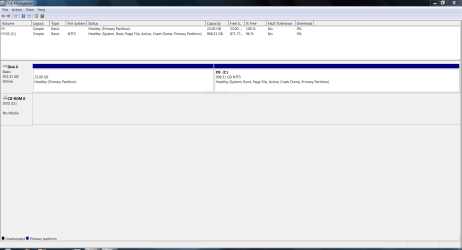
Here:
 

Attachments

  • Capture.PNG
    Capture.PNG
    29.6 KB · Views: 64

My Computer My Computer

At a glance

Windows 7 Home Premium 64bitIntel Core i7 2720QM @ 2.20GHz8 GBNVIDIA GeForce GTX 560M
Computer type
PC/Desktop
Computer Manufacturer/Model Number
ASUS G74SX-BBK11
OS
Windows 7 Home Premium 64bit
CPU
Intel Core i7 2720QM @ 2.20GHz
Motherboard
ASUSTeK Computer Inc. G74Sx (CPU 1)
Memory
8 GB
Graphics Card(s)
NVIDIA GeForce GTX 560M
Screen Resolution
1920x1080
Hard Drives
977GB Seagate ST1000LM024 HN-M101MBB (SATA)
128 GB SSD
Internet Speed
~20 Mbps
So what`s up with that 25 GB partition ? Is that where you want to install W8 ?
Did you create it ? Why is it to the left of C: ?
 

My Computer My Computer

At a glance

Windows 10 Pro x64Intel Core i7 6700KGSkill TridentZ RGB 16GB 3600 16-16-16-36EVGA GTX 980 Ti SC x2
Computer type
PC/Desktop
Computer Manufacturer/Model Number
Skylake Special #666
OS
Windows 10 Pro x64
CPU
Intel Core i7 6700K
Motherboard
Asus Sabertooth Z170 Mark 1
Memory
GSkill TridentZ RGB 16GB 3600 16-16-16-36
Graphics Card(s)
EVGA GTX 980 Ti SC x2
Sound Card
Realtek High Definition
Monitor(s) Displays
AOC G2460PG
Screen Resolution
1920 x 1080 144Hz
Hard Drives
Samsung 860 Pro 256GB, Seagate Barracuda 4TB x2
PSU
EVGA 1000 P2, EVGA White Custom Braided Cables
Case
Corsair Vengeance C70 Gunmetal Black
Cooling
Corsair H100i v2, Corsair ML120 x2, Thermal Grizzly Kryonaut
Keyboard
Logitech G910 Orion Spectrum
Mouse
Logitech G700s
Internet Speed
Verizon Fios Quantum Gateway 75/75
Antivirus
Windows Defender, Malwarebytes Free 3.8.3
Browser
Chrome
Other Info
Corsair SP120 x4, LG Blu-ray Drive, Durabrand HT-395 100 Watt Dolby Digital Amp, Corsair H2100 Wireless 7.1 Headset
So what`s up with that 25 GB partition ? Is that where you want to install W8 ?
Did you create it ? Why is it to the left of C: ?

That was my recovery partition. It had Windows files and a few files I put on there. Thats what happened the first time, it wasnt under "computer" so I clicked make active... Then I couldnt reboot. Since the reinstall, I didnt do anything with partitions or drives. You see it as the reinstall put it after I messed it up.
 

My Computer My Computer

At a glance

Windows 7 Home Premium 64bitIntel Core i7 2720QM @ 2.20GHz8 GBNVIDIA GeForce GTX 560M
Computer type
PC/Desktop
Computer Manufacturer/Model Number
ASUS G74SX-BBK11
OS
Windows 7 Home Premium 64bit
CPU
Intel Core i7 2720QM @ 2.20GHz
Motherboard
ASUSTeK Computer Inc. G74Sx (CPU 1)
Memory
8 GB
Graphics Card(s)
NVIDIA GeForce GTX 560M
Screen Resolution
1920x1080
Hard Drives
977GB Seagate ST1000LM024 HN-M101MBB (SATA)
128 GB SSD
Internet Speed
~20 Mbps
#1 Did you create a Partition Wizard Bootable CD ?
#2 Did you read up on how to use it ? It`s very easy.
 

My Computer My Computer

At a glance

Windows 10 Pro x64Intel Core i7 6700KGSkill TridentZ RGB 16GB 3600 16-16-16-36EVGA GTX 980 Ti SC x2
Computer type
PC/Desktop
Computer Manufacturer/Model Number
Skylake Special #666
OS
Windows 10 Pro x64
CPU
Intel Core i7 6700K
Motherboard
Asus Sabertooth Z170 Mark 1
Memory
GSkill TridentZ RGB 16GB 3600 16-16-16-36
Graphics Card(s)
EVGA GTX 980 Ti SC x2
Sound Card
Realtek High Definition
Monitor(s) Displays
AOC G2460PG
Screen Resolution
1920 x 1080 144Hz
Hard Drives
Samsung 860 Pro 256GB, Seagate Barracuda 4TB x2
PSU
EVGA 1000 P2, EVGA White Custom Braided Cables
Case
Corsair Vengeance C70 Gunmetal Black
Cooling
Corsair H100i v2, Corsair ML120 x2, Thermal Grizzly Kryonaut
Keyboard
Logitech G910 Orion Spectrum
Mouse
Logitech G700s
Internet Speed
Verizon Fios Quantum Gateway 75/75
Antivirus
Windows Defender, Malwarebytes Free 3.8.3
Browser
Chrome
Other Info
Corsair SP120 x4, LG Blu-ray Drive, Durabrand HT-395 100 Watt Dolby Digital Amp, Corsair H2100 Wireless 7.1 Headset
Back
Top