Japanese text displayed as blank squares even though it used to before

kabur88

New member
Local time
6:53 AM
Messages
14
Hi,

Using windows 64 here and I have enabled Japanese text on my computer. The problem I am facing is that the names of some of my files that used to be shown in Japanese text now only show blank squares. I can still type in Japanese though, however all my files that used to show Japanese text now only show blank squares. I've tried enabling Japanese text again and it still doesn't work. It's very confusing to me as the Japanese font is still there and I can type in Japanese on Word, but all my files that have Japanese now only show blank squares

If anyone knows how to fix this please let me know

Thanks
 

My Computer My Computer

At a glance

Windows 7 Home Premium 32bit
Computer Manufacturer/Model Number
HP pavilion dv6
OS
Windows 7 Home Premium 32bit
What you're talking about is language display - this is enabled in Windows 7 with language packs
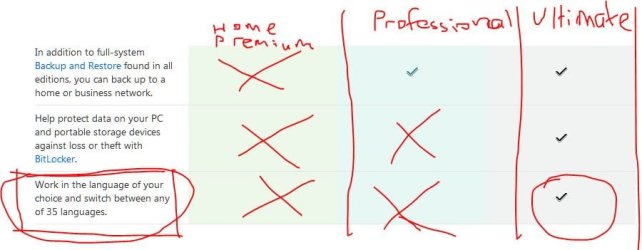
Windows Home Premium and Professional don't support language packs, so you'll have to buy Windows Ultimate 32/64 bit.
Compare Windows - Microsoft Windows
 

Attachments

  • Win Ultimate.JPG
    Win Ultimate.JPG
    43.9 KB · Views: 172

My Computer My Computer

At a glance

Windows 7 Professional x64 SP1Intel Core i7 860 @2.80GHz6144MB DDR3-SDRAM (3 x 2048 DDR3)nVidia GeForce 310
Computer Manufacturer/Model Number
Dell - Vostro 430
OS
Windows 7 Professional x64 SP1
CPU
Intel Core i7 860 @2.80GHz
Motherboard
Dell 054KM3
Memory
6144MB DDR3-SDRAM (3 x 2048 DDR3)
Graphics Card(s)
nVidia GeForce 310
Sound Card
Realtek High Definition Audio ALC662
Monitor(s) Displays
Dell Computer DELL E2311H
Screen Resolution
1920 x 1080
Hard Drives
Seagate Barracuda ST3750528AS (750 GB)
PSU
J515T 350W
Case
14.58inH x 6.69inW x 17.43inD
Cooling
Fan from the Box heehee
Keyboard
Rapoo Wireless Keyboard
Mouse
Rapoo Wireless Mouse
Internet Speed
1 byte every 2.6 hours
Other Info
Dreaming of building a new PC :D

Cant wait :)
What you're talking about is language display - this is enabled in Windows 7 with language packs
Windows Home Premium and Professional don't support language packs, so you'll have to buy Windows Ultimate 32/64 bit.
Compare Windows - Microsoft Windows

Well before this my computer was using 32bit Home Premium and then the hard disk broke and I replaced it again with 64bit home premium. In the 32bit the Japanese text remained as is and didn't convert back to blank squares. It's only now that after converting to 64bit the Japanese text which showed itself before all of a sudden changed back to blank squares.
 

My Computer My Computer

At a glance

Windows 7 Home Premium 32bit
Computer Manufacturer/Model Number
HP pavilion dv6
OS
Windows 7 Home Premium 32bit
It's possible that your hardware(processor) does not support 64bit.

Someone correct me if I am wrong.
 

My Computer My Computer

At a glance

Windows 8.1 Pro x64Intel Core i5-4570 CPU @ 3.20GHz8GB DDR3-1596 - Dual ChannelNVIDIA GeForce GTX 750 Ti SC
Computer type
PC/Desktop
Computer Manufacturer/Model Number
Custom
OS
Windows 8.1 Pro x64
CPU
Intel Core i5-4570 CPU @ 3.20GHz
Motherboard
Gigabyte Z87-D3HP-CF
Memory
8GB DDR3-1596 - Dual Channel
Graphics Card(s)
NVIDIA GeForce GTX 750 Ti SC
Sound Card
Onboard
Monitor(s) Displays
Samsung
Screen Resolution
1920x1080
Hard Drives
SSD - 120GB
Second - 1TB
Antivirus
MSE
Browser
Chrome
Could you give me your computer model and manufacturer (Eg: Dell XPS 8500), it's possible your system didn't exactly support Japanese. Not too sure since I don't really use language packs other than English.
 

My Computer My Computer

At a glance

Windows 7 Professional x64 SP1Intel Core i7 860 @2.80GHz6144MB DDR3-SDRAM (3 x 2048 DDR3)nVidia GeForce 310
Computer Manufacturer/Model Number
Dell - Vostro 430
OS
Windows 7 Professional x64 SP1
CPU
Intel Core i7 860 @2.80GHz
Motherboard
Dell 054KM3
Memory
6144MB DDR3-SDRAM (3 x 2048 DDR3)
Graphics Card(s)
nVidia GeForce 310
Sound Card
Realtek High Definition Audio ALC662
Monitor(s) Displays
Dell Computer DELL E2311H
Screen Resolution
1920 x 1080
Hard Drives
Seagate Barracuda ST3750528AS (750 GB)
PSU
J515T 350W
Case
14.58inH x 6.69inW x 17.43inD
Cooling
Fan from the Box heehee
Keyboard
Rapoo Wireless Keyboard
Mouse
Rapoo Wireless Mouse
Internet Speed
1 byte every 2.6 hours
Other Info
Dreaming of building a new PC :D

Cant wait :)
I'm sorry, i read that wrong. How did you download the language packs? Through windows update?
 

My Computer My Computer

At a glance

Windows 8.1 Pro x64Intel Core i5-4570 CPU @ 3.20GHz8GB DDR3-1596 - Dual ChannelNVIDIA GeForce GTX 750 Ti SC
Computer type
PC/Desktop
Computer Manufacturer/Model Number
Custom
OS
Windows 8.1 Pro x64
CPU
Intel Core i5-4570 CPU @ 3.20GHz
Motherboard
Gigabyte Z87-D3HP-CF
Memory
8GB DDR3-1596 - Dual Channel
Graphics Card(s)
NVIDIA GeForce GTX 750 Ti SC
Sound Card
Onboard
Monitor(s) Displays
Samsung
Screen Resolution
1920x1080
Hard Drives
SSD - 120GB
Second - 1TB
Antivirus
MSE
Browser
Chrome
I'm sorry, i read that wrong. How did you download the language packs? Through windows update?

Yes, at least that's how I think I did it.
Sorry, but it was like last month and my memory is a little hazy.
I added it to my keyboard so I can type in it
 

My Computer My Computer

At a glance

Windows 7 Home Premium 32bit
Computer Manufacturer/Model Number
HP pavilion dv6
OS
Windows 7 Home Premium 32bit
I'm sorry, i read that wrong. How did you download the language packs? Through windows update?

Windows Update, Check for updates, Optional, it should show all the language packs. Then you go into Control Panel and enable the language packs.
 

My Computer My Computer

At a glance

Windows 7 Professional x64 SP1Intel Core i7 860 @2.80GHz6144MB DDR3-SDRAM (3 x 2048 DDR3)nVidia GeForce 310
Computer Manufacturer/Model Number
Dell - Vostro 430
OS
Windows 7 Professional x64 SP1
CPU
Intel Core i7 860 @2.80GHz
Motherboard
Dell 054KM3
Memory
6144MB DDR3-SDRAM (3 x 2048 DDR3)
Graphics Card(s)
nVidia GeForce 310
Sound Card
Realtek High Definition Audio ALC662
Monitor(s) Displays
Dell Computer DELL E2311H
Screen Resolution
1920 x 1080
Hard Drives
Seagate Barracuda ST3750528AS (750 GB)
PSU
J515T 350W
Case
14.58inH x 6.69inW x 17.43inD
Cooling
Fan from the Box heehee
Keyboard
Rapoo Wireless Keyboard
Mouse
Rapoo Wireless Mouse
Internet Speed
1 byte every 2.6 hours
Other Info
Dreaming of building a new PC :D

Cant wait :)
He beat me to it by like a few seconds heeheeheeh
 

My Computer My Computer

At a glance

Windows 7 Professional x64 SP1Intel Core i7 860 @2.80GHz6144MB DDR3-SDRAM (3 x 2048 DDR3)nVidia GeForce 310
Computer Manufacturer/Model Number
Dell - Vostro 430
OS
Windows 7 Professional x64 SP1
CPU
Intel Core i7 860 @2.80GHz
Motherboard
Dell 054KM3
Memory
6144MB DDR3-SDRAM (3 x 2048 DDR3)
Graphics Card(s)
nVidia GeForce 310
Sound Card
Realtek High Definition Audio ALC662
Monitor(s) Displays
Dell Computer DELL E2311H
Screen Resolution
1920 x 1080
Hard Drives
Seagate Barracuda ST3750528AS (750 GB)
PSU
J515T 350W
Case
14.58inH x 6.69inW x 17.43inD
Cooling
Fan from the Box heehee
Keyboard
Rapoo Wireless Keyboard
Mouse
Rapoo Wireless Mouse
Internet Speed
1 byte every 2.6 hours
Other Info
Dreaming of building a new PC :D

Cant wait :)
Could you give me your computer model and manufacturer (Eg: Dell XPS 8500), it's possible your system didn't exactly support Japanese. Not too sure since I don't really use language packs other than English.

HP Pavilion dv6
 

My Computer My Computer

At a glance

Windows 7 Home Premium 32bit
Computer Manufacturer/Model Number
HP pavilion dv6
OS
Windows 7 Home Premium 32bit
Have you tried doing a quick restore, and then trying to reinstall the language pack?
 

My Computer My Computer

At a glance

Windows 8.1 Pro x64Intel Core i5-4570 CPU @ 3.20GHz8GB DDR3-1596 - Dual ChannelNVIDIA GeForce GTX 750 Ti SC
Computer type
PC/Desktop
Computer Manufacturer/Model Number
Custom
OS
Windows 8.1 Pro x64
CPU
Intel Core i5-4570 CPU @ 3.20GHz
Motherboard
Gigabyte Z87-D3HP-CF
Memory
8GB DDR3-1596 - Dual Channel
Graphics Card(s)
NVIDIA GeForce GTX 750 Ti SC
Sound Card
Onboard
Monitor(s) Displays
Samsung
Screen Resolution
1920x1080
Hard Drives
SSD - 120GB
Second - 1TB
Antivirus
MSE
Browser
Chrome
I'm sorry, i read that wrong. How did you download the language packs? Through windows update?

Windows Update, Check for updates, Optional, it should show all the language packs. Then you go into Control Panel and enable the language packs.

I've done that but for some reason whenever I click 'check for updates' it says that there aren't any optional updates. I'm not sure what this means as it's not like I've installed every update imaginable
 

My Computer My Computer

At a glance

Windows 7 Home Premium 32bit
Computer Manufacturer/Model Number
HP pavilion dv6
OS
Windows 7 Home Premium 32bit
Could you give me your computer model and manufacturer (Eg: Dell XPS 8500), it's possible your system didn't exactly support Japanese. Not too sure since I don't really use language packs other than English.

HP Pavilion dv6

Can't seem to find that PC/Laptop on Google.
 

My Computer My Computer

At a glance

Windows 7 Professional x64 SP1Intel Core i7 860 @2.80GHz6144MB DDR3-SDRAM (3 x 2048 DDR3)nVidia GeForce 310
Computer Manufacturer/Model Number
Dell - Vostro 430
OS
Windows 7 Professional x64 SP1
CPU
Intel Core i7 860 @2.80GHz
Motherboard
Dell 054KM3
Memory
6144MB DDR3-SDRAM (3 x 2048 DDR3)
Graphics Card(s)
nVidia GeForce 310
Sound Card
Realtek High Definition Audio ALC662
Monitor(s) Displays
Dell Computer DELL E2311H
Screen Resolution
1920 x 1080
Hard Drives
Seagate Barracuda ST3750528AS (750 GB)
PSU
J515T 350W
Case
14.58inH x 6.69inW x 17.43inD
Cooling
Fan from the Box heehee
Keyboard
Rapoo Wireless Keyboard
Mouse
Rapoo Wireless Mouse
Internet Speed
1 byte every 2.6 hours
Other Info
Dreaming of building a new PC :D

Cant wait :)
I'm sorry, i read that wrong. How did you download the language packs? Through windows update?

Windows Update, Check for updates, Optional, it should show all the language packs. Then you go into Control Panel and enable the language packs.

I've done that but for some reason whenever I click 'check for updates' it says that there aren't any optional updates. I'm not sure what this means as it's not like I've installed every update imaginable

Have you checked that you installed your Hard drive correctly?
 

My Computer My Computer

At a glance

Windows 7 Professional x64 SP1Intel Core i7 860 @2.80GHz6144MB DDR3-SDRAM (3 x 2048 DDR3)nVidia GeForce 310
Computer Manufacturer/Model Number
Dell - Vostro 430
OS
Windows 7 Professional x64 SP1
CPU
Intel Core i7 860 @2.80GHz
Motherboard
Dell 054KM3
Memory
6144MB DDR3-SDRAM (3 x 2048 DDR3)
Graphics Card(s)
nVidia GeForce 310
Sound Card
Realtek High Definition Audio ALC662
Monitor(s) Displays
Dell Computer DELL E2311H
Screen Resolution
1920 x 1080
Hard Drives
Seagate Barracuda ST3750528AS (750 GB)
PSU
J515T 350W
Case
14.58inH x 6.69inW x 17.43inD
Cooling
Fan from the Box heehee
Keyboard
Rapoo Wireless Keyboard
Mouse
Rapoo Wireless Mouse
Internet Speed
1 byte every 2.6 hours
Other Info
Dreaming of building a new PC :D

Cant wait :)

My Computer My Computer

At a glance

Windows 8.1 Pro x64Intel Core i5-4570 CPU @ 3.20GHz8GB DDR3-1596 - Dual ChannelNVIDIA GeForce GTX 750 Ti SC
Computer type
PC/Desktop
Computer Manufacturer/Model Number
Custom
OS
Windows 8.1 Pro x64
CPU
Intel Core i5-4570 CPU @ 3.20GHz
Motherboard
Gigabyte Z87-D3HP-CF
Memory
8GB DDR3-1596 - Dual Channel
Graphics Card(s)
NVIDIA GeForce GTX 750 Ti SC
Sound Card
Onboard
Monitor(s) Displays
Samsung
Screen Resolution
1920x1080
Hard Drives
SSD - 120GB
Second - 1TB
Antivirus
MSE
Browser
Chrome
Have you tried doing a quick restore, and then trying to reinstall the language pack?

Haven't done that yet. I'l try and see if that works
Need to wait for work to end first though and then go home
 

My Computer My Computer

At a glance

Windows 7 Home Premium 32bit
Computer Manufacturer/Model Number
HP pavilion dv6
OS
Windows 7 Home Premium 32bit
Windows Update, Check for updates, Optional, it should show all the language packs. Then you go into Control Panel and enable the language packs.

I've done that but for some reason whenever I click 'check for updates' it says that there aren't any optional updates. I'm not sure what this means as it's not like I've installed every update imaginable

Have you checked that you installed your Hard drive correctly?

Sorry but I'm not sure how to check for that
 

My Computer My Computer

At a glance

Windows 7 Home Premium 32bit
Computer Manufacturer/Model Number
HP pavilion dv6
OS
Windows 7 Home Premium 32bit
Well make sure you backup all of your files. After you do so, please post up the results
 

My Computer My Computer

At a glance

Windows 8.1 Pro x64Intel Core i5-4570 CPU @ 3.20GHz8GB DDR3-1596 - Dual ChannelNVIDIA GeForce GTX 750 Ti SC
Computer type
PC/Desktop
Computer Manufacturer/Model Number
Custom
OS
Windows 8.1 Pro x64
CPU
Intel Core i5-4570 CPU @ 3.20GHz
Motherboard
Gigabyte Z87-D3HP-CF
Memory
8GB DDR3-1596 - Dual Channel
Graphics Card(s)
NVIDIA GeForce GTX 750 Ti SC
Sound Card
Onboard
Monitor(s) Displays
Samsung
Screen Resolution
1920x1080
Hard Drives
SSD - 120GB
Second - 1TB
Antivirus
MSE
Browser
Chrome

My Computer My Computer

At a glance

Windows 7 Professional x64 SP1Intel Core i7 860 @2.80GHz6144MB DDR3-SDRAM (3 x 2048 DDR3)nVidia GeForce 310
Computer Manufacturer/Model Number
Dell - Vostro 430
OS
Windows 7 Professional x64 SP1
CPU
Intel Core i7 860 @2.80GHz
Motherboard
Dell 054KM3
Memory
6144MB DDR3-SDRAM (3 x 2048 DDR3)
Graphics Card(s)
nVidia GeForce 310
Sound Card
Realtek High Definition Audio ALC662
Monitor(s) Displays
Dell Computer DELL E2311H
Screen Resolution
1920 x 1080
Hard Drives
Seagate Barracuda ST3750528AS (750 GB)
PSU
J515T 350W
Case
14.58inH x 6.69inW x 17.43inD
Cooling
Fan from the Box heehee
Keyboard
Rapoo Wireless Keyboard
Mouse
Rapoo Wireless Mouse
Internet Speed
1 byte every 2.6 hours
Other Info
Dreaming of building a new PC :D

Cant wait :)
I've done that but for some reason whenever I click 'check for updates' it says that there aren't any optional updates. I'm not sure what this means as it's not like I've installed every update imaginable

Have you checked that you installed your Hard drive correctly?

Sorry but I'm not sure how to check for that

He bought the laptop so he didn't put any hardware in it.
 

My Computer My Computer

At a glance

Windows 8.1 Pro x64Intel Core i5-4570 CPU @ 3.20GHz8GB DDR3-1596 - Dual ChannelNVIDIA GeForce GTX 750 Ti SC
Computer type
PC/Desktop
Computer Manufacturer/Model Number
Custom
OS
Windows 8.1 Pro x64
CPU
Intel Core i5-4570 CPU @ 3.20GHz
Motherboard
Gigabyte Z87-D3HP-CF
Memory
8GB DDR3-1596 - Dual Channel
Graphics Card(s)
NVIDIA GeForce GTX 750 Ti SC
Sound Card
Onboard
Monitor(s) Displays
Samsung
Screen Resolution
1920x1080
Hard Drives
SSD - 120GB
Second - 1TB
Antivirus
MSE
Browser
Chrome
Back
Top