
Solved Install 7 on new hard drive with valid key, windows saying not valid

hrhartist

New member
Member
Local time
12:18 PM
Messages
33
Location
Arkansas
I am a part-time computer technician when I am not at my actual job doing IT Help Desk for the bank, and I have an issue with this laptop i am working on.

Laptop specs:
Toshiba Satelite L455D
Windows 7 32bit (sticker does not say which version)
(per belarc and magic jelly bean software)
it listed this on the OS:
Windows 7 Home Premium(build 7600)

under the Software Licenses(on belarc)
Microsoft - Windows 7 Home Premium XXXXX-OEM-X...X-XXXXX(Key:"listed key here")
with magic jelly bean, it pulled the same license key

The laptop was brought to me because it would not boot. After diagnosing, i discovered the hard drive had/is failing. So, preparing to install windows again i was hoping the hard drive was just lying to me about failing. it wasn't.
I had to get a hold of the laptop's owner and he informed me he did not have any discs or anything for the laptop.
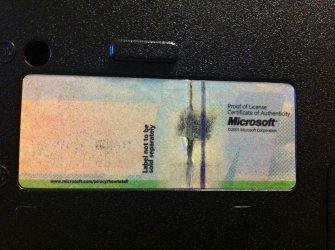
*the sticker on the bottom of the laptop (where the key is suppose to be) is blank so i think it faded? but the "Proof of license Certificate of Authenticity Microsoft" is on there nice black and bold. so this is why i had to ask the customer if they had their discs.

To get the laptop to boot to the hard drive, i had to do some work on it. I plugged it into an adapter to my computer and ran multiple different chkdsk switches, and to my surprise it finally booted to the os. Computer properties said the correct version of windows as stated above, and i ran magic jelly bean to make sure, the belarc so i had a general idea of the drivers to reinstall if windows couldn't find them. (everything checked out)

I borrowed a version of windows 7 install disc(an all in one disc)from a fellow techie friend so that i could install the os, plug in the key and away i go, smooth as pepto bismol....the computer looked at me and said, 'negative ghost rider.'
I tried putting in the key during the install it said not valid. so i just skipped that part thinking it just couldn't connect bc the driver wasn't installed. When i tried to enter the key in from the computer > properties > change product key it says the key is not valid.

where can i go from here?
two questions:
1. is the problem the all-in-one disc
if yes, where can i get a legal copy(preferably free) to try to eliminate that possibility.
2. is the key the problem?
if yes:
can i request a new key(for free)from microsoft?
or am i just being a complete dunce?
:sarc: if it helps, i still have the 'old' hard drive and all the files on it, and it still boots when i put it into the laptop.

*hope i have all the relevant information for ya'll guys thanks in advance! :D
 

My Computer My Computer

At a glance

Windows 7 Professional 32bit, 64 bit, Windows...Intel4GB-8GB
Computer type
PC/Desktop
Computer Manufacturer/Model Number
Dell Optiplex
OS
Windows 7 Professional 32bit, 64 bit, Windows XP Professional
CPU
Intel
Memory
4GB-8GB
Monitor(s) Displays
1-3
Hard Drives
80GB+
Keyboard
wired dell stock keyboard and wireless logitech
Mouse
wired dell stock mouse and wireless logitech
Antivirus
System Center 2012 Endpoint Protection
Browser
Internet Explorer 8/9, Firefox, Chrome

My Computer My Computer

At a glance

Windows 10, Home Clean InstallIntel Core2 processsor Q8200(2.33Ghz 1333FSB)...6 gbATI Radeon 256MB HD3650
Computer type
PC/Desktop
Computer Manufacturer/Model Number
Dell XPS 420
OS
Windows 10, Home Clean Install
CPU
Intel Core2 processsor Q8200(2.33Ghz 1333FSB) Quad Core Tech
Motherboard
Dell
Memory
6 gb
Graphics Card(s)
ATI Radeon 256MB HD3650
Sound Card
Intergrated 7.1 Channel Audio
Monitor(s) Displays
Dell SP2009W 20"
Hard Drives
640 GB Serial ATA Hard drive
Cooling
Fan
Keyboard
Dell USB Keyboard
Mouse
Dell Premium Optical USB
Internet Speed
DSL 2.85
The key audited from a factory OEM installation is the Factory OEM-SLP mass-activation key which cannot be used to activate Win7 after a clean reinstall.

You must have the OEM-COA key on the COA sticker or use Recovery Disks ordered from Tech Support which self-activate.

Another option to consider is to install Windows 8 Consumer Preview which is comparable in quality to Win7 with a more graphical buttons start page which takes some getting used to. This will be free to use until Jan 2013 and during that time user can participate in pre-sales and free preview party offers to get the OS for free or low cost after that. Windows 8 Release Preview - Download
 
@gregrocker: i am too skeptical about windows 8 to put it on the laptop. it was more designed towards mobile devices like tablets etc. (i hear) and causes problems with actual computers when it is installed on them.

@richc: i tried the tutorial on the activate windows by phone, and when i typed in slui.exe 4, i got: "This pre-release version of Windows has expired. To keep using Windows, back up your files, and the install any released edition of Windows 7 Home Premium.
 

My Computer My Computer

At a glance

Windows 7 Professional 32bit, 64 bit, Windows...Intel4GB-8GB
Computer type
PC/Desktop
Computer Manufacturer/Model Number
Dell Optiplex
OS
Windows 7 Professional 32bit, 64 bit, Windows XP Professional
CPU
Intel
Memory
4GB-8GB
Monitor(s) Displays
1-3
Hard Drives
80GB+
Keyboard
wired dell stock keyboard and wireless logitech
Mouse
wired dell stock mouse and wireless logitech
Antivirus
System Center 2012 Endpoint Protection
Browser
Internet Explorer 8/9, Firefox, Chrome
oh and i meant to say: greg, if they pre installed it and everything with a factory key...how can i get the 'actual' copy for this laptop to reinstall it on the new hard drive?
 

My Computer My Computer

At a glance

Windows 7 Professional 32bit, 64 bit, Windows...Intel4GB-8GB
Computer type
PC/Desktop
Computer Manufacturer/Model Number
Dell Optiplex
OS
Windows 7 Professional 32bit, 64 bit, Windows XP Professional
CPU
Intel
Memory
4GB-8GB
Monitor(s) Displays
1-3
Hard Drives
80GB+
Keyboard
wired dell stock keyboard and wireless logitech
Mouse
wired dell stock mouse and wireless logitech
Antivirus
System Center 2012 Endpoint Protection
Browser
Internet Explorer 8/9, Firefox, Chrome
My Computer My Computer

At a glance

Windows 10, Home Clean InstallIntel Core2 processsor Q8200(2.33Ghz 1333FSB)...6 gbATI Radeon 256MB HD3650
Computer type
PC/Desktop
Computer Manufacturer/Model Number
Dell XPS 420
OS
Windows 10, Home Clean Install
CPU
Intel Core2 processsor Q8200(2.33Ghz 1333FSB) Quad Core Tech
Motherboard
Dell
Memory
6 gb
Graphics Card(s)
ATI Radeon 256MB HD3650
Sound Card
Intergrated 7.1 Channel Audio
Monitor(s) Displays
Dell SP2009W 20"
Hard Drives
640 GB Serial ATA Hard drive
Cooling
Fan
Keyboard
Dell USB Keyboard
Mouse
Dell Premium Optical USB
Internet Speed
DSL 2.85
Ask if the OS has already been reinstalled with the COA sticker key which means that will be the one you audited. The error you just reported to Rich sounds lke it may be an outdated installer problem.

If you find the key you audited is indeed from the COA sticker then use the ISO and tools to burn to DVD in Steps 1 and 2 in Clean Reinstall - Factory OEM Windows 7.

If it's not already been reinstalled previously with COA key so that's the one which you read, then your only option now is to order Recovery Disks from OEM tech support.
 
i'm not familiar with that term, greg, but i will attach an image of what i think your talking about and to clarify what i said earlier about the authenticity sticker being faded/or blank
IMG_1492.jpg
in the meantime, i will work on the tutorials to see if it works.
Thank ya'll for the speedy response!
 

My Computer My Computer

At a glance

Windows 7 Professional 32bit, 64 bit, Windows...Intel4GB-8GB
Computer type
PC/Desktop
Computer Manufacturer/Model Number
Dell Optiplex
OS
Windows 7 Professional 32bit, 64 bit, Windows XP Professional
CPU
Intel
Memory
4GB-8GB
Monitor(s) Displays
1-3
Hard Drives
80GB+
Keyboard
wired dell stock keyboard and wireless logitech
Mouse
wired dell stock mouse and wireless logitech
Antivirus
System Center 2012 Endpoint Protection
Browser
Internet Explorer 8/9, Firefox, Chrome
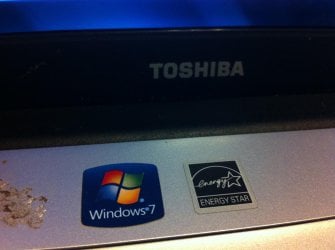
how come it has a windows 7 sticker on it then?
IMG_1493.jpg

thank you for you help greg.
your knowledge is very welcome
 
Last edited:

My Computer My Computer

At a glance

Windows 7 Professional 32bit, 64 bit, Windows...Intel4GB-8GB
Computer type
PC/Desktop
Computer Manufacturer/Model Number
Dell Optiplex
OS
Windows 7 Professional 32bit, 64 bit, Windows XP Professional
CPU
Intel
Memory
4GB-8GB
Monitor(s) Displays
1-3
Hard Drives
80GB+
Keyboard
wired dell stock keyboard and wireless logitech
Mouse
wired dell stock mouse and wireless logitech
Antivirus
System Center 2012 Endpoint Protection
Browser
Internet Explorer 8/9, Firefox, Chrome
Please do not bother about 2005. It is the Microsoft Copyright date and has no relevance to Windows Installation date.

Having lost the COA key, you have just three options now.

1. Get the Recovery Disks for the system from Toshiba. It will self activate provided the SLIC table in the system is not corrupted.

2. You may also try to get the COA-SLP key from Toshiba furnishing the Serial number of the system and other relevant details - but I am skeptical that Toshiba will dig up the records and help you.

3. If none of the above two works, get the Recovery CDs from anyone having the same system with the same edition of OS.( It is the licence for the system that matters, not the media and where you get it from.)
 

My Computer My Computer

At a glance

Windows 7 Home Premium 32 bit
OS
Windows 7 Home Premium 32 bit
What's the BIOS date? - that's the most obvious clue as to which version (but not edition) of WIndows it came installed with.
Is the OS running at all? - if so, please run an MGADiag report, and post it. You may also be able to retireve the Key using Belarc Advisor, or Magical JellyBean (don't post that, though!!)

What is the FULL product ID (NOT the Key!) which you edited from your first post? - it's the same one for everyone with that model and OS, so isn't confidential

I agree with Jumanji about the proper course of action here.
 

My Computer My Computer

At a glance

Win 7 x64 Home Premium (and x86 VirtualBox VM...i3 370M/i7 6500U8GB - finally :)/8GBit's an i3, dude!/dual Intel&nVidia
Computer type
Laptop
Computer Manufacturer/Model Number
Asus K52F or Lenovo B51-80
OS
Win 7 x64 Home Premium (and x86 VirtualBox VM)/Win10
CPU
i3 370M/i7 6500U
Motherboard
Asus/Lenovo
Memory
8GB - finally :)/8GB
Graphics Card(s)
it's an i3, dude!/dual Intel&nVidia
Sound Card
onboard
Monitor(s) Displays
15.6" built-in
Screen Resolution
1366x768/1920x1080
Hard Drives
750GB Seagate internal
Sundry external drives attached to other computers on the local network
1TB SSD on the Lenovo
PSU
n/a
Internet Speed
as much as I can get - usually on a dongle/phone, so <1MB/s
Antivirus
MSE/Defender
Browser
IE11/12/Edge/Chrome/FF(if I must)
The model shipped with Win7 Home Premium 32 bit.

If you didn't wipe the Recovery partition before reinstall you might still be able to run Toshiba Factory Recovery by rebooting while holding down the 0 key to see if Recovery Starts. User Guide Page 61

If not you can try resetting Recovery partition using the fix given here: Satellite L455D-S5976 no recovery utility - Toshiba Forums

If no Recovery partition and the key you audited wasn't from a Clean Reinstall with COA key, then you'll need to order Toshiba Recovery Disks. Recovery media can be ordered online. Click here to begin the order process. There is no charge for the software itself, for which customers already own licenses, and as of 11/5/11 the shipping and handling charges for delivery of recovery media in the US is $29.95 for DVD media or $39.95 for USB sticks.
 
BIOS version/date: Toshiba v1.20, 11/17/2009

ok, here is the mgadiag reprot you requested, noeldp:

Code:
Diagnostic Report (1.9.0027.0):
-----------------------------------------
Windows Validation Data-->
Validation Code: 0
Cached Online Validation Code: 0x0
Windows Product Key: *****-*****-4F8HK-M4P73-W8DQG
Windows Product Key Hash: Xs1iQgVeo0C+sObJxS7eu+FuBPQ=
Windows Product ID: 00359-OEM-8992687-00057
Windows Product ID Type: 2
Windows License Type: OEM SLP
Windows OS version: 6.1.7600.2.00010300.0.0.003
ID: {33A44F51-9EED-47FF-BEEE-9DBCC46E882E}(1)
Is Admin: Yes
TestCab: 0x0
LegitcheckControl ActiveX: N/A, hr = 0x80070002
Signed By: N/A, hr = 0x80070002
Product Name: Windows 7 Home Premium
Architecture: 0x00000000
Build lab: 7600.win7_gdr.120305-1504
TTS Error: 
Validation Diagnostic: 
Resolution Status: N/A
Vista WgaER Data-->
ThreatID(s): N/A, hr = 0x80070002
Version: N/A, hr = 0x80070002
Windows XP Notifications Data-->
Cached Result: N/A, hr = 0x80070002
File Exists: No
Version: N/A, hr = 0x80070002
WgaTray.exe Signed By: N/A, hr = 0x80070002
WgaLogon.dll Signed By: N/A, hr = 0x80070002
OGA Notifications Data-->
Cached Result: N/A, hr = 0x80070002
Version: 2.0.48.0
OGAExec.exe Signed By: Microsoft
OGAAddin.dll Signed By: Microsoft
OGA Data-->
Office Status: 102
Microsoft Office Home and Student 2007 - 100 Genuine
OGA Version: Registered, 2.0.48.0
Signed By: Microsoft
Office Diagnostics: 77F760FE-153-80070002_7E90FEE8-175-80070002_025D1FF3-364-80041010_025D1FF3-229-80041010_025D1FF3-230-1_025D1FF3-517-80040154_025D1FF3-237-80040154_025D1FF3-238-2_025D1FF3-244-80070002_025D1FF3-258-3_B4D0AA8B-920-80070057
Browser Data-->
Proxy settings: N/A
User Agent: Mozilla/4.0 (compatible; MSIE 8.0; Win32)
Default Browser: C:\Program Files\Google\Chrome\Application\chrome.exe
Download signed ActiveX controls: Prompt
Download unsigned ActiveX controls: Disabled
Run ActiveX controls and plug-ins: Allowed
Initialize and script ActiveX controls not marked as safe: Disabled
Allow scripting of Internet Explorer Webbrowser control: Disabled
Active scripting: Allowed
Script ActiveX controls marked as safe for scripting: Allowed
File Scan Data-->
Other data-->
Office Details: <GenuineResults><MachineData><UGUID>{33A44F51-9EED-47FF-BEEE-9DBCC46E882E}</UGUID><Version>1.9.0027.0</Version><OS>6.1.7600.2.00010300.0.0.003</OS><Architecture>x32</Architecture><PKey>*****-*****-*****-*****-W8DQG</PKey><PID>00359-OEM-8992687-00057</PID><PIDType>2</PIDType><SID>S-1-5-21-1748159083-837515160-2541004446</SID><SYSTEM><Manufacturer>TOSHIBA</Manufacturer><Model>Satellite L455D</Model></SYSTEM><BIOS><Manufacturer>TOSHIBA</Manufacturer><Version>V1.20</Version><SMBIOSVersion major="2" minor="4"/><Date>20091117000000.000000+000</Date></BIOS><HWID>B6BB3607018400F6</HWID><UserLCID>0409</UserLCID><SystemLCID>0409</SystemLCID><TimeZone>Central Standard Time(GMT-06:00)</TimeZone><iJoin>0</iJoin><SBID><stat>3</stat><msppid></msppid><name></name><model></model></SBID><OEM><OEMID>TOSCPL</OEMID><OEMTableID>TOSCPL00</OEMTableID></OEM><GANotification><File Name="OGAAddin.dll" Version="2.0.48.0"/></GANotification></MachineData><Software><Office><Result>102</Result><Products><Product GUID="{91120000-002F-0000-0000-0000000FF1CE}"><LegitResult>100</LegitResult><Name>Microsoft Office Home and Student 2007</Name><Ver>12</Ver><PidType>19</PidType></Product></Products><Applications><App Id="16" Version="12" Result="100"/><App Id="18" Version="12" Result="100"/><App Id="1B" Version="12" Result="100"/><App Id="A1" Version="12" Result="100"/></Applications></Office></Software></GenuineResults>  
Spsys.log Content: 0x80070002
Licensing Data-->
Software licensing service version: 6.1.7600.16385
Name: Windows(R) 7, HomePremium edition
Description: Windows Operating System - Windows(R) 7, OEM_SLP channel
Activation ID: d2c04e90-c3dd-4260-b0f3-f845f5d27d64
Application ID: 55c92734-d682-4d71-983e-d6ec3f16059f
Extended PID: 00359-00178-926-800057-02-1033-7600.0000-2392009
Installation ID: 002724595380589976248522131643063140887842207046164404
Processor Certificate URL: [URL]http://go.microsoft.com/fwlink/?LinkID=88338[/URL]
Machine Certificate URL: [URL]http://go.microsoft.com/fwlink/?LinkID=88339[/URL]
Use License URL: [URL]http://go.microsoft.com/fwlink/?LinkID=88341[/URL]
Product Key Certificate URL: [URL]http://go.microsoft.com/fwlink/?LinkID=88340[/URL]
Partial Product Key: W8DQG
License Status: Licensed
Remaining Windows rearm count: 3
Trusted time: 7/28/2012 2:47:20 PM
Windows Activation Technologies-->
HrOffline: 0x00000000
HrOnline: 0x00000000
HealthStatus: 0x0000000000000000
Event Time Stamp: 7:20:2012 19:49
ActiveX: Registered, Version: 7.1.7600.16395
Admin Service: Registered, Version: 7.1.7600.16395
HealthStatus Bitmask Output:
 
HWID Data-->
HWID Hash Current: MgAAAAEABAABAAEAAAABAAAAAgABAAEAJJSWvPxJEDNU+eL7Fkjck5brHiCAnRJVDh4=
OEM Activation 1.0 Data-->
N/A
OEM Activation 2.0 Data-->
BIOS valid for OA 2.0: yes
Windows marker version: 0x20001
OEMID and OEMTableID Consistent: yes
BIOS Information: 
  ACPI Table Name OEMID Value OEMTableID Value
  APIC   PTLTD     APIC  
  FACP   AMD     ANT     
  SRAT   AMD     HAMMER  
  MSCT   OEMID   MSCTTBL 
  HPET   PTLTD   HPETTBL 
  MCFG   PTLTD     MCFG  
  TCPA   TOSCPL          
  SLIC   TOSCPL  TOSCPL00
  SSDT   PTLTD   POWERNOW

@noeldp: when i ran belarc and jelly bean they gave me the same product key as i had before when i wrote the post.
i finally got the iso from the digital river site downloaded for home premium so i am going to fire it up in my wmware player first to see if it is going to work, then try putting it onto the new hard drive i ordered.

i did however get to the mytoshiba application and am making some recovery discs from it, so i have that to try too.

@gregrocker: it doesn't seem to have a recovery partition. i even unhid hidden files and the system files, but did not see one.
 

My Computer My Computer

At a glance

Windows 7 Professional 32bit, 64 bit, Windows...Intel4GB-8GB
Computer type
PC/Desktop
Computer Manufacturer/Model Number
Dell Optiplex
OS
Windows 7 Professional 32bit, 64 bit, Windows XP Professional
CPU
Intel
Memory
4GB-8GB
Monitor(s) Displays
1-3
Hard Drives
80GB+
Keyboard
wired dell stock keyboard and wireless logitech
Mouse
wired dell stock mouse and wireless logitech
Antivirus
System Center 2012 Endpoint Protection
Browser
Internet Explorer 8/9, Firefox, Chrome
The Product Key in use is the OEM_SLP Key rather than the COA_SLP Key - it will only work when used with the manufacturer's Recovery media.
You have a couple of options....

1) reinstall with Retail media, and see if you can persuade MS to part with a replacement Key. (they will sometimes do this - but it seems to be down to which side of the bed the operator got out of!)

3) reinstall using the Recovery Media - you may be able to acquire them from a reputable company other than the OEM itself, such as restoredisks.com

FYI....


Computers that come pre-installed with Windows from large manufacturers usually come with two Product Keys.

OEM SLP: This is the key that came in Windows (from the factory). It works by connecting to a BIOS flag (the SLIC table) found only on computers from that Manufacturer. Once it sees the correct BIOS flag, it self activates.

COA SLP: This is the key seen on the sticker located on the side, bottom or in the battery compartment of your machine. The purpose of this key is to be used in the case the OEM SLP self-activation stops working for whatever reason.
 

My Computer My Computer

At a glance

Win 7 x64 Home Premium (and x86 VirtualBox VM...i3 370M/i7 6500U8GB - finally :)/8GBit's an i3, dude!/dual Intel&nVidia
Computer type
Laptop
Computer Manufacturer/Model Number
Asus K52F or Lenovo B51-80
OS
Win 7 x64 Home Premium (and x86 VirtualBox VM)/Win10
CPU
i3 370M/i7 6500U
Motherboard
Asus/Lenovo
Memory
8GB - finally :)/8GB
Graphics Card(s)
it's an i3, dude!/dual Intel&nVidia
Sound Card
onboard
Monitor(s) Displays
15.6" built-in
Screen Resolution
1366x768/1920x1080
Hard Drives
750GB Seagate internal
Sundry external drives attached to other computers on the local network
1TB SSD on the Lenovo
PSU
n/a
Internet Speed
as much as I can get - usually on a dongle/phone, so <1MB/s
Antivirus
MSE/Defender
Browser
IE11/12/Edge/Chrome/FF(if I must)
The Product Key in use is the OEM_SLP Key rather than the COA_SLP Key - it will only work when used with the manufacturer's Recovery media.
You have a couple of options....

1) reinstall with Retail media, and see if you can persuade MS to part with a replacement Key. (they will sometimes do this - but it seems to be down to which side of the bed the operator got out of!)

3) reinstall using the Recovery Media - you may be able to acquire them from a reputable company other than the OEM itself, such as restoredisks.com

FYI....


Computers that come pre-installed with Windows from large manufacturers usually come with two Product Keys.

OEM SLP: This is the key that came in Windows (from the factory). It works by connecting to a BIOS flag (the SLIC table) found only on computers from that Manufacturer. Once it sees the correct BIOS flag, it self activates.

COA SLP: This is the key seen on the sticker located on the side, bottom or in the battery compartment of your machine. The purpose of this key is to be used in the case the OEM SLP self-activation stops working for whatever reason.

ah ha, that makes sense. so, if i install the new hard drive and launch these recovery disc(x3) that i made from the my toshiba appliation i got to launch, should it pull that OEM SLP, or what....and, @noeldp, was there a 2. in your options or did you just mistype?
 

My Computer My Computer

At a glance

Windows 7 Professional 32bit, 64 bit, Windows...Intel4GB-8GB
Computer type
PC/Desktop
Computer Manufacturer/Model Number
Dell Optiplex
OS
Windows 7 Professional 32bit, 64 bit, Windows XP Professional
CPU
Intel
Memory
4GB-8GB
Monitor(s) Displays
1-3
Hard Drives
80GB+
Keyboard
wired dell stock keyboard and wireless logitech
Mouse
wired dell stock mouse and wireless logitech
Antivirus
System Center 2012 Endpoint Protection
Browser
Internet Explorer 8/9, Firefox, Chrome
The OEM-SLP key is baked into the Recovery media so it doesn't have to be accessed or inserted at all.

THere is a way to back up the SLP activation file so it can be reinstalled to a Clean install but it isn't supported here. You would have to research it yourself.
 
The OEM-SLP key is baked into the Recovery media so it doesn't have to be accessed or inserted at all.

THere is a way to back up the SLP activation file so it can be reinstalled to a Clean install but it isn't supported here. You would have to research it yourself.

ok, so i was able to make 3 discs from the recovery media creator from some toshiba bloatware. They are listed as: System Recovery Media(Recovery DVD Disk 1 + Recovery DVD Disk 2) and then an Application Disc(totaling to 3 different discs.

if i understand what i am reading from gregrocker, and the sites i have been looking at, if i just install the new HDD into the laptop, place recovery dvd disk 1 in, boot to cd then put the other dvds in when asked, i should be able to reinstall it if i don't mess with the motherboard?
:sarc: or can it be that simple?

oh, and on another note, i ran the SIW program i found in another forum thread and under the Software> Licenses tab it listed a:
Resource Type (under this column it lists the programs(im guessing)with keys.
one of the listed is titled: Microsoft Windows NT CurrentVersion DefaultProduct Key

this wouldn't by chance of a miracle be the COA key would it?
would make me a happy
 

My Computer My Computer

At a glance

Windows 7 Professional 32bit, 64 bit, Windows...Intel4GB-8GB
Computer type
PC/Desktop
Computer Manufacturer/Model Number
Dell Optiplex
OS
Windows 7 Professional 32bit, 64 bit, Windows XP Professional
CPU
Intel
Memory
4GB-8GB
Monitor(s) Displays
1-3
Hard Drives
80GB+
Keyboard
wired dell stock keyboard and wireless logitech
Mouse
wired dell stock mouse and wireless logitech
Antivirus
System Center 2012 Endpoint Protection
Browser
Internet Explorer 8/9, Firefox, Chrome
Yes try running the Recovery Disks.

Default key is the one which gives 30 days until Activation.
 
ah ha, that makes sense. so, if i install the new hard drive and launch these recovery disc(x3) that i made from the my toshiba appliation i got to launch, should it pull that OEM SLP, or what....and, @noeldp, was there a 2. in your options or did you just mistype?

Typo - sorry about that!

What SW claimed as a Default Key is in fact the OEM_SLP Key - the Default Key for Windows ends 74XYM-BH4JX-XM76F, and as Gregrocker says, it allows 30 days to play with the system, but cannot be activated legally by any means.
 

My Computer My Computer

At a glance

Win 7 x64 Home Premium (and x86 VirtualBox VM...i3 370M/i7 6500U8GB - finally :)/8GBit's an i3, dude!/dual Intel&nVidia
Computer type
Laptop
Computer Manufacturer/Model Number
Asus K52F or Lenovo B51-80
OS
Win 7 x64 Home Premium (and x86 VirtualBox VM)/Win10
CPU
i3 370M/i7 6500U
Motherboard
Asus/Lenovo
Memory
8GB - finally :)/8GB
Graphics Card(s)
it's an i3, dude!/dual Intel&nVidia
Sound Card
onboard
Monitor(s) Displays
15.6" built-in
Screen Resolution
1366x768/1920x1080
Hard Drives
750GB Seagate internal
Sundry external drives attached to other computers on the local network
1TB SSD on the Lenovo
PSU
n/a
Internet Speed
as much as I can get - usually on a dongle/phone, so <1MB/s
Antivirus
MSE/Defender
Browser
IE11/12/Edge/Chrome/FF(if I must)
haha, if figured so, but thought i would make sure. so the other key that it listed by home professional and Windows 7 product key would be the non-30day key i'm guessing?

When i tried booting to those recovery disks on my new hard drive, it got to the point of copying files from the first disc, it ejected the disc and displayed: error: 0A-224-0000 i then had the option to hit ok.
a prompt titled, cmd.exe told me it couldn't find a disc in the drive, so i pushed the disc back in, and it shut itself down...i have done this about 3 times. and when i try to boot with the 2nd recovery disc it gives error: F3-F200-0002.

so, i decided to try to use the 'blank' home premium disc i created with the iso from digital river, and it gave me the error error:F3-F200-0002

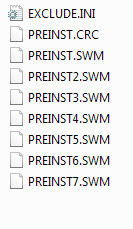
i'm gonna plug the hdd into my sata adapter to my pc and run disk part on it to format it because when i opened it up in explorer it had these files (see attachment) in a folder named $TOSIMG$
error.PNG
 

My Computer My Computer

At a glance

Windows 7 Professional 32bit, 64 bit, Windows...Intel4GB-8GB
Computer type
PC/Desktop
Computer Manufacturer/Model Number
Dell Optiplex
OS
Windows 7 Professional 32bit, 64 bit, Windows XP Professional
CPU
Intel
Memory
4GB-8GB
Monitor(s) Displays
1-3
Hard Drives
80GB+
Keyboard
wired dell stock keyboard and wireless logitech
Mouse
wired dell stock mouse and wireless logitech
Antivirus
System Center 2012 Endpoint Protection
Browser
Internet Explorer 8/9, Firefox, Chrome
Back
Top