Win7 defragmenter analyzes SSD frequently

deepsilence

New member
Local time
12:28 PM
Messages
8
Location
Tucson, AZ
I have newly installed a Samsung 830 128GB SSD as my system C: drive and installed Windows 7 freshly on it.

Windows 7 recognized it as SSD after running WEI and excluded the drive to be defragmented (the C: drive is not shown in the "Disk Defragmenter -> Configure schedule -> Select disks" ). see attachment 1.

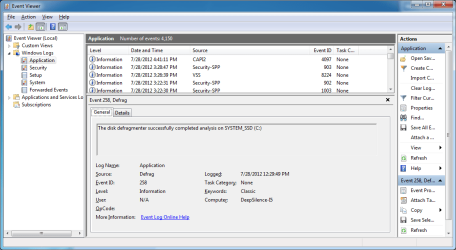
However, Windows 7 defragmenter seems to automatically analyzes the SSD frequently in system idle (almost everyday). The Disk Defragmenter shows Last Run of the SSD with the "% fragmented". I noticed the value was different, smaller than that of two days ago. Also, in the Event Viewer, it shows the three log of "The disk defragmenter successfully completed analysis on SYSTEM_SSD (C:). see attachment 2

recent logs of defragmenter analyzes SSD in event viewer:
7/28/2012 12:29:49 PM
7/27/2012 12:51:42 PM
7/27/2012 3:36:41 AM
7/27/2012 1:14:13 AM
7/27/2012 1:07:07 AM
7/25/2012 7:09:03 PM


Any idea why Windows 7 does that?
 

Attachments

  • Defragmenter.png
    Defragmenter.png
    60.9 KB · Views: 146
  • defrag_event.png
    defrag_event.png
    32.3 KB · Views: 85

My Computer My Computer

At a glance

Windows 7 Pro 64-bitIntel I5-750 2.67GHz12G DDR3Radeon HD6770 xFire with HD5770
OS
Windows 7 Pro 64-bit
CPU
Intel I5-750 2.67GHz
Motherboard
Asus P7P55D-PRO
Memory
12G DDR3
Graphics Card(s)
Radeon HD6770 xFire with HD5770
Monitor(s) Displays
Dell U2412M + Samsung SyncMaster 2333SW
Hard Drives
Samsung 830 SSD 128GB
Seagate 1.5TB
Fantom GreenDrive 1TB
I've noticed the same thing.

I'd guess that the SSD is analyzed because you can defrag it manually if you want to--although you shouldn't. In that sense, Windows treats it like an HDD.

The fragmentation level of my SSD moves around a bit. I manually analyzed it a few minutes ago and the fragmentation level dropped from 10 to 9. I've never defragged it.

I'd be interested in other comments, but I don't think it's any cause for concern.
 

My Computer My Computer

At a glance

Windows 7 Home Premium SP1, 64-bitIntel Skylake i5-6600K, not overclocked8 GB HyperX DDR4-2666 (2 x 4 GB)none; graphics are integrated on CPU
Computer type
PC/Desktop
Computer Manufacturer/Model Number
Ignatz Special; 4 speed manual gearbox; factory air conditioning; one of one
OS
Windows 7 Home Premium SP1, 64-bit
CPU
Intel Skylake i5-6600K, not overclocked
Motherboard
AsRock Z170M Extreme 4, micro ATX
Memory
8 GB HyperX DDR4-2666 (2 x 4 GB)
Graphics Card(s)
none; graphics are integrated on CPU
Sound Card
onboard: Realtek ALC1150; external: USB Behringer UF0-202
Monitor(s) Displays
Dell S2340M 23 inch IPS
Screen Resolution
1600 x 900
Hard Drives
System: Crucial MX100 series SSD, 128 GB;
Data: Samsung Spinpoint 103SJ, 1 TB;
Backup: WD Caviar Green WD30EZRX-00D8PB0, 3 TB
PSU
Rosewill SilentNight 500 watt fanless, semi-modular
Case
Antec Solo II
Cooling
Noctua NH-U12S; Noctua F12 intake, Noctua S12A exhaust
Keyboard
Microsoft 200 6JH-00001 USB
Mouse
Dell or Microsoft optical wired; USB
Antivirus
Microsoft Security Essentials and Malwarebytes Premium
Browser
Pale Moon
Other Info
All fans PWM; speeds at idle: CPU circa 500 rpm; intake circa 600 rpm; exhaust circa 600 rpm; CPU temps 27 idle and 47 C load in a warm room (27 C/81 F) when running Intel Extreme Tuning Utility stress test.
Hi
You will not see the C: drive under "Configure Schedule" as Windows treats this as an SSD and thats how the Windows 7 defragmenter interface is programmed.

Anyway There are various reasons for why it does this analysis. Try the below steps.

1. Check the Task Scheduler( Task Scheduler library>Microsoft>Windows>Defrag ) ... it is by default set to all drive with -c parameter...Try disabling this task or at least specifying the drives you want to defrag

2. Check Boot time optimization @ "HKEY_LOCAL_MACHINE\SOFTWARE\Microsoft\Dfrg\BootOptimizeFunction" where Key OptimizeComplete needs to be No... If Yes it means boot defragmentation is set

3. check volume optimization HKEY_LOCAL_MACHINE\SOFTWARE\Microsoft\Windows\CurrentVersion\OptimalLayout. There should not be EnableAutoLayout key present.

4. Disable Prefetch/superfetch @ "HKEY_LOCAL_MACHINE\SYSTEM\CurrentControlSet\Control\SessionManager\Memory Management\PrefetchParameters" . Right-click on both EnablePrefetcher and EnableSuperfetch and Modify on each of these to change the value from 1 (or 3) to 0. Also disable the SuperFetch service @ Services.msc

5. Disable Indexing on the SSD.


Try these and let me know...
 

My Computer My Computer

At a glance

Windows 7 ultimate x64
Computer Manufacturer/Model Number
Nothing specific....what ever the clients provide for Repair
OS
Windows 7 ultimate x64
I've noticed the same thing.

I'd guess that the SSD is analyzed because you can defrag it manually if you want to--although you shouldn't. In that sense, Windows treats it like an HDD.

The fragmentation level of my SSD moves around a bit. I manually analyzed it a few minutes ago and the fragmentation level dropped from 10 to 9. I've never defragged it.

I'd be interested in other comments, but I don't think it's any cause for concern.

Thanks for replying.

Do you mean win7 defrager also checks your SSD frequently like this?
 

My Computer My Computer

At a glance

Windows 7 Pro 64-bitIntel I5-750 2.67GHz12G DDR3Radeon HD6770 xFire with HD5770
OS
Windows 7 Pro 64-bit
CPU
Intel I5-750 2.67GHz
Motherboard
Asus P7P55D-PRO
Memory
12G DDR3
Graphics Card(s)
Radeon HD6770 xFire with HD5770
Monitor(s) Displays
Dell U2412M + Samsung SyncMaster 2333SW
Hard Drives
Samsung 830 SSD 128GB
Seagate 1.5TB
Fantom GreenDrive 1TB
Hi
You will not see the C: drive under "Configure Schedule" as Windows treats this as an SSD and thats how the Windows 7 defragmenter interface is programmed.

Anyway There are various reasons for why it does this analysis. Try the below steps.

1. Check the Task Scheduler( Task Scheduler library>Microsoft>Windows>Defrag ) ... it is by default set to all drive with -c parameter...Try disabling this task or at least specifying the drives you want to defrag

2. Check Boot time optimization @ "HKEY_LOCAL_MACHINE\SOFTWARE\Microsoft\Dfrg\BootOptimizeFunction" where Key OptimizeComplete needs to be No... If Yes it means boot defragmentation is set

3. check volume optimization HKEY_LOCAL_MACHINE\SOFTWARE\Microsoft\Windows\CurrentVersion\OptimalLayout. There should not be EnableAutoLayout key present.

4. Disable Prefetch/superfetch @ "HKEY_LOCAL_MACHINE\SYSTEM\CurrentControlSet\Control\SessionManager\Memory Management\PrefetchParameters" . Right-click on both EnablePrefetcher and EnableSuperfetch and Modify on each of these to change the value from 1 (or 3) to 0. Also disable the SuperFetch service @ Services.msc

5. Disable Indexing on the SSD.


Try these and let me know...


Thanks a lot!.

I just checked the settings in my system:

1. There is nothing in Task Scheduler( Task Scheduler library>Microsoft>Windows>Defrag )

2. There is NO Boot time optimization @ "HKEY_LOCAL_MACHINE\SOFTWARE\Microsoft\Dfrg\BootOptimizeFunction"

3. There is NO volume optimization HKEY_LOCAL_MACHINE\SOFTWARE\Microsoft\Windows\CurrentVersion\OptimalLayout

4. Prefetch/superfetch were Disabled.

5. Indexing on the SSD is Disabled.

I followed Sean's guide when I was installing win7 Sean's Windows 7 Install & Optimization Guide for SSDs & HDDs
 

My Computer My Computer

At a glance

Windows 7 Pro 64-bitIntel I5-750 2.67GHz12G DDR3Radeon HD6770 xFire with HD5770
OS
Windows 7 Pro 64-bit
CPU
Intel I5-750 2.67GHz
Motherboard
Asus P7P55D-PRO
Memory
12G DDR3
Graphics Card(s)
Radeon HD6770 xFire with HD5770
Monitor(s) Displays
Dell U2412M + Samsung SyncMaster 2333SW
Hard Drives
Samsung 830 SSD 128GB
Seagate 1.5TB
Fantom GreenDrive 1TB
Well let me answer your question differently....

From vista and above, microsoft has made windows defragmenter a little bit smarter on how fragmentation in analysed and defraged . it would automatically analyse the system to determine whether you have SSD or HDD. if you have SSD then windows will automatically disable defragmentation on the SSD drive. if you have HDD it would automatically enable the defragmation along with an option to do it for the whole drive or manually selecting the drives.

The only way to do this kind of check is by using the windows defragmenter and hence even when windows defragmenter is disabled on the SSD... windows needs to check every time to confirm the presence of the SSD to either during each boot (if set to automatic service ) or during the running of the schedule. (if set to manual service)

It shouldn't be a concern why you see then in eventviewer as this is how the Windows 7 defragmenter is programmed to behave..

If you dont want to see them .... go ahead and disable the Disk defragmenter service.. Hopefully that should solve your problem
 

My Computer My Computer

At a glance

Windows 7 ultimate x64
Computer Manufacturer/Model Number
Nothing specific....what ever the clients provide for Repair
OS
Windows 7 ultimate x64
It's just a quick data check really I don't think it's a reason for major concern either.
Then again I'm starting to get the impression that all this work we do trying to keep reads and writes down on our ssd's is kind of wasted as well.
People act like they will crap out in 6 months if you actually use them at all.
It's not the case... not at all
I'm actually currently using my main one as a normal boot drive it's also holding some commonly used apps. I haven't taken any of the normal steps people take to protect their ssd's for extra reads and writes.

I'm at 8 months now and it's not showing any signs of suffering ill effects from this.
 

My Computer My Computer

At a glance

Windows 7 x64Intel i7 2600kG.skill Ripjaw 16gigs @ 1866Nvidia gtx580 (evga)
Computer Manufacturer/Model Number
Insane hobo technologies. ;-)
OS
Windows 7 x64
CPU
Intel i7 2600k
Motherboard
Asrock z68 extreme 4 gen 3
Memory
G.skill Ripjaw 16gigs @ 1866
Graphics Card(s)
Nvidia gtx580 (evga)
Sound Card
Integrated HD audio + hdmi
Monitor(s) Displays
24" ASUS widescreen + 42" insignia
Screen Resolution
1080p (1920x1080)
Hard Drives
128 Samsung 830
256 Samsung 840
3 x 1tb storage drive (various)
1 western digital 1tb (eSATA)
1 Seagate 1tb (eSATA)
PSU
1 kilowatt SLI/Crossfire rated Silverstone modular
Case
NZXT Phantom + additional 220 fan
Cooling
Zalmann
Keyboard
Microsoft wireless 3000 (v2)
Mouse
MS - wireless 5000 (bluetrack)
Internet Speed
depends on if you ask me or my provider.
Other Info
The above information is provided as is, and the author assumes no responsibility for issues it may cause with your sanity or fanboyism.
It is highly recommended not to defrag a SSD by all manufactures. It's not needed and it will just shorten the life of the SSD.
 

My Computer My Computer

At a glance

Windows 10 Pro. 64/ version 1709 Windows 7 Pr...Intel i7-6800K @ 4.3Corsair Platinum 16 gig @2400EVGA GTX 1070 OC
Computer type
PC/Desktop
Computer Manufacturer/Model Number
Home made Desktop
OS
Windows 10 Pro. 64/ version 1709 Windows 7 Pro/64
CPU
Intel i7-6800K @ 4.3
Motherboard
ASUS X-99 Deluxe II
Memory
Corsair Platinum 16 gig @2400
Graphics Card(s)
EVGA GTX 1070 OC
Monitor(s) Displays
Asus 27" LED LCD/VE278Q
Screen Resolution
1920-1080 or 1280-720 HDMI
Hard Drives
INTEL SSD 730-240 Gb Sata 3.0/
PSU
EVGA Platium 1200W
Case
Phanteks Luxe Tempered Glass 8 fans/ one radiator
Cooling
XSPC/ Water Cooled CPU
Keyboard
Das 4 Professional
Mouse
Logitech M705/MX Anywhere 2-S
Internet Speed
100 mbits
Antivirus
Microsoft Security Essentials/ Malwarebytes Premium 3.0/ SAS
Browser
I.E. 11 default/Firefox/ ISP Time Warner Cable/Spectrum
Other Info
LG BluRay Burner/
Sound system-KLipsch-THX/
Icy Dock ssd Hot Swap bays.
It still remains that analyzing is not actually defragging, they are two totally different things.
 

My Computer My Computer

At a glance

Windows 7 x64Intel i7 2600kG.skill Ripjaw 16gigs @ 1866Nvidia gtx580 (evga)
Computer Manufacturer/Model Number
Insane hobo technologies. ;-)
OS
Windows 7 x64
CPU
Intel i7 2600k
Motherboard
Asrock z68 extreme 4 gen 3
Memory
G.skill Ripjaw 16gigs @ 1866
Graphics Card(s)
Nvidia gtx580 (evga)
Sound Card
Integrated HD audio + hdmi
Monitor(s) Displays
24" ASUS widescreen + 42" insignia
Screen Resolution
1080p (1920x1080)
Hard Drives
128 Samsung 830
256 Samsung 840
3 x 1tb storage drive (various)
1 western digital 1tb (eSATA)
1 Seagate 1tb (eSATA)
PSU
1 kilowatt SLI/Crossfire rated Silverstone modular
Case
NZXT Phantom + additional 220 fan
Cooling
Zalmann
Keyboard
Microsoft wireless 3000 (v2)
Mouse
MS - wireless 5000 (bluetrack)
Internet Speed
depends on if you ask me or my provider.
Other Info
The above information is provided as is, and the author assumes no responsibility for issues it may cause with your sanity or fanboyism.
My understanding is that still uses reads and write to analyze the SSD.
Yes analyzing and defrag are two separate process.
 

My Computer My Computer

At a glance

Windows 10 Pro. 64/ version 1709 Windows 7 Pr...Intel i7-6800K @ 4.3Corsair Platinum 16 gig @2400EVGA GTX 1070 OC
Computer type
PC/Desktop
Computer Manufacturer/Model Number
Home made Desktop
OS
Windows 10 Pro. 64/ version 1709 Windows 7 Pro/64
CPU
Intel i7-6800K @ 4.3
Motherboard
ASUS X-99 Deluxe II
Memory
Corsair Platinum 16 gig @2400
Graphics Card(s)
EVGA GTX 1070 OC
Monitor(s) Displays
Asus 27" LED LCD/VE278Q
Screen Resolution
1920-1080 or 1280-720 HDMI
Hard Drives
INTEL SSD 730-240 Gb Sata 3.0/
PSU
EVGA Platium 1200W
Case
Phanteks Luxe Tempered Glass 8 fans/ one radiator
Cooling
XSPC/ Water Cooled CPU
Keyboard
Das 4 Professional
Mouse
Logitech M705/MX Anywhere 2-S
Internet Speed
100 mbits
Antivirus
Microsoft Security Essentials/ Malwarebytes Premium 3.0/ SAS
Browser
I.E. 11 default/Firefox/ ISP Time Warner Cable/Spectrum
Other Info
LG BluRay Burner/
Sound system-KLipsch-THX/
Icy Dock ssd Hot Swap bays.
To my knowledge no writing occurs during the analyzing process, except perhaps to the log. It also is not analyzing the entire disk it's a very brief check and completes in a matter of seconds. (at least on my system) I can't believe it's really that much of a hard hitter to lifespan.
Obviously every byte of read and write brings you one less to your last before decay, that has always been true of any type of drive or disk though.

I am simply not understanding why people freak out about it so much more with ssd's than they did with mechanicals.
 

My Computer My Computer

At a glance

Windows 7 x64Intel i7 2600kG.skill Ripjaw 16gigs @ 1866Nvidia gtx580 (evga)
Computer Manufacturer/Model Number
Insane hobo technologies. ;-)
OS
Windows 7 x64
CPU
Intel i7 2600k
Motherboard
Asrock z68 extreme 4 gen 3
Memory
G.skill Ripjaw 16gigs @ 1866
Graphics Card(s)
Nvidia gtx580 (evga)
Sound Card
Integrated HD audio + hdmi
Monitor(s) Displays
24" ASUS widescreen + 42" insignia
Screen Resolution
1080p (1920x1080)
Hard Drives
128 Samsung 830
256 Samsung 840
3 x 1tb storage drive (various)
1 western digital 1tb (eSATA)
1 Seagate 1tb (eSATA)
PSU
1 kilowatt SLI/Crossfire rated Silverstone modular
Case
NZXT Phantom + additional 220 fan
Cooling
Zalmann
Keyboard
Microsoft wireless 3000 (v2)
Mouse
MS - wireless 5000 (bluetrack)
Internet Speed
depends on if you ask me or my provider.
Other Info
The above information is provided as is, and the author assumes no responsibility for issues it may cause with your sanity or fanboyism.
I'm not freaking out, it's not my computer. When one does analyze the defrag percent what has been accomplished?
 

My Computer My Computer

At a glance

Windows 10 Pro. 64/ version 1709 Windows 7 Pr...Intel i7-6800K @ 4.3Corsair Platinum 16 gig @2400EVGA GTX 1070 OC
Computer type
PC/Desktop
Computer Manufacturer/Model Number
Home made Desktop
OS
Windows 10 Pro. 64/ version 1709 Windows 7 Pro/64
CPU
Intel i7-6800K @ 4.3
Motherboard
ASUS X-99 Deluxe II
Memory
Corsair Platinum 16 gig @2400
Graphics Card(s)
EVGA GTX 1070 OC
Monitor(s) Displays
Asus 27" LED LCD/VE278Q
Screen Resolution
1920-1080 or 1280-720 HDMI
Hard Drives
INTEL SSD 730-240 Gb Sata 3.0/
PSU
EVGA Platium 1200W
Case
Phanteks Luxe Tempered Glass 8 fans/ one radiator
Cooling
XSPC/ Water Cooled CPU
Keyboard
Das 4 Professional
Mouse
Logitech M705/MX Anywhere 2-S
Internet Speed
100 mbits
Antivirus
Microsoft Security Essentials/ Malwarebytes Premium 3.0/ SAS
Browser
I.E. 11 default/Firefox/ ISP Time Warner Cable/Spectrum
Other Info
LG BluRay Burner/
Sound system-KLipsch-THX/
Icy Dock ssd Hot Swap bays.
it can be a measure of overall drive activity and use actually. I'll agree with you that overall it's fairly useless and there is likely a way to prevent it by looking through the task scheduler.
 

My Computer My Computer

At a glance

Windows 7 x64Intel i7 2600kG.skill Ripjaw 16gigs @ 1866Nvidia gtx580 (evga)
Computer Manufacturer/Model Number
Insane hobo technologies. ;-)
OS
Windows 7 x64
CPU
Intel i7 2600k
Motherboard
Asrock z68 extreme 4 gen 3
Memory
G.skill Ripjaw 16gigs @ 1866
Graphics Card(s)
Nvidia gtx580 (evga)
Sound Card
Integrated HD audio + hdmi
Monitor(s) Displays
24" ASUS widescreen + 42" insignia
Screen Resolution
1080p (1920x1080)
Hard Drives
128 Samsung 830
256 Samsung 840
3 x 1tb storage drive (various)
1 western digital 1tb (eSATA)
1 Seagate 1tb (eSATA)
PSU
1 kilowatt SLI/Crossfire rated Silverstone modular
Case
NZXT Phantom + additional 220 fan
Cooling
Zalmann
Keyboard
Microsoft wireless 3000 (v2)
Mouse
MS - wireless 5000 (bluetrack)
Internet Speed
depends on if you ask me or my provider.
Other Info
The above information is provided as is, and the author assumes no responsibility for issues it may cause with your sanity or fanboyism.
I've noticed the same thing.

I'd guess that the SSD is analyzed because you can defrag it manually if you want to--although you shouldn't. In that sense, Windows treats it like an HDD.

The fragmentation level of my SSD moves around a bit. I manually analyzed it a few minutes ago and the fragmentation level dropped from 10 to 9. I've never defragged it.

I'd be interested in other comments, but I don't think it's any cause for concern.

Thanks for replying.

Do you mean win7 defrager also checks your SSD frequently like this?

My SSD was installed in late April 2011.

I just looked at all the event 258 (defrag) entries in Event Viewer.

My SSD was analyzed at these times:

May 2011: once
June 2011: 3 times
July 2011: 3 times
September 2011: once
October 2011: 3 times
November 2011: once
February 2012: once
May 2012: once
July 2012: once

A total of 15 times. My defrag schedule is set for weekly. My SSD is never defragged.

I did not count them, but I would estimate that each of my 2 HDDs has at least 5 times as many defrag entries in Event Viewer as my SSD---perhaps 10 times as many. Perhaps once per week according to a schedule?

I will occasionally go to the defrag window and MANUALLY analyze my drives. It may be that ALL of the 15 analyses of the SSD were the result of a manual request, rather than the result of any automated schedule. I'm not sure about that.

So it appears you have much more SSD analysis going on than I do.
 

My Computer My Computer

At a glance

Windows 7 Home Premium SP1, 64-bitIntel Skylake i5-6600K, not overclocked8 GB HyperX DDR4-2666 (2 x 4 GB)none; graphics are integrated on CPU
Computer type
PC/Desktop
Computer Manufacturer/Model Number
Ignatz Special; 4 speed manual gearbox; factory air conditioning; one of one
OS
Windows 7 Home Premium SP1, 64-bit
CPU
Intel Skylake i5-6600K, not overclocked
Motherboard
AsRock Z170M Extreme 4, micro ATX
Memory
8 GB HyperX DDR4-2666 (2 x 4 GB)
Graphics Card(s)
none; graphics are integrated on CPU
Sound Card
onboard: Realtek ALC1150; external: USB Behringer UF0-202
Monitor(s) Displays
Dell S2340M 23 inch IPS
Screen Resolution
1600 x 900
Hard Drives
System: Crucial MX100 series SSD, 128 GB;
Data: Samsung Spinpoint 103SJ, 1 TB;
Backup: WD Caviar Green WD30EZRX-00D8PB0, 3 TB
PSU
Rosewill SilentNight 500 watt fanless, semi-modular
Case
Antec Solo II
Cooling
Noctua NH-U12S; Noctua F12 intake, Noctua S12A exhaust
Keyboard
Microsoft 200 6JH-00001 USB
Mouse
Dell or Microsoft optical wired; USB
Antivirus
Microsoft Security Essentials and Malwarebytes Premium
Browser
Pale Moon
Other Info
All fans PWM; speeds at idle: CPU circa 500 rpm; intake circa 600 rpm; exhaust circa 600 rpm; CPU temps 27 idle and 47 C load in a warm room (27 C/81 F) when running Intel Extreme Tuning Utility stress test.
BTW SSD reads do not deplete it's lifetime. At least not like writes do. Your SSD is read from probably 10,000 times as much as it is written to. Reads do not cause "wear" like writes do.

Watching the fragment value go down is likely due to the SSDs internal garbage collection at work :)
 

My Computer My Computer

At a glance

Windows 7 x64 Ultimatei7 96012 Gig Corsair DominatorNvidia 480
Computer Manufacturer/Model Number
Scratch built
OS
Windows 7 x64 Ultimate
CPU
i7 960
Motherboard
Asus P6X58D
Memory
12 Gig Corsair Dominator
Graphics Card(s)
Nvidia 480
Sound Card
Maudio Delta 44 + breakout box
Monitor(s) Displays
Dell UltraSharp U2410 24in and Samsung 21 dual monitors
Screen Resolution
1920x1200 and 1280x1024
Hard Drives
Primary: Intel X-25M G2 160G SSD
Secondary: Segate baracuda 1.0 TB
HDs in AHCI mode.
PSU
Corasair TX850
Case
Cooler Master HAF
Cooling
Corsair H50
Keyboard
Logitech G15 + N52 game pad
Mouse
Logitech MX518
Internet Speed
15kbs down 4.5kbps up
Other Info
WEI 7.6
CPU & RAM 7.6
Graphics 7.9
Hard disk 7.7
I'm thinking Trim is there for a reason. How you would check and see if it works properly, who knows. I just use Intel Tool Box.
 

My Computer My Computer

At a glance

Windows 10 Pro. 64/ version 1709 Windows 7 Pr...Intel i7-6800K @ 4.3Corsair Platinum 16 gig @2400EVGA GTX 1070 OC
Computer type
PC/Desktop
Computer Manufacturer/Model Number
Home made Desktop
OS
Windows 10 Pro. 64/ version 1709 Windows 7 Pro/64
CPU
Intel i7-6800K @ 4.3
Motherboard
ASUS X-99 Deluxe II
Memory
Corsair Platinum 16 gig @2400
Graphics Card(s)
EVGA GTX 1070 OC
Monitor(s) Displays
Asus 27" LED LCD/VE278Q
Screen Resolution
1920-1080 or 1280-720 HDMI
Hard Drives
INTEL SSD 730-240 Gb Sata 3.0/
PSU
EVGA Platium 1200W
Case
Phanteks Luxe Tempered Glass 8 fans/ one radiator
Cooling
XSPC/ Water Cooled CPU
Keyboard
Das 4 Professional
Mouse
Logitech M705/MX Anywhere 2-S
Internet Speed
100 mbits
Antivirus
Microsoft Security Essentials/ Malwarebytes Premium 3.0/ SAS
Browser
I.E. 11 default/Firefox/ ISP Time Warner Cable/Spectrum
Other Info
LG BluRay Burner/
Sound system-KLipsch-THX/
Icy Dock ssd Hot Swap bays.
Layback:

Enter this at a command prompt:

fsutil behavior query disabledeletenotify

If the response is DisableDeleteNotify = 0, trim is enabled.
 

My Computer My Computer

At a glance

Windows 7 Home Premium SP1, 64-bitIntel Skylake i5-6600K, not overclocked8 GB HyperX DDR4-2666 (2 x 4 GB)none; graphics are integrated on CPU
Computer type
PC/Desktop
Computer Manufacturer/Model Number
Ignatz Special; 4 speed manual gearbox; factory air conditioning; one of one
OS
Windows 7 Home Premium SP1, 64-bit
CPU
Intel Skylake i5-6600K, not overclocked
Motherboard
AsRock Z170M Extreme 4, micro ATX
Memory
8 GB HyperX DDR4-2666 (2 x 4 GB)
Graphics Card(s)
none; graphics are integrated on CPU
Sound Card
onboard: Realtek ALC1150; external: USB Behringer UF0-202
Monitor(s) Displays
Dell S2340M 23 inch IPS
Screen Resolution
1600 x 900
Hard Drives
System: Crucial MX100 series SSD, 128 GB;
Data: Samsung Spinpoint 103SJ, 1 TB;
Backup: WD Caviar Green WD30EZRX-00D8PB0, 3 TB
PSU
Rosewill SilentNight 500 watt fanless, semi-modular
Case
Antec Solo II
Cooling
Noctua NH-U12S; Noctua F12 intake, Noctua S12A exhaust
Keyboard
Microsoft 200 6JH-00001 USB
Mouse
Dell or Microsoft optical wired; USB
Antivirus
Microsoft Security Essentials and Malwarebytes Premium
Browser
Pale Moon
Other Info
All fans PWM; speeds at idle: CPU circa 500 rpm; intake circa 600 rpm; exhaust circa 600 rpm; CPU temps 27 idle and 47 C load in a warm room (27 C/81 F) when running Intel Extreme Tuning Utility stress test.
I have made that check before and got a zero (0). Just did it again and got zero (0) again. To my way of thinking Trim is the defrag for SSD's.
 

My Computer My Computer

At a glance

Windows 10 Pro. 64/ version 1709 Windows 7 Pr...Intel i7-6800K @ 4.3Corsair Platinum 16 gig @2400EVGA GTX 1070 OC
Computer type
PC/Desktop
Computer Manufacturer/Model Number
Home made Desktop
OS
Windows 10 Pro. 64/ version 1709 Windows 7 Pro/64
CPU
Intel i7-6800K @ 4.3
Motherboard
ASUS X-99 Deluxe II
Memory
Corsair Platinum 16 gig @2400
Graphics Card(s)
EVGA GTX 1070 OC
Monitor(s) Displays
Asus 27" LED LCD/VE278Q
Screen Resolution
1920-1080 or 1280-720 HDMI
Hard Drives
INTEL SSD 730-240 Gb Sata 3.0/
PSU
EVGA Platium 1200W
Case
Phanteks Luxe Tempered Glass 8 fans/ one radiator
Cooling
XSPC/ Water Cooled CPU
Keyboard
Das 4 Professional
Mouse
Logitech M705/MX Anywhere 2-S
Internet Speed
100 mbits
Antivirus
Microsoft Security Essentials/ Malwarebytes Premium 3.0/ SAS
Browser
I.E. 11 default/Firefox/ ISP Time Warner Cable/Spectrum
Other Info
LG BluRay Burner/
Sound system-KLipsch-THX/
Icy Dock ssd Hot Swap bays.
I have made that check before and got a zero (0). Just did it again and got zero (0) again. To my way of thinking Trim is the defrag for SSD's.

And you are still confused about how to check trim, as stated in post 16 by your "who knows" comment?
 

My Computer My Computer

At a glance

Windows 7 Home Premium SP1, 64-bitIntel Skylake i5-6600K, not overclocked8 GB HyperX DDR4-2666 (2 x 4 GB)none; graphics are integrated on CPU
Computer type
PC/Desktop
Computer Manufacturer/Model Number
Ignatz Special; 4 speed manual gearbox; factory air conditioning; one of one
OS
Windows 7 Home Premium SP1, 64-bit
CPU
Intel Skylake i5-6600K, not overclocked
Motherboard
AsRock Z170M Extreme 4, micro ATX
Memory
8 GB HyperX DDR4-2666 (2 x 4 GB)
Graphics Card(s)
none; graphics are integrated on CPU
Sound Card
onboard: Realtek ALC1150; external: USB Behringer UF0-202
Monitor(s) Displays
Dell S2340M 23 inch IPS
Screen Resolution
1600 x 900
Hard Drives
System: Crucial MX100 series SSD, 128 GB;
Data: Samsung Spinpoint 103SJ, 1 TB;
Backup: WD Caviar Green WD30EZRX-00D8PB0, 3 TB
PSU
Rosewill SilentNight 500 watt fanless, semi-modular
Case
Antec Solo II
Cooling
Noctua NH-U12S; Noctua F12 intake, Noctua S12A exhaust
Keyboard
Microsoft 200 6JH-00001 USB
Mouse
Dell or Microsoft optical wired; USB
Antivirus
Microsoft Security Essentials and Malwarebytes Premium
Browser
Pale Moon
Other Info
All fans PWM; speeds at idle: CPU circa 500 rpm; intake circa 600 rpm; exhaust circa 600 rpm; CPU temps 27 idle and 47 C load in a warm room (27 C/81 F) when running Intel Extreme Tuning Utility stress test.
I understand I have Trim working but I don't really know how good it works. That what I mean by who knows. When you defrag a hard drive a lot of times you can see with your own eyes that things are faster. A SSD is so fast anyway I don't know if one would know. That's what I mean by who knows. Back to the OP's question.
If you want to analyze your SSD do it. If you want to defrag your SSD, do it. The manufactures of all SSD that I have looked into recommend not doing it.
Have a nice day.
 

My Computer My Computer

At a glance

Windows 10 Pro. 64/ version 1709 Windows 7 Pr...Intel i7-6800K @ 4.3Corsair Platinum 16 gig @2400EVGA GTX 1070 OC
Computer type
PC/Desktop
Computer Manufacturer/Model Number
Home made Desktop
OS
Windows 10 Pro. 64/ version 1709 Windows 7 Pro/64
CPU
Intel i7-6800K @ 4.3
Motherboard
ASUS X-99 Deluxe II
Memory
Corsair Platinum 16 gig @2400
Graphics Card(s)
EVGA GTX 1070 OC
Monitor(s) Displays
Asus 27" LED LCD/VE278Q
Screen Resolution
1920-1080 or 1280-720 HDMI
Hard Drives
INTEL SSD 730-240 Gb Sata 3.0/
PSU
EVGA Platium 1200W
Case
Phanteks Luxe Tempered Glass 8 fans/ one radiator
Cooling
XSPC/ Water Cooled CPU
Keyboard
Das 4 Professional
Mouse
Logitech M705/MX Anywhere 2-S
Internet Speed
100 mbits
Antivirus
Microsoft Security Essentials/ Malwarebytes Premium 3.0/ SAS
Browser
I.E. 11 default/Firefox/ ISP Time Warner Cable/Spectrum
Other Info
LG BluRay Burner/
Sound system-KLipsch-THX/
Icy Dock ssd Hot Swap bays.
Back
Top